
Ermöglicht es einem AI-Client, Aufgaben, Kalendertermine und wiederkehrende Arbeiten über ein einheitliches, auf SQLite basierendes Datenmodell zu verwalten.
Auch bekannt als GhostPawJS/questlog, questlog, @ghostpaw/questlog
- Stars
- 1
- Tools
- 12
- Downloads, 30 Tage
- 4.256
- Neueste Version
- 0.14.2
- Letzter Commit
- 12. Nov. 2026
- Lizenz
- MIT
Was ist GhostPaw Questlog MCP?
Ermöglicht es einem AI-Client, Aufgaben, Kalendertermine und wiederkehrende Arbeiten über ein einheitliches, auf SQLite basierendes Datenmodell zu verwalten. Er stellt 12 Tools bereit, etwa search_questlog, review_questlog, inspect_questlog_item.
Zusammenfassung generiert aus dem README des Projekts
Über GhostPaw Questlog MCP server
GhostPaw Questlog bietet ein einheitliches Datenmodell zur Verwaltung von Aufgaben, Kalenderereignissen, Deadlines und wiederkehrenden Verpflichtungen mithilfe einer lokalen SQLite-Datenbank. Es ist sowohl für menschliche Entwickler, die ein CLI nutzen, als auch für LLM-Agents konzipiert, die über eine strukturierte Tool-Schnittstelle interagieren. Das System behandelt alle Arbeitsformen als ein einziges, kohärentes Modell, anstatt separate Systeme für Zeitpläne und To-do-Listen zu führen.
Nutzer können den Server via stdio für Clients wie Claude Desktop, Cursor oder Claude Code bereitstellen. Er kann lokal über npx oder als eigenständige Binary ausgeführt werden und unterstützt benutzerdefinierte Datenbank-Standorte über die Umgebungsvariable GHOSTPAW_QUESTLOG_DB oder ein spezifisches Command-Line-Flag. Der Server ist für Node.js-Umgebungen gebaut und kompatibel mit verschiedenen MCP-Revisionen, sodass er in unterschiedlichen agentischen Workflows und Sandboxed-Harnesses funktioniert.
Was du damit machen kannst
- 1Aufgabenerledigung mit Ergebnissen protokollierenEin AI-Agent kann eine Quest als abgeschlossen markieren, indem er eine schriftliche Zusammenfassung der erzielten Ergebnisse liefert.
- 2Zeitkritische Verpflichtungen verwaltenEntwickler können Aufgaben mit spezifischen Fälligkeitsdaten mittels natürlicher Sprache oder ISO-Formaten planen.
- 3In bestehenden Arbeitselementen suchenEin Agent kann spezifische Aufgaben oder Notizen innerhalb der Datenbank mittels Keyword-Suche finden.
- 4Aufgaben mit Metadaten organisierenNutzer können ihre Arbeitslast organisieren, indem sie einem einzelnen Eintrag mehrere Tags zuweisen.
Geschrieben aus dem README des Projekts. Jeder Use Case wurde gegen ein Zitat daraus geprüft.
So installierst du GhostPaw Questlog MCP
Formate geprüft am 10. Nov. 2026Zu Cursor hinzufügenZu Goose hinzufügenGhostPaw Questlog MCP in Claude Code installieren
$ claude mcp add questlog -- npx -y @ghostpaw/questlogGhostPaw Questlog MCP in Cursor installieren
~/.cursor/mcp.json
{
  "mcpServers": {
    "questlog": {
      "command": "npx",
      "args": [
        "-y",
        "@ghostpaw/questlog"
      ]
    }
  }
}GhostPaw Questlog MCP in VS Code installieren
.vscode/mcp.json
{
  "servers": {
    "questlog": {
      "type": "stdio",
      "command": "npx",
      "args": [
        "-y",
        "@ghostpaw/questlog"
      ]
    }
  }
}GhostPaw Questlog MCP in VS Code CLI installieren
$ code --add-mcp '{"name":"questlog","type":"stdio","command":"npx","args":["-y","@ghostpaw/questlog"]}'GhostPaw Questlog MCP in Claude Desktop installieren
claude_desktop_config.json
{
  "mcpServers": {
    "questlog": {
      "command": "npx",
      "args": [
        "-y",
        "@ghostpaw/questlog"
      ]
    }
  }
}GhostPaw Questlog MCP in Codex installieren
$ codex mcp add questlog -- npx -y @ghostpaw/questlogGhostPaw Questlog MCP in Codex config.toml installieren
~/.codex/config.toml
[mcp_servers.questlog]
command = "npx"
args = ["-y", "@ghostpaw/questlog"]
GhostPaw Questlog MCP in Gemini CLI installieren
$ gemini mcp add -s user questlog npx -- -y @ghostpaw/questlogGhostPaw Questlog MCP in Gemini settings.json installieren
~/.gemini/settings.json
{
  "mcpServers": {
    "questlog": {
      "command": "npx",
      "args": [
        "-y",
        "@ghostpaw/questlog"
      ]
    }
  }
}GhostPaw Questlog MCP tools 12
Erkannt aus dem READMEsearch_questlogreview_questloginspect_questlog_itemcapture_rumorshape_workplan_questrun_questorganize_workmanage_repeatabletag_workreward_workretire_work
| search_questlog | — | |
| review_questlog | — | |
| inspect_questlog_item | — | |
| capture_rumor | — | |
| shape_work | — | |
| plan_quest | — | |
| run_quest | — | |
| organize_work | — | |
| manage_repeatable | — | |
| tag_work | — | |
| reward_work | — | |
| retire_work | — |
Konfiguration
GHOSTPAW_QUESTLOG_DBSQLite database path (default: ~/.ghostpaw/questlog.db)
| Name | Beschreibung | Typ |
|---|---|---|
| GHOSTPAW_QUESTLOG_DB | SQLite database path (default: ~/.ghostpaw/questlog.db) |
Automatisierte Checks
Geluften am 12. Nov. 2026Vollständiger Bericht →Unsere automatisierten Checks bestanden. Das ist kein Security-Audit: Lies den Code und gib dem Server nur den minimal notwendigen Zugriff. Wie die Checks funktionieren

- Source Repository verknüpft und erreichbarBestanden
- Open Source Lizenz (OSI)Bestanden
- Commit oder Release im letzten JahrBestanden
- Package-Name ähnelt keinem populären PackageBestanden
- Remote Endpoint nutzt HTTPSNicht geprüft
- Destruktive Tools sind markiertBestanden
- Keine versteckten Anweisungen an das ModellBestanden
- Keine kritischen Advisories im Paket oder seinen AbhängigkeitenBestanden
README
Auf GitHub ansehen@ghostpaw/questlog







Agent tasks as quests that finish only with a written outcome.
curl -fsSL https://raw.githubusercontent.com/GhostPawJS/questlog/main/install.sh | sh
A unified task and calendar model for Node.js, built on SQLite.
Questlog treats tasks, events, deadlines, recurring commitments, and loose intake as one coherent data model instead of separate systems. It ships as a single prebundled blob with zero runtime dependencies, designed for two audiences at once: human developers working directly in code, and LLM agents operating through a structured tool facade.
MCP server
Every client below starts the same stdio server: ghostpaw-questlog mcp.
For npm-based environments, use npx -y @ghostpaw/questlog mcp (Node 24+).
Data lives in ~/.ghostpaw/questlog.db unless the GHOSTPAW_QUESTLOG_DB
environment variable (absolute path) or --db <path> says otherwise.
Claude Code
claude mcp add ghostpaw-questlog -- ghostpaw-questlog mcp
or as a plugin, which also installs the skill:
/plugin marketplace add GhostPawJS/questlog
/plugin install ghostpaw-questlog@ghostpaw-questlog
Codex CLI (~/.codex/config.toml)
[mcp_servers.ghostpaw-questlog]
command = "ghostpaw-questlog"
args = ["mcp"]
Cursor (.cursor/mcp.json), Claude Desktop (claude_desktop_config.json)
or a project .mcp.json:
{
  "mcpServers": {
    "ghostpaw-questlog": {
      "command": "ghostpaw-questlog",
      "args": ["mcp"]
    }
  }
}
Claude Desktop users can also install server.mcpb from the
latest GitHub release.
A Dockerfile is included for container hosts:
docker build -t ghostpaw-questlog . && docker run -i --rm -v questlog:/data ghostpaw-questlog.
The server speaks MCP 2026-07-28 (stateless, server/discover) and the
initialize-based revisions 2025-11-25, 2025-06-18, 2025-03-26 and 2024-11-05.
Running inside sandboxed agent harnesses
Inside a Codex CLI --sandbox workspace-write session, the database and its
parent directory must be inside a writable root, including SQLite's -wal and
-shm side files. A default DB under ~/.ghostpaw outside those roots can fail
with SQLITE_CANTOPEN or EPERM (often exit 70; directory creation failures
may exit 2), even when normal shell permissions allow access. Put the DB inside the workspace with --db ./state/questlog.db,
or set GHOSTPAW_QUESTLOG_DB="$PWD/state/questlog.db" for CLI/MCP use.
To use an external DB directory, add it when starting the OpenAI Codex CLI
(replace <dir-with-db> with its absolute path):
codex exec --sandbox workspace-write --add-dir <dir-with-db> "Run the GhostPaw CLI"
Alternatively, set sandbox_workspace_write.writable_roots in
~/.codex/config.toml before starting the session:
[sandbox_workspace_write]
writable_roots = ["/absolute/dir-with-db"]
CLI
Install the release binary for ghostpaw-questlog (questlog is an alias).
questlog add "Review release notes" --tag release --due 2030-01-02
questlog list --limit 10
questlog search release notes --limit 5
questlog show 1
questlog start 1
questlog done 1 --outcome "Reviewed changes"
questlog list --view quests.resolved --json
add accepts comma-separated tags (--tag a,b) and repeated --tag flags, --objective (defaults to the title),
--questline <id>, and --due as YYYY-MM-DD, DD.MM.YYYY, today, tomorrow,
+3d, an ISO date-time with timezone, or milliseconds since epoch. Date-only
values use local end of day.
--objective is the one flag that reads a file: @path, @- for stdin, and
@@text for a literal @text (help marks it (@file, @- stdin, @@ literal @)). Every
other value, including titles, --outcome and per-tool flags, is literal.
list --tag work --tag urgent requires all tags and supports quest views; unknown tags return an empty list.
list defaults to available quests; list --help lists all supported views.
Its --limit and --offset paginate text and JSON. JSON data includes total, offset, limit, and hasMore.
search --fts enables raw FTS5 syntax; search text is literal by default.
search --limit caps matches in both formats. show prints full quest detail.
Lists show local due dates, overdue markers, and recorded outcomes. Plain JSON
adds ISO UTC siblings for numeric timestamp fields ending in At.
done stores --outcome with the finished quest; without it the command prints a usage hint (--outcome '...') and exits 2.
drop <id> [--reason text] (also quest abandon <id>) abandons a quest and records the reason; the default is "Abandoned via CLI."
Quest actions are revise and abandon. Create quests with questlog add "<title>" --tag x;
unsupported quest actions such as create, new, or add print this guidance and exit 2.
Top-level --help leads with add, list, start, done, due, and drop. Advanced commands
for rumors, unlocks, rewards, hooks, and repeatables remain available in its advanced section.
Revise a title with questlog quest revise <id> --title "New title".
Count filtered quests with questlog list --count-by tag|prefix.
Find similar open quest titles with questlog list --view quests.duplicates.
Commands print text by default, including hooks, delivery views and each watch tick; call and direct tool commands return the raw tool result as JSON. Use --json for the full tool result
and --compact for compact JSON. --db path works before or after the command.
Each command accepts --help. Exit codes are 0 for success, 1 for invalid input
or a tool error, 2 for usage errors, and 3 when clarification is needed or a quest, delivery, or hook target is not found.
An empty hook list prints No hooks ([] with --json). Delivery text timestamps use local time; JSON retains UTC/epoch timestamps. hook label names the database, not an individual target.
questlog skill --short prints the compact cheat sheet; questlog skill --list lists guides.
ISO date-times without a zone (for example 2026-10-29T09:00) use the local time zone.
The call command and the per-tool form still reach every tool and parameter:
questlog tools
questlog call capture_rumor '{"title":"Review release notes"}'
questlog search_questlog --query "release notes"
questlog mcp starts the stdio server.
The default database is ~/.ghostpaw/questlog.db. Override it with --db <path>
or GHOSTPAW_QUESTLOG_DB; top-level help shows the selected path. New database
files are reported on stderr. The npm entry requires Node 24+ and exits 2 with
an installation hint on older Node versions, including for help and version.
Agent Skill
SKILL.md (repo root) and skills/questlog/SKILL.md follow the
Agent Skills format and ship in the npm package.
Copy skills/questlog/ into your agent's skills folder, or print it:
ghostpaw-questlog skill > SKILL.md
Install
Release binary (default)
Each line downloads the latest release asset, checks it against the release’s SHA256SUMS and installs it on the PATH (~/.local/bin on Linux/macOS; the Windows script adds its folder to the user PATH).
These lines never edit ~/.profile or other shell startup files: export PATH applies to the current shell only. To keep it in new shells, use the ~/.profile line below.
linux-x64:
curl -fsSL https://raw.githubusercontent.com/GhostPawJS/questlog/main/install.sh | sh -s -- --target linux-x64 && export PATH="$HOME/.local/bin:$PATH"
linux-arm64:
curl -fsSL https://raw.githubusercontent.com/GhostPawJS/questlog/main/install.sh | sh -s -- --target linux-arm64 && export PATH="$HOME/.local/bin:$PATH"
darwin-arm64:
curl -fsSL https://raw.githubusercontent.com/GhostPawJS/questlog/main/install.sh | sh -s -- --target darwin-arm64 && export PATH="$HOME/.local/bin:$PATH"
darwin-x64:
curl -fsSL https://raw.githubusercontent.com/GhostPawJS/questlog/main/install.sh | sh -s -- --target darwin-x64 && export PATH="$HOME/.local/bin:$PATH"
windows-x64 (PowerShell; persistently adds its folder to the user PATH):
irm https://raw.githubusercontent.com/GhostPawJS/questlog/main/install.ps1 | iex
Pinned to a release:
curl -fsSL https://raw.githubusercontent.com/GhostPawJS/questlog/main/install.sh | sh -s -- --target linux-x64 --version 0.11.1 && export PATH="$HOME/.local/bin:$PATH"
Also adding ~/.local/bin to ~/.profile (edits ~/.profile once; skipped if it already mentions ~/.local/bin; zsh login shells read ~/.zprofile instead, so use that file name there):
curl -fsSL https://raw.githubusercontent.com/GhostPawJS/questlog/main/install.sh | sh -s -- --target linux-x64 && { grep -qs '.local/bin' ~/.profile || echo 'export PATH="$HOME/.local/bin:$PATH"' >> ~/.profile; } && export PATH="$HOME/.local/bin:$PATH"
To skip the persistent Windows user PATH edit (the installer still installs and prints the folder to add):
$env:GHOSTPAW_NO_MODIFY_PATH=1; irm https://raw.githubusercontent.com/GhostPawJS/questlog/main/install.ps1 | iex
$ ghostpaw-questlog --version
questlog 0.11.1 (binary, linux-x64)
Scripts that compare versions should use --version --short or --version --json.
Standalone binaries are available from GitHub Releases.
A session with the 0.9.1 linux-x64 binary against a fresh database:
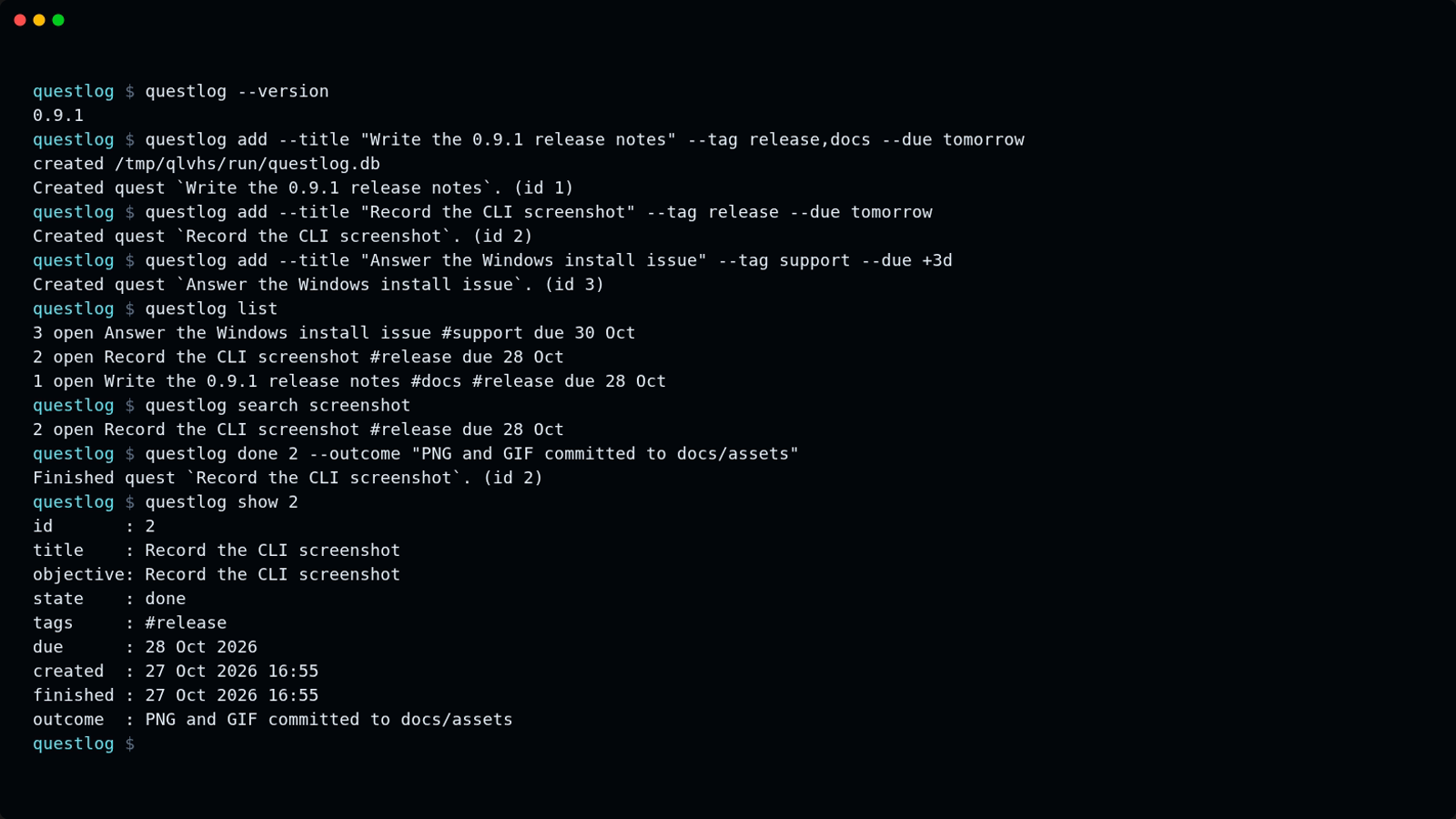
The same session as an animated GIF.
Other release installers:
mise use -g github:GhostPawJS/questlog
ubi --project GhostPawJS/questlog --exe ghostpaw-questlog --in ~/.local/bin
eget GhostPawJS/questlog
For aqua, define a
github_release package in aqua.yaml:
registries:
  - name: questlog
    type: local
    path: questlog-registry.yaml
packages:
  - name: GhostPawJS/questlog@v0.8.0
    registry: questlog
questlog-registry.yaml:
packages:
  - type: github_release
    repo_owner: GhostPawJS
    repo_name: questlog
    asset: ghostpaw-questlog-{{trimV .Version}}-{{.OS}}-{{.Arch}}.tar.gz
    format: tar.gz
    replacements: { amd64: x64 }
    overrides:
      - goos: windows
        asset: ghostpaw-questlog-{{trimV .Version}}-windows-{{.Arch}}.zip
        format: zip
    files:
      - name: ghostpaw-questlog
Install scripts verify SHA256SUMS. To verify a downloaded archive's build attestation:
gh attestation verify <archive> -R GhostPawJS/questlog
Set GHOSTPAW_VERIFY=attestation for attestation verification in install.sh.
Binaries are unsigned; macOS binaries carry an ad-hoc signature. For a browser
download on macOS, remove quarantine with
xattr -d com.apple.quarantine /path/to/ghostpaw-questlog.
Linux binaries require glibc 2.28+; use npx on Alpine.
See the binary build workflow.
npx / npm (for npm-based environments)
The npm package requires Node 24+:
npx -y @ghostpaw/questlog --help
npm install -g @ghostpaw/questlog
Library (for harnesses embedding it in code)
npm install @ghostpaw/questlog
import { initQuestlogTables, read, write } from '@ghostpaw/questlog';
See library usage. The library uses built-in node:sqlite with zero runtime dependencies.
Quick Start
import { DatabaseSync } from 'node:sqlite';
import { initQuestlogTables, read, write } from '@ghostpaw/questlog';

const db = new DatabaseSync(':memory:');
initQuestlogTables(db);

// Capture incoming work as a rumor before committing to shape
const rumor = write.captureRumor(db, {
  title: 'Legal says the vendor terms changed',
  details: 'Need to understand pricing delta and termination clause.',
});

// Settle the rumor into real work once the shape is clear
write.settleRumor(db, rumor.id, {
  settledAt: Date.now(),
  questline: {
    title: 'Vendor Renewal',
    description: 'Commercial, legal, and approval work.',
  },
  quests: [
    { title: 'Collect redlines', objective: 'Obtain the latest legal markup.' },
    { title: 'Review pricing delta', objective: 'Compare current vs. proposed cost.' },
  ],
});

// Drive the day from derived views, not from memory
const available = read.listAvailableQuests(db);
const dueSoon = read.listDueSoonQuests(db, 7 * 24 * 60 * 60 * 1000);
const results = read.searchQuestlog(db, 'vendor');
Docs
The live demo runs the library in your browser against an in-memory SQLite database. Each view below opens a different part of it:
- Dashboard: open, available, overdue and pending work
- Intake: capture rumors and triage them into quests
- Quests: start, block and finish quests with an outcome
- Planning: questlines and scheduling
- Search: full-text search across the log
The Model
Seven concepts, strict separation of concerns:
| Concept | Purpose |
|---|---|
| Rumor | Incoming signal that may or may not become real work |
| Questline | Shared context and rollup for a group of related quests |
| Quest | One concrete commitment with lifecycle, timing, and outcome |
| Repeatable Quest | Recurring template that spawns fresh quests on a schedule |
| Unlock | Hard prerequisite: quest B stays blocked until quest A succeeds |
| Reward | Descriptive outcome attached to completed work, with a claim lifecycle |
| Tag | Cross-cutting label for filtering and reporting |
The unified model means one entity type covers every temporal intention:
| What it looks like | What it actually is |
|---|---|
| A todo item | A quest with no temporal metadata |
| A deadline | A quest with dueAt |
| A calendar event | A quest with scheduledStartAt and scheduledEndAt |
| A recurring commitment | A repeatable quest with an RRULE |
| A completed action | A quest resolved via finishQuest |
State is derived, not toggled. A quest's availability comes from its lifecycle, timing fields, and unlock graph — computed at read time, never stored as a status flag.
Lifecycle at a glance
Questlog computes WoW-style markers on every read. They change as work moves through its lifecycle:
Intake
$\color{Goldenrod}{\textsf{❗}}$ Legal says the vendor terms changed rumor · open↓ settle into questline + quests Quest progression
$\color{Goldenrod}{\textsf{❗}}$ Review pricing delta open · available$\color{Gray}{\textsf{❓}}$ Review pricing delta in progress$\color{Goldenrod}{\textsf{❓}}$ Review pricing delta done · reward unclaimed✓ Review pricing delta done · reward claimedOther markers
$\color{CornflowerBlue}{\textsf{❗}}$ Weekly standup notes repeatable · due$\color{Gray}{\textsf{❗}}$ Plan Q3 roadmap open · deferred$\color{Gray}{\textsf{❓}}$ Obtain finance approval open · blocked
Marker IDs are semantic strings (attention.available, progress.complete, ...) computed at read time, never stored. The markers namespace maps each to its symbol, color, label, and CSS class for consistent rendering across HTML, TTY, and plain text.
Two Audiences
Human developers
Use the read and write namespaces for direct-code access to every domain operation:
import { read, write } from '@ghostpaw/questlog';

write.createQuest(db, { title: 'Ship release notes', objective: 'Draft and publish.' });
write.startQuest(db, questId);
write.finishQuest(db, questId, 'Published to blog and changelog.');

const blocked = read.listBlockedQuests(db);
const overdue = read.listOverdueQuests(db);
See HUMAN.md for the full human-facing guide with worked examples.
LLM agents
Use the tools, skills, and soul namespaces for a structured runtime surface designed to minimize LLM cognitive load:
import { tools, skills, soul } from '@ghostpaw/questlog';

// 12 intent-shaped tools with JSON Schema inputs and structured results
const allTools = tools.questlogTools;
const searchTool = tools.getQuestlogToolByName('search_questlog')!;
const result = searchTool.handler(db, { query: 'vendor', mode: 'browse' });

// 25 reusable workflow skills for common multi-step scenarios
const allSkills = skills.questlogSkills;

// Thinking foundation for system prompts
const prompt = soul.renderQuestlogSoulPromptFoundation();
Every tool returns a discriminated result with outcome: 'success' | 'no_op' | 'needs_clarification' | 'error', structured entities, next-step hints, and actionable recovery advice. No thrown exceptions to parse, no ambiguous prose.
See LLM.md for the full AI-facing guide covering soul, tools, and skills.
Tools
Twelve tools shaped around operator intent, not raw storage operations:
| Tool | What it does |
|---|---|
search_questlog |
Cross-entity full-text search |
review_questlog |
Filtered list views (available, overdue, due soon, ...) |
inspect_questlog_item |
Detailed inspection of any single entity |
capture_rumor |
Record incoming work before committing to shape |
shape_work |
Create quests, questlines, settle rumors into structure |
plan_quest |
Set timing: due dates, defer dates, scheduled windows |
run_quest |
Start, finish, abandon, log effort |
organize_work |
Move quests between questlines, manage questline lifecycle |
manage_repeatable |
Create and maintain recurring quest templates |
tag_work |
Classify quests and repeatables with tags |
reward_work |
Attach, update, claim, or remove rewards |
retire_work |
Soft-delete or archive things that should leave the active surface |
Each tool exports runtime metadata — name, description, JSON Schema, input descriptions, side-effect level — so agent harnesses can wire them without reading docs.
The run_quest tool refuses to start a quest with unmet unlock prerequisites and returns the blocking quests with inspection hints. Set force: true to start anyway with a warning. The library startQuest function remains permissive.
Key Properties
- Zero runtime dependencies. Only
node:sqlite(built into Node 24+). - Single prebundled blob. One ESM + one CJS entry in
dist/. No subpath exports, no code splitting. - Pure SQLite storage. FTS5 full-text search, CHECK-constrained state transitions, trigger-maintained indexes. Bring your own
DatabaseSyncinstance. - Derived state. Availability, blocking, deferral, overdue, and markers are computed at read time from fields and relationships, never stored as flags.
- Intention-shaped writes.
captureRumor,settleRumor,startQuest,finishQuest,abandonQuest— operations that say what happened, not generic CRUD. - RFC 5545 recurrence. Standard RRULE strings for recurring work. No custom recurrence format.
- WoW-style markers. Semantic marker IDs (
attention.available,progress.complete, ...) computed on every read, renderable to any channel. - Colocated tests. Every non-type module has a colocated
.test.tsfile. The behavior described in docs is backed by executable coverage.
Performance
Measured with npm run bench on Node 24.14.0, Linux, Intel Xeon (shared
cloud vCPU), 10,000 quests in a file-backed database:
| Operation | p50 | p95 |
|---|---|---|
search_questlog (tool) |
0.06 ms | 0.07 ms |
MCP tools/call search, stdio framing included |
0.07 ms | 0.08 ms |
read.searchQuestlog, one matching quest |
0.07 ms | 0.08 ms |
read.searchQuestlog, all 10,000 quests matching |
26.6 ms | 41.9 ms |
write.createQuest |
0.22 ms | 0.69 ms |
The library search returns every match with a highlighted snippet, so a query
that matches the whole log pays for building all of those rows. Cold start
(process spawn to first response, median) is about 30 ms for --version and
the MCP server.
Package Surface
import {
  initQuestlogTables,  // schema setup
  read,                // all query functions
  write,               // all mutation functions
  tools,               // LLM tool definitions + registry
  skills,              // LLM workflow skills + registry
  soul,                // thinking foundation for system prompts
  markers,             // marker derivation and lookup
} from '@ghostpaw/questlog';
All domain types are also available at the root for TypeScript consumers:
import type {
  QuestlogDb,
  QuestState,
  QuestDetail,
  CreateQuestInput,
  QuestlogSearchResult,
  QuestlogToolDefinition,
  QuestlogSkill,
  QuestlogSoul,
} from '@ghostpaw/questlog';
Documentation
| Document | Audience |
|---|---|
| HUMAN.md | Human developers using the low-level read/write API |
| LLM.md | Agent builders wiring tools, skills, and soul into LLM systems |
| docs/README.md | Architecture overview: model, invariants, lifecycle, markers |
| docs/entities/ | Per-entity manuals with exact public API listings |
Development
npm install
npm test            # node:test runner
npm run typecheck   # tsc --noEmit
npm run lint        # biome check
npm run build       # ESM + CJS + declarations via tsup
The repo is pinned to Node 24.14.0 via .nvmrc / .node-version / .tool-versions / mise.toml / Volta. Use whichever version manager you prefer.
Support
If this package helps your project, consider sponsoring its maintenance:

GhostPaw Questlog MCP Fragen
Wie füge ich GhostPaw Questlog MCP zu Claude Code hinzu?
Führe claude mcp add questlog -- npx -y @ghostpaw/questlog in deinem Terminal aus. Füge --scope user hinzu, damit der Server in jedem Projekt verfügbar ist.
Wie füge ich GhostPaw Questlog MCP zu Cursor hinzu?
Öffne ~/.cursor/mcp.json und füge den Server unter mcpServers hinzu, mit der Cursor-Config aus dem Installationsabschnitt oben.
Welche Tools bietet GhostPaw Questlog MCP?
Er stellt 12 Tools bereit, darunter search_questlog, review_questlog, inspect_questlog_item, capture_rumor, shape_work.
Wo werden die Questlog-Daten gespeichert?
Die Daten werden standardmäßig in einer SQLite-Datenbank unter ~/.ghostpaw/questlog.db gespeichert, aber du kannst über die Umgebungsvariable GHOSTPAW_QUESTLOG_DB oder das --db Flag einen benutzerdefinierten Pfad angeben.
Wie kann ich Questlog mit Claude Desktop nutzen?
Claude Desktop Nutzer können den Server installieren, indem sie ihn ihrer claude_desktop_config.json hinzufügen oder die server.mcpb Datei aus dem neuesten GitHub Release installieren.
Was passiert, wenn ich eine Aufgabe ohne ein Ergebnis als erledigt markiere?
Der Befehl gibt einen Nutzungshinweis aus, der das --outcome Flag erfordert, und beendet sich dann mit dem Exit-Code 2.