
Deploye und verwalte Cloud-Infrastruktur, Datenbanken und Services über AI Coding Agents mithilfe der Bult DevOps Plattform.
Auch bekannt als bultcloud/mcp-server, mcp-server, @bultcloud/mcp-server
- Stars
- 2
- Tools
- 24
- Downloads, 30 Tage
- 128
- Neueste Version
- 1.0.1
- Letzter Commit
- 12. Okt. 2026
- Lizenz
- MIT
Was ist Bult MCP?
Bult ist ein MCP server. Deploye und verwalte Cloud-Infrastruktur, Datenbanken und Services über AI Coding Agents mithilfe der Bult DevOps Plattform. Er stellt 24 Tools bereit, etwa list-projects, get-project, create-project.
Zusammenfassung generiert aus dem README des Projekts
Über Bult MCP server
Bult bietet AI Coding Agents die Möglichkeit, Cloud-Infrastruktur und Hosting-Ressourcen direkt über die Bult DevOps Plattform zu verwalten. Entwickler können diesen MCP server mit Clients wie Claude Desktop, Claude Code, Cursor und Codex nutzen, um das Deployment von GitHub Repositories, Docker Images und Datenbank-Services zu automatisieren. Er läuft über stdio und benötigt einen Bult API Token sowie die Bult API URL für den Betrieb.
Der Server enthält eine breite Palette an Tools für die Verwaltung des gesamten Projekt-Lifecycles. Du kannst spezifische Commands nutzen, um Projekte aufzulisten oder zu erstellen, Daemon- und Datenbank-Services zu verwalten und persistente Volumes zu handhaben. Er ermöglicht zudem die Konfiguration von Route- und Domain-Mappings, das Anwenden von Projekt-Templates sowie die Einsicht in die Build-Historie.
Über das Deployment hinaus ermöglicht der Server aktives Troubleshooting, indem er Zugriff auf Service-Logs bietet. Dies erlaubt es einem AI Agent, fehlgeschlagene Deployments zu untersuchen oder das Verhalten von Anwendungen zu überwachen. Nutzer müssen einen BULT_API_TOKEN via Umgebungsvariablen bereitstellen, um Anfragen an die Bult API zu authentifizieren.
Was du damit machen kannst
- 1Deployen von Code-RepositoriesEin AI Agent kann ein GitHub Repository nehmen und es auf der Bult Cloud Plattform deployen.
- 2Troubleshooting von Deployment-FehlernDu kannst eine AI anweisen, Service-Logs zu prüfen, um herauszufinden, warum ein Deployment nicht funktioniert hat.
- 3Verwalten von Datenbank-ServicesEin Entwickler kann einen Agent anweisen, einen neuen Datenbank-Service zu erstellen und zu konfigurieren.
- 4Konfigurieren von Netzwerk-RoutesEine AI kann öffentliche Domain- oder Pfad-Mappings für einen spezifischen Service einrichten.
Geschrieben aus dem README des Projekts. Jeder Use Case wurde gegen ein Zitat daraus geprüft.
So installierst du Bult MCP
Formate geprüft am 10. Nov. 2026Zu Cursor hinzufügenZu Goose hinzufügenBult MCP in Claude Code installieren
$ claude mcp add --env 'BULT_API_TOKEN=<YOUR_BULT_API_TOKEN>' --env 'BULT_API_URL=<BULT_API_URL>' mcp-server -- npx -y @bultcloud/mcp-serverBult MCP in Cursor installieren
~/.cursor/mcp.json
{
  "mcpServers": {
    "mcp-server": {
      "command": "npx",
      "args": [
        "-y",
        "@bultcloud/mcp-server"
      ],
      "env": {
        "BULT_API_TOKEN": "<YOUR_BULT_API_TOKEN>",
        "BULT_API_URL": "<BULT_API_URL>"
      }
    }
  }
}Bult MCP in VS Code installieren
.vscode/mcp.json
{
  "servers": {
    "mcp-server": {
      "type": "stdio",
      "command": "npx",
      "args": [
        "-y",
        "@bultcloud/mcp-server"
      ],
      "env": {
        "BULT_API_TOKEN": "<YOUR_BULT_API_TOKEN>",
        "BULT_API_URL": "<BULT_API_URL>"
      }
    }
  }
}Bult MCP in VS Code CLI installieren
$ code --add-mcp '{"name":"mcp-server","type":"stdio","command":"npx","args":["-y","@bultcloud/mcp-server"],"env":{"BULT_API_TOKEN":"<YOUR_BULT_API_TOKEN>","BULT_API_URL":"<BULT_API_URL>"}}'Bult MCP in Claude Desktop installieren
claude_desktop_config.json
{
  "mcpServers": {
    "mcp-server": {
      "command": "npx",
      "args": [
        "-y",
        "@bultcloud/mcp-server"
      ],
      "env": {
        "BULT_API_TOKEN": "<YOUR_BULT_API_TOKEN>",
        "BULT_API_URL": "<BULT_API_URL>"
      }
    }
  }
}Bult MCP in Codex installieren
$ codex mcp add mcp-server --env 'BULT_API_TOKEN=<YOUR_BULT_API_TOKEN>' --env 'BULT_API_URL=<BULT_API_URL>' -- npx -y @bultcloud/mcp-serverBult MCP in Codex config.toml installieren
~/.codex/config.toml
[mcp_servers.mcp-server]
command = "npx"
args = ["-y", "@bultcloud/mcp-server"]

[mcp_servers.mcp-server.env]
BULT_API_TOKEN = "<YOUR_BULT_API_TOKEN>"
BULT_API_URL = "<BULT_API_URL>"
Bult MCP in Gemini CLI installieren
$ gemini mcp add -s user -e 'BULT_API_TOKEN=<YOUR_BULT_API_TOKEN>' -e 'BULT_API_URL=<BULT_API_URL>' mcp-server npx -- -y @bultcloud/mcp-serverBult MCP in Gemini settings.json installieren
~/.gemini/settings.json
{
  "mcpServers": {
    "mcp-server": {
      "command": "npx",
      "args": [
        "-y",
        "@bultcloud/mcp-server"
      ],
      "env": {
        "BULT_API_TOKEN": "<YOUR_BULT_API_TOKEN>",
        "BULT_API_URL": "<BULT_API_URL>"
      }
    }
  }
}Bult MCP tools 24
Erkannt aus dem READMElist-projectsget-projectcreate-projectupdate-projectdelete-projectdeploy-projectcontrol-projectlist-servicesget-servicecreate-serviceupdate-servicedelete-service
| list-projects | — | |
| get-project | — | |
| create-project | — | |
| update-project | — | |
| delete-project | — | |
| deploy-project | — | |
| control-project | — | |
| list-services | — | |
| get-service | — | |
| create-service | — | |
| update-service | — | |
| delete-service | — |
Alle 24 Tools anzeigenWeniger Tools anzeigen
control-servicecreate-volumeupdate-volumedelete-volumewipe-volumecreate-routeupdate-routedelete-routelist-templatesapply-templateget-service-logslist-builds
| control-service | — | |
| create-volume | — | |
| update-volume | — | |
| delete-volume | — | |
| wipe-volume | — | |
| create-route | — | |
| update-route | — | |
| delete-route | — | |
| list-templates | — | |
| apply-template | — | |
| get-service-logs | — | |
| list-builds | — |
Konfiguration
BULT_API_TOKENErforderlichSecretBult API token used to authenticate requests.
BULT_API_URLErforderlichBase URL of the Bult.ai API.
| Name | Beschreibung | Typ |
|---|---|---|
| BULT_API_TOKEN | Bult API token used to authenticate requests. | ErforderlichSecret |
| BULT_API_URL | Base URL of the Bult.ai API. | Erforderlich |
Automatisierte Checks
Geluften am 14. Nov. 2026Vollständiger Bericht →Unsere automatisierten Checks bestanden. Das ist kein Security-Audit: Lies den Code und gib dem Server nur den minimal notwendigen Zugriff. Wie die Checks funktionieren

- Source Repository verknüpft und erreichbarbultcloud/mcp-server is public and reachablegithub.com/bultcloud/mcp-server ↗Bestanden
- Paket nennt dieses Repository als Quelle@bultcloud/mcp-server names bultcloud/mcp-server as sourcenpmjs.com/package/@bultcloud/mcp-server ↗Bestanden
- Build-Provenienz (Sigstore-Attestierung)No build attestation published for this releaseNicht geprüft
- Open Source Lizenz (OSI)MITspdx.org/licenses/MIT.html ↗Bestanden
- Commit oder Release im letzten JahrLast commit or release 2026-10-12github.com/bultcloud/mcp-server ↗Bestanden
- OpenSSF ScorecardNicht geprüft
- Package-Name ähnelt keinem populären PackageNo popular package one edit away from @bultcloud/mcp-serverBestanden
- Keine kritischen Advisories im Paket oder seinen Abhängigkeiten99 resolved dependencies checked; no critical advisoryosv.dev ↗Bestanden
- Keine versteckten Anweisungen an das Modell24 tool descriptions and the README read; no override phrases, credential paths or hidden charactersBestanden
- Destruktive Tools sind markiertNicht geprüft
- Remote-Endpoint beantwortet den MCP-HandshakeNicht geprüft
README
Auf GitHub ansehen@bultcloud/mcp-server

Official Model Context Protocol (MCP) server for Bult.ai, a DevOps platform and cloud hosting Platform-as-a-Service for deploying apps, GitHub repositories, Docker images, databases, and services with AI agents.
Use Bult MCP with Claude Desktop, Claude Code, Cursor, Codex, and other MCP-compatible clients to deploy apps, manage cloud infrastructure, inspect logs, and troubleshoot deployments through the Bult API.
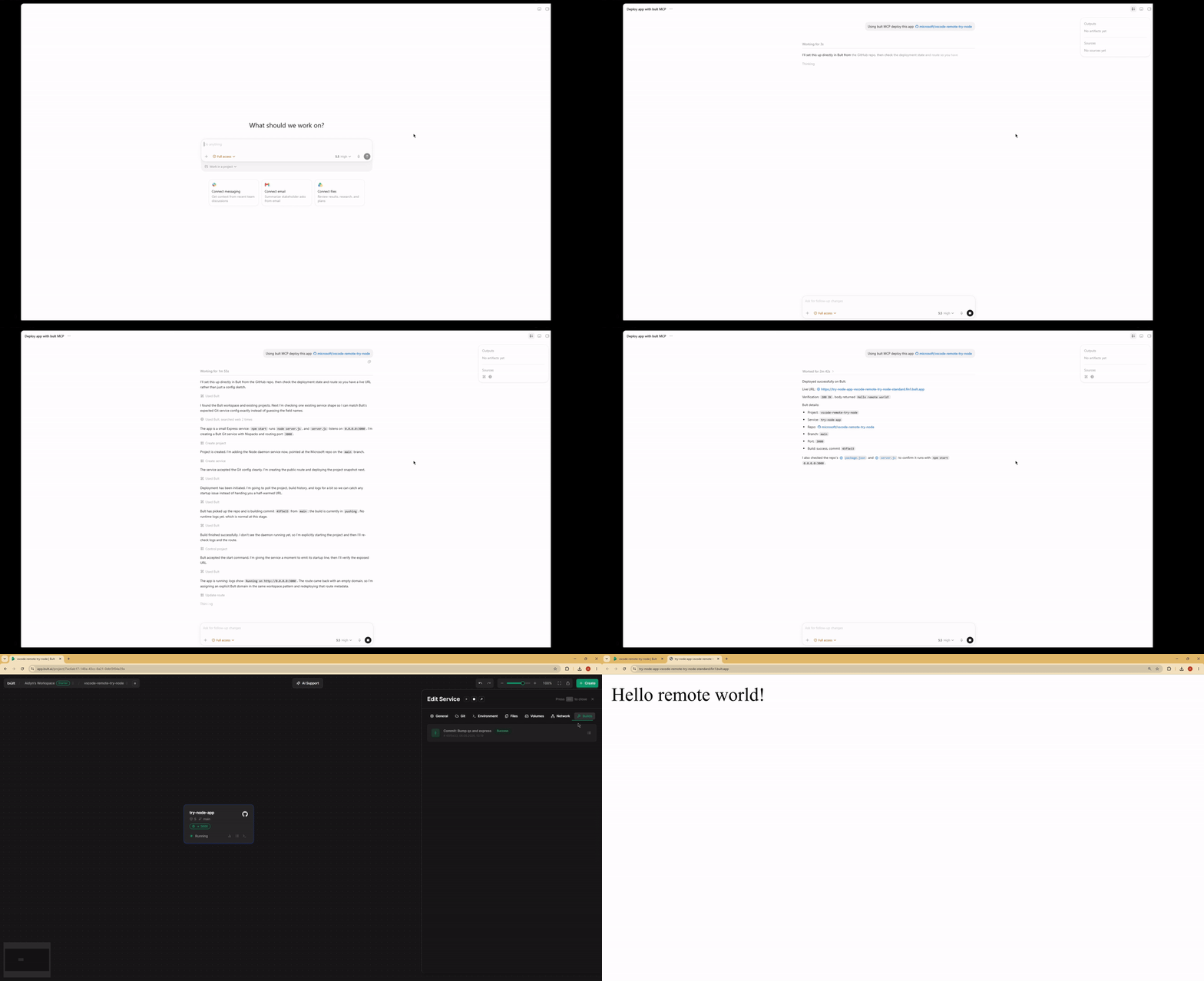
Demo
Features
- Deploy GitHub repositories, Docker images, databases, and app services from MCP-compatible AI agents.
- Project lifecycle tools: list, inspect, create, update, delete, deploy, start, stop, and discard changes.
- Service management for daemon and database services, including Docker image and Git-based deployments.
- Persistent volumes, route/domain mappings, templates, service logs, and build history.
- MCP tool annotations for read-only, idempotent, and destructive operations where supported.
- Works over stdio with Claude Desktop, Claude Code, Cursor, Google Antigravity and other MCP-compatible clients.
When to use Bult MCP
Use Bult MCP when you want an AI coding agent to deploy and operate cloud hosting resources for you. Common workflows include deploying a GitHub repo from Cursor, deploying the current project from Claude Code, launching a Docker image, creating a database service, adding a public route, checking build logs, and debugging failed deployments.
Requirements
- Node.js 18 or newer.
- Bult API token.
Installation
If you install the package globally, use the bult-mcp binary:
npm install -g @bultcloud/mcp-server
bult-mcp
You can also run it with npx from MCP client configs:
npx -y @bultcloud/mcp-server
Configuration
The server reads its configuration from environment variables.
| Variable | Required | Description |
|---|---|---|
BULT_API_URL |
Yes | Bult API base URL, https://app.bult.ai. |
BULT_API_TOKEN |
Yes | API token used for Bearer authentication. |
The server exits during startup if either variable is missing.
MCP Client Setup
Claude Desktop
Add the server to claude_desktop_config.json.
Using npx:
{
  "mcpServers": {
    "bult": {
      "command": "npx",
      "args": ["-y", "@bultcloud/mcp-server"],
      "env": {
        "BULT_API_URL": "https://app.bult.ai",
        "BULT_API_TOKEN": "your-token"
      }
    }
  }
}
Claude Code
Using npx:
claude mcp add bult \
  -e BULT_API_URL=https://app.bult.ai \
  -e BULT_API_TOKEN=your-token \
  -- npx -y @bultcloud/mcp-server
Codex CLI
Using npx:
codex mcp add \
  --env BULT_API_URL=https://app.bult.ai \
  --env BULT_API_TOKEN=your-token \
  bult \
  -- npx -y @bultcloud/mcp-server
Available Tools
Projects
| Tool | Description |
|---|---|
list-projects |
List all projects in the workspace. |
get-project |
Get a project overview with services, volumes, and routes. |
create-project |
Create a new project. |
update-project |
Update a project name. |
delete-project |
Delete a project and all of its resources. |
deploy-project |
Deploy project changes and create a version snapshot. |
control-project |
Start, stop, or discard project changes. |
Services
| Tool | Description |
|---|---|
list-services |
List all services in a project. |
get-service |
Get service details and configuration. |
create-service |
Create a daemon or database service. |
update-service |
Update service configuration. |
delete-service |
Delete a service. |
control-service |
Start, stop, or rebuild a service. |
Volumes
| Tool | Description |
|---|---|
create-volume |
Create a persistent storage volume. |
update-volume |
Update a volume name or size. |
delete-volume |
Delete a volume. |
wipe-volume |
Irreversibly wipe all data from a volume. |
Routes
| Tool | Description |
|---|---|
create-route |
Create a domain or path mapping for a service. |
update-route |
Update route configuration. |
delete-route |
Delete a route. |
Templates
| Tool | Description |
|---|---|
list-templates |
List available project templates. |
apply-template |
Apply a template to a project. |
Logs and Builds
| Tool | Description |
|---|---|
get-service-logs |
Read service logs with cursor-based pagination. |
list-builds |
List build history for a service. |
Example Prompts
- Deploy this GitHub repo to Bult and give me the public URL.
- Deploy the current project to Bult.
- Check why my deployment failed.
- Show the latest logs for my app.
- Set DATABASE_URL and restart the service.
- Deploy this Docker image to Bult.
- List my Bult projects and services.
Development
npm run dev      # run with tsx, no build step
npm run build    # compile TypeScript to dist/
npm run lint     # type-check without emitting files
Project layout:
src/index.ts          MCP server entrypoint
src/client.ts         Bult API client
src/tools/*.ts        MCP tool registrations by resource type
Security
BULT_API_TOKEN grants access to your Bult resources. Keep it out of
source control, shell history, issue reports, and screenshots. Prefer scoped or
rotatable tokens when available.
Some tools can create, delete, deploy, stop, or wipe resources. Review tool calls from your MCP client before approving destructive actions.
Privacy Policy
This MCP server connects your MCP client to Bult.ai using the API token you provide. Requests are sent to Bult.ai to perform actions such as listing projects, deploying services, managing routes and volumes, and reading logs.
The server does not store your API token. Tokens are passed through your MCP client configuration or extension settings. For Bult.ai data handling practices, see the Bult.ai Privacy Policy.
Contributing
Issues and pull requests are welcome at github.com/bultcloud/mcp-server.
Before opening a pull request, run:
npm run lint
npm run build
License
This project is licensed under the MIT License.
Bult MCP Fragen
Wie füge ich Bult MCP zu Claude Code hinzu?
Führe claude mcp add --env 'BULT_API_TOKEN=<YOUR_BULT_API_TOKEN>' --env 'BULT_API_URL=<BULT_API_URL>' mcp-server -- npx -y @bultcloud/mcp-server in deinem Terminal aus. Füge --scope user hinzu, damit der Server in jedem Projekt verfügbar ist.
Wie füge ich Bult MCP zu Cursor hinzu?
Öffne ~/.cursor/mcp.json und füge den Server unter mcpServers hinzu, mit der Cursor-Config aus dem Installationsabschnitt oben.
Welche Tools bietet Bult MCP?
Er stellt 24 Tools bereit, darunter list-projects, get-project, create-project, update-project, delete-project.
Was kann ich mit Bult MCP deployen?
Du kannst GitHub Repositories, Docker Images, Datenbanken und verschiedene App Services deployen.
Welche AI Clients sind mit Bult MCP kompatibel?
Es funktioniert mit Claude Desktop, Claude Code, Cursor, Codex, Google Antigravity und anderen MCP-kompatiblen Clients.
Was sind die Systemvoraussetzungen für die Installation?
Du benötigst Node.js Version 18 oder neuer und einen gültigen Bult API Token.
Wie konfiguriere ich den Server?
Der Server wird über die Umgebungsvariablen BULT_API_URL und BULT_API_TOKEN konfiguriert.