
2extract MCP server
Commit 23. Okt. 2026Ermöglicht es einem AI Agent, Residential- und Mobile-Proxies mit Geo-Targeting, Nutzungslimits und Spend-Reporting zu erstellen und zu verwalten.
Auch bekannt als 2extract/mcp, mcp
- Stars
- 1
- Tools
- —
- Downloads, 30 Tage
- —
- Neueste Version
- 1.0.2
- Letzter Commit
- 23. Okt. 2026
- Lizenz
- MIT
Was ist 2extract MCP?
2extract ist ein MCP server. Ermöglicht es einem AI Agent, Residential- und Mobile-Proxies mit Geo-Targeting, Nutzungslimits und Spend-Reporting zu erstellen und zu verwalten.
Zusammenfassung generiert aus dem README des Projekts
Über 2extract MCP server
2extract ermöglicht es Entwicklern und Data Researchers, Residential- und Mobile-Proxies über einen AI Agent zu verwalten. Dieser remote MCP Server erlaubt es einem Agent, den gesamten Lebenszyklus von Proxy-Ressourcen zu steuern – von der initialen Erstellung über die granulare Konfiguration bis hin zum Kostenmonitoring. Nutzer verbinden ihre MCP Clients, wie Claude Desktop, Cursor oder VS Code, über einen 2extract API Key via Streamable HTTP mit einem hosted Endpoint.
Agents können hochspezifische Aufgaben ausführen, wie etwa Geo-Targeting auf eine bestimmte Stadt, Postleitzahl oder einen Mobilfunkanbieter. Der Server bietet Tools, um Traffic- und Spend-Limits zu setzen, IP-Whitelists zu verwalten und den Zugriff auf spezifische Target-Hosts einzuschränken. Über die reine Verwaltung hinaus bietet er Reporting-Funktionen, um die Historie des Kontostands und Nutzungsstatistiken zu tracken. Dies ermöglicht es einer KI, Ressourcen proaktiv zu verwalten, indem sie beispielsweise ungenutzte Proxies identifiziert und deaktiviert oder monatliche Kostenberichte erstellt.
Was du damit machen kannst
- 1Automatisierte Proxy-BereitstellungEin AI Agent kann basierend auf einer Anfrage in natürlicher Sprache einen neuen Proxy mit spezifischen geografischen und nutzungsbezogenen Einschränkungen erstellen.
- 2Granulares Geo-Targeting ResearchEntwickler können einen Agent anweisen, spezifische Mobilfunkanbieter oder Postleitzahlen zu finden, die für das Proxy-Targeting verfügbar sind.
- 3Kosten- und NutzungsprüfungDu kannst eine KI anweisen, deine Ausgabenmuster zu analysieren und Ausreißer bei den Proxy-Traffic-Kosten zu markieren.
- 4Ressourcen-Bereinigung und OptimierungEin Agent kann Proxies identifizieren, die seit einem Monat inaktiv sind, und diese deaktivieren, um Kosten zu sparen.
Geschrieben aus dem README des Projekts. Jeder Use Case wurde gegen ein Zitat daraus geprüft.
So installierst du 2extract MCP
Formate geprüft am 10. Nov. 2026Zu Cursor hinzufügenZu Goose hinzufügen2extract MCP in Claude Code installieren
$ claude mcp add --transport http mcp https://mcp.2extract.com/mcp2extract MCP in Cursor installieren
~/.cursor/mcp.json
{
  "mcpServers": {
    "mcp": {
      "url": "https://mcp.2extract.com/mcp"
    }
  }
}2extract MCP in VS Code installieren
.vscode/mcp.json
{
  "servers": {
    "mcp": {
      "type": "http",
      "url": "https://mcp.2extract.com/mcp"
    }
  }
}2extract MCP in VS Code CLI installieren
$ code --add-mcp '{"name":"mcp","type":"http","url":"https://mcp.2extract.com/mcp"}'2extract MCP in Codex installieren
$ codex mcp add mcp --url https://mcp.2extract.com/mcp2extract MCP in Codex config.toml installieren
~/.codex/config.toml
[mcp_servers.mcp]
url = "https://mcp.2extract.com/mcp"
2extract MCP in Gemini CLI installieren
$ gemini mcp add -s user --transport http mcp https://mcp.2extract.com/mcp2extract MCP in Gemini settings.json installieren
~/.gemini/settings.json
{
  "mcpServers": {
    "mcp": {
      "url": "https://mcp.2extract.com/mcp",
      "type": "http"
    }
  }
}Konfiguration
EXTRACT_API_KEY
| Name | Beschreibung | Typ |
|---|---|---|
| EXTRACT_API_KEY | — |
Automatisierte Checks
Geluften am 14. Nov. 2026Vollständiger Bericht →Noch nicht verifiziert. Ein Server benötigt einen Score von 80, keine kritischen Befunde und genug Daten für unsere Prüfung. Wie die Checks funktionieren · Was du für mehr Punkte verbessern kannst

- Source Repository verknüpft und erreichbar2extract/mcp is public and reachablegithub.com/2extract/mcp ↗Bestanden
- Paket nennt dieses Repository als QuelleNicht geprüft
- Build-Provenienz (Sigstore-Attestierung)Nicht geprüft
- Open Source Lizenz (OSI)MITspdx.org/licenses/MIT.html ↗Bestanden
- Commit oder Release im letzten JahrLast commit or release 2026-10-23github.com/2extract/mcp ↗Bestanden
- OpenSSF ScorecardNicht geprüft
- Package-Name ähnelt keinem populären PackageNicht geprüft
- Keine kritischen Advisories im Paket oder seinen AbhängigkeitenNicht geprüft
- Keine versteckten Anweisungen an das Modell0 tool descriptions and the README read; no override phrases, credential paths or hidden charactersBestanden
- Destruktive Tools sind markiertNicht geprüft
- Remote-Endpoint beantwortet den MCP-Handshakeinitialize answered with protocol 2025-06-18 in 1051 msBestanden
README
Auf GitHub ansehen2extract MCP Server
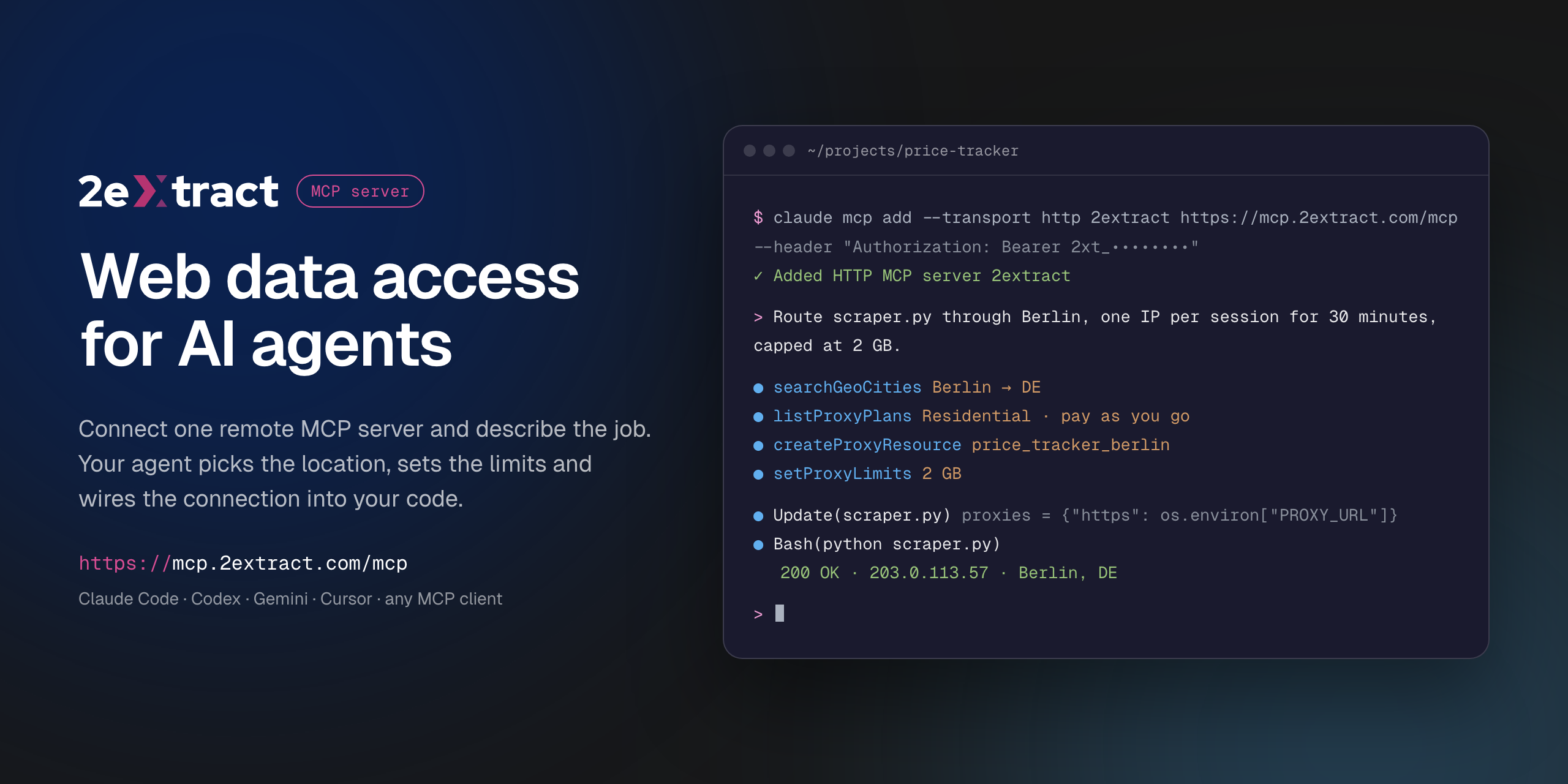


VS Code asks for the API key on install and does not store it in the config. Cursor installs with a placeholder: replace 2xt_your_api_key in mcp.json with your key.
Remote Model Context Protocol server for 2extract. It lets an AI agent create and manage residential and mobile proxies, pick geo targeting down to city, ZIP or carrier, set traffic and spend limits, and report on usage and cost.
This is a hosted server. There is nothing to install or run locally: your MCP client connects to the URL below with your 2extract API key.
| Endpoint | https://mcp.2extract.com/mcp |
| Transport | Streamable HTTP |
| Auth | Authorization: Bearer 2xt_... (2extract API key) |
Get an API key
- Sign up or log in to 2extract.
- Open API keys and create a key.
- Grant the scopes the agent needs:
proxies:read,proxies:write,balance:read,stats:read,geo:read. Write scopes do not include read access, so most workflows need bothproxies:readandproxies:write.
A read-only key (no proxies:write) is enough for reporting and lookups.
Connect
Claude Code
claude mcp add --transport http 2extract https://mcp.2extract.com/mcp \
  --header "Authorization: Bearer 2xt_your_api_key"
Codex CLI
The key is read from the EXTRACT_API_KEY environment variable; Codex adds Bearer itself:
export EXTRACT_API_KEY=2xt_your_api_key
codex mcp add 2extract --url https://mcp.2extract.com/mcp --bearer-token-env-var EXTRACT_API_KEY
Or edit ~/.codex/config.toml (or .codex/config.toml in a trusted project):
[mcp_servers.2extract]
url = "https://mcp.2extract.com/mcp"
bearer_token_env_var = "EXTRACT_API_KEY"
Gemini CLI
gemini mcp add -s user --transport http \
  --header "Authorization: Bearer 2xt_your_api_key" \
  2extract https://mcp.2extract.com/mcp
Or edit ~/.gemini/settings.json (or .gemini/settings.json in a project):
{
  "mcpServers": {
    "2extract": {
      "httpUrl": "https://mcp.2extract.com/mcp",
      "headers": { "Authorization": "Bearer 2xt_your_api_key" }
    }
  }
}
OpenCode
opencode.json in your project (or ~/.config/opencode/opencode.json). The key is read from the EXTRACT_API_KEY environment variable:
{
  "$schema": "https://opencode.ai/config.json",
  "mcp": {
    "2extract": {
      "type": "remote",
      "url": "https://mcp.2extract.com/mcp",
      "enabled": true,
      "headers": { "Authorization": "Bearer {env:EXTRACT_API_KEY}" }
    }
  }
}
Claude Desktop
claude_desktop_config.json:
{
  "mcpServers": {
    "2extract": {
      "type": "http",
      "url": "https://mcp.2extract.com/mcp",
      "headers": { "Authorization": "Bearer 2xt_your_api_key" }
    }
  }
}
Cursor
~/.cursor/mcp.json or .cursor/mcp.json:
{
  "mcpServers": {
    "2extract": {
      "url": "https://mcp.2extract.com/mcp",
      "headers": { "Authorization": "Bearer 2xt_your_api_key" }
    }
  }
}
VS Code
.vscode/mcp.json (the key is requested on first use and not stored in the file):
{
  "inputs": [
    {
      "type": "promptString",
      "id": "2extract-api-key",
      "description": "2extract API key",
      "password": true
    }
  ],
  "servers": {
    "2extract": {
      "type": "http",
      "url": "https://mcp.2extract.com/mcp",
      "headers": { "Authorization": "Bearer ${input:2extract-api-key}" }
    }
  }
}
Cline
Open the Cline panel, click MCP Servers, then Configure MCP Servers, and add to cline_mcp_settings.json:
{
  "mcpServers": {
    "2extract": {
      "type": "streamableHttp",
      "url": "https://mcp.2extract.com/mcp",
      "headers": { "Authorization": "Bearer 2xt_your_api_key" },
      "disabled": false
    }
  }
}
Keep "type": "streamableHttp": without it Cline falls back to the older SSE transport.
Other clients
Any client that supports remote MCP servers works. Give it the endpoint URL, the Streamable HTTP transport and the Authorization header.
Tools
Account
| Tool | What it does | Scope |
|---|---|---|
getAccountBalance |
Available funds, whether a new proxy can be created, and the proxy username prefix | balance:read |
getAccountTrafficUsage |
Traffic and spend over a period, for the account or one proxy | stats:read |
listAccountBalanceHistory |
Deposits and charges over a period | stats:read |
Geo targeting
| Tool | What it does | Scope |
|---|---|---|
listGeoCountries |
Countries available for targeting | geo:read |
searchGeoRegions |
Regions and states within a country | geo:read |
searchGeoCities |
Cities within a country or region | geo:read |
searchGeoZips |
ZIP and postal codes within a country | geo:read |
searchGeoISP |
Mobile carriers for ISP targeting | geo:read |
Plans
| Tool | What it does | Scope |
|---|---|---|
listProxyPlans |
Available plans and their prices | proxies:read |
Proxies
| Tool | What it does | Scope |
|---|---|---|
listProxyResources |
Every proxy on the account, with traffic and spend | proxies:read |
getProxyResource |
Full detail for one proxy | proxies:read |
createProxyResource |
Create a proxy (billable) | proxies:write |
updateProxyResource |
Change description, status, geo, whitelist or limits | proxies:write |
deactivateProxyResource |
Stop traffic without deleting the proxy | proxies:write |
deleteProxyResource |
Permanently remove a proxy (asks for confirmation) | proxies:write |
regenerateProxyPassword |
Issue a new password (asks for confirmation) | proxies:write |
setProxyLimits |
Cap traffic or spend per day or month | proxies:write |
setProxyIpWhitelist |
Restrict which IP addresses can use the proxy | proxies:write |
setProxyTargetHosts |
Restrict which domains the proxy can reach (wildcards like *.example.com) |
proxies:write |
buildConnectionString |
Ready-to-use username and connection string with geo, carrier and sticky-session parameters | proxies:read, balance:read |
Confirmation for destructive tools happens in your client. If the client does not ask, any key with proxies:write can run them, so scope keys accordingly.
Prompts
| Prompt | Arguments | What it does |
|---|---|---|
create-proxy-resource |
purpose, proxy_type?, country? |
Creates a proxy for a stated job and returns a connection string |
build-connection-string |
proxy_id?, purpose? |
Builds a connection string for an existing proxy |
monthly-cost-report |
period |
Traffic and spend per proxy for a period, with outliers flagged. Read-only |
cleanup-unused-proxies |
none | Finds proxies with no traffic in 30 days and deactivates them after you confirm. Never deletes |
Example requests
- "Create a residential proxy in Germany, Berlin, for price monitoring, capped at 5 GB a month."
- "Give me a sticky-session connection string for my
serp_usproxy." - "How much did I spend on traffic last month, per proxy?"
- "Which proxies had no traffic in the last 30 days? Deactivate them."
- "Find mobile carriers in the US I can target."
Documentation
Support
- Email: support@2extract.com
- Issues with this listing: open an issue in this repository
Legal
The server source code is not published. This repository holds the public listing, client configuration examples and the registry manifest (server.json).
2extract MCP Fragen
Wie füge ich 2extract MCP zu Claude Code hinzu?
Führe claude mcp add --transport http mcp https://mcp.2extract.com/mcp in deinem Terminal aus. Füge --scope user hinzu, damit der Server in jedem Projekt verfügbar ist.
Wie füge ich 2extract MCP zu Cursor hinzu?
Öffne ~/.cursor/mcp.json und füge den Server unter mcpServers hinzu, mit der Cursor-Config aus dem Installationsabschnitt oben.
Welche Scopes muss ich meinem API Key gewähren?
Du solltest deinem Agent die Scopes gewähren, die er benötigt, wie zum Beispiel proxies:read, proxies:write, balance:read, stats:read und geo:read. Die meisten Workflows erfordern sowohl Read- als auch Write-Zugriff.
Muss ich lokal etwas installieren?
Nein, dies ist ein hosted Server. Du verbindest deinen MCP Client einfach über deine API Key mit der bereitgestellten URL via Streamable HTTP.
Kann ich einen Read-only Key verwenden?
Ja, ein Read-only Key ohne proxies:write Berechtigung reicht aus, um Reports zu erstellen und Lookups durchzuführen.