
AIクライアントがGitの識別情報、SSHキー、およびリポジトリの設定を検査し、正しいコミット署名とユーザー詳細を確保できるようにします。
別名 Yantrakar/gitpro
- スター
- 0
- ツール
- —
- ダウンロード数(30日間)
- —
- 最新バージョン
- 0.4.6
- 最終コミット
- 2026年11月6日
- ライセンス
- MIT
gitpro MCPとは
gitproはMCPサーバーです。 AIクライアントがGitの識別情報、SSHキー、およびリポジトリの設定を検査し、正しいコミット署名とユーザー詳細を確保できるようにします。.
プロジェクトのREADMEから生成された概要
gitpro MCP server について
Gitproは、AIクライアントや開発者が、異なるリポジトリ間で複数のGit識別情報、SSHキー、およびコミット署名を管理するための手段を提供します。リモートURLを分析して、仕事用か個人用かの認証情報を使用するかどうかを判断することで機能し、すべてのプロジェクトに正しいメールアドレスと署名キーが適用されることを保証します。このツールは、GitHubやGitLabの別々のカウントを管理しており、誤ったユーザー詳細での不注意なコミットを避けたいユーザー向けに設計されています。
サーバーはLinuxまたはmacOS上でローカルに動作し、Git 2.36+、Python 3.9+、およびOpenSSHが必要です。既存のGitおよびSSH設定、リポジトリ設定、およびSSHキーを検査することで動作します。ユーザーは gitpro setup コマンドを使用して環境をセットアップでき、既存のリポジトリのスキャンに基づいて識別情報の提案を受けられます。設定完了後、AIエージェントはこのMCP serverを使用して識別情報とリポジトリ設定を検査し、業務とプライベートの作業を厳格に分離できます。
できること
- 1リポジトリの識別情報の検証特定のプロジェクトがなぜ特定のメールアドレスやSSHキーを使用しているのか、AIに説明させます。
- 2設定の不一致の特定現在、誤った識別設定になっているすべてのリポジトリのリストを要求します。
- 3誤ったコミットの防止特定のホストに対して誤った識別情報を使用するコミットをブロックするセーフティメカニズムを利用します。
プロジェクトの README から作成されています。すべてのユースケースは、その引用と照らし合わせて確認されています。
gitpro MCPのインストール方法
フォーマット検証日 2026年11月10日Cursor に追加Gooseに追加Claude Codeにgitpro MCPをインストール
$ claude mcp add gitpro -- uvx gitproCursorにgitpro MCPをインストール
~/.cursor/mcp.json
{
  "mcpServers": {
    "gitpro": {
      "command": "uvx",
      "args": [
        "gitpro"
      ]
    }
  }
}VS Codeにgitpro MCPをインストール
.vscode/mcp.json
{
  "servers": {
    "gitpro": {
      "type": "stdio",
      "command": "uvx",
      "args": [
        "gitpro"
      ]
    }
  }
}VS Code CLIにgitpro MCPをインストール
$ code --add-mcp '{"name":"gitpro","type":"stdio","command":"uvx","args":["gitpro"]}'Claude Desktopにgitpro MCPをインストール
claude_desktop_config.json
{
  "mcpServers": {
    "gitpro": {
      "command": "uvx",
      "args": [
        "gitpro"
      ]
    }
  }
}Codexにgitpro MCPをインストール
$ codex mcp add gitpro -- uvx gitproCodex config.tomlにgitpro MCPをインストール
~/.codex/config.toml
[mcp_servers.gitpro]
command = "uvx"
args = ["gitpro"]
Gemini CLIにgitpro MCPをインストール
$ gemini mcp add -s user gitpro uvx -- gitproGemini settings.jsonにgitpro MCPをインストール
~/.gemini/settings.json
{
  "mcpServers": {
    "gitpro": {
      "command": "uvx",
      "args": [
        "gitpro"
      ]
    }
  }
}自動チェック
実行日 2026年11月14日完全なレポート →自動チェックに合格しました。これはセキュリティ監査ではありません。コードを読み、サーバーに必要最小限のアクセス権を与えてください。 チェックの仕組み

- ソースリポジトリがリンクされており、アクセス可能yantrakar/gitpro is public and reachablegithub.com/yantrakar/gitpro ↗合格
- パッケージがこのリポジトリをソースとして指定gitpro names yantrakar/gitpro as sourcepypi.org/project/gitpro/ ↗合格
- ビルドの来歴 (Sigstore 証明)Sigstore attestation for gitpropypi.org/project/gitpro/ ↗合格
- オープンソースライセンス (OSI)MITspdx.org/licenses/MIT.html ↗合格
- 過去1年以内にコミットまたはリリースありLast commit or release 2026-11-06github.com/yantrakar/gitpro ↗合格
- OpenSSF Scorecard未チェック
- パッケージ名が有名なパッケージに酷似していないNo popular package one edit away from gitpro合格
- パッケージおよびその依存関係に重大な勧告なし5 resolved dependencies checked; no critical advisoryosv.dev ↗合格
- モデルへの隠れた指示がない0 tool descriptions and the README read; no override phrases, credential paths or hidden characters合格
- 破壊的なツールがラベル付けされている未チェック
- リモートエンドポイントが MCP ハンドシェイクに応答未チェック
README
GitHubで見るgitpro
The right Git identity, SSH key and signature for every repository.
gitpro.dev · PyPI · VS Code · made by Yantrakar
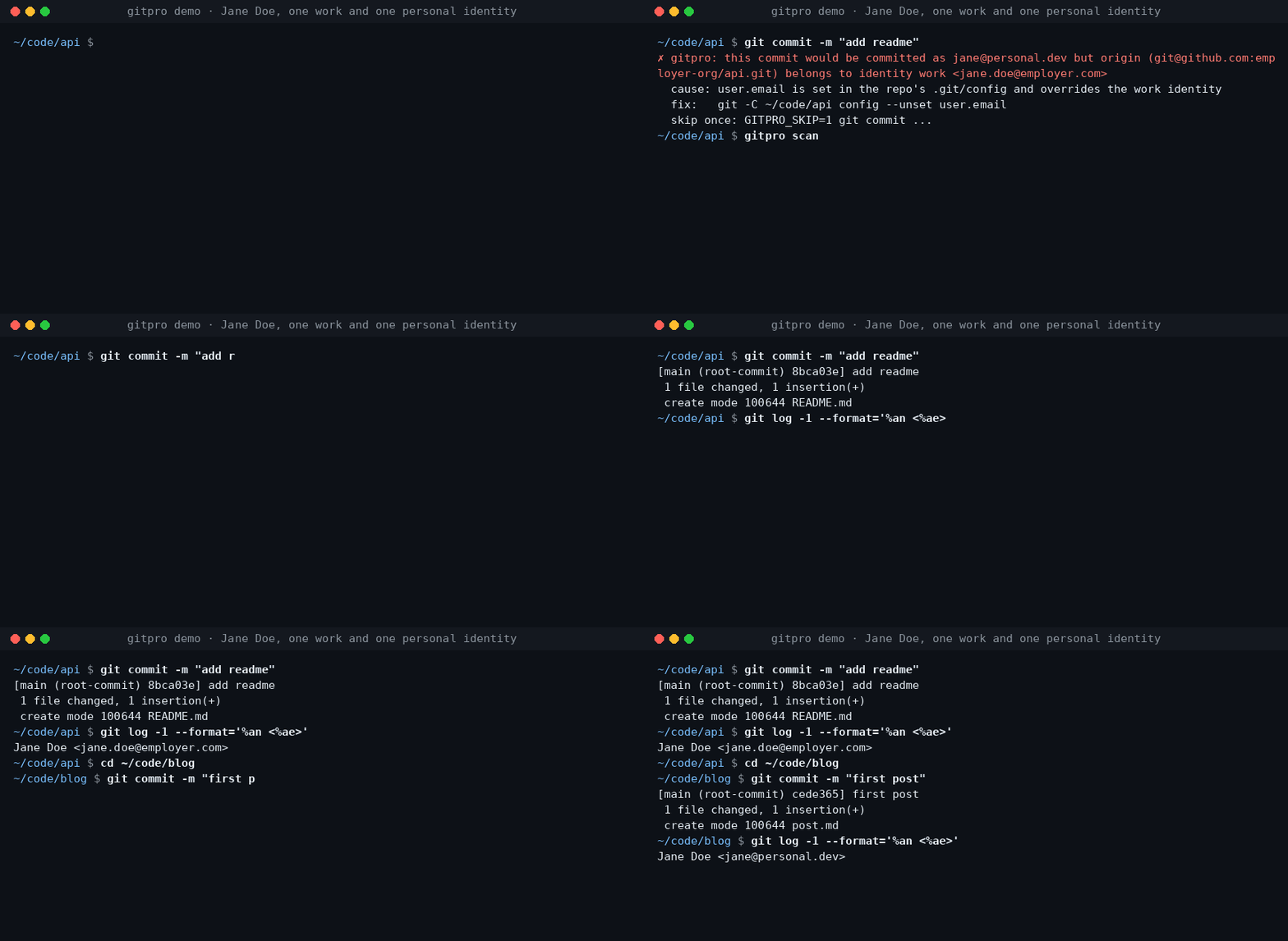
Work on a company repository, commit with your work email. Switch to a personal project, use your personal identity. Gitpro chooses by remote URL, not by where you happened to clone the repository.
Useful when you have more than one GitHub/GitLab account, separate work and personal keys, or keep finding the wrong email on your commits.
Try it
Requires Linux or macOS, Git 2.36+, Python 3.9+ and OpenSSH. Install from PyPI with pipx.
pipx install gitpro
gitpro setup
Setup offers to look through your repos and proposes your identities. Accept, edit or answer the questions yourself; no TOML editing is needed. One preview shows everything, including the commit guard and, with Claude Code, its hook and MCP server. One yes applies it all. Setup never changes your repos.
flowchart LR
  S["gitpro setup"] --> HC{"Config <br/>exists?"}
  HC -->|no| L["Read your repos, <br/>SSH config and <br/>editor recents, <br/>if you agree"]
  L --> Q["Propose <br/>identities; you <br/>accept or edit"]
  Q --> I
  HC -->|yes| I["Inspect config, <br/>Git and SSH files, <br/>keys, guard, <br/>agent hook, MCP"]
  I -->|all current| OK["Nothing <br/>to do"]
  I -->|something to do| PV["One preview, <br/>each part with <br/>its undo"]
  PV --> ASK{"Apply <br/>all?"}
  ASK -->|no| NONE["Nothing <br/>written"]
  ASK -->|yes| AP["Write it, print <br/>the public keys <br/>to register"]
  AP --> NX["Next: <br/>gitpro scan"]
Then:
gitpro why               # inside a repository: the expected identity and anything overriding it
gitpro scan              # repos that need a fix, with the command for each
Already have a config? gitpro setup brings this machine up to date with it.
gitpro setup -n only shows what is left to do. Prefer editing files? The
user guide covers the full TOML format.
What you get
- Work/personal separation: names, emails, SSH keys and signing per host/owner.
- Answers, not guesswork:
gitpro whyexplains mismatches and suggests a fix. - A safety net: optional hooks can block wrong-identity commits and pushes.
- Editor and container support: see your identity in VS Code and carry it into dev containers.
Gitpro generates ordinary Git and SSH configuration; it needs no background service. Changes can be previewed, existing hand-written files are backed up, and key uploads are never part of setup.
Using VS Code?
The extension shows the current identity and helps find repository-level overrides. It runs the same commands as the terminal. Install the extension.
Go further when you need to
AI agents get the same answers through the MCP server and the Claude Code hook: see agent workflows.
| I want to… | Start here |
|---|---|
| Understand matching, SSH keys or signing | Configuration |
| Find wrong identities or forgotten work | Daily use · Finding things |
| Use dev containers | Container setup |
| Configure team policy, CI or AI assistants | Teams and CI · AI assistants |
| Look up a command or undo changes | Command reference · Undo |
| Troubleshoot or contribute | Troubleshooting · Development |
Problems and questions
Run gitpro report to draft an issue with the versions and a redacted gitpro why; it shows
you the draft and opens nothing until you say yes. Or open an issue at github.com/Yantrakar/gitpro/issues.
Report a security problem privately with gitpro report --security, as the
security policy describes, not in a public issue.
License
gitpro MCPのよくある質問
gitpro MCPをClaude Codeに追加するには
ターミナルでclaude mcp add gitpro -- uvx gitproを実行します。すべてのプロジェクトで利用するには--scope userを追加します。
gitpro MCPをCursorに追加するには
~/.cursor/mcp.jsonを開き、上記のインストールセクションに示すCursor設定を使ってmcpServersの下にサーバーを追加します。
gitproはどの識別情報を使用するかをどのように選択しますか?
Gitproは、リポジトリがクローンされたローカルディレクトリではなく、リモートURLに基づいて識別情報を選択します。
gitproを使えば、誤ったメールアドレスでのコミットを防げますか?
はい、フックを通じてオプションのセーフティネットを提供し、誤った識別情報を使用したコミットやプッシュをブロックできます。
gitproの実行にバックグラウンドサービスは必要ですか?
いいえ、標準的なGitおよびSSH設定を生成するだけであり、実行中のバックグラウンドプロセスは必要ありません。