
Worktable MCPサーバー
コミット 2026年11月14日AIエージェントが、コラボレーションワークスペース内でドキュメント、図面、構造化されたレコード、およびインタラクティブなHTMLツールを作成・修正することを可能にします。
別名 worktable/worktable-dev, worktable-dev
- スター
- 8
- ツール
- —
- ダウンロード数(30日間)
- —
- 最新バージョン
- 0.1.49
- 最終コミット
- 2026年11月14日
- ライセンス
- AGPL-3.0
Worktable MCPとは
WorktableはMCPサーバーです。 AIエージェントが、コラボレーションワークスペース内でドキュメント、図面、構造化されたレコード、およびインタラクティブなHTMLツールを作成・修正することを可能にします。.
プロジェクトのREADMEから生成された概要
Worktable MCP server について
Worktableを使用すると、AIエージェントと協力してドキュメント、図面、インタラクティブなツールを作成できます。このワークスペースでは、MCP対応のエージェントを接続して、構造化されたレコードや、計算機やダッシュボードのようなHTMLベースのツールを作成・修正できます。作業は、ブラウザ、macOS用のデスクトップアプリケーション、またはmacOSおよびLinux用のターミナルインストール経由で管理可能です。
ユーザーは、自身で管理するファイルを使用したローカルインスタンスの実行、独自の環境のセルフホスティング、またはWorktable Cloudの利用から選択できます。ローカルセットアップではアカウントは不要ですが、クラウドオプションではホスティングが管理されます。エージェントを使用する際は、各エージェントプロバイダーの要件に従い、自身でサブスクリプションまたはAPI認証情報を提供する必要があります。
この環境は、異なるエージェントが保存された同じ調査結果やデータにアクセスできるため、継続的な作業をサポートします。結果を手動で編集したり、エージェントへの指示としてコメントを残したりすることも可能です。システムは、エクスポートおよびインポート機能を通じて、ローカル、セルフホスト、クラウド版の間でワークスペースを移動することをサポートしています。
できること
- 1調査結果の整理エージェントに情報を収集させ、その結果をワークスペース内のリンクされたドキュメントに保存させます。
- 2視覚的な図面の作成エージェントにレイアウトや視覚的な説明図を描かせ、後で修正できるようにします。
- 3カスタム計算機の開発特定のデータを使用して、ダッシュボードやコストエクスプローラーのようなインタラクティブなツールを構築するようエージェントに指示します。
- 4構造化データレコードの管理整理されたレコード内の共有フィールドを使用して、タスクやフィードバックを維持するためにエージェントを活用します。
プロジェクトの README から作成されています。すべてのユースケースは、その引用と照らし合わせて確認されています。
Worktable MCPのインストール方法
フォーマット検証日 2026年11月10日Claude CodeにWorktable MCPをインストール
$ claude mcp add --transport http worktable-dev https://app.worktable.cloud/api/mcpCursorにWorktable MCPをインストール
~/.cursor/mcp.json
{
  "mcpServers": {
    "worktable-dev": {
      "url": "https://app.worktable.cloud/api/mcp"
    }
  }
}VS CodeにWorktable MCPをインストール
.vscode/mcp.json
{
  "servers": {
    "worktable-dev": {
      "type": "http",
      "url": "https://app.worktable.cloud/api/mcp"
    }
  }
}CodexにWorktable MCPをインストール
~/.codex/config.toml
[mcp_servers.worktable-dev]
url = "https://app.worktable.cloud/api/mcp"
Gemini CLIにWorktable MCPをインストール
~/.gemini/settings.json
{
  "mcpServers": {
    "worktable-dev": {
      "httpUrl": "https://app.worktable.cloud/api/mcp"
    }
  }
}自動チェック
実行日 2026年11月14日詳細レポート →まだ検証されていません。サーバーには80点のスコア、重大な問題がないこと、および検証に必要な十分なデータが必要です。 チェックの仕組み

- ソースリポジトリがリンクされており、アクセス可能worktable/worktable-dev is public and reachablegithub.com/worktable/worktable-dev ↗合格
- パッケージがこのリポジトリをソースとして示している未チェック
- ビルドの来歴(Sigstore 証明)未チェック
- オープンソースライセンス (OSI)AGPL-3.0spdx.org/licenses/AGPL-3.0.html ↗合格
- 過去1年以内にコミットまたはリリースありLast commit or release 2026-11-14github.com/worktable/worktable-dev ↗合格
- OpenSSF Scorecard未チェック
- パッケージ名が有名なパッケージに酷似していない未チェック
- パッケージと依存関係に重大なアドバイザリがない未チェック
- モデルへの隠れた指示がない0 tool descriptions and the README read; no override phrases, credential paths or hidden characters合格
- 破壊的なツールがラベル付けされている未チェック
- リモート endpoint が MCP ハンドシェイクに応答するHTTPS endpoint answered 401 (sign-in required)合格
README
GitHubで見るWorktable
Worktable is an open-source workspace where you and your agents create and revise documents, drawings, structured records, and interactive tools. Connect an agent through MCP, then work together in the browser or Desktop app.
Run it locally with files you control, self-host it, or use Worktable Cloud.
Get started · Documentation · Worktable Cloud · Releases
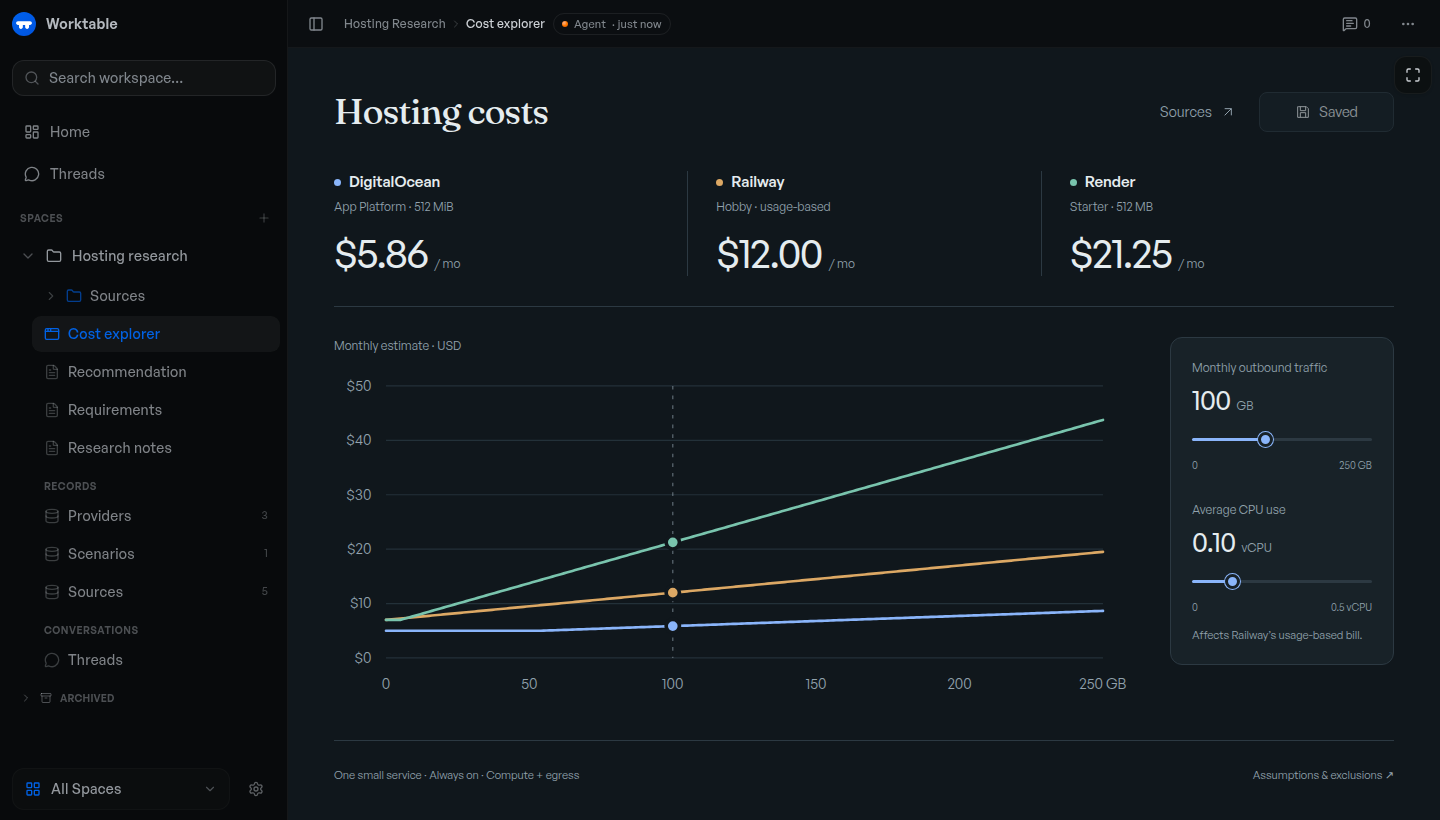
Example cost explorer backed by saved research and records. The displayed prices illustrate the tool; they are not current provider quotes.
Get started
Use an MCP-compatible agent, with its own subscription or API credentials where required.
macOS app: Download Worktable for Mac for Apple Silicon, macOS 13 or newer. Install and open the app, then choose This Mac.
Terminal: macOS or Linux, arm64 or x64. No separate runtime or source checkout needed.
curl -fsSL https://worktable.dev/install | sh
Open the browser address printed by the installer. Run worktable to open
it again later.
In either version, open Settings → Agents and connect your agent. Ask it to save research, organize records, or build a tool in Worktable.
Inspect the installer · Installation guide · First task
Cloud: Worktable Cloud manages hosting for you. For other setups, see self-hosting.
What to make
- Save your research. Keep findings, plans, and decisions in linked documents.
- Organize your data. Maintain tasks, sources, feedback, and other records with shared fields.
- Draw a plan. Sketch a layout, diagram, or visual explanation and revise it with an agent.
- Build interactive tools. Create a calculator, dashboard, or explorer. Use supplied data, or connect the tool to workspace records when needed.
For example, ask an agent to research hosting options, save the sources and pricing, and build a cost explorer for your expected usage. Recheck the rates or change the assumptions later; the research, data, and tool stay together.
Continue your work
Connected agents work with the same saved documents, records, and tools. Ask another agent to continue from what's already there. You can edit the results yourself or leave comments for an agent to act on.
Your data
- Keep work local. Local and self-hosted workspaces are backed by files you can inspect and back up. Local Worktable requires no account.
- Move your workspace. Export and import between Local, self-hosted Worktable, and Cloud.
Connected agent providers may process the content you give them under their own terms. See workspace storage for storage and portability details.
Documentation
Workflows · CLI and MCP reference · Changelog
Report a bug or ask a question. Remove private information from attachments. Report vulnerabilities privately through the security policy.
Contributing
Fixes and documentation improvements are welcome. Please discuss substantial features first. Read CONTRIBUTING.md for the contribution process, development to run from source, or building to create release artifacts.
License
The Worktable application is AGPL-3.0-only, copyright Reva Labs. See LICENSE. Some shared components and agent plugins have MIT licenses; NOTICE and the relevant package notices identify the exact exceptions and third-party terms.
Worktable MCPのよくある質問
Worktable MCPをClaude Codeに追加するには
ターミナルでclaude mcp add --transport http worktable-dev https://app.worktable.cloud/api/mcpを実行します。すべてのプロジェクトで利用するには--scope userを追加します。
Worktable MCPをCursorに追加するには
~/.cursor/mcp.jsonを開き、上記のインストールセクションに示すCursor設定を使ってmcpServersの下にサーバーを追加します。
Worktableではエージェントがどのようなツールを作成できますか?
エージェントはワークスペースのデータを使用して、計算機、ダッシュボード、エクスプローラーなどのインタラクティブなツールを作成できます。
ローカル版を使用するにはアカウントが必要ですか?
いいえ、Worktableのローカル版ではアカウントは必要ありません。