
VGraph MCPとは
VGraphはMCPサーバーです。 Vithanco Graph Languageのテキストから、IBISマップ、コンセプトマップ、因果ループ図などの構造化された図を生成します。.
プロジェクトのREADMEから生成された概要
VGraph MCP server について
vgraph-mcpは、テキストを構造化された視覚的図解へと変換することを、開発者や思考者に提供します。Vithanco Graph Language (VGL) を使用することで、ユーザーはすべてのノードとエッジが特定の意味を持つ、型定義されたネットワークグラフを定義できます。これにより、シンプルなテキスト形式を通じて、IBISマップ、因果ループ図、C4モデルといった複雑な推論ツールを作成できます。
ユーザーは npx @vithanco/vgraph-mcp を使用してこのサーバーをローカルで実行するか、ホストされたバージョンに接続できます。エンジンはこれらの定義をSVG形式でレンダリングするため、異なる環境間でも図の一貫性が保たれます。Impact Mapping、決定木、タイムライン、攻撃防御ツリーなどの多様な組み込み表記法をサポートしており、カスタム表記法の宣言も可能です。
できること
- 1意思決定の推論マップを生成する特定の製品に関する意思決定において、質問、回答、メリット、デメリットを可視化するためのIBISマップを作成します。
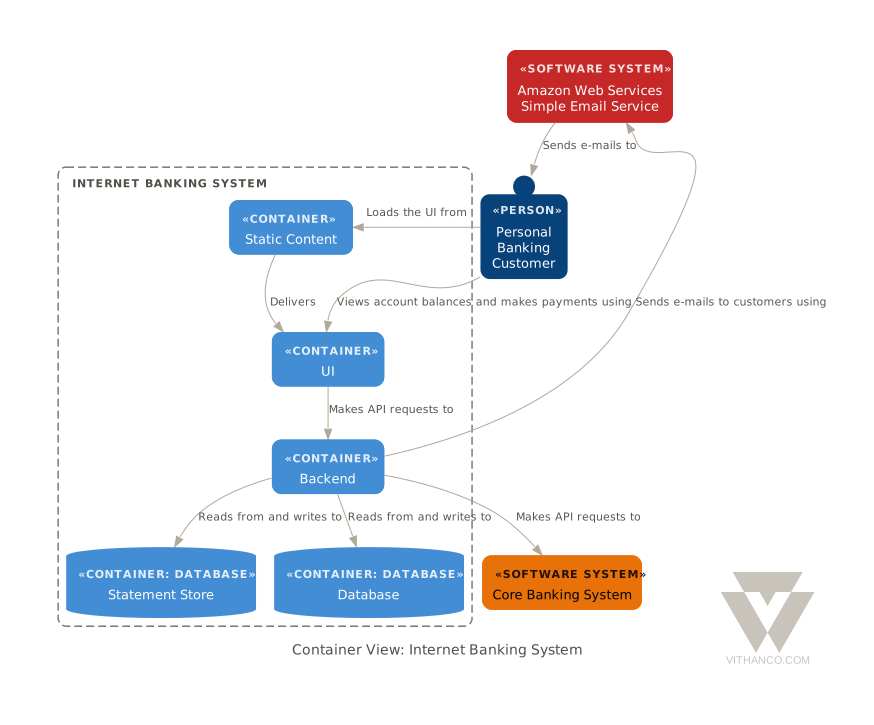
- 2システムアーキテクチャを可視化するテキストによる記述をC4図に変換し、ソフトウェアアーキテクチャを表現します。
- 3因果関係をモデル化する因果ループ図を使用して、複雑なフィードバックループをマッピングします。
プロジェクトの README から作成されています。すべてのユースケースは、その引用と照らし合わせて確認されています。
VGraph MCPのインストール方法
フォーマット検証日 2026年11月10日Claude CodeにVGraph MCPをインストール
$ claude mcp add vgraph -- npx -y @vithanco/vgraph-mcpCursorにVGraph MCPをインストール
~/.cursor/mcp.json
{
  "mcpServers": {
    "vgraph": {
      "command": "npx",
      "args": [
        "-y",
        "@vithanco/vgraph-mcp"
      ]
    }
  }
}VS CodeにVGraph MCPをインストール
.vscode/mcp.json
{
  "servers": {
    "vgraph": {
      "type": "stdio",
      "command": "npx",
      "args": [
        "-y",
        "@vithanco/vgraph-mcp"
      ]
    }
  }
}Claude DesktopにVGraph MCPをインストール
claude_desktop_config.json
{
  "mcpServers": {
    "vgraph": {
      "command": "npx",
      "args": [
        "-y",
        "@vithanco/vgraph-mcp"
      ]
    }
  }
}CodexにVGraph MCPをインストール
~/.codex/config.toml
[mcp_servers.vgraph]
command = "npx"
args = ["-y", "@vithanco/vgraph-mcp"]
Gemini CLIにVGraph MCPをインストール
~/.gemini/settings.json
{
  "mcpServers": {
    "vgraph": {
      "command": "npx",
      "args": [
        "-y",
        "@vithanco/vgraph-mcp"
      ]
    }
  }
}自動チェック
実行日 2026年11月14日詳細レポート →自動チェックに合格しました。これはセキュリティ監査ではありません。コードを読み、サーバーに必要最小限のアクセス権を与えてください。 チェックの仕組み

- ソースリポジトリがリンクされており、アクセス可能vithanco/vgraph is public and reachablegithub.com/vithanco/vgraph ↗合格
- パッケージがこのリポジトリをソースとして示している@vithanco/vgraph-mcp names vithanco/vgraph as sourcenpmjs.com/package/@vithanco/vgraph-mcp ↗合格
- ビルドの来歴(Sigstore 証明)No build attestation published for this release未チェック
- オープンソースライセンス (OSI)Apache-2.0spdx.org/licenses/Apache-2.0.html ↗合格
- 過去1年以内にコミットまたはリリースありLast commit or release 2026-11-13github.com/vithanco/vgraph ↗合格
- OpenSSF Scorecard未チェック
- パッケージ名が有名なパッケージに酷似していないNo popular package one edit away from @vithanco/vgraph-mcp合格
- パッケージと依存関係に重大なアドバイザリがない101 resolved dependencies checked; no critical advisoryosv.dev ↗合格
- モデルへの隠れた指示がない0 tool descriptions and the README read; no override phrases, credential paths or hidden characters合格
- 破壊的なツールがラベル付けされている未チェック
- リモート endpoint が MCP ハンドシェイクに応答するEndpoint did not answer initialize: HTTP 200検出事項
README
GitHubで見るVGraph
Vithanco stands for Visual Thinking and Communication. It helps you think in a structured way by drawing typed network graphs. In a typed graph every node and every edge has a meaning of its own: in an IBIS map a Question, an Answer, a Pro and a Con are different things, and the notation says how they may be connected. The drawing becomes a way of reasoning, and a way of explaining that reasoning to someone else.
VGraph is the open-source engine behind it. It lays a typed graph out and draws it as SVG. The Vithanco Graph Language (VGL) is only the how: a small text format in which these diagrams are written down, stored and shared. The same Swift code runs natively and, compiled to WebAssembly, in the browser, in Obsidian, in VS Code and behind an MCP server, so a diagram looks the same everywhere.
vgraph decision: IBIS "Should we ship the plugin?" {
  node q1: Question "Should we ship?";
  node a1: Answer "Yes, soon";
  node p1: Pro "Users have asked for it";
  node c1: Con "Docs are still thin";
  edge q1 -> a1;
  edge a1 -> p1;
  edge a1 -> c1;
}
A notation is the vocabulary of a diagram: it fixes the node and edge types and how they look. Every document names one. These ship with VGraph: IBIS, BBS, Impact Mapping, Concept Map, Current Reality Tree, Evaporating Cloud, Future Reality Tree, Prerequisite Tree, Transition Tree, Attack-Defense Tree, Goal Tree, Causal Loop Diagram, Decision Tree, Timeline, C4 and Arithmetic. A document can also declare notations of its own. The VGL guide has the whole language.
Ways to use it
| Web editor | vithanco.com/editor: write VGL, see the diagram, edit it on the canvas |
| Obsidian | obsidian-vithanco: a vgl code block becomes a diagram |
| VS Code | vscode-vithanco |
| MCP server | npx @vithanco/vgraph-mcp runs it locally; https://mcp.vithanco.com/mcp is hosted. Details |
| Command line | vgraph-cli, built from this repository |
| Swift package | the VGraph, VGLanguage and VGraphSVG libraries |
Building
Two tiers, so a parser fix does not send you through a toolchain install:
- Native only.
swift buildandswift testneed nothing but a Swift 6.4 toolchain. - With the wasm build.
just build,just test, the wasm smoke tests and the editor's browser tests also need Node,jq,binaryen,wabt,justand the Embedded Swift SDK that matches.swift-version.
Install the toolchain with swiftly, then
the SDK. One bundle holds both the plain and the -embedded SDK, and its version
must equal .swift-version. The checksum is per release; take it from
swift.org's WebAssembly guide.
V=$(cat .swift-version)
swiftly install "$V" && swiftly use "$V"
swift sdk install "https://download.swift.org/swift-$V-release/wasm-sdk/swift-$V-RELEASE/swift-$V-RELEASE_wasm.artifactbundle.tar.gz" \
    --checksum <checksum for $V from the guide>
just doctor lists what is missing; a missing SDK is reported but does not fail
it.
just build     # compile everything: wasm, command line, MCP server
just test      # build, then the full suite: Swift, wasm smoke tests, editor browser tests
just           # everything else
For most changes swift test is the quick loop. The Obsidian and VS Code
plugins are separate repositories; just plugins-setup clones them next to this
one, and the build and test recipes use them when they are there.
How it is organised
VGraph is built as hexagons: a pure domain at the centre, ports that name each conversation with the outside, and adapters at the edge. The parser, the SVG renderer and the Graphviz layout are separate targets that know only the core. Why it is shaped this way and where a change goes are written down, as are the decisions behind the design (ADRs) and the visual rules (design guide).
Contributing
Pull requests are welcome, and so are issues. Start with CONTRIBUTING.md.
Licence
Apache-2.0, see LICENSE. Third-party works, among them Graphviz and the DM Sans typeface, are listed in NOTICE. The Vithanco name and logo are not covered by the licence: the artwork is all rights reserved, and a fork should use a name and a logo of its own. See graphics/README.md for what is allowed.
VGraph MCPのよくある質問
VGraph MCPをClaude Codeに追加するには
ターミナルでclaude mcp add vgraph -- npx -y @vithanco/vgraph-mcpを実行します。すべてのプロジェクトで利用するには--scope userを追加します。
VGraph MCPをCursorに追加するには
~/.cursor/mcp.jsonを開き、上記のインストールセクションに示すCursor設定を使ってmcpServersの下にサーバーを追加します。
VGraphではどのような図を作成できますか?
IBIS、コンセプトマップ、因果ループ図、タイムライン、C4、決定木など、幅広い表記法をサポートしています。
VGraphの言語構造はどのようになっていますか?
Vithanco Graph Language (VGL) は、図の記述、保存、共有に使用される軽量なテキスト形式です。
VGraphをローカルで実行できますか?
はい、npx経由またはコマンドラインツールとしてローカルで実行可能です。