
uidx MCPサーバー
コミット 2026年11月14日AIエージェントと人間が、プロジェクトのリポジトリに直接保存された差分可能なJSXファイルを使用して、ビジュアルワークスペースを共同で設計・編集できます。
別名 uidxkit/uidx
- スター
- 13
- ツール
- —
- ダウンロード数(30日間)
- —
- 最新バージョン
- —
- 最終コミット
- 2026年11月14日
- ライセンス
- MIT
uidx MCPとは
AIエージェントと人間が、プロジェクトのリポジトリに直接保存された差分可能なJSXファイルを使用して、ビジュアルワークスペースを共同で設計・編集できます。
プロジェクトのREADMEから生成された概要
uidx MCP server について
uidxは、開発者とAIエージェントがアプリケーションのリポジトリ内で直接ビジュアルワークスペースを設計できるようにします。@uidxkit/uidx をローカルの開発用依存関係としてインストールすることで、.uidx フォルダに保存された差分可能なJSXファイルを通じてデザインを管理できます。このアプローチにより、Gitを使用して、アプリケーションコードと並行してデザインアセット、フォント、レイアウトのバージョン管理を行うことが可能です。
ユーザーは、プロジェクト内のファイルと同期するローカルビューアーおよびキャンバスを通じてシステムを操作します。セットアップはローカルマシン上で実行され、キャンバスの同期にホストされたデザインサービスやLLMを必要としません。AIクライアントを接続するには、生成された .mcp.json ファイルを使用して uidx:mcp スクリプトを起動します。これは、実行中のプロジェクトサーバーへの stdio bridge として機能します。この構成により、外部ツールは、人間がビジュアルインスペクターで使用するのと同じデザインファイルを検査および編集できるようになります。
できること
- 1共同デザイン編集AIエージェントがリポジトリ内のデザインファイルを修正して、レイアウトやスタイルを更新できます。
- 2バージョン管理されたデザインシステム開発者は標準的なGitワークフローを使用して、コンポーネント、バリアント、デザイントークンを管理できます。
- 3ビジュアルワークスペース管理ビジュアルキャンバスとインスペクターを使用して、新しいページを作成したりレイアウトを調整したりできます。
プロジェクトの README から作成されています。すべてのユースケースは、その引用と照らし合わせて確認されています。
自動チェック
実行日 2026年11月14日完全なレポート →まだ検証されていません。サーバーには80点のスコア、重大な問題がないこと、および検証に必要な十分なデータが必要です。 チェックの仕組み · 点数を上げるための改善点

- ソースリポジトリがリンクされており、アクセス可能uidxkit/uidx is public and reachablegithub.com/uidxkit/uidx ↗合格
- パッケージがこのリポジトリをソースとして指定未チェック
- ビルドの来歴 (Sigstore 証明)未チェック
- オープンソースライセンス (OSI)MITspdx.org/licenses/MIT.html ↗合格
- 過去1年以内にコミットまたはリリースありLast commit or release 2026-11-14github.com/uidxkit/uidx ↗合格
- OpenSSF Scorecard未チェック
- パッケージ名が有名なパッケージに酷似していない未チェック
- パッケージおよびその依存関係に重大な勧告なし未チェック
- モデルへの隠れた指示がない0 tool descriptions and the README read; no override phrases, credential paths or hidden characters合格
- 破壊的なツールがラベル付けされている未チェック
- リモートエンドポイントが MCP ハンドシェイクに応答未チェック
README
GitHubで見る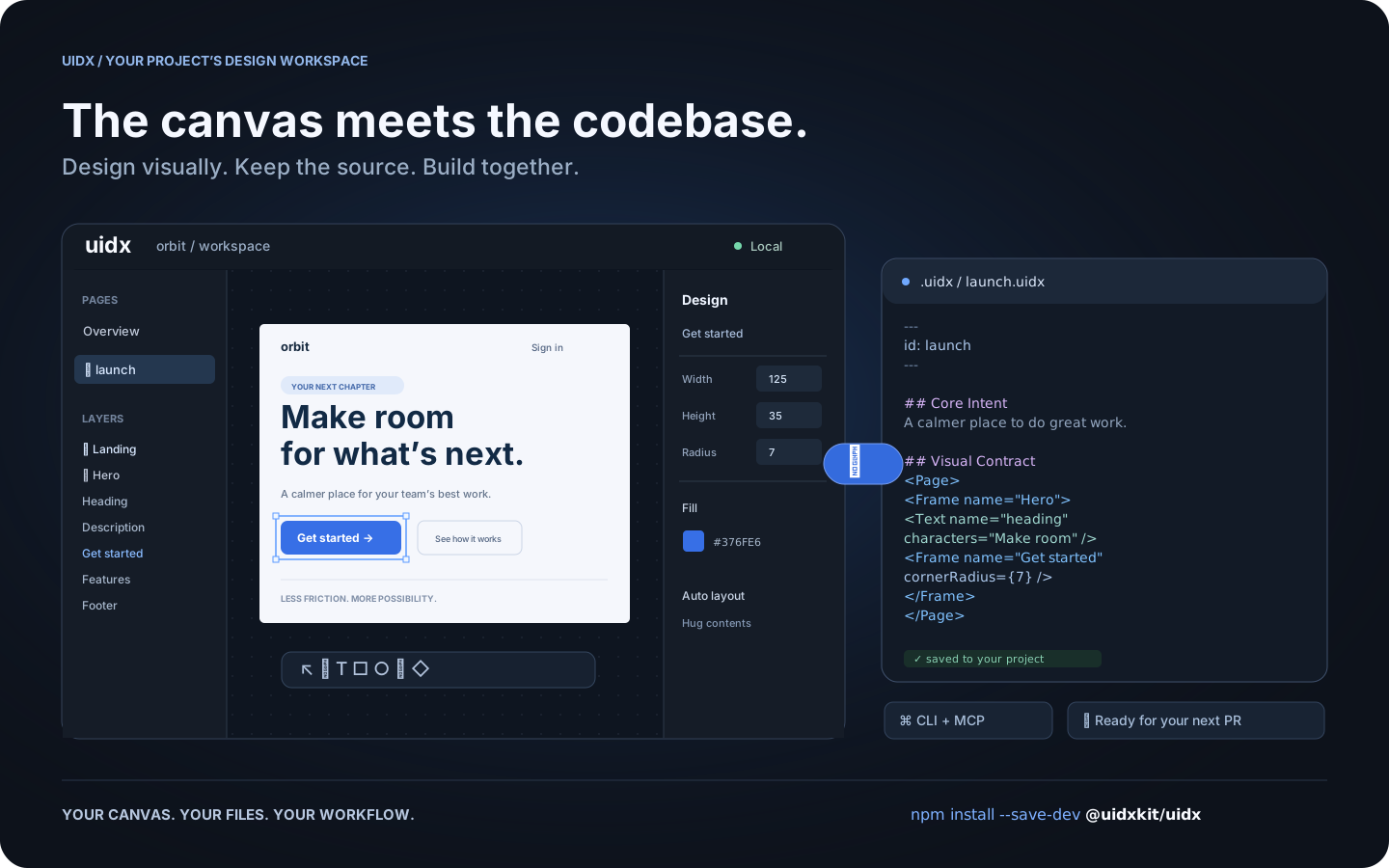
Workflow illustration: one design, shared by the canvas, your files, and your tools.
What is UIDX?
UIDX brings a design canvas into your application's repository. Install
@uidxkit/uidx as a local development dependency, run npm run uidx, and
work on designs stored in your project's .uidx/ folder.
A .uidx file combines Markdown describing a design's purpose with a declarative
node tree describing its appearance. Edit the canvas and the file updates. Edit
the file and the canvas follows. Changes produce focused text diffs you can
review in a pull request.
- A visual workspace. Create pages, draw shapes, edit text, and adjust layout and styling from the canvas and inspector.
- Reusable design systems. Components, instances, variants, slots, and design tokens share a document namespace.
- Your project owns the files. Keep designs, assets, and fonts next to your application and version them with Git.
- A shared workflow for people and agents. The CLI and MCP bridge let external tools inspect and edit the same files the viewer uses.
- Local by default. The viewer and project server run on your machine. Canvas synchronization does not require an LLM or a hosted design service.
UIDX is an early release. The file format and APIs may change before 1.0. It is a design workspace; it does not render your application's existing UI components as Storybook stories.
Install
Requires Node.js 22.19 or newer. Node 24 is recommended.
Run these commands inside your application's repository:
npm install --save-dev @uidxkit/uidx
npm run uidx
Installation adds the uidx and uidx:mcp scripts and creates .uidx/ when it
doesn't exist. Existing scripts, configuration, and designs are preserved.
The CLI, server, viewer, WASM, and bundled fonts live in your project's
node_modules; a global UIDX installation is not required.
Recent npm versions do not run a package's install script until you approve
it, and warn with install scripts not yet covered by allowScripts. Nothing is
lost: the first npx uidx dev performs the same setup itself and says so, or
approve the script with npm install-scripts approve @uidxkit/uidx and
reinstall. To set up explicitly, run npx --no-install uidx init. If your
project already uses a script named uidx, choose another with
npx --no-install uidx init --script design, then run npm run design.
Your design workspace
your-project/
├── package.json          # @uidxkit/uidx devDependency and npm scripts
├── .mcp.json             # connection for MCP clients
├── src/
└── .uidx/
    ├── config.json       # project settings
    ├── uidx.json         # document name, page patterns, and asset patterns
    ├── welcome.uidx      # initial page for a new workspace
    ├── assets/
    └── fonts/
Open the viewer, click New page, give it a name, and start designing. New
pages are saved in your design folder and appear in the overview. Commit your
project's .uidx/ files alongside application code.
Configuration
Set the shared viewer and MCP port in .uidx/config.json:
{
  "port": 4400
}
Restart npm run uidx after changing it. Use npm run uidx -- --port 4500 for a
one-time override. If the requested port is busy, UIDX tries the next available
one and reports its actual address. Configuration currently uses JSON.
The separate .uidx/uidx.json manifest controls which files belong to the document:
{
  "id": "my-project",
  "files": ["**/*.uidx"],
  "assets": ["assets/**"]
}
CLI and MCP
npm run uidx starts the local viewer, file synchronization server, and MCP HTTP
endpoint on one port. MCP clients use the generated .mcp.json to launch
npm run --silent uidx:mcp, a stdio bridge to that running project server.
npx --no-install uidx status
npx --no-install uidx check
npx --no-install uidx fmt --check
The CLI also supports reading, creating, editing, and rendering pages. See the CLI guide and agent architecture.
Documentation
- Drawing icons and custom graphics
- Fonts
- Property vocabulary
- Architecture decisions
- Release guide
- Changelog
Contributing and license
Bug reports, documentation improvements, and pull requests are welcome.
See Contributing for development setup and checks.
Follow the Code of Conduct and report vulnerabilities through
the security policy. Changes to main are merged by the owner.
UIDX is MIT licensed. Third-party code and fonts retain their respective licenses.
uidx MCPのよくある質問
プロジェクトにUIDXをインストールするにはどうすればよいですか?
npm install --save-dev @uidxkit/uidx を使用してローカルの開発用依存関係としてインストールし、その後 npm run uidx を実行してください。
UIDXの同期にホストされたデザインサービスやLLMは必要ですか?
いいえ、ビューアーとプロジェクトサーバーはローカルマシン上で動作するため、キャンバスの同期にLLMやホストされたサービスを必要としません。
UIDXをAIエージェントで使用できますか?
はい、MCP bridgeを使用することで、外部ツールやエージェントがビジュアルキャンバスで使用されているものと同じデザインファイルを検査および編集できます。
UIDXのシステム要件は何ですか?
Node.js バージョン 22.19 以降が必要です(Node 24 を推奨します)。