
sysketch MCPとは
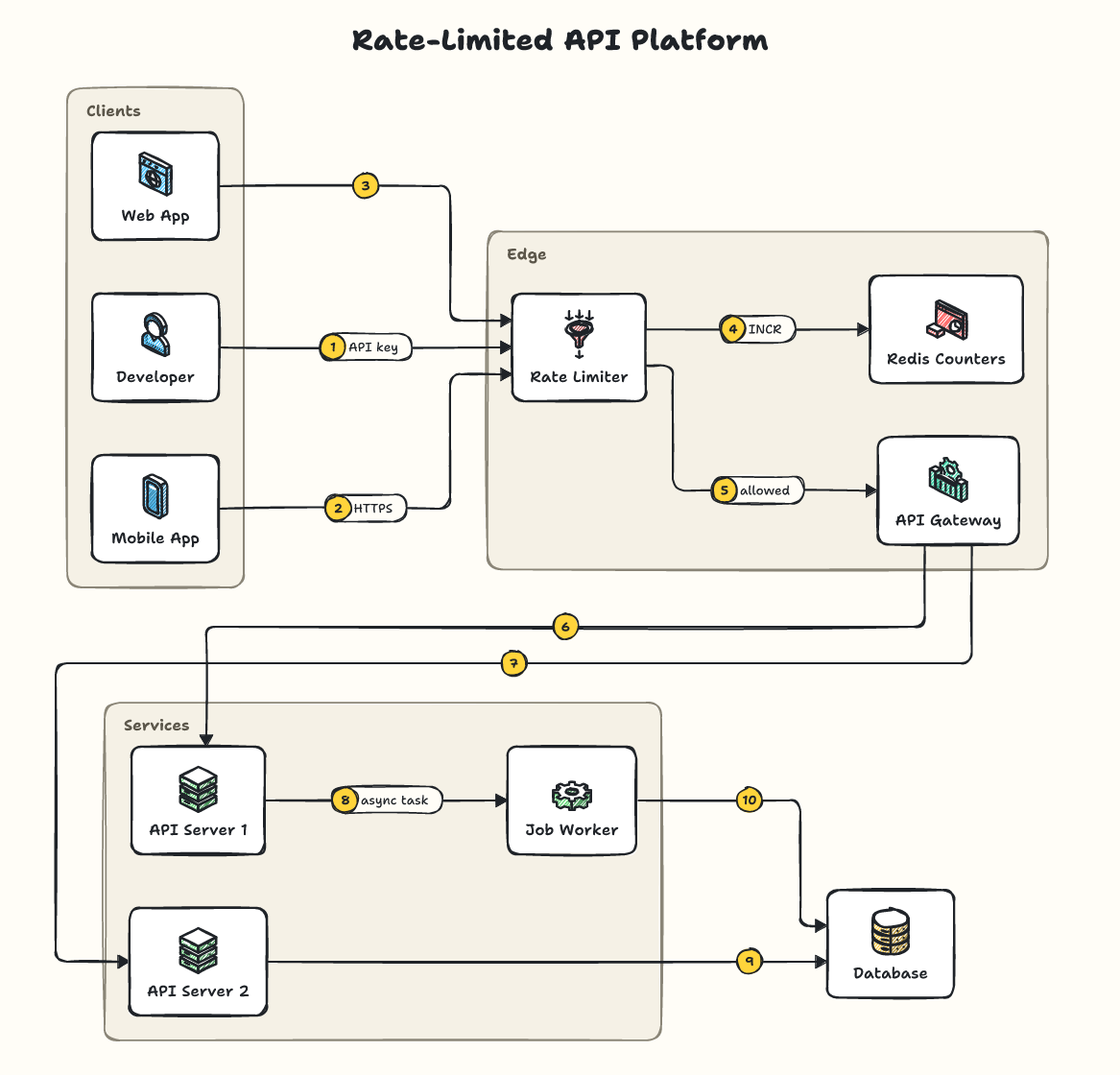
sysketchはMCPサーバーです。 簡潔なYAML仕様から、手書き風のシステム設計図をSVGまたはPNG形式で生成します。. 2個のツールを提供しており、render_diagram, list_iconsなどがあります。
プロジェクトのREADMEから生成された概要
sysketch MCP server について
sysketchを使用すると、ClaudeやCursorなどのAIアシスタントが、YAML仕様に基づいて手書き風のシステム設計図を生成できるようになります。アシスタントが複雑な画像データを直接生成するのではなく、短い記述を書き、それをサーバーがSVGまたはPNGファイルに変換します。この手法によりトークン使用量が大幅に削減され、開発者にとってより高速でコスト効率の高いプロセスを実現します。
デスクトップクライアントではnpx経由でローカルにサーバーをセットアップでき、Webベースのチャットではリモートエンドポイントに接続することも可能です。サーバーの実行にはNode.js 20以降が必要です。仕様やファイルからビジュアルを作成するrender_diagramツールと、利用可能なアイコンやロゴを確認できるlist_iconsツールを提供しています。生成された図はローカルディレクトリに保存されます。保存先はSYSKETCH_DIR環境変数または特定のディレクトリ引数を使用してカスタマイズできます。
できること
- 1システムアーキテクチャの可視化AIアシスタントに、ライドシェアシステムのアーキテクチャのPNG図を作成するよう依頼します。
- 2既存の図の修正新しいサービスを追加するなど、以前に生成した図に対して特定の変更を依頼します。
- 3異なるビジュアルスタイルの適用blueprintなどの異なるテーマを指定して、図のデザインを変更します。
- 4公式ブランドロゴの組み込みS3やStripeなどのサービスに対して、認識可能な製品名を使用して実際のロゴを表示します。
プロジェクトの README から作成されています。すべてのユースケースは、その引用と照らし合わせて確認されています。
sysketch MCPのインストール方法
フォーマット検証日 2026年11月10日Cursor に追加Gooseに追加Claude Codeにsysketch MCPをインストール
$ claude mcp add sysketch -- npx -y sysketch-mcpCursorにsysketch MCPをインストール
~/.cursor/mcp.json
{
  "mcpServers": {
    "sysketch": {
      "command": "npx",
      "args": [
        "-y",
        "sysketch-mcp"
      ]
    }
  }
}VS Codeにsysketch MCPをインストール
.vscode/mcp.json
{
  "servers": {
    "sysketch": {
      "type": "stdio",
      "command": "npx",
      "args": [
        "-y",
        "sysketch-mcp"
      ]
    }
  }
}VS Code CLIにsysketch MCPをインストール
$ code --add-mcp '{"name":"sysketch","type":"stdio","command":"npx","args":["-y","sysketch-mcp"]}'Claude Desktopにsysketch MCPをインストール
claude_desktop_config.json
{
  "mcpServers": {
    "sysketch": {
      "command": "npx",
      "args": [
        "-y",
        "sysketch-mcp"
      ]
    }
  }
}Codexにsysketch MCPをインストール
$ codex mcp add sysketch -- npx -y sysketch-mcpCodex config.tomlにsysketch MCPをインストール
~/.codex/config.toml
[mcp_servers.sysketch]
command = "npx"
args = ["-y", "sysketch-mcp"]
Gemini CLIにsysketch MCPをインストール
$ gemini mcp add -s user sysketch npx -- -y sysketch-mcpGemini settings.jsonにsysketch MCPをインストール
~/.gemini/settings.json
{
  "mcpServers": {
    "sysketch": {
      "command": "npx",
      "args": [
        "-y",
        "sysketch-mcp"
      ]
    }
  }
}sysketch MCPツール 2
READMEから検出render_diagramlist_icons
| render_diagram | — | |
| list_icons | — |
自動チェック
実行日 2026年11月13日完全なレポート →自動チェックに合格しました。これはセキュリティ監査ではありません。コードを読み、サーバーに必要最小限のアクセス権を与えてください。 チェックの仕組み

- ソースリポジトリがリンクされており、アクセス可能合格
- オープンソースライセンス (OSI)合格
- 過去1年以内にコミットまたはリリースあり合格
- パッケージ名が有名なパッケージに酷似していない合格
- リモートエンドポイントがHTTPSを使用合格
- 破壊的なツールがラベル付けされている合格
- モデルへの隠れた指示がない合格
- パッケージおよびその依存関係に重大な勧告なし合格
README
GitHubで見るsysketch-mcp
Lets Claude, Cursor and other AI assistants draw clean, hand-sketched system design diagrams with sysketch. The assistant writes a short description of your system instead of drawing the image itself, which makes diagrams faster, cheaper and consistent.
Setup
You need Node.js 20 or newer.
Claude Code: run once in your terminal:
claude mcp add sysketch -- npx -y sysketch-mcp
Claude Desktop, Cursor and other assistants: add this to the assistant's MCP settings, then restart it:
{
  "mcpServers": {
    "sysketch": { "command": "npx", "args": ["-y", "sysketch-mcp"] }
  }
}
Diagrams are saved in the folder your assistant runs the server in (your project, in Claude Code and Cursor). Claude Desktop starts servers outside any project, so there they go to a sysketch folder in your home folder. To choose a folder, add "--dir", "/path/to/folder" to args, or set the SYSKETCH_DIR environment variable.
ChatGPT, Claude on the web, Perplexity and other AI chats: you don't need this package. Add https://sysketch.vercel.app/mcp as a custom connector instead (details).
Use
Ask your assistant, for example:
Use sysketch to draw a ride-sharing system as a PNG.
The diagram is saved in diagrams/ inside that folder, together with its description, so you can ask for changes later: "add a notification service", "use the blueprint theme". Only a one-line summary comes back into the conversation, never the image data.
Measured with Claude Code (Sonnet) on 5 system design requests: 4,352 output tokens with sysketch vs 77,518 when the assistant drew the SVG itself, about 18x fewer (benchmark).
Tools
| Tool | What it does |
|---|---|
render_diagram |
Draws a diagram from a description (spec) or a file (file) to .svg or .png, with an optional theme. preview: true returns the image to the assistant (off by default). |
list_icons |
Lists the icons and recognized names; logos searches installed official logos. |
The tool definitions add about 450 tokens to each session.
Official logos (optional)
When official logos are installed, product names like s3 or stripe show the real logo. See the logos guide.
More examples, themes and the full spec: github.com/Tonys-Coding/sysketch
MIT License.
sysketch MCPのよくある質問
sysketch MCPをClaude Codeに追加するには
ターミナルでclaude mcp add sysketch -- npx -y sysketch-mcpを実行します。すべてのプロジェクトで利用するには--scope userを追加します。
sysketch MCPをCursorに追加するには
~/.cursor/mcp.jsonを開き、上記のインストールセクションに示すCursor設定を使ってmcpServersの下にサーバーを追加します。
sysketch MCPが提供するツールは
2個のツールを提供しており、render_diagram, list_iconsなどがあります。
図の中に公式ロゴを使用できますか?
はい、公式ロゴがインストールされている場合、s3やstripeなどの製品名を入力すると実際のロゴが表示されます。
このMCP serverはトークンを大量に消費しますか?
いいえ、非常に効率的です。アシスタントが直接生のSVGを描画させる場合に比べ、トークン使用量を約18分の1に抑えられます。