
Ternimal MCPサーバー
コミット 2026年11月14日Model Context Protocolを介して、AIエージェントがリモートホスト上でコマンドの実行やファイル管理を行えるセキュアなリモートターミナルを提供します。
別名 ternimal/tern
- スター
- 1
- ツール
- —
- ダウンロード数(30日間)
- —
- 最新バージョン
- —
- 最終コミット
- 2026年11月14日
- ライセンス
- AGPL-3.0
Ternimal MCPとは
TernimalはMCPサーバーです。 Model Context Protocolを介して、AIエージェントがリモートホスト上でコマンドの実行やファイル管理を行えるセキュアなリモートターミナルを提供します。.
プロジェクトのREADMEから生成された概要
Ternimal MCP server について
Ternimalを使用すると、AIインターフェースを通じてリモートサーバーを管理できます。このツールは、Model Context Protocolを使用して、AIエージェントがリモートホスト上でコマンドの実行やファイル管理を行えるセキュアなリモートターミナルを提供します。Claude Desktop、Claude Code、CursorなどのAIクライアントに対して、システムへの制御されたアクセスを許可する必要がある管理者向けに設計されています。
セットアップには、リモートホストでterndエージェントを実行し、ternクライアント経由で接続する必要があります。ユーザーはローカルネットワーク経由で直接接続するか、ternrリレーを使用して、インバウンドポートを開放することなくNATを越えて接続できます。セキュリティは、エンドツーエンドのTLS暗号化と、OpenSSHキーまたは共有トークンのいずれかを使用した必須の認証によって維持されます。
不正な操作を防ぐため、MCP serverは特定のポリシーに基づいて動作し、デフォルトでは読み取り専用となります。すべての呼び出しの監査ログを保持し、指定されたアクションを実行する前には手動での承認が必要です。これにより、AIエージェントがshell、exec、ポートフォワーディング、ファイルコピーのツールとやり取りできる一方で、人間のユーザーがリモート環境の制御権を保持し続けることができます。
できること
- 1AI経由のリモートコマンド実行MCPインターフェースを通じて、AIエージェントにリモートホスト上で特定のシェルコマンドを実行させます。
- 2AIによる管理操作の監査システム上でAIエージェントが実行したすべてのコマンドとインタラクションの完全なログを確認します。
プロジェクトの README から作成されています。すべてのユースケースは、その引用と照らし合わせて確認されています。
設定
TERN_TOKEN
| 名前 | 説明 | 種類 |
|---|---|---|
| TERN_TOKEN | — |
自動チェック
実行日 2026年11月15日完全なレポート →まだ検証されていません。サーバーには80点のスコア、重大な問題がないこと、および検証に必要な十分なデータが必要です。 チェックの仕組み · 点数を上げるための改善点

- ソースリポジトリがリンクされており、アクセス可能ternimal/tern is public and reachablegithub.com/ternimal/tern ↗合格
- パッケージがこのリポジトリをソースとして指定未チェック
- ビルドの来歴 (Sigstore 証明)未チェック
- オープンソースライセンス (OSI)AGPL-3.0spdx.org/licenses/AGPL-3.0.html ↗合格
- 過去1年以内にコミットまたはリリースありLast commit or release 2026-11-14github.com/ternimal/tern ↗合格
- OpenSSF Scorecard未チェック
- パッケージ名が有名なパッケージに酷似していない未チェック
- パッケージおよびその依存関係に重大な勧告なし未チェック
- モデルへの隠れた指示がない0 tool descriptions and the README read; no override phrases, credential paths or hidden characters合格
- 破壊的なツールがラベル付けされている未チェック
- リモートエンドポイントが MCP ハンドシェイクに応答未チェック
README
GitHubで見るTernimal
+------------------------------------------------------------------+
| \\\_\                                                            |
| \\\( ^>     t e r n                                              |
|  \\\=/      A minimal, portable, secure remote terminal with MCP |
|  ~~~~~                                                           |
+------------------------------------------------------------------+


Ternimal (terminal + minimal) is a minimal, portable, secure remote terminal: SSH-style shells, command exec, port forwarding and file copy over end-to-end TLS, reached directly or through a relay for NAT traversal. One project, four small binaries:
| binary | role |
|---|---|
tern |
client: shells, exec, port forwarding, file copy, REST gateway, MCP server for AI agents |
ternd |
agent: hosts sessions for authenticated clients; listens directly or dials a relay |
ternr |
relay: bridges clients to agents behind NAT; a public rendezvous that only forwards opaque bytes |
rtern |
combined relay + client: catches an agent that dials in and drops you into its shell; one process instead of ternr + tern |
Client-to-agent traffic is end-to-end TLS (clients pin the agent's certificate) and authentication to the agent is mandatory. This is an administration tool, not a stealth tool: connections are logged and the agent has no unauthenticated mode. Only use it on systems you own or are authorized to access.
Installation
Download the zip for your OS and architecture from the
latest release, check it
against SHA256SUMS and, with the GitHub CLI, its
build provenance attestation, and put the four binaries on your PATH:
curl -LO https://github.com/ternimal/tern/releases/latest/download/ternimal-linux-amd64.zip
curl -LO https://github.com/ternimal/tern/releases/latest/download/SHA256SUMS
sha256sum --ignore-missing -c SHA256SUMS
gh attestation verify ternimal-linux-amd64.zip -R ternimal/tern
mkdir -p ~/.local/bin
unzip ternimal-linux-amd64.zip tern ternd ternr rtern -d ~/.local/bin
Or build them with Go 1.21 or later:
go install github.com/ternimal/tern/cmd/...@latest
Notes for macOS and Windows, building from source and the supported platforms are in docs/install.md.
Quick start
# agent: zero-config, listens on port 2222 on every IPv4 and IPv6 address,
# mints a token, prints its fingerprint
ternd

# client: connect by IP with the agent's fingerprint and token
TERN_TOKEN=<token> tern connect -a AGENT_IP:2222 -f <agent-fp>
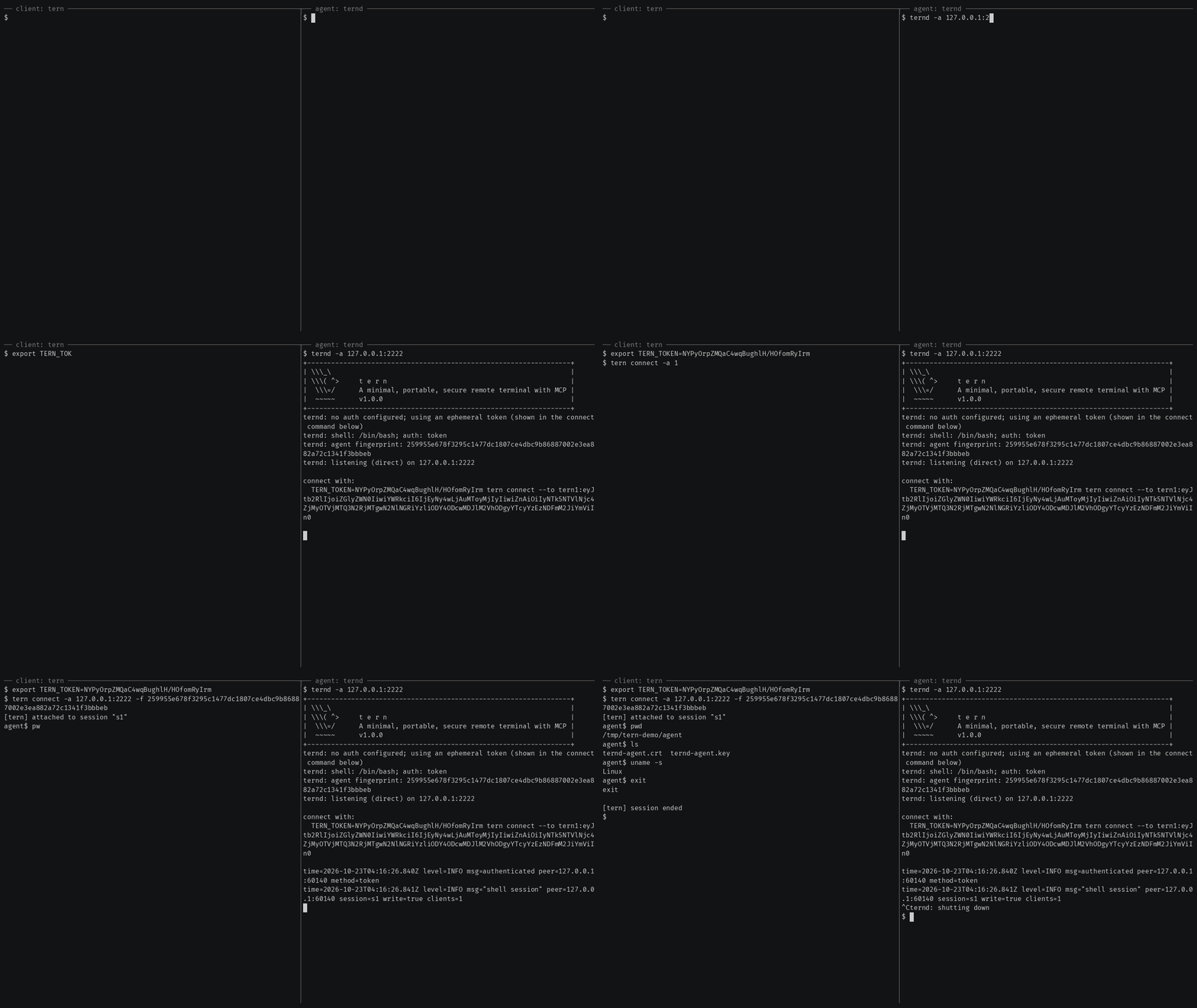
Getting started also covers reaching an agent
behind NAT through a relay, catching one with rtern and logging in with
OpenSSH keys instead of a token.
AI agents (tern mcp)
tern mcp lets an AI client such as Claude Code, Claude Desktop or Cursor work
on your agents through the
Model Context Protocol, under a policy you
set and with an audit log of every call. It is read-only by default, and asks
you before the actions you choose.
In Claude Code, install tern first, then the Ternimal plugin:
claude plugin marketplace add ternimal/tern
claude plugin install ternimal@ternimal
The plugin starts tern from your PATH and reads your hosts from a config
file, ~/.config/tern/mcp.json by default; its ternimal:setup skill walks
you through writing one. plugin/README.md says what it
runs and what it sends. Other clients, a one-line setup without a config
file, the tools and the safety model are in docs/mcp.md.
Features
- Direct or relay: reach an agent on your LAN directly, or reach one behind NAT through a relay, so that agent needs no inbound port.
- End-to-end encryption: TLS and authentication run between client and agent, so a relay only forwards ciphertext.
- Keys or tokens: OpenSSH public keys in
authorized_keysformat, or a shared token. - Resumable sessions:
tern connectreconnects on its own after a drop and resumes the session with scrollback replay; others can join it as read-only viewers. - One connection, many channels: one authenticated connection can carry a
shell,
exec, port forwards and file copy at once. - REST gateway and MCP server: run commands over HTTP, or let AI agents work under a policy.
- Recording: with
ternd --record-dir, the agent saves each session as an asciicast, playable withasciinema play. - Zero-config: run
terndwith no flags on a terminal and it mints a token and prints the line to connect with. - Portable: Linux, macOS, Windows and Android on amd64 and arm64.
All of them in detail: docs/features.md.
Documentation
- Getting started: direct, through a relay, with
rtern, with OpenSSH keys and the insecure flags for testing - Commands: every
terncommand, sharing and resuming sessions, copying files, port forwards - REST gateway: run commands on an agent over HTTP
- AI agents over MCP: the config file, profiles, tools, approvals and the audit log
- Install and build: checking a release, building from source, supported platforms
- Keys, tokens and files: the rules for the files tern reads
- Operating notes: listeners, shutdown, recordings and other details
- Security: the threat model, the dangerous flags and how to report a vulnerability
- Contributing: license terms, the CLA, development and the code layout
License
Ternimal is licensed under the GNU Affero General Public License v3.0 only (AGPL-3.0-only); see LICENSE. Running a modified version to provide a network service requires offering that version's source to its users.
A separate commercial license is available for uses that cannot comply with the AGPL, for example embedding Ternimal in a proprietary or hosted service; see NOTICE. Contributions are welcome; see CONTRIBUTING for the license terms and the CLA.
"Ternimal", the binary names (tern, ternd, ternr, rtern) and the
project logo are project trademarks and are not licensed under the AGPL; see
NOTICE.
Ternimal MCPのよくある質問
AIエージェントはどのようにTernimalを使用できますか?
Claude CodeやCursorなどのAIクライアントは、tern mcpコマンドを使用してModel Context Protocol (MCP) 経由でエージェントを操作できます。
接続は安全ですか?
はい。クライアントとエージェント間の通信は、エンドツーエンドのTLSと必須の認証を使用しており、リレーサーバーは不透明な暗号文を転送するだけなので安全です。
NATの背後にあるマシンにTernimalでアクセスできますか?
はい。リレーを使用して接続をブリッジすることで、NATの背後にあるエージェントにアクセス可能です。
AIエージェントのデフォルトの権限は何ですか?
デフォルトではMCP serverは読み取り専用であり、指定されたアクションを実行する前には必ずユーザーの承認を求めます。