
tty-table MCPサーバー
コミット 2026年10月13日AIクライアントがデータをASCIIまたはUnicodeのターミナル用テーブルとしてレンダリングし、READMEやその他のテキストファイルで使用できるようにします。
別名 tecfu/tty-table
- スター
- 311
- ツール
- 4
- ダウンロード数(30日間)
- —
- 最新バージョン
- —
- 最終コミット
- 2026年10月13日
- ライセンス
- MIT
tty-table MCPとは
tty-tableはMCPサーバーです。 AIクライアントがデータをASCIIまたはUnicodeのターミナル用テーブルとしてレンダリングし、READMEやその他のテキストファイルで使用できるようにします。. 4個のツールを提供しており、render_table, header, rowsなどがあります。
プロジェクトのREADMEから生成された概要
tty-table MCP server について
tty-tableは、生のデータを整形されたASCIIまたはUnicodeのターミナル用テーブルに変換することをAIクライアントに可能にします。Claude、Cursor、またはその他のIDEエージェントを使用している開発者は、npxを使用してstdio経由でこのサーバーに接続し、構造化された情報を読みやすいテキストレイアウトに変換できます。これは、AIとの会話から直接、クリーンなドキュメント、READMEファイル、またはターミナルに適したレポートを生成する際に特に有用です。
render_tableツールが主要なインターフェースとして機能し、ユーザーはヘッダー、行、およびwidth、borderStyle、align、compact modeなどの特定の構成オプションを渡すことができます。サーバーは、Unicodeの幅の測定やテキストの折り返しを含む複雑なフォーマットロジックを処理し、ターミナル環境でテーブルが正しく表示されるようにします。このMCP実装を実行するには、Node.js 22以降が必要です。
プロジェクトの README から作成されています。すべてのユースケースは、その引用と照らし合わせて確認されています。
tty-table MCPツール 4
READMEから検出render_tableheaderrowsoptions
| render_table | — | |
| header | — | |
| rows | — | |
| options | — |
自動チェック
実行日 2026年11月13日完全なレポート →まだ検証されていません。サーバーには80点のスコア、重大な問題がないこと、および検証に必要な十分なデータが必要です。 チェックの仕組み · 点数を上げるための改善点

- ソースリポジトリがリンクされており、アクセス可能tecfu/tty-table is public and reachablegithub.com/tecfu/tty-table ↗合格
- パッケージがこのリポジトリをソースとして指定未チェック
- ビルドの来歴 (Sigstore 証明)未チェック
- オープンソースライセンス (OSI)MITspdx.org/licenses/MIT.html ↗合格
- 過去1年以内にコミットまたはリリースありLast commit or release 2026-10-13github.com/tecfu/tty-table ↗合格
- OpenSSF ScorecardOpenSSF Scorecard 4.8 / 10; weakest: Code-Review 0, Pinned-Dependencies 0, CII-Best-Practices 0scorecard.dev/viewer/?uri=github.com/tecfu/tty-table ↗一部 7/15
- パッケージ名が有名なパッケージに酷似していない未チェック
- パッケージおよびその依存関係に重大な勧告なし未チェック
- モデルへの隠れた指示がない4 tool descriptions and the README read; no override phrases, credential paths or hidden characters合格
- 破壊的なツールがラベル付けされているNo tool named like delete, drop or exec合格
- リモートエンドポイントが MCP ハンドシェイクに応答未チェック
README
GitHubで見るtty-table
A TypeScript-first terminal table renderer with a compatibility-oriented factory API.
Examples
See here for complete example list
To view all example output:
$ git clone https://github.com/tecfu/tty-table && cd tty-table && npm i
$ npm run view-examples
Terminal (Static)
examples/styles-and-formatting.js

Terminal (Streaming)
$ node examples/data/fake-stream.js | tty-table --format json --header examples/config/header.js
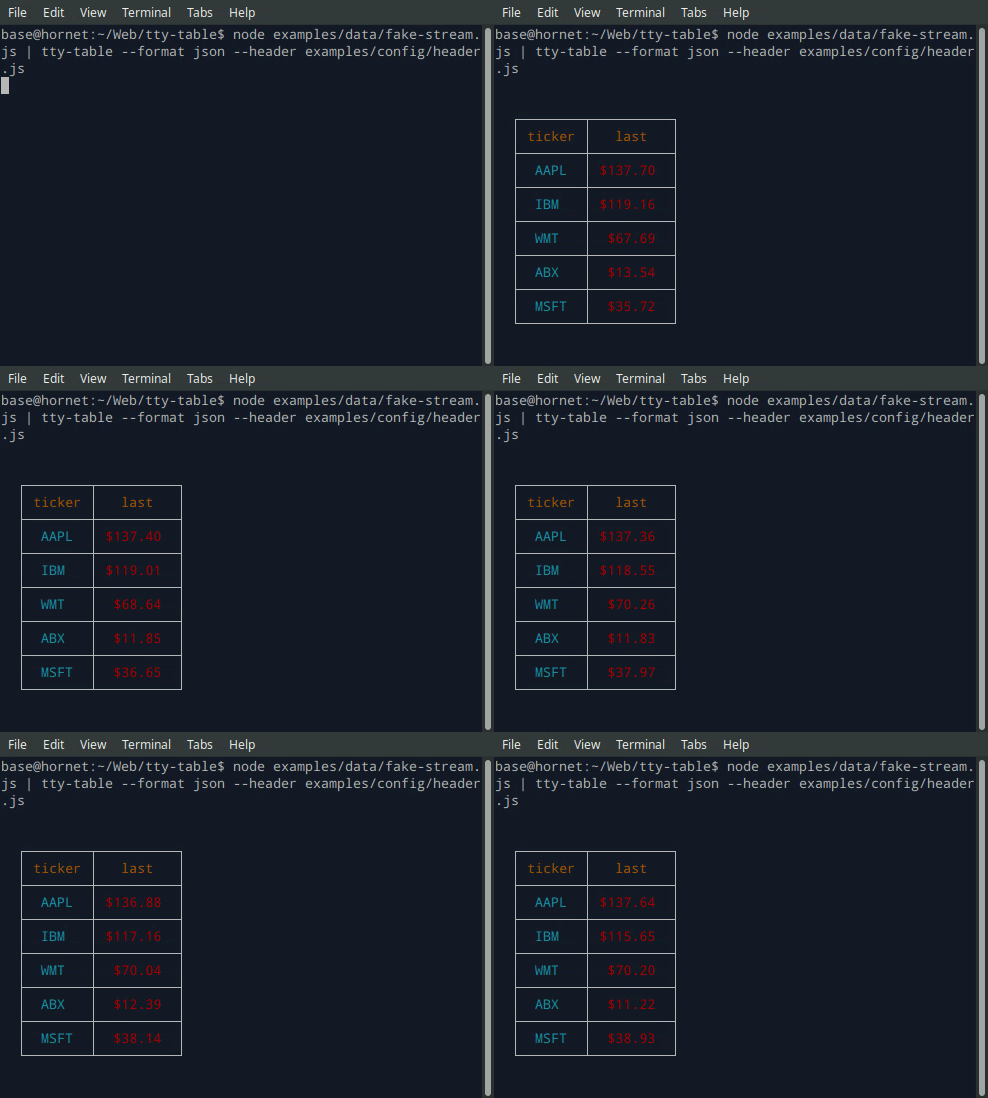
- See the built-in help for the terminal version of tty-table with:
$ tty-table -h
MCP server
Expose tty-table to MCP clients (Claude, IDE agents, Cursor, etc.) over stdio.
Client configuration
{
  "mcpServers": {
    "tty-table": {
      "command": "npx",
      "args": ["-y", "--package=tty-table", "tty-table-mcp"]
    }
  }
}
Tools
| Tool | Description |
|---|---|
render_table |
Render data as an ASCII/Unicode terminal table. Accepts header, rows, and any tty-table options; returns the rendered table as text. |
Arguments for render_table:
| Name | Type | Required | Description |
|---|---|---|---|
header |
(string | {value, align?, width?})[] |
no | Column definitions |
rows |
(unknown[] | Record<string, unknown>)[] |
yes | Row data (arrays of cells, or objects keyed by column name) |
options |
object |
no | Any tty-table option (e.g. width, borderStyle, align, compact) |
Example tool call:
{
  "header": [{ "value": "name" }, { "value": "score", "align": "right" }],
  "rows": [["Ada", 100], ["Grace", 98]],
  "options": { "width": 40 }
}
Rendered result:
  ┌───────┬───────┐
  │ name  │ score │
  ├───────┼───────┤
  │  Ada  │   100 │
  ├───────┼───────┤
  │ Grace │    98 │
  └───────┴───────┘
Additional tools may be added in future releases under the same MCP server.
Browser & Browser Console
The published package ships a standalone IIFE bundle that exposes a TtyTable global. Load it directly from a CDN — no install or build step required:
<script src="https://cdn.jsdelivr.net/npm/tty-table@7/dist/browser/tty-table.global.js"></script>
<script>
  const Table = TtyTable.default
  console.log(Table([{ value: "name" }, { value: "score" }], [["Ada", 100]], null).render())
</script>
- Try it online before installing: live example on JSFiddle
- View the full example locally in Chrome or Chromium by opening examples/browser-example.html (e.g. served with
npx serve .or any static file server). - source: examples/browser-example.html

Compatibility
Node.js
Current releases require Node.js 22 or newer. This is a breaking change from the Node 20 baseline used by early v6 releases (and from the v5 line, which supported older Node.js releases). The floor was raised to match smartwrap@4 / breakword@2.1.0. If your application must remain on Node 20, stay on a prior tty-table release until you can upgrade.
The published package provides both ESM and CommonJS entry points for Node.js. The CLI requires Node.js 22+ as well.
API
import Table from "tty-table"

const table = Table(
  [{ value: "name" }, { value: "score", align: "right" }],
  [
    { name: "Ada", score: 100 },
    { name: "Grace", score: 98 }
  ],
  { borderStyle: "solid" }
)

console.log(table.render())
Legacy Table(header, rows, footer, options) and Table(rows, options) construction remains supported.
Formatter context
New code can use the explicit context form:
const formatter = (value: unknown) => String(value).toUpperCase()
The compatibility callback signature is still accepted. New integrations should prefer a formatter that accepts the documented context object and avoid relying on dynamic this mutation.
Width semantics
Widths are measured in terminal display columns, not JavaScript string length. ANSI escape sequences are ignored for measurement; Unicode code points are counted using breakword.width() (Unicode 18.0.0 East Asian Width + UAX #51 Emoji_Presentation). Wrapping and truncation operate on the same display-width semantics.
Compared with older releases that used wcwidth, some symbols that were previously treated as 1 cell are now 2 cells (for example ⚡ U+26A1). Tables containing those characters may reflow slightly; measurement is now aligned with the same library used for wrapping.
Development
npm install
npm run typecheck
npm run build
npm test
npm run test:unit
npm run lint
tty-table MCPのよくある質問
tty-table MCPが提供するツールは
4個のツールを提供しており、render_table, header, rows, optionsなどがあります。
ClaudeやCursorでtty-tableを使用するにはどうすればよいですか?
クライアントの設定でmcpServersを設定することで、stdio経由でClaude、IDEエージェント、CursorなどのMCPクライアントに公開できます。
このMCP serverではどのようなツールが利用可能ですか?
このサーバーはrender_tableツールを提供します。このツールは、ヘッダー、行、および各種tty-tableオプションを受け取り、レンダリングされたASCII/Unicodeテーブルを返します。
必要なNode.jsのバージョンは?
現在のリリースでは、Node.js 22以降が必要です。