
archwhere MCPサーバー
コミット 2026年11月7日自動化されたアーキテクチャマップの維持とブランチの衝突検知により、AIコーディングエージェントのミッションコントロールを提供します。
別名 tapaskar/archwhere
- スター
- 6
- ツール
- —
- ダウンロード数(30日間)
- —
- 最新バージョン
- —
- 最終コミット
- 2026年11月7日
- ライセンス
- MIT
archwhere MCPとは
自動化されたアーキテクチャマップの維持とブランチの衝突検知により、AIコーディングエージェントのミッションコントロールを提供します。
プロジェクトのREADMEから生成された概要
archwhere MCP server について
大規模なAIコーディングエージェントの集団を管理するには、個々のdiffを確認するだけでは不十分です。Archwhereは、すべてのエージェントがどのコンポーネントに触れているかを追跡する自動化されたアーキテクチャマップを維持することで、ミッションコントロールを提供します。ディレクトリ構造、パッケージワークスペース、およびインポートの依存関係を宣言されたモデルにマッピングし、自動化されたCIチェックを通じて最新の状態に保つことで、開発者がエージェントの活動を監督できるよう支援します。
ユーザーは、missionと呼ばれるローカルUIを介してシステムとやり取りします。これは、開発者がGitHub issuesを通じてエージェントと直接対話できるインターフェースとして機能します。このツールは、ClaudeやGitHubとやり取り可能なあらゆるエージェントと連携します。設定には単一のJSONファイルが必要で、npxを使用してローカルにセットアップできます。また、エージェントがアーキテクチャを調査できるように、stdio経由の読み取り専用MCP serverモードもサポートしています。
マッピング機能に加え、このシステムは進行中の複数のプルリクエスト間でファイルの重複をチェックすることで、ブランチの衝突を検知します。エージェントがセキュリティゾーン外にファイルを移動しようとしたり、適切なラベルなしにモデルを変更したりした場合にCIを失敗させることで、アーキテクチャの劣化を防ぎます。これにより、アーキテクチャマップが古くなった手動の記録ではなく、常に更新される生きたドキュメントであることを保証します。
できること
- 1ブランチの衝突検知マージを試みる前に、アクティブなブランチのうちどれが互いに競合するかを特定します。
- 2アーキテクチャメンテナンスの自動化エージェントがマップされていないファイルをコンポーネントに自動的に組み込むことで、アーキテクチャマップを常に最新の状態に保ちます。
- 3コンポーネントのヘルス監視統合されたダッシュボードを通じて、特定のシステムコンポーネントのライブステータスやエラー率を可視化します。
プロジェクトの README から作成されています。すべてのユースケースは、その引用と照らし合わせて確認されています。
設定
AGENT_MENTIONS
| 名前 | 説明 | 種類 |
|---|---|---|
| AGENT_MENTIONS | — |
自動チェック
実行日 2026年11月14日完全なレポート →まだ検証されていません。サーバーには80点のスコア、重大な問題がないこと、および検証に必要な十分なデータが必要です。 チェックの仕組み · 点数を上げるための改善点

- ソースリポジトリがリンクされており、アクセス可能tapaskar/archwhere is public and reachablegithub.com/tapaskar/archwhere ↗合格
- パッケージがこのリポジトリをソースとして指定未チェック
- ビルドの来歴 (Sigstore 証明)未チェック
- オープンソースライセンス (OSI)MITspdx.org/licenses/MIT.html ↗合格
- 過去1年以内にコミットまたはリリースありLast commit or release 2026-11-07github.com/tapaskar/archwhere ↗合格
- OpenSSF Scorecard未チェック
- パッケージ名が有名なパッケージに酷似していない未チェック
- パッケージおよびその依存関係に重大な勧告なし未チェック
- モデルへの隠れた指示がない0 tool descriptions and the README read; no override phrases, credential paths or hidden characters合格
- 破壊的なツールがラベル付けされている未チェック
- リモートエンドポイントが MCP ハンドシェイクに応答未チェック
README
GitHubで見るarchwhere
Your AI coding agents ship thirty PRs a week. Do you know where they land?
archwhere puts every change — every PR, every task, every agent — on a declared architecture map: which component it touches, whether that component is a security zone, and what needs you right now. Then it goes further: the map becomes the place you talk to your agents.
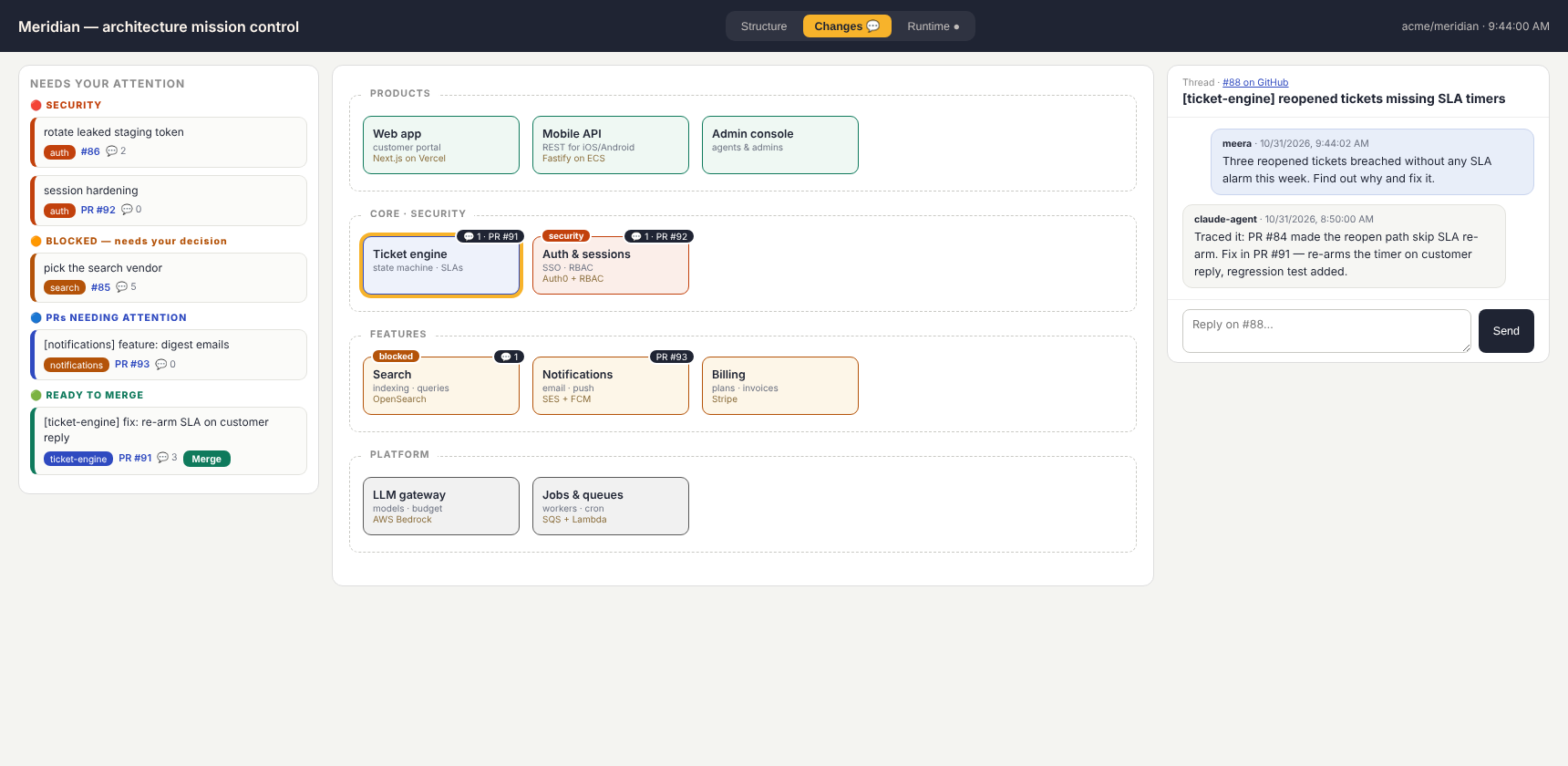
Mission control on Meridian, the fictional product in examples/: failing components
at the top of the attention rail, the work strip, and the map graded by live health.
One surface — no tabs. The health figures come from an example runtime endpoint.
Zero dependencies. One JSON file. Works with Claude, or any agent that can see GitHub.
Why
Supervising an agent workforce diff-by-diff doesn't scale. Architecture tools (Structurizr, IcePanel) assume a human architect maintains the model — so the model rots. CODEOWNERS and labelers map files to owners but carry no meaning.
archwhere inverts it: your agents maintain the map as a condition of merging
(there's a SKILL.md that tells them how, and archwhere check fails CI when
the map goes stale). You read components, not diffs.
Quickstart
npx archwhere init
That drafts the model from your repo itself — directory structure,
package.json workspaces, import edges — with guessed kinds (auth → security,
ui → product, scripts → ops), plus the PR-comment workflow and two agent
listeners. archwhere check passes from minute one; you rename and refine
instead of starting from a blank file. It also prints a prompt you paste to
your coding agent so it polishes the model by surveying the repo. The
cold-start problem every architecture-as-code tool dies on? Automated.
Daily driver:
npx archwhere                    # what is my working tree touching?
npx archwhere --base origin/main # what does this branch touch?
npx archwhere check              # CI guard: model valid, no file unmapped, no stale glob
npx archwhere check --fix        # adopt unmapped files into the nearest component
npx archwhere heat               # which components churned most in the last 30 days?
npx archwhere doc --out ARCHITECTURE.md
npx archwhere mission            # the UI at http://localhost:4610
npx archwhere mcp                # MCP server on stdio; read-only unless --write
npx archwhere record verify      # check the shared record's hash chain
npx archwhere collide --refs a,b # which branches in flight will fight each other
The map heals itself
When an agent's PR adds files the model doesn't own, the PR comment doesn't
just complain — it suggests the exact patch (adopt into the nearest
component, or create a new one), and archwhere check --fix applies it. Tell
your agents "run check --fix and review the adopted globs" and the map stays
alive with no human bookkeeping.
Every PR gets mapped
Add the action (one of the files init writes):
- uses: tapaskar/archwhere@v1
Every PR gets a comment: a component/kind/files table, security flags, and the system map with touched components highlighted — rendered natively by GitHub:
flowchart LR
  web-app["Web app"]
  mobile-api["Mobile API"]
  admin-console["Admin console"]
  ticket-engine["Ticket engine"]
  auth["Auth & sessions"]
  search["Search"]
  notifications["Notifications"]
  billing["Billing"]
  llm-gateway["LLM gateway"]
  jobs["Jobs & queues"]
  ops["Ops & CI"]
  docs["Docs"]
  web-app --> ticket-engine
  web-app --> auth
  mobile-api --> ticket-engine
  mobile-api --> auth
  admin-console --> ticket-engine
  ticket-engine --> search
  ticket-engine --> notifications
  ticket-engine --> llm-gateway
  search --> jobs
  notifications --> jobs
  classDef core fill:#E8EEF9,stroke:#2F4AC0,color:#1F2433
  classDef security fill:#FDE8E4,stroke:#C2410C,color:#1F2433
  classDef feature fill:#FFF4E0,stroke:#B45309,color:#1F2433
  classDef infra fill:#EFEFEF,stroke:#595959,color:#1F2433
  classDef product fill:#E3F2EC,stroke:#0F7A5C,color:#1F2433
  classDef ops fill:#F3E8F9,stroke:#7E3FA0,color:#1F2433
  classDef docs fill:#F7F7F7,stroke:#8A8A8A,color:#1F2433
  classDef other fill:#F2F2EF,stroke:#777,color:#1F2433
  classDef touched fill:#F7B32B,stroke:#1F2433,stroke-width:3px,color:#1F2433
  class web-app,mobile-api,admin-console product
  class ticket-engine core
  class auth security
  class search,notifications,billing feature
  class llm-gateway,jobs infra
  class ops ops
  class docs docs
A PR can't quietly review itself out
The map decides what gets reviewed, and a PR can edit the map. So with enforce: true,
archwhere reads the model from the base commit and compares. The PR fails, and its comment says why, when it:
| The PR | Example |
|---|---|
| removes or reclassifies a security component | "kind": "security" becomes "feature" in the PR that edits core/auth/ |
removes or rewrites a watch pattern |
session|token|rbac becomes session |
| moves a file out of a zone with a glob | web-app gains core/auth/session.js, and the longest match wins |
| moves the model file | arch/architecture.json is replaced by a looser architecture.json |
changes a security component or fires a watch pattern, with no owner-review label |
judged by the base model too, so reclassifying doesn't help |
edits a workflow or CODEOWNERS with no owner-review label |
these decide whether the check runs |
Adding the owner-review label reruns the check and lets it pass. A weakening stays in the comment.
Create the label once with gh label create owner-review; init doesn't create it.
Run archwhere check --base origin/main locally for the same report without failing on the label.
What this doesn't do. A label records that someone looked; it isn't an approval, and anyone with
triage access can add one. A pull_request workflow also runs from the PR's own merge commit, so a PR
can rewrite the workflow itself. Mission control flags that from outside CI, but only GitHub can stop
it. For real enforcement, turn on branch protection: make this job a required check, require a review,
and put arch/ and .github/ in CODEOWNERS.
Talk to your agents on the diagram
npx archwhere mission serves a local UI where the map is the conversation surface:
- Attention rail — security items, blocked decisions, PRs needing attention, PRs ready to merge (the Merge button uses your token; agents never merge).
- Click any component → open a thread. Threads are GitHub issues labelled
component:<id>(auto-created). Your agent answers; the reply appears on the map. - One surface, no tabs. The rail, the map and the thread are all on screen at once. Open PRs, alerts and each component's live health show together, so "this one is red and has an open PR" is a glance, not two clicks.
- Health or Heat, as a toggle over the same cards. Health comes from any
endpoint you point
RUNTIME_URLat (see below); a component that reports nothing readsunknown— dashed and dimmed, never green. Heat colours by git churn over the last 30 days: where your agents are actually spending effort. - Two drawers under the map, for the things you consult rather than watch. System flow draws the Mermaid system map, with components that have an open PR highlighted, and every process flow in your model as a sequence diagram; it fetches Mermaid 11 from jsDelivr the first time you open it, pinned by hash. Record shows, read-only, whether the shared record verifies, active claims and the latest entries.
The runtime contract
Point RUNTIME_URL at anything that answers this shape. It is deliberately dumb,
so you can satisfy it from Prometheus, Datadog, pm2 or a shell script, and
archwhere never learns to speak a vendor's API.
{"components": {"<id>": {
  "status": "ok|warn|bad|unknown",
  "deploy": {"at": "2026-11-06T07:00:00Z", "ref": "PR #221"},
  "signals": {"traffic": {"value": 1840, "unit": "req/h"},
              "errors":  {"value": 212, "of": 1840},
              "latency": {"p99_ms": 4800}},
  "failures": [{"name": "restarts", "count": 24522, "window": "9h", "severity": "bad"}],
  "lines": ["pm2 online", "up 9 h"],
  "links": [{"label": "errors", "url": "https://obs.example/errors"}]
}}}
Only status is required, and the older {status, lines} shape still works. Two
rules are enforced rather than suggested:
- Errors need
of. A count with no denominator is not a signal: 212 failures out of 300 is an outage, 212 out of two million is noise. A count without a denominator is shown, never graded. - Unknown is not ok. A component reporting a status archwhere does not
recognise, or whose reading is over two minutes old, renders as
unknown— dashed and dimmed, never green. Silence looking like health is how a dead service goes unnoticed.
Grading lives in one tested place (lib/signals.js): the worst of the stated
status, the error rate against traffic, and any declared failure severity. Bands
are per component, so a chatty service and a quiet one are not held to one number.
Collisions: what GitHub does not tell you
GitHub computes a pull request against its base. When several agents work at once the expensive conflict is pull request against pull request, and nothing reports it until the second merge.
npx archwhere collide --refs feat/a,feat/b,fix/c --base main
against main:
  ✗ feat/a  conflicts in docs, mission
  ✓ fix/c clean

against each other:
  ✗ feat/a  ×  feat/b
      components: docs
      both change: CHANGELOG.md, README.md

merge order (least entangled first):
  fix/c  (collides with nothing)
git merge-tree merges in memory: no working tree, no network, no GitHub API, so
it is cheap enough to run on every page load. Conflicts are reported in
components, not only paths. A branch behind base conflicts with every branch
that is current, which says nothing about those two — so the matrix reports file
overlap since base beside the merge result, names the stale branches, and ranks
the merge order on genuine overlap only.
Bring your own coding agent
The bus is GitHub — archwhere never talks to an agent directly:
| Your agent | Setup |
|---|---|
| Claude | agent-reply.yml (written by init) answers @claude via the Claude GitHub App |
| Any agent with an API | agent-webhook.yml POSTs each thread event (component, issue, body, HMAC) to AGENT_WEBHOOK_URL; it replies with its own GitHub token |
| Anything already watching GitHub | nothing to do — have it watch issues labelled component:* |
Which mention the UI appends is yours: arch/mission.config.json → {"agentMention": "@your-bot"} (env AGENT_MENTION overrides; "" disables).
Several agents (Claude + Kiro)
Put more than one agent on the board and choose who answers each message:
AGENT_MENTIONS="Claude=@claude,Kiro=@kiro" npx archwhere mission
or in arch/mission.config.json:
{ "agents": [ { "name": "Claude", "mention": "@claude" }, { "name": "Kiro", "mention": "@kiro" } ] }
AGENT_MENTIONS beats AGENT_MENTION, which beats agents, which beats agentMention. The old
single-agent settings still work, and the first agent is the default.
- The Ask selector. With two or more agents, an Ask: menu sits next to Send: each agent, plus Both (two agents) or All (three or more). Your last choice is remembered in the browser. With one agent you see nothing new.
- A typed mention wins. If your message already names any known agent (
@kiro where is…), archwhere adds nothing, so a hand-typed@kironever summons Claude as well. - Who replied. Each reply is tagged with the agent: the Claude GitHub App by its bot login, and
bridge replies by their
🤖 **Kiro** (via archwhere bridge)header.
archwhere bridge lets a CLI agent with no GitHub App answer board threads. Kiro is the example.
It runs on your machine, polls the repo for new issues and comments that mention the agent, runs the
CLI once per mention in a read-only checkout, and posts the answer back as a comment:
# once: install the read-only Kiro agent (reads the working directory only, no shell, no writes, no MCP)
mkdir -p ~/.kiro/agents && cp node_modules/archwhere/examples/kiro/archwhere-readonly.json ~/.kiro/agents/

git clone --depth 1 https://github.com/you/repo ~/ro/repo   # a separate checkout just for reading
npx archwhere bridge --repo you/repo --mention @kiro --cwd ~/ro/repo \
  --cmd "kiro-cli chat --no-interactive --agent archwhere-readonly"
| Flag | Default | |
|---|---|---|
--mention |
(required) | handle to watch for, e.g. @kiro |
--cmd |
(required) | agent command; the prompt is added as the last argument |
--cwd |
current dir | where the agent runs: use a read-only checkout |
--repo |
origin of --cwd |
owner/name |
--name |
the mention without @ |
name in the reply header |
--allow |
extra GitHub logins allowed to summon it (the repo owner always is) | |
--interval / --timeout |
30 s / 300 s | poll interval and per-answer time limit |
--state |
~/.archwhere/bridge-<owner>-<repo>-<mention>.json |
cursor + seen-set, so restarts never answer twice |
--once |
poll once, answer, exit (for cron and tests) |
It uses the same token as mission control (GITHUB_TOKEN or gh auth token). It runs one job at a
time, strips ANSI colour codes, caps replies at about 60k characters, and posts a short "couldn't
answer" note when the agent fails or times out.
Security notes
- Allow-list. Only the repo owner and the logins in
--allowcan summon it. Bots are never answered, and neither are the bridge's own replies (it spots them by the header). On a public repo this matters: anyone can comment, and the comment becomes the agent's prompt. - Read-only. Point
--cwdat a separate checkout that nothing deploys from, and give the agent read-only tools: thearchwhere-readonlyKiro agent above exposes onlyread, limited to the working directory. - Don't pre-approve the tool. In
kiro-cli2.28, listing a tool inallowedToolsor passing--trust-toolsskips its path limits, so the agent could read any file your user can, including secrets elsewhere on the machine. LeaveallowedToolsempty: reads insideallowedPathsstill go through, and in--no-interactivemode anything else is refused. Check this on your own version. - Never trust all tools. The bridge refuses to start if
--cmdcontains-aor--trust-all-tools. - No shell. The command is split once and run with
execFileand an argument array. The thread text goes in as one argument and is never shell-interpolated. - No pings.
@handlesin the agent's answer are broken with a zero-width space, so an answer can't summon another agent or notify people.
Give your agents the map over MCP
claude mcp add --transport stdio archwhere -- npx -y archwhere mcp
archwhere mcp serves the map, what a file or diff touches, the attention rail, threads and the record to any MCP
client. It is hand-written JSON-RPC over stdio with no dependencies. It speaks the current protocol (2026-07-28) and the
older initialize handshake.
It is read-only by default. With --write and a declared identity, agents can also store specs, findings and
decisions, claim tasks, and ask the owner one question, which lands under Blocked. There is no merge tool and no shell
tool, and agents can't sign off. Output from GitHub and the record is marked as untrusted data.
Setup for Claude Code, Kiro and Hermes, the tool list and the safety rules: docs/MCP.md.
A shared, attributed record
Agents forget, and GitHub threads don't say who decided what. archwhere record is an append-only log that every agent
reads and writes, with each entry naming its author, agent, model and vendor:
archwhere record spec put ticket-sla --file specs/sla.md --components ticket-engine   # word for word, SHA-256, versioned
archwhere task claim T-12 --role builder --branch feat/sla                            # atomic; one writer per branch
archwhere record search holidays --component ticket-engine
archwhere record independent --task T-12    # did a different vendor and model approve this? exit 0 or 1
archwhere record signoff --target <hash> --decision approve --signer dana             # owner signature, from a terminal
archwhere record verify                     # detects edits, deletions and reordering
archwhere record anchor --tag --push        # keep the head hash somewhere else
Be clear about what this is:
- Tamper-evident, not tamper-proof. Someone with disk access can rewrite the whole chain. Only an anchor kept elsewhere exposes that, and deleting the newest entries breaks no link either.
- Vendor and model are self-declared. The independent check confirms what was recorded, not what ran.
- A sign-off holds only while an agent can't get the key and its passphrase and can't change the trust list.
- Claims are atomic on one filesystem and advisory. Claims from separate clones can collide; that is reported on import, not prevented.
- Not committed by default, because it can hold sensitive text. In a public repo, committing it publishes it for good.
Storage, concurrency, merge behaviour and every limit: docs/RECORD.md.
The model
One file, declared judgment — not an auto-extracted import hairball:
{
  "system": "Meridian",
  "components": {
    "auth": {
      "name": "Auth & sessions", "kind": "security",
      "provider": "Auth0 + RBAC",               // shows on every surface: map, PR comment, docs, mission UI
      "paths": ["core/auth/**"],                  // ** crosses dirs, * stays in one; longest match wins
      "watch": [{ "pattern": "session|token|rbac", "note": "security review" }],
      "deps": []
    }
  },
  "lanes": [["web-app"], ["auth"]],               // optional; defaults to kind grouping
  "flows": { "signup": { "name": "…", "actor": "…", "steps": [{"from": "web-app", "to": "auth", "label": "SSO"}] } }
}
Kinds: core · security · feature · infra · product · ops · docs. flows are
your C4-style dynamic views — the process layer above the components. The full
example: examples/meridian/architecture.json.
Interactive diagrams (Archify)
npx archwhere ir compiles the model into Archify
IR — an animated signal-flow system diagram with trust boundaries and guided
views per flow, plus one numbered diagram per flow. Render with Archify's CLI.
For your agents
SKILL.md is the agent's side of the contract: place work on the map
before coding, extend the model when adding modules, update flows when changing
user-visible processes, keep archwhere check green. Works as a Claude Code /
agent skill, or paste it into your agent's instructions.
Compared to…
| maps PRs | visual | agents maintain it | talk to agents on it | |
|---|---|---|---|---|
| CODEOWNERS / labeler | ✓ | — | — | — |
| Structurizr / IcePanel | — | ✓ | — | — |
| dependency graphs | ✓ | hairball | n/a | — |
| archwhere | ✓ | ✓ | ✓ | ✓ |
Compared to OnMemory
OnMemory describes a similar loop: a spec kept verbatim, agents on several models writing to one memory, review by another vendor's model, and attributed sign-off. It is in closed test. We haven't used it, and what follows about it comes only from its public page.
| archwhere | OnMemory's page says | |
|---|---|---|
| Spec kept word for word | SHA-256 addressed, versioned | keeps it verbatim |
| Shared memory | Local append-only log, exportable, not hosted | all writing to one memory |
| Cross-vendor review | Recorded and checked on declared data; archwhere doesn't run the reviewers | a different vendor's model reviews |
| Provable history | Tamper-evident hash chain, with limits spelled out | history is provable |
| Retrieval | Plain-text, component and task search | its own retrieval method; archwhere has no equivalent |
archwhere is open source (MIT) and also puts the work on an architecture map.
Onboarding at a glance
From stranger to agent-replies-on-the-map in under twenty minutes — the full funnel, stage by stage: docs/ONBOARDING.md.
Releasing
Push a version tag; .github/workflows/release.yml publishes it.
npm version patch          # or minor / major — this also makes the tag
git push --follow-tags origin main
The workflow uses npm trusted publishing: GitHub mints a short-lived identity token for that
one workflow and npm checks it against the trusted publisher on the package. No token is stored —
not in a repository secret, not in a .npmrc, not on anyone's machine. It refuses to publish if
the tag and package.json disagree, and runs the suite and archwhere check first.
One-time setup, on npmjs.com → the package → Settings → Trusted publisher → GitHub Actions:
organization tapaskar, repository archwhere, workflow release.yml. The package has to exist
already, which it does.
License
MIT © Tapas Kar. Built with and for AI coding agents — this repo's own model
lives in arch/architecture.json, of course.
archwhere MCPのよくある質問
archwhereはどのようにしてアーキテクチャマップを最新の状態に保つのですか?
エージェントはマージの条件としてマップを維持します。また、archwhere check --fixコマンドを使用すると、マップされていないファイルを最寄りのコンポーネントに自動的に組み込むことができます。
マージ前に複数のブランチが衝突するかどうかを検知できますか?
はい、archwhere collideコマンドがコンポーネント内のファイルの重複を報告することで、進行中のどのブランチ同士が競合するかを特定します。
既存のコーディングエージェントとarchwhereを統合するにはどうすればよいですか?
GitHubを介して動作します。Claude GitHub Appを使用するか、他のエージェント用にwebhookを設定するか、コンポーネントIDのラベルが付いたGitHub issuesをエージェントに監視させることができます。
コンポーネントのヘルス状態を表示するために、特定のランタイムが必要ですか?
いいえ、Prometheus、Datadog、またはシェルスクリプトなど、特定のJSON形式を返す任意のエンドポイントにRUNTIME_URLを向けることができます。