
AIクライアントが、レビューワークフローを備えたページやテーブルで構成されるセルフホスト型のチームWikiを、書き込み、更新、クエリできるようにします。
別名 stuga-dev/stuga, @stuga/mcp
- スター
- 6
- ツール
- —
- ダウンロード数(30日間)
- —
- 最新バージョン
- 0.2.1
- 最終コミット
- 2026年11月12日
- ライセンス
- AGPL-3.0
Stuga MCPとは
StugaはMCPサーバーです。 AIクライアントが、レビューワークフローを備えたページやテーブルで構成されるセルフホスト型のチームWikiを、書き込み、更新、クエリできるようにします。.
プロジェクトのREADMEから生成された概要
Stuga MCP server について
Stugaは、エージェントがページやテーブルの書き込み、更新、クエリを行えるようにすることで、AIクライアントを通じたチームWikiの管理を実現します。このセルフホスト型ソリューションは、Apple silicon搭載のMac、またはサーバー上のDockerで動作します。Claude Desktop、Cursor、VS Codeなどの様々なMCPクライアントに接続し、エージェント自身のモデルを使用するため、ノード自体に個別のAIキーを用意する必要はありません。
ユーザーは、3つの異なるレビューレベルを通じて情報の更新方法を制御できます。変更内容は、リクエストした本人によるレビュー、同僚による承認、またはWikiへの直接適用を選択できます。システムは、情報を記録するためのSave to Stuga、承認済みコンテンツを検索するためのAsk Stuga、古いページやリンク切れを特定するためのCheck Stugaといったツールを使用します。データはPostgresとSQLiteを使用してローカルに保存されるため、チームのドキュメントは常にユーザーの管理下に置かれます。
できること
- 1Wikiドキュメントの自動化AIエージェントが、会議のメモやメールの要点を、正しいWikiページやテーブルの行に自動的に記録できます。
- 2共同コンテンツ検証AIが提案した編集内容を、別のチームメンバーが承認しなければならないワークフローを構築できます。
- 3検証済みナレッジのクエリ開発者は、公式に承認された情報のみに基づいて回答するようAIに質問できます。
- 4WikiのメンテナンスとクリーンアップAIがドキュメントをスキャンし、孤立したページやリンク切れを見つけて修正を提案できます。
プロジェクトの README から作成されています。すべてのユースケースは、その引用と照らし合わせて確認されています。
Stuga MCPのインストール方法
フォーマット検証日 2026年11月10日Cursor に追加Gooseに追加Claude CodeにStuga MCPをインストール
$ claude mcp add --env 'STUGA_URL=<STUGA_URL>' stuga -- npx -y @stuga/mcpCursorにStuga MCPをインストール
~/.cursor/mcp.json
{
  "mcpServers": {
    "stuga": {
      "command": "npx",
      "args": [
        "-y",
        "@stuga/mcp"
      ],
      "env": {
        "STUGA_URL": "<STUGA_URL>"
      }
    }
  }
}VS CodeにStuga MCPをインストール
.vscode/mcp.json
{
  "servers": {
    "stuga": {
      "type": "stdio",
      "command": "npx",
      "args": [
        "-y",
        "@stuga/mcp"
      ],
      "env": {
        "STUGA_URL": "<STUGA_URL>"
      }
    }
  }
}VS Code CLIにStuga MCPをインストール
$ code --add-mcp '{"name":"stuga","type":"stdio","command":"npx","args":["-y","@stuga/mcp"],"env":{"STUGA_URL":"<STUGA_URL>"}}'Claude DesktopにStuga MCPをインストール
claude_desktop_config.json
{
  "mcpServers": {
    "stuga": {
      "command": "npx",
      "args": [
        "-y",
        "@stuga/mcp"
      ],
      "env": {
        "STUGA_URL": "<STUGA_URL>"
      }
    }
  }
}CodexにStuga MCPをインストール
$ codex mcp add stuga --env 'STUGA_URL=<STUGA_URL>' -- npx -y @stuga/mcpCodex config.tomlにStuga MCPをインストール
~/.codex/config.toml
[mcp_servers.stuga]
command = "npx"
args = ["-y", "@stuga/mcp"]

[mcp_servers.stuga.env]
STUGA_URL = "<STUGA_URL>"
Gemini CLIにStuga MCPをインストール
$ gemini mcp add -s user -e 'STUGA_URL=<STUGA_URL>' stuga npx -- -y @stuga/mcpGemini settings.jsonにStuga MCPをインストール
~/.gemini/settings.json
{
  "mcpServers": {
    "stuga": {
      "command": "npx",
      "args": [
        "-y",
        "@stuga/mcp"
      ],
      "env": {
        "STUGA_URL": "<STUGA_URL>"
      }
    }
  }
}設定
STUGA_URL必須The address you open Stuga at.
| 名前 | 説明 | 種類 |
|---|---|---|
| STUGA_URL | The address you open Stuga at. | 必須 |
自動チェック
実行日 2026年11月12日完全なレポート →自動チェックに合格しました。これはセキュリティ監査ではありません。コードを読み、サーバーに必要最小限のアクセス権を与えてください。 チェックの仕組み

- ソースリポジトリがリンクされており、アクセス可能合格
- オープンソースライセンス (OSI)合格
- 過去1年以内にコミットまたはリリースあり合格
- パッケージ名が有名なパッケージに酷似していない合格
- リモートエンドポイントがHTTPSを使用合格
- 破壊的なツールがラベル付けされている未チェック
- モデルへの隠れた指示がない合格
- パッケージおよびその依存関係に重大な勧告なし合格
README
GitHubで見るStuga
Your AI writes the team wiki. A colleague approves.
A team wiki of pages and tables, on a Mac or server you run. Say Save to Stuga to Claude, Codex or any MCP client, and it files each point on the right page or in the right table row. By default a change to the wiki waits for whoever asked the AI; set a folder to Reviewed by a colleague and someone else approves it. Ask Stuga answers from what is approved, and says what still waits.
Download for Mac (Apple silicon, macOS 15+) · Install with Docker
Install, then create your account and workspace and connect your AI. Help for people using Stuga: stuga.dev/docs.
How the wiki stays right
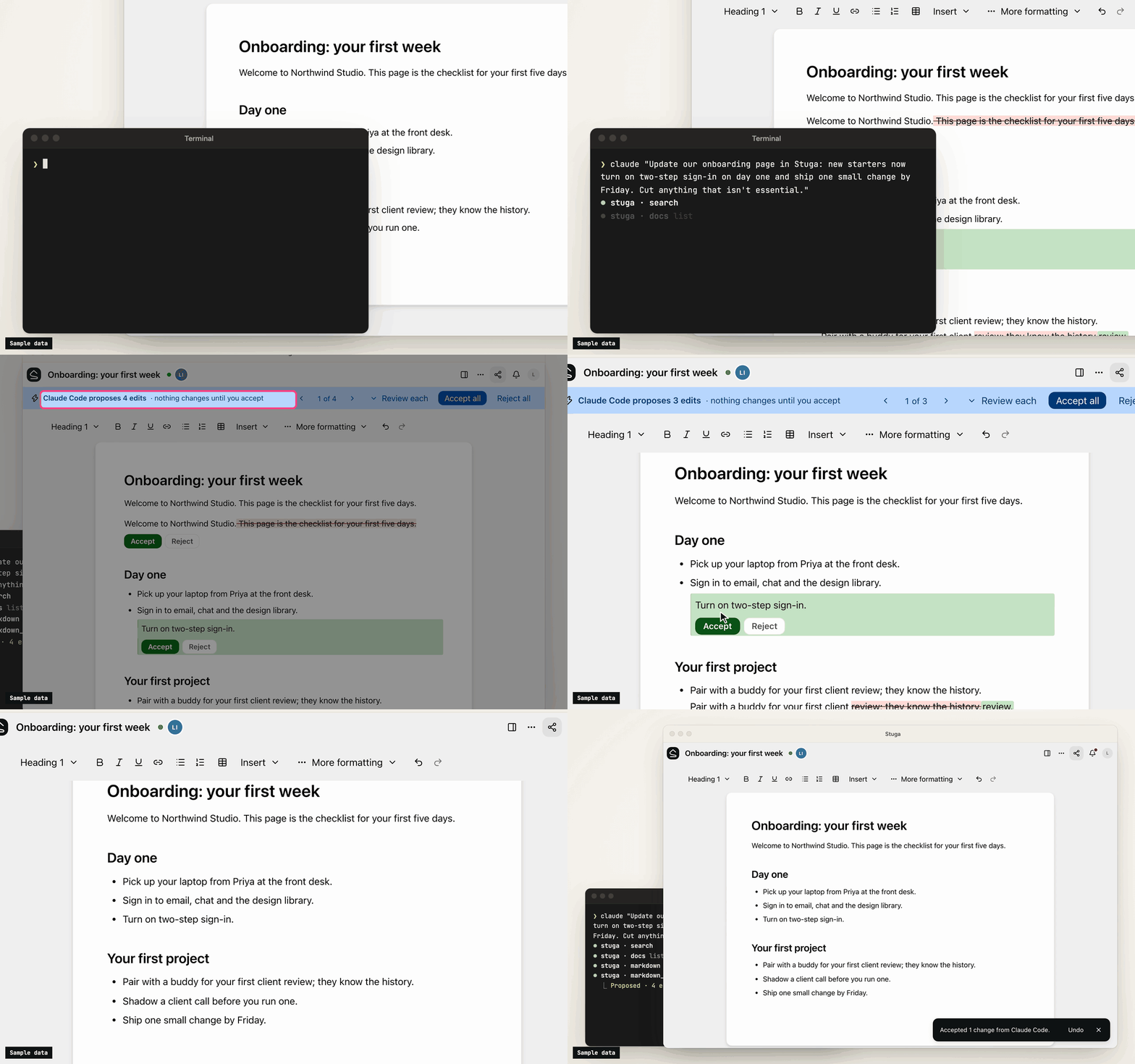
- Save to Stuga. Your AI finds the page and section a point belongs in, or the row a fact fills, and corrects the sentence it changes rather than adding another. It cites the meeting or email a point came from, and tells you what it saved where and what waits. A point no page is about starts a page in the folder it belongs in, or goes in your own My notes.
- Three review levels. In Who reviews AI edits…, a folder, page or database is Reviewed by whoever asked the AI (the default), Reviewed by a colleague (someone else who can edit it, from the folder's approver group if it names one, never the person who asked), or AI edits apply directly (recorded, attributed and revertible). People's own edits go straight in.
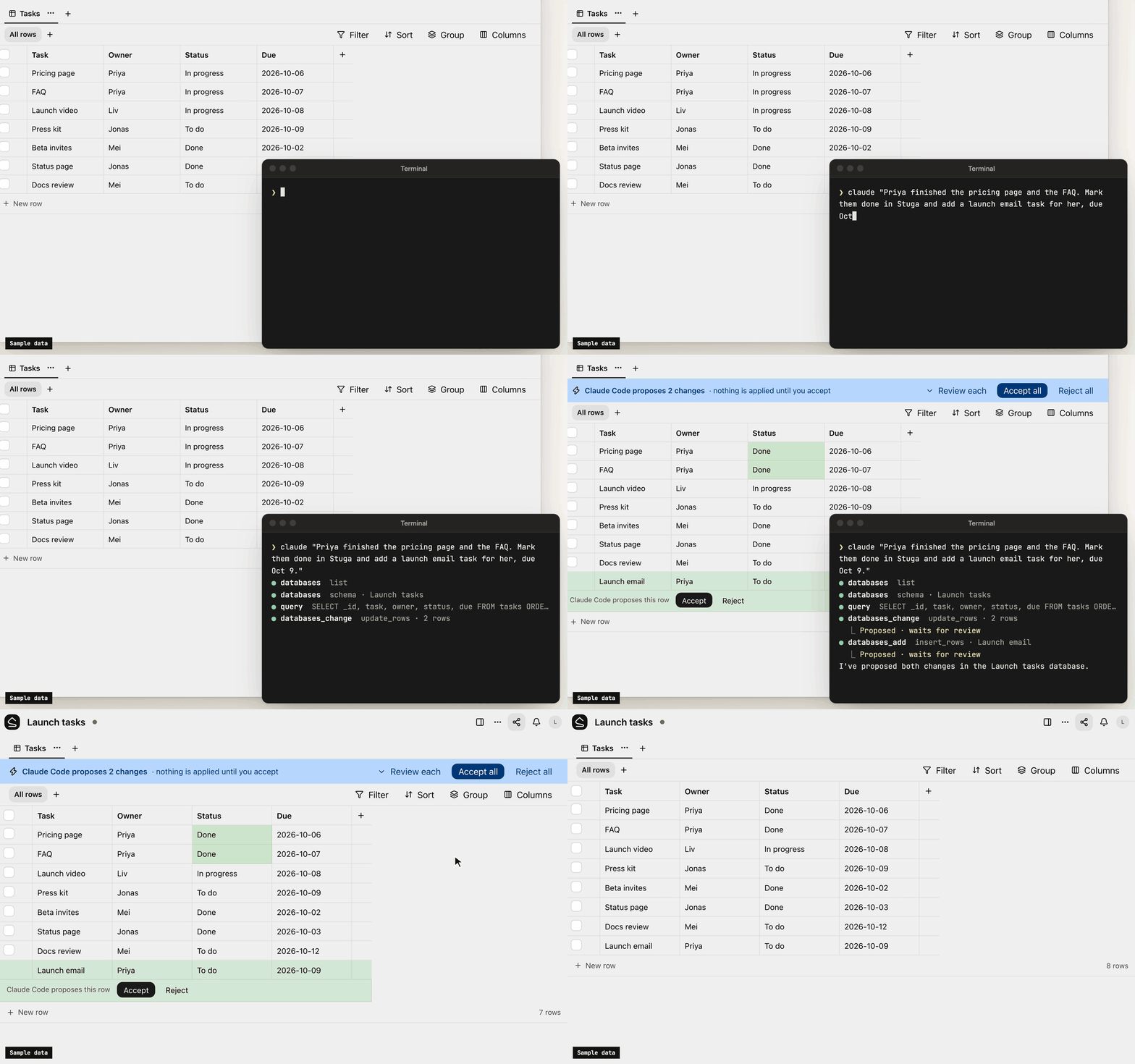
- One card per change. Filing a meeting across several pages is one change, reviewed on one card laid out for a phone: each edit in its paragraph, with the sources it cites. Approve all, Ask for changes… or Decline… with a note the AI reads. A folder can post each change that waits for a colleague to a Slack channel.
- Ask Stuga. Your AI answers from the pages and tables, with who last changed each one and when, and what waits: "the page says 14 days; a change to 30 days waits for a colleague".
- Check Stuga. Linked from under each page, Needs checking when a page it cites changes, and Wiki → Index and Wiki → Log. Say Check Stuga and your AI finds stale pages, orphans and broken links, and proposes the fixes as one change.
- Instructions that stack. The workspace, folders, pages and databases can each tell agents what goes where. They advise the model; permissions and review decide what a write does.
What's in it
- Pages written together. Real-time editing (Tiptap over a Yjs CRDT) with presence, comments, @mentions and version history.
- Tables beside the pages. Typed tables, each database its own SQLite file, with saved views, row pages and CSV import. Agents, Ask and the REST API run read-only SQL on them.
- Search that follows permissions. Keyword (BM25 over Postgres full-text search) and semantic (pgvector) search in one SQL statement, with access checked inside it. Chinese, Japanese, Korean and Thai work without setup.
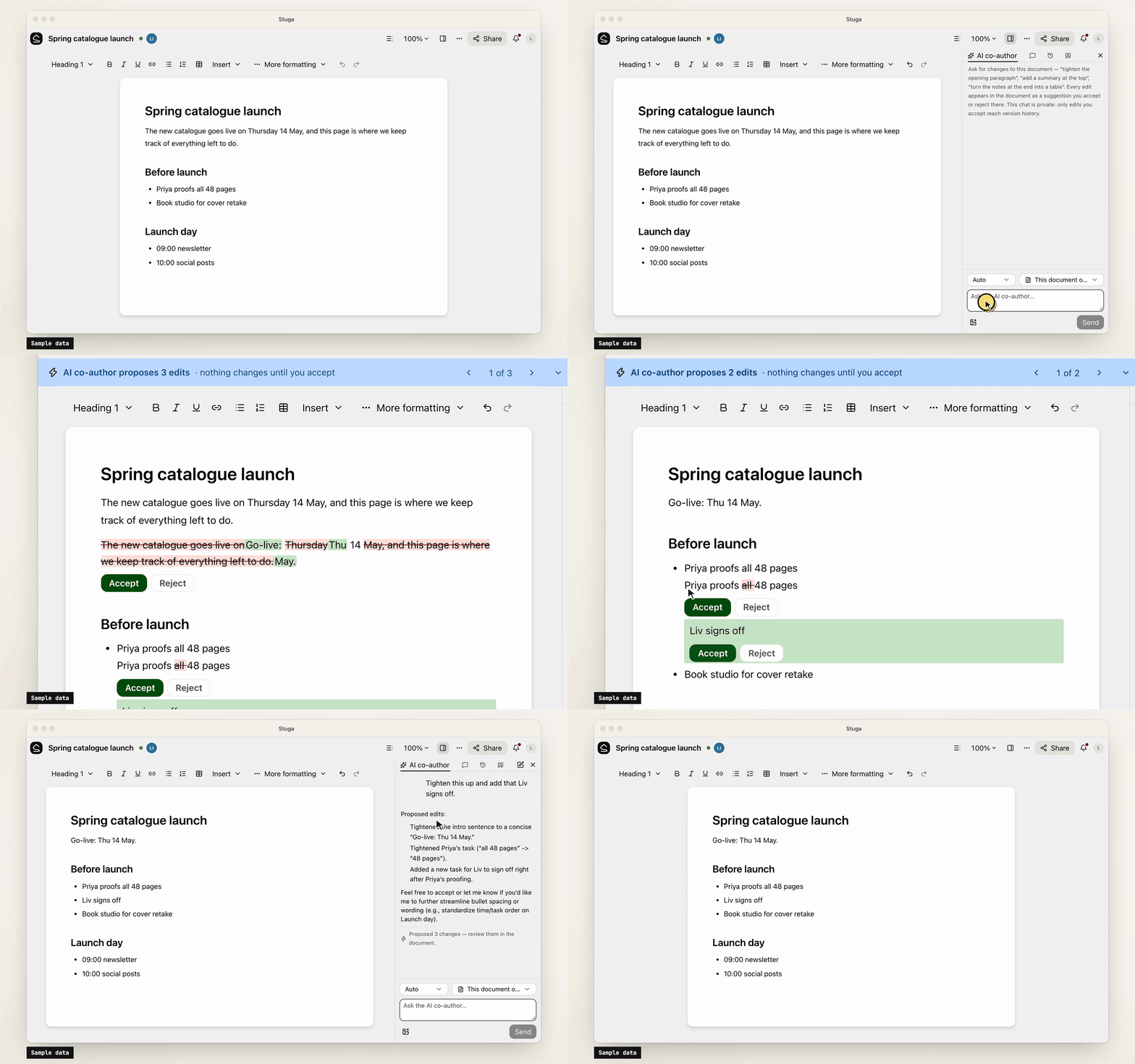
- Built-in AI, off until set up. A co-author and a table assistant, whose edits are reviewed like an agent's, and Ask, which cites sources. OpenAI, Anthropic, Gemini, DeepSeek and more, or Ollama.
- Sharing and sign-in. Workspaces, folders, per-page sharing, groups and guests. People join by invite link and sign in with a password or your OpenID Connect provider.
- Import and export. A Notion export, or a zipped Obsidian vault or folder of Markdown, becomes a
workspace; a workspace exports as one
.stuga.zipof Markdown, JSON Lines and its files.
Connect your AI
Agents connect over MCP. Settings → Your AI agents gives the setup for Claude Code, Claude Desktop, Codex, Antigravity, Cursor, VS Code, Kiro, Goose, LM Studio, DeepSeek Harness and Pi, with your node's address filled in, and the URL any other MCP client needs (docs/agents.md). Each agent brings its own model, so the node needs no AI key.
- Scoped sign-in. Most clients sign in through the browser, where you tick the workspaces an app may use and choose Read only or Read and suggest changes. Revoke ends its access.
- Narrow keys. A client without sign-in uses an API key, which can be confined to folders, made read-only or given an expiry.
- Content only. Agents change documents and databases. Renaming, moving, deleting, sharing and the review setting stay with people.
- Full audit. Every MCP call, reads included, is in the workspace's audit log. An event feed and signed webhooks report what changed.
Your data
Stuga sends no telemetry, and nothing reaches us unless a node admin turns on remote access. The node makes outbound requests only for features in use, such as an AI provider, and asks GitHub once a day for the list of releases unless a node admin turns that off. docs/privacy.md lists what the node sends and stores.
Install
-
A Mac with Apple silicon, on macOS 15 or later: open the package, or
Stuga-<version>.pkgfrom the latest release. It carries its own Postgres and Node.js (docs/install/macos.md). -
Docker on x86-64 or arm64, such as a Linux server or a NAS:
install.shstarts Postgres and the node with Compose (docs/install/docker.md):curl -fsSL https://github.com/stuga-dev/stuga/releases/latest/download/install.sh | bash
A node is one Node.js process and Postgres with pgvector; people open it in a browser. It backs itself up every day by default and before every upgrade (docs/operations.md). docs/getting-started.md walks through the first hour.
Questions and feedback
Ask a question or share an idea in Discussions; report a bug as an issue.
Contributing
Issues and pull requests are welcome. CONTRIBUTING.md covers running Stuga from source, the tests and the conventions, and RELEASING.md how a release is cut. Contributions are accepted under a Contributor License Agreement (CLA.md); a bot asks on your first pull request. Report a vulnerability privately, as SECURITY.md describes.
License
AGPL-3.0-only, except integrations/, which is MIT; copyright notice in NOTICE. If you modify Stuga and offer it to others over a network, you share your changes under the same terms. The name and logo are not covered by the license: TRADEMARKS.md says how you may use them.
Stuga MCPのよくある質問
Stuga MCPをClaude Codeに追加するには
ターミナルでclaude mcp add --env 'STUGA_URL=<STUGA_URL>' stuga -- npx -y @stuga/mcpを実行します。すべてのプロジェクトで利用するには--scope userを追加します。
Stuga MCPをCursorに追加するには
~/.cursor/mcp.jsonを開き、上記のインストールセクションに示すCursor設定を使ってmcpServersの下にサーバーを追加します。
AIはどのようにWikiを更新しますか?
AIは更新すべき正しいページ、セクション、またはテーブルの行を特定し、単に新しい内容を追加するのではなく、既存の文章を修正します。
サーバーに独自のAIキーは必要ですか?
いいえ、各エージェントが独自のモデルを使用するため、ノード自体にAIキーは必要ありません。
既存のノートをインポートするにはどうすればよいですか?
Notionのエクスポート、またはObsidianのvault(zip形式)やMarkdownフォルダをワークスペースにインポートできます。