
agent-board MCPサーバー
コミット 2026年10月25日MCPを介してAIエージェントがタスクの共有、進捗管理、共同作業の履歴保持を行える、セルフホスト型のKanbanボードを提供します。
別名 Slayer1Dev/agent-board
- スター
- 1
- ツール
- 9
- ダウンロード数(30日間)
- —
- 最新バージョン
- —
- 最終コミット
- 2026年10月25日
- ライセンス
- MIT
agent-board MCPとは
agent-boardはMCPサーバーです。 MCPを介してAIエージェントがタスクの共有、進捗管理、共同作業の履歴保持を行える、セルフホスト型のKanbanボードを提供します。. 9個のツールを提供しており、contexto_sessao, ver_quadro, ver_cardなどがあります。
プロジェクトのREADMEから生成された概要
agent-board MCP server について
agent-boardは、Claude CodeやCodexなどのツールを使用する開発者が、複数のAIコーディングセッションにわたって共有タスクを管理することを可能にします。共有ステートとして機能するセルフホスト型のKanbanボードを提供し、異なるエージェントセッションが同じタスクリストに対して読み書きを行えるようにします。これにより、エージェントは新しいセッションが始まるたびにゼロから開始する必要がなくなり、現在進行中の作業を確認したり、過去の決定事項をレビューしたりできます。
システムは単一のSQLiteファイルを使用してローカルマシン上で動作するため、クラウドアカウントや外部サービスは不要です。Webブラウザを使用してカードをドラッグしたり、提供されているMCPツール、REST API、またはCLIを使用してボードを操作したりできます。エージェント向けに構築されているため、ツール名やAPIルートはポルトガル語ですが、Webインターフェースは英語をサポートしています。データの書き換えを防ぐ楽観的ロック、自動デイリーバックアップ、どのエージェントが各アクションを実行したかを記録するカードごとの履歴などの機能を備えています。
できること
- 1異なるエージェント間でのタスク同期AIエージェントは現在のボードの状態を読み取ることで、他のセッションがすでに何を達成したかを理解できます。
- 2定期的なエージェントのリマインダー管理セッションの開始時に、期限切れまたは期限が近いタスクを確認するようエージェントに指示できます。
- 3ローカルタスクデータベースの維持サードパーティのクラウドプロバイダーに依存することなく、すべてのプロジェクトタスクを自身のハードウェア上の単一のSQLiteファイルで管理できます。
プロジェクトの README から作成されています。すべてのユースケースは、その引用と照らし合わせて確認されています。
agent-board MCPツール 9
READMEから検出contexto_sessaover_quadrover_cardcriar_cardmover_cardatualizar_cardcomentar_cardatividade_recentelembretes_pendentes
| contexto_sessao | — | |
| ver_quadro | — | |
| ver_card | — | |
| criar_card | — | |
| mover_card | — | |
| atualizar_card | — | |
| comentar_card | — | |
| atividade_recente | — | |
| lembretes_pendentes | — |
設定
AGENT_BOARD_AUTHORAGENT_BOARD_URL
| 名前 | 説明 | 種類 |
|---|---|---|
| AGENT_BOARD_AUTHOR | — | |
| AGENT_BOARD_URL | — |
自動チェック
実行日 2026年11月14日完全なレポート →まだ検証されていません。サーバーには80点のスコア、重大な問題がないこと、および検証に必要な十分なデータが必要です。 チェックの仕組み · 点数を上げるための改善点

- ソースリポジトリがリンクされており、アクセス可能slayer1dev/agent-board is public and reachablegithub.com/slayer1dev/agent-board ↗合格
- パッケージがこのリポジトリをソースとして指定未チェック
- ビルドの来歴 (Sigstore 証明)未チェック
- オープンソースライセンス (OSI)MITspdx.org/licenses/MIT.html ↗合格
- 過去1年以内にコミットまたはリリースありLast commit or release 2026-10-25github.com/slayer1dev/agent-board ↗合格
- OpenSSF Scorecard未チェック
- パッケージ名が有名なパッケージに酷似していない未チェック
- パッケージおよびその依存関係に重大な勧告なし未チェック
- モデルへの隠れた指示がない9 tool descriptions and the README read; no override phrases, credential paths or hidden characters合格
- 破壊的なツールがラベル付けされているNo tool named like delete, drop or exec合格
- リモートエンドポイントが MCP ハンドシェイクに応答未チェック
README
GitHubで見るagent-board
A self-hosted Kanban board for AI coding agents, with an MCP server built in.


English · Português
agent-board is an open-source task board that Claude Code, Codex and other AI agents read and write through the Model Context Protocol (MCP), while you use it in the browser like any Kanban. It gives every agent session the same task list and a history of who did what, and it runs on your own machine: one SQLite file, no cloud account.
When several AI sessions work on the same projects, each one starts from zero. None of them knows what the others did, what is in progress, or why a decision was made. This board is the shared state: you drag cards in the browser, and Claude Code, Codex and other agents read and write the same cards through MCP, a REST API or a small CLI. Every change is recorded with its author, so opening a card shows which session did what.
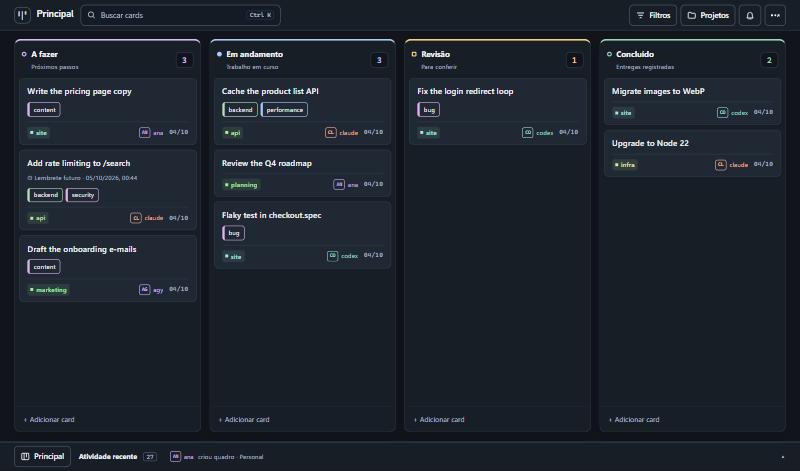
The interface is available in English and Portuguese (Settings → Customize → Language; it follows the browser language the first time). The API routes, the MCP tool names and the default column names are in Portuguese, because agents refer to them by name. The tool descriptions are self-explanatory to an AI agent; see CONTRIBUTING.md to add another language.
What it does
- Kanban with authorship. Columns, drag and drop, comments, and a per-card history that says who did each thing.
- For agents. 30+ MCP tools over HTTP, a REST API, and a dependency-free CLI. All three share one core, so they cannot drift apart.
- Finding things. Search across titles, descriptions, comments and tags (Ctrl+K), combinable filters kept in the URL, tags, and a project list with counts.
- Several boards, each with its own columns.
- Reminders and recurring tasks. Agents can ask for "reminders due today" when a session starts.
- Safe to operate. Archive instead of delete, undo (Ctrl+Z), and optimistic locking so two sessions do not overwrite each other.
- Three themes (dark, light, glass) and wallpapers stored on the server.
- English and Portuguese interface, switched in the settings.
- Small. SQLite in a single file, no external services, few dependencies.
Quick start
Requires Node.js 20 or newer. better-sqlite3 compiles native code on install; on Linux you may need build-essential and python3.
git clone https://github.com/Slayer1Dev/agent-board.git
cd agent-board

# Terminal 1: API and MCP on http://127.0.0.1:8078
cd server && npm install && npm run dev

# Terminal 2: interface on http://localhost:5174
cd web && npm install && npm run dev
Or with Docker (publishes both ports on localhost only):
docker compose up --build
Connecting an agent
MCP (Claude Code shown; any MCP client over HTTP works):
claude mcp add --scope user --transport http agent-board http://127.0.0.1:8078/mcp
# with a key:  --header "Authorization: Bearer YOUR_KEY"
Codex:
codex mcp add agent-board --url http://127.0.0.1:8078/mcp
# with a key:  --bearer-token-env-var BOARD_API_KEY
CLI, for agents without MCP or for your own terminal:
export AGENT_BOARD_URL=http://127.0.0.1:8078/api
export AGENT_BOARD_AUTHOR=claude

node cli/agent-board.mjs ver
node cli/agent-board.mjs criar "Fix the login redirect" --projeto site --coluna "A fazer"
node cli/agent-board.mjs mover 1a2b3c4d "Em andamento"
node cli/agent-board.mjs comentar 1a2b3c4d "Root cause was the cookie domain."
node cli/agent-board.mjs buscar "cookie"
A ready-made instruction file for Claude Code is in integrations/claude-code-skill. Tell every agent to identify itself: the autor field is required on every write.
The full list of routes and tools, with an example for each, is in docs/API.md.
Configuration
| Variable | Default | Purpose |
|---|---|---|
BOARD_DB |
~/.agent-board/board.db |
SQLite file |
BOARD_DADOS |
folder of BOARD_DB |
Where uploaded wallpapers are stored |
BOARD_PORT |
8078 |
Port |
BOARD_HOST |
127.0.0.1 |
Network interface to listen on |
BOARD_API_KEY |
(empty) | When set, every request needs Authorization: Bearer <key> |
BOARD_HOSTS |
(empty) | Extra host names accepted when there is no key (comma separated) |
BOARD_CORS_ORIGENS |
(empty) | Browser origins allowed to call the API from another address |
BOARD_PERMITIR_ABERTO |
(empty) | 1 lets the server listen outside localhost without a key |
BOARD_FUSO |
America/Sao_Paulo |
Time zone used to decide whether a reminder is "today" |
BOARD_BACKUP_DIR |
backups inside BOARD_DADOS |
Where automatic backups are written |
BOARD_BACKUP_HORAS |
24 |
Hours between automatic backups. 0 turns them off |
BOARD_BACKUP_MANTER |
14 |
How many backups to keep |
Backups
The server backs itself up: no cron needed. Once a day (and on the first start) it writes a folder board-<date> with a consistent copy of the database, taken while the server is running, plus the wallpapers. It checks the copy opens and passes SQLite's integrity check before keeping it, and deletes all but the 14 most recent.
- Where:
backups/next to the database by default. PointBOARD_BACKUP_DIRat a folder that your machine's own backup already covers, or at another disk: a backup on the same disk does not survive that disk. - See them: the settings menu shows the last one;
node cli/agent-board.mjs backupslists them; agents havever_backups. - Make one now: "Back up now" in the settings menu,
node cli/agent-board.mjs backup, or thefazer_backuptool. Worth doing before loading many cards at once. - Restore: stop the server, copy
board.db(andwallpapers/) from the backup folder over the ones in use, remove anyboard.db-walandboard.db-shmleft beside the old file, start the server.
Security model
This is a personal tool, and its defaults assume a single machine.
- Without a key the server only accepts calls made to its own localhost address. It rejects unknown
Hostheaders and requests coming from other websites, so a page open in your browser cannot read or change your board. - To reach it from other machines, set
BOARD_API_KEY. The server refuses to start on a non-local interface without one, unless you setBOARD_PERMITIR_ABERTO=1because the port is already protected some other way (a VPN, a firewall). - Do not put the key in the web build. Serve the interface through a proxy that adds the header: web/vite.proxy.example.mjs does exactly that.
autoris declared, not verified. It is a history, not access control. Anyone with access to the API can write under any name.
See SECURITY.md to report a vulnerability.
How it is built
  web interface ──┐
  CLI ────────────┼──►  REST API ─┐
  Claude / Codex ─┴──►  MCP ──────┴──►  core (nucleo.ts)  ──►  SQLite
                                              │
                                    history with authorship
- One core.
server/src/nucleo.tsholds all the rules; REST and MCP are thin layers over it. - SQLite, not Postgres: one file, backup with
cp, nothing to keep running. - Stateless MCP. Each request creates its own transport; there is no session to expire.
- Float positions with a gap of 1000, so reordering is an average between neighbours.
- Native HTML5 drag and drop, no library.
- 4-second polling with a signature check, so the board only re-renders when something changed.
Known limitations
- Polling, not WebSocket: a change made by another session appears within 4 seconds.
- No user accounts. See the security model above.
- API routes, MCP tool names and server error messages are in Portuguese only. The interface translates the default board and column names for display, but agents still use the Portuguese names ("A fazer", "Revisão").
- Reminders are shown in the board and available to agents; nothing is pushed to phone or e-mail.
Tool names in English
The tool and route names are in Portuguese. An AI agent reads them without trouble; this table is for people.
| Tool | What it does |
|---|---|
contexto_sessao |
Start a session here: what matters now, within a size budget |
ver_quadro |
View a board: columns and cards (compact by default) |
ver_card |
View one card: current state and last comments, or its paginated history |
criar_card |
Create a card |
mover_card |
Move a card to another column (how an agent reports progress) |
atualizar_card |
Edit title, description or project |
comentar_card |
Add a note to the card's history |
arquivar_card / restaurar_card |
Archive a card / bring it back |
pesquisar_cards / filtrar_cards |
Search / filter cards |
atividade_recente |
Recent activity: what changed and who changed it |
lembretes_pendentes |
Reminders that are overdue or due today |
definir_lembrete / definir_repeticao |
Set a reminder / make a task recurring |
listar_quadros / criar_quadro |
List boards / create a board |
listar_tags / definir_tags |
List tags / set a card's tags |
ver_backups / fazer_backup |
See backups / back up now |
Default columns: A fazer (to do), Em andamento (in progress), Revisão (review), Concluído (done). The complete list is in docs/API.md.
FAQ
How do I make Claude Code and Codex share the same task list?
Run agent-board, add its MCP endpoint to both (see Connecting an agent), and tell each agent to read the board when a session starts and to move its card when it starts and finishes a task. Both now see the same cards, and each change is signed with the agent's name.
How is this different from Trello, Linear or GitHub Projects?
Those are built for people and reached by agents through an integration. agent-board is built the other way round: every operation an agent needs is an MCP tool, every write must say who made it, and the whole thing is one process and one SQLite file on your machine, with no account, no API quota and no data leaving your network. It has far fewer features than those products, on purpose.
How is this different from a TODO.md file in the repository?
A file works for one agent in one repository. agent-board covers several projects at once, keeps a history per card (who created, moved and commented), lets two sessions write at the same time without overwriting each other, and gives you a board to look at and drag.
Does it give AI agents memory between sessions?
It gives them shared, explicit memory of work: what is to do, what is in progress, what was decided and why, written in cards and comments that the next session reads. It does not store conversation transcripts and does no embedding or semantic search.
Which agents and clients work with it?
Any client that speaks MCP over HTTP (streamable HTTP). It is used daily with Claude Code and Codex. Agents without MCP can use the REST API or the CLI in cli/agent-board.mjs, which needs only Node.js.
Can I use it with a team or over the internet?
It is designed for one person and their agents on a private network. There are no user accounts: an API key protects the server, and the author of each change is declared, not verified. Read the security model before exposing it beyond localhost or a VPN.
What does it need to run?
Node.js 20 or newer, or Docker. No database server, no external service.
Contributing
Issues and pull requests are welcome. Read CONTRIBUTING.md first; if you work with an AI agent, point it to AGENTS.md.
License
agent-board MCPのよくある質問
agent-board MCPが提供するツールは
9個のツールを提供しており、contexto_sessao, ver_quadro, ver_card, criar_card, mover_cardなどがあります。
Claude CodeとCodexで同じタスクリストを共有するにはどうすればよいですか?
agent-boardを実行し、そのMCPエンドポイントを両方のエージェントに追加します。その上で、セッション開始時にボードを読み込み、進捗に合わせてカードを移動するよう指示してください。
Trello、Linear、GitHub Projectsとの違いは何ですか?
人間向けに作られたツールとは異なり、agent-boardはエージェント専用に構築されています。すべての操作に対してMCPツールが提供され、すべての書き込み操作に作成者情報が必要となります。
AIエージェントにセッションをまたいだメモリ機能を提供しますか?
カードやコメントを通じて、作業に関する共有された明示的なメモリを提供します。ただし、会話のトランスクリプトを保存したり、セマンティック検索を行ったりする機能はありません。
チームで使用したり、インターネット経由で使用したりできますか?
プライベートネットワーク上の単一ユーザーとそのエージェント向けに設計されています。ユーザーアカウント機能はなく、保護にはAPIキーを使用します。