
ArchScript MCPサーバー
コミット 2026年11月11日ArchScript for Macアプリケーションで、ArchScriptによるarchitecture-as-codeを用いて、AIクライアントがソフトウェアアーキテクチャ図の計画、編集、レビューを行えるようにします。
別名 schlummer13/archscript-mcp, archscript-mcp
- スター
- 0
- ツール
- —
- ダウンロード数(30日間)
- —
- 最新バージョン
- 1.0.0
- 最終コミット
- 2026年11月11日
- ライセンス
- MIT
ArchScript MCPとは
ArchScriptはMCPサーバーです。 ArchScript for Macアプリケーションで、ArchScriptによるarchitecture-as-codeを用いて、AIクライアントがソフトウェアアーキテクチャ図の計画、編集、レビューを行えるようにします。.
プロジェクトのREADMEから生成された概要
ArchScript MCP server について
ArchScript MCPは、Claude DesktopやClaude CodeなどのAIクライアントをArchScript for Macアプリケーションに接続します。これにより、AIアシスタントがarchitecture-as-codeのアプローチを通じてソフトウェアアーキテクチャを管理できるようになります。アシスタントはファイル全体を書き換えるのではなく、構造化された操作を使用して、クラスター、サーバー、コンテナなどの要素を追加、名前変更、または移動します。この手法により、既存のコメントやフォーマットを維持したまま、レンダリングされた図にライブアップデートを適用できます。
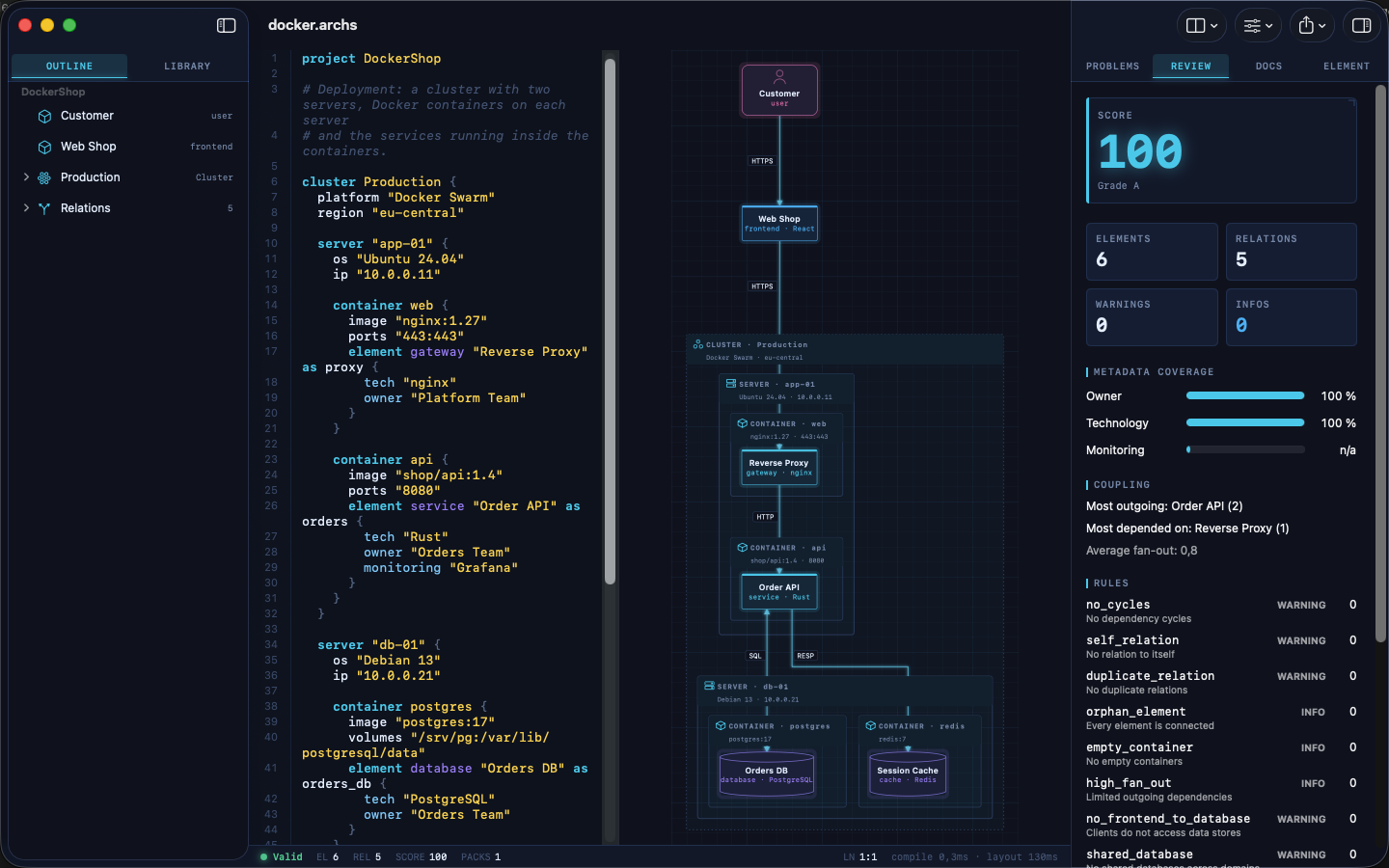
このローカル専用サーバーを使用するには、macOS 14以降にArchScript for Macがインストールされている必要があります。セットアップには、認証用のパーソナルアクセストークンを生成するために、アプリ内でAIアシスタント設定を有効にする必要があります。サーバーはlocalhost上で動作し、テレメトリを収集しないため、アーキテクチャデータはプライベートに保たれます。ツールセットには、ルールに基づいたモデルの検証、アーキテクチャスコアのレビュー、およびTerraform、Mermaid、PlantUMLなどの形式への設計の書き出しを行うための特定の機能が含まれています。
できること
- 1アーキテクチャレビューの自動化AIに現在のシステム設計を分析させ、確立されたアーキテクチャルールへの違反がないか特定させます。
- 2反復的なシステム拡張既存のインフラストラクチャに、バックグラウンドワーカーや特定のコンテナなどの新しいコンポーネントを追加するようアシスタントに指示します。
- 3インフラストラクチャコードの生成視覚的なアーキテクチャモデルを、クラウドデプロイ用の機能的なTerraformコードに変換するよう依頼します。
- 4迅速なプロトタイピング簡単なテキスト記述から、イベント駆動型またはマイクロサービスアーキテクチャの完全な構成をAIに生成させます。
プロジェクトの README から作成されています。すべてのユースケースは、その引用と照らし合わせて確認されています。
設定
ARCHSCRIPT_TOKEN必須シークレットAccess token from ArchScript → Settings → AI
| 名前 | 説明 | 種類 |
|---|---|---|
| ARCHSCRIPT_TOKEN | Access token from ArchScript → Settings → AI | 必須シークレット |
自動チェック
実行日 2026年11月14日詳細レポート →まだ検証されていません。サーバーには80点のスコア、重大な問題がないこと、および検証に必要な十分なデータが必要です。 チェックの仕組み

- ソースリポジトリがリンクされており、アクセス可能schlummer13/archscript-mcp is public and reachablegithub.com/schlummer13/archscript-mcp ↗合格
- パッケージがこのリポジトリをソースとして示している未チェック
- ビルドの来歴(Sigstore 証明)未チェック
- オープンソースライセンス (OSI)MITspdx.org/licenses/MIT.html ↗合格
- 過去1年以内にコミットまたはリリースありLast commit or release 2026-11-11github.com/schlummer13/archscript-mcp ↗合格
- OpenSSF Scorecard未チェック
- パッケージ名が有名なパッケージに酷似していない未チェック
- パッケージと依存関係に重大なアドバイザリがない未チェック
- モデルへの隠れた指示がない0 tool descriptions and the README read; no override phrases, credential paths or hidden characters合格
- 破壊的なツールがラベル付けされている未チェック
- リモート endpoint が MCP ハンドシェイクに応答する未チェック
README
GitHubで見る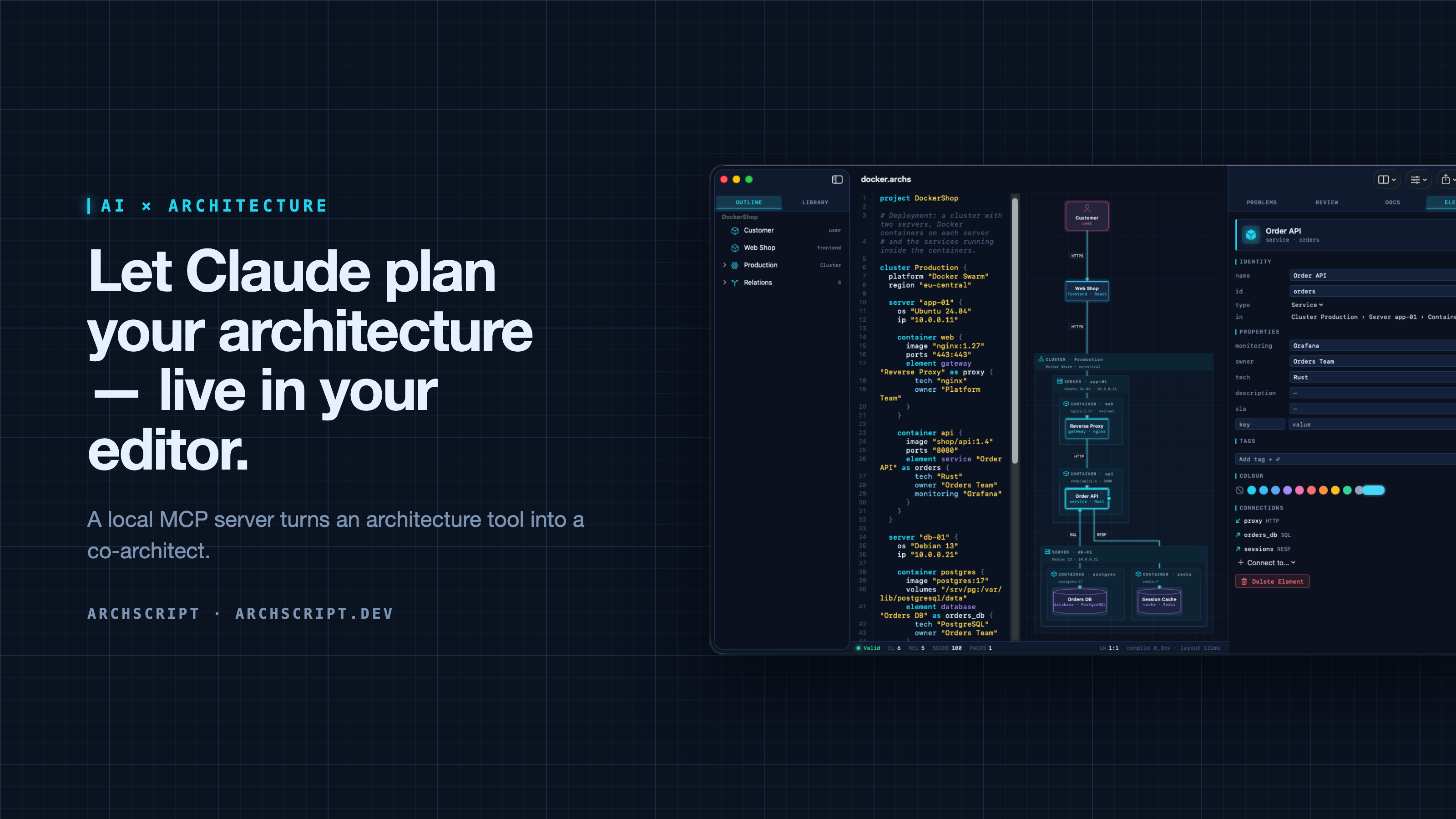
ArchScript is an architecture-as-code tool. You describe a system — domains, services, databases, queues, and deployments as cluster → server → Docker container — in a small language. ArchScript draws the diagram, checks the model against architecture rules and exports documentation, a PDF report, Mermaid, PlantUML and Terraform.
ArchScript for Mac includes an MCP server. Claude Desktop, Claude Code and other MCP clients can read the architectures you have open, change them with precise, structured edits, validate them and look at the rendered diagram. Every change appears live in the window and can be undone.
This repository contains the documentation, configuration examples, example models and a small open-source stdio bridge (
server/) for the ArchScript MCP server. ArchScript itself is a closed-source app, available on the Mac App Store. The browser Playground is free.
What Claude can do
| Tool | What it does |
|---|---|
archscript_guide |
Learns the language, element types and rules |
list_documents |
Lists the open documents (id, name, validity) |
get_document |
Reads a document with line numbers and a structure outline |
create_document |
Creates a new architecture from ArchScript source |
set_document_source |
Replaces a document's source |
edit_document |
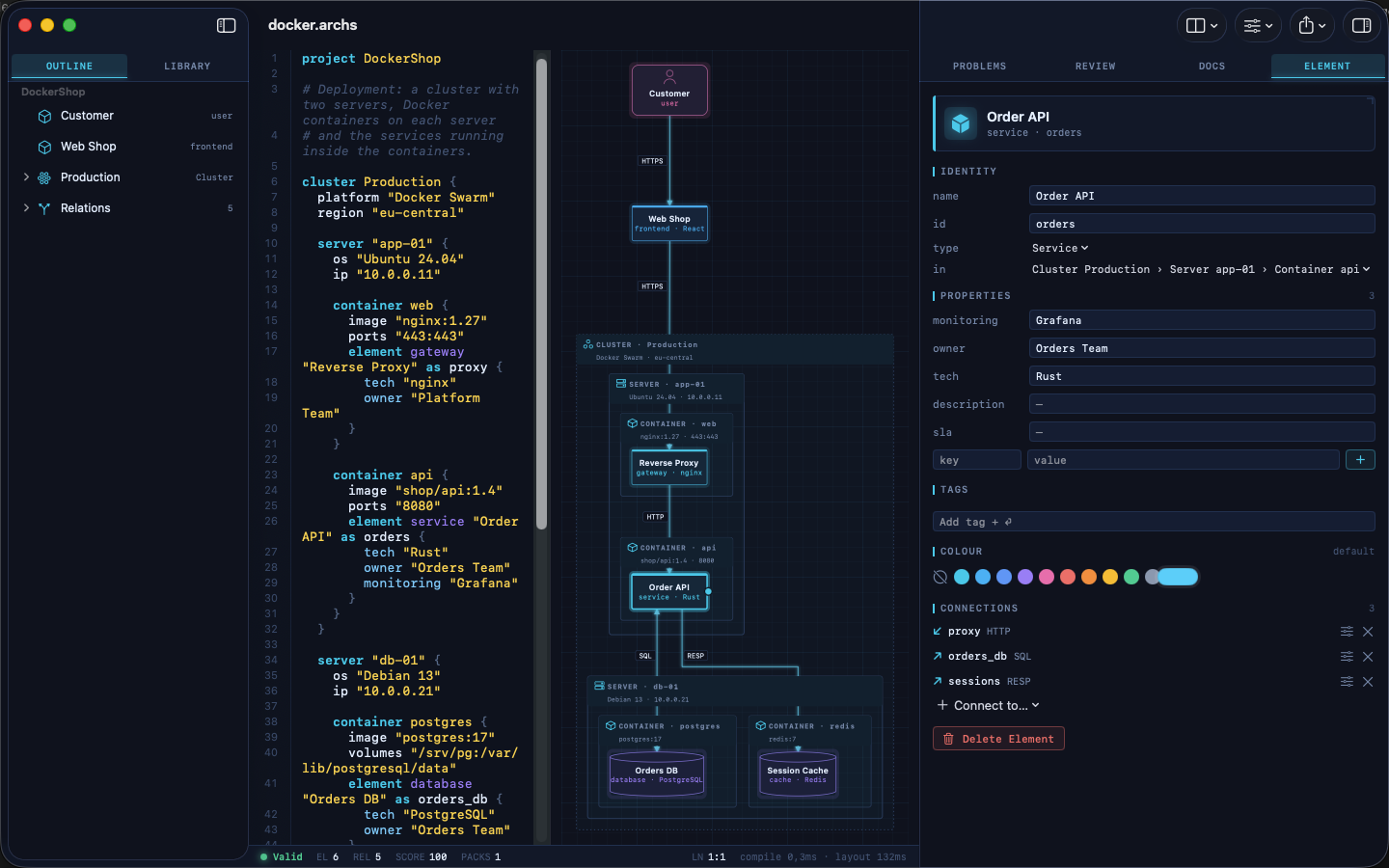
Structured edits: add, rename, move and delete elements, relations and containers, and set properties, tags and colours |
validate |
Returns diagnostics |
review |
Returns the review score, grade and rule findings |
render_diagram |
Returns the diagram as an image, so the assistant can see the result |
export |
Exports Mermaid, PlantUML, Markdown, JSON or Terraform |
The assistant doesn't rewrite your file. It sends small operations (for example
add_element into cluster:Production/server:app-01/container:api). The
ArchScript core turns those into minimal text edits, so comments and formatting
stay intact. After each change the assistant gets the validation result and
review score back, the same feedback loop a human architect uses.
Example prompts
- "Read my architecture and tell me which rules it violates."
- "Add a background worker that sends order emails. Put it in its own container on app-01 and connect the Order API to it."
- "Create an event-driven architecture for a ticket shop with a payment provider and a read model."
- "Export the current model as Terraform for AWS and list what wasn't mapped."
Setup
Requirements: ArchScript for Mac (macOS 14+) with ArchScript Pro (14-day free trial).
- Open ArchScript → Settings → AI and turn on Allow AI assistants (MCP).
- Copy the snippet for your client from that screen. It already contains your personal access token.
Claude Desktop: one-click install (recommended)
- Download archscript.mcpb from the latest release.
- Double-click it, or drag it into Claude Desktop → Settings → Extensions.
- Paste the access token from ArchScript → Settings → AI.
The extension contains no ArchScript code. It holds a manifest and a small
launcher script (mcpb/server/archscript-mcp)
that finds ArchScript for Mac and starts its bundled helper.
Claude Code
claude mcp add --transport http archscript http://127.0.0.1:47621/mcp \
  --header "Authorization: Bearer <token from Settings → AI>"
Claude Desktop (manual)
Add the snippet to claude_desktop_config.json, then restart Claude:
{
  "mcpServers": {
    "archscript": {
      "command": "/Applications/ArchScript.app/Contents/MacOS/archscript-mcp",
      "args": ["--token", "<token from Settings → AI>", "--port", "47621"]
    }
  }
}
The bundled archscript-mcp helper bridges stdio to the app and starts
ArchScript when Claude needs it.
Other MCP clients
Any client that supports Streamable HTTP can connect to
http://127.0.0.1:47621/mcp with the header Authorization: Bearer <token>.
Clients that only support stdio can use the helper as shown above, or the
open-source Node bridge in server/ (Node 18+, no dependencies):
{
  "mcpServers": {
    "archscript": {
      "command": "node",
      "args": ["/path/to/archscript-mcp/server/index.js"],
      "env": { "ARCHSCRIPT_TOKEN": "<token from Settings → AI>" }
    }
  }
}
Privacy and security
- Local only. The server listens on
127.0.0.1and is never reachable from the network. - Token required. Every request needs your access token. You can regenerate it at any time in Settings → AI.
- Off by default. Nothing runs until you turn it on.
- No telemetry. ArchScript collects no data and sends nothing anywhere. Your AI client only sees what it reads through the tools.
- The helper is sandboxed and only forwards stdio to the local server.
Screenshots
| Visual editing | Review and rules |
|---|---|
 |
 |
| Inspector | Element library |
 |
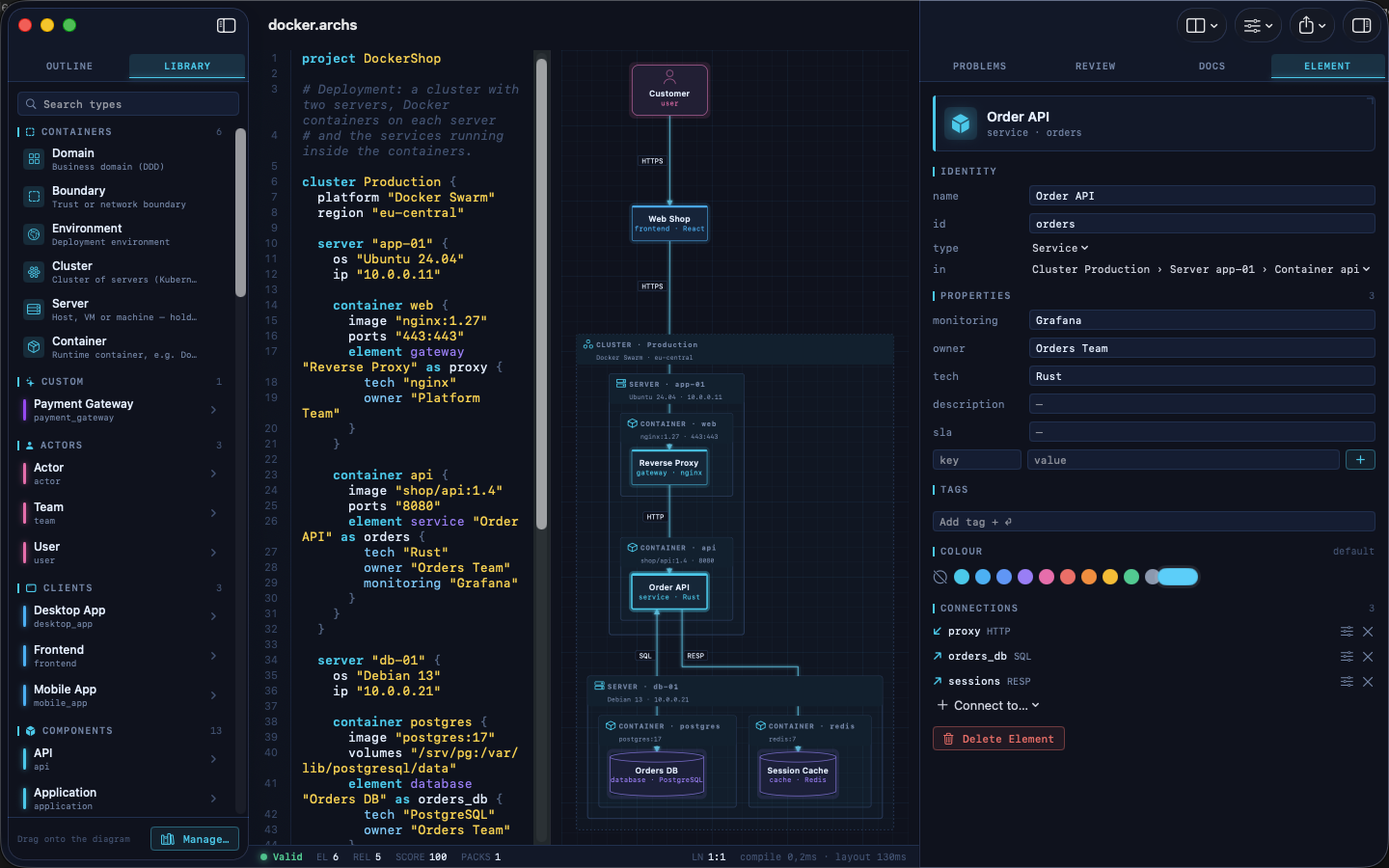 |
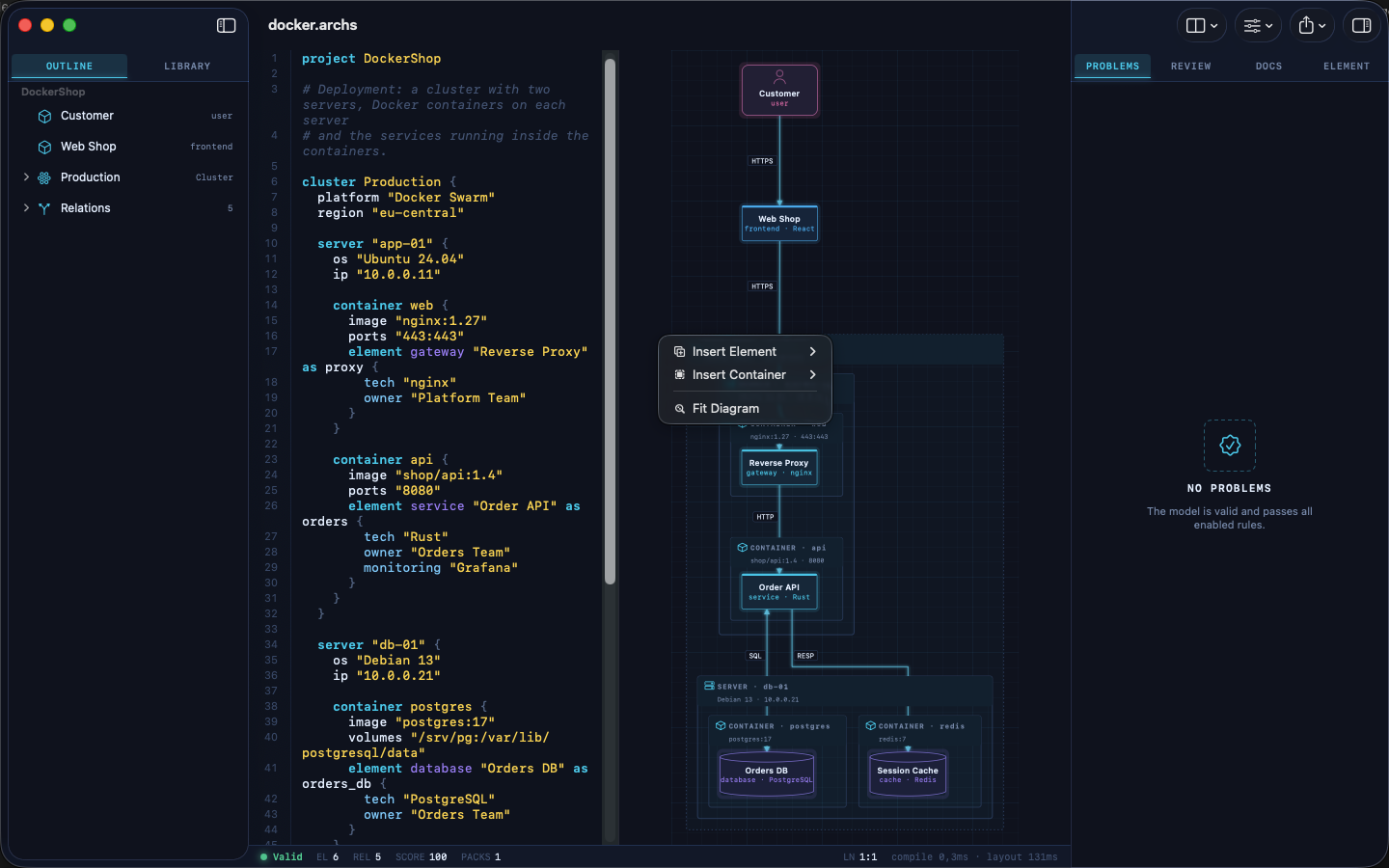
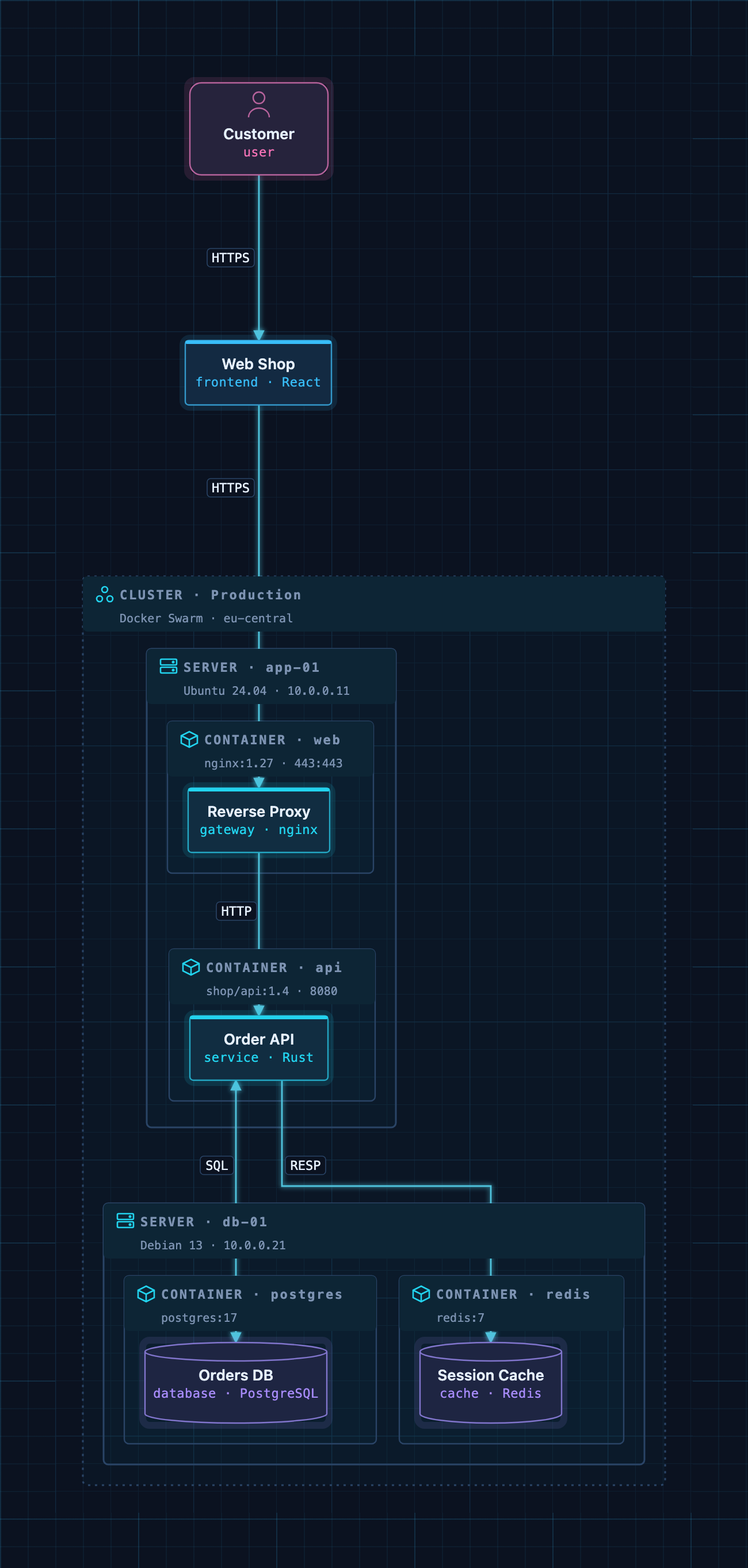
A Docker deployment as code: cluster → servers → containers → services.
Example models
The examples/ folder contains ready-to-use architectures. Open one
in ArchScript for Mac, or paste it into the
Playground:
| File | Architecture |
|---|---|
basic.archs |
The smallest useful model |
customer-management.archs |
One domain with web app, API and database |
webapp.archs |
Classic web application with boundaries |
microservices.archs |
Services with their own databases and an event bus |
ddd.archs |
Bounded contexts (domain-driven design) |
event.archs |
Event-driven, CQRS-style flow |
saas.archs |
Production SaaS with gateway and identity provider |
docker.archs |
Docker Swarm cluster, servers and containers |
A taste of the language:
project DockerShop

cluster Production {
  platform "Docker Swarm"

  server "app-01" {
    container api {
      image "shop/api:1.4"
      element service "Order API" as orders { tech "Rust"; owner "Orders Team" }
    }
  }
}

element frontend "Web Shop" as shop
relation shop -> orders : HTTPS
The full language reference is at archscript.dev/docs.
Feedback
Found a bug in the MCP integration or have an idea for a tool? Please open an issue. Feature requests for ArchScript itself are welcome too.
License
The documentation, configuration snippets, example models and the bridge in
server/ are available under the MIT License. ArchScript for Mac and the
ArchScript core are proprietary software.
ArchScript MCPのよくある質問
ClaudeでArchScriptを使って何ができますか?
Claudeは、公開されているアーキテクチャの読み取り、要素の追加や名前変更などの構造化された編集、ルールに基づいたモデルの検証、アーキテクチャスコアのレビュー、およびTerraformやMermaidなどの形式への図の書き出しが可能です。
ArchScript MCP serverを使用する場合、データはプライベートに保たれますか?
はい、このサーバーはローカル専用で、127.0.0.1で待機し、テレメトリの収集やデータの外部送信は一切行いません。
セットアップのシステム要件は何ですか?
macOS 14以降でArchScript Proが動作するArchScript for Macが必要です。