
Webサイトやドキュメントを、AIクライアントがクエリ、差分比較、エクスポート可能な、バージョン管理された引用付きコンテキストに変換します。
別名 raintree-technology/docpull
- スター
- 29
- ツール
- —
- ダウンロード数(30日間)
- 762
- 最新バージョン
- 6.10.0
- 最終コミット
- 2026年11月13日
- ライセンス
- MIT
DocPull MCPとは
DocPullはMCPサーバーです。 Webサイトやドキュメントを、AIクライアントがクエリ、差分比較、エクスポート可能な、バージョン管理された引用付きコンテキストに変換します。.
プロジェクトのREADMEから生成された概要
DocPull MCP server について
DocPullは、Webページやドキュメントを、AIエージェント向けの引用付きでバージョン管理されたコンテキストへと変換します。ドキュメント、GitHubリポジトリ、ポリシーページなどの公開Webソースをキャプチャし、AIが正確なソース範囲を指定してクエリできる、再現可能なアーカイブに変換できます。このプロセスにより、エージェントの回答が、変動するWebコンテンツではなく、具体的で検証可能なエビデンスに基づいていることを保証できます。
Python stdioサーバーを介してローカルで動作するため、機能を利用するために有料アカウントやホストされたサービスは必要ありません。ユーザーはCLIを通じてソースを管理したり、PythonまたはTypeScript SDKを使用して機能をアプリケーションに統合したりできます。Claude CodeのようなMCPクライアントに接続すると、コンテンツのフェッチ、同期、および差分比較を行うためのツールをエージェントに提供します。システムはロックファイルメカニズムを使用してコンテンツハッシュとソースURLを追跡するため、ドキュメントが以前のバージョンから乖離したことを簡単に検知できます。
できること
- 1ドキュメントの変更検知現在のWebドキュメントを以前に保存されたバージョンと比較し、更新や乖離を特定します。
- 2エージェントへの引用付きコンテキストの提供ロックされたアーカイブから、重複のない特定の記述を抽出し、正確な引用とともに質問に回答します。
- 3開発ツール向けコンテキストのエクスポート収集したドキュメントを準備し、異なるAI環境で使用できる専用の形式に変換して移動します。
- 4ドキュメント品質チェックの自動化収集されたコンテキストが、引用の網羅性や鮮度に関する特定の基準を満たしているかを確認するための自動ゲートを実行します。
プロジェクトの README から作成されています。すべてのユースケースは、その引用と照らし合わせて確認されています。
DocPull MCPのインストール方法
フォーマット検証日 2026年11月10日Cursor に追加Gooseに追加Claude CodeにDocPull MCPをインストール
$ claude mcp add docpull -- uvx docpullCursorにDocPull MCPをインストール
~/.cursor/mcp.json
{
  "mcpServers": {
    "docpull": {
      "command": "uvx",
      "args": [
        "docpull"
      ]
    }
  }
}VS CodeにDocPull MCPをインストール
.vscode/mcp.json
{
  "servers": {
    "docpull": {
      "type": "stdio",
      "command": "uvx",
      "args": [
        "docpull"
      ]
    }
  }
}VS Code CLIにDocPull MCPをインストール
$ code --add-mcp '{"name":"docpull","type":"stdio","command":"uvx","args":["docpull"]}'Claude DesktopにDocPull MCPをインストール
claude_desktop_config.json
{
  "mcpServers": {
    "docpull": {
      "command": "uvx",
      "args": [
        "docpull"
      ]
    }
  }
}CodexにDocPull MCPをインストール
$ codex mcp add docpull -- uvx docpullCodex config.tomlにDocPull MCPをインストール
~/.codex/config.toml
[mcp_servers.docpull]
command = "uvx"
args = ["docpull"]
Gemini CLIにDocPull MCPをインストール
$ gemini mcp add -s user docpull uvx -- docpullGemini settings.jsonにDocPull MCPをインストール
~/.gemini/settings.json
{
  "mcpServers": {
    "docpull": {
      "command": "uvx",
      "args": [
        "docpull"
      ]
    }
  }
}自動チェック
実行日 2026年11月14日完全なレポート →自動チェックに合格しました。これはセキュリティ監査ではありません。コードを読み、サーバーに必要最小限のアクセス権を与えてください。 チェックの仕組み

- ソースリポジトリがリンクされており、アクセス可能raintree-technology/docpull is public and reachablegithub.com/raintree-technology/docpull ↗合格
- パッケージがこのリポジトリをソースとして指定docpull names raintree-technology/docpull as sourcepypi.org/project/docpull/ ↗合格
- ビルドの来歴 (Sigstore 証明)Sigstore attestation for docpullpypi.org/project/docpull/ ↗合格
- オープンソースライセンス (OSI)MITspdx.org/licenses/MIT.html ↗合格
- 過去1年以内にコミットまたはリリースありLast commit or release 2026-11-13github.com/raintree-technology/docpull ↗合格
- OpenSSF Scorecard未チェック
- パッケージ名が有名なパッケージに酷似していないNo popular package one edit away from docpull合格
- パッケージおよびその依存関係に重大な勧告なしthe package checked; no critical advisoryosv.dev ↗合格
- モデルへの隠れた指示がない0 tool descriptions and the README read; no override phrases, credential paths or hidden characters合格
- 破壊的なツールがラベル付けされている未チェック
- リモートエンドポイントが MCP ハンドシェイクに応答未チェック
README
GitHubで見るDocPull
Active open-source project · MIT License
DocPull turns changing public web sources into cited, reproducible context for AI agents and retrieval pipelines. Use it when your application needs to know which sources it used, whether they changed, and how to rebuild the same context later.


Install and sync your first source
pip install docpull
docpull init stripe-docs
docpull add https://docs.stripe.com
docpull sync
docpull query "retry policy" --max-tokens 4000
docpull diff
docpull export context-pack --target cursor
The project stores declared sources in docpull.yaml and resolved inputs in
.docpull/context.lock.json. Later syncs produce a hash-based diff while preserving
source URLs, content hashes, run IDs, citations, and export metadata.
docpull query retrieves deduplicated passages from locked archives with version
filters, a response budget, and exact source spans. The same query is available
through the Python SDK and MCP. See Query locked context
for budget semantics and queries across projects.
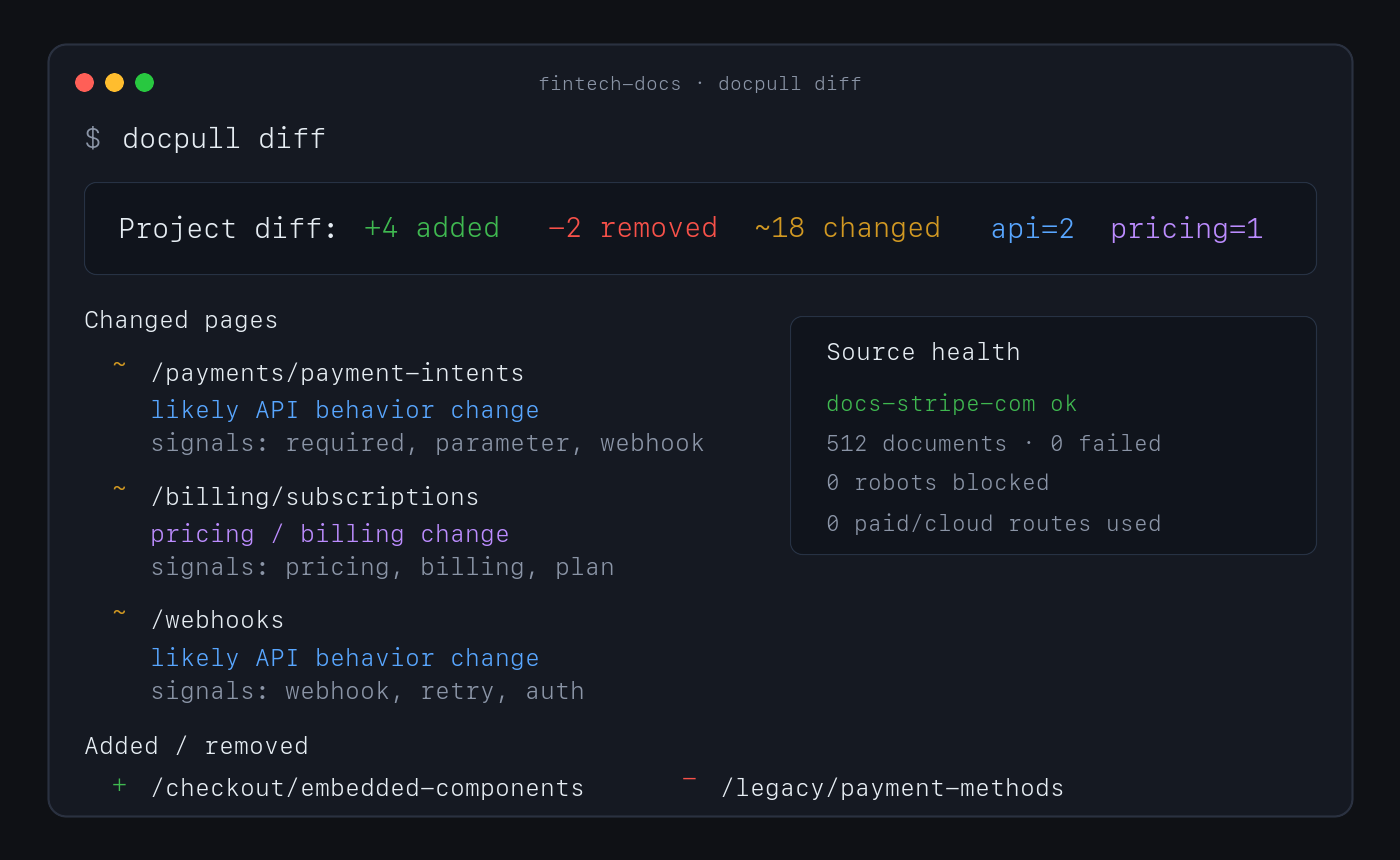
No account or paid API is required for this path. Direct fetching, discovery, extraction, indexing, pack analysis, and diffs run locally.
Why use DocPull
- Reproduce agent context. Stable IDs, hashes, manifests, and lockfiles show which source versions produced an answer or artifact.
- Detect source drift. Sync and diff documentation, product pages, policies, feeds, repositories, packages, standards, and local documents.
- Keep evidence inspectable. Markdown, NDJSON, SQLite, citations, and provenance sidecars remain readable without a hosted service.
- Choose the downstream surface. Export context for agent clients, vector import, data workflows, or a versioned context-pack release.
- Keep expensive routes explicit. Browser and cloud rendering require an explicit choice and can be blocked with a zero-dollar budget.
How it works
declared sources → local acquisition → versioned evidence → diff and validation → export
DocPull's v3 pack contract separates raw extraction, agent-ready context, and eval-grade evidence. Validate the level a downstream system requires:
docpull pack prepare packs/docs --eval-grade
docpull pack validate packs/docs --level eval
docpull ci --prepare
docpull ci checks freshness, citation coverage, pack quality, rights metadata, and
other configured gates. It writes context-ci.report.json and CONTEXT_CI.md, then
exits non-zero when a hard gate fails.
Supported surfaces
| Surface | Use it for | Start here |
|---|---|---|
| CLI | Fetch, sync, diff, validate, and export | docs/cli-recipes.md |
| Python SDK | Embed acquisition in Python applications | docs/surface-contract.md |
| MCP server | Give local agent clients source tools | MCP server |
| TypeScript SDK | Read local packs and invoke the CLI from Node or Bun | sdk/js/README.md |
| Agent plugin | Install the supported MCP workflow in an agent client | plugin/README.md |
Common source shapes include static and server-rendered websites, OpenAPI documents, feeds, papers, public GitHub repositories, npm and PyPI packages, standards, datasets, transcripts, Wikimedia pages, product and policy pages, and local PDF or office files. See context-pack workflows for the complete surface.
MCP server
pip install 'docpull[mcp]'
docpull mcp
Claude Code can register the same local server:
claude mcp add --transport stdio docpull -- docpull mcp
The Python stdio server is the supported MCP server.
Limits and security boundary
DocPull is an evidence-acquisition engine, not a hosted competitive-intelligence product. It owns fetching, explicit rendering adapters, versioning, citations, hashing, validation, replay, and export. Downstream products own scheduling, human review, approved claims, legal conclusions, accounts, and notifications.
The default path does not handle complex interactive browser workflows, CAPTCHAs, stealth scraping, or private dashboards. JavaScript rendering is explicit. Authenticated sources require environment-variable references; DocPull does not persist credential values in project artifacts.
Security defaults include HTTPS-only fetching, robots.txt compliance, SSRF and DNS rebinding protections, redirect guards, XXE protection, and path-traversal checks. Read the web-source boundary, security posture, and evidence-engine decision before extending acquisition behavior.
Documentation and evidence
- CLI recipes — Common commands and advanced workflows.
- Context dependencies — Project and lockfile model.
- Context Pack Contract v3 — Artifact levels and compatibility.
- Public contracts — Schemas and versioning rules.
- Alternatives — Browser automation and hosted extraction tradeoffs.
- JavaScript SDK and loaders — TypeScript client and LangChain/LlamaIndex loaders.
- Dependency security — Locked dependency sets and optional parser support.
- Evaluation lab — Reproducible methods, results, and claim boundaries.
- Changelog — Release history.
Raintree open-source system
DocPull owns evidence acquisition and reproducible agent context. It can be used independently; the sibling projects do not imply a required integration or shared release cycle.
| Project | Responsibility |
|---|---|
| Raintree Standards | Defines governed requirements and evidence. |
| Trellis | Enforces shared JavaScript and TypeScript code policy. |
| HIG Doctor | Audits interface source and provides HIG guidance. |
| PolicyStrata | Tests cross-layer policy behavior. |
See the Raintree open-source portfolio for current lifecycle and distribution links.
Raintree also builds BetterOff, which keeps a household's spending, investments, assets, debts, and net worth in one current record.
Project policies
Contributing · Code of Conduct · Security · Metrics and evidence limits · Source repository · MIT License
DocPull MCPのよくある質問
DocPull MCPをClaude Codeに追加するには
ターミナルでclaude mcp add docpull -- uvx docpullを実行します。すべてのプロジェクトで利用するには--scope userを追加します。
DocPull MCPをCursorに追加するには
~/.cursor/mcp.jsonを開き、上記のインストールセクションに示すCursor設定を使ってmcpServersの下にサーバーを追加します。
DocPull MCP serverのインストールと実行方法を教えてください。
pipでMCP extraをインストールし、docpull mcpを実行すると、対応するローカルstdioサーバーが起動します。また、claude mcp addコマンドを使用してClaude Codeに登録することも可能です。
DocPullを利用するためにアカウントや有料APIは必要ですか?
いいえ。デフォルトのパスでは、アカウントや有料APIを使用せずに、ローカルでフェッチ、抽出、インデックス作成、および差分比較を行います。
ソースの変更を検知することはできますか?
はい。再度同期を行うことで、URL、コンテンツハッシュ、実行ID、および引用を保持したまま、変更されたソースを示すハッシュベースの差分を生成します。
DocPullにはどのようなセキュリティ保護機能がありますか?
デフォルトでHTTPSのみのフェッチ、robots.txtへの準拠、SSRFおよびDNSリバインディング保護、リダイレクトガード、XXE保護、およびパス・トラバーサル・チェックを備えています。
認証が必要なソースはどのように扱われますか?
認証情報は環境変数の参照を通じて提供する必要があり、プロジェクトのアーティファクトには保存されません。