
AIエージェントが画面の読み取り、タップ、タイピング、アクセシビリティの検証を行うことで、iPhoneやiOSシミュレータを操作できるようにします。
別名 RadishSoftware/mobster, mobster-cli
- スター
- 7
- ツール
- —
- ダウンロード数(30日間)
- 193
- 最新バージョン
- 0.4.3
- 最終コミット
- 2026年11月15日
- ライセンス
- MIT
Mobster MCPとは
MobsterはMCPサーバーです。 AIエージェントが画面の読み取り、タップ、タイピング、アクセシビリティの検証を行うことで、iPhoneやiOSシミュレータを操作できるようにします。.
プロジェクトのREADMEから生成された概要
Mobster MCP server について
Mobsterは、AIコーディングエージェントとiOSデバイスまたはシミュレータの間のブリッジを提供します。これにより、Claude Code、Cursor、Codexなどのツールが、画面の読み取り、タップ、テキスト入力を行うことで、モバイルアプリケーションと直接対話できるようになります。このMCP serverは、開発プロセス中にエージェントに実機のiPhoneやiOSシミュレータを操作させたい開発者向けに設計されています。
このサーバーを使用するには、XcodeとPython 3.12以降がインストールされたmacOS環境が必要です。MCP serverは、npx @radishsoftware/mobster mcpコマンドを使用するか、pip経由でmobster-cliパッケージをインストールすることで起動できます。システムには検証エンジンが含まれており、エージェントがアクセシビリティの検証を実行し、アクセシビリティツリーに基づいて合格または不合格の判定を受け取ることができます。
このツールは、コマンドラインインターフェースとMac用Mobsterアプリケーションの両方を駆動する共有ランタイムを提供している点が特徴です。標準的なテストではXCTestに依存することがありますが、MobsterはエージェントがMCPプロトコルを通じて画面を検査しタスクを実行することを可能にし、検証結果をデバイスの実際のアクセシビリティツリーに紐付けます。
できること
- 1デバイス操作の自動化AIエージェントがタップやタイピングなどのユーザー入力をシミュレートすることで、iOSアプリケーション内をナビゲートできます。
- 2アクセシビリティの検証開発者はこのサーバーを使用して自動チェックを実行し、アクセシビリティ要素が特定の基準を満たしているかどうかのレポートを受け取ることができます。
- 3画面の視覚的検査エージェントがモバイルインターフェースの現在の状態を分析し、何が表示されているかを理解できます。
プロジェクトの README から作成されています。すべてのユースケースは、その引用と照らし合わせて確認されています。
Mobster MCPのインストール方法
フォーマット検証日 2026年11月10日Cursor に追加Gooseに追加Claude CodeにMobster MCPをインストール
$ claude mcp add mobster -- uvx mobster-cliCursorにMobster MCPをインストール
~/.cursor/mcp.json
{
  "mcpServers": {
    "mobster": {
      "command": "uvx",
      "args": [
        "mobster-cli"
      ]
    }
  }
}VS CodeにMobster MCPをインストール
.vscode/mcp.json
{
  "servers": {
    "mobster": {
      "type": "stdio",
      "command": "uvx",
      "args": [
        "mobster-cli"
      ]
    }
  }
}VS Code CLIにMobster MCPをインストール
$ code --add-mcp '{"name":"mobster","type":"stdio","command":"uvx","args":["mobster-cli"]}'Claude DesktopにMobster MCPをインストール
claude_desktop_config.json
{
  "mcpServers": {
    "mobster": {
      "command": "uvx",
      "args": [
        "mobster-cli"
      ]
    }
  }
}CodexにMobster MCPをインストール
$ codex mcp add mobster -- uvx mobster-cliCodex config.tomlにMobster MCPをインストール
~/.codex/config.toml
[mcp_servers.mobster]
command = "uvx"
args = ["mobster-cli"]
Gemini CLIにMobster MCPをインストール
$ gemini mcp add -s user mobster uvx -- mobster-cliGemini settings.jsonにMobster MCPをインストール
~/.gemini/settings.json
{
  "mcpServers": {
    "mobster": {
      "command": "uvx",
      "args": [
        "mobster-cli"
      ]
    }
  }
}自動チェック
実行日 2026年11月14日完全なレポート →自動チェックに合格しました。これはセキュリティ監査ではありません。コードを読み、サーバーに必要最小限のアクセス権を与えてください。 チェックの仕組み

- ソースリポジトリがリンクされており、アクセス可能radishsoftware/mobster is public and reachablegithub.com/radishsoftware/mobster ↗合格
- パッケージがこのリポジトリをソースとして指定mobster-cli names radishsoftware/mobster as sourcepypi.org/project/mobster-cli/ ↗合格
- ビルドの来歴 (Sigstore 証明)Sigstore attestation for mobster-clipypi.org/project/mobster-cli/ ↗合格
- オープンソースライセンス (OSI)MITspdx.org/licenses/MIT.html ↗合格
- 過去1年以内にコミットまたはリリースありLast commit or release 2026-11-10github.com/radishsoftware/mobster ↗合格
- OpenSSF Scorecard未チェック
- パッケージ名が有名なパッケージに酷似していないNo popular package one edit away from mobster-cli合格
- パッケージおよびその依存関係に重大な勧告なし24 resolved dependencies checked; no critical advisoryosv.dev ↗合格
- モデルへの隠れた指示がない0 tool descriptions and the README read; no override phrases, credential paths or hidden characters合格
- 破壊的なツールがラベル付けされている未チェック
- リモートエンドポイントが MCP ハンドシェイクに応答未チェック
README
GitHubで見るMobster
MCP server and CLI that lets Claude Code, Cursor and Codex drive a real iPhone or iOS simulator — read the screen, tap, type, and get pass/fail verdicts from accessibility assertions.
Mobster connects your coding agent to the app you are building. Run saved checks, inspect failures and keep the verdict tied to the accessibility tree. The shared runtime powers the command line and Mobster for Mac; this repository owns the CLI, MCP server, simulator tools and verification engine.
On macOS, with Python 3.12 or later:
python3.12 -m pip install mobster-cli
Running a device requires macOS and Xcode. The Python package runs independently of Mobster for Mac. With uv installed, npx @radishsoftware/mobster mcp runs the same CLI through the npm launcher. Tests use synthetic fixtures.
| Workflow | Mobster CLI | Mobster for Mac | XCTest |
|---|---|---|---|
| Claude Code, Cursor or Codex controls a device through MCP | mobster mcp |
Agent integration in the app | Requires an adapter |
| Inspect the screen, tap and type | CLI and MCP tools | Live view and agent tasks | Test code |
| Accessibility assertions with pass/fail reports | mobster verify, mobster test |
Shared verification runtime | XCTest assertions |
| Desktop workspace and team features | Separate app extensions | Included with the app | Xcode workspace |
Connect your agent
mobster mcp --help
mobster mcp install --help
mobster sim --help
mobster verify --help
Follow the agent setup guide and testing guide.
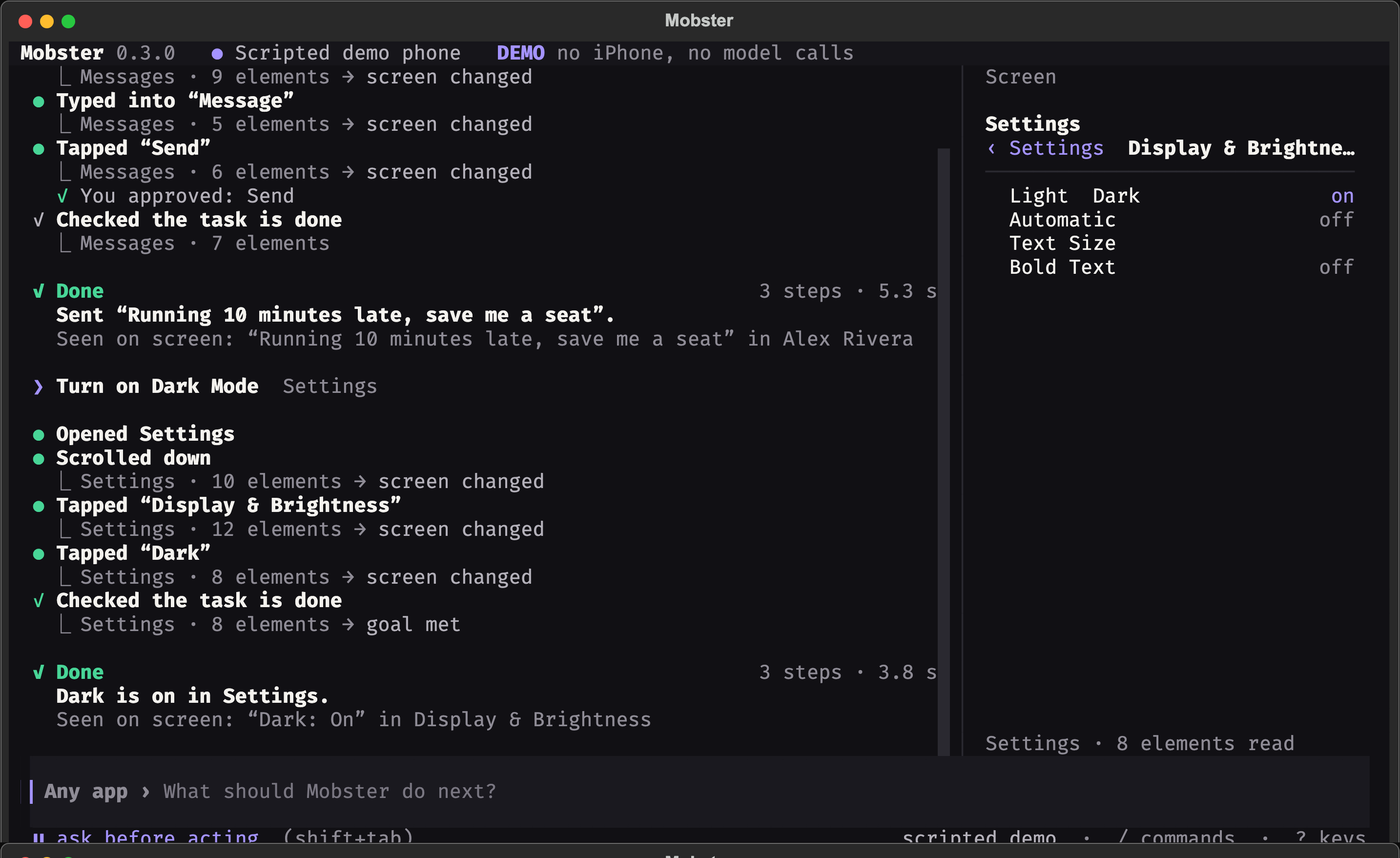
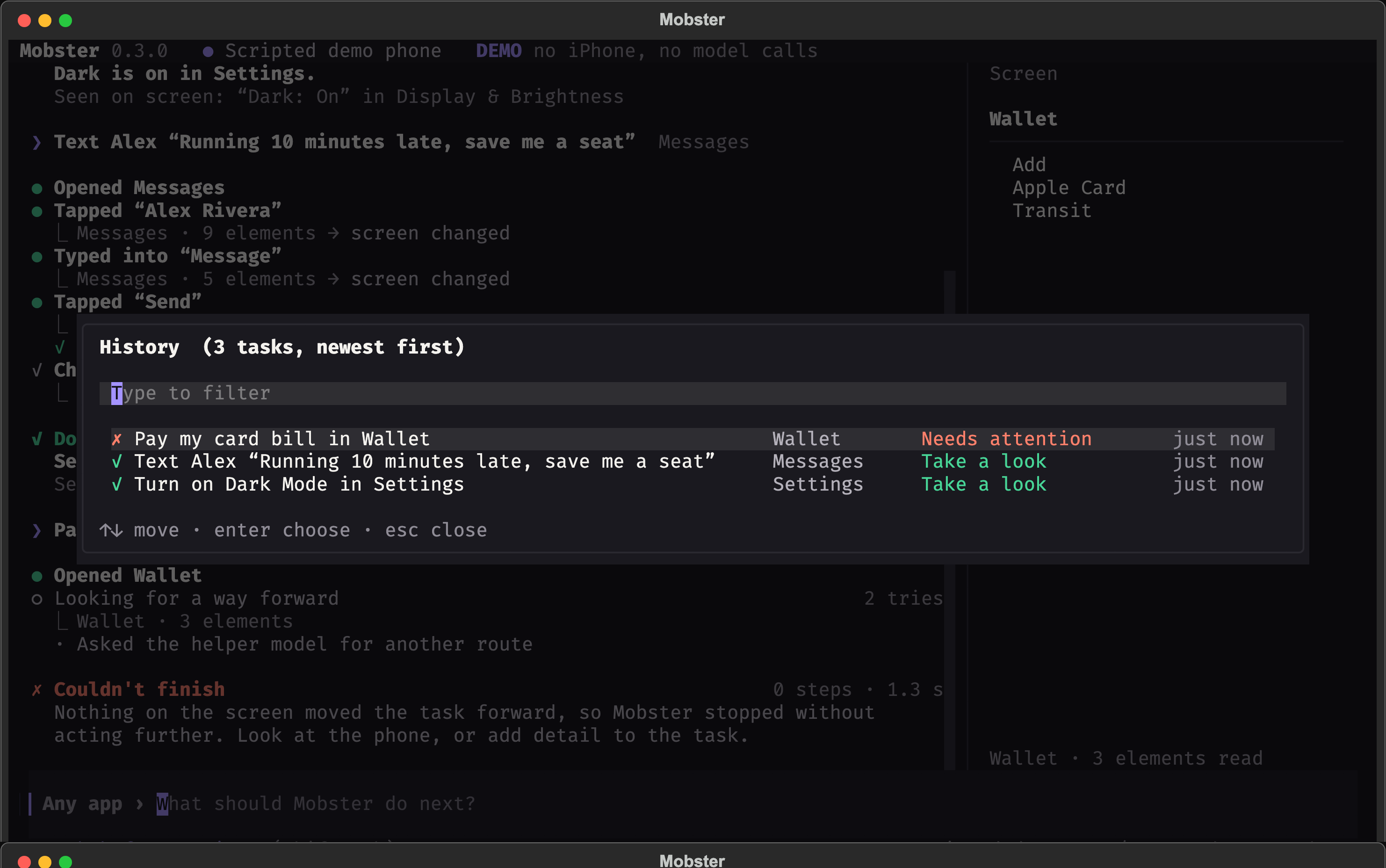
Terminal screenshots
These are scripted demo sessions, not captures of a personal phone.
Develop
From this source checkout:
make venv
make test-backend
Read CONTRIBUTING.md. Training, model weights, datasets and experiment outputs are maintained separately from the product runtime.
Mobster MCPのよくある質問
Mobster MCPをClaude Codeに追加するには
ターミナルでclaude mcp add mobster -- uvx mobster-cliを実行します。すべてのプロジェクトで利用するには--scope userを追加します。
Mobster MCPをCursorに追加するには
~/.cursor/mcp.jsonを開き、上記のインストールセクションに示すCursor設定を使ってmcpServersの下にサーバーを追加します。
Mobsterの実行に必要なハードウェアとソフトウェアは何ですか?
デバイスの実行にはmacOSとXcodeが必要であり、サーバーにはPython 3.12以降が必要です。
Claude CodeやCursorでMobsterを使用できますか?
はい、Mobsterを使用すると、Claude Code、Cursor、CodexがMCPを介して実機のiPhoneやiOSシミュレータを操作できます。