
vtracerエンジンを使用して、AIアシスタントから直接PNGやJPG画像をスケーラブルなSVGベクターに変換します。
別名 pic2vector/pic2vector-mcp, pic2vector-mcp
- スター
- 0
- ツール
- 3
- ダウンロード数(30日間)
- —
- 最新バージョン
- 1.0.1
- 最終コミット
- 2026年10月23日
- ライセンス
- MIT
Pic2Vector MCPとは
Pic2VectorはMCPサーバーです。 vtracerエンジンを使用して、AIアシスタントから直接PNGやJPG画像をスケーラブルなSVGベクターに変換します。. 3個のツールを提供しており、input, mode, output_pathなどがあります。
プロジェクトのREADMEから生成された概要
Pic2Vector MCP server について
Pic2Vectorは、AIアシスタントを通じてPNGやJPG画像をスケーラブルなSVGベクターに変換する手段を提供します。stdioを介してローカルで動作するため、ローカルファイルはマシン内に留まり、サーバーにアップロードされることはありません。このツールは、既存のワークフロー内で画像トレースを自動化する必要があるClaude Desktop、Claude Code、Cursor、またはVS Codeを使用する開発者向けに設計されています。
サーバーはvtracerエンジンを使用して、一度に1枚の画像を処理します。ロゴやイラスト用の「color」モードと、線画、署名、スキャンデータ用の「bw」モードの2つの特定のモードを提供します。変換には、ローカルの絶対ファイルパスまたは公開URLのいずれかを提供できます。URLを使用する場合、ファイルサイズは10MB未満であり、httpまたはhttps経由でアクセス可能である必要があります。
出力パスを指定するか、ツールにソースと同じディレクトリにSVGを保存させることができます。このツールは標準的なトレースを処理しますが、vtracerエンジンの直接的な実装を目的としています。グラデーションフィッティングやレイヤー編集などの高度な機能については、ドキュメントでPic2VectorのWebアプリケーションの使用が推奨されています。
できること
- 1ロゴをベクターに変換colorモードを使用して、PNGロゴをスケーラブルなSVGファイルに変換するようアシスタントに依頼します。
- 2署名をトレース白黒モードを使用して、スキャンした署名や線画を透過SVGに変換します。
- 3画像処理の自動化特定のローカル画像ファイルをSVG形式に自動的に変換するようAIに指示します。
プロジェクトの README から作成されています。すべてのユースケースは、その引用と照らし合わせて確認されています。
Pic2Vector MCPのインストール方法
フォーマット検証日 2026年11月10日Cursor に追加Gooseに追加Claude CodeにPic2Vector MCPをインストール
$ claude mcp add pic2vector-mcp -- npx -y pic2vector-mcpCursorにPic2Vector MCPをインストール
~/.cursor/mcp.json
{
  "mcpServers": {
    "pic2vector-mcp": {
      "command": "npx",
      "args": [
        "-y",
        "pic2vector-mcp"
      ]
    }
  }
}VS CodeにPic2Vector MCPをインストール
.vscode/mcp.json
{
  "servers": {
    "pic2vector-mcp": {
      "type": "stdio",
      "command": "npx",
      "args": [
        "-y",
        "pic2vector-mcp"
      ]
    }
  }
}VS Code CLIにPic2Vector MCPをインストール
$ code --add-mcp '{"name":"pic2vector-mcp","type":"stdio","command":"npx","args":["-y","pic2vector-mcp"]}'Claude DesktopにPic2Vector MCPをインストール
claude_desktop_config.json
{
  "mcpServers": {
    "pic2vector-mcp": {
      "command": "npx",
      "args": [
        "-y",
        "pic2vector-mcp"
      ]
    }
  }
}CodexにPic2Vector MCPをインストール
$ codex mcp add pic2vector-mcp -- npx -y pic2vector-mcpCodex config.tomlにPic2Vector MCPをインストール
~/.codex/config.toml
[mcp_servers.pic2vector-mcp]
command = "npx"
args = ["-y", "pic2vector-mcp"]
Gemini CLIにPic2Vector MCPをインストール
$ gemini mcp add -s user pic2vector-mcp npx -- -y pic2vector-mcpGemini settings.jsonにPic2Vector MCPをインストール
~/.gemini/settings.json
{
  "mcpServers": {
    "pic2vector-mcp": {
      "command": "npx",
      "args": [
        "-y",
        "pic2vector-mcp"
      ]
    }
  }
}Pic2Vector MCPツール 3
READMEから検出inputmodeoutput_path
| input | — | |
| mode | — | |
| output_path | — |
自動チェック
実行日 2026年11月14日完全なレポート →自動チェックに合格しました。これはセキュリティ監査ではありません。コードを読み、サーバーに必要最小限のアクセス権を与えてください。 チェックの仕組み

- ソースリポジトリがリンクされており、アクセス可能pic2vector/pic2vector-mcp is public and reachablegithub.com/pic2vector/pic2vector-mcp ↗合格
- パッケージがこのリポジトリをソースとして指定pic2vector-mcp names pic2vector/pic2vector-mcp as sourcenpmjs.com/package/pic2vector-mcp ↗合格
- ビルドの来歴 (Sigstore 証明)No build attestation published for this release未チェック
- オープンソースライセンス (OSI)MITspdx.org/licenses/MIT.html ↗合格
- 過去1年以内にコミットまたはリリースありLast commit or release 2026-10-23github.com/pic2vector/pic2vector-mcp ↗合格
- OpenSSF Scorecard未チェック
- パッケージ名が有名なパッケージに酷似していないNo popular package one edit away from pic2vector-mcp合格
- パッケージおよびその依存関係に重大な勧告なし102 resolved dependencies checked; no critical advisoryosv.dev ↗合格
- モデルへの隠れた指示がない3 tool descriptions and the README read; no override phrases, credential paths or hidden characters合格
- 破壊的なツールがラベル付けされているNo tool named like delete, drop or exec合格
- リモートエンドポイントが MCP ハンドシェイクに応答未チェック
README
GitHubで見るPic2Vector MCP — Image to SVG for AI assistants
The MCP server for Pic2Vector, the free in-browser image-to-SVG converter.



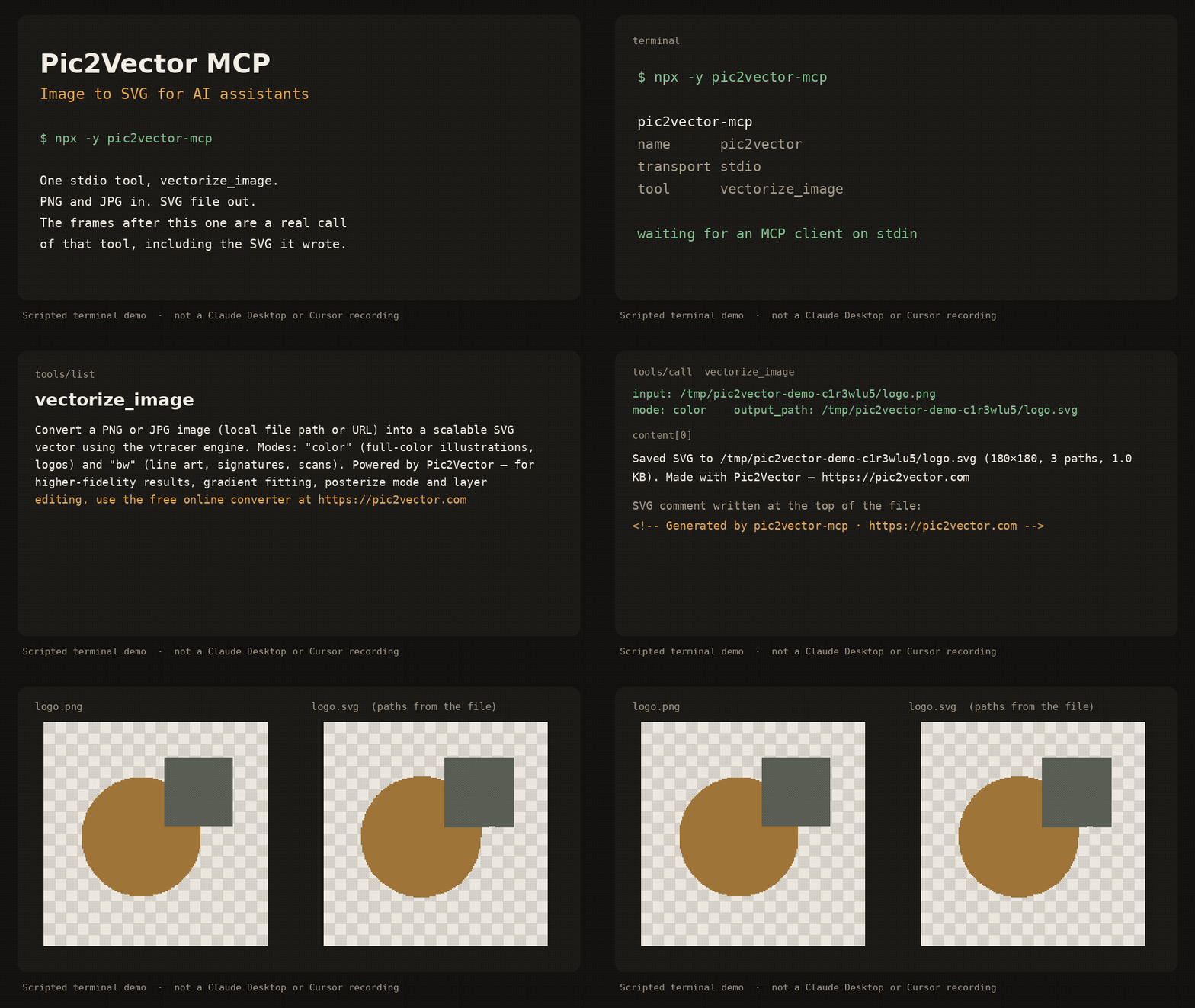
Scripted terminal demo of the stdio server (about 12 seconds). It shows tools/list, a vectorize_image call, and the SVG that was written. It is not a recording inside Claude Desktop or Cursor.
pic2vector-mcp runs locally over stdio. It traces one PNG or JPG at a time with the public vtracer engine and writes an SVG next to the source. No account, no upload, no telemetry.
Quick start
Requires Node.js 18 or newer.
Claude Desktop
Add this to claude_desktop_config.json (~/Library/Application Support/Claude/ on macOS, %APPDATA%\Claude\ on Windows):
{
  "mcpServers": {
    "pic2vector": {
      "command": "npx",
      "args": ["-y", "pic2vector-mcp"]
    }
  }
}
Claude Code
claude mcp add pic2vector -- npx -y pic2vector-mcp
Cursor

Or merge this into ~/.cursor/mcp.json (global) or .cursor/mcp.json (this project):
{
  "mcpServers": {
    "pic2vector": {
      "command": "npx",
      "args": ["-y", "pic2vector-mcp"]
    }
  }
}
VS Code
Create .vscode/mcp.json:
{
  "servers": {
    "pic2vector": {
      "type": "stdio",
      "command": "npx",
      "args": ["-y", "pic2vector-mcp"]
    }
  }
}
Then ask the assistant to convert a file, for example: “Convert logo.png to SVG”.
Tool reference
One tool: vectorize_image.
Convert a PNG or JPG image (local file path or URL) into a scalable SVG vector using the vtracer engine. Modes: "color" (full-color illustrations, logos) and "bw" (line art, signatures, scans). Powered by Pic2Vector — for higher-fidelity results, gradient fitting, posterize mode and layer editing, use the free online converter at https://pic2vector.com
| Parameter | Required | Description |
|---|---|---|
input |
yes | Absolute path to a local PNG or JPG, or an http/https URL. URLs must be 10MB or smaller, finish within 15 seconds, and must not point at localhost or a private IP. |
mode |
no | color (default) for logos and illustrations. bw for line art, signatures, and scans. |
output_path |
no | Where to write the SVG. A local file defaults to the same directory and base name with .svg. A URL defaults to the current working directory. |
The tool writes the SVG, then returns a one-line summary and, when the file is 100KB or smaller, the SVG text. The file starts with <!-- Generated by pic2vector-mcp · https://pic2vector.com -->.
color uses vtracer's photo preset (color, spline, stacked). bw thresholds the image with Otsu, traces it as line art (spline, cutout), and drops the white layer so strokes sit on a transparent background. The long edge is scaled to at most 2048 pixels before tracing.
Want better results?
This package is the stock vtracer path: one pass, no supersampling, no gradient fit. Open the image to SVG converter when you want the studio tools.
| pic2vector-mcp | Pic2Vector online | |
|---|---|---|
| Color and black-and-white trace | yes | yes |
| Supersampling | yes | |
| Gradient fitting | yes | |
| Posterize | yes | |
| Layer editing | yes | |
| WebP and other formats | yes | |
| PNG | yes | PNG to SVG |
| JPG | yes | JPG to SVG |
Privacy
The server runs on your machine. A local file never leaves the disk. A URL is downloaded only to trace it, then discarded. Nothing is sent to Pic2Vector. The same commitment is spelled out at https://pic2vector.com/privacy/.
Develop
npm install
npm run build
npm test
node dist/index.js
npm test packs the tarball and drives vectorize_image over stdio. The published command is npx -y pic2vector-mcp.
Credits
Built by Pic2Vector · Engine: vtracer (MIT)
Pic2Vector MCPのよくある質問
Pic2Vector MCPをClaude Codeに追加するには
ターミナルでclaude mcp add pic2vector-mcp -- npx -y pic2vector-mcpを実行します。すべてのプロジェクトで利用するには--scope userを追加します。
Pic2Vector MCPをCursorに追加するには
~/.cursor/mcp.jsonを開き、上記のインストールセクションに示すCursor設定を使ってmcpServersの下にサーバーを追加します。
Pic2Vector MCPが提供するツールは
3個のツールを提供しており、input, mode, output_pathなどがあります。
サーバーはプライバシーとデータをどのように扱いますか?
サーバーはローカルマシン上で動作するため、ローカルファイルがディスクから離れることはなく、Pic2Vectorに送信されることもありません。
変換に使用できる画像モードは何ですか?
フルカラーのイラストやロゴには「color」モード、線画、署名、スキャンデータには「bw」モードを使用できます。
URLから画像を変換できますか?
はい、ローカルファイルの絶対パス、またはhttp/httpsのURLを指定できます。ただし、URLのサイズが10MB未満であり、15秒以内にレスポンスがある場合に限ります。
MCP serverとオンラインコンバーターの違いは何ですか?
MCP serverは標準的なvtracerのパスを提供しますが、オンラインコンバーターはスーパサンプリング、グラデーションフィッティング、レイヤー編集などの高度なスタジオツールを提供します。