
Roku Dev Studio MCPサーバー
コミット 2026年11月15日MCP serverを介して、AI agentがRokuデバイスを制御および操作できるようにします。
別名 paramount-engineering/roku-dev-studio
- スター
- 37
- ツール
- —
- ダウンロード数(30日間)
- —
- 最新バージョン
- —
- 最終コミット
- 2026年11月15日
- ライセンス
- MIT
Roku Dev Studio MCPとは
Roku Dev StudioはMCPサーバーです。 MCP serverを介して、AI agentがRokuデバイスを制御および操作できるようにします。.
プロジェクトのREADMEから生成された概要
Roku Dev Studio MCP server について
Roku Dev Studioは、macOS、Windows、Linuxにおいて、開発者がRokuデバイスを管理およびデバッグするための統合されたデスクトップ環境を提供します。ECP、RALE、telnetといった断片化された様々なプロトコルを単一のインターフェースに集約し、リモートコントロール、アプリのサイドロード、BrightScriptのデバッグツールを提供します。本プラットフォームは、ローカルネットワーク接続と、専用のリモートサーバーブリッジを介したインターネット接続の両方のデバイスをサポートしています。
このスイートには、Cursor、Claude Desktop、VS Codeなどのクライアント内のAI agentが、物理的なRokuハードウェアと直接やり取りできるようにする専用のMCP serverが含まれています。開発者は、ヘッドレス操作には付属のrds CLIを、複雑なワークフローの管理にはデスクトップGUIを使用できます。また、チャンネル機能を呼び出すためのApp Connectorや、組み込みのMITMプロキシを介してHTTPトラフィックを監視するNetwork Inspectorも備えています。
できること
- 1AIによるデバイス操作の自動化統合されたMCP serverを通じて、AI agentが物理的なRokuデバイスを操作できます。
- 2複数デバイスへのアプリ展開Sideload Relayを使用することで、複数の対象デバイスに対して開発用チャンネルを同時にインストールし、起動できます。
- 3複雑なテストシーケンスの実行Action Scriptsを使用することで、キー入力、クエリ、条件ロジックを含む自動化されたフローを作成し、実行できます。
- 4アプリ機能の検査と呼び出しApp Connectorを使用して、特定のチャンネル機能を呼び出したりデータを渡したりすることで、RALEの機能を拡張できます。
プロジェクトの README から作成されています。すべてのユースケースは、その引用と照らし合わせて確認されています。
自動チェック
実行日 2026年11月14日完全なレポート →まだ検証されていません。サーバーには80点のスコア、重大な問題がないこと、および検証に必要な十分なデータが必要です。 チェックの仕組み · 点数を上げるための改善点

- ソースリポジトリがリンクされており、アクセス可能paramount-engineering/roku-dev-studio is public and reachablegithub.com/paramount-engineering/roku-dev-studio ↗合格
- パッケージがこのリポジトリをソースとして指定未チェック
- ビルドの来歴 (Sigstore 証明)未チェック
- オープンソースライセンス (OSI)MITspdx.org/licenses/MIT.html ↗合格
- 過去1年以内にコミットまたはリリースありLast commit or release 2026-11-06github.com/paramount-engineering/roku-dev-studio ↗合格
- OpenSSF Scorecard未チェック
- パッケージ名が有名なパッケージに酷似していない未チェック
- パッケージおよびその依存関係に重大な勧告なし未チェック
- モデルへの隠れた指示がない0 tool descriptions and the README read; no override phrases, credential paths or hidden characters合格
- 破壊的なツールがラベル付けされている未チェック
- リモートエンドポイントが MCP ハンドシェイクに応答未チェック
README
GitHubで見る





Roku Developer Tools for macOS, Windows, and Linux — Remote Control, App Side-loading, ECP automation, RALE / App Connector, Network Inspector, Action Scripts, MCP server for AI agents (Cursor, Claude, VS Code), and a rds CLI. Supports both local network and internet-bridged devices.
A comprehensive cross-platform desktop application for controlling and developing on Roku devices over your local network or via remote server using the External Control Protocol (ECP).
Why Roku Dev Studio? (vs. official Roku tools)
Roku development is normally split across a pile of separate, single-purpose official tools — the Roku Remote Tool, the browser-based sideload installer, raw telnet, RALE, sca-cmd — that don't talk to each other. Roku Dev Studio doesn't replace Roku's own protocols (ECP, RALE, telnet, sca-cmd) — it wraps all of them in one GUI, one CLI (rds), and one MCP server:
| Task | Without Roku Dev Studio | With Roku Dev Studio |
|---|---|---|
| Remote control | The official Roku Remote Tool, or raw ECP keypress calls via curl/Postman |
One tab: full D-Pad, keyboard remote, and a floating mini-remote |
| Sideloading | The device's browser-based installer or a VS Code extension — one IP at a time | Sideload Relay — one push from your IDE installs, launches, and captures console on every targeted device |
| Debug console | telnet <ip> 8085 in a raw terminal or through an IDE — no search/filter/save either way |
A structured console with search, filtering, and saved logs |
| BrightScript debugging | The socket debug protocol, usable mainly through a single IDE's extension | A standalone debugger: breakpoints, step execution, call stack, variables, watch |
| App inspection (RALE) | RALE alone only inspects SceneGraph nodes — no way to call into a channel or exchange data with it | App Connector — extends RALE with the ability to call your channel's own functions and pass data back and forth (GET/POST-style), unlocking automation that didn't exist before |
| Network traffic | A separately configured MITM proxy (Charles/mitmproxy/Fiddler) with manual device setup | Built-in local MITM proxy + optional hotspot packet capture |
| Static analysis | sca-cmd output cross-referenced by hand against Roku's cert docs |
Runs sca-cmd for you, with cert-requirement links straight to Roku's docs |
| Remote locations / labs | Physical presence required — ECP only works on the local network | A bundled remote server bridges ECP over the internet |
| Repeatable testing | Hand-rolled scripts around ECP and RALE | Action Scripts — build a flow (keypresses, queries, conditionals, waits) from a GUI, or run it headless via rds |
| AI-agent access | Nothing official | A bundled MCP server lets Cursor, Claude Desktop, or VS Code drive a real device |
Why have I built Roku Dev Studio?
This repository is an npm workspace monorepo. Run npm install and npm start from the repository root so workspaces link correctly. Installing runs a postinstall (npm run build:libs) that compiles the shared roku-dev-studio-platform and roku-dev-studio-api packages to their dist/ outputs, which the app and remote server import. Use npm run typecheck for a full TypeScript check across every workspace and npm test to run unit tests. CI runs these plus per-package build/syntax smoke checks on each push and pull request. Setup, scripts, and distributable builds are documented in INSTALLATION.md.
Repository layout
| Location | What it is |
|---|---|
apps/roku-dev-studio/ |
Electron desktop app (main process, renderer, packaging). Dev and distributable builds: INSTALLATION.md. |
packages/roku-dev-studio-api/ |
Shared Node library + rds CLI: discovery, ECP, screenshots, sideload, RALE, action-script runner, headless validator — package README. |
packages/roku-dev-studio-mcp/ |
MCP server that lets AI agents (Cursor, Claude Desktop, VS Code) drive a Roku through this app — package README. |
packages/roku-dev-studio-network-inspector/ |
Network Inspector engine: hotspot packet capture (DNS/SNI/HTTP) + local MITM proxy, transport-agnostic so it runs in both the desktop app and the remote server — package README. |
packages/roku-dev-studio-rce/ |
Roku Cloud Emulator (RCE) client — Core API (accounts / devices / snapshots) and Device API (ECP proxy, ports-bridge sockets) for cloud-hosted virtual Rokus, used by the app's RCE locations — package README. |
packages/roku-dev-studio-remote-server/ |
HTTP/WebSocket relay to control Rokus over the internet — package README. |
packages/roku-dev-studio-platform/ |
Shared host-platform helpers (OS identity, modifier keys, path-safe, node-only filesystem helpers) used by the app and other packages so platform logic lives in one place. Built to dist/ on npm install — package README. |
roku-components/ |
BrightScript-side artifacts: TrackerTask.xml (drop into your channel for App Connector / RALE), the fiddle/ SceneGraph scaffold, and demo/ (the bundled Roku Dev Studio Showcase channel behind Try Demo App) — components README. |
Author: Hareendra Donapati
Glossary
| Term | One-line meaning |
|---|---|
| ECP | External Control Protocol — Roku's HTTP API on port 8060 (KeyPress, Launch, Query, Deep-Link). |
| Telnet 8085 / 8080 | The BrightScript debug console (8085) and dev system commands (8080) on a Developer-Mode Roku. |
| RALE | Roku Advanced Layout Editor — Roku's SceneGraph inspection protocol over a TCP socket (default port 49200), spoken by the TrackerTask component. |
| TrackerTask | The BrightScript component channel developers add to their app to make it reachable from RALE / App Connector — see roku-components/README.md. |
| App Connector | The Dev Studio tab that talks RALE: list / call your channel's GetExternalControlFunctions, plus built-ins (node lookup, registry editor, update node). |
| Network Inspector | The Dev Studio tab / engine that inspects a dev channel's HTTP(S) traffic through a local MITM proxy, with optional hotspot packet capture. |
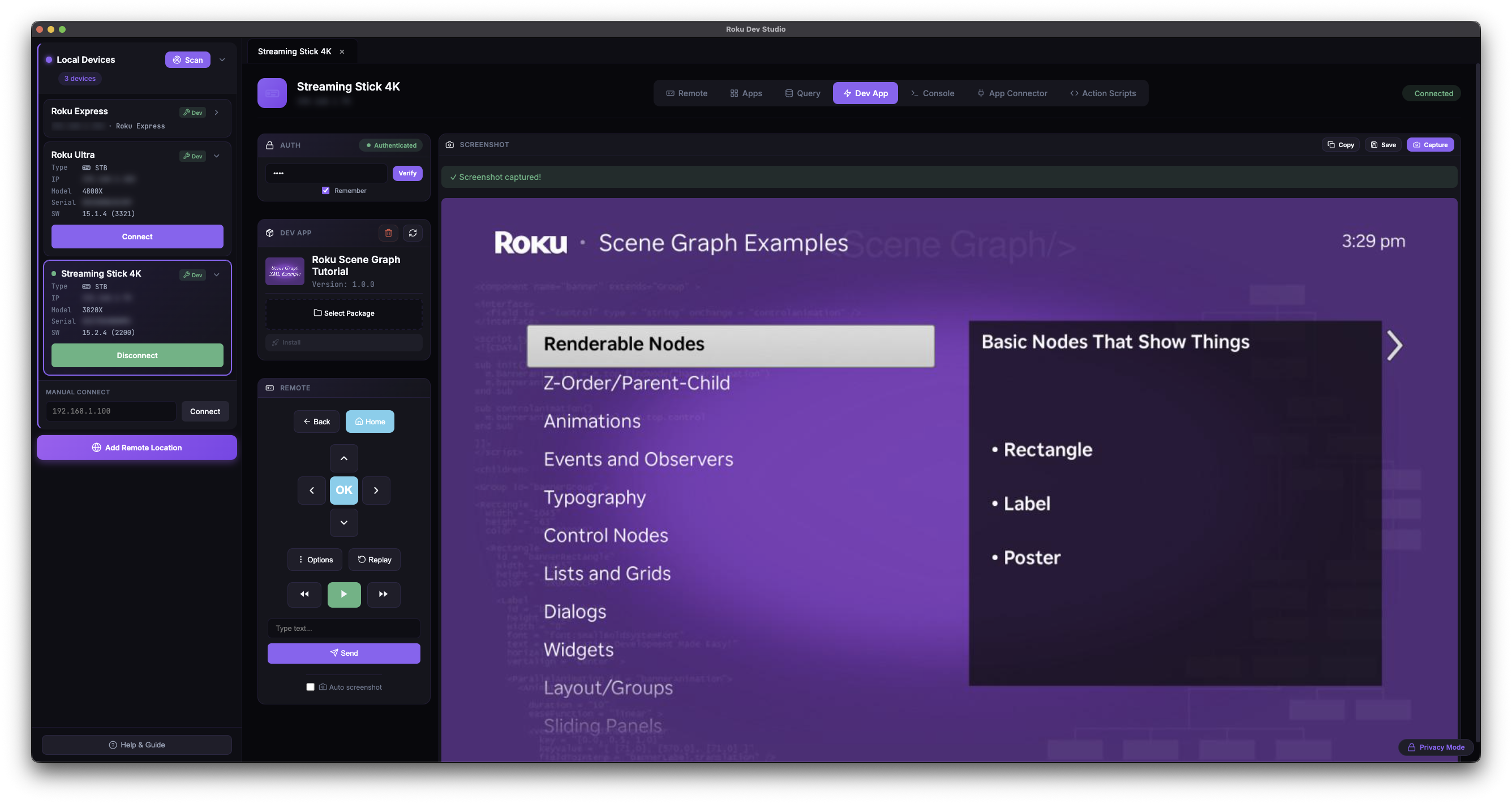
| Sideload | Uploading and installing a .zip / .pkg dev channel onto a Developer-Mode Roku via its Dev Password. |
| Sideload Relay | RDS advertising itself as a Roku so one sideload from your IDE / browser fans out (install → launch → console) to many targeted devices. |
| Action Script | JSON-described automation that chains keypresses, queries, sideload, App Connector calls, screenshots, conditionals, waits, and variables. Built and run from the Action Scripts tab; also runnable headless via rds. |
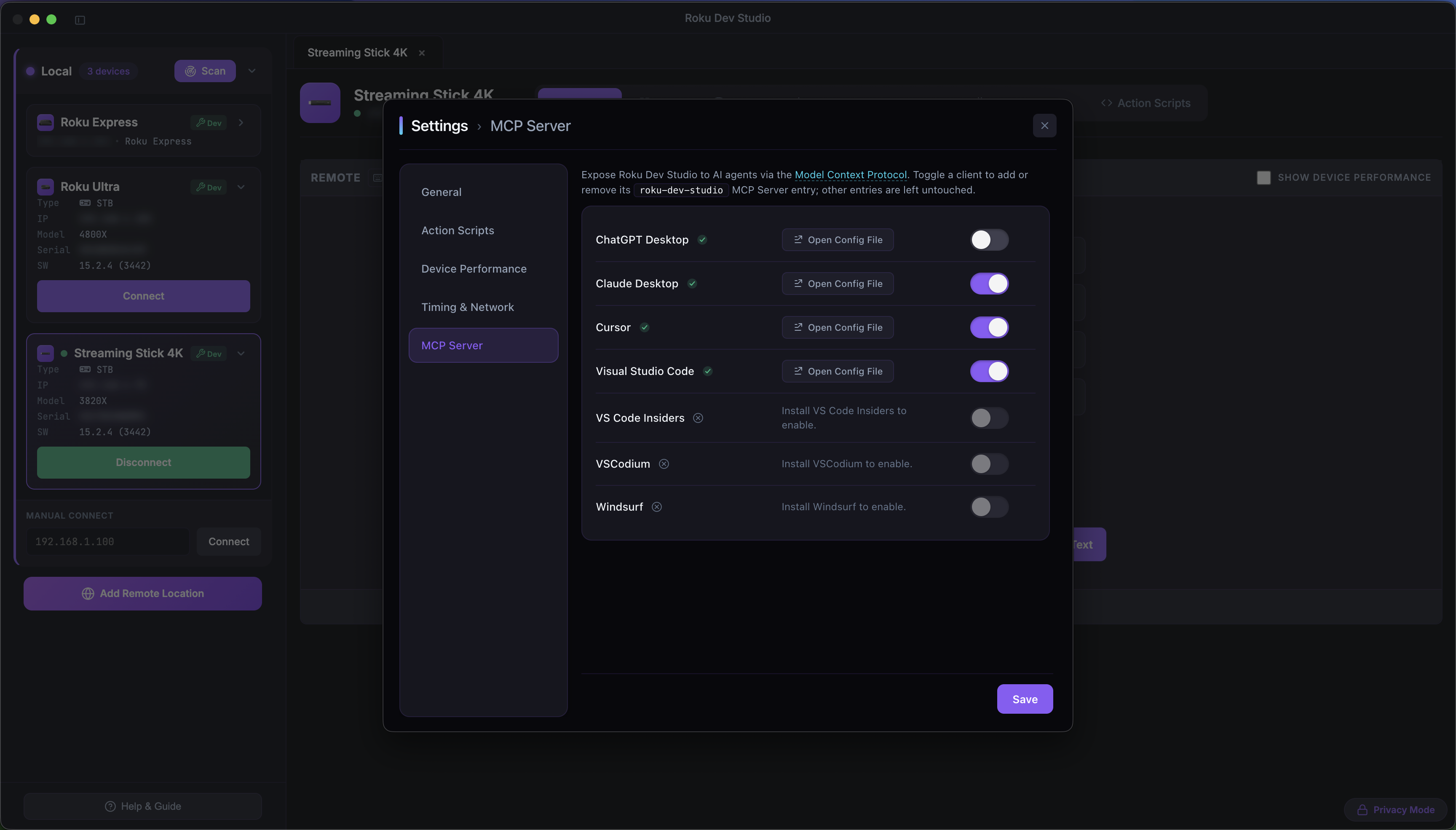
| MCP server | Roku Dev Studio's Model Context Protocol server — lets Cursor / Claude Desktop / VS Code drive a real device through this app while it's open. Toggle clients in Settings → MCP Server. |
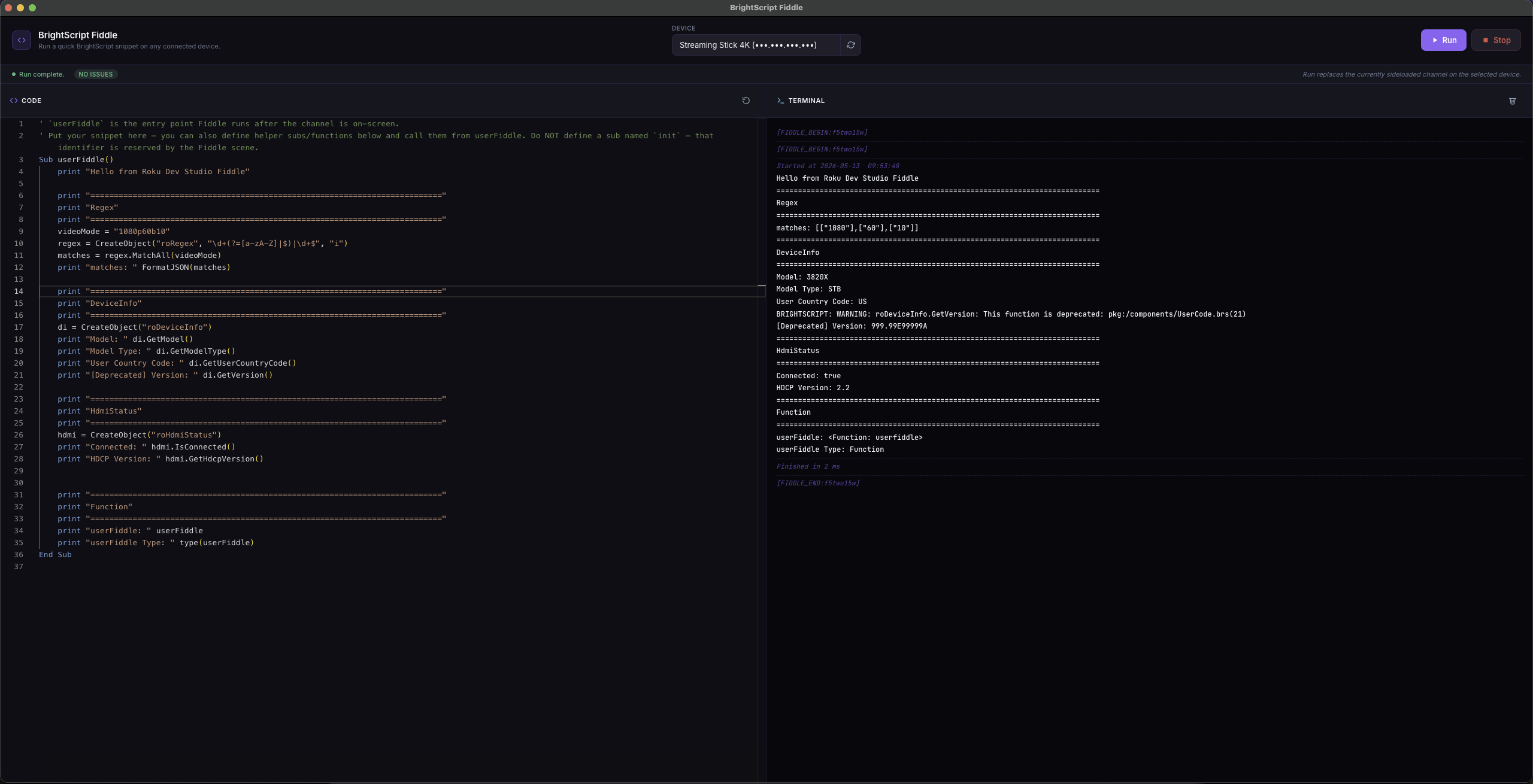
| Fiddle | The BrightScript scratch editor (Monaco + brighterscript lint) that wraps your snippet into a temporary channel and runs it on a selected device. |
rds |
The terminal CLI shipped by roku-dev-studio-api (rds discover, rds keypress, rds script run, rds rale repl, …). |
Supported Platforms
Roku Dev Studio is available for:
| Platform | Options |
|---|---|
| macOS | DMG installer, Portable ZIP archive |
| Windows | NSIS installer, Portable executable |
| Linux | DEB package, AppImage |
| Home |
|---|
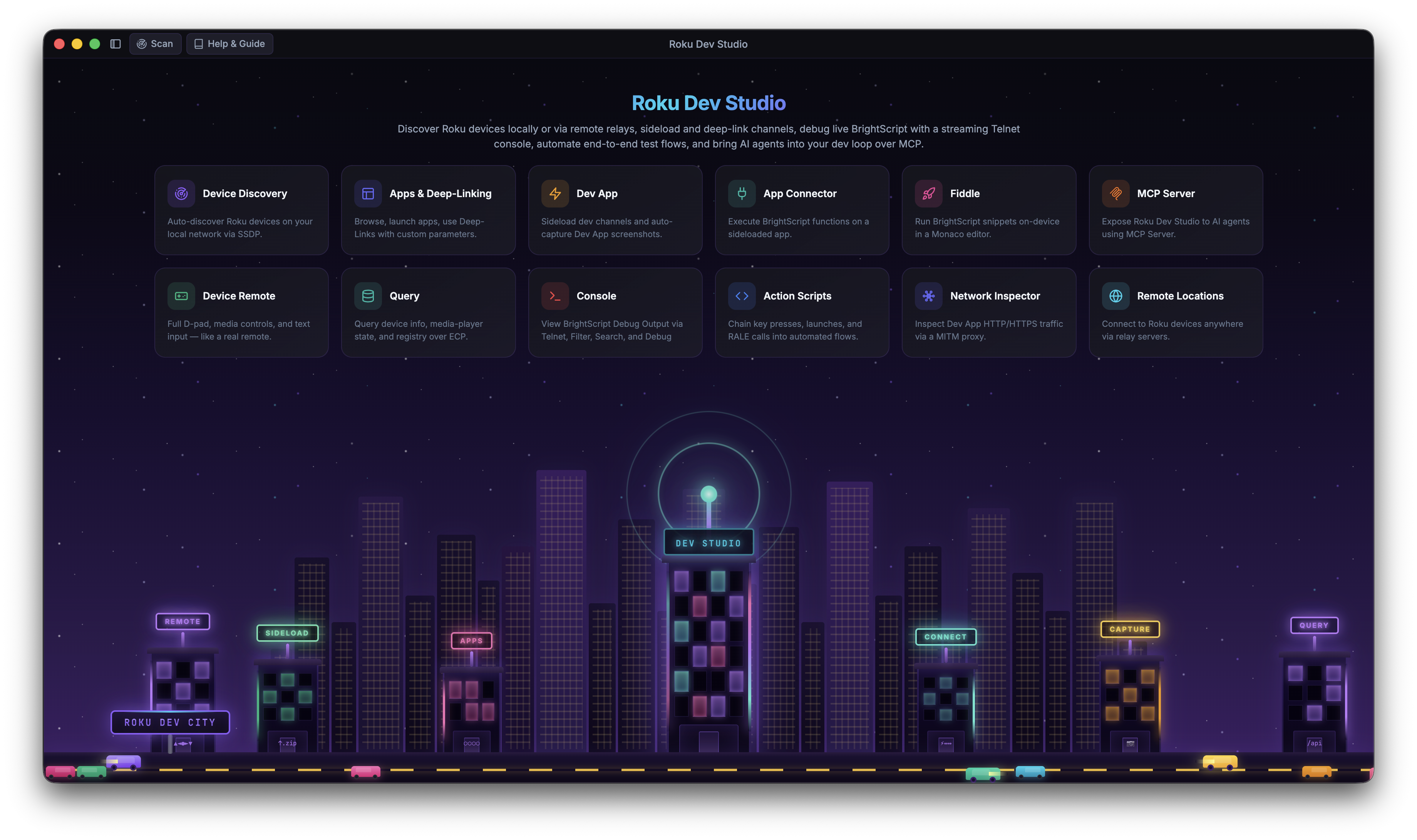 |
| Remote + Device Performance | App Connector (RALE) | Action Scripts Builder |
|---|---|---|
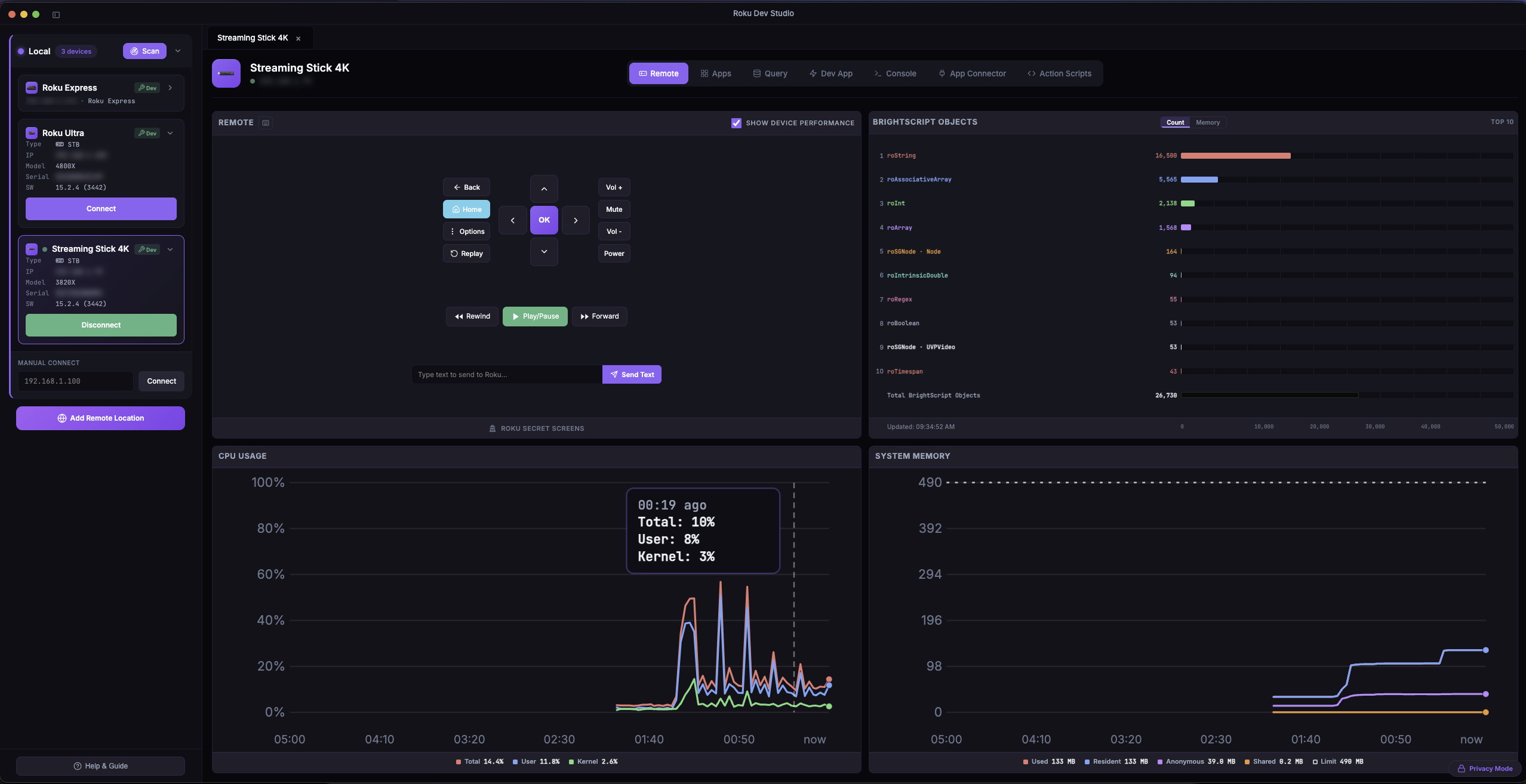 |
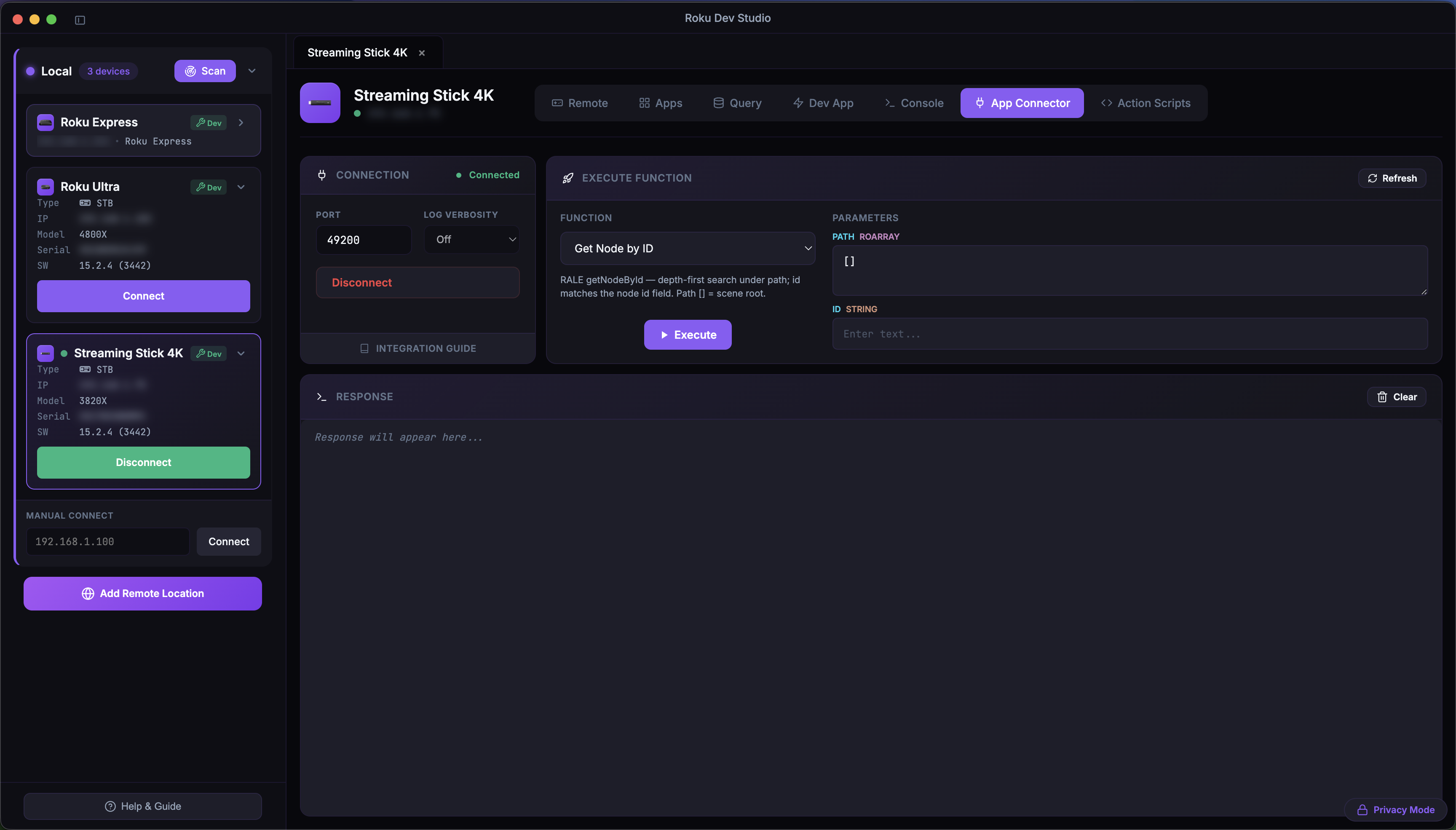 |
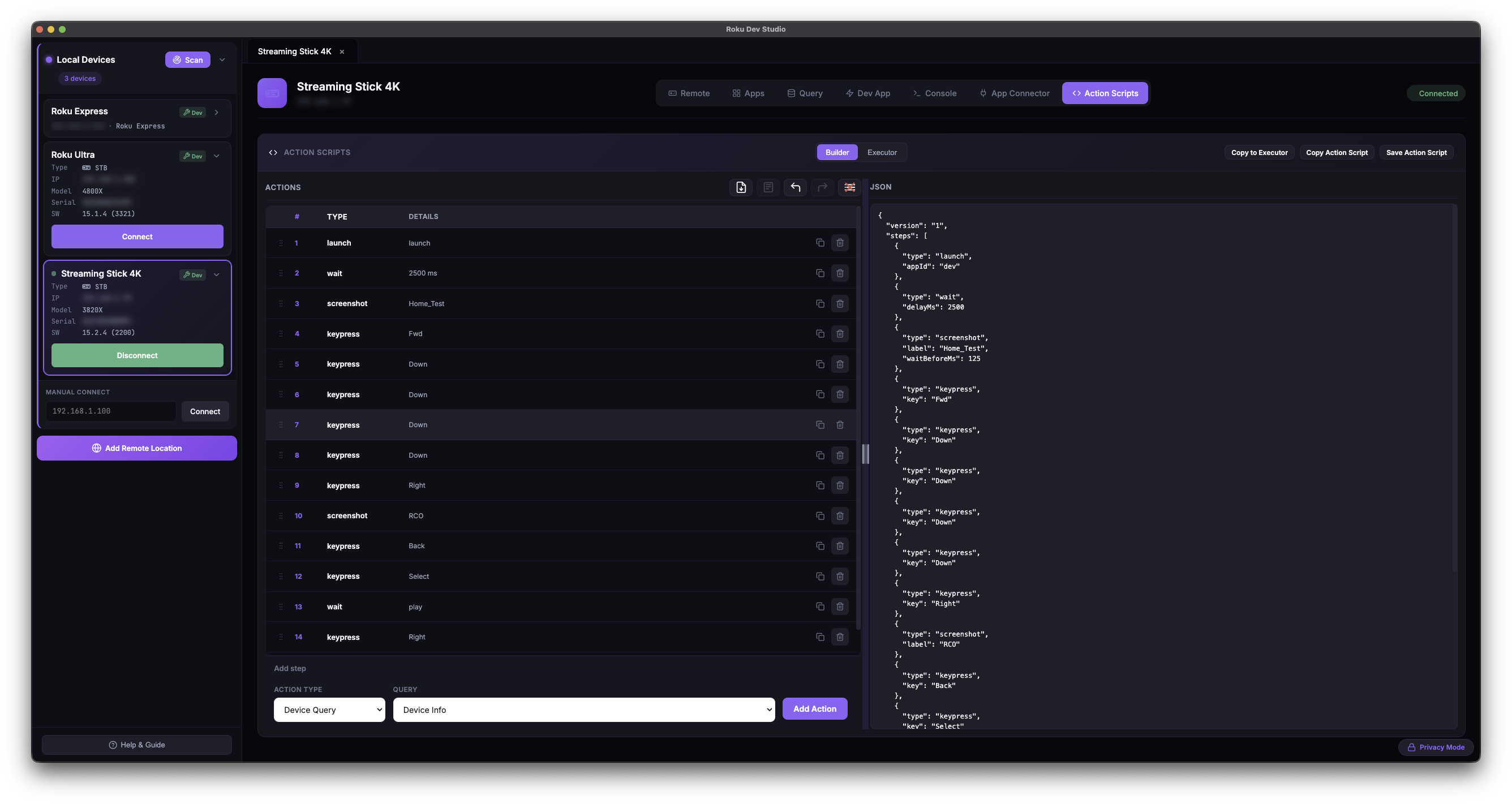 |
| BrightScript Fiddle | MCP Server Settings | Dev App / Sideload |
|---|---|---|
 |
 |
 |
More screenshots for every feature: FEATURES.md.
Features
See FEATURES.md for the full tour with screenshots. Quick index:
Remote Control (Floating Remote) · Device Performance · Device Discovery · App Launcher & Management · Device Queries · Dev App Management · Try Demo App · Sideload Relay · Console & Debugging · Ports Window · Console Monitor · BrightScript Debugger · App Connector (RALE) · Network Inspector · Network Session Viewer · Action Scripts · AI Agents (MCP Server) · BrightScript Fiddle · Log File Viewer · Static Channel Analysis · rds CLI · Remote Server Support · Settings · Language Switching · Crash Reporting · Developer Features
Remote Server Setup
Roku Dev Studio can control devices over the internet using a remote server bridge, so you can manage devices in Remote Locations without being on the same network as the desktop app. Run the relay (npm run remote-server from this repo, or npm install -g roku-dev-studio-remote-server), then add it via Add Remote Location in the device selector. The modal has two tabs: RDS Relay (Relay Server address + port) and RCE (a Roku Cloud Emulator account name + Personal Access Token). RCE devices list as shutdown / pending / running and must be started first (Start, with optional snapshot / firmware / Max Run Time options) — ECP, sideload and console only respond while a device is running.
Full setup (running the server as a service, network/firewall configuration, the HTTP/WebSocket API, and Swagger docs) lives in the remote server package README.
Project structure
.
├── apps/
│   └── roku-dev-studio/                 # Electron desktop app (see INSTALLATION.md)
├── packages/
│   ├── roku-dev-studio-api/             # Shared API + `rds` CLI (npm: roku-dev-studio-api)
│   ├── roku-dev-studio-mcp/             # MCP server bundled into the desktop app
│   ├── roku-dev-studio-network-inspector/ # Network capture + MITM proxy engine
│   ├── roku-dev-studio-rce/             # Roku Cloud Emulator client (accounts, devices, ECP proxy)
│   ├── roku-dev-studio-platform/        # Shared platform helpers (path-safe, OS identity)
│   └── roku-dev-studio-remote-server/   # HTTP/WS relay (npm: roku-dev-studio-remote-server)
├── roku-components/                     # TrackerTask + Fiddle SceneGraph assets
├── package.json                         # Workspace root (workspaces: apps/*, packages/*)
├── INSTALLATION.md
└── README.md
The Electron app’s own tree (TypeScript main.ts / preload.ts bundled to main.bundled.cjs / preload.bundled.cjs, renderer/, build assets) lives under apps/roku-dev-studio/.
Requirements
For Running the App:
- Node.js 24.17+
- npm (bundled with Node.js)
- Roku device on local network (or remote server for remote access)
For Building:
- All of the above
- Platform-specific build tools:
- macOS: Xcode Command Line Tools
- Windows: Windows SDK (for NSIS installer)
- Linux: Standard build tools (gcc, make, etc.)
See Installation for setup and build instructions.
License
This project is licensed under the MIT License.
Third-party components used in this software and their licences:
| Library | Purpose | Licence |
|---|---|---|
| @tanstack/virtual-core | Virtualized list rendering (telnet console, large script results) | MIT |
| archiver | Building sideload .zip packages |
MIT |
| brighterscript | BrightScript linting in the Fiddle editor | MIT |
| commander | rds CLI argument parsing |
MIT |
| electron | Desktop app runtime | MIT |
| electron-builder | Packaging & installers | MIT |
| form-data | HTTP multipart uploads | MIT |
| modern-screenshot | DOM-to-image capture for chart cards / PDF export | MIT |
| monaco-editor | Code editor (Fiddle, action-script step editors) | MIT |
| pdf-lib | PDF generation | MIT |
| sharp | Image processing (icons/build) | Apache-2.0 |
| solid-js | Reactive framework powering the new renderer | MIT |
| ws | WebSocket client | MIT |
Their dependencies are used under the terms declared in package-lock.json and each package’s repository.
Roku Dev Studio MCPのよくある質問
このMCP serverでAI agentは何ができますか?
このMCP serverを使用すると、Cursor、Claude Desktop、VS CodeなどのAI agentから、実際のRokuデバイスをアプリケーション経由で操作できます。
インターネット経由でRokuデバイスを制御できますか?
はい、リモートサーバーブリッジを使用することで、インターネット経由のECP制御が可能になり、離れた場所にあるデバイスを管理できます。