
Model Context Protocol ツールをサポートするフレームワークを使用して、AIネイティブな IDE 製品を構築します。
別名 opensumi/core
- スター
- 3,666
- ツール
- —
- ダウンロード数(30日間)
- —
- 最新バージョン
- —
- 最終コミット
- 2026年10月15日
- ライセンス
- MIT
OpenSumi MCPとは
Model Context Protocol ツールをサポートするフレームワークを使用して、AIネイティブな IDE 製品を構築します。
プロジェクトのREADMEから生成された概要
OpenSumi MCP server について
このフレームワークの主な目的は、AIネイティブな統合開発環境を構築することです。開発者は、Model Context Protocol ツールをネイティブにサポートする特化型のコーディング製品を作成するために必要なツールを利用できます。これにより、開発環境と AI 機能の深い統合が可能になります。
開発者は、Electron を使用したデスクトップアプリケーション、クラウドベースの IDE、またはブラウザで直接動作する軽量なウェブ版など、さまざまなプラットフォームにこのフレームワークを実装できます。セットアップには yarn install や yarn run start といった標準的な開発コマンドを使用し、環境変数を通じてローカルのワークスペースディレクトリを指定することも可能です。純粋なウェブ IDE フレームワークから、ミニアプリ形式の開発環境まで、あらゆるものを構築したい開発者向けに設計されています。
できること
- 1デスクトップ IDE の作成Electron ベースのテンプレートを使用して、ローカルのコーディングアプリケーションを構築できます。
- 2クラウド IDE の立ち上げチームはスタートアップテンプレートを活用して、クラウド上に開発環境をデプロイできます。
- 3ブラウザベースのエディタ開発ウェブブラウザ内のみで完全に動作する軽量な IDE を構築できます。
プロジェクトの README から作成されています。すべてのユースケースは、その引用と照らし合わせて確認されています。
自動チェック
実行日 2026年11月15日完全なレポート →まだ検証されていません。サーバーには80点のスコア、重大な問題がないこと、および検証に必要な十分なデータが必要です。 チェックの仕組み · 点数を上げるための改善点

- ソースリポジトリがリンクされており、アクセス可能opensumi/core is public and reachablegithub.com/opensumi/core ↗合格
- パッケージがこのリポジトリをソースとして指定未チェック
- ビルドの来歴 (Sigstore 証明)未チェック
- オープンソースライセンス (OSI)MITspdx.org/licenses/MIT.html ↗合格
- 過去1年以内にコミットまたはリリースありLast commit or release 2026-10-15github.com/opensumi/core ↗合格
- OpenSSF Scorecard未チェック
- パッケージ名が有名なパッケージに酷似していない未チェック
- パッケージおよびその依存関係に重大な勧告なし未チェック
- モデルへの隠れた指示がない0 tool descriptions and the README read; no override phrases, credential paths or hidden characters合格
- 破壊的なツールがラベル付けされている未チェック
- リモートエンドポイントが MCP ハンドシェイクに応答未チェック
README
GitHubで見る






Changelog · Report Bug · Request Feature · English · 中文
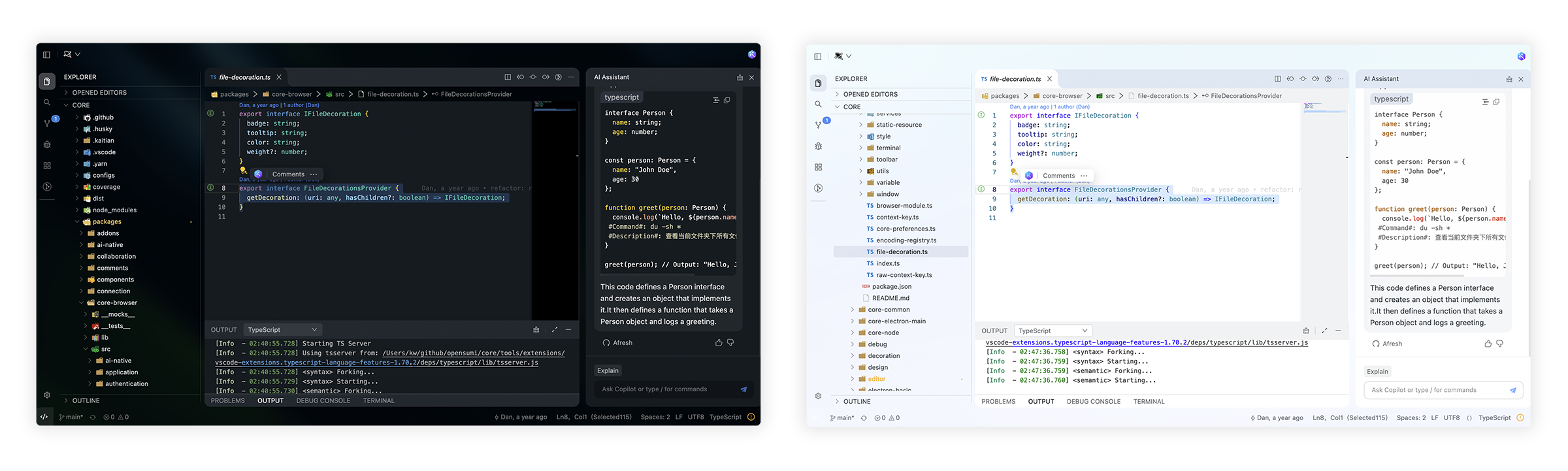
🌟 Getting Started
Here you can find some of our example projects and templates:
- Cloud IDE
- Desktop IDE - based on the Electron
- CodeFuse IDE - AI IDE based on OpenSumi
- CodeBlitz - A pure web IDE Framework
- Lite Web IDE - A pure web IDE on the Browser
- The Mini-App liked IDE
⚡️ Development
$ yarn install
$ yarn run init
$ yarn run download-extension  # Optional
$ yarn run start
By default, the tools/workspace folder in the project would be opened, or you can run the project by specifying the directory in the following way:
$ MY_WORKSPACE={local_path} yarn run start
Usually, you may still encounter some system-level environment dependencies. You can visit Development Environment Preparation to see how to install the corresponding environment dependencies.
📕 Documentation
For complete documentation: opensumi.com
📍 ReleaseNotes & BreakingChanges
You can see all the releasenotes and breaking changes here: CHANGELOG.md.
🔥 Contributing
Read through our Contributing Guide to learn about our submission process, coding rules and more.
🙋♀️ Want to Help?
Want to report a bug, contribute some code, or improve documentation? Excellent! Read up on our Contributing Guidelines for contributing and then check out one of our issues labeled as help wanted or good first issue.
🧑💻 Needs some help?
Go to our issues or discussions to create a topic, it will be resolved as soon as we can.
✨ Contributors
Let's build a better OpenSumi together.
We warmly invite contributions from everyone. Before you get started, please take a moment to review our Contributing Guide. Feel free to share your ideas through Pull Requests or GitHub Issues.
📃 License
Copyright (c) 2019-present Alibaba Group Holding Limited, Ant Group Co. Ltd.
Licensed under the MIT license.
This project contains various third-party code under other open source licenses.
See the NOTICE.md file for more information.
OpenSumi MCPのよくある質問
OpenSumi での開発を始めるにはどうすればよいですか?
yarn install、yarn run init、そして yarn run start を実行することで開始できます。