
GitHub、Slack、Gmail、および45以上のサービスにわたって、AIエージェントが安全にタスクを自動化するための意思決定レイヤーを提供する、ローカルファーストの自動化ランタイムです。
別名 Oolab-labs/patchwork-os
- スター
- 33
- ツール
- —
- ダウンロード数(30日間)
- —
- 最新バージョン
- —
- 最終コミット
- 2026年11月13日
- ライセンス
- MIT
Patchwork OS MCPとは
Patchwork OSはMCPサーバーです。 GitHub、Slack、Gmail、および45以上のサービスにわたって、AIエージェントが安全にタスクを自動化するための意思決定レイヤーを提供する、ローカルファーストの自動化ランタイムです。.
プロジェクトのREADMEから生成された概要
Patchwork OS MCP server について
Patchwork OSは、現実世界のシステムとやり取りするAIエージェントを管理する必要がある開発者やテクニカルオペレーター向けに設計された、ローカルファーストの自動化ランタイムです。エージェントの意図と実行の間に位置する意思決定レイヤーとして機能し、GitHub、Slack、Gmail、およびその他45以上のサービスにわたるアクションを制御できます。アクションを潜在的な影響範囲に基づいて分類することで、高リスクまたは取り消し不可能なタスクを自動的に一時停止し、人間の承認を求めることができます。
ユーザーは、これをVS CodeやCursorなどのエディタ向けに180個のMCPツールを提供するスタンドアロンのIDEブリッジとして、あるいはYAMLレシピとワーカーを使用したフル自動化ランタイムとしてデプロイできます。セットアップには、Node 22.5+、ターミナル、およびClaude CLIやAPIキーなどのモデルドライバーが必要です。ランタイムとすべての認証情報はローカルマシンに保持されますが、システムは選択したモデルプロバイダーおよび許可されたサービスコネクタと通信します。承認キューを強制するガバナンスモードや、制限のない自動化を行う互換モードなど、異なるプロファイルを提供します。
できること
- 1高リスクなエージェントアクションのレビューAIエージェントが、取り消し不可能な書き込み操作を実行する前に、一時停止して許可を求めるように設定できます。
- 2日次の情報集約の自動化Gmail、Google Calendar、GitHub、Linearからデータを集約し、単一のMarkdownサマリーを作成するモーニングブリーフ用のレシピを実行できます。
- 3エージェントの自律レベルの管理開発者はエージェントに特定のアイデンティティを割り当て、過去の成功実績に基づいて、より高い独立性を獲得できるように設定できます。
- 4MCPによるIDE機能の強化IDEブリッジを使用して、診断、リファクタリング、ターミナルアクセスなどの専門的なツールをAIアシスタントに提供します。
プロジェクトの README から作成されています。すべてのユースケースは、その引用と照らし合わせて確認されています。
Patchwork OS MCPのインストール方法
フォーマット検証日 2026年11月10日Claude CodeにPatchwork OS MCPをインストール
$ claude mcp add patchwork-os -- npx -y patchwork-osCursorにPatchwork OS MCPをインストール
~/.cursor/mcp.json
{
  "mcpServers": {
    "patchwork-os": {
      "command": "npx",
      "args": [
        "-y",
        "patchwork-os"
      ]
    }
  }
}VS CodeにPatchwork OS MCPをインストール
.vscode/mcp.json
{
  "servers": {
    "patchwork-os": {
      "type": "stdio",
      "command": "npx",
      "args": [
        "-y",
        "patchwork-os"
      ]
    }
  }
}Claude DesktopにPatchwork OS MCPをインストール
claude_desktop_config.json
{
  "mcpServers": {
    "patchwork-os": {
      "command": "npx",
      "args": [
        "-y",
        "patchwork-os"
      ]
    }
  }
}CodexにPatchwork OS MCPをインストール
~/.codex/config.toml
[mcp_servers.patchwork-os]
command = "npx"
args = ["-y", "patchwork-os"]
Gemini CLIにPatchwork OS MCPをインストール
~/.gemini/settings.json
{
  "mcpServers": {
    "patchwork-os": {
      "command": "npx",
      "args": [
        "-y",
        "patchwork-os"
      ]
    }
  }
}自動チェック
実行日 2026年11月13日詳細レポート →自動チェックに合格しました。これはセキュリティ監査ではありません。コードを読み、サーバーに必要最小限のアクセス権を与えてください。 チェックの仕組み

- ソースリポジトリがリンクされており、アクセス可能oolab-labs/patchwork-os is public and reachablegithub.com/oolab-labs/patchwork-os ↗合格
- パッケージがこのリポジトリをソースとして示しているpatchwork-os names oolab-labs/patchwork-os as sourcenpmjs.com/package/patchwork-os ↗合格
- ビルドの来歴(Sigstore 証明)Sigstore attestation for patchwork-osnpmjs.com/package/patchwork-os/v/1.2.7#provenance ↗合格
- オープンソースライセンス (OSI)MITspdx.org/licenses/MIT.html ↗合格
- 過去1年以内にコミットまたはリリースありLast commit or release 2026-11-13github.com/oolab-labs/patchwork-os ↗合格
- OpenSSF Scorecard未チェック
- パッケージ名が有名なパッケージに酷似していないNo popular package one edit away from patchwork-os合格
- パッケージと依存関係に重大なアドバイザリがない未チェック
- モデルへの隠れた指示がない0 tool descriptions and the README read; no override phrases, credential paths or hidden characters合格
- 破壊的なツールがラベル付けされている未チェック
- リモート endpoint が MCP ハンドシェイクに応答する未チェック
README
GitHubで見るPatchwork OS


You don't have an automation problem. You have a decision problem.
Every AI-agent horror story ends the same way: an action nobody stopped to question. Patchwork OS is the layer between the agent's impulse and the action — a local-first runtime where your AI can automate real work across your editor, GitHub, Slack, Gmail, and 45+ services, while anything consequential can be made to stop and ask you first.
Who it's for: developers and technical operators who already run agents against real systems — a repo that ships, an inbox that matters, a production service — and who want a record of what was allowed and why. It expects a terminal, a Node install, and comfort editing YAML.
Three ideas, one runtime:
-
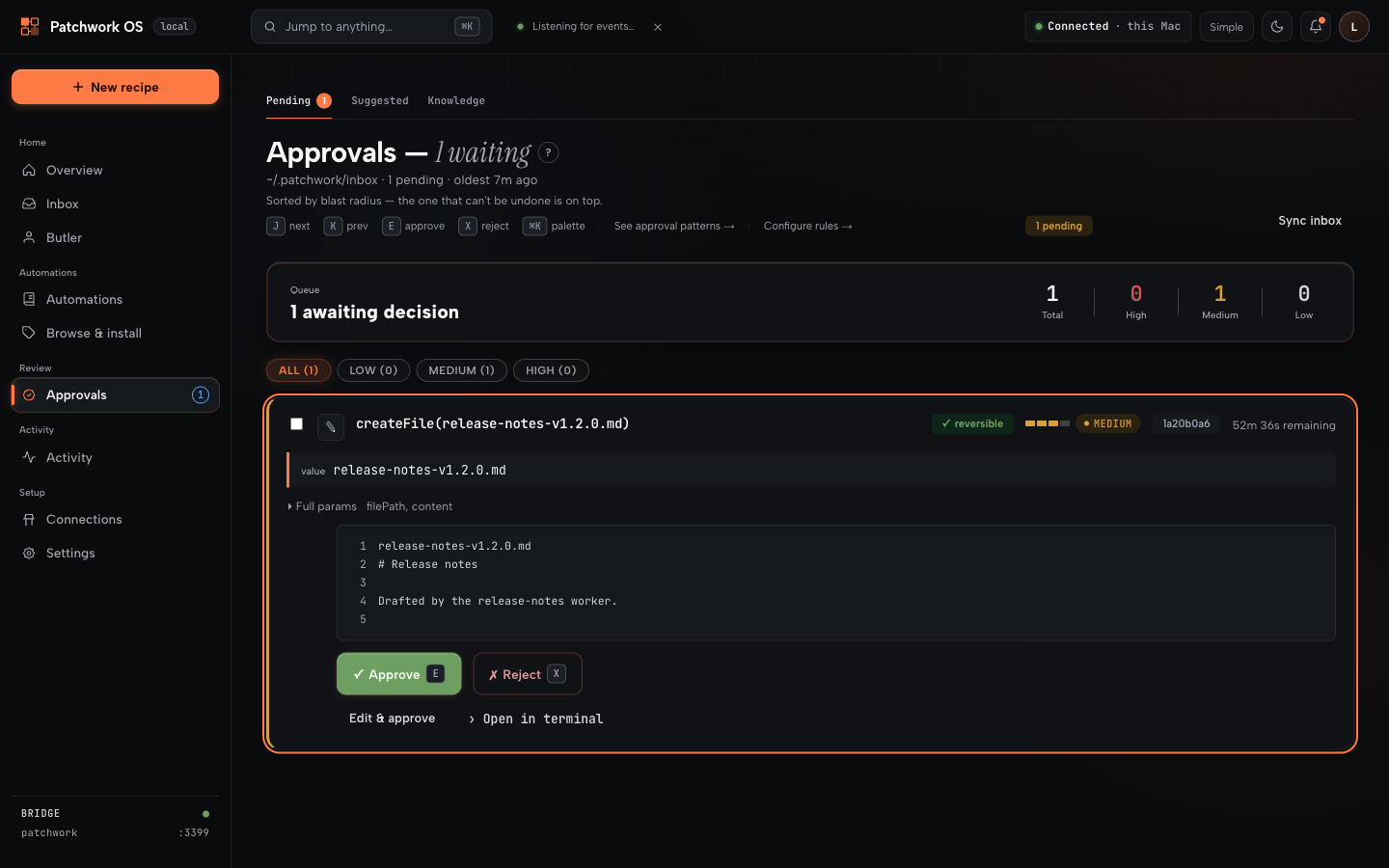
Ask before acting. Every action is classified by blast radius — can it be undone, and how much breaks if it's wrong? Reversible things flow freely. Risky things wait in an approval queue with the evidence attached: what exactly will run, why it fired, and what happens if it's wrong.
-
Trust is earned, never assumed. Workers — named agents with jobs — start supervised and earn independence from their track record, per action type. Good at filing issues ≠ allowed to push code. One bad high-stakes action outweighs a hundred trivial successes. You set the ceiling; the math never raises it for them.
-
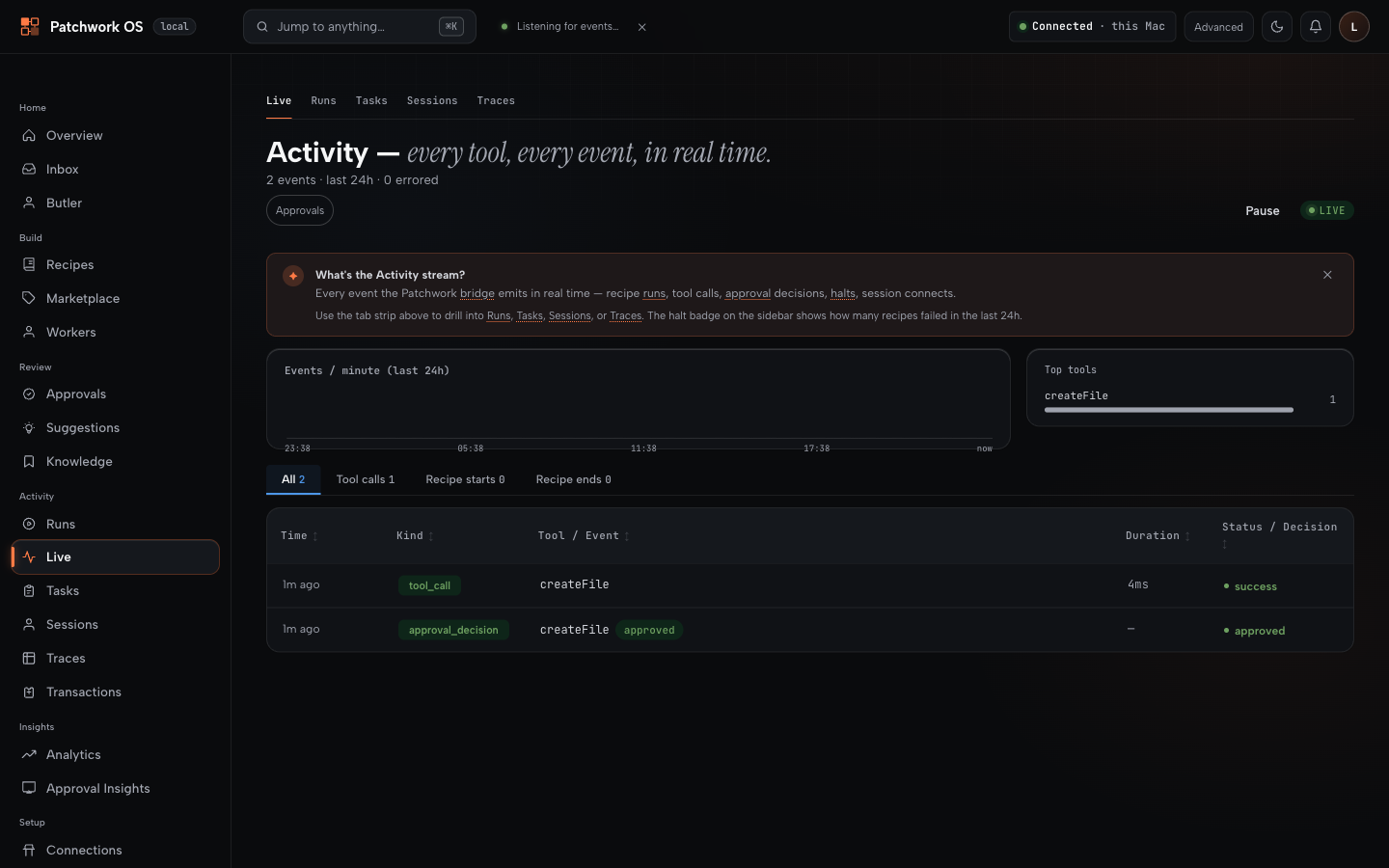
Every decision leaves a receipt. What was done, why it was allowed, and how it turned out — durable, replayable, explainable via
patchwork judgments, the dashboard's traces page, andpatchwork gate explain. When you approve something, you find out later whether you were right.
An agent wants to write a file. With the gate on, it waits — and shows you exactly what it would do:
You approve. The call proceeds, and both halves are on the record:
Status: stable 1.2
Version 1.2.6, published to npm as latest. The decision layer, recipes, connectors and IDE bridge all work and are dogfooded daily. Interfaces can still change between minor versions and some surfaces are rougher than others. Pin an exact version if you are building on it.
Whether the safety features are on depends on how you installed. This matters more than any other line in this README:
- New install:
patchwork-os initon a machine with no~/.patchwork/config.jsonwritesprofile: governed. The gate is on from the first run. - Existing install: upgrading never changes your profile. An existing config stays as it is; opt in with
patchwork profile governedand restart the bridge. - No config at all (starting the bridge without
init): thecompatprofile, where nothing is gated.
Run patchwork doctor to see what is enforced on your machine right now. Trust its output over this table.
| Feature | governed (new init) |
compat (existing config, or none) |
|---|---|---|
| Approval queue | on at high, for automated triggers (cron, webhook, file-watch, git-hook) as well as manual runs |
off unless --approval-gate high or all, and then manual runs only |
| Non-reversible writes | ask for approval whatever their tier | follow the tier threshold |
| Agent steps | contained: read-only tools, no network or shell | full access unless a step sets sandbox: true |
Recipe plugins (servers:) |
load only if listed in plugins.allow |
any entry loads, in-process |
| A tool nothing is registered under | the run halts | the step is skipped |
Kill switch (patchwork panic) |
available; fails closed if its state is unreadable | available; fails open |
| Worker autonomy ramp | on for worker-owned recipes (runs need a driver, e.g. --driver subprocess) |
off unless PATCHWORK_FLAG_WORKER_AUTONOMY=1 (same driver requirement) |
| Telemetry | off | off; opt in explicitly (details) |
Under compat, a fresh bridge is an automation runtime, and it becomes a decision layer when you switch the gate on. Everything above about "stops and asks you first" describes the gate when it is on.
The loop
trigger → recipe/worker → reversible?           → runs
                        → risky, gate on        → approval queue → your yes → receipt
                        → risky, gate off       → runs
                        → forbidden by policy   → refused (no approval unlocks it)
patchwork panic blocks every write-tier tool call across all running bridges, immediately. Reads keep working, and in-flight reasoning is not killed — it is a write block, not a full stop.
Install
npm install -g patchwork-os@beta
patchwork-os init
init scaffolds ~/.patchwork, seeds local-only recipes, and registers Patchwork's PreToolUse hook in ~/.claude/settings.json. Restart Claude Code afterwards — it reads hooks at session start.
Prereqs: Node 22.5+. macOS, Linux, and native Windows (no WSL).
Two things worth knowing before you start:
- Use a global install, not
npx.npxdoes not persist the binary, so the very next command in any guide will not be found. - The web dashboard is not in the npm package. It's a Next.js app that needs its own build, so it ships with the repo:
Everything below works from the CLI without it. The dashboard is where approvals, traces and connector setup are pleasant rather than possible.git clone https://github.com/Oolab-labs/patchwork-os && cd patchwork-os/dashboard npm install && npm run build && npm start # http://localhost:3200
First run: zero connectors
Prove the runtime works before wiring any service to it. daily-status touches only git and local files — no accounts, no network:
patchwork recipe run daily-status
It reads your commits since yesterday plus ~/.patchwork/planned.md, and writes a Markdown digest to ~/.patchwork/inbox/daily-status-<date>.md. If that file exists, your install is sound.
Useful neighbours: patchwork recipe list, patchwork status, patchwork recipe doctor <name> when something misbehaves.
Morning Brief: the connected workflow
patchwork-os init --with-connectors   # seeds the connector-backed recipes
patchwork connect gmail
patchwork connect google-calendar
patchwork connect github
patchwork connect linear
patchwork recipe run morning-brief
The recipe pulls unread mail, today's calendar, your open GitHub issues and PRs, Linear issues, and local git activity, then has a model summarise them into one Markdown brief in ~/.patchwork/inbox/. Its email step is triage — it lists what needs an answer; it does not compose or send replies. Nothing leaves your machine except the API calls to the services you connected.
All four connectors are required as written — no step is guarded, so a missing one halts the run. Drop the steps you don't want, or start from daily-status and add sources one at a time.
Requires a working model driver (--driver subprocess with the Claude CLI on PATH, or an API key). patchwork recipe preflight templates/recipes/morning-brief.yaml lists exactly what a recipe needs before you run it.
Two ways to run this
As an automation runtime — recipes, workers, connectors, the decision layer. Needs ~/.patchwork and a model driver; an editor is optional.
patchwork start # bridge + Claude + dashboard
patchwork start launches claude --ide alongside the bridge, so it expects the Claude CLI on your PATH. Use patchwork start --no-dashboard, or run the bridge alone with patchwork --workspace ., if you don't want that.
On a global npm install there is no dashboard/ to start, so it logs a dashboard warning and carries on with bridge + Claude; pass --no-dashboard to silence it. From a repo clone it starts all three.
As a standalone IDE bridge — 180 MCP tools giving Claude Code eyes and hands in your editor: diagnostics, LSP navigation, refactoring with risk analysis, debugger, terminal, git/GitHub, file ops. No ~/.patchwork, no recipes, no gate.
npm install -g patchwork-os
claude-ide-bridge install-extension     # VS Code / Cursor / Windsurf / Antigravity
claude-ide-bridge --workspace .
claude --ide                            # in another terminal
JetBrains via a companion plugin. Claude Desktop, Gemini CLI, Codex CLI, Grok Build, and claude.ai connect over stdio or HTTP. Use the bridge alone forever if that's all you need; the runtime is an optional layer on top.
claude --ide can't find an IDE? Set CLAUDE_CODE_IDE_SKIP_VALID_CHECK=true (init does this for you).
What "local-first" does and doesn't mean
On your machine: the runtime, every recipe and worker, all credentials and connector tokens, the approval queue, and every log and decision receipt under ~/.patchwork/. Nothing is uploaded, and no Patchwork-operated server sits in any path.
Over the network, necessarily: calls to whatever model you point it at (Anthropic, OpenAI, Google, xAI) and to every connector you authorise (Gmail, GitHub, Slack…). Prompts, and whatever context a step feeds them, go to that model provider. Choosing a local Ollama endpoint keeps inference on your machine too; connector calls still leave it, because that is what a connector is.
Only if you opt in: anonymous analytics.
Other boundaries worth knowing: runCommand executes only allowlisted commands, sendHttpRequest blocks private and loopback ranges, and file tools refuse symlink escapes out of the workspace. Remote deployments must sit behind TLS with OAuth 2.0 — see docs/remote-access.md.
What's here
-
Decision layer — approval queue · blast-radius action classes · worker trust ramp · kill switch · decision receipts
-
Automation — YAML recipes · cron/file/git/test/webhook triggers · event hooks · multi-model (Claude, GPT, Gemini, Grok, Ollama)
-
Connectors — 45+, all writes governed by your policy: GitHub, Slack, Gmail, Calendar, Drive, Linear, Jira, Sentry, Notion, Stripe, PagerDuty, Datadog, …
-
IDE bridge — 180 MCP tools · VS Code-family extension · JetBrains plugin · plugins hot-reload (write tools mid-session)
-
Oversight — web dashboard · mobile push approvals (PWA) · halts/judgments CLI · trace memory across sessions
-
Deployment — your laptop · headless VPS with OAuth 2.0 (guide) · native Windows
Recipes are plain YAML: a trigger (cron, file save, git commit, test run, or any webhook — iPhone Shortcut, Stream Deck, Home Assistant) plus steps. Share them like dotfiles, install them from the marketplace, or let the dashboard generate one from a sentence.
Workers are recipes with an identity and a track record. A worker that triages failing CI starts by only proposing ("this looks like a real break — file an issue?"). Confirm its filings were real and it earns a longer leash — for that job only. It can be demoted in one bad day. You can cap any worker permanently with one line of YAML.
Why not Zapier / an MCP server / a hosted assistant? Honest tradeoffs: documents/comparison.md.
Docs
Docs index · Platform reference · Recipes & triggers · Worker autonomy · Plugin authoring · Architecture · Windows · ADRs
Telemetry
Off by default; nothing is sent unless you opt in. If you do: aggregate counts and latencies only — never paths, prompts, file contents, arguments, or anything from ~/.patchwork/. Details & source.
Contributing & support
Issues · Discussions · CONTRIBUTING.md
⭐ If this saved you a config file or a blown deploy, a star is the only signal I get that it's helping.
MIT © Oolab Labs — what that covers · name and marks
Patchwork OS MCPのよくある質問
Patchwork OS MCPをClaude Codeに追加するには
ターミナルでclaude mcp add patchwork-os -- npx -y patchwork-osを実行します。すべてのプロジェクトで利用するには--scope userを追加します。
Patchwork OS MCPをCursorに追加するには
~/.cursor/mcp.jsonを開き、上記のインストールセクションに示すCursor設定を使ってmcpServersの下にサーバーを追加します。
承認プロセスはどのように機能しますか?
リスクの高いアクションは影響範囲(blast radius)に基づいて分類され、承認キューに送られます。ユーザーは、実行内容、根拠、および潜在的な影響を確認した上で、実行するかどうかを決定できます。
データはサーバーにアップロードされますか?
いいえ、ランタイム、レシピ、ワーカー、認証情報、および意思決定ログはすべて、ローカルマシンの ~/.patchwork/ に保存されます。
エージェントのアクションをすべて即座に停止する必要がある場合はどうすればよいですか?
patchwork panic コマンドを使用すると、実行中のすべてのブリッジにおいて、書き込み権限を持つすべてのツール呼び出しを即座にブロックできます。