
デコレータ、依存性の注入、認証、UIウィジェットを備えた、TypeScriptによるMCP serverの構築、テスト、デプロイを開発者に提供します。
別名 nitrocloudofficial/nitrostack, @nitrostack/cli, @nitrostack/core, @nitrostack/widgets
- スター
- 2,565
- ツール
- —
- ダウンロード数(30日間)
- —
- 最新バージョン
- —
- 最終コミット
- 2026年11月11日
- ライセンス
- Apache-2.0
NitroStack MCPとは
デコレータ、依存性の注入、認証、UIウィジェットを備えた、TypeScriptによるMCP serverの構築、テスト、デプロイを開発者に提供します。
プロジェクトのREADMEから生成された概要
NitroStack MCP server について
このフレームワークを使用する開発者の主な目的は、本番環境向けのTypeScript MCP serverを構築することです。デコレータ駆動のアプローチを通じて、認証、依存性の注入、スキーマ検証などの一般的なバックエンド要件を処理する、定型化された環境を提供します。開発者は @nitrostack/cli を使用して、新しいプロジェクトの雛形作成や開発ライフサイクルの管理を行うことができます。
ユーザーは、JWT、OAuth 2.1、API keyを含むさまざまなセキュリティプロトコルを、サーバーロジックに直接統合できます。また、UIウィジェットを介してReactコンポーネントをtoolの出力に付加することをサポートしており、AIクライアント内でインタラクティブなレスポンスを実現します。テストとデバッグについては、デスクトップアプリケーションのNitroStudioが、toolの実行、ペイロードの検査、およびサーバーとのリアルタイムなチャットを行うためのビジュアルインターフェースを提供します。
このセットアップには、Node.js version 20.18以上およびnpm version 9以上が必要です。エコシステムはモジュール化されており、ランタイム用の @nitrostack/core や、インタラクティブなユーザーインターフェース構築用の @nitrostack/widgets など、特定のパッケージを個別にインストールできます。
できること
- 1新しいプロジェクトの雛形作成開発者はコマンドラインインターフェースを使用して、新しいMCP serverディレクトリを迅速に初期化できます。
- 2インタラクティブなtool出力の作成Reactコンポーネントをtoolの出力に付加することで、ユーザーに対してリッチでインタラクティブなレスポンスを提供できます。
- 3セキュアなtoolアクセスの実装開発者は、API keyなどの組み込みの認証ガードを使用して、特定のtoolを保護できます。
プロジェクトの README から作成されています。すべてのユースケースは、その引用と照らし合わせて確認されています。
NitroStack MCPのインストール方法
フォーマット検証日 2026年11月10日Cursor に追加Gooseに追加Claude CodeにNitroStack MCPをインストール
$ claude mcp add nitrostack -- npx -y @nitrostack/cliCursorにNitroStack MCPをインストール
~/.cursor/mcp.json
{
  "mcpServers": {
    "nitrostack": {
      "command": "npx",
      "args": [
        "-y",
        "@nitrostack/cli"
      ]
    }
  }
}VS CodeにNitroStack MCPをインストール
.vscode/mcp.json
{
  "servers": {
    "nitrostack": {
      "type": "stdio",
      "command": "npx",
      "args": [
        "-y",
        "@nitrostack/cli"
      ]
    }
  }
}VS Code CLIにNitroStack MCPをインストール
$ code --add-mcp '{"name":"nitrostack","type":"stdio","command":"npx","args":["-y","@nitrostack/cli"]}'Claude DesktopにNitroStack MCPをインストール
claude_desktop_config.json
{
  "mcpServers": {
    "nitrostack": {
      "command": "npx",
      "args": [
        "-y",
        "@nitrostack/cli"
      ]
    }
  }
}CodexにNitroStack MCPをインストール
$ codex mcp add nitrostack -- npx -y @nitrostack/cliCodex config.tomlにNitroStack MCPをインストール
~/.codex/config.toml
[mcp_servers.nitrostack]
command = "npx"
args = ["-y", "@nitrostack/cli"]
Gemini CLIにNitroStack MCPをインストール
$ gemini mcp add -s user nitrostack npx -- -y @nitrostack/cliGemini settings.jsonにNitroStack MCPをインストール
~/.gemini/settings.json
{
  "mcpServers": {
    "nitrostack": {
      "command": "npx",
      "args": [
        "-y",
        "@nitrostack/cli"
      ]
    }
  }
}自動チェック
実行日 2026年11月12日完全なレポート →自動チェックに合格しました。これはセキュリティ監査ではありません。コードを読み、サーバーに必要最小限のアクセス権を与えてください。 チェックの仕組み

- ソースリポジトリがリンクされており、アクセス可能合格
- オープンソースライセンス (OSI)合格
- 過去1年以内にコミットまたはリリースあり合格
- パッケージ名が有名なパッケージに酷似していない合格
- リモートエンドポイントがHTTPSを使用未チェック
- 破壊的なツールがラベル付けされている未チェック
- モデルへの隠れた指示がない合格
- パッケージおよびその依存関係に重大な勧告なし未チェック
README
GitHubで見る
Documentation · Quick Start · Blog · NitroStudio · Discord
Quick Start
Prerequisites
- Node.js >= 20.18 (download)
- npm >= 9
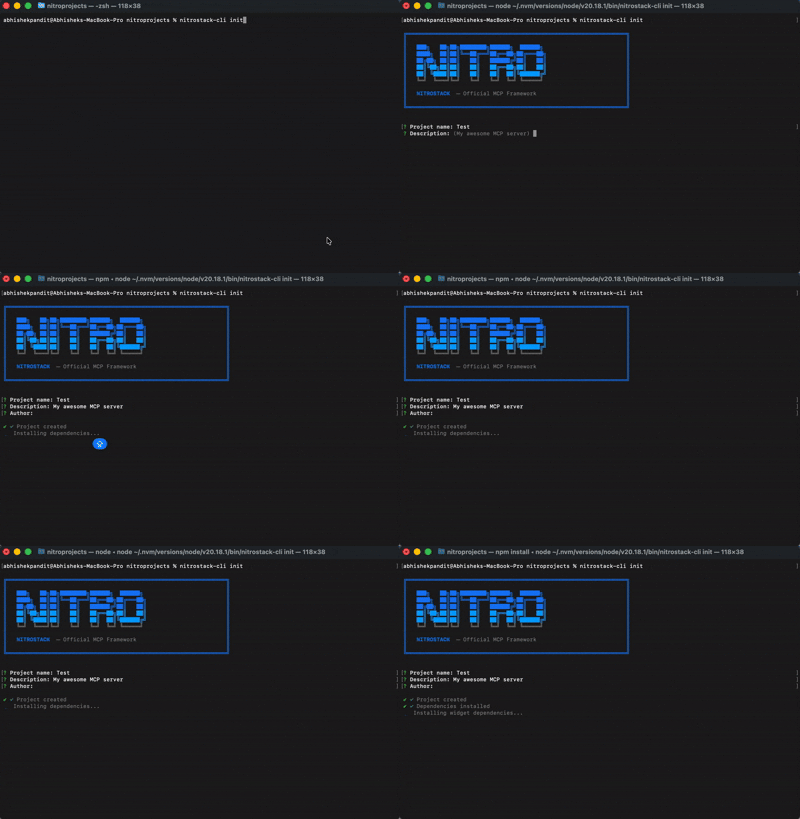
1. Scaffold a new project
npx @nitrostack/cli init my-server
2. Start developing
cd my-server
npm install
npm run dev
Your MCP server is running. Connect it to any MCP-compatible client.
3. Open in NitroStudio
Once your project is scaffolded, open the same folder in NitroStudio for visual testing and debugging.
- Download: https://nitrostack.ai/studio
- Open your
my-serverproject folder - Use NitroStudio to test tools, inspect payloads, and chat with your MCP server
Why NitroStack?
Building MCP servers today means stitching together boilerplate, reinventing authentication, and hoping your tooling scales. NitroStack gives you an opinionated, batteries-included framework so you can focus on what your server actually does.
- Decorator-driven — Define tools, resources, and prompts with clean, declarative TypeScript decorators
- Dependency injection — First-class DI container with singleton, transient, and scoped lifecycles
- Auth built in — JWT, OAuth 2.1, and API key authentication out of the box
- Middleware pipeline — Guards, interceptors, pipes, and exception filters just like enterprise backends
- UI Widgets — Attach React components to tool outputs for rich, interactive responses
- Zod validation — End-to-end type safety from schema to runtime
- NitroStudio — A dedicated desktop app for testing, debugging, and chatting with your server
See It in Action
import { McpApp, Module, ToolDecorator as Tool, z, ExecutionContext } from '@nitrostack/core';

@McpApp({
  module: AppModule,
  server: { name: 'my-server', version: '1.0.0' }
})
@Module({ imports: [] })
export class AppModule {}

export class SearchTools {
  @Tool({
    name: 'search_products',
    description: 'Search the product catalog',
    inputSchema: z.object({
      query: z.string().describe('Search query'),
      maxResults: z.number().default(10)
    })
  })
  @UseGuards(ApiKeyGuard)
  @Cache({ ttl: 300 })
  @Widget('product-grid')
  async search(input: { query: string; maxResults: number }, ctx: ExecutionContext) {
    ctx.logger.info('Searching products', { query: input.query });
    return this.productService.search(input.query, input.maxResults);
  }
}
One decorator stack gives you: API definition + validation + auth + caching + UI — zero boilerplate.
Ecosystem
NitroStack is modular. Install only what you need:
The implementation workspace for NitroStack packages lives in typescript/.
| Package | What it does | Install |
|---|---|---|
@nitrostack/core |
The framework — decorators, DI, server runtime | npm i @nitrostack/core |
@nitrostack/cli |
Scaffolding, dev server, code generators | npm i -g @nitrostack/cli |
@nitrostack/widgets |
React SDK for interactive tool output UIs | npm i @nitrostack/widgets |
NitroStudio
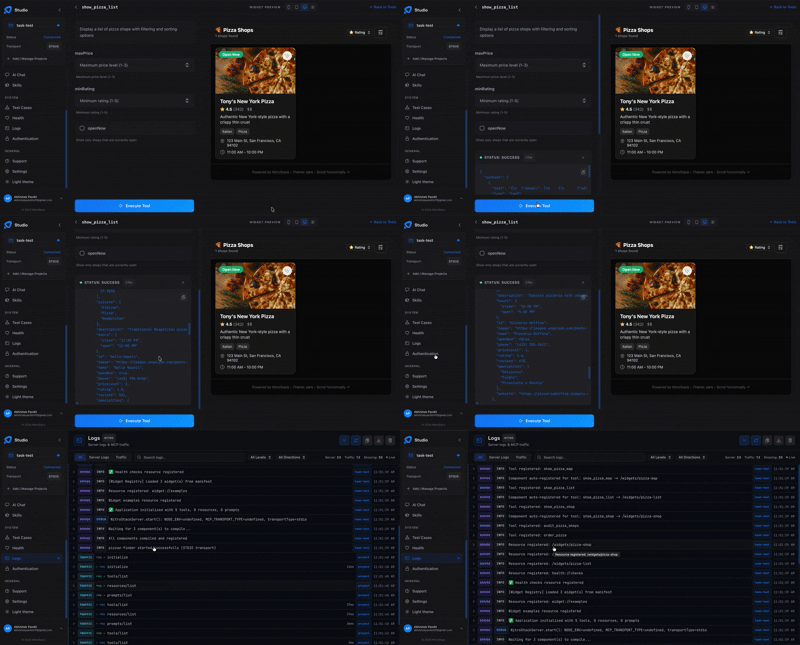
NitroStudio is a desktop app purpose-built for developing MCP servers. Open your project folder — it handles the dev server for you.
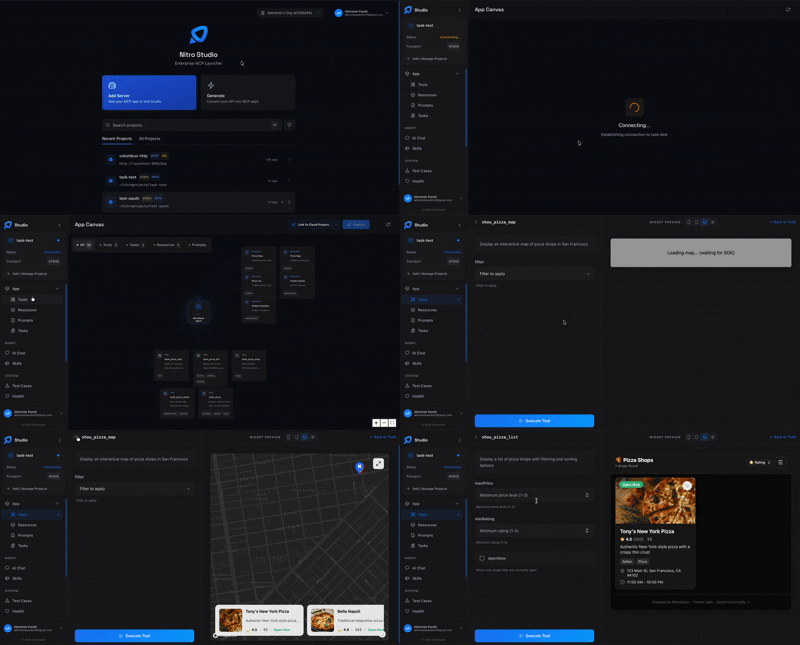
Real-time tool testing Execute tools, inspect payloads, and debug request/response cycles.
Built-in AI chat Talk to your MCP server through an integrated AI assistant.
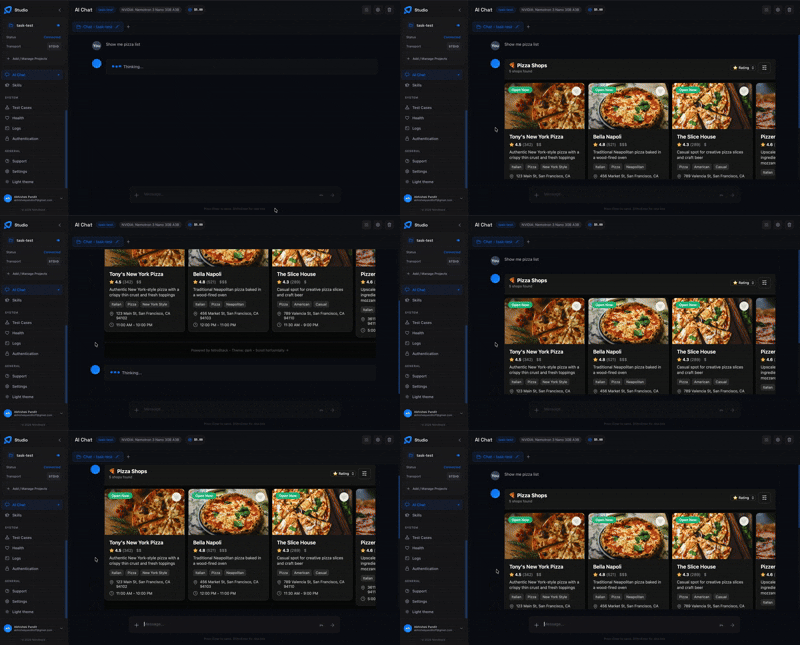
- Widget preview — Instantly visualize your interactive UI components
- Hot reload — Changes reflect in real time as you develop
Documentation
| Resource | Description |
|---|---|
| Getting Started | Installation, quick start, and first project |
| Server Concepts | Modules, DI, and architecture deep dive |
| Tools Guide | Defining tools, validation, annotations |
| Widgets Guide | Building interactive UI components |
| Authentication | JWT, OAuth 2.1, API key setup |
| CLI Reference | All CLI commands and options |
| Deployment | Production checklist, Docker, cloud platforms |
Community
- Discord — Ask questions, share projects, get help
- GitHub Discussions — Proposals, ideas, and Q&A
- Twitter / X — Announcements and updates
- YouTube — Product demos and walkthroughs
- LinkedIn — Company news and updates
- GitHub — Organization profile and open-source work
- Blog — Tutorials, deep dives, and release notes
Contributing
We welcome contributions of all kinds — bug fixes, features, docs, and ideas. Read the Contributing Guide to get started.
Looking for a place to begin? Check out issues labeled good first issue.
Contributors
License
NitroStack is open-source software licensed under the Apache License 2.0.
NitroStack MCPのよくある質問
NitroStack MCPをClaude Codeに追加するには
ターミナルでclaude mcp add nitrostack -- npx -y @nitrostack/cliを実行します。すべてのプロジェクトで利用するには--scope userを追加します。
NitroStack MCPをCursorに追加するには
~/.cursor/mcp.jsonを開き、上記のインストールセクションに示すCursor設定を使ってmcpServersの下にサーバーを追加します。
NitroStackとは何ですか?
NitroStackは、本番環境向けのMCP serverおよびAIネイティブなバックエンドを構築するための、エンタープライズグレードのTypeScriptフレームワークです。デコレータ、依存性の注入、ウィジェット、および組み込みの認証機能が含まれています。
新しいNitroStack MCP serverプロジェクトの雛形を作成するにはどうすればよいですか?
npx @nitrostack/cli init my-server を実行し、ディレクトリに移動して依存関係をインストールした後、npm run dev を実行します。Node.js 20.18以上およびnpm 9以上が必要です。
NitroStackは認証をサポートしていますか?
はい、JWT、OAuth 2.1、およびAPI key認証を標準で提供しています。ApiKeyGuardのようなガードをデコレータで適用できます。
NitroStudioとは何ですか?
NitroStudioは、MCP serverのテスト、デバッグ、およびチャットを行うためのデスクトップアプリです。プロジェクトフォルダを開くだけで、開発サーバーの管理を自動で行います。
MCP toolの出力にUIコンポーネントを付加できますか?
はい、@nitrostack/widgetsパッケージはReact SDKであり、@Widgetデコレータを介してtoolの出力にインタラクティブなUIコンポーネントを付加できます。