
MCPlex MCPサーバー
コミット 2026年10月22日MCPを使用するAIエージェント向けに、セマンティックなツールルーティング、セキュリティガードレール、およびリアルタイムのオブザーバビリティを提供するRustベースのゲートウェイです。
別名 ModernOps888/mcplex
- スター
- 13
- ツール
- 6
- ダウンロード数(30日間)
- —
- 最新バージョン
- —
- 最終コミット
- 2026年10月22日
- ライセンス
- MIT
MCPlex MCPとは
MCPlexはMCPサーバーです。 MCPを使用するAIエージェント向けに、セマンティックなツールルーティング、セキュリティガードレール、およびリアルタイムのオブザーバビリティを提供するRustベースのゲートウェイです。. 6個のツールを提供しており、mcplex_find_tools, mcplex_call_tool, mcplex_list_categoriesなどがあります。
プロジェクトのREADMEから生成された概要
MCPlex MCP server について
数十ものMCP serverを管理すると、膨大なツール定義によってAIエージェントのコンテキストウィンドウが圧迫される可能性があります。MCPlexは、エージェントと各種MCP serverの間に位置するRust製のシングルバイナリゲートウェイとして機能し、セマンティックなツールルーティングを通じてこの問題を解決します。特定のタスクに必要なツールのみをインテリジェントに選択することで、トークン消費量を70%から90%削減できます。
開発者は、提供されるstdioブリッジを介して、Claude Desktop、Claude Code、またはVS Codeを使用するエージェントを接続できます。また、CursorなどのHTTP対応クライアントやカスタムのPythonエージェントは、ゲートウェイに直接接続することが可能です。本システムは、ローカルサーバー向けの永続的なstdioトランスポートと、リモート接続向けのステートレスなstreamable HTTPの両方をサポートしています。さらに、RBAC、API key認証、監査ログを含む中央管理レイヤーを提供し、ツールへのアクセスを保護します。
ルーティング機能に加え、本ゲートウェイはダッシュボードとPrometheusメトリクスによるリアルタイムのオブザーバビリティを提供します。読み取り専用操作のためのレスポンスキャッシュや、本番環境の再起動を不要にする設定のホットリロードなどの機能も備えています。これにより、セキュリティと可視性を維持しながら、複雑なマルチエージェントシステムをオーケストレーションするためのセントラルハブとして機能します。
できること
- 1コンテキストウィンドウの肥大化を抑制AIエージェントがセマンティックルーティングを使用することで、不要な数千ものツール定義をメモリにロードすることを回避できます。
- 2セキュアなマルチテナントのツールアクセスロールベースのアクセス制御(RBAC)とAPI key認証を実装することで、どのエージェントが特定のツールを使用できるかを管理できます。
- 3エージェントのパフォーマンスとコストの監視運用チームは、リアルタイムダッシュボードを通じて、レイテンシ、トークン使用量、およびツール選択のエラーを追跡できます。
プロジェクトの README から作成されています。すべてのユースケースは、その引用と照らし合わせて確認されています。
MCPlex MCPツール 6
READMEから検出mcplex_find_toolsmcplex_call_toolmcplex_list_categoriessemantickeywordpassthrough
| mcplex_find_tools | — | |
| mcplex_call_tool | — | |
| mcplex_list_categories | — | |
| semantic | — | |
| keyword | — | |
| passthrough | — |
設定
MCPLEX_GATEWAY
| 名前 | 説明 | 種類 |
|---|---|---|
| MCPLEX_GATEWAY | — |
自動チェック
実行日 2026年11月13日完全なレポート →まだ検証されていません。サーバーには80点のスコア、重大な問題がないこと、および検証に必要な十分なデータが必要です。 チェックの仕組み · 点数を上げるための改善点

- ソースリポジトリがリンクされており、アクセス可能modernops888/mcplex is public and reachablegithub.com/modernops888/mcplex ↗合格
- パッケージがこのリポジトリをソースとして指定未チェック
- ビルドの来歴 (Sigstore 証明)未チェック
- オープンソースライセンス (OSI)MITspdx.org/licenses/MIT.html ↗合格
- 過去1年以内にコミットまたはリリースありLast commit or release 2026-10-22github.com/modernops888/mcplex ↗合格
- OpenSSF Scorecard未チェック
- パッケージ名が有名なパッケージに酷似していない未チェック
- パッケージおよびその依存関係に重大な勧告なし未チェック
- モデルへの隠れた指示がない6 tool descriptions and the README read; no override phrases, credential paths or hidden characters合格
- 破壊的なツールがラベル付けされているNo tool named like delete, drop or exec合格
- リモートエンドポイントが MCP ハンドシェイクに応答未チェック
README
GitHubで見る🚀 MCPlex — The MCP Smart Gateway
Semantic tool routing • Security guardrails • Real-time observability


Stop dumping 50k tokens of tool definitions into your LLM's context window. MCPlex intelligently routes only the tools your agent actually needs.
The Problem
Every developer building multi-agent AI systems with MCP hits the same wall:
| Pain Point | Impact |
|---|---|
| 🧠 Context Bloat | 20+ MCP servers = 50k+ tokens of tool definitions consuming your context window |
| 🔓 No Security | No RBAC, no audit trails, tool poisoning vulnerabilities |
| 👁️ Blind Operations | Can't track costs, latency, or debug wrong tool selection |
| 🔄 Restart Required | Config changes require full restart in production |
| 🕸️ N×M Complexity | Orchestrating dozens of servers is an integration nightmare |
The Solution
MCPlex is a single-binary Rust gateway that sits between your AI agent and MCP servers:
Your Agent ──→ MCPlex Gateway ──→ GitHub MCP     (stdio — persistent)
                    │           ──→ Slack MCP      (stdio — persistent)
                    │           ──→ Database MCP   (HTTP)
                    │           ──→ Filesystem MCP  (stdio — persistent)
                    ▼
            🧠 Smart Routing (70-90% token savings)
            🔒 RBAC + Audit Logs + API Key Auth
            📊 Real-time Dashboard + Prometheus
            📦 Response Caching (auto-detect read-only)
            🔑 Multi-Tenant (API key → role mapping)
            🔥 Hot-reload Config
Transport Support
MCPlex supports both MCP transport types as a first-class citizen:
| Transport | Discovery | Runtime Calls | Connection Model |
|---|---|---|---|
| Stdio | ✅ Full MCP handshake | ✅ Multiplexed JSON-RPC | Persistent child process (long-lived) |
| Streamable HTTP | ✅ Full MCP handshake | ✅ Standard HTTP POST | Stateless (connection pooling) |
Stdio servers are spawned at startup and kept alive for the gateway's lifetime. The MCP handshake (initialize → notifications/initialized) runs once, then all subsequent tools/call, resources/read, and prompts/get requests are multiplexed over the same stdin/stdout pipe using JSON-RPC ID correlation.
⚡ Quick Start
1. Install (Pre-built Binary)
Download the latest release from GitHub Releases:
# Linux / macOS
curl -LO https://github.com/ModernOps888/mcplex/releases/latest/download/mcplex-linux-x86_64
chmod +x mcplex-linux-x86_64
sudo mv mcplex-linux-x86_64 /usr/local/bin/mcplex
2. Build from Source
git clone https://github.com/modernops888/mcplex.git
cd mcplex
cargo build --release
3. Configure
cp mcplex.toml my-config.toml
# Edit my-config.toml with your MCP servers
Minimal config for stdio servers:
[gateway]
listen = "127.0.0.1:3100"
dashboard = "127.0.0.1:9090"

[router]
strategy = "semantic"

[[servers]]
name = "filesystem"
command = "npx"
args = ["-y", "@modelcontextprotocol/server-filesystem", "/tmp"]

[[servers]]
name = "memory"
command = "npx"
args = ["-y", "@modelcontextprotocol/server-memory"]
4. Run
./target/release/mcplex --config my-config.toml

# Expected output:
# 🔌 Spawning stdio server 'filesystem': npx ["-y", "@modelcontextprotocol/server-filesystem", "/tmp"]
# 🤝 MCP handshake complete for 'filesystem'
# 📡 Server 'filesystem': 11 tools, 0 resources, 0 prompts
# 🔌 Spawning stdio server 'memory': npx ["-y", "@modelcontextprotocol/server-memory"]
# 🤝 MCP handshake complete for 'memory'
# 📡 Server 'memory': 3 tools, 0 resources, 0 prompts
# ⚡ MCPlex gateway listening on 127.0.0.1:3100
5. Connect Your Agent
Point your MCP client to http://127.0.0.1:3100/mcp and open the dashboard at http://127.0.0.1:9090.
🚀 Running as a Service (Deployment)
For persistent environments, run MCPlex as a background service to ensure it starts automatically on boot and restarts if it crashes.
Linux (systemd)
Create a systemd unit file at /etc/systemd/system/mcplex.service:
[Unit]
Description=MCPlex Gateway
After=network.target

[Service]
Type=simple
User=your_user
WorkingDirectory=/path/to/mcplex
ExecStart=/usr/local/bin/mcplex --config /path/to/mcplex/mcplex.toml
Restart=always
RestartSec=3

[Install]
WantedBy=multi-user.target
Enable and start the service:
sudo systemctl daemon-reload
sudo systemctl enable mcplex
sudo systemctl start mcplex
sudo systemctl status mcplex
macOS (launchd)
Create a launchd plist file at ~/Library/LaunchAgents/com.modernops.mcplex.plist:
<?xml version="1.0" encoding="UTF-8"?>
<!DOCTYPE plist PUBLIC "-//Apple//DTD PLIST 1.0//EN" "http://www.apple.com/DTDs/PropertyList-1.0.dtd">
<plist version="1.0">
<dict>
    <key>Label</key>
    <string>com.modernops.mcplex</string>
    <key>ProgramArguments</key>
    <array>
        <string>/usr/local/bin/mcplex</string>
        <string>--config</string>
        <string>/path/to/mcplex.toml</string>
    </array>
    <key>RunAtLoad</key>
    <true/>
    <key>KeepAlive</key>
    <true/>
    <key>StandardOutPath</key>
    <string>/tmp/mcplex.log</string>
    <key>StandardErrorPath</key>
    <string>/tmp/mcplex-error.log</string>
    <key>EnvironmentVariables</key>
    <dict>
        <key>PATH</key>
        <string>/usr/local/bin:/usr/bin:/bin:/usr/sbin:/sbin</string>
    </dict>
</dict>
</plist>
Load and start the service:
launchctl load ~/Library/LaunchAgents/com.modernops.mcplex.plist
launchctl start com.modernops.mcplex
Log Rotation
When running as a service, ensure you implement log rotation to prevent infinite log growth. For macOS, add an entry to /etc/newsyslog.conf; for Linux, use logrotate. MCPlex also has built-in audit log rotation configured via max_log_size_mb.
Service Troubleshooting
| Issue | Resolution |
|---|---|
| Service fails to start immediately | Check your configuration file syntax by running mcplex --check --config <path> manually. |
| Port already in use | Verify no other service is bound to the listen port. Change gateway.listen in your config. |
launchd permission errors |
Ensure the ProgramArguments path is absolute and executable by the user. |
| Server respawn loop | Check the StandardErrorPath log for fatal bootstrap errors or missing dependencies (e.g., Node.js for npx servers). |
🔌 How to Connect Your Agent
MCPlex is a transparent MCP proxy — any MCP client that supports Streamable HTTP can connect to it. Your agent talks to MCPlex as if it were a single MCP server, and MCPlex handles multiplexing, routing, and security behind the scenes.
Claude Code / Claude Desktop (Recommended — stdio bridge)
Claude Code and Claude Desktop use stdio transport. MCPlex ships a cross-platform bridge (bridge.mjs) that translates stdio ↔ HTTP. Works on macOS, Windows, and Linux.
Add a .mcp.json to your project root (Claude Code auto-discovers it):
{
  "mcpServers": {
    "mcplex": {
      "command": "node",
      "args": ["/path/to/mcplex/bridge.mjs"],
      "env": {
        "MCPLEX_GATEWAY": "http://127.0.0.1:3100/mcp"
      }
    }
  }
}
For Claude Desktop, add the same config to claude_desktop_config.json.
VS Code / GitHub Copilot (agent mode)
VS Code supports MCP servers natively. Add a .vscode/mcp.json to your workspace (or run MCP: Add Server from the Command Palette) pointing at the MCPlex bridge:
{
  "servers": {
    "mcplex": {
      "type": "stdio",
      "command": "node",
      "args": ["/path/to/mcplex/bridge.mjs"],
      "env": {
        "MCPLEX_GATEWAY": "http://127.0.0.1:3100/mcp"
      }
    }
  }
}
A ready-to-copy template lives at examples/vscode-mcp.json.
With the default meta-tool mode, Copilot's agent sees just 3 gateway tools (~200 tokens) instead of every tool definition from every connected server — the same 70–90% context savings apply inside your IDE session. Tool discovery happens on demand via mcplex_find_tools, and every call is still routed through RBAC, allowlists, audit logging, and the response cache.
Cursor / Windsurf / HTTP-capable MCP Clients
Clients that support streamable HTTP can connect directly:
{
  "mcpServers": {
    "mcplex-gateway": {
      "url": "http://127.0.0.1:3100/mcp"
    }
  }
}
Custom Python Agent
import requests

GATEWAY = "http://127.0.0.1:3100/mcp"
HEADERS = {"Authorization": "Bearer YOUR_API_KEY"}  # Optional

# Initialize
resp = requests.post(GATEWAY, json={
    "jsonrpc": "2.0", "id": 1, "method": "initialize",
    "params": {"protocolVersion": "2025-11-25", "capabilities": {},
               "clientInfo": {"name": "my-agent", "version": "1.0"}}
}, headers=HEADERS)

# List all tools (MCPlex aggregates from all servers)
resp = requests.post(GATEWAY, json={
    "jsonrpc": "2.0", "id": 2, "method": "tools/list"
}, headers=HEADERS)
tools = resp.json()["result"]["tools"]

# Call a tool (MCPlex routes to the right server automatically)
resp = requests.post(GATEWAY, json={
    "jsonrpc": "2.0", "id": 3, "method": "tools/call",
    "params": {"name": "create_issue", "arguments": {"repo": "my-repo", "title": "Bug fix"}}
}, headers=HEADERS)
How It Catches Your Agent's Calls
MCPlex acts as a man-in-the-middle proxy for all MCP traffic:
Your Agent ──POST /mcp──→ MCPlex Gateway ──→ Upstream MCP Server
                              │                (persistent stdio or HTTP)
                              ├─ ✅ Auth check (constant-time API key compare)
                              ├─ 🚦 Rate limit check
                              ├─ 🧪 Input validation (name charset, 64KB / depth-16 args cap)
                              ├─ 🔒 RBAC + allowlist/blocklist (role bound to API key)
                              ├─ 📝 Audit log (every call)
                              └─ 📊 Metrics (latency, tokens, security events)
Every tools/call goes through the security engine and is logged. Every tools/list goes through the semantic router. There's no way to bypass it — if your agent uses MCPlex as its MCP endpoint, all calls are intercepted, checked, and logged.
🤖 Compatible AI Models
MCPlex is model-agnostic — it routes any MCP-compliant client traffic regardless of which LLM is driving it. These are the frontier models actively tested and validated with MCPlex:
| Model | Provider | Context | MCP Client | Best For |
|---|---|---|---|---|
| GPT-6 Astra | OpenAI | 1M / 1.05M | ChatGPT Work, custom | Flagship reasoning + autonomous agentic tasks |
| GPT-6.1 Sol | OpenAI | 1M / 1.05M | ChatGPT Work, custom | High-precision coding + system architecture |
| GPT-5 | OpenAI | 400K | ChatGPT Work, custom | Balanced performance / cost |
| o3 / o3-mini | OpenAI | 200K | Custom, Cursor, IDEs | Deep math, logic & low-latency reasoning |
| Claude Opus 5.5 | Anthropic | 500K | Claude Code, Claude Desktop | Frontier multi-step agent workflows & deep code |
| Claude Sonnet 5.5 | Anthropic | 400K | Claude Code, Cursor, Windsurf | High-speed coding + everyday agentic tasks |
| Claude Haiku 5.5 | Anthropic | 200K | Claude Code, custom | Ultra-low-latency tool routing & subagents |
| Claude Fable 5.1 | Anthropic | 1M | Claude Code, Claude Desktop | Long-horizon extended reasoning |
| Gemini 4 Argon | Google DeepMind | 2M | Gemini Spark, custom | Frontier multimodal + massive-context synthesis |
| Gemini 3.8 Pro | Google DeepMind | 2M | Gemini Spark, custom | Multimodal + enterprise Workspace integration |
| Gemini 3.8 Flash | Google DeepMind | 1M | Gemini Spark, custom | High-throughput, cost-efficient agent loops |
| DeepSeek V3 / R1 | DeepSeek | 128K | Custom, Open-WebUI, Ollama | Open frontier reasoning, cost efficiency |
| Grok 4.7 | xAI | 256K | Custom / open-weight stacks | Real-time reasoning, competitive coding |
| Llama 3.3 70B | Meta | 128K | Ollama, vLLM, local stacks | Self-hosted open-weights tool execution |
The meta-tool pattern (3 gateway tools, ~200 tokens) is particularly effective with models that have smaller default context budgets — MCPlex's token savings become more impactful as model costs rise.
Context savings scale with model pricing. With GPT-6 Astra and Claude Opus 5.5 at frontier pricing, eliminating 40k tokens of tool definitions per request translates to measurable cost reduction at scale.
🧠 Semantic Tool Routing
The killer feature. Instead of dumping all tool definitions into your LLM's context, MCPlex uses a meta-tool pattern that works with every standard MCP client — no custom extensions needed:
| Scenario | Without MCPlex | With MCPlex | Savings |
|---|---|---|---|
| 5 servers, 50 tools | ~10,000 tokens | ~200 tokens | 98% |
| 10 servers, 100 tools | ~20,000 tokens | ~200 tokens | 99% |
| 20 servers, 200 tools | ~40,000 tokens | ~200 tokens | 99.5% |
How It Works
When your agent calls tools/list, MCPlex returns 3 lightweight meta-tools (~200 tokens) instead of all real tools:
Agent                        MCPlex Gateway
  │                               │
  ├──tools/list──────────────────►│  Returns: mcplex_find_tools, mcplex_call_tool,
  │                               │           mcplex_list_categories (~200 tokens)
  │                               │
  ├──mcplex_find_tools────────────►│  "store a memory"
  │◄──────────────────────────────┤  → [{name: "create_memory", desc: "...", inputSchema: {...}},
  │                               │     {name: "save_note", desc: "...", inputSchema: {...}}]
  │                               │
  ├──mcplex_call_tool─────────────►│  {name: "create_memory", arguments: {...}}
  │◄──────────────────────────────┤  → tool result (routed through security + cache + audit)
mcplex_find_tools(query)— Search for tools by natural language intent. Returns matching tools with full schemas.mcplex_call_tool(name, arguments)— Execute a discovered tool. Routes through the full security/audit/cache pipeline.mcplex_list_categories()— Browse available tool categories (server groups) with tool counts.
This works with Claude Code, Claude Desktop, Cursor, Windsurf, and any other MCP client — no custom extensions or client-side plugins required.
Routing Mode
MCPlex supports three routing modes via router.mode:
| Mode | Behavior | Client Compatibility |
|---|---|---|
metatool (default) |
Returns 3 gateway meta-tools; agent discovers real tools via mcplex_find_tools |
✅ All standard MCP clients |
passthrough |
Returns all real tools directly (no routing indirection) | ✅ All standard MCP clients |
legacy |
Uses _mcplex_query param extension for filtering |
❌ Custom clients only |
Routing Strategy
Within metatool and legacy modes, MCPlex uses a routing strategy to rank tools:
semantic— Character n-gram embeddings with cosine similarity (recommended)keyword— TF-IDF keyword matching (zero ML dependency)passthrough— No filtering (baseline)
[router]
mode = "metatool"            # "metatool", "passthrough", or "legacy"
strategy = "semantic"        # "semantic", "keyword", or "passthrough"
top_k = 5                    # Return top 5 most relevant tools
similarity_threshold = 0.3   # Minimum relevance score
cache_embeddings = true       # Cache for faster repeated queries
🔒 Security Engine
Role-Based Access Control (RBAC)
[security]
enable_rbac = true

[roles.developer]
allowed_tools = ["github/*", "database/query_*"]

[roles.admin]
allowed_tools = ["*"]

[roles.readonly]
allowed_tools = ["*/list_*", "*/get_*"]
blocked_tools = ["*/delete_*", "*/drop_*"]
Role trust boundary: a caller's role is only ever established server-side, from a verified
api_key/api_keysmatch — never from anything a client sends in the request body. Whenenable_rbac = trueand noapi_key/api_keysare configured, every tool call is denied by default (no role can be established), and the gateway logs a startup warning so this isn't mistaken for a bug.
Per-Server Tool Blocklists
[[servers]]
name = "database"
url = "http://localhost:8080/mcp"
blocked_tools = ["drop_table", "delete_*", "truncate_*"]
Structured Audit Logging
Every tool invocation is logged as JSON Lines:
{"timestamp":"2026-04-10T10:00:00Z","event":"tool_call","tool_name":"github/create_issue","server_name":"github","duration_ms":342,"trace_id":"a1b2c3d4"}
{"timestamp":"2026-04-10T10:00:01Z","event":"tool_blocked","tool_name":"database/drop_table","reason":"security_policy","trace_id":"e5f6g7h8"}
📊 Real-time Dashboard
Built-in observability dashboard at http://localhost:9090:
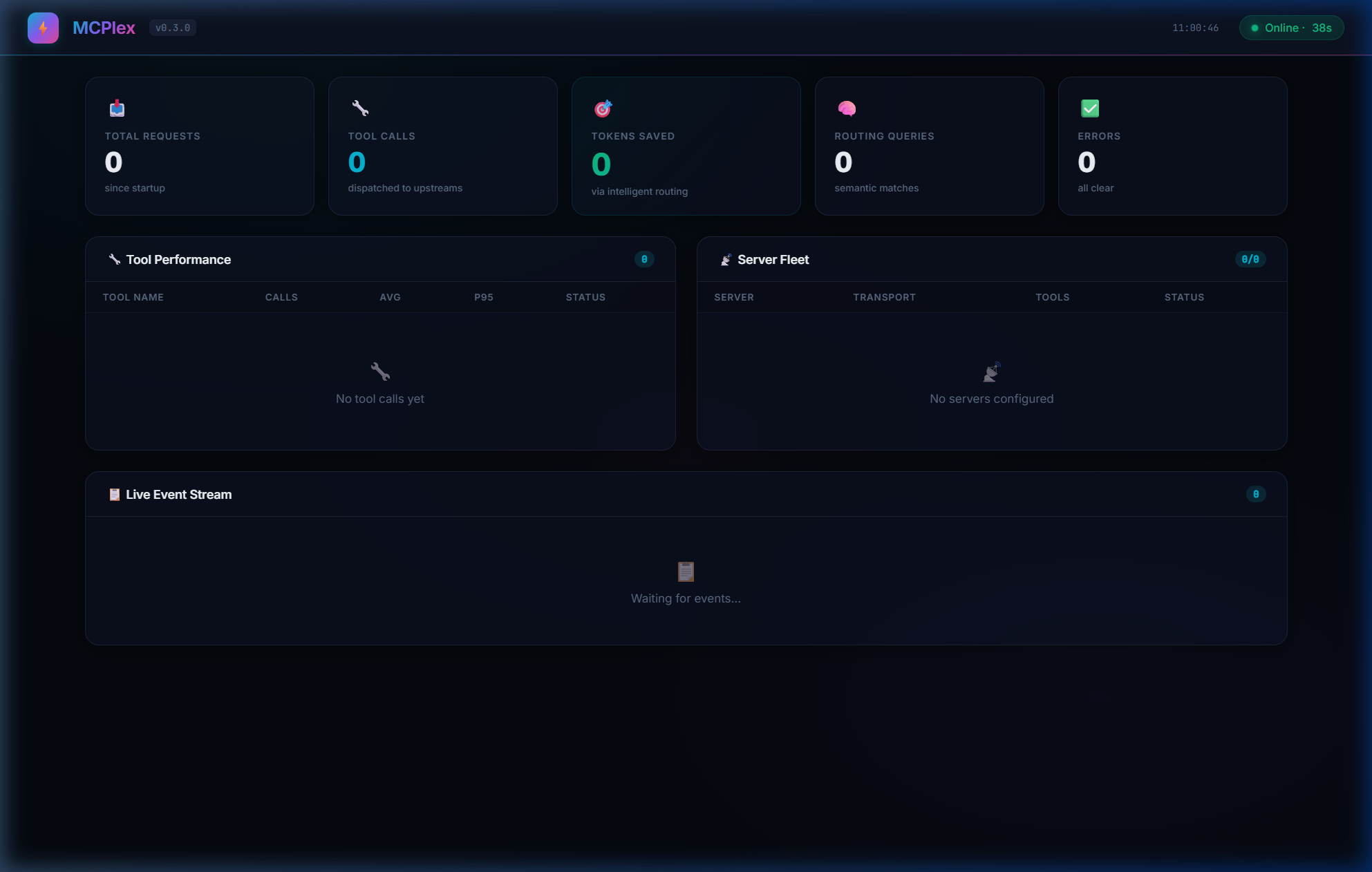
- Global Metrics — Total requests, tool calls, errors, tokens saved
- Per-Tool Stats — Invocation count, avg/p50/p95/p99 latency
- Server Fleet — Connected servers, transport type, tool/resource/prompt counts
- Live Event Stream — Real-time feed of all gateway activity with latency tags
Glassmorphism design with animated gradients. Auto-refreshes every 3 seconds. Zero configuration.
By default the dashboard's /api/* routes are unauthenticated — fine for 127.0.0.1-only binds, but if you expose the dashboard beyond localhost, set gateway.dashboard_api_key so requests need an Authorization: Bearer <key> (or X-API-Key) header:
[gateway]
dashboard_api_key = "${MCPLEX_DASHBOARD_API_KEY}"
📦 Response Caching
Avoid redundant upstream calls for read-only tools:
[cache]
enabled = true
ttl_seconds = 300     # 5 minute TTL
max_entries = 1000    # Max cached responses
Cached responses are partitioned by caller role, so a cache entry from one role/tenant is never served to another. MCPlex auto-detects read-only tools by prefix (list_*, get_*, search_*, query_*, describe_*, show_*). You can override with custom patterns:
[cache]
patterns = ["my_custom_tool", "expensive_*"]
Write operations (create_*, update_*, delete_*) are never cached by default.
🔑 Multi-Tenant API Keys
Map API keys to RBAC roles for team-based access:
[api_keys."sk-dev-team-abc123"]
role = "developer"
description = "Dev team key"

[api_keys."sk-admin-xyz789"]
role = "admin"
description = "Admin key"
When a request comes in with Authorization: Bearer sk-dev-team-abc123, MCPlex automatically applies the developer role's RBAC policies.
🔥 Hot-Reload Configuration
Config changes apply instantly — no restart needed:
# Edit config while MCPlex is running
vim mcplex.toml

# MCPlex automatically detects changes:
# 🔄 Config file changed, reloading...
# ✅ Configuration reloaded successfully
📖 Full MCP Capability Support
MCPlex aggregates and forwards all three MCP capability types from upstream servers:
| Capability | List | Execute/Read | Routing |
|---|---|---|---|
| Tools | tools/list → aggregated |
tools/call → routed to owner |
✅ Semantic / Keyword |
| Resources | resources/list → aggregated |
resources/read → routed by URI |
Direct routing |
| Prompts | prompts/list → aggregated |
prompts/get → routed by name |
Direct routing |
Configuration Reference
[gateway]
| Key | Type | Default | Description |
|---|---|---|---|
listen |
string | 127.0.0.1:3100 |
MCP client connection address |
dashboard |
string | — | Dashboard address (disabled if not set) |
hot_reload |
bool | true |
Auto-reload config on file change |
name |
string | mcplex |
Gateway instance name |
api_key |
string | — | API key for client auth (supports ${ENV}) |
dashboard_api_key |
string | — | API key for the dashboard /api/* routes (supports ${ENV}). If unset, the dashboard is unauthenticated — bind it to 127.0.0.1 in that case. |
rate_limit_rps |
int | 0 |
Max requests/sec per client (0 = unlimited) |
[router]
| Key | Type | Default | Description |
|---|---|---|---|
mode |
string | metatool |
metatool, passthrough, or legacy |
strategy |
string | keyword |
semantic, keyword, or passthrough |
top_k |
int | 5 |
Maximum tools returned per query |
similarity_threshold |
float | 0.3 |
Minimum relevance score (0.0-1.0) |
cache_embeddings |
bool | true |
Cache tool embeddings |
[security]
| Key | Type | Default | Description |
|---|---|---|---|
enable_rbac |
bool | false |
Enable role-based access control |
enable_audit_log |
bool | false |
Enable structured audit logging |
audit_log_path |
string | ./logs/audit.jsonl |
Audit log file path |
max_log_size_mb |
int | 100 |
Max log file size before rotation (keeps 5 backups) |
circuit_breaker_max_crashes |
int | 5 |
Max crashes within the window before respawns are blocked |
circuit_breaker_window_secs |
int | 60 |
Sliding window (seconds) for crash counting |
request_timeout_secs |
int | 30 |
Steady-state per-request timeout for HTTP and stdio upstream calls, once connected (0 = no timeout) |
default_handshake_timeout_secs |
int | 30 |
Default timeout for the initial stdio MCP handshake (initialize), before a server is considered failed and enters the respawn loop. Overridable per server — see servers[].handshake_timeout_secs below. (0 = no timeout) |
MCPlex MCPのよくある質問
MCPlex MCPが提供するツールは
6個のツールを提供しており、mcplex_find_tools, mcplex_call_tool, mcplex_list_categories, semantic, keywordなどがあります。
セキュリティ機能はサポートされていますか?
はい、RBAC、監査ログ、API key認証、および入力バリデーションが含まれています。