
mex MCPサーバー
コミット 2026年11月15日Gitリポジトリ内にMarkdownファイルとして知識を保存することで、エンジニアとAIエージェント間でプロジェクトの共有メモリを提供します。
別名 mex-memory/mex
- スター
- 1,795
- ツール
- —
- ダウンロード数(30日間)
- —
- 最新バージョン
- —
- 最終コミット
- 2026年11月15日
- ライセンス
- MIT
mex MCPとは
Gitリポジトリ内にMarkdownファイルとして知識を保存することで、エンジニアとAIエージェント間でプロジェクトの共有メモリを提供します。
プロジェクトのREADMEから生成された概要
mex MCP server について
mexは、エンジニアとAIコーディングエージェントが、Gitリポジトリ内にMarkdownファイルとして知識を保存することで、共有のプロジェクトメモリを維持できるようにします。このシステムにより、アーキテクチャの決定事項、デバッグ履歴、技術的な制約が、標準的なGit操作を通じてコードと共に管理されます。ローカルでの使用を想定して設計されているため、データの管理にホストサービス、Docker、または外部のMEXアカウントは必要ありません。
開発者はCLIを使用して環境をセットアップし、Project Hubを使用して接続された知識の探索や提案された変更の確認を行います。このシステムは、mex-inbox、mex-relay、mex-statechartなどの特定のSKILLを通じて、Claude CodeやCodexなどのツールと統合されます。CursorやGitHub Copilotなどのエディタ向けにインストラクションアンカーを提供していますが、完全なSKILLコマンドは現在、サポートされているエージェントCLIに限定されています。セットアップはnpx経由で行い、SQLite FTS5をサポートするNode.js 22.5以降が必要です。
できること
- 1エンジニア間のタスク引き継ぎエンジニアはRelayを作成して、進捗状況、ブロッカー、およびチームメイトへの次のステップを記録できます。
- 2アーキテクチャ決定のドキュメント化チームはWikiを使用して、特定のシステムパターンや規約がなぜ選ばれたのかを記録できます。
- 3知識更新の提案エージェントは、チームによるレビューを受けるための新しい情報の正式な提案を準備できます。
プロジェクトの README から作成されています。すべてのユースケースは、その引用と照らし合わせて確認されています。
自動チェック
実行日 2026年11月12日完全なレポート →まだ検証されていません。サーバーには80点のスコア、重大な問題がないこと、および検証に必要な十分なデータが必要です。 チェックの仕組み · 点数を上げるための改善点

- ソースリポジトリがリンクされており、アクセス可能合格
- オープンソースライセンス (OSI)合格
- 過去1年以内にコミットまたはリリースあり合格
- パッケージ名が有名なパッケージに酷似していない未チェック
- リモートエンドポイントがHTTPSを使用未チェック
- 破壊的なツールがラベル付けされている未チェック
- モデルへの隠れた指示がない合格
- パッケージおよびその依存関係に重大な勧告なし未チェック
README
GitHubで見るShared project memory for engineers and their coding agents.
Memory lives as Markdown in .mex/, travels with Git, and stays linked to the code. Local Hub for people. CLI + skills for agents.
npx mex-agent@0.8.5 setup
English | 简体中文 | Español | Português (Brasil)









Works with · Team memory · A teammate-handoff example · Project Hub · Quick start · How it works · Command map
Works with
| Tool | What setup installs in 0.8 |
|---|---|
| Claude Code | Project anchor + skills (/mex-inbox, /mex-relay, /mex-statechart) |
| Codex | Project anchor + skills ($mex-inbox, $mex-relay, $mex-statechart) |
| Cursor, Windsurf, GitHub Copilot, OpenCode | Instruction anchor / template only — no official mex skill commands yet |
[!IMPORTANT] MEX 0.8.5 turns complicated agent explanations into checked state diagrams. Ask your agent to explain a flow, bug, or recovery path with a statechart; read it in chat or explore it in Hub. This release also adds parallel, resumable setup and faster graph builds. Existing users should sync their project skills after upgrading.
One engineer knows why a constraint exists. Another has the debugging history. A coding agent found an important edge case in a session nobody else will read. The next teammate has to piece it together again.
What one engineer and their agent learn should become context the next teammate can use. MEX gives that knowledge a durable home in the repository: readable Markdown, code-linked explanations, reviewed knowledge contributions, and structured handoffs. People explore and review it in a local Hub; agents retrieve and help maintain it through project instructions and the CLI.
What your team remembers
| What the team needs to retain | Where it lives in MEX |
|---|---|
| How the system works, and why | Wiki architecture, decisions, conventions, and patterns, with Code Graph grounding |
| A decision or explanation worth sharing | An Inbox proposal that adds to or corrects existing Wiki knowledge |
| Product requirements already captured | Existing Specs, requirements, constraints, and acceptance criteria remain supported |
| Where another engineer should continue | Relays with progress, decisions, blockers, evidence, and next actions |
| Earlier workflow context | Existing Workstream records remain readable |
| Who is involved, and what MEX recorded | Members and Activity history |
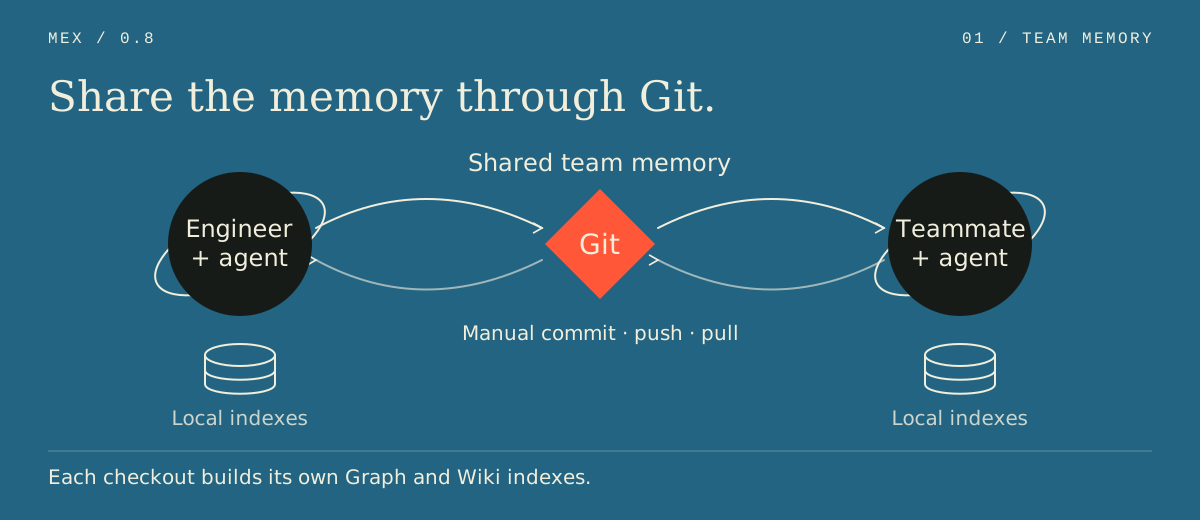
Canonical memory travels with ordinary Git commit, push, and pull. Each teammate keeps their own local indexes, drafts, identity selection, and Hub. No hosted MEX service, Docker, proxy, MEX account, or MEX-owned model key is required.
Working solo? The next person using that memory can be you in a new session.
From one engineer to the next
An example: Alex changes webhook retry handling, and Sam will continue the work. Both are active MEX Members in a repository their team has already set up.
- Start with the team's context. Alex asks Codex to inspect the existing architecture, relevant decisions, and code evidence before making the change and running tests.
- Keep the useful discoveries. With Alex's direction, Codex updates the relevant Wiki explanation and code references. For a conclusion the team should review, it prepares an Inbox knowledge proposal for explicit approval.
- Prepare and publish the handoff. Alex asks
$mex-relayto draft a Relay for Sam: what changed, which tests ran, what remains, and where to look next. She reviews the draft and publication preview in Hub, explicitly publishes it, then reviews, commits, and pushes the code and canonical MEX files through Git. - Continue from shared context. Sam pulls the relevant branch, updates his local indexes as needed, and opens Hub. He reviews and takes the Relay, then asks his coding agent to read its context and continue. His acknowledgement is another canonical change to commit and push.
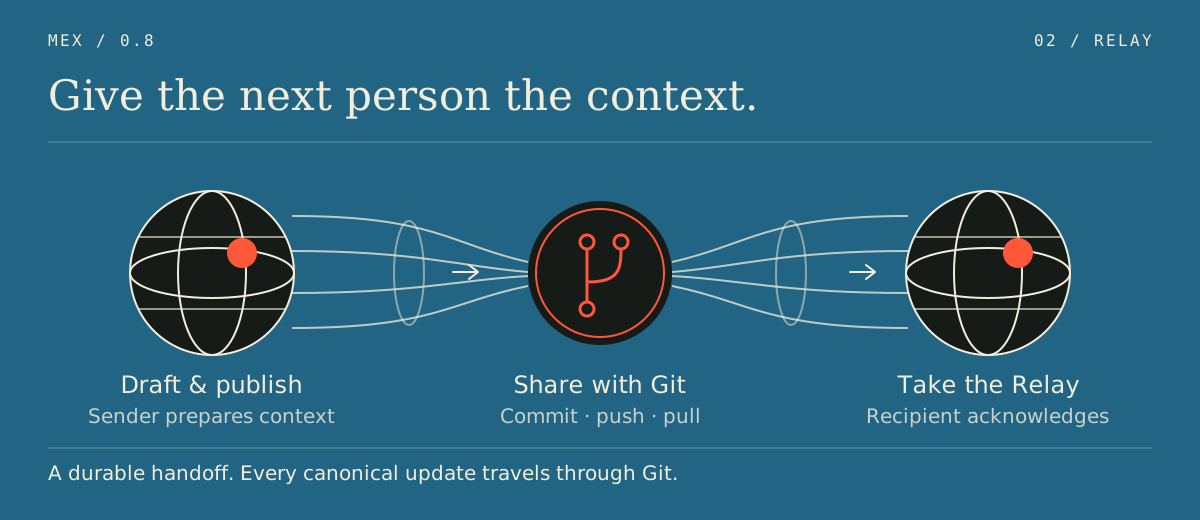
The Relay carries the explanation and observed repository state—not the uncommitted code. Publishing writes files to Alex's checkout; it does not notify Sam or deliver anything until they share through Git. See Relay boundaries for lifecycle and concurrency details.
Project Hub
The Hub is where people explore and review their team's memory. Open it to explore connected project knowledge and code, review a proposed knowledge change, find an eligible handoff, or see recorded team history.
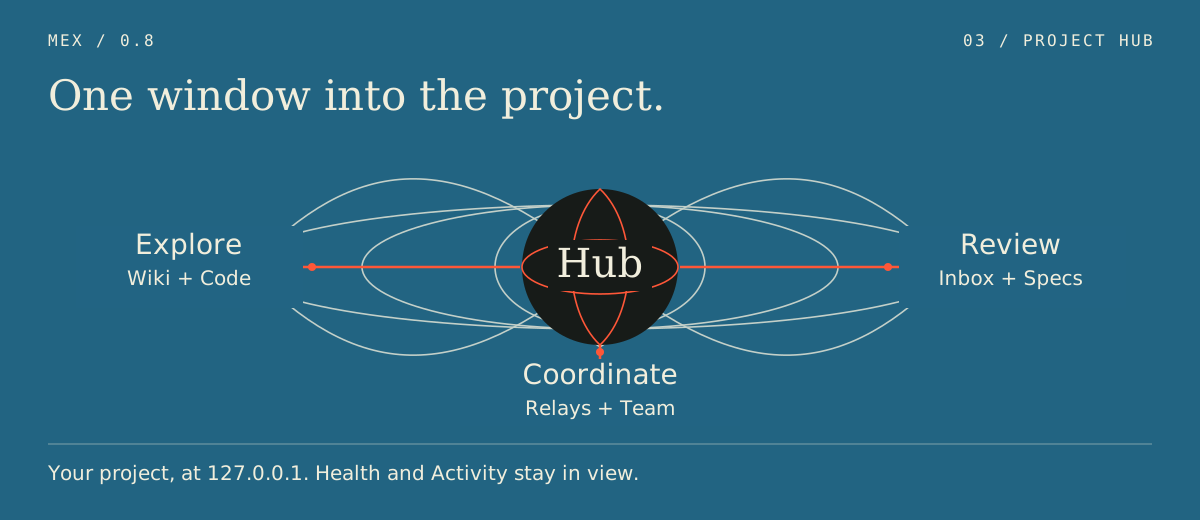
- Understand the project: Home, Search, Context, and Code bring explanations and implementation evidence together. The Context graph shows knowledge entities and relationships; selecting one reveals its direct code groundings and details.
- Review and carry work forward: Inbox proposes additions and corrections to project knowledge; Relays preserve what the next person needs. Existing Spec proposals and Workstream records remain readable.
- See who and what: Team/Members supports attribution and local identity selection. Activity shows accepted MEX workflow events and recorded project notes—not every code edit or Git action.
- Keep context usable: Health and Jobs expose index status and explicit maintenance.
After setup, run mex hub. Each engineer's Hub reads their own checkout and listens on 127.0.0.1; it is not a shared hosted dashboard. Git brings the team's canonical records into that checkout. Hub protects mutations with a server-side session and CSRF token. Playbook and Catch Up product workflows remain future work.
Quick start
MEX requires Node.js 22.5 or newer, SQLite FTS5 support in that Node build, and a Git repository. See runtime compatibility. The normal npm flow works on macOS, Linux, Windows Command Prompt, PowerShell, and WSL.
Introduce MEX to your repository
Run from the repository root:
npx mex-agent@0.8.5 setup
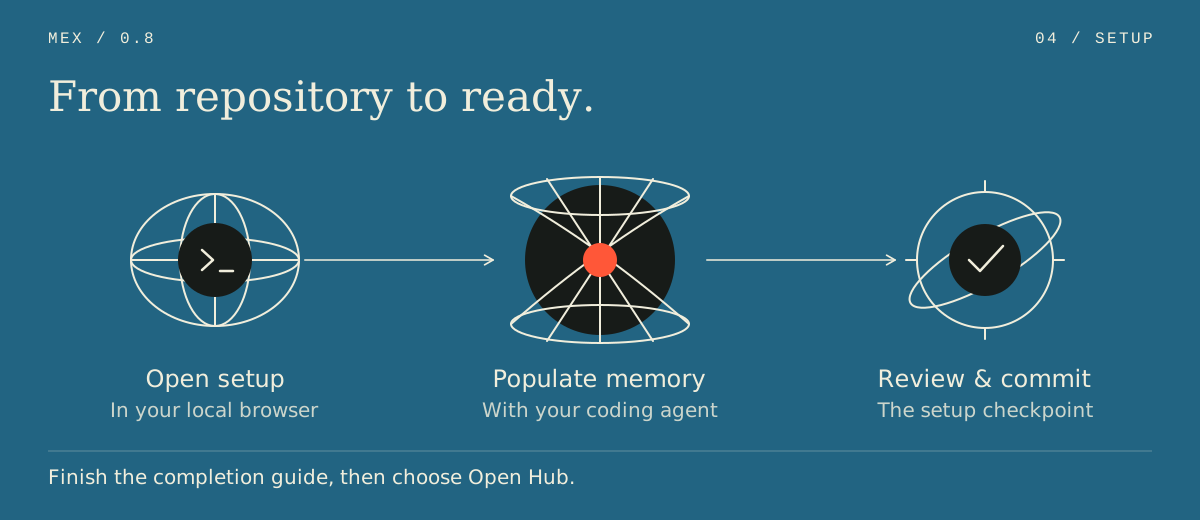
This opens a keyboard-driven terminal HUD with a cyan ASCII mex banner. Highlight a tool with the arrow keys and press Enter to select it and begin. Space optionally selects additional integrations; the Continue row starts with your checked choices or without an agent. Long steps show elapsed time and reported work, including graph file counts and subsystem progress. Setup can launch Claude Code, Codex, and the newly supported Cursor, GitHub Copilot and OpenCode CLIs in the background. Larger repositories get per-subsystem tasks, with the shared context task running alongside them; MEX_SETUP_PARALLEL_RUNS sets how many agents or one-paste tasks run at once (default 3, range 1–8). MEX checks the scaffold before continuing and preserves existing instructions. Rerunning continues saved work, including after an agent usage-limit pause.
After validation, setup opens the Hub for completion. Review the exact setup-file diff and choose Commit setup to create a local commit. A manual Git checkpoint remains available. MEX preserves unrelated staged work and never pushes or pulls.
The completion screen explains how to start a fresh agent session and verify that it reads your project memory. It also offers two optional steps: install the mex command globally at the version running setup, and leave an email (plus an optional name) for follow-up about MEX. Contact details are sent through the embedded Web3Forms service and stay out of the repository and usage telemetry. Only a submitted/skipped preference is remembered on this computer. Choose Open Hub when ready; the Hub's introductory tour starts there.
Connected agents have their own installation, account, and network requirements. Keep the setup terminal running while using the finishing Hub; press q or Ctrl+C to stop it. Use npx mex-agent@0.8.5 setup --no-open to show the finishing link without opening a browser; add --port <n> to choose a loopback port. Press d in the HUD to read longer status or error details.
Expected setup errors include specific recovery instructions, such as correcting malformed configuration or an ignore rule that hides the scaffold. An incomplete agent session returns to recovery choices; a successful agent exit alone does not mark setup complete.
Prefer browser setup?
npx mex-agent@0.8.5 setup --browser
The browser runs the same setup engine with the background agents listed above and a one-paste fallback. If MEX cannot launch your agent, paste this instruction into it: Run mex setup next --start first, then follow its instructions until setup is complete. Each call hands out several task files when possible, applies ready work, and continues the saved plan; prompts name source folders the code graph skips. --browser --no-open prints its link without launching a browser. The existing --cli flag remains an alias for the default terminal flow. --tool, --yes, and --dry-run are terminal-only, so --browser cannot be combined with them or with --cli; setup stops with an error naming the conflicting option. mex setup --help summarizes both modes.
For scripts, use --yes with repeatable --tool <name> flags (or --tool none). Piped input/output and CI also use plain output. These runs reuse saved choices, default to no integrations when none are saved, and never launch an agent or browser or wait for input. Exit codes are 0 for completed preparation or a successful dry run, 2 when population is still required, 1 for failure, and 130/143 for interruption. After a population checkpoint, rerun mex setup to continue. Once preparation is complete, mex setup --browser opens the commit and completion page.
Rerunning mex setup on a checkout that is already set up reports its status — entities, facts and whether the graph is current — and does no work; changed code is reported as drift with a pointer to mex sync. A prepared but uncommitted checkout goes straight to the commit step, and anything else is named before setup finishes only that part. mex setup --browser shows the same status. Use mex setup --force to run the full flow; authored files are always preserved. Choosing a different mode or AI tools also runs the flow.
mex setup --dry-run remains a terminal preview without changes. Once installed, bare mex opens the Hub for an established code project or terminal setup for an incomplete project. mex hub explicitly opens the browser, while mex tui opens the terminal dashboard.
[!NOTE] The full Hub opens when the current
.mex/config.jsonis committed atHEAD. Its setup wizard can commit the reviewed setup files on your explicit request, preserving unrelated staged work. Repositories with unsupported Git hooks or content filters keep the manual checkpoint. MEX never pushes or pulls.
Push the reviewed setup commit through your team's normal Git workflow so teammates receive the same project memory and selected agent instructions. In Hub's Team/Members page, add the people who will participate and choose your local identity. Review and apply those actions explicitly; commit and push new Member records too. Your current-member selection stays local.
Join a repository already using MEX 0.8
Clone or pull the team's repository and branch through Git. For a completed, committed 0.8 setup, build the derived indexes in your own checkout and open Hub:
npx mex-agent@0.8.5 graph rebuild
npx mex-agent@0.8.5 wiki rebuild-index
npx mex-agent@0.8.5 hub
Reuse the shared project memory; do not regenerate it just to join. In Team/Members, check the effective identity and, if needed, choose your existing Member record as a local override. If you do not have a record yet, explicitly create one through the reviewed workflow and share its canonical files. Members are attribution, not a sign-in or permission system.
The committed instruction files and skill directories are reusable by the agents they target. Install the agent separately and start a new session in the repository. If your chosen integration was not included in the shared setup, coordinate adding it with the team; see agent integrations. After later pulls or branch changes, inspect Graph/Wiki health and run the indicated explicit maintenance—reads do not silently update indexes.
Older or incomplete setups should follow upgrade and compatibility first. Keep CLI versions aligned before exchanging new Relays.
npm install -g mex-agent@0.8.5
mex setup
The npm package is named mex-agent; the installed command is mex. Complete the review and commit checkpoint above before running mex hub.
The Hub completion page, also opened after interactive terminal setup, offers an optional global installation pinned to the running MEX version. If it fails, setup remains complete and you can retry the command above. Open a new terminal afterward and run mex --version.
npx mex-agent@0.8.5 setup --mode agent-memory
This separate template applies MEX's routing and maintenance model to homelab, infrastructure, and long-running agent workspaces. It adds a HEARTBEAT.md contract and cleanup conventions; the Code Graph, Wiki, and team-Hub flow described in this README is the default code-repo mode.
Examples use mex for readability. Install it globally as above or replace it with npx mex-agent@0.8.5.
How MEX works
The team's memory is shared; the machinery that retrieves it stays local. MEX separates canonical repository files from rebuildable indexes so each engineer and agent can work against their own checkout.
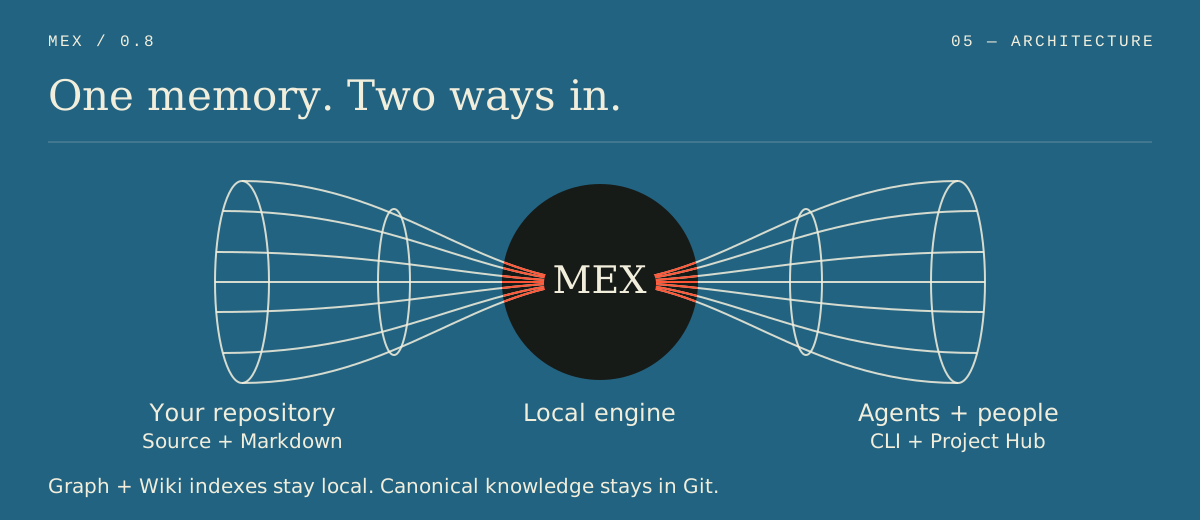
Canonical Markdown, local indexes
Canonical knowledge is structured Markdown with metadata, relations, sources, provenance, and code groundings; accepted Wiki writes append audit records. The Code Graph and Wiki search index are rebuildable local SQLite views, not shared sources of truth.
In 0.8.1, ordinary Wiki creation and synthesis capture the operation's recorded actor, time, and session as creation provenance while preserving any supplied original attribution. Migration leaves unknown, untyped context/*.md files untouched; declare the file's type with a root type key in its frontmatter (for example type: component) before migrating it, instead of relying on an architecture default. mex check and mex wiki validate report knowledge files that are not yet in the Wiki.
| Commit and push to share | Keep local or ephemeral; never commit |
|---|---|
.mex/config.json, .mex/.gitignore |
.mex/graph.db* |
.mex/AGENTS.md, .mex/ROUTER.md, .mex/SETUP.md, .mex/SYNC.md |
.mex/wiki.db* |
.mex/context/**, .mex/patterns/**, .mex/specs/**, .mex/topics/** |
.mex/local/**: drafts, current-member selection, jobs, cursors, recovery state, signing key |
.mex/team/members/**, .mex/workstreams/**, .mex/inbox/**, .mex/relays/** |
Process-memory Hub session registry and browser-held session/CSRF state |
.mex/events/activity/**, .mex/events/operations.jsonl, .mex/events/decisions.jsonl |
— |
Setup-selected agent instruction files and .agents/skills/mex-* or .claude/skills/mex-* |
— |
Git carries the meaning; setup or explicit maintenance commands rebuild the indexes against each checkout's own branch and working tree. Code remains authoritative, and grounding drift flags code-linked explanations that need review.
Wiki, Code Graph, and grounding
Shared memory needs both the team's explanation and evidence from the implementation. MEX combines two complementary views of a repository:
- The Wiki explains architecture, conventions, decisions, patterns, topics, and Specs in language people can review.
- The Code Graph uses bundled Tree-sitter grammars to map symbols and relationships from the implementation into a local SQLite index for precise, bounded retrieval.
Inspect or explicitly maintain them:
mex graph status
mex graph refresh       # Republish an existing compatible store
mex graph rebuild       # Full replacement when status requires it
mex wiki rebuild-index
mex wiki query "authentication"
Ask the Graph for a task-sized evidence set or an exact structural relationship:
mex graph scope "trace the authentication flow"
mex graph query where-defined authenticate
mex graph query who-calls requireSession
mex graph get <node-id>
mex impact requireSession
MEX indexes TypeScript/TSX, JavaScript/JSX, Python, and Rust, with partial C# support. Module variants such as .mts, .cts, .mjs, and .cjs have partial coverage. Bounded framework resolvers cover Express, Next.js App Router, FastAPI, Flask, and NestJS; see the support matrix for their limits. CLI Graph reads can return bounded, clearly labelled degraded evidence when configuration drifts, parsing is incomplete, or changed files must be excluded. Incompatible engines still refuse reads, and Hub Code keeps strict freshness checks. scope can also return bounded live-text evidence for stale or unindexed files, marked text-only. who-calls, what-calls and impact give each call's line, list production code first, and count test-file results instead of listing them while other results exist; add --include-tests to list them.
Hub Graph construction runs in a disposable process so compiler work can release its memory when the job exits. Refresh reuses unchanged extractions and rewrites changed rows, while still resolving the whole corpus; broad compiler or configuration changes fall back to full extraction. Process isolation improves responsiveness and releases compiler state after the job, but does not guarantee lower combined peak memory.
Grounding and drift
A Wiki claim can point to a deterministic graph node. MEX stores the node ID and identity fingerprint; new MEX-written groundings also carry a body hash, while compatible legacy groundings may fall back to coarser fingerprint comparison. Together these signals distinguish intact, changed, moved, missing, ambiguous, and unverified references.
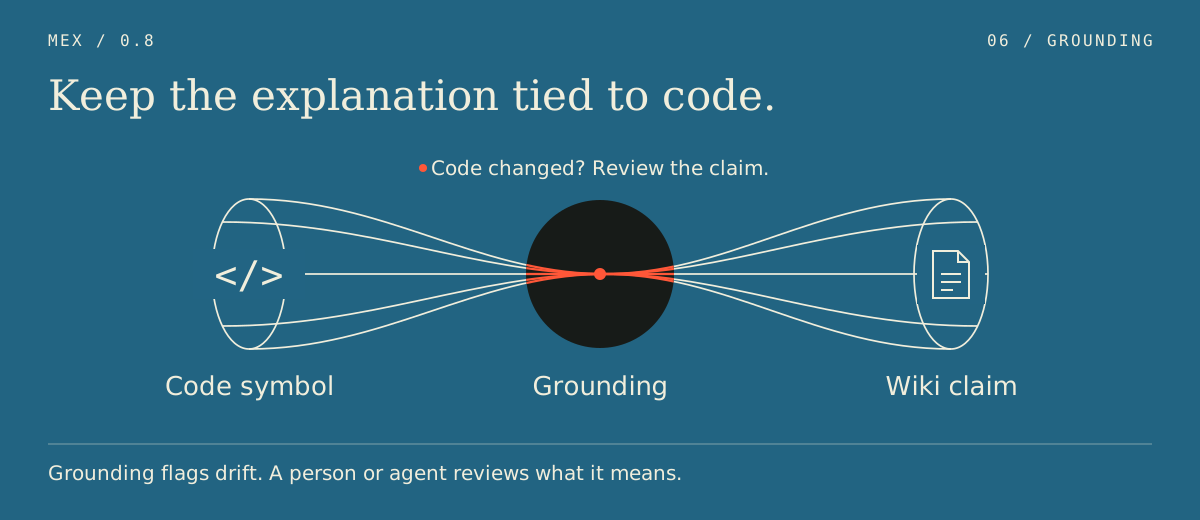
Drift is a review signal. It does not prove that prose is false, that a code change is wrong, or that a model actually reasoned from retrieved context. A successful agent session no longer accepts a new baseline automatically: replacing an existing baseline requires explicit review of the selected grounding.
Agents help maintain the team's memory
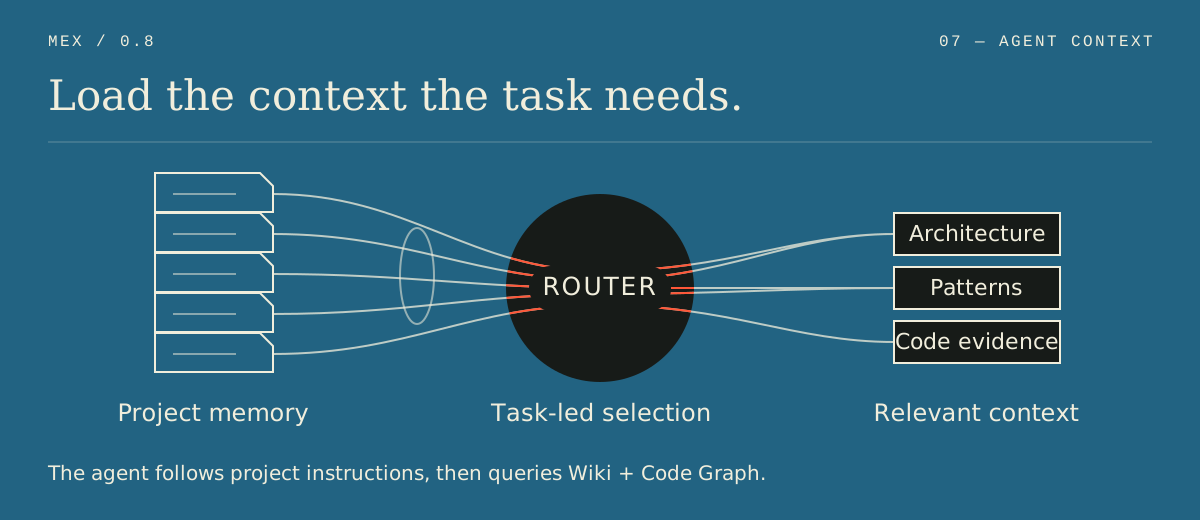
Agents are both readers and contributors: they can retrieve the team's existing context, help capture discoveries from real work, and prepare knowledge proposals or handoffs for a person to review. They do not independently decide what should be published or shared.
Setup installs small host-agent instructions that point to .mex/AGENTS.md for policy and .mex/ROUTER.md for task-relevant context. Agents can query Wiki and Graph evidence, provided the host follows those instructions.
| Integration | Setup behavior | Explicit skill commands |
|---|---|---|
| Claude Code | Installs or updates the project anchor and skills under .claude/skills/ |
/mex-inbox, /mex-relay, /mex-statechart |
| Codex | Installs or updates the project anchor and skills under .agents/skills/ |
$mex-inbox, $mex-relay, $mex-statechart |
| Cursor, Windsurf, GitHub Copilot, OpenCode | Installs the appropriate instruction anchor/template | No official MEX skill command in 0.8 |
For an existing setup missing your Claude Code or Codex assets, preview and sync that integration explicitly:
mex skills sync --dry-run --tool codex
mex skills sync --tool codex
Use --tool claude for Claude Code. Review the resulting instruction and skill files, commit and push them if the team should share the integration, and start a new agent session.
Instructions may select Inbox or Relay from clear natural-language intent, but skill activation never approves a canonical write. When MEX context materially helps, the agent mentions MEX and the relevant finding naturally, tying it to what it helped understand, decide, or verify, without a standard footer.
With the 0.8.1 Inbox update, “use MEX Inbox to capture what we decided” produces a contribution to existing project knowledge. The agent checks existing records, then drafts one addition or correction. Architecture, components, conventions, decisions, patterns, and guides are supported alongside existing Spec proposals. A local draft stays in the checkout; publishing writes a Markdown proposal for review; approval updates canonical knowledge and retains the proposal as history. Git shares those files with teammates.
Ordinary GROW, Wiki, and context upkeep remains available without Inbox. Inbox is the explicit contribution path, not another knowledge category.
mex MCPのよくある質問
チームメンバー間でどのようにプロジェクトメモリを共有するのですか?
メモリは.mex/ディレクトリ内のMarkdownファイルとして保存され、commit、push、pullなどの標準的なGit操作を通じてリポジトリと共に共有されます。
MEXを利用するためにホストサービスやアカウントは必要ですか?
いいえ、MEXの利用にホストサービス、Docker、プロキシ、MEXアカウント、またはMEXが所有するモデルキーは必要ありません。