
コーディングエージェントが、断続的に発生するテスト失敗の再現、再現用入力の最小化、および実証的な根拠に基づくコード修正の検証を可能にします。
別名 LBarimi/FailTrace
- スター
- 0
- ツール
- —
- ダウンロード数(30日間)
- —
- 最新バージョン
- 1.5.0
- 最終コミット
- 2026年9月7日
- ライセンス
- MIT
FailTrace MCPとは
コーディングエージェントが、断続的に発生するテスト失敗の再現、再現用入力の最小化、および実証的な根拠に基づくコード修正の検証を可能にします。
プロジェクトのREADMEから生成された概要
FailTrace MCP server について
FailTraceは、デバッグのための実証的なエビデンスを作成することで、コーディングエージェントが断続的なテスト失敗に対処できるようにします。ローカルのstdio MCP serverまたはCLIを通じて動作し、失敗したベースラインのキャプチャ、再現用入力の最小化、およびコードパッチの検証を行うことができます。このツールはNode.js 22.12+とnpmを使用してローカルマシン上で動作するため、機能するために外部のAI API、アカウント、テレメトリを必要としません。
エージェントは、回帰検索、最小化、検証を含む、調査ライフサイクルを管理するための7つの特定のMCPツールを使用できます。システムは、複数の試行にわたって失敗のシグネチャと調査のエビデンスを追跡します。既存のテストランナーやアサーションをサポートしており、NUnitやUnity EditModeテストへの特定のサポートも含まれています。データの肥大化を防ぐため、サーバーは保持するstdoutおよびstderrを、1試行あたり16 MiB、1回の実行または最小化プロセスあたり256 MiBに制限しています。
できること
- 1再現用入力の最小化エージェントは、複雑な入力セットを、特定のテスト失敗をトリガーするために必要な最小限のデータまで削減できます。
- 2コードパッチの検証開発者はこのツールを使用して、提案された修正が保存されたベースラインと比較して、対象の失敗を実際に解決しているかを確認できます。
- 3回帰ソースの特定システムは、bisectプロセスを通じて、どの特定のGit変更がテストの失敗を導入したかを特定するのに役立ちます。
- 4断続的な失敗のキャプチャユーザーはコマンドを実行してテストを複数回繰り返し、一貫した失敗のシグネチャをキャプチャできます。
プロジェクトの README から作成されています。すべてのユースケースは、その引用と照らし合わせて確認されています。
FailTrace MCPのインストール方法
フォーマット検証日 2026年11月10日Cursor に追加Gooseに追加Claude CodeにFailTrace MCPをインストール
$ claude mcp add failtrace -- npx -y failtraceCursorにFailTrace MCPをインストール
~/.cursor/mcp.json
{
  "mcpServers": {
    "failtrace": {
      "command": "npx",
      "args": [
        "-y",
        "failtrace"
      ]
    }
  }
}VS CodeにFailTrace MCPをインストール
.vscode/mcp.json
{
  "servers": {
    "failtrace": {
      "type": "stdio",
      "command": "npx",
      "args": [
        "-y",
        "failtrace"
      ]
    }
  }
}VS Code CLIにFailTrace MCPをインストール
$ code --add-mcp '{"name":"failtrace","type":"stdio","command":"npx","args":["-y","failtrace"]}'Claude DesktopにFailTrace MCPをインストール
claude_desktop_config.json
{
  "mcpServers": {
    "failtrace": {
      "command": "npx",
      "args": [
        "-y",
        "failtrace"
      ]
    }
  }
}CodexにFailTrace MCPをインストール
$ codex mcp add failtrace -- npx -y failtraceCodex config.tomlにFailTrace MCPをインストール
~/.codex/config.toml
[mcp_servers.failtrace]
command = "npx"
args = ["-y", "failtrace"]
Gemini CLIにFailTrace MCPをインストール
$ gemini mcp add -s user failtrace npx -- -y failtraceGemini settings.jsonにFailTrace MCPをインストール
~/.gemini/settings.json
{
  "mcpServers": {
    "failtrace": {
      "command": "npx",
      "args": [
        "-y",
        "failtrace"
      ]
    }
  }
}自動チェック
実行日 2026年11月15日完全なレポート →自動チェックに合格しました。これはセキュリティ監査ではありません。コードを読み、サーバーに必要最小限のアクセス権を与えてください。 チェックの仕組み

- ソースリポジトリがリンクされており、アクセス可能lbarimi/failtrace is public and reachablegithub.com/lbarimi/failtrace ↗合格
- パッケージがこのリポジトリをソースとして指定failtrace names lbarimi/failtrace as sourcenpmjs.com/package/failtrace ↗合格
- ビルドの来歴 (Sigstore 証明)No build attestation published for this release未チェック
- オープンソースライセンス (OSI)MITspdx.org/licenses/MIT.html ↗合格
- 過去1年以内にコミットまたはリリースありLast commit or release 2026-09-07github.com/lbarimi/failtrace ↗合格
- OpenSSF Scorecard未チェック
- パッケージ名が有名なパッケージに酷似していないNo popular package one edit away from failtrace合格
- パッケージおよびその依存関係に重大な勧告なし6 resolved dependencies checked; no critical advisoryosv.dev ↗合格
- モデルへの隠れた指示がない0 tool descriptions and the README read; no override phrases, credential paths or hidden characters合格
- 破壊的なツールがラベル付けされている未チェック
- リモートエンドポイントが MCP ハンドシェイクに応答未チェック
README
GitHubで見るFailTrace
Reproduce the failure. Check the fix.
A test fails intermittently. Your coding agent changes the code. One passing retry leaves you guessing.
FailTrace repeats the same check, saves a failing baseline, and checks the proposed fix against it. Use the CLI or MCP tools to get trial results, a smaller reproducer, and evidence your agent can inspect before accepting a patch.


Local execution. No AI API, account, or telemetry required. Keep your existing test runner and assertions.
Quick start
With Node.js 22.12+ and npm, run this in any working directory:
npx --yes failtrace demo
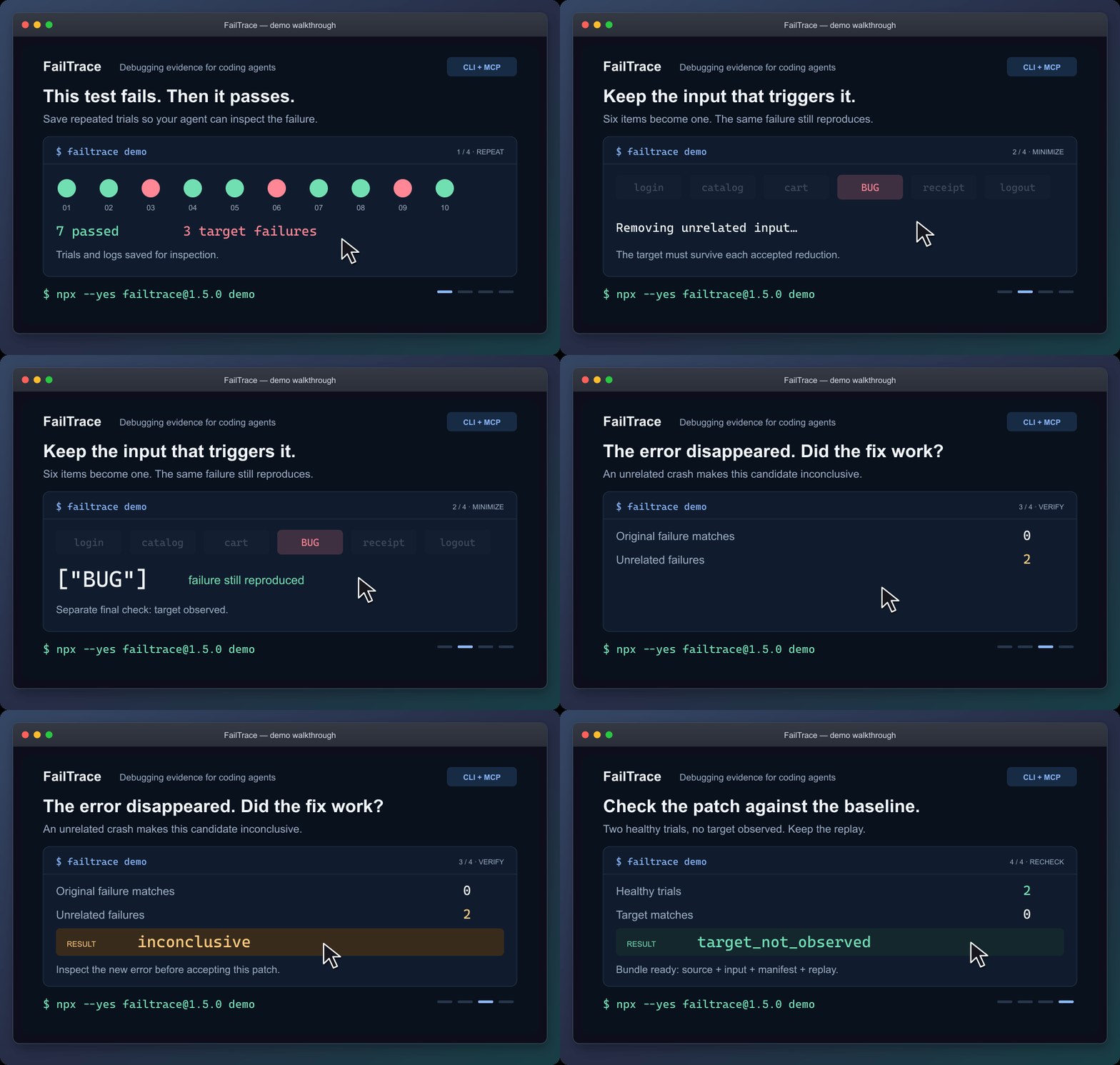
Static walkthrough · Static poster · Demo guide
The demo reduces six input items to ["BUG"], rejects a patch that crashes for another reason, and checks a working patch. It saves the evidence in .failtrace/ and prints a replay command.
For coding agents
Connect the local stdio MCP server through your client's configuration:
npx --yes failtrace@1.5.0 mcp --cwd "/absolute/path/to/your/project"
Copy the MCP configuration and check the connection →
Your client launches this command. Running it alone in a terminal waits for MCP requests. The guide includes Windows setup.
Then ask your agent:
Use FailTrace to capture this test failure before editing. Choose the exact test or failure message, save a bounded baseline, and inspect the matching trial. After the change, verify against that baseline and explain any unrelated errors or incomplete evidence.
The seven MCP tools share the CLI's Core engine. They retain the failure signature and investigation evidence across repetition, comparison, regression search, minimization, verification and replay. Agents can retrieve saved trial and log pages without rerunning the command. Shell-capable agents can also use the CLI with --json.
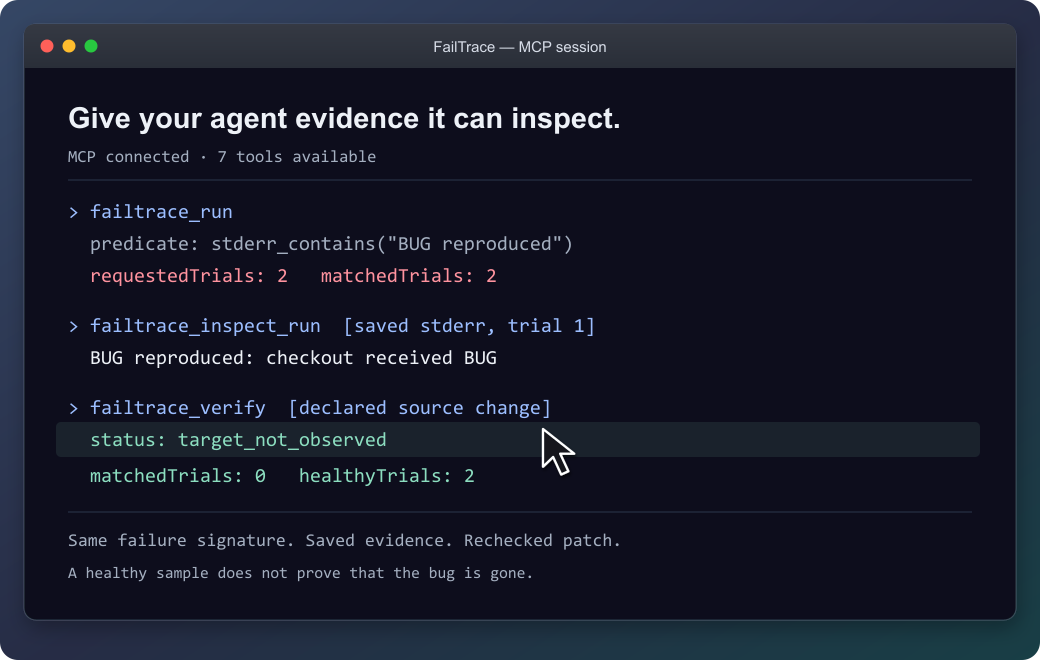
The agent can inspect the saved failure before checking the patch.
Recheck an existing unit test
Follow an exact NUnit or Unity test through a fix. Each attempt gets a fresh NUnit 3 report. Missing or skipped tests and unrelated failures stay inconclusive, so an agent cannot accept them as evidence that the selected test passed.
Connect your test or try the original EditMode example →
NUnit support is included in 1.3.0 through CLI and MCP. The documented Unity validation covers the Windows EditMode example.
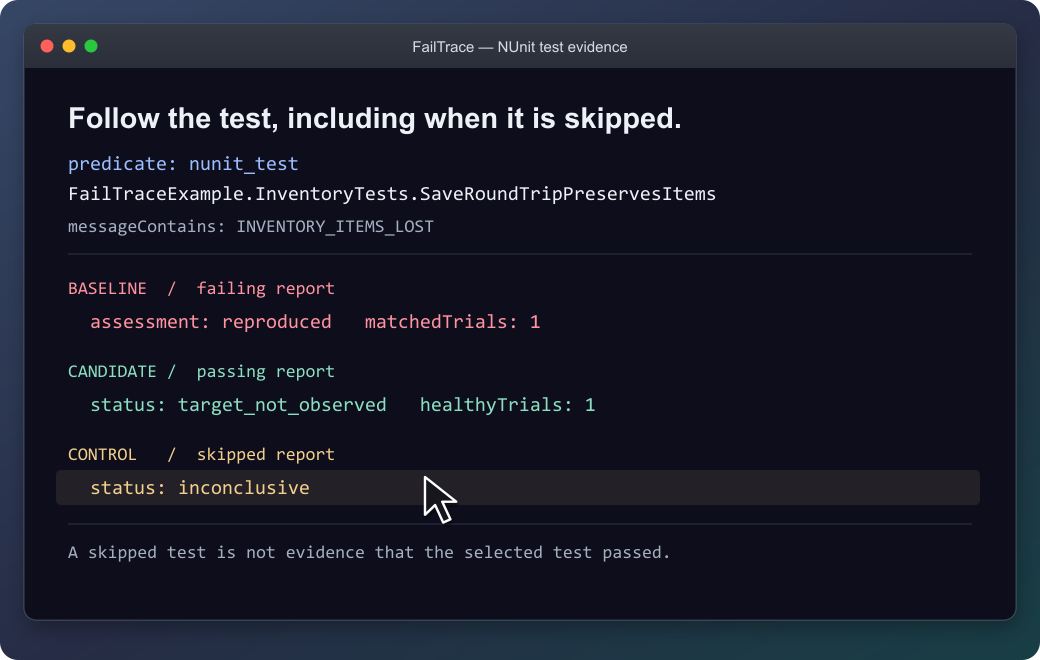
The selected test stays the same; a skipped report is not accepted as a passing test.
Use it on your own failure
From your project, replace the command and message with your own:
npx --yes failtrace@1.5.0 run "npm test -- checkout" --repeat 20 --stderr-contains "checkout failed" --capture-context
Run this before editing in a Git project. --capture-context records source identity for Verify; outside Git, select files with --context-source. Each trial saves its output, and exit 1 can mean the target was captured successfully. Then edit and verify the patch →
| Your next question | Command |
|---|---|
| How often does this failure appear? | run |
| What differs between a healthy and failing trial? | compare |
| Which Git change introduced it? | bisect |
| What input is enough to reproduce it? | minimize |
| What happened after the proposed fix? | verify |
| How can I replay this investigation? | bundle |
Command reference · Literal executable arguments · Reusable project scripts
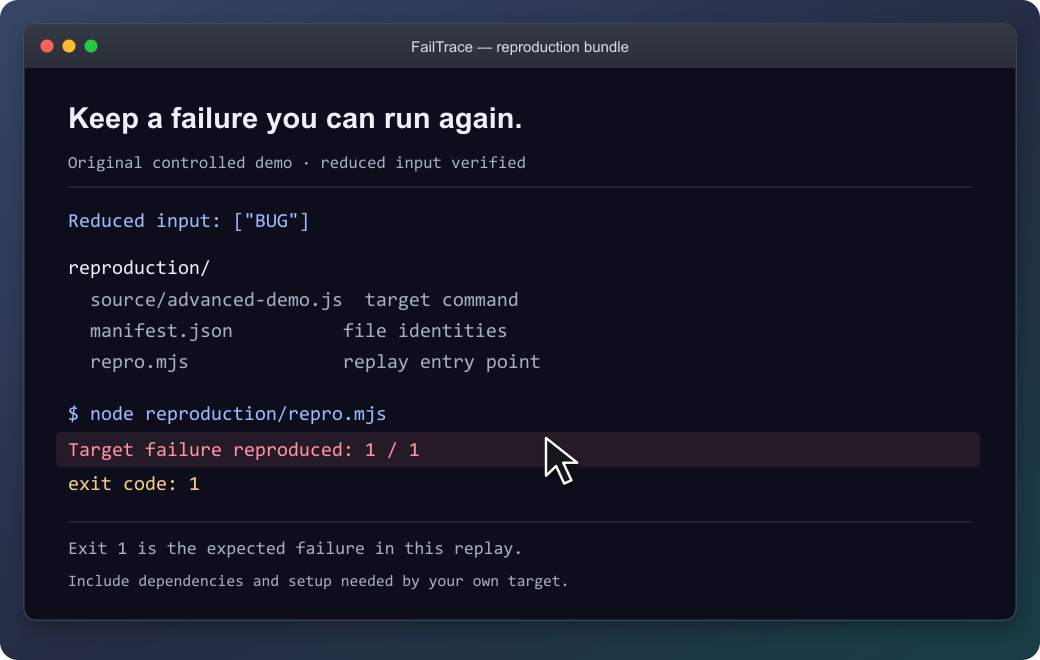
The demo's bundle reproduces its original failure with exit 1. Keep the source, input and replay together; supply the target's prerequisites when packaging your own investigation.
What the results establish
FailTrace reports observations under the chosen settings. Verify separates a target observed, a healthy sample without that target, and inconclusive evidence. Bisect reports a sampled first-parent boundary; minimization rechecks its result without promising the smallest possible input.
The demo shows controlled example outcomes, not performance measurements. A passing sample does not prove a bug is gone.
Commands run with your permissions, and process cleanup is best effort. Retained stdout/stderr is capped by default at 16 MiB per trial and 256 MiB per run or bisect/minimization. Previous investigations accumulate separately. Review logs, commands and selected files before sharing; bundles still require the target's dependencies and setup.
Result and exit-code reference · Resource limits · Storage inventory · Bundle guide
Availability and contributing
The quick start uses npm's latest release; the verified version is 1.5.0. MCP configuration and repeatable installation examples keep that exact version pinned: installation options, GitHub release, and MCP Registry entry.
Version 1.5.0 adds: short run references, Verify readiness and next-step guidance, and intermittent-minimization guidance. See the changelog.
Documentation: choose your next task →
Development instructions · Compatibility · Roadmap · Third-party notices
FailTrace MCPのよくある質問
FailTrace MCPをClaude Codeに追加するには
ターミナルでclaude mcp add failtrace -- npx -y failtraceを実行します。すべてのプロジェクトで利用するには--scope userを追加します。
FailTrace MCPをCursorに追加するには
~/.cursor/mcp.jsonを開き、上記のインストールセクションに示すCursor設定を使ってmcpServersの下にサーバーを追加します。
FailTraceを使用するためにAI APIやアカウントは必要ですか?
いいえ、AI APIやアカウント、テレメトリを必要とせず、ローカル実行のみで行われます。
NUnitテストでFailTraceを使用できますか?
はい、バージョン1.3.0以降であれば、CLIとMCPの両方を通じてNUnitをサポートしています。
ログのリソース制限はありますか?
保持されるstdout/stderrは、1試行あたり16 MiB、1回の実行、bisect、または最小化プロセスあたり256 MiBに制限されます。
テストがパスしたサンプルがあれば、バグが修正されたと証明されますか?
いいえ、テストがパスしたサンプルは、バグが完全に解消されたことを絶対的に証明するものではありません。