
ContextQuant MCPサーバー
コミット 2026年11月9日JSONツールの結果サイズを最大90%削減し、省略されたデータを取得するためのツールをエージェントに提供するMCPプロキシです。
別名 khankaif/ContextQuant
- スター
- 5
- ツール
- —
- ダウンロード数(30日間)
- —
- 最新バージョン
- —
- 最終コミット
- 2026年11月9日
- ライセンス
- MIT
ContextQuant MCPとは
ContextQuantはMCPサーバーです。 JSONツールの結果サイズを最大90%削減し、省略されたデータを取得するためのツールをエージェントに提供するMCPプロキシです。.
プロジェクトのREADMEから生成された概要
ContextQuant MCP server について
ContextQuantは、AIエージェント向けの巨大なJSONツール結果のサイズを削減します。これは、Claude CodeなどのMCPクライアントと、GitHub、Jira、データベースなどの既存のMCP serverとの間に位置するプロキシとして機能します。ツールが膨大なペイロードを返すと、プロキシは必須フィールドの選択、長いテキストの削除、および繰り返される値のヘッダーへの集約を行うことでデータを圧縮します。このプロセスにより、トークン使用量を最大90%削減できます。
単なる切り捨てとは異なり、このプロキシは削除された内容を明示的に宣言するため、エージェントが欠落した情報を推測する必要がありません。また、contextquant_more という特定のツールを提供しており、エージェントはハンドルを使用して、省略されたデータや特定のフィールドを取得できます。この構成は、jqのようなコマンドを実行するためのシェルを持たないチャットアプリやホスト型エージェントを使用している開発者に最適です。ユーザーは、設定ファイルまたはコマンドライン引数を通じて、トークン予算、テキストの文字数制限、および特定のフィールド要件を構成できます。
できること
- 1GitHubやJiraのイシューのトリアージエージェントは、コンテキストウィンドウを使い果たすことなく、特定のラベルや担当者を求めて数十のイシューを迅速にスキャンできます。
- 2CRMプロファイルデータのフィルタリング数十のプロファイル属性を含む膨大なAPIレスポンスから、いくつかの主要なフィールドを抽出するためにプロキシを使用できます。
- 3大規模なデータベースやログのクエリ多くのレコードにわたって、ほとんどの列が繰り返されているか空であるような、SELECT形式の結果を処理します。
- 4コード実行環境のないエージェントのサポートjqを実行できないチャットアプリケーションのユーザーでも、リカバリツールを通じて完全なデータセットにアクセスできます。
プロジェクトの README から作成されています。すべてのユースケースは、その引用と照らし合わせて確認されています。
自動チェック
実行日 2026年11月15日完全なレポート →まだ検証されていません。サーバーには80点のスコア、重大な問題がないこと、および検証に必要な十分なデータが必要です。 チェックの仕組み · 点数を上げるための改善点

- ソースリポジトリがリンクされており、アクセス可能khankaif/contextquant is public and reachablegithub.com/khankaif/contextquant ↗合格
- パッケージがこのリポジトリをソースとして指定未チェック
- ビルドの来歴 (Sigstore 証明)未チェック
- オープンソースライセンス (OSI)MITspdx.org/licenses/MIT.html ↗合格
- 過去1年以内にコミットまたはリリースありLast commit or release 2026-11-09github.com/khankaif/contextquant ↗合格
- OpenSSF Scorecard未チェック
- パッケージ名が有名なパッケージに酷似していない未チェック
- パッケージおよびその依存関係に重大な勧告なし未チェック
- モデルへの隠れた指示がない0 tool descriptions and the README read; no override phrases, credential paths or hidden characters合格
- 破壊的なツールがラベル付けされている未チェック
- リモートエンドポイントが MCP ハンドシェイクに応答未チェック
README
GitHubで見るContextQuant
An MCP proxy that shrinks large JSON tool results before they reach an AI agent. It tells the agent exactly what it cut, and gives it a tool to get the cut parts back.
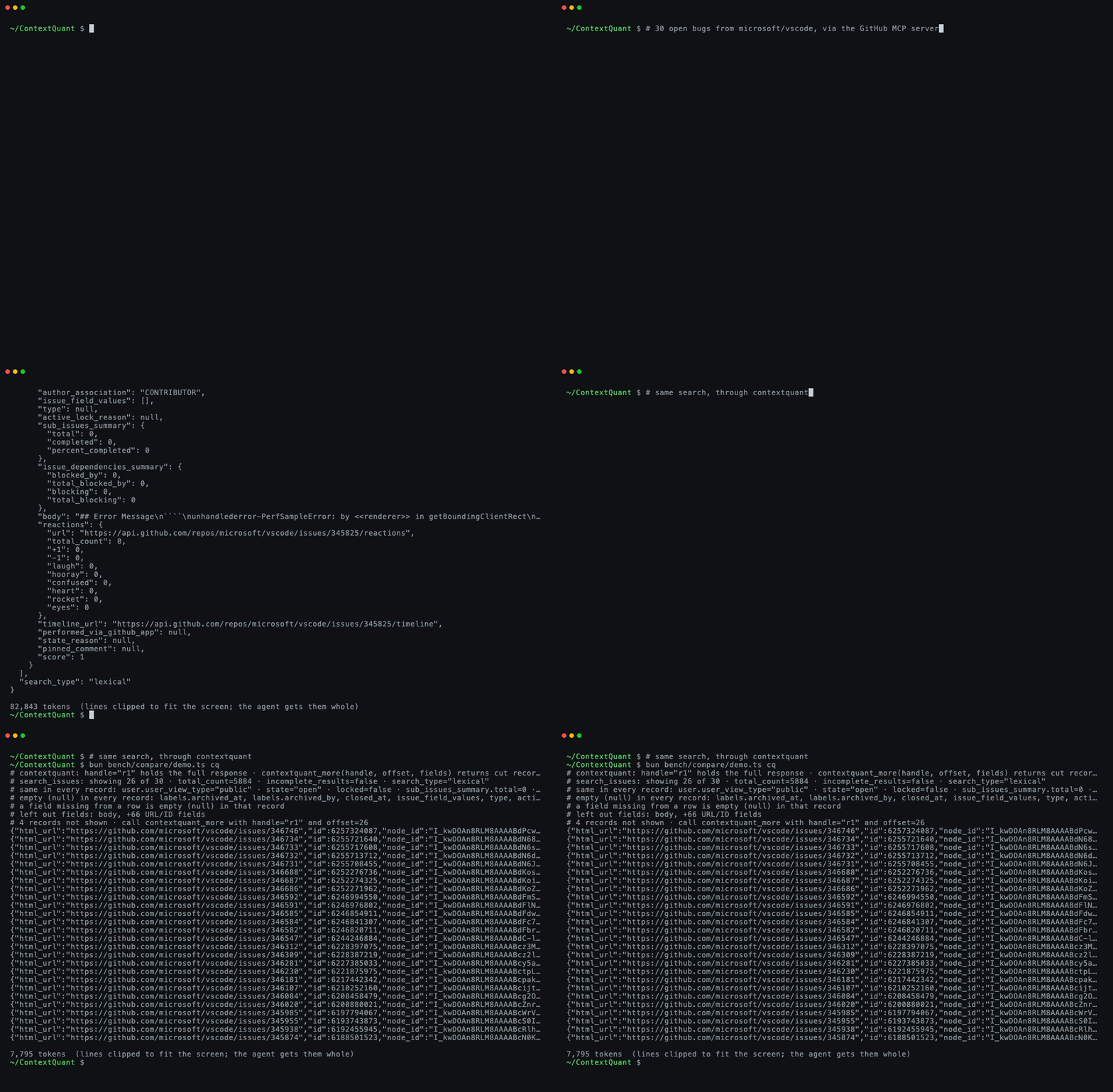
Real GitHub data, recorded with vhs from media/demo.tape.
The problem
MCP tools often return far more than the agent needs. One GitHub search_issues call for 30 issues is
about 70,000 tokens: every issue body, about 60 API links per issue, and the same author metadata
repeated 30 times. To answer "which open auth bugs are unassigned?" the agent needs four fields:
number, title, labels and assignee.
Clients deal with oversized results in one of three ways, and all three hurt:
| What the client does | What goes wrong |
|---|---|
| Puts the whole result in context | Fills the context window; every later turn re-reads it |
| Truncates it, or keeps only some fields | The agent can't tell what's missing, so it guesses or searches again |
| Saves it to a file | Fine if the agent can run code (jq); otherwise it never sees the data |
ContextQuant takes a fourth approach: cut the result down, and declare every cut.
How it works
ContextQuant sits between the agent and any MCP server. Tool calls pass through unchanged; only the results are rewritten.
agent (Claude Code, any MCP client)
   │   tool call ──────────────► passes through unchanged
   ▼
ContextQuant proxy ──────────────► wrapped MCP server (GitHub, Jira, a database…)
   │   ◄─────────────────────────  70k-token JSON result
   │
   │   1. find the list of records in the JSON
   │   2. pick the fields worth keeping (short values stay; long text and API links go)
   │   3. print fields that are the same in every record once, not 30 times
   │   4. fit as many records as the token budget allows (default 8,000)
   │   5. write a header saying what was left out and how to get it
   │   6. keep the original in memory under a handle, e.g. "r1"
   ▼
agent reads ~6k tokens, and can call contextquant_more("r1", …) for anything cut
What the agent reads for 18 GitHub issues (37,903 tokens raw, 5,556 through ContextQuant):
# contextquant: handle="r1" holds the full response · contextquant_more(handle, offset, fields) returns cut records or left-out fields
# search_issues: showing 18 of 18 · total_count=18 · incomplete_results=false
# same in every record: user.type="User" · state="open" · locked=false · …
# empty (null) in every record: closed_at, milestone, …
# left out fields: body, +66 URL/ID fields
{"html_url":"https://github.com/modelcontextprotocol/typescript-sdk/issues/2510","number":2510,"title":"Mid-session re-auth after refresh-token expiry dead-ends: …","labels":[{"name":"bug",…}],…}
…
Each header line tells the agent something it would otherwise have to guess:
| Line | What it tells the agent |
|---|---|
showing 18 of 18 |
How many records came back and how many are shown |
same in every record: … |
Values shared by all records, printed once; nothing is missing |
empty (null) in every record: … |
Fields that exist but are empty, so "nobody is assigned" is an answer, not a gap |
left out fields: body, … |
Fields removed from the rows; contextquant_more(handle, fields=["number","body"]) returns them |
12 records not shown · call contextquant_more with handle="r1" and offset=18 |
Records cut to fit the budget, with the exact call for the next page |
Why declaring the cuts matters. A model that can't see a field and isn't told it was removed tends to fill the gap with something plausible. In testing, a model asked for a person's "headline" answered with their job title every time when the field had been dropped silently, and said "not shown" when the cut was declared. The header turns a silent gap into a known one.
Results that aren't a list of records (plain text, single objects, errors), results that wouldn't get smaller, and results with a declared output schema pass through untouched.
Use cases
It fits any tool that returns many records when the agent needs a few fields from each:
- Issue and ticket triage. GitHub, Jira, Linear or Sentry searches: "which open bugs are unassigned?"
- CRM and people search. HubSpot or enrichment APIs return 50+ fields per profile; the agent filters on five.
- Database and log queries.
SELECT *-style results where most columns repeat or are empty. - Agents that can't run code. Chat apps, connectors and hosted agents can't
jqa saved file. This is where ContextQuant measured best (see Results).
It doesn't fit:
- Prose, code or logs. It only works on JSON lists of records.
- Coding agents with a shell, if cost is the goal. Raw results saved to a file plus
jqwere as accurate and about 2× cheaper. ContextQuant was faster there, but not cheaper. - Tools whose every field is needed every time. Mark them
skipin the config.
Quick start
Needs Node 20+. Put ContextQuant in front of any MCP server's own command:
claude mcp add --env GITHUB_PERSONAL_ACCESS_TOKEN=ghp_... github-cq \
  -- npx -y contextquant proxy -- npx -y @modelcontextprotocol/server-github
Any MCP client works the same way: npx -y contextquant proxy -- <the server's command>.
Remote (HTTP) servers use --url:
npx -y contextquant proxy --url https://api.githubcopilot.com/mcp/ --header "Authorization: Bearer ghp_..."
Environment variables (API tokens) pass through to the wrapped server. Each shaped call logs its
saving to stderr, e.g. contextquant search_issues: 37903 → 5556 tokens (o200k).
Configuration (optional)
npx -y contextquant proxy --budget 8000 --config contextquant.json -- <server command>
{
  "budget_tokens": 8000,
  "long_text_chars": 200,
  "keep_responses": 50,
  "timeout_seconds": 600,
  "tools": {
    "search_issues": { "fields": ["number", "title", "labels.name", "assignee.login"], "counts": ["labels.name"] },
    "get_file_contents": { "skip": true }
  }
}
| Key | Meaning (values above are the defaults) |
|---|---|
budget_tokens |
Max tokens per result. 8,000 keeps it under Claude Code's 10,000-token warning |
long_text_chars |
Text fields averaging more characters than this are left out |
keep_responses |
How many original responses contextquant_more can still reach |
tools.<name>.fields |
Fields to keep for that tool, replacing the automatic choice |
tools.<name>.counts |
Adds value counts over all records, so the agent reads counts instead of counting rows |
tools.<name>.skip |
Pass that tool's results through unchanged |
Results
Token counts use a real tokenizer (o200k). All data is live GitHub results, captured once and replayed byte for byte so every option sees the same input.
Size. Five searches of 30 issues each (MCP SDK, bun, vscode, rust, next.js):
| Tokens | Facts visible to the agent | |
|---|---|---|
| Raw JSON | 373,363 | 100% |
| ContextQuant | 37,883 (−90%) | 90%; the rest declared and one call away |
| mcp-trunc-proxy | 9,165 | ~3%; the rest behind its grep tool |
| headroom | 312,290 | 99%; compressed 2 of the 5 |
Accuracy. 12 questions about two of those searches, graded in code, 3 runs each, on Claude Haiku,
Claude Sonnet and Gemini 3.8 Flash (eval/github-agent.ts, results in eval/results/).
Agent with only the MCP tool (no shell):
| Correct | Confidently wrong | |
|---|---|---|
| Raw JSON | 19/108 | 0 (the client saved the result to a file the agent couldn't read) |
| ContextQuant | 105/108 | 0 |
| mcp-trunc-proxy | 93/108 | 6 (its grep returns JSON lines without saying which record they belong to) |
Agent with a read-only shell (jq, grep, head…), Claude only:
| Correct | Turns (Sonnet) | Cost, all runs | |
|---|---|---|---|
| Raw JSON | 71/72 | 3.9 | $1.22 |
| ContextQuant | 71/72 | 2.7 | $2.97 |
| mcp-trunc-proxy | 71/72 | 7.0 | $2.41 |
With a shell, raw is cheapest: the big result stays in a file and jq pulls out only what's needed,
while ContextQuant's ~8k tokens sit in the context and are re-read every turn. A smaller budget didn't
fix that. Small sample (my own 12 questions); full numbers and caveats in notes/findings.md.
Compared to other tools
| What it reduces | How | |
|---|---|---|
| ContextQuant | JSON tool results from any MCP server | Picks fields, prints shared values once, declares every cut, recovery tool |
| mcp-trunc-proxy | Large MCP tool results | Stores them, returns head/tail lines and a grep tool |
| headroom | All agent context: JSON, code, logs, history | Content-aware compressors, originals retrievable |
| rtk | Shell command output | Per-command filters |
| TOON | JSON in prompts | A more compact notation for the same data |
Code map
src/
  proxy.ts      MCP proxy: wraps a server, shapes each result, serves contextquant_more
  shape.ts      the core: records → kept fields → budget → header + rows
  auto.ts       automatic field choice (what counts as long text or a machine link)
  ids.ts        shortens opaque IDs (UUIDs, hashes) to aliases like @1
  tokens.ts     token counting (o200k / cl100k)
  cli.ts        command line: proxy, gateway, shape, bench
  gateway/      a built-in MCP server with hand-tuned GitHub, Jira and HubSpot tools
  adapters/     per-API rendering for the gateway (Jira and HubSpot tested against fixtures only)
bench/compare/  capture live GitHub results, replay them, compare tools by tokens
eval/           agent accuracy eval on the replayed results
notes/          measurements, research and what failed
Also usable as a library: shape(responseText, { fields: "auto", maxTokens: 4000 }) from src/index.ts.
Development
Needs Bun 1.1+.
bun install
bun test                     # unit, stress and end-to-end proxy tests
bunx tsc --noEmit -p .
bun run bench                # token comparison on a synthetic people fixture
bun bench/compare/capture.ts && bun bench/compare/compare.ts   # live GitHub comparison
Status
Finished at v0.3.1. The question it set out to answer (does declaring cuts beat sending everything or cutting silently?) has an answer: yes for agents that can't run code, no for cost when they can. See notes/next.md for what a restart would pick up.
The first version was a C dictionary compressor (only-c branch).
Measured with real tokenizers it saved nothing, because rare symbols cost more tokens than the words
they replaced. That is why this version removes fields instead of compressing text.
License
MIT
ContextQuant MCPのよくある質問
ContextQuantは大きなJSON結果に対してどのような処理を行いますか?
必須フィールドの選択、共通値の重複排除、および何がカットされたかの明示的な宣言を行うことで、結果を圧縮します。これにより、エージェントは後で必要なデータをリクエストできます。
エージェントは削除されたデータをどのように取得できますか?
エージェントは contextquant_more ツールを使用し、リザルトハンドル、オフセット、および取得したい特定のフィールドを渡すことで、不足している情報を取得できます。
任意のMCP serverで使用できますか?
はい。エージェントと任意のMCP serverの間に位置するプロキシとして機能し、サーバーのコマンドをラップします。
処理できるトークン数に制限はありますか?
はい。設定可能なトークン予算があり、デフォルトでは1リザルトあたり8,000トークンに設定されています。