
AIクライアントがクラウドブラウザを制御し、ウェブサイトの閲覧、サインイン、フォーム入力、購入、ダウンロード、およびPlaywrightによる自動化を実行できるようにします。
別名 kernel/kernel-mcp-server, kernel-mcp-server
- スター
- 39
- ツール
- 33
- ダウンロード数(30日間)
- —
- 最新バージョン
- 1.1.0
- 最終コミット
- 2026年11月13日
- ライセンス
- MIT
Kernel MCPとは
KernelはMCPサーバーです。 AIクライアントがクラウドブラウザを制御し、ウェブサイトの閲覧、サインイン、フォーム入力、購入、ダウンロード、およびPlaywrightによる自動化を実行できるようにします。. 33個のツールを提供しており、manage_browsers, manage_profiles, manage_projectsなどがあります。
プロジェクトのREADMEから生成された概要
Kernel MCP server について
AIアシスタントを通じてウェブタスクを自動化する必要がある開発者は、このサーバーを使用してクラウドベースのブラウザを制御できます。Claude、Cursor、WindsurfなどのツールをKernelプラットフォームに接続し、AIによるウェブサイトのナビゲーション、フォーム入力、クラウドデプロイの管理を実現します。このサーバーはヘッドレスChromiumセッションへのアクセスを提供し、Playwrightコードの実行や、Patchrightなどのネイティブヘルパーや生のCDPを使用したJavaScript Browser REPLセルの実行をサポートします。
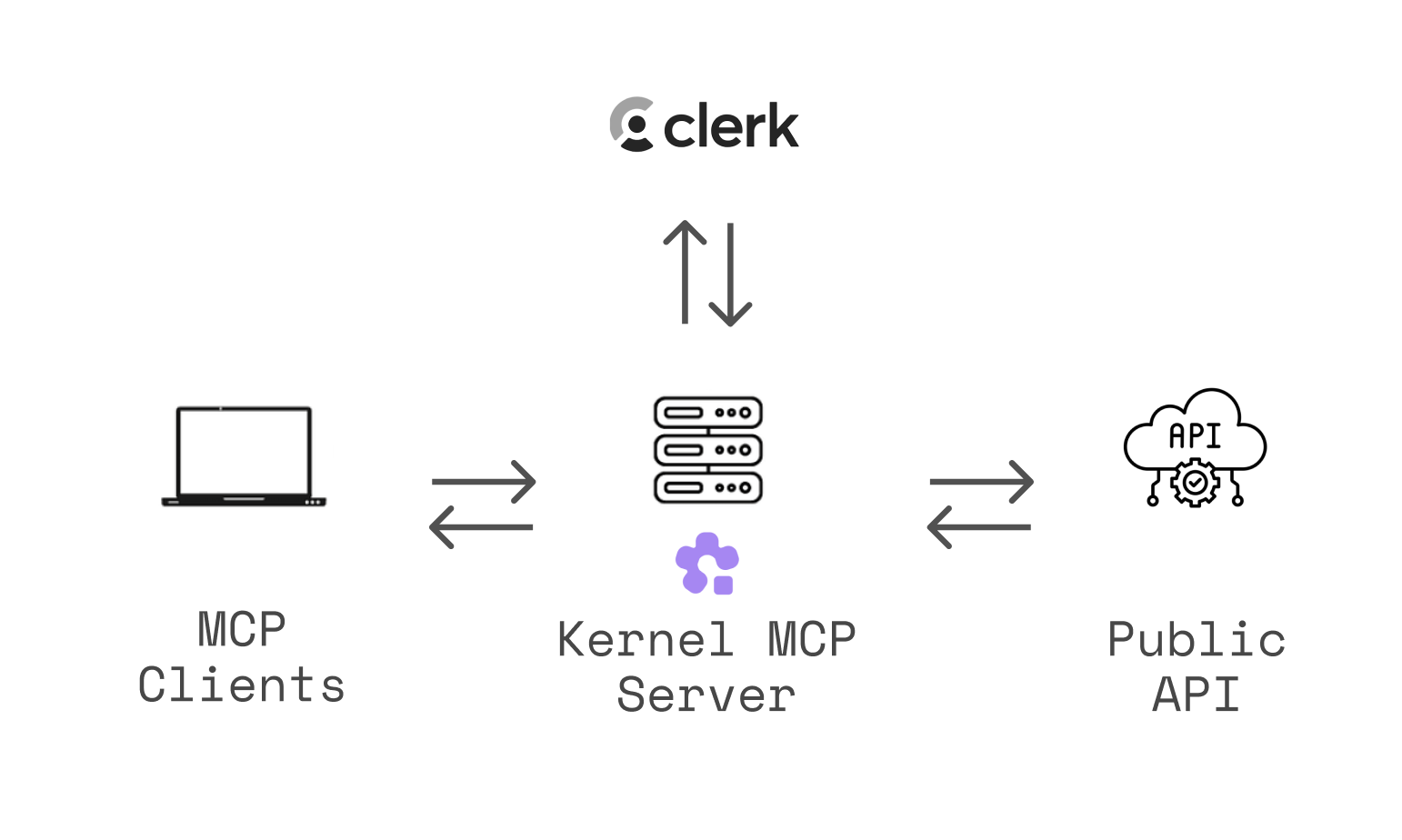
これは、Clerk経由のOAuth 2.0認証を使用してリソースを保護する、中央ホスト型のリモートサービスです。組織全体へのアクセスを許可するか、トークンを特定のKernelプロジェクトに制限するかを選択できます。セットアップは、さまざまなターゲットに対してKernel CLIを使用するか、streamable HTTPエンドポイントに直接接続することで簡単に行えます。リモートMCPをサポートしていないクライアントの場合は、mcp-remoteを使用してstdio経由で接続を確立できます。
できること
- 1カスタム自動化スクリプトの実行開発者はAIに対し、任意のPlaywrightコードを実行させたり、ライブブラウザセッションに対してJavaScript REPLを使用させたりすることができます。
- 2クラウドアプリケーションデプロイの管理ユーザーはAIクライアントを使用して、Kernelプラットフォーム上にホストされているアプリケーションのデプロイや監視を行うことができます。
- 3ブラウザ自動化セッションの記録AIに対して、実行した自動ブラウザ操作のMP4ビデオリプレイを生成するよう指示できます。
プロジェクトの README から作成されています。すべてのユースケースは、その引用と照らし合わせて確認されています。
Kernel MCPのインストール方法
フォーマット検証日 2026年11月10日Cursor に追加Gooseに追加Claude CodeにKernel MCPをインストール
$ claude mcp add --transport http kernel-mcp-server https://mcp.onkernel.com/mcpCursorにKernel MCPをインストール
~/.cursor/mcp.json
{
  "mcpServers": {
    "kernel-mcp-server": {
      "url": "https://mcp.onkernel.com/mcp"
    }
  }
}VS CodeにKernel MCPをインストール
.vscode/mcp.json
{
  "servers": {
    "kernel-mcp-server": {
      "type": "http",
      "url": "https://mcp.onkernel.com/mcp"
    }
  }
}VS Code CLIにKernel MCPをインストール
$ code --add-mcp '{"name":"kernel-mcp-server","type":"http","url":"https://mcp.onkernel.com/mcp"}'CodexにKernel MCPをインストール
$ codex mcp add kernel-mcp-server --url https://mcp.onkernel.com/mcpCodex config.tomlにKernel MCPをインストール
~/.codex/config.toml
[mcp_servers.kernel-mcp-server]
url = "https://mcp.onkernel.com/mcp"
Gemini CLIにKernel MCPをインストール
$ gemini mcp add -s user --transport http kernel-mcp-server https://mcp.onkernel.com/mcpGemini settings.jsonにKernel MCPをインストール
~/.gemini/settings.json
{
  "mcpServers": {
    "kernel-mcp-server": {
      "url": "https://mcp.onkernel.com/mcp",
      "type": "http"
    }
  }
}Kernel MCPツール 33
READMEから検出manage_browsersmanage_profilesmanage_projectsmanage_api_keysmanage_browser_poolsmanage_browser_filesmanage_config_registrymanage_proxiesmanage_replaysmanage_playwright_executorsweb_searchmanage_extensions
| manage_browsers | — | |
| manage_profiles | — | |
| manage_projects | — | |
| manage_api_keys | — | |
| manage_browser_pools | — | |
| manage_browser_files | — | |
| manage_config_registry | — | |
| manage_proxies | — | |
| manage_replays | — | |
| manage_playwright_executors | — | |
| web_search | — | |
| manage_extensions | — |
33個のツールをすべて表示ツールを折りたたむ
manage_appsmanage_auth_connectionsmanage_credentialsmanage_credential_providersmanage_vault_provider_configsmanage_vaultsmanage_vault_walletsmanage_vault_cardsmanage_vault_credentialsmanage_vault_itemsget_connection_contextcomputer_actionbrowser_curlexecute_playwright_codebrowser_replwebmcpexec_commandsearch_docsget_more_toolssubmit_feedbackopen_auth_login
| manage_apps | — | |
| manage_auth_connections | — | |
| manage_credentials | — | |
| manage_credential_providers | — | |
| manage_vault_provider_configs | — | |
| manage_vaults | — | |
| manage_vault_wallets | — | |
| manage_vault_cards | — | |
| manage_vault_credentials | — | |
| manage_vault_items | — | |
| get_connection_context | — | |
| computer_action | — | |
| browser_curl | — | |
| execute_playwright_code | — | |
| browser_repl | — | |
| webmcp | — | |
| exec_command | — | |
| search_docs | — | |
| get_more_tools | — | |
| submit_feedback | — | |
| open_auth_login | — |
自動チェック
実行日 2026年11月12日完全なレポート →自動チェックに合格しました。これはセキュリティ監査ではありません。コードを読み、サーバーに必要最小限のアクセス権を与えてください。 チェックの仕組み

- ソースリポジトリがリンクされており、アクセス可能合格
- オープンソースライセンス (OSI)合格
- 過去1年以内にコミットまたはリリースあり合格
- パッケージ名が有名なパッケージに酷似していない未チェック
- リモートエンドポイントがHTTPSを使用合格
- 破壊的なツールがラベル付けされている未チェック
- モデルへの隠れた指示がない合格
- パッケージおよびその依存関係に重大な勧告なし未チェック
README
GitHubで見るKernel MCP Server


A Model Context Protocol (MCP) server that provides AI assistants with secure access to Kernel platform tools and browser automation capabilities.
🌐 Use instantly at https://mcp.onkernel.com/mcp — no installation required!
What is this?
The Kernel MCP Server bridges AI assistants (like Claude, Cursor, fx, or other MCP-compatible tools) with the Kernel platform, enabling them to:
- 🚀 Deploy and manage Kernel apps in the cloud
- 🌐 Launch and control headless Chromium sessions for web automation
- 📊 Monitor deployments and track invocations
- 🔍 Search Kernel documentation and inject context
- 💻 Execute arbitrary Playwright code against live browsers
- 🧠 Run persistent JavaScript Browser REPL cells with native helpers, Patchright, Playwright, and raw CDP
- 🎥 Record MP4 video replays of browser automation
Open-source & fully-managed — the complete codebase is available here, and we run the production instance so you don't need to deploy anything.
The server uses OAuth 2.0 authentication via Clerk to ensure secure access to your Kernel resources. During authorization, users can grant organization-wide access or restrict the resulting access and refresh tokens to one Kernel project. Project-scoped tokens cannot switch projects; organization-wide authorization remains available for existing workflows.
For a deeper dive into why and how we built this server, see our blog post: Introducing Kernel MCP Server.
Setup Instructions
General (Transports)
- Streamable HTTP (recommended):
https://mcp.onkernel.com/mcp - stdio via
mcp-remote(for clients without remote MCP support):npx -y mcp-remote https://mcp.onkernel.com/mcp
Use the streamable HTTP endpoint where supported for increased reliability. If your client does not support remote MCP, use mcp-remote over stdio.
Kernel's server is a centrally hosted, authenticated remote MCP using OAuth 2.1 with dynamic client registration.
Protocol compatibility
The same /mcp endpoint serves SDK v1 / 2025-era Streamable HTTP clients and
protocol revision 2026-07-28 clients through the SDK v2 stateless handler.
Legacy clients still initialize normally. Modern clients use per-request metadata
and do not initialize or receive an MCP session ID. Both use the same tools and
authentication checks; MCP Apps capabilities are read per request for modern clients.
Legacy clients should handle both JSON-RPC errors and isError tool results.
Unknown tools now produce JSON-RPC error -32602; ordinary tool failures still
return isError. Validation-error text and generated tool schemas can differ from
SDK v1. No byte-preserving compatibility layer or Tasks extension is installed.
Run bun test 'src/app/[transport]/dual-era.test.ts' to exercise both SDK client
generations over HTTP, including OAuth authorization and refresh with local upstream
service fixtures. The v1 SDK is retained only as a test dependency.
Quick Setup with Kernel CLI
The fastest way to configure the MCP server is using the Kernel CLI:
# Install the CLI
brew install onkernel/tap/kernel
# or: npm install -g @onkernel/cli

# Install MCP for your tool
kernel mcp install --target <target>
Supported Targets
| Target | Command |
|---|---|
| Cursor | kernel mcp install --target cursor |
| Claude Desktop | kernel mcp install --target claude |
| Claude Code | kernel mcp install --target claude-code |
| VS Code | kernel mcp install --target vscode |
| Windsurf | kernel mcp install --target windsurf |
| Zed | kernel mcp install --target zed |
| Goose | kernel mcp install --target goose |
| fx | kernel mcp install --target fx |
The CLI automatically locates your tool's config file and adds the Kernel MCP server configuration.
Connect in your client
Claude
Our remote MCP server is not compatible with the method Free users of Claude use to add MCP servers.
Pro, Max, Team & Enterprise (Claude.ai and Claude Desktop)
- Go to Settings → Connectors → Add custom connector.
- Enter: Integration name:
Kernel, Integration URL:https://mcp.onkernel.com/mcp, then click Add. - In Settings → Connectors, click Connect next to
Kernelto launch OAuth and approve. - In chat, click Search and tools and enable the Kernel tools if needed.
On Claude for Work (Team/Enterprise), only Primary Owners or Owners can enable custom connectors for the org. After it's configured, each user still needs to go to Settings → Connectors and click Connect to authorize it for their account.
Claude Code CLI
claude mcp add --transport http kernel https://mcp.onkernel.com/mcp
# Then in the REPL run once to authenticate:
/mcp
Cursor
Automatic setup

Manual setup
- Press ⌘/Ctrl Shift J.
- Go to MCP & Integrations → New MCP server.
- Add this configuration:
{
  "mcpServers": {
    "kernel": {
      "url": "https://mcp.onkernel.com/mcp"
    }
  }
}
- Save. The server will appear in Tools.
OpenCode
Add the following to your ~/.config/opencode/opencode.jsonc:
{
  "mcp": {
    "kernel": {
      "type": "remote",
      "url": "https://mcp.onkernel.com/mcp",
    },
  },
}
Then authenticate using the OpenCode CLI:
# Authenticate with Kernel
opencode mcp auth kernel

# If you need to re-authenticate, first logout then auth again
opencode mcp logout kernel
opencode mcp auth kernel
fx
Configure Kernel with the Kernel CLI:
kernel mcp install --target fx
Or add Kernel to the mcp map in ~/.fx/mcp.json manually:
{
  "mcp": {
    "kernel": {
      "type": "http",
      "url": "https://mcp.onkernel.com/mcp",
      "oauth": {}
    }
  }
}
Start fx, or reload the configuration in an existing session:
/mcp reload
Then authenticate with Kernel:
/mcp auth kernel --open
Authorize access in the browser window that opens. Run /mcp list to verify that Kernel is connected.
Goose
Click here to install Kernel on Goose in one click.
Goose Desktop
- Click
Extensionsin the sidebar of the Goose Desktop. - Click
Add custom extension. - On the
Add custom extensionmodal, enter:- Extension Name:
Kernel - Type:
STDIO - Description:
Access Kernel's cloud-based browsers via MCP - Command:
npx -y mcp-remote https://mcp.onkernel.com/mcp - Timeout:
300
- Extension Name:
- Click
Save Changesbutton.
Goose CLI
- Run the following command:
goose configure - Select
Add Extensionfrom the menu. - Choose
Command-line Extension. - Follow the prompts:
- Extension name:
Kernel - Command:
npx -y mcp-remote https://mcp.onkernel.com/mcp - Timeout:
300 - Description:
Access Kernel's cloud-based browsers via MCP
- Extension name:
Visual Studio Code
{
  "mcpServers": {
    "kernel": {
      "url": "https://mcp.onkernel.com/mcp",
      "type": "http"
    }
  }
}
- Press ⌘/Ctrl P → search MCP: Add Server.
- Select HTTP (HTTP or Server-Sent Events).
- Enter:
https://mcp.onkernel.com/mcp - Name the server Kernel → Enter.
Windsurf
- Press ⌘/Ctrl , to open settings.
- Navigate Cascade → MCP servers → View raw config.
- Paste:
{
  "mcpServers": {
    "kernel": {
      "command": "npx",
      "args": ["-y", "mcp-remote", "https://mcp.onkernel.com/mcp"]
    }
  }
}
- On Manage MCPs, click Refresh to load Kernel MCP.
Zed
- Press ⌘/Ctrl , to open settings.
- Paste:
{
  "context_servers": {
    "kernel": {
      "source": "custom",
      "command": "npx",
      "args": ["-y", "mcp-remote", "https://mcp.onkernel.com/mcp"]
    }
  }
}
Smithery
You can connect directly to https://mcp.onkernel.com/mcp, or use Smithery as a proxy using its provided URL.
-
Use Smithery URL in any MCP client:
- Open Smithery: Kernel.
- Copy the URL from "Get connection URL".
- Paste it into your MCP client's "Add server" flow.
-
Use Kernel in Smithery's Playground MCP client:
- Open Smithery Playground.
- Click "Add servers", search for "Kernel", and add it.
- Sign in and authorize Kernel when prompted.
Others
Many other MCP-capable tools accept:
- Command:
npx - Arguments:
-y mcp-remote https://mcp.onkernel.com/mcp
{
  "kernel": {
    "command": "npx",
    "args": ["-y", "mcp-remote", "https://mcp.onkernel.com/mcp"]
  }
}
Configure these values wherever the tool expects MCP server settings.
Tools
Each Kernel feature has a single manage_* tool with an action parameter, keeping the tool set small and consistent. Standalone tools handle high-frequency and interactive workflows.
One additional Managed Auth helper (begin_auth_login) is marked app-only (_meta.ui.visibility: ["app"]); it refuses to execute on hosts that do not declare MCP Apps support. The App forwards the server-issued signed flow checkpoint to the shared manage_auth_connections wait action, so flow identity and terminal-state decisions stay on the server.
Self-hosted deployments can select tool families with KERNEL_MCP_ENABLED_TOOLSETS or hide them with KERNEL_MCP_DISABLED_TOOLSETS. Both accept comma- or space-separated toolset names and standalone aliases. For example, KERNEL_MCP_ENABLED_TOOLSETS="playwright repl computer" exposes browser-control tools without browser lifecycle or managed-auth tools, while KERNEL_MCP_DISABLED_TOOLSETS=api_keys only removes manage_api_keys. get_connection_context remains available in either mode.
Call get_connection_context before deciding whether to create or select a project. Its canonical connection_scope reports whether the connection is organization-wide or fixed to a project. Project-scoped tools advertise an optional project (name or ID) and a deprecated project_id: organization-wide connections may omit them to preserve organization-wide reads and API default-project behavior, while fixed-project connections may omit them or pass the matching project. Project resources use project-qualified kernel://orgs/{organizationId}/projects/{projectId}/... URIs. Authorization remains enforced by the Kernel API; selecting a project never grants access to it.
Inputs that mirror the API's nested proxy, network, browser, and proxy config objects replace older flat inputs. Some flat inputs, such as proxy_id and browser_region, remain as deprecated aliases, and combining one with its nested replacement is rejected. Removed flat inputs, such as proxy_routes and custom_host, are rejected with an error that names the replacement. Tool-call analytics records the names, never the values, of deprecated and removed inputs each call used in $mcp_deprecated_params and $mcp_removed_params; both lists live in src/lib/mcp/deprecated-params.ts.
manage_* tools
manage_browsers- Create, update, list, get, and delete browser sessions, and read archived telemetry for active or deleted sessions. Supports headless mode, site-compatibility settings, profiles, proxies (proxyby id, name, or mode), create-only per-host proxy routes (network.proxy_routes) and private-host routing (network.private_hosts), egress allowlists (network.allowed_hosts, set on create, then replaced with a new list or removed withnullon update), viewports, extensions, names and tags, and SSH tunneling. The browser tools (manage_browsers,computer_action,execute_playwright_code,browser_repl,exec_command,browser_curl,manage_browser_files,manage_replays,webmcp) accept a live session's name in place of itssession_id; deleted sessions, andmanage_browser_poolsrelease, take the ID only.manage_profiles- Setup (with guided live browser session), search/list with pagination, get, and delete browser profiles for persisting cookies and logins.manage_projects- Create, list, get, update, and delete organization projects. Inspect and update per-project resource limits.manage_api_keys- Create, list, get, update, and delete org-wide or project-scoped API keys. Create returns the plaintext key once.manage_browser_pools- Create, update, list, get, delete, and flush pools of pre-warmed browsers. Acquire and release browsers from pools. Poolnetworkmirrors the API object, including egress allowlists (network.allowed_hosts); an update replaces the whole object.manage_browser_files- Read, write, upload, download, and manage files in running browser VMs. Supports text and base64 input and returns binary downloads as embedded MCP resources. Paths must be absolute.read,download, anddownload_dir_ziprefuse files or archives overmax_bytes(default 10 MiB, maximum 25 MiB) instead of truncating them; mutating actions are never retried.manage_config_registry- Look up current browser and proxy recommendations, start and inspect analyses, request cancellation, and list project configurations or analysis history.manage_proxies- Create, list, get, check, and delete proxy configurations (datacenter, ISP, residential, mobile, custom). List filters by exactnameor aquerysubstring.manage_replays- Start, stop, and list MP4 video replay recordings for a browser session. Session-scoped: start once, run your automation, then stop. Requires a paid Kernel plan.manage_playwright_executors- List and delete the Playwright executors of a browser session.listreturns every executor (defaultfirst) withbusy,created_at,last_used_at, and for named executors thetarget_idandurlof the tab it owns.deletetakesnameand an optionalclose_tab(default true); deletingdefaultrestarts it instead of removing it. A browser can have at most 8 named executors.web_search- Search the web, retrieve retained results, and inspect provider capabilities. Tool visibility uses a per-credential, per-connection Search entitlement snapshot cached for up to 30 minutes; the Search API remains authoritative for execution access. Search creation is billable and is not automatically retried.manage_extensions- List and delete uploaded browser extensions.manage_apps- List/search apps, invoke actions, get/list/delete deployments, and get invocation results.manage_auth_connections- Create, list, get, update, delete, login, submit, inspect timelines, and wait for managed-auth connections in every client. Supports health-check and automatic re-auth settings, managed-auth browser configuration, and canonical interaction-bound field/choice submissions. Use domain-filteredlistfor discovery. App-capable clients additionally receiveopen_auth_login; the programmatic actions remain available there too.manage_credentials- Create, list, get, update, and delete stored credentials; fetch a current TOTP code for credentials with a configured totp_secret.manage_credential_providers- Create, list, get, update, and delete external credential providers (e.g. 1Password); list available items and test the provider connection.manage_vault_provider_configs- Create, list, get, rename, rotate secrets, and delete organization-owned Link and AgentCard configurations. Writes require organization scope.manage_vaults- Create, list, get, and delete project-owned vaults; use one per end user.manage_vault_wallets- Connect Kernel-hosted card wallets or Kernel-managed/configured Link/AgentCard wallets, import Link grants from a trusted backend, and inspect live payment methods and eligibility.manage_vault_cards- Create card requests or update supported providers according to the API's lifecycle rules; explicitly authorize an advertised Kernel card after user approval (Visa returns a hosted spend-approval action), or a Link card at the final checkout page withbrowser_idandpage_url. Creating or updating a card never authorizes it. AgentCardcheckout_originis caller-declared for eligible autopilot rule matching on non-prepared checkout authorizations; Kernel forwards it without comparing it with the browser page. Omission keeps the existing approval flow, autopilot may fall back to user approval, and prepared checkout usespreparation.merchant_origin. It does not enable autopilot or ensure payment success.manage_vault_credentials- Create credentials through one of two user-chosen paths: Kernel-hosted collection (definitions for private human collection; update values or description with version and optional immutable item identity preconditions) or 1Password brokered approval (connect a 1Password account, then create a request for 1-5 logins the user approves in the 1Password app). Agents reuse an existing credential for the site first, otherwise ask the user where their login lives before creating credentials.manage_vault_items- List, get, invoke advertised operations (including fill andwebmcp_invokewith value-free bindings), observe events, and delete vault items. Read credential definitions, presence, version, collection links, and explicitly non-sensitive values; sensitive values remain hidden.collectreopens the full form; provider approvals remain user actions. Ready is not login or payment success. Kernel cards also advertiseconfirm_transactionto report an observed merchant outcome once, and may advertiserestart_verificationfor proven no-dispatch attestation recovery only.
See Vault payments for the provider flows, safety rules, and response shapes. manage_browsers accepts creation-only vaults references (max 20); existing sessions and pools cannot gain vault bindings. The six vault tools share the vaults toolset and prepare/observe credentials rather than submitting merchant payments. They are exposed only when GET /org/entitlements reports features.vaults.enabled: true for the current credential; missing or unavailable entitlements hide them. Toolset configuration cannot override this access check. Credential create → collect → readiness → fill is supported entirely through MCP tools. prepare_checkout remains API/CLI-only. The SDK dependency is pinned in bun.lock.
For Kernel-managed Visa cards: enroll through the cardholder's private card_enrollment URL, observe a connected wallet and eligible payment method, then create a card request with merchant_country. After user approval, use either manage_vault_cards authorize or the equivalent manage_vault_items invoke authorize; deliver the returned spend_approval URL privately to the cardholder. Once ready, fill in a browser created with the vault attached, using the exact current HTTPS top-level page_url on the merchant origin. Kernel fill supports number, expiration (format: "MM/YY" or "MM/YYYY"), cvc, exp_month, and exp_year: no billing details are stored, and billing_* fields fail with 400 field_unavailable before any write. Enter billing name/ZIP on the merchant page.
After the user submits checkout and the merchant outcome is observed, call manage_vault_items invoke confirm_transaction exactly once, only when advertised, with status, transaction_type, integer minor-unit amount (0..1000000, no more than approved), matching uppercase currency (e.g. USD), and RFC3339 occurred_at; no extra properties. See the full input contract. Never infer payment success from fill. PENDING requires explicit merchant evidence of an accepted pending transaction; ERROR requires an explicit merchant transaction error, not transport loss or an ambiguous processing page. For unknown outcomes, ask the user to check merchant orders, email or statements and report the confirmed outcome even after expiry. If a report response is lost, re-get and send the identical observed report once more only if freshly advertised; otherwise observe state/events, never repeat checkout.
If a recovery_required Kernel card advertises restart_verification, invoke with no inputs after explicit user approval each time and privately deliver the new spend_approval URL; the cardholder must verify and approve spending again. If the response is unclear, re-get and share any new action; invoke once more only if still advertised with renewed user approval. Otherwise contact support@kernel.sh privately with project, vault, key, status_reason and event timestamps (never card data, API keys or capability URLs); do not delete or replace unresolved items. Kernel errors pass the API's HTTP status, safe code, Retry-After, and message through unchanged, with HTTP(S) URLs scrubbed; the API message states what happened and what to do next. The only added text is for a request that received no response. No automatic retries or merchant checkout replay.
For reconnect_required wallets share the new enrollment action; degraded wallets require user-confirmed, API-permitted deletion before a new enrollment. Re-check network_token_pending eligibility later at most once; unsupported/failed or persistent ineligibility needs a different card under a new wallet key with user confirmation. After a confirmed decline or expiry before checkout, delete only if permitted and create one new card under a new key with user confirmation; reconcile and report submitted checkout first. Optional actual merchant_category and merchant_category_code are supported; omit rather than invent them. See the full recovery rules in Vault payments.
Kernel MCPのよくある質問
Kernel MCPをClaude Codeに追加するには
ターミナルでclaude mcp add --transport http kernel-mcp-server https://mcp.onkernel.com/mcpを実行します。すべてのプロジェクトで利用するには--scope userを追加します。
Kernel MCPをCursorに追加するには
~/.cursor/mcp.jsonを開き、上記のインストールセクションに示すCursor設定を使ってmcpServersの下にサーバーを追加します。
Kernel MCPが提供するツールは
33個のツールを提供しており、manage_browsers, manage_profiles, manage_projects, manage_api_keys, manage_browser_poolsなどがあります。
Kernel MCP serverはAIアシスタントで何ができますか?
AIアシスタントをKernelプラットフォームに接続することで、ヘッドレスChromiumセッションの起動と制御、アプリのデプロイ、およびライブブラウザに対するPlaywrightやCDPコードの実行が可能になります。
Kernel MCPを使用するために何かをインストールする必要がありますか?
いいえ。ホストされたstreamable HTTPエンドポイントに直接接続するか、クライアントがリモートMCPをサポートしていない場合はstdio経由でmcp-remoteを使用できます。
Kernelはブラウザセッションを記録できますか?
はい。ブラウザ自動化のMP4ビデオリプレイを記録できます。
Kernel MCPはどのクライアントをサポートしていますか?
Kernel CLIを使用することで、Cursor、Claude Desktop、Claude Code、VS Code、Windsurf、Zed、Goose、およびfxの設定が可能です。