
セルフホストされたフリートダッシュボードを通じて、AIクライアントがClaude CodeやCodex CLIのセッションを監視、検索、起動、および制御できるようにします。
別名 jstuart0/agentpulse, @craze0/agentpulse-mcp
- スター
- 34
- ツール
- —
- ダウンロード数(30日間)
- 692
- 最新バージョン
- —
- 最終コミット
- 2026年11月11日
- ライセンス
- MIT
AgentPulse MCPとは
セルフホストされたフリートダッシュボードを通じて、AIクライアントがClaude CodeやCodex CLIのセッションを監視、検索、起動、および制御できるようにします。
プロジェクトのREADMEから生成された概要
AgentPulse MCP server について
AgentPulseは、Claude Code、Codex CLI、Copilot CLI、またはOpenCodeを使用する開発者向けに、単一のダッシュボードから複数のAIコーディングセッションを監視および管理する機能を提供します。異なるマシン上で動作しているアクティブなエージェントを観察するための集約されたビューを提供し、現在のステータス、プロジェクトのコンテキスト、およびプロンプトとツール使用の完全なチャット履歴を表示します。
ユーザーは、セッションをリアルタイムで監視する「オブザーバビリティモード」か、ローカルのスーパーバイザーを通じてセッションを起動、制御、管理する「オーケストレーションモード」を選択できます。システムは、SQLiteまたはPostgreSQLデータベースを備えたDockerまたはKubernetesによるセルフホストをサポートしています。セッションのリモートコントロールが可能であり、別のコンピュータからタスクへのプロンプト送信、停止、またはリトライを行うことができます。
提供されているMCP serverを使用すると、一つのエージェントにフリート全体を管理させることも可能です。これにより、プライマリエージェントが他のセッションを直接一覧表示、検索、起動、および制御できるようになります。プラットフォームは作業をプロジェクトごとに整理し、セッションテンプレートを使用して、特定のエージェント構成やホストルーティングのセットアップを自動化します。
できること
- 1複数のアクティブなコーディングセッションを監視実行中のすべてのClaude CodeおよびCodex CLIセッションをライブグリッドで表示し、どれが動作中、待機中、またはアイドル状態かを確認できます。
- 2リモートデバイスからエージェントを制御セッションをリモートで起動または停止することで、スマートフォンや別のコンピュータからコーディングエージェントを管理できます。
- 3MCPによるエージェント管理の自動化MCP serverを使用して、プライマリAIエージェントにコーディングセッションのフリート全体をオーケストレーションさせることができます。
- 4マシン間のエージェントアクティビティを集約さまざまなラップトップ、デスクトップ、またはサーバーからのセッションデータを、一つの統合されたダッシュボードに集約します。
プロジェクトの README から作成されています。すべてのユースケースは、その引用と照らし合わせて確認されています。
AgentPulse MCPのインストール方法
フォーマット検証日 2026年11月10日Cursor に追加Gooseに追加Claude CodeにAgentPulse MCPをインストール
$ claude mcp add agentpulse -- npx -y @craze0/agentpulse-mcpCursorにAgentPulse MCPをインストール
~/.cursor/mcp.json
{
  "mcpServers": {
    "agentpulse": {
      "command": "npx",
      "args": [
        "-y",
        "@craze0/agentpulse-mcp"
      ]
    }
  }
}VS CodeにAgentPulse MCPをインストール
.vscode/mcp.json
{
  "servers": {
    "agentpulse": {
      "type": "stdio",
      "command": "npx",
      "args": [
        "-y",
        "@craze0/agentpulse-mcp"
      ]
    }
  }
}VS Code CLIにAgentPulse MCPをインストール
$ code --add-mcp '{"name":"agentpulse","type":"stdio","command":"npx","args":["-y","@craze0/agentpulse-mcp"]}'Claude DesktopにAgentPulse MCPをインストール
claude_desktop_config.json
{
  "mcpServers": {
    "agentpulse": {
      "command": "npx",
      "args": [
        "-y",
        "@craze0/agentpulse-mcp"
      ]
    }
  }
}CodexにAgentPulse MCPをインストール
$ codex mcp add agentpulse -- npx -y @craze0/agentpulse-mcpCodex config.tomlにAgentPulse MCPをインストール
~/.codex/config.toml
[mcp_servers.agentpulse]
command = "npx"
args = ["-y", "@craze0/agentpulse-mcp"]
Gemini CLIにAgentPulse MCPをインストール
$ gemini mcp add -s user agentpulse npx -- -y @craze0/agentpulse-mcpGemini settings.jsonにAgentPulse MCPをインストール
~/.gemini/settings.json
{
  "mcpServers": {
    "agentpulse": {
      "command": "npx",
      "args": [
        "-y",
        "@craze0/agentpulse-mcp"
      ]
    }
  }
}設定
AGENTPULSE_AI_ENABLEDAGENTPULSE_OTEL_ENDPOINTAGENTPULSE_SECRETS_KEYAPI_TOKENTELEGRAM_BOT_TOKENTELEGRAM_WEBHOOK_SECRET
| 名前 | 説明 | 種類 |
|---|---|---|
| AGENTPULSE_AI_ENABLED | — | |
| AGENTPULSE_OTEL_ENDPOINT | — | |
| AGENTPULSE_SECRETS_KEY | — | |
| API_TOKEN | — | |
| TELEGRAM_BOT_TOKEN | — | |
| TELEGRAM_WEBHOOK_SECRET | — |
自動チェック
実行日 2026年11月12日完全なレポート →自動チェックに合格しました。これはセキュリティ監査ではありません。コードを読み、サーバーに必要最小限のアクセス権を与えてください。 チェックの仕組み

- ソースリポジトリがリンクされており、アクセス可能合格
- オープンソースライセンス (OSI)合格
- 過去1年以内にコミットまたはリリースあり合格
- パッケージ名が有名なパッケージに酷似していない合格
- リモートエンドポイントがHTTPSを使用未チェック
- 破壊的なツールがラベル付けされている未チェック
- モデルへの隠れた指示がない合格
- パッケージおよびその依存関係に重大な勧告なし未チェック
README
GitHubで見るAgentPulse



Open-source, self-hosted dashboard to monitor, orchestrate and remotely control Claude Code and Codex CLI sessions, and observe Copilot CLI and OpenCode, across all your machines.
If you run multiple Claude Code, Codex CLI, Copilot CLI, or OpenCode sessions across different terminal tabs, you know the pain: which tab is doing what? AgentPulse gives you a live dashboard that shows every active session, what it's working on, and a scrollable chat history of everything you've said to each agent.
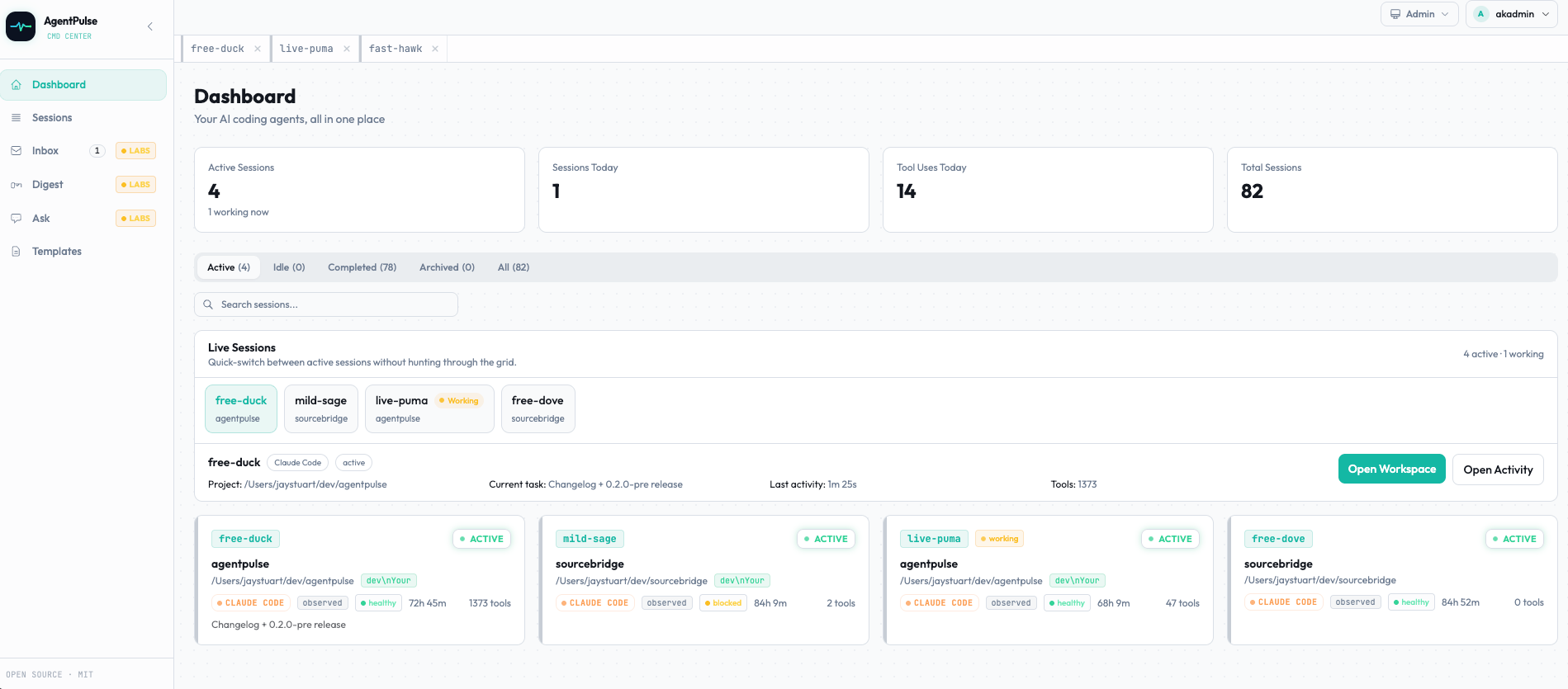
The AgentPulse dashboard: every running Claude Code, Codex CLI, Copilot CLI and OpenCode session in one grid, marked Working, Waiting, Idle or Error.
What AgentPulse is
AgentPulse has two major modes:
- Observability -- watch Claude Code, Codex, Copilot CLI, and OpenCode sessions in real time, with prompts, responses, progress, notes, and session history in one dashboard (Copilot CLI and OpenCode are observed only -- AgentPulse can't launch or steer them)
- Orchestration -- launch and manage sessions from AgentPulse itself with templates, supervisors, headless tasks, interactive sessions, retries, host routing, answering a managed Codex session's command and file-change approvals from the dashboard (see Answering Codex approvals), and continuing a Claude Code session you started by hand as a fork, with its approvals answered the same way (see Continuing a Claude Code session)
Plus an AI Labs layer that's very new and explicitly experimental -- see the Labs section below.
You can run AgentPulse as:
- observability only -- hooks + dashboard, no supervisor/control plane
- full local orchestration -- hooks + dashboard + local supervisor for launch/control on the same machine
- remote dashboard -- relay local events to a remote AgentPulse instance
Use cases
- Monitor multiple Claude Code sessions at once. One live grid instead of a dozen terminal tabs, with each session's state, last prompt and full history. Guide
- See agents on every machine in one place. A relay on each laptop, desktop or server forwards events to one dashboard, with a filter by machine. Guide
- Check on and control Claude Code from your phone or another computer. Watch any session remotely, and launch, prompt, stop or retry the ones AgentPulse started. Guide
- Self-host it for yourself or a team. Docker or Kubernetes, SQLite or PostgreSQL, behind Authentik, Authelia, oauth2-proxy, Pomerium or Cloudflare Access. Guide
- Let your agents manage your other agents over MCP. Claude Code or Codex CLI can list, search, launch and steer sessions through the
@craze0/agentpulse-mcpserver. Guide
Not sure whether you need monitoring or orchestration? See observability vs. orchestration for AI coding agents.
How it works
Your terminal tabs                          AgentPulse dashboard
┌─────────────────┐                        ┌──────────────────────┐
│ Claude Code (1) │──── hook events ──────>│  bold-falcon: active │
│ fixing auth bug │                        │  "fix the auth bug"  │
├─────────────────┤                        ├──────────────────────┤
│ Claude Code (2) │──── hook events ──────>│  zen-owl: active     │
│ writing tests   │                        │  "add unit tests"    │
├─────────────────┤                        ├──────────────────────┤
│ Codex CLI       │──── hook events ──────>│  warm-crane: idle    │
│ (idle)          │                        │  last: 5m ago        │
├─────────────────┤                        ├──────────────────────┤
│ Copilot CLI     │──── hook events ──────>│  quiet-otter: active │
│ (observed only) │                        │  "review the diff"   │
├─────────────────┤                        ├──────────────────────┤
│ OpenCode        │──── plugin events ────>│  calm-heron: idle    │
│ (observed only) │                        │  last: 2m ago        │
└─────────────────┘                        └──────────────────────┘
Each session gets a random memorable name (like bold-falcon) so you can match the dashboard to your terminal tabs at a glance. Click any session to see a live chat-style timeline of your prompts and the agent's tool usage.
Quick start
Easiest local install: 1 command
macOS / Linux:
This installs AgentPulse locally with Bun + SQLite, starts the web app and local supervisor as services, and configures Claude Code + Codex hooks automatically.
curl -fsSL https://raw.githubusercontent.com/jstuart0/agentpulse/main/scripts/install-local.sh | bash
Windows:
irm https://raw.githubusercontent.com/jstuart0/agentpulse/main/scripts/install-local.ps1 | iex
It needs curl and git, plus python3 for the supervisor and hooks. If it can't find a Bun 1.3.12 or newer it installs a pinned one, which also needs unzip and shasum or sha256sum. Anything missing is listed up front with the command to install it, and nothing is installed until it's there. To put Bun somewhere of your choosing (supply it again on a re-run; with a BUN_INSTALL other than ~/.bun, only $BUN_INSTALL/bin/bun is considered, not PATH):
curl -fsSL https://raw.githubusercontent.com/jstuart0/agentpulse/main/scripts/install-local.sh | BUN_INSTALL=/opt/bun bash
When it finishes, open http://localhost:3000 and start a new Claude Code or Codex session.
Docker install: 1 shell line
If you prefer Docker, this starts the container, waits for health, and configures hooks:
docker run -d -p 127.0.0.1:3000:3000 -v agentpulse-data:/app/data -e DISABLE_AUTH=true --restart unless-stopped --name agentpulse ghcr.io/jstuart0/agentpulse && until curl -fsSL http://localhost:3000/api/v1/health >/dev/null 2>&1; do sleep 1; done && curl -fsSL http://localhost:3000/setup.sh | bash
Security note:
-p 127.0.0.1:3000:3000binds the host port to localhost only. The older-p 3000:3000form would publish on all host interfaces, exposing the auth-disabled server to your LAN. Use the127.0.0.1:prefix wheneverDISABLE_AUTH=true.
Done. Open http://localhost:3000 and you have:
- live session observability
- local launch/control via the supervisor
- Claude Code + Codex hooks already configured
Why localhost? Claude Code and Codex block HTTP hooks to remote/private IPs as a security measure. Only
localhost/127.0.0.1is allowed. This keeps things simple -- one Docker container on your machine, no networking to configure. If port 3000 is taken, use any free port:docker run -d -p 127.0.0.1:4000:3000 -v agentpulse-data:/app/data -e DISABLE_AUTH=true -e PUBLIC_URL=http://localhost:4000 --restart unless-stopped --name agentpulse ghcr.io/jstuart0/agentpulse curl -fsSL http://localhost:4000/setup.sh | bash
What you'll see
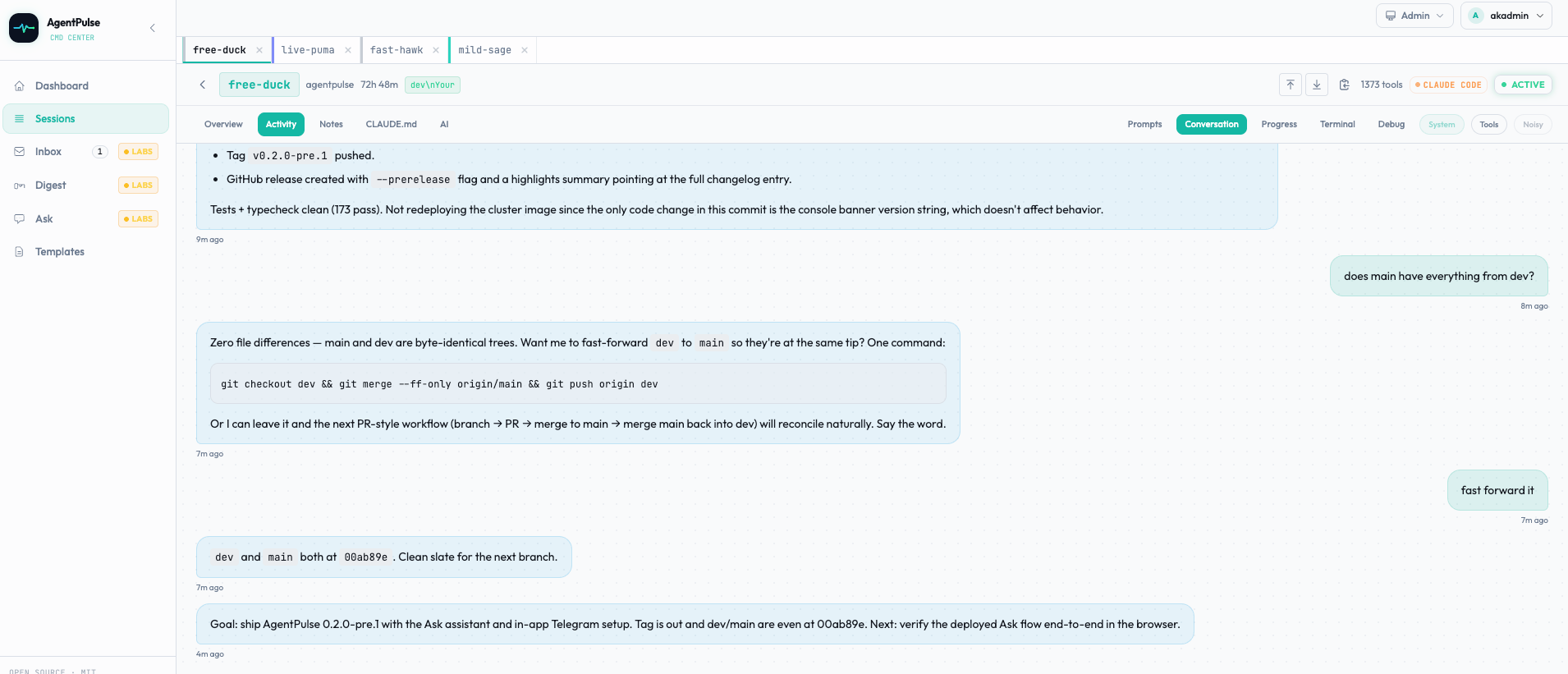
Session detail: a chat-style history of your prompts to one agent, with its tool calls inline.
- Dashboard -- grid of all sessions with status, project name, session name, duration, and tool use count. Each session is in exactly one operational state: Waiting (the agent finished a turn, or has an outstanding permission prompt, and is waiting on you -- "Mark as seen" clears it), Error (the session failed and hasn't been dismissed -- "Dismiss error" clears it), Working (the agent is actively working right now), or Idle (nothing is waiting and the agent isn't working). Status cards above the grid filter by state; a "What do these states mean?" popover repeats this explanation in the UI
- Session detail -- click a session to see a chat-style timeline with your prompts as blue bubbles and tool usage inline
- Unsent prompts -- a prompt you typed in a session's box and haven't sent is kept in your browser (in plain text, in
localStorage) for up to 7 days, per person and per session, so it survives switching sessions and reloading. It says "Unsent draft, saved ..." with a Discard draft button (and an Undo for a few seconds), drafts over 20,000 characters are kept only while the page is open, and Sign out removes every draft this browser holds - Projects -- first-class projects with cwd-based session resolution; sessions stamp themselves with the right project on ingest, templates inherit project defaults (cwd, agentType, model) with per-field overrides, and a
/projectspage lets you create / edit / delete them. Saving a template under a new directory auto-creates the project for you - Session templates -- save reusable Claude Code and Codex session setups, link them to a project for live-inheritance defaults, preview normalized launch specs, and route launches to the right host
- Orchestration -- launch headless or interactive sessions from AgentPulse, track launch status, retry, stop, and manage sessions through the local supervisor
- Search -- full-text across session names, prompts, plans, notes, and event payloads. SQLite uses FTS5 (BM25-ranked); Postgres uses ILIKE. Clicking an event hit jumps to the matching event in the timeline and applies a brief amber flash
- Inbox -- single
/inboxview that aggregates every open approval (HITL, Ask-driven actions, alert-rule firings), stuck / risky session warnings, and recent failures. Approve / decline inline; snooze noisy items - Real-time updates -- everything updates live via WebSocket, no refreshing needed
- Random session names -- each session gets a name like
brave-falconso you can tell them apart - CLAUDE.md editor -- view and edit your agent instruction files from the dashboard
- Setup page -- generates hook config you can copy-paste, or use the one-liner above
- MCP server -- let Claude Code, Codex CLI, or any MCP-compliant agent observe and orchestrate your fleet directly (list/inspect sessions, search, launch agents, steer live sessions, decide inbox items). Ships from a checkout via
agentpulse mcp serve, or standalone via the@craze0/agentpulse-mcpnpm package -- no checkout required. See below. - AI Labs (experimental) -- optional AI layer that watches sessions, classifies health, proposes next steps with human-in-the-loop approval, plus an Ask command surface that lets you launch / edit / search / summarize / alert in natural language. Each feature is behind its own Labs toggle. See below.
MCP server
AgentPulse can be driven by an external AI coding agent over the Model Context Protocol: read tools (sessions, search, digest, AI intelligence) plus orchestration tools (launch agents, prompt/stop live sessions, decide HITL/inbox items), gated behind a scoped API key.
From a checkout:
agentpulse mcp install --mint my-agent          # observe-only (read-only), the safe default
agentpulse mcp install --mint my-agent --orchestrate  # adds launch/steer/decide -- read the security notes first
Without cloning this repo -- the standalone @craze0/agentpulse-mcp npm package:
npx @craze0/agentpulse-mcp install --mint my-agent
Either way, install prints ready-to-paste Claude Code and Codex CLI config. See docs/MCP.md for the full tool catalog, client setup, and a security section covering what a manage-scoped key can do and why Codex CLI does not honor Claude Code's confirmation prompt.
AI Labs (experimental)
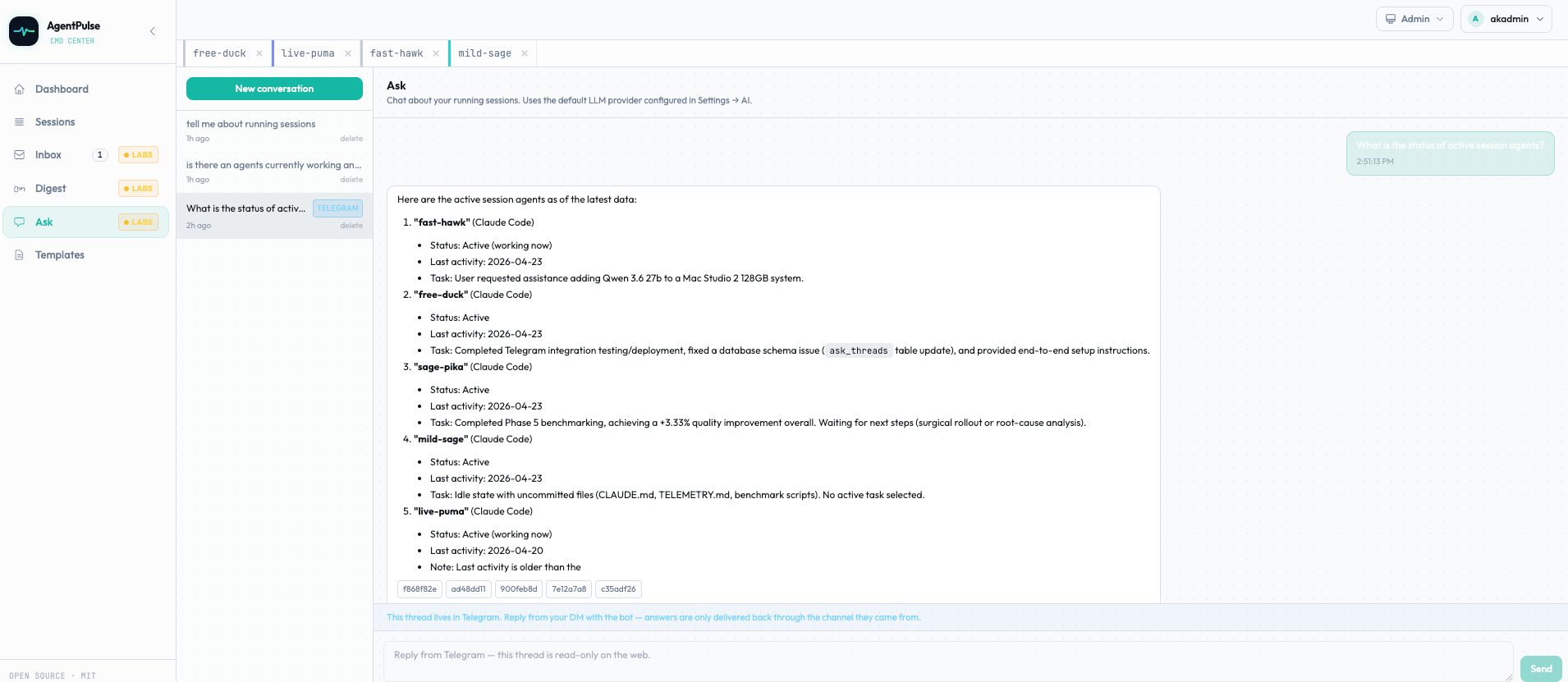
The Ask assistant: ask about, launch or search your agent sessions in plain language.
Heads up: the AI layer is new, shipping under explicit Labs framing. Every feature is toggleable under Settings → Labs. Contracts, UI, and defaults may change. Disable any toggle if it gets in your way -- nothing else in AgentPulse depends on it.
When enabled, AgentPulse can use an LLM provider you choose (Anthropic, OpenAI, OpenRouter, Google, or any OpenAI-compatible endpoint like Ollama / LM Studio / vLLM) to do the following. All AI work is human-in-the-loop by default: the watcher proposes, you approve or decline, and the runtime records every step as an auditable event.
AgentPulse MCPのよくある質問
AgentPulse MCPをClaude Codeに追加するには
ターミナルでclaude mcp add agentpulse -- npx -y @craze0/agentpulse-mcpを実行します。すべてのプロジェクトで利用するには--scope userを追加します。
AgentPulse MCPをCursorに追加するには
~/.cursor/mcp.jsonを開き、上記のインストールセクションに示すCursor設定を使ってmcpServersの下にサーバーを追加します。
AgentPulse MCP serverを使用すると、AIエージェントは何ができますか?
MCP serverを介して、セッションの一覧表示と詳細確認、履歴の検索、新しいエージェントセッションの起動、実行中のセッションの制御、およびインボックス項目の判断が可能です。
チェックアウトせずにAgentPulse MCP serverをインストールするにはどうすればよいですか?
スタンドアロンの @craze0/agentpulse-mcp npm パッケージを使用してください。代替手段として agentpulse mcp serve コマンドも利用可能です。
AgentPulseはどのコーディングエージェントをサポートしていますか?
Claude Code、Codex CLI、GitHub Copilot CLI、およびOpenCodeをサポートしています。ただし、Copilot CLIとOpenCodeは監視のみの対応となります。
AgentPulseをセルフホストすることはできますか?
はい、DockerまたはKubernetesを使用して、SQLiteまたはPostgreSQLとともにセルフホスト可能です。オプションで認証プロキシ経由での運用もできます。
AgentPulseはリアルタイムで更新を表示しますか?
はい、セッションとイベントはWebSocketを介してライブで更新されるため、ページをリフレッシュする必要はありません。