
Wraps git, GitHub, GitLab, Bitbucket and Jira actions so an AI client can manage repos, work items, commits, issues and pull requests.
別名 gitkraken/gk-cli, @gitkraken/gk
- スター
- 467
- ツール
- —
- ダウンロード数(30日間)
- 304,568
- 最新バージョン
- 3.1.77
- 最終コミット
- 2026年11月12日
- ライセンス
- —
GitKraken MCPとは
GitKrakenはMCPサーバーです。 Wraps git, GitHub, GitLab, Bitbucket and Jira actions so an AI client can manage repos, work items, commits, issues and pull requests.
プロジェクトのREADMEから生成された概要
GitKraken MCP server について
Managing multiple repositories and development tasks from an AI client is what gk-cli enables. This local MCP server acts as a bridge between your LLM and your development workflow by wrapping git, GitHub, GitLab, Bitbucket, and Jira actions. It allows developers to handle work items, issues, and pull requests through a unified interface, even when working across several different repositories simultaneously.
Users interact with the server by configuring it on macOS, Windows, or Unix systems. The setup requires authenticating with the GitKraken platform via the auth command and adding provider tokens for your specific hosting services. Once configured, the server provides tools for AI-powered commit message generation and automated pull request creation. It also supports standard git command passthrough, allowing the AI to execute commands like status or remote directly through the interface.
できること
- 1Automated commit and PR generationAn AI client can use the server to write commit messages and create pull requests using artificial intelligence.
- 2Multi-repository task managementDevelopers can group different repositories into a single work item to manage complex features across a codebase.
- 3Issue and work item trackingYou can instruct an AI to manage your development backlog and track specific issues using the integrated provider actions.
プロジェクトの README から作成されています。すべてのユースケースは、その引用と照らし合わせて確認されています。
GitKraken MCPのインストール方法
フォーマット検証日 2026年11月10日Cursor に追加Gooseに追加Claude CodeにGitKraken MCPをインストール
$ claude mcp add gk-cli -- npx -y @gitkraken/gkCursorにGitKraken MCPをインストール
~/.cursor/mcp.json
{
  "mcpServers": {
    "gk-cli": {
      "command": "npx",
      "args": [
        "-y",
        "@gitkraken/gk"
      ]
    }
  }
}VS CodeにGitKraken MCPをインストール
.vscode/mcp.json
{
  "servers": {
    "gk-cli": {
      "type": "stdio",
      "command": "npx",
      "args": [
        "-y",
        "@gitkraken/gk"
      ]
    }
  }
}VS Code CLIにGitKraken MCPをインストール
$ code --add-mcp '{"name":"gk-cli","type":"stdio","command":"npx","args":["-y","@gitkraken/gk"]}'Claude DesktopにGitKraken MCPをインストール
claude_desktop_config.json
{
  "mcpServers": {
    "gk-cli": {
      "command": "npx",
      "args": [
        "-y",
        "@gitkraken/gk"
      ]
    }
  }
}CodexにGitKraken MCPをインストール
$ codex mcp add gk-cli -- npx -y @gitkraken/gkCodex config.tomlにGitKraken MCPをインストール
~/.codex/config.toml
[mcp_servers.gk-cli]
command = "npx"
args = ["-y", "@gitkraken/gk"]
Gemini CLIにGitKraken MCPをインストール
$ gemini mcp add -s user gk-cli npx -- -y @gitkraken/gkGemini settings.jsonにGitKraken MCPをインストール
~/.gemini/settings.json
{
  "mcpServers": {
    "gk-cli": {
      "command": "npx",
      "args": [
        "-y",
        "@gitkraken/gk"
      ]
    }
  }
}自動チェック
実行日 2026年11月12日完全なレポート →自動チェックに合格しました。これはセキュリティ監査ではありません。コードを読み、サーバーに必要最小限のアクセス権を与えてください。 チェックの仕組み · 点数を上げるための改善点

- ソースリポジトリがリンクされており、アクセス可能合格
- オープンソースライセンス (OSI)No license検出事項
- 過去1年以内にコミットまたはリリースあり合格
- パッケージ名が有名なパッケージに酷似していない合格
- リモートエンドポイントがHTTPSを使用未チェック
- 破壊的なツールがラベル付けされている未チェック
- モデルへの隠れた指示がない合格
- パッケージおよびその依存関係に重大な勧告なし合格
README
GitHubで見る🚀 GitKraken CLI
gk is GitKraken on the command line. The core functionality is focused on "Work Items" which can be thought of as the feature or issue you are trying to tackle. This allows you to work with multiple repos at once and get the same UX as if you were in a monorepo. We also provide robust AI-powered commit messages and Pull Request generation. It also provides an MCP server that streamlines working with git and your Issue and git hosting providers.
GitKraken CLI is available on macOS, Windows, and Unix systems.

Table of Contents
MCP Server
The GitKraken MCP server is a local MCP server that is powerful and easy to use. It wraps git, GitHub, Jira MCP actions as well as provides tools to LLMs that work with GitKraken APIs and functionality. You can find specific installation instructions based on your chosen AI application in the Help Center.
If you want to read more about the MCP server, you can check out the introduction blog post
Documentation
gk help is going to be your best source for exploring the CLI. But also see the workflows below.
Welcome to GitKraken CLI, a premium CLI experience for managing multiple repositories with familiar GIT CLI commands

Usage:
  gk [flags]
  gk [command]

AUTHENTICATING
  auth         Authenticate with the GitKraken platform
  provider     Add or remove provider tokens

CORE COMMANDS
  graph        Display commit graph in current repository
  issue        Manage your issues
  organization Manage your Gitkraken organizations
  work         Interact with your work.
  workspace    Interact with your workspaces. Alias: 'ws'

Additional Commands:
  help         Help about any command
  setup        Display information about your current system configuration
  version      Print the version number of GK CLI

Flags:
  -h, --help   help for gk

Use "gk [command] --help" for more information about a command.
Workflows
Start with a single repo. You can add more later.
In general, your process will look like this:
# Authenticate
gk auth login

# Navigate to a git repo directory on your filesystem
cd ./path/to/repo

# Then create a Work Item and the current directory
# will be automatically added to the Work Item
gk work create "My new work item"

# Edit files...
# ...

# Commit your changes using AI
gk work commit --ai

# Push your changes
gk work push

# Create a Pull Request
gk work pr create --ai
Once you have familiarized yourself with using a single repo, try out creating work items and generating commits and PRs for multiple repos at a time by just adding multiple repos to a new Work Item.
# Add a repo to the current work item
gk work add ./path/to/repo # path could be as simple as "." if you are in the directory already
git Command Passthrough
You can also use gk to pass through any git command. eg:
gk status
gk remote -v
# etc
Installation
macOS
gk is available from Homebrew with the following command:
Homebrew:
brew install gitkraken-cli
Or download it from the releases page and add it to your binaries folder:
mv ~/Downloads/gk /usr/local/bin/gk
Unix / Ubuntu

gk is available as a downloadable binary from the releases page. Once you have it, add it to your binaries folder:
mv ~/Downloads/gk /usr/local/bin/gk
Or create a new directory, move the binary and add it to $PATH:
mkdir "$HOME/cli"
mv ~/Downloads/gk "$HOME/cli"
export PATH="$HOME/gk:$PATH"
You can also [download][releases page] your corresponding package (.deb, .rpm) and install it with:
sudo apt install ./gk.deb
or
sudo rpm -i ./gk.rpm
Windows
gk is available from [Winget][winget] with the following command:
winget install gitkraken.cli
⚙️ Configuration
Nerd Fonts
The GitKraken CLI supports Nerd Fonts to display icons for some commands. To ensure correct icon rendering, please obtain and install a Nerd Font available at https://www.nerdfonts.com/. After installation, set the selected Nerd Font as the default font for your terminal.
Troubleshooting
gk login freezes after authenticating in browser
This problem is due to the browser. Currently we know that Safari and Brave do not allow to respond to localhost through port 1314. To fix this, change your default browser or copy the URL before the redirect and open it in another browser.
gk from Oh-My-Zsh
Oh-My-Zsh has gitk aliased as gk and that can create some problems. To fix this, type in your terminal:
unalias gk
Manual macOS Installation
If you install the CLI manually from the releases page on macOS, you will likely run into a security error that looks like this:
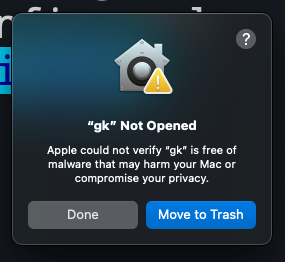
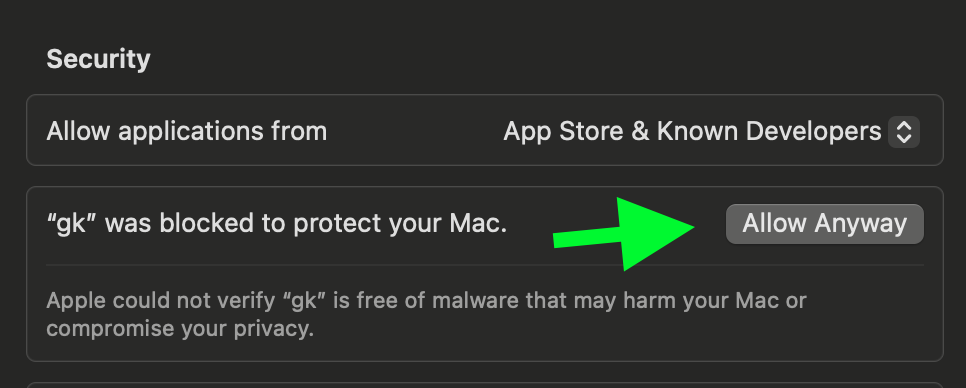
To fix this, go to Settings > Security & Privacy > General and click "Allow Anyway".
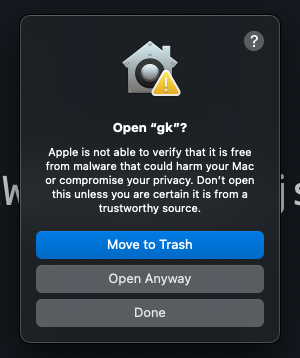
Try running gk setup again and then click "Open Anyway" to continue.
GitKraken MCPのよくある質問
GitKraken MCPをClaude Codeに追加するには
ターミナルでclaude mcp add gk-cli -- npx -y @gitkraken/gkを実行します。すべてのプロジェクトで利用するには--scope userを追加します。
GitKraken MCPをCursorに追加するには
~/.cursor/mcp.jsonを開き、上記のインストールセクションに示すCursor設定を使ってmcpServersの下にサーバーを追加します。
What does the GitKraken MCP server do?
It is a local MCP server that wraps git, GitHub and Jira actions and exposes tools for LLMs to work with GitKraken APIs and functionality.
How do I authenticate the GitKraken CLI?
Run gk auth login to authenticate with the GitKraken platform; provider tokens for hosting services can be added with gk provider.
Can GitKraken generate commit messages and pull requests with AI?
Yes, gk work commit --ai creates AI-powered commit messages and gk work pr create --ai generates pull requests.
Does the GitKraken CLI support multiple repositories at once?
Yes, work items can include multiple repos so you get monorepo-like UX across them.