
Rigor MCPサーバー
コミット 2026年11月13日テストコードを書くことなく、QAチームがMCPのツール、リソース、プロンプト、およびコントラクトに対して、決定論的な自然言語テストを実行できるようにします。
別名 FusionOnePlatform/mcprigor
- スター
- 3
- ツール
- —
- ダウンロード数(30日間)
- —
- 最新バージョン
- —
- 最終コミット
- 2026年11月13日
- ライセンス
- Apache-2.0
Rigor MCPとは
テストコードを書くことなく、QAチームがMCPのツール、リソース、プロンプト、およびコントラクトに対して、決定論的な自然言語テストを実行できるようにします。
プロジェクトのREADMEから生成された概要
Rigor MCP server について
QAチームは、従来のテストコードを書くことなく、MCPのツール、リソース、プロンプト、およびコントラクトに対して、決定論的な自然言語テストを実行できます。専用の構文を使用することで、テスターはツール呼び出し、リソース読み取り、およびプロンプト出力に対する期待値を定義できます。このアプローチでは、テスト文言の解釈にAIモデルを使用しないため、テストの予測可能性が確保されます。
ユーザーは、環境変数による認証を使用して、ローカルのstdioサーバー、Pythonサーバー、またはリモートのHTTPサーバーに対してテストを実行できます。システムは、ローカルのブラウザベースのQAワークスペース、CI統合用のCLI、およびライブサーバーからテストを生成するインタラクティブな作成モードを含む、さまざまなワークフローをサポートしています。また、ローカル環境とデプロイ済み環境の動作を比較するparityコマンドも提供しています。
開発者は、CSV、JSON、またはSQLアダプターを使用したデータ駆動型のシナリオを通じて、複雑なテスト要件を管理できます。このツールには、セキュリティ監査、パーセンタイル制限によるパフォーマンス予算管理、マルチサーバーフリートの構成チェックなどの高度な機能が含まれています。VS Code拡張機能を通じて開発ワークフローに統合でき、インタラクティブなエビデンスタイムラインを含む詳細なHTMLレポートを提供します。
できること
- 1ツールの出力精度を検証する開発者は、定義された引数を使用して特定のツールを呼び出すようシステムに指示し、返された構造化コンテンツが期待値と一致するかどうかを確認できます。
- 2ローカル環境とリモート環境を比較するチームは、ローカルの開発サーバーとデプロイされたQAサーバーの両方に対して同じテストシナリオを実行し、意味的な差異を特定できます。
- 3外部データを使用してテストを自動化するテスターは、ExcelやSQLデータベースなどのファイルからインポートされた複数のデータ行に対して、同じツール呼び出しを実行できます。
- 4ライブサーバーからテストを生成するファイルを manually 手動で作成する代わりに、ガイド付きプロセスを使用して操作を検出し、レビュー可能なテストファイルを自動的に作成できます。
プロジェクトの README から作成されています。すべてのユースケースは、その引用と照らし合わせて確認されています。
設定
MCP_TOKEN
| 名前 | 説明 | 種類 |
|---|---|---|
| MCP_TOKEN | — |
自動チェック
実行日 2026年11月14日完全なレポート →まだ検証されていません。サーバーには80点のスコア、重大な問題がないこと、および検証に必要な十分なデータが必要です。 チェックの仕組み · 点数を上げるための改善点

- ソースリポジトリがリンクされており、アクセス可能fusiononeplatform/mcprigor is public and reachablegithub.com/fusiononeplatform/mcprigor ↗合格
- パッケージがこのリポジトリをソースとして指定未チェック
- ビルドの来歴 (Sigstore 証明)未チェック
- オープンソースライセンス (OSI)Apache-2.0spdx.org/licenses/Apache-2.0.html ↗合格
- 過去1年以内にコミットまたはリリースありLast commit or release 2026-11-13github.com/fusiononeplatform/mcprigor ↗合格
- OpenSSF Scorecard未チェック
- パッケージ名が有名なパッケージに酷似していない未チェック
- パッケージおよびその依存関係に重大な勧告なし未チェック
- モデルへの隠れた指示がない0 tool descriptions and the README read; no override phrases, credential paths or hidden characters合格
- 破壊的なツールがラベル付けされている未チェック
- リモートエンドポイントが MCP ハンドシェイクに応答未チェック
README
GitHubで見るMCP Rigor







Natural-language testing for Model Context Protocol servers.
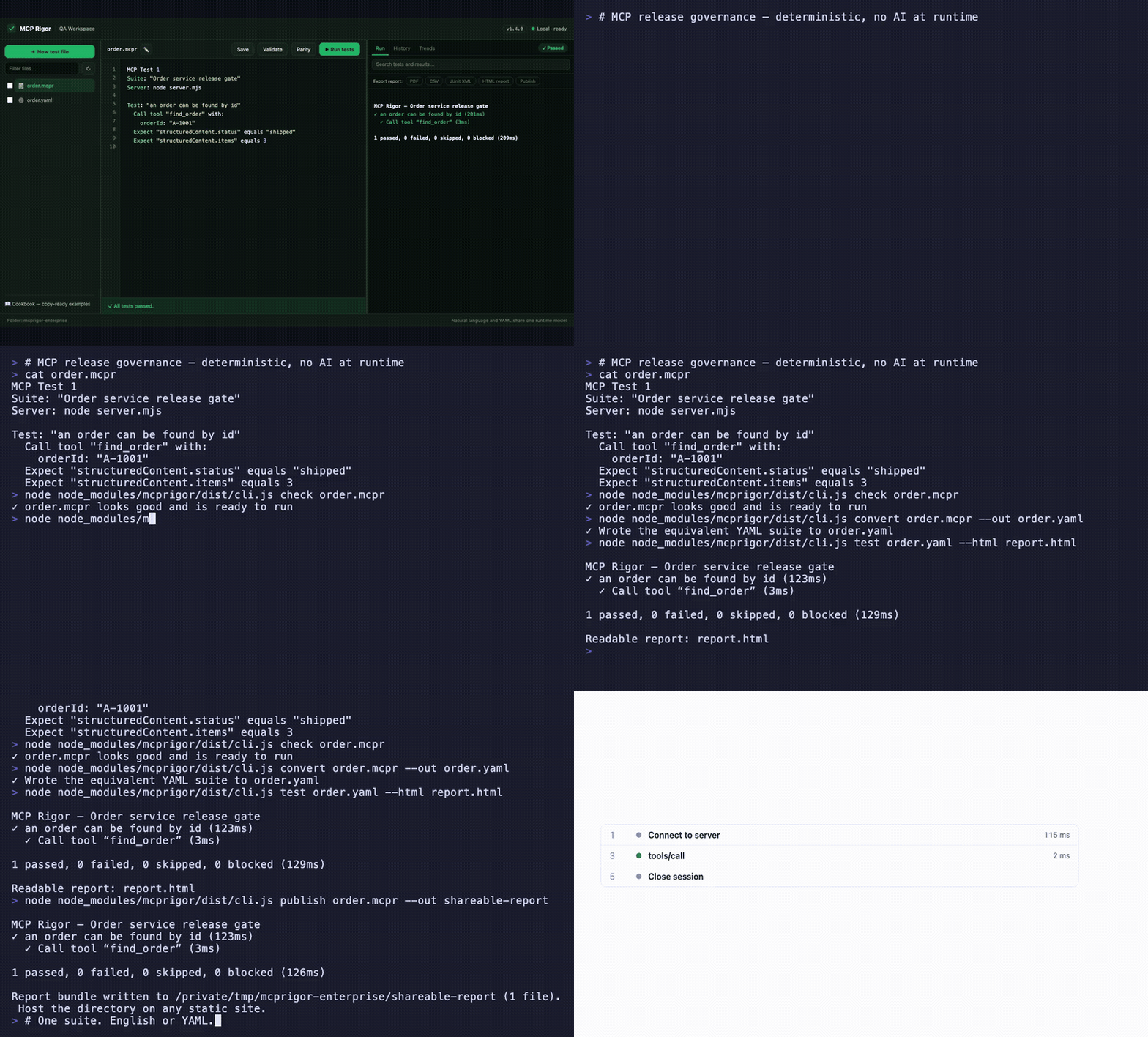
Visual QA workspace · English ⇄ YAML parity · interactive evidence timeline · CLI, CI, and shareable reports — watch the MP4
MCP Rigor lets QA teams test MCP tools, resources, prompts, contracts, and transports without writing test code. Tests are deterministic: no AI model interprets the wording.
Status:
1.5.0stable. Node.js 20 or 22 is required.
Install
MCP Rigor is published on npm as mcprigor. The package ships compiled code, ready to run:
npm install mcprigor
Or try it instantly without installing:
npx mcprigor@latest init tests/acceptance.mcpr
Use npx mcprigor in commands below, or install globally (npm install -g mcprigor) to use mcprigor directly. In a project where tests run only during development or CI, npm install --save-dev mcprigor keeps it out of production dependencies.
Install from source
Only needed if you want to modify MCP Rigor itself:
git clone https://github.com/FusionOnePlatform/mcprigor.git
cd mcprigor
npm ci
npm run check   # build + full test suite
npm link        # optional: use your local build as the global `mcprigor`
Write your first test
Create calculator.mcpr:
MCP Test 1

Suite: "Calculator acceptance tests"
Server: node dist/server.js

Test: "Adding 20 and 22 gives 42"
  Call tool "add" with:
    a: 20
    b: 22

  Expect "structuredContent.sum" equals 42
Check the wording, then run it:
npx mcprigor check calculator.mcpr
npx mcprigor test calculator.mcpr
Create a browser report:
npx mcprigor test calculator.mcpr --html report.html
Expected summary:
✓ Adding 20 and 22 gives 42

1 passed, 0 failed, 0 skipped, 0 blocked
Use the QA workspace
Start the local browser interface:
npx mcprigor workspace .
Or expose MCP Rigor to AI coding agents as an MCP server (docs):
npx mcprigor serve .
Open the printed http://127.0.0.1:... URL. You can select a suite, edit it, validate the wording, run tests, run transport parity, and review results.
The workspace is loopback-only and does not accept arbitrary commands from the browser.
Connect to an MCP server
Local stdio server:
Server: node dist/server.js
Python server:
Server: python -m my_mcp_server
Streamable HTTP server:
MCP URL: https://qa.example.com/mcp

Server options:
  headers:
    Authorization: "Bearer ${env.MCP_TOKEN}"
Run with an environment variable:
MCP_TOKEN="your-token" npx mcprigor test customer.mcpr
Do not place reusable credentials directly in test files.
Common test actions
Call tool "search" with:
  query: "red shoes"

Read resource "catalog://status"

Get prompt "write_summary" with:
  topic: "Release quality"

Expect it succeeds
Expect an error
Expect "structuredContent.total" equals 2
Expect "content[0].text" contains "complete"
Expect "items" has 3 items
See the natural-language cookbook for copy-ready examples.
Compare local and deployed behavior
MCP Test 1
Suite: "Calculator parity"

Compare target "Local": node dist/server.js
Compare target "QA": https://qa.example.com/mcp

Test: "Addition is consistent"
  Call tool "add" with:
    a: 20
    b: 22
  Expect "structuredContent.sum" equals 42
npx mcprigor parity calculator-parity.mcpr
MCP Rigor runs every scenario against both targets and reports semantic differences.
Create a test from a live server
Provide a small .mcpr file containing the target, then run:
npx mcprigor author server.mcpr --out search-customer.mcpr
The guided author discovers operations, asks for inputs, previews a response, and writes a reviewable natural-language test.
Use data-driven tests
Test: "Calculator examples"
  For each row:
    | caseId | a  | b  | expected |
    | basic  | 2  | 3  | 5        |
    | larger | 20 | 22 | 42       |

  Call tool "add" with:
    a: "${row.a}"
    b: "${row.b}"

  Expect "structuredContent.sum" equals "${row.expected}"
CSV, JSON, YAML, Excel, REST, Google Sheets, SQL adapters, typed columns, filters, joins, and deterministic sampling are also supported.
Use in CI
- uses: actions/setup-node@v4
  with:
    node-version: 20
- run: npm ci
- run: npx mcprigor check tests/acceptance.mcpr
- run: npx mcprigor test tests/acceptance.mcpr --junit reports/mcp.xml --evidence .mcprigor/ci-run
Exit codes:
| Code | Meaning |
|---|---|
0 |
Tests passed |
1 |
A test or comparison failed |
2 |
Usage, language, or configuration problem |
3 |
Server, transport, or internal failure |
Main commands
mcprigor workspace [DIRECTORY]        Start the local QA interface
mcprigor init FILE                    Create an example test
mcprigor check FILE                   Validate without connecting
mcprigor test FILE                    Run natural-language or YAML tests
mcprigor author TARGET --out FILE     Build a test interactively
mcprigor parity FILE                  Compare named targets
mcprigor audit FILE                   Run deterministic security probes
mcprigor composition-check FILE       Check a mounted server fleet
mcprigor composition-discover FILE    Save a combined fleet contract
mcprigor composition-drift FILE       Gate fleet contract drift
mcprigor discover FILE                Save the live MCP contract
mcprigor contract-check LOCK --target FILE
mcprigor evidence-show DIRECTORY
Performance and governance features new in 1.5.0:
Expect the call to finish within 800ms, percentile budgets, and--fail-on-regressionmcprigor auditdeterministic security probes with scored PDF/CSV/JSON reports- Multi-server test routing, collision checks, combined fleet locks, and composition drift
- GitHub Action with rich PR reports
- Live MCP surface and schema coverage with
--fail-under - Scheduled HTTP monitoring with failure/recovery webhooks
- Clickable HAR-style session timeline in HTML reports
- Contract drift markdown as a downloadable Action artifact
mcprigor publish— shareable static report URLs
See the complete CLI reference.
Editor support
The VS Code extension in editors/vscode adds syntax highlighting and inline mcprigor check diagnostics for .mcpr files. Package it with npx @vscode/vsce package from that directory, or install a release .vsix with code --install-extension.
Choose your next guide
- New QA user: Getting started
- Writing scenarios: Natural-language cookbook
- Using the browser UI: QA workspace
- Setting up targets and CI: Engineer setup
- Fixing failures: Troubleshooting
- All documentation: Documentation index
Scope and safety
MCP Rigor performs black-box behavior and contract testing. It complements MCP Inspector and official MCP Conformance; it does not provide certification.
Remote data and custom extensions are disabled unless explicitly enabled. Reports and evidence are sanitized, but business response data may still be sensitive. Review security and retention before storing CI artifacts.
Contributing
See CONTRIBUTING.md, then run:
npm ci
npm run check
Apache-2.0 licensed.
Rigor MCPのよくある質問
MCP Rigorを使用して、異なるサーバー環境を比較できますか?
はい、parityコマンドを使用することで、ローカルのターゲットとQAターゲットを比較し、意味的な差異をレポートできます。
データ駆動型テストはサポートされていますか?
はい、CSV、JSON、YAML、Excel、REST、Google Sheets、SQLなどのさまざまなアダプターを使用したデータ駆動型テストをサポートしています。