
React、Vue、Swift、Kotlinアプリケーション向けのJSONフォーム定義の作成、検証、および修正をAIエージェントに可能にします。
別名 formhaus-dev/formhaus, @formhaus/mcp
- スター
- 8
- ツール
- —
- ダウンロード数(30日間)
- 8,002
- 最新バージョン
- —
- 最終コミット
- 2026年11月8日
- ライセンス
- MIT
formhaus MCPとは
formhausはMCPサーバーです。 React、Vue、Swift、Kotlinアプリケーション向けのJSONフォーム定義の作成、検証、および修正をAIエージェントに可能にします。.
プロジェクトのREADMEから生成された概要
formhaus MCP server について
Formhausは、フォームのフィールド、バリデーション、および分岐ロジックを管理する単一のJSON定義を作成するためのシステムを提供します。このアプローチにより、開発者は一度フォームを記述するだけで、React、Vue、Swift、Kotlinを含むさまざまなプラットフォームでレンダリングできます。コアエンジンはフレームワークに依存せず、SvelteやバニラJavaScriptの環境でも使用可能です。
開発者はnpx経由でMCP serverをローカルで使用し、Claude Desktop、Cursor、Claude CodeなどのAIエージェントにこれらのJSON定義の作成、検証、修正を行わせることができます。ホスト型のソリューションが必要な場合は、Formhaus CloudがリモートMCP serverを提供しており、エージェントがフォームの公開やレスポンスの直接読み取りを行うことができます。このシステムは、マルチステップの分岐、条件付きフィールド、翻訳カタログによる国際化などの複雑な機能をサポートしています。
できること
- 1JSON定義の検証と修正開発者はMCP serverを使用して、フォームのJSONが構文的に正しく、論理的に整合していることを確認できます。
- 2デザインツールでのフォームプロトタイプ作成デザイナーは、JSON定義をFigma内のインタラクティブなプロトタイプやフローマップに変換できます。
プロジェクトの README から作成されています。すべてのユースケースは、その引用と照らし合わせて確認されています。
formhaus MCPのインストール方法
フォーマット検証日 2026年11月10日Cursor に追加Gooseに追加Claude Codeにformhaus MCPをインストール
$ claude mcp add formhaus -- npx -y @formhaus/mcpCursorにformhaus MCPをインストール
~/.cursor/mcp.json
{
  "mcpServers": {
    "formhaus": {
      "command": "npx",
      "args": [
        "-y",
        "@formhaus/mcp"
      ]
    }
  }
}VS Codeにformhaus MCPをインストール
.vscode/mcp.json
{
  "servers": {
    "formhaus": {
      "type": "stdio",
      "command": "npx",
      "args": [
        "-y",
        "@formhaus/mcp"
      ]
    }
  }
}VS Code CLIにformhaus MCPをインストール
$ code --add-mcp '{"name":"formhaus","type":"stdio","command":"npx","args":["-y","@formhaus/mcp"]}'Claude Desktopにformhaus MCPをインストール
claude_desktop_config.json
{
  "mcpServers": {
    "formhaus": {
      "command": "npx",
      "args": [
        "-y",
        "@formhaus/mcp"
      ]
    }
  }
}Codexにformhaus MCPをインストール
$ codex mcp add formhaus -- npx -y @formhaus/mcpCodex config.tomlにformhaus MCPをインストール
~/.codex/config.toml
[mcp_servers.formhaus]
command = "npx"
args = ["-y", "@formhaus/mcp"]
Gemini CLIにformhaus MCPをインストール
$ gemini mcp add -s user formhaus npx -- -y @formhaus/mcpGemini settings.jsonにformhaus MCPをインストール
~/.gemini/settings.json
{
  "mcpServers": {
    "formhaus": {
      "command": "npx",
      "args": [
        "-y",
        "@formhaus/mcp"
      ]
    }
  }
}自動チェック
実行日 2026年11月14日完全なレポート →自動チェックに合格しました。これはセキュリティ監査ではありません。コードを読み、サーバーに必要最小限のアクセス権を与えてください。 チェックの仕組み

- ソースリポジトリがリンクされており、アクセス可能formhaus-dev/formhaus is public and reachablegithub.com/formhaus-dev/formhaus ↗合格
- パッケージがこのリポジトリをソースとして指定@formhaus/mcp names formhaus-dev/formhaus as sourcenpmjs.com/package/@formhaus/mcp ↗合格
- ビルドの来歴 (Sigstore 証明)Sigstore attestation for @formhaus/mcpnpmjs.com/package/@formhaus/mcp/v/0.15.3#provenance ↗合格
- オープンソースライセンス (OSI)MITspdx.org/licenses/MIT.html ↗合格
- 過去1年以内にコミットまたはリリースありLast commit or release 2026-11-08github.com/formhaus-dev/formhaus ↗合格
- OpenSSF Scorecard未チェック
- パッケージ名が有名なパッケージに酷似していないNo popular package one edit away from @formhaus/mcp合格
- パッケージおよびその依存関係に重大な勧告なし未チェック
- モデルへの隠れた指示がない0 tool descriptions and the README read; no override phrases, credential paths or hidden characters合格
- 破壊的なツールがラベル付けされている未チェック
- リモートエンドポイントが MCP ハンドシェイクに応答未チェック
README
GitHubで見るAdd Formhaus to your coding agent
npx formhaus
Adds the Formhaus MCP server to Claude Code, Codex, Cursor and Claude Desktop. Writes, checks and repairs definitions locally, with no account · Setup for each client
Two independent ways to use it:
-
Use the library. MIT, no account, no key. The core is framework-agnostic and runs the form in any app; React and Vue renderers are ready to use. Your submit handler sends the data wherever you want. CI tests React 18 and 19, and Vue 3.3 and 3.5.
npm install @formhaus/core # plus @formhaus/react or @formhaus/vue -
Use Formhaus Cloud. A hosted form backend: a submission endpoint with server validation, a dashboard and webhooks, plus hosted links, embeds and a visual builder. The first form needs no account.
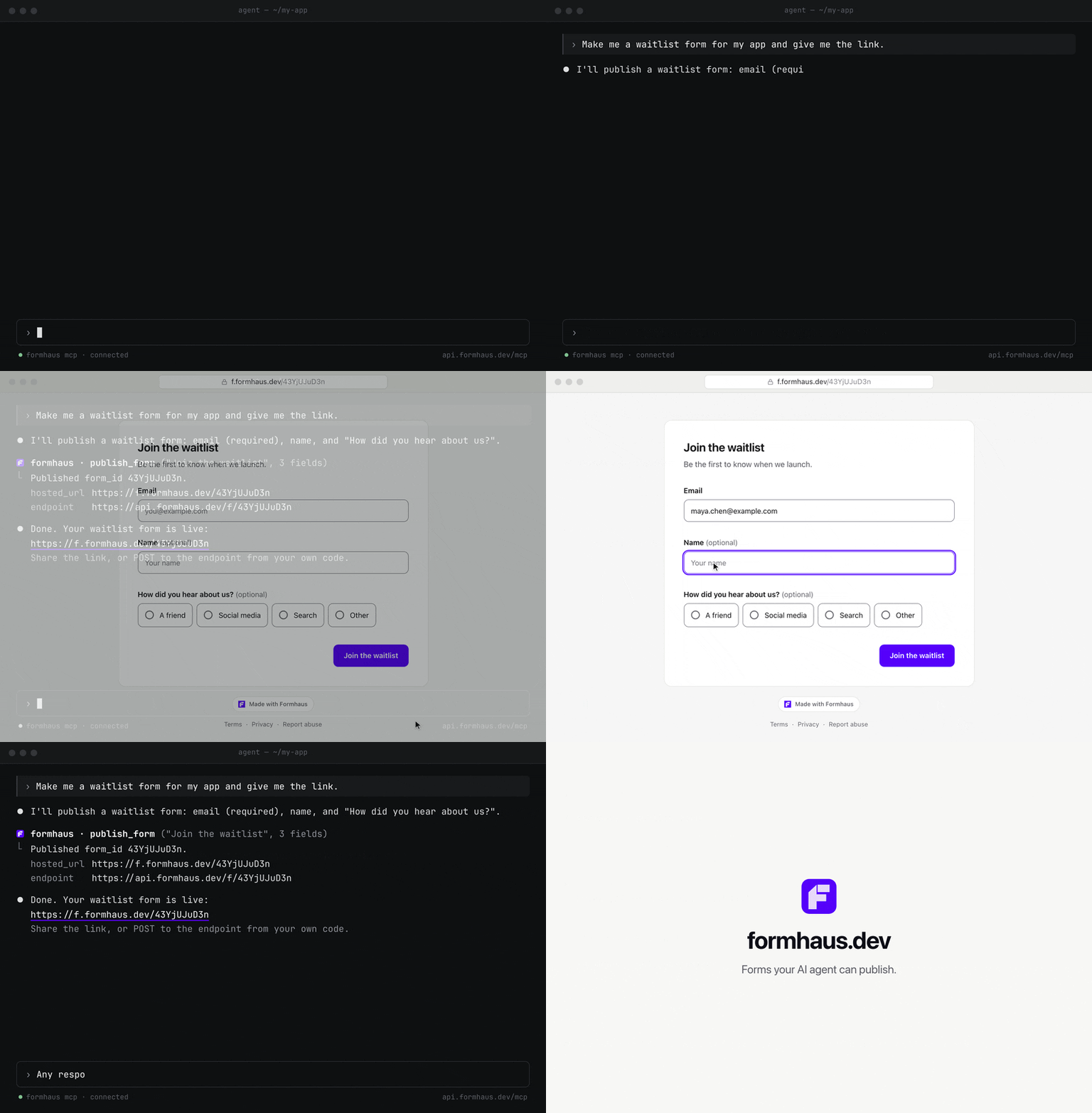
Build in the browser at app.formhaus.dev, or add the remote MCP server and ask your agent: "Make me a waitlist form and give me the link."
claude mcp add --transport http formhaus https://api.formhaus.dev/mcp
What you get
| Feature | |
|---|---|
| One definition | Fields, validation, conditional fields, steps, branching routes, sections and repeatable groups in one JSON file you keep in git |
| React and Vue | Native renderers with accessible defaults, or your own components through components |
| Validation | Built-in rules and custom validators. validateSubmission() checks the same definition on the server |
| Agents | The MCP server writes, validates and fixes definitions. Remote MCP publishes forms and reads responses |
| i18n | Translation catalogs and keys for labels, messages and options |
| Accessibility | Labels, error summary, focus management and live regions built in |
| Small core | Zero dependencies, tree-shakable ESM |
| Figma | The plugin renders mockups, flow maps and prototypes from the same definition |
| Cloud, optional | Hosted links, embeds, a submission endpoint, CSV export and webhooks |
What it's for
- Multi-step forms with branching in React or Vue.
- Rendering a form from JSON with your own components.
- Designing the form in Figma from the same file.
- Generating and checking definitions with AI agents: Claude Code skills, the MCP server (
claude plugin marketplace add formhaus-dev/formhaus && claude plugin install formhaus@formhaus), the JSON Schema and the format specification. - Translated forms with your own catalogs, or with i18next, vue-i18n and Lokalise keys.
- A headless engine for Svelte or vanilla JS.
Example
Business accounts get a company step; everyone converges on review.
{
  "$schema": "https://formhaus.dev/schema/form-definition.json",
  "id": "signup",
  "title": "Sign up",
  "submit": { "label": "Create account" },
  "steps": [
    {
      "id": "account",
      "title": "Account",
      "fields": [
        { "key": "email", "type": "email", "label": "Email", "validation": { "required": true } },
        { "key": "kind", "type": "radio", "label": "Account type", "autoAdvance": true,
          "options": [{ "value": "personal", "label": "Personal" }, { "value": "business", "label": "Business" }] }
      ],
      "routes": [
        { "to": "company", "show": [{ "field": "kind", "eq": "business" }] },
        { "to": "review" }
      ]
    },
    { "id": "company", "title": "Company", "routes": [{ "to": "review" }],
      "fields": [{ "key": "company", "type": "text", "label": "Company name", "validation": { "required": true } }] },
    { "id": "review", "title": "Review",
      "fields": [{ "key": "terms", "type": "checkbox", "label": "I accept the terms", "validation": { "required": true } }] }
  ]
}
import { FormRenderer } from '@formhaus/react';
import definition from './signup.json';

<FormRenderer definition={definition} onSubmit={save} />;
Compare with react-hook-form, react-jsonschema-form, JSON Forms and SurveyJS →
Packages
| Package | Description | npm |
|---|---|---|
@formhaus/core |
Zero-dependency form engine: types, validation, visibility, multi-step | npm i @formhaus/core |
@formhaus/react |
React adapter with native HTML defaults and custom component support | npm i @formhaus/core @formhaus/react |
@formhaus/vue |
Vue 3 adapter with native HTML defaults and custom component support | npm i @formhaus/core @formhaus/vue |
@formhaus/mcp |
MCP server: validate definitions and simulate paths from AI agents | claude mcp add formhaus -- npx -y @formhaus/mcp |
@formhaus/figma generates form mockups on the Figma canvas. It is not on Figma Community yet; build it locally, then import packages/figma/manifest.json.
Svelte, Solid, or anything else: use @formhaus/core directly. See the Svelte recipe.
Install
npm install @formhaus/core
If you need a framework adapter:
npm install @formhaus/core @formhaus/react   # React
npm install @formhaus/core @formhaus/vue     # Vue
Or use @formhaus/core directly with any framework. See the Svelte recipe.
Quick start
Define a form
Write the JSON by hand, or use the /formhaus:formhaus-create-form Claude Code skill to generate it from a text description, a CSV table, or a screenshot of an existing form.
{
  "$schema": "https://formhaus.dev/schema/form-definition.json",
  "id": "contact",
  "title": "Contact Us",
  "submit": { "label": "Send" },
  "fields": [
    {
      "key": "name",
      "type": "text",
      "label": "Name",
      "placeholder": "Your name",
      "validation": { "required": true, "minLength": 2 }
    },
    {
      "key": "email",
      "type": "email",
      "label": "Email",
      "placeholder": "you@example.com",
      "validation": {
        "required": true,
        "pattern": "^[^\\s@]+@[^\\s@]+\\.[^\\s@]+$",
        "patternMessage": "Please enter a valid email address"
      }
    },
    {
      "key": "message",
      "type": "textarea",
      "label": "Message",
      "placeholder": "How can we help?",
      "rows": 4,
      "validation": { "required": true }
    }
  ]
}
React
npm install @formhaus/core @formhaus/react
import { FormRenderer } from '@formhaus/react';
import definition from './contact-form.json';

function ContactPage() {
  async function handleSubmit(values: Record<string, unknown>) {
    await fetch('/api/contact', {
      method: 'POST',
      body: JSON.stringify(values),
    });
  }

  return <FormRenderer definition={definition} onSubmit={handleSubmit} />;
}
Vue
npm install @formhaus/core @formhaus/vue
<script setup lang="ts">
import { FormRenderer } from '@formhaus/vue';
import definition from './contact-form.json';

async function handleSubmit(values: Record<string, unknown>) {
  await fetch('/api/contact', {
    method: 'POST',
    body: JSON.stringify(values),
  });
}
</script>

<template>
  <FormRenderer :definition="definition" @submit="handleSubmit" />
</template>
By default, both adapters render native HTML inputs. A step can hide Next with next: false, and cancellable async hooks run before and after navigation and submission. See lifecycle hooks.
Custom components
Both adapters accept a components prop (a FieldComponentMap) that lets you swap native HTML inputs for your own UI kit.
import type { FieldComponentMap, FieldComponentProps } from '@formhaus/react';

function MyTextInput({ field, value, error, onChange, onBlur }: FieldComponentProps) {
  return (
    <div>
      <label>{field.label}</label>
      <input
        type={field.type}
        value={(value as string) ?? ''}
        placeholder={field.placeholder}
        onChange={(e) => onChange(e.target.value)}
        onBlur={onBlur}
      />
      {error && <span className="error">{error}</span>}
    </div>
  );
}

const components: FieldComponentMap = {
  text: MyTextInput,
  email: MyTextInput,
};

<FormRenderer definition={definition} onSubmit={handleSubmit} components={components} />;
<!-- MyTextInput.vue -->
<script setup lang="ts">
import type { FieldComponentProps } from '@formhaus/vue';

const props = defineProps<FieldComponentProps>();
const emit = defineEmits<{ (e: 'update:modelValue', value: unknown): void }>();
</script>

<template>
  <label>{{ props.field.label }}</label>
  <input
    :value="(props.modelValue as string) ?? ''"
    @input="emit('update:modelValue', ($event.target as HTMLInputElement).value)"
  />
</template>
<!-- Usage -->
<script setup>
import { FormRenderer } from '@formhaus/vue';
import MyTextInput from './MyTextInput.vue';
</script>

<template>
  <FormRenderer
    :definition="definition"
    :components="{ text: MyTextInput, email: MyTextInput }"
    @submit="handleSubmit"
  />
</template>
Each field component receives the full FormField descriptor, the current value, and any validation error. Implement as many or as few field types as you need. Unmapped types fall back to native HTML.
Figma plugin
@formhaus/figma renders form definitions in Figma with built-in Material 3 and iOS-like kits or with your own components. Branching forms get a flow map, multi-step forms a clickable prototype, and a generated form can be selected, edited and updated in place.
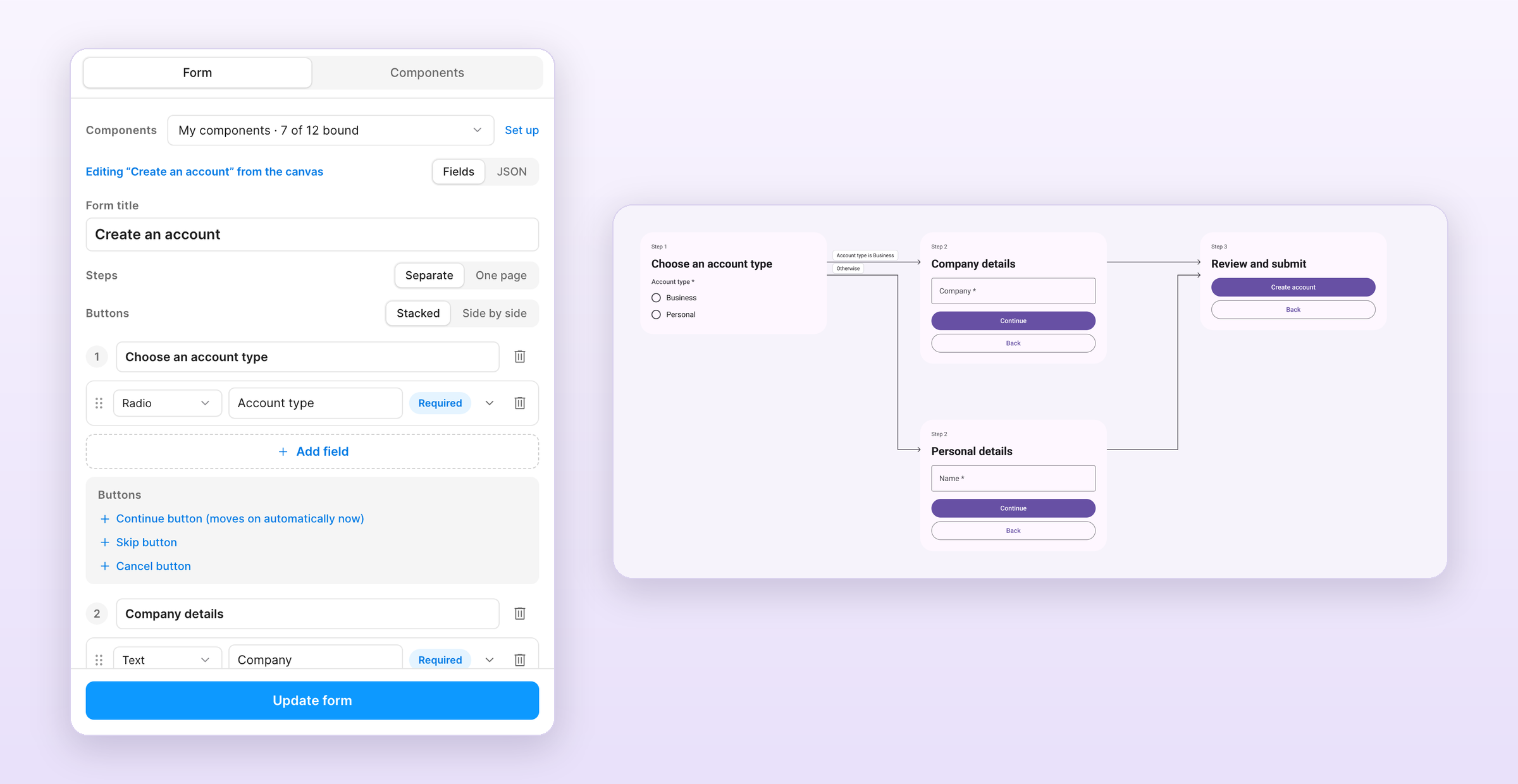
The /formhaus:formhaus-figma-connect Claude Code skill binds your library's components to the plugin. See the plugin guide for local installation.
Contributing
See CONTRIBUTING.md.
License
formhaus MCPのよくある質問
formhaus MCPをClaude Codeに追加するには
ターミナルでclaude mcp add formhaus -- npx -y @formhaus/mcpを実行します。すべてのプロジェクトで利用するには--scope userを追加します。
formhaus MCPをCursorに追加するには
~/.cursor/mcp.jsonを開き、上記のインストールセクションに示すCursor設定を使ってmcpServersの下にサーバーを追加します。
Formhaus MCP serverで何ができますか?
このMCP serverを使用すると、アカウントを作成することなく、ローカル環境でAIエージェントがフォーム定義の作成、チェック、修正を行えます。
独自のUIコンポーネントでFormhausを使用できますか?
はい、ReactとVueの両方のアダプターにおいて、componentsプロップを使用することで、標準のHTML入力の代わりに独自のカスタムコンポーネントを組み込むことが可能です。
Formhausはマルチステップフォームに対応していますか?
はい、JSON定義は、フィールド、バリデーション、条件付きフィールド、ステップ、および分岐ルートを含むマルチステップフォームをサポートしています。