
Agent Lighthouse MCPサーバー
コミット 2026年11月13日AIエージェント、LLMクローラー、MCPクライアントが、サイトのコンテンツを効果的に発見、解析、引用、および実行できるかを監査します。
別名 ForkPoint/agent-lighthouse, @forkpoint/agent-lighthouse, @forkpoint/agent-lighthouse-core, @forkpoint/agent-lighthouse-mcp
- スター
- 17
- ツール
- —
- ダウンロード数(30日間)
- 10,490
- 最新バージョン
- —
- 最終コミット
- 2026年11月13日
- ライセンス
- Apache-2.0
Agent Lighthouse MCPとは
Agent LighthouseはMCPサーバーです。 AIエージェント、LLMクローラー、MCPクライアントが、サイトのコンテンツを効果的に発見、解析、引用、および実行できるかを監査します。.
プロジェクトのREADMEから生成された概要
Agent Lighthouse MCP server について
Agent Lighthouseは、開発者やサイトオーナーが、自身のウェブサイトが人工知能とどの程度良好に相互作用できるかを評価するための、特化した監査フレームワークを提供します。LLMクローラー、エージェンティックブラウザ、およびMCPクライアントが、サイトのコンテンツを正常に発見、解析、および実行できるかを評価します。このツールは、GPTBotやClaudeBotなどのボット向けのrobots.txtポリシー、llms.txtのようなマシンディスカバリファイル、Schema.orgによる構造化データなどの重要な要素を調査します。
ユーザーは、npxを使用したコマンドラインインターフェースを通じて監査を実行したり、MCP serverを介して機能を開発ワークフローに統合したりできます。これにより、Claude DesktopやCursorなどのクライアントが audit_website ツールを直接実行できるようになります。システムは、ターミナルのサマリー、HTMLレポート、JSONファイルなどのさまざまな出力を生成します。また、GitHub Actionも提供されており、サイトが指定された最小スコアを下回った場合にビルドを失敗させることで、継続的インテグレーションパイプラインでのテストを自動化できます。
できること
- 1AI対応テストの自動化継続的インテグレーションのチェックを設定し、ウェブサイトの変更によってAIアクセシビリティスコアが一定の閾値を下回らないようにします。
- 2エージェンティックコマース機能の監査AIエージェントが製品のオファー、在庫状況、およびチェックアウトプロセスを処理するために必要なインターフェースをウェブサイトが提供しているかを確認します。
- 3IDE経由での直接監査CursorなどのMCPクライアントを通じてウェブサイトのスキャンを実行し、マシンディスカバリやインターフェースの準拠状況を確認します。
プロジェクトの README から作成されています。すべてのユースケースは、その引用と照らし合わせて確認されています。
Agent Lighthouse MCPのインストール方法
フォーマット検証日 2026年11月10日Cursor に追加Gooseに追加Claude CodeにAgent Lighthouse MCPをインストール
$ claude mcp add agent-lighthouse -- npx -y @forkpoint/agent-lighthouseCursorにAgent Lighthouse MCPをインストール
~/.cursor/mcp.json
{
  "mcpServers": {
    "agent-lighthouse": {
      "command": "npx",
      "args": [
        "-y",
        "@forkpoint/agent-lighthouse"
      ]
    }
  }
}VS CodeにAgent Lighthouse MCPをインストール
.vscode/mcp.json
{
  "servers": {
    "agent-lighthouse": {
      "type": "stdio",
      "command": "npx",
      "args": [
        "-y",
        "@forkpoint/agent-lighthouse"
      ]
    }
  }
}VS Code CLIにAgent Lighthouse MCPをインストール
$ code --add-mcp '{"name":"agent-lighthouse","type":"stdio","command":"npx","args":["-y","@forkpoint/agent-lighthouse"]}'Claude DesktopにAgent Lighthouse MCPをインストール
claude_desktop_config.json
{
  "mcpServers": {
    "agent-lighthouse": {
      "command": "npx",
      "args": [
        "-y",
        "@forkpoint/agent-lighthouse"
      ]
    }
  }
}CodexにAgent Lighthouse MCPをインストール
$ codex mcp add agent-lighthouse -- npx -y @forkpoint/agent-lighthouseCodex config.tomlにAgent Lighthouse MCPをインストール
~/.codex/config.toml
[mcp_servers.agent-lighthouse]
command = "npx"
args = ["-y", "@forkpoint/agent-lighthouse"]
Gemini CLIにAgent Lighthouse MCPをインストール
$ gemini mcp add -s user agent-lighthouse npx -- -y @forkpoint/agent-lighthouseGemini settings.jsonにAgent Lighthouse MCPをインストール
~/.gemini/settings.json
{
  "mcpServers": {
    "agent-lighthouse": {
      "command": "npx",
      "args": [
        "-y",
        "@forkpoint/agent-lighthouse"
      ]
    }
  }
}自動チェック
実行日 2026年11月14日完全なレポート →まだ検証されていません。サーバーには80点のスコア、重大な問題がないこと、および検証に必要な十分なデータが必要です。 チェックの仕組み · 点数を上げるための改善点

- ソースリポジトリがリンクされており、アクセス可能forkpoint/agent-lighthouse is public and reachablegithub.com/forkpoint/agent-lighthouse ↗合格
- パッケージがこのリポジトリをソースとして指定@forkpoint/agent-lighthouse, @forkpoint/agent-lighthouse-core name forkpoint/agent-lighthouse as sourcenpmjs.com/package/@forkpoint/agent-lighthouse ↗合格
- ビルドの来歴 (Sigstore 証明)No build attestation published for this release未チェック
- オープンソースライセンス (OSI)Apache-2.0spdx.org/licenses/Apache-2.0.html ↗合格
- 過去1年以内にコミットまたはリリースありLast commit or release 2026-11-11github.com/forkpoint/agent-lighthouse ↗合格
- OpenSSF Scorecard未チェック
- パッケージ名が有名なパッケージに酷似していないNo popular package one edit away from @forkpoint/agent-lighthouse, @forkpoint/agent-lighthouse-core, @forkpoint/agent-lighthouse-mcp合格
- パッケージおよびその依存関係に重大な勧告なし未チェック
- モデルへの隠れた指示がない0 tool descriptions and the README read; no override phrases, credential paths or hidden characters合格
- 破壊的なツールがラベル付けされている未チェック
- リモートエンドポイントが MCP ハンドシェイクに応答未チェック
README
GitHubで見る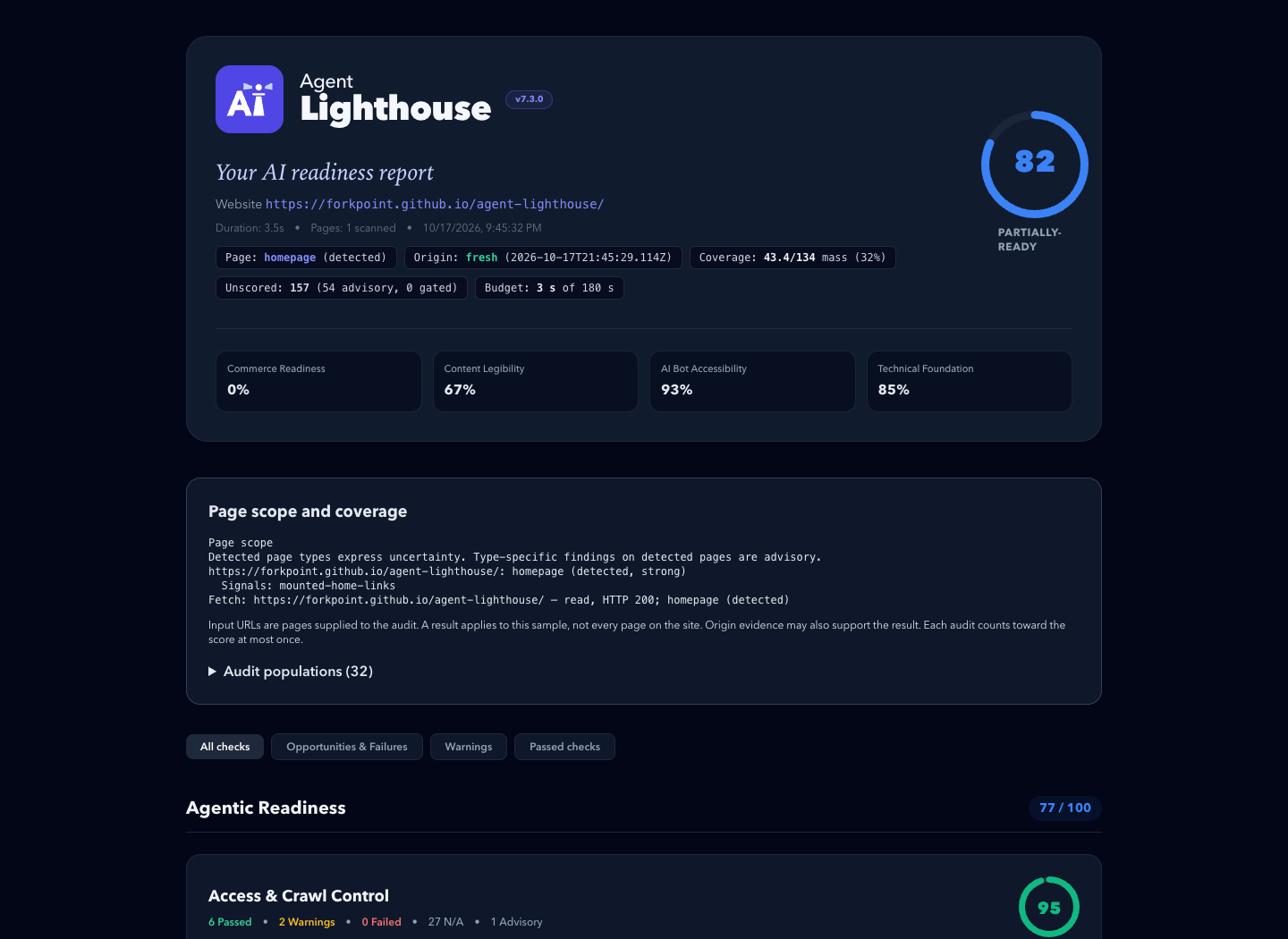
An example report. Its scores describe one past scan, not the site's current state.
⚡ Quickstart
Requires Node.js 22.22.2+ (22.x), 24.15.0+ (24.x), or 26+.
# Terminal report, plus HTML and JSON reports in ./reports
npx @forkpoint/agent-lighthouse https://example.com

# Open the HTML report in your browser
npx @forkpoint/agent-lighthouse https://example.com --view

# Fail (exit 1) below a score, for CI
npx @forkpoint/agent-lighthouse https://staging.example.com --min-score 85
Agentic readiness skill
The agent-lighthouse skill lets a coding agent turn a report into verified fixes, on any website stack. It traces findings through source files and hosting settings, and keeps local fixes apart from deployed scan results.
Install it from this repository's marketplace. In Claude Code:
claude plugin marketplace add ForkPoint/agent-lighthouse
claude plugin install agent-lighthouse@agent-lighthouse
In Codex:
codex plugin marketplace add ForkPoint/agent-lighthouse
codex plugin add agent-lighthouse@agent-lighthouse
From a local checkout, pass /absolute/path/to/agent-lighthouse to marketplace add. Start a new chat after installing. The CLI and MCP npm packages are separate. See the installation and workflow guide.
🎯 What Agent Lighthouse Checks
Agent Lighthouse evaluates websites across 8 agent-journey categories grouped into 3 readiness pillars:
├── 1. Agentic Readiness
│   ├── Access & Crawl Control (robots.txt rules for GPTBot, ClaudeBot, PerplexityBot, blocks, status codes)
│   ├── Machine Discovery (llms.txt, llms-full.txt, sitemaps, feeds, .well-known surfaces)
│   ├── Agent Interfaces (WebMCP manifests, OpenAPI specs, agents.json, search actions)
│   └── Agentic Commerce (product offers, availability, checkout and payment surfaces)
│
├── 2. AI Search Optimization
│   ├── Content Extraction (clean main content, semantic structure, render and response cost)
│   ├── Structured Data (Schema.org Product, Offer, SKU, GTIN, Organization, JSON-LD validity)
│   └── Answer Readiness (direct answerability, step lists, tables, unique data, citations)
│
└── 3. Technical Foundation
    └── Agent Operability & Safety (HTTPS, security.txt, tdmrep, stability, broken agent endpoints)
📦 Packages & Architecture
A pnpm monorepo published under the @forkpoint scope:
| Package | npm Package | Description |
|---|---|---|
packages/cli |
@forkpoint/agent-lighthouse |
Main CLI binary (npx @forkpoint/agent-lighthouse <url>). |
packages/core |
@forkpoint/agent-lighthouse-core |
Core gatherer-audit engine, scoring algorithms, and types. |
packages/report |
@forkpoint/agent-lighthouse-report |
Standalone HTML, Markdown, and unified report view-model. |
packages/mcp |
@forkpoint/agent-lighthouse-mcp |
Model Context Protocol (MCP) server for Claude / Cursor / IDEs. |
🛡️ GitHub Actions CI
- uses: ForkPoint/agent-lighthouse@main
  with:
    url: https://staging.example.com
    min-score: "85"
    github-token: ${{ secrets.GITHUB_TOKEN }}
The action writes terminal, HTML, JSON, and Markdown reports. With github-token it comments the Markdown summary on the pull request. Inputs and pinning are in the GitHub Action guide.
💻 Programmatic Node.js / TypeScript SDK
import { runScan } from "@forkpoint/agent-lighthouse-core";
import {
  buildReportView,
  generateHtmlReport,
} from "@forkpoint/agent-lighthouse-report";

const report = await runScan("https://example.com");
const view = buildReportView(report);

// overallScore is null when the scan saw too little to judge the site
console.log(`Overall Score: ${view.overallScore}/100 (${view.scoreTier})`);

const html = generateHtmlReport(report); // standalone HTML report
Options are in programmatic options.
🤖 Model Context Protocol (MCP) Server
Let Claude Desktop, Cursor or another MCP client run scans through the audit_website tool:
{
  "mcpServers": {
    "agent-lighthouse": {
      "command": "npx",
      "args": ["-y", "@forkpoint/agent-lighthouse-mcp"]
    }
  }
}
📣 Share Your Score
Reports are standalone files: attach them to pull requests, send them to clients, or publish a before/after. Put the score in a README with a badge. Share a public site's result through the site score template.
More: media kit (boilerplate, screenshots, logos) · brand guide · brand kit download
🛠️ Development
git clone https://github.com/ForkPoint/agent-lighthouse.git
cd agent-lighthouse
pnpm install
pnpm build
pnpm test   # deterministic tests with fixed inputs
Contributor rules, including how to add an audit, are in CLAUDE.md.
📄 License
Apache-2.0 © ForkPoint
Agent Lighthouse MCPのよくある質問
Agent Lighthouse MCPをClaude Codeに追加するには
ターミナルでclaude mcp add agent-lighthouse -- npx -y @forkpoint/agent-lighthouseを実行します。すべてのプロジェクトで利用するには--scope userを追加します。
Agent Lighthouse MCPをCursorに追加するには
~/.cursor/mcp.jsonを開き、上記のインストールセクションに示すCursor設定を使ってmcpServersの下にサーバーを追加します。
Agent Lighthouseは何をチェックしますか?
アクセス制御、マシンディスカバリ、エージェントインターフェース、エージェンティックコマース、コンテンツ抽出、構造化データ、回答準備性、技術的基盤の8つのエージェント・ジャーニー・カテゴリにわたってウェブサイトを評価します。
CI/CDパイプラインで使用できますか?
はい、CLIを使用して一定のスコアを下回るビルドを失敗させたり、公式のGitHub Actionを使用してプルリクエストにMarkdown形式のサマリーをコメントしたりできます。
Claude DesktopやCursorでどのように使用できますか?
npx経由で @forkpoint/agent-lighthouse-mcp パッケージを使用し、MCP serverとして接続できます。