
glass MCPサーバー
コミット 2026年11月13日アクセシビリティ駆動のループを通じて、AIコーディングエージェントがデスクトップおよびモバイルプラットフォーム上のネイティブGUIアプリケーションを起動、操作、デバッグできるようにします。
別名 fixed-width/glass
- スター
- 21
- ツール
- —
- ダウンロード数(30日間)
- —
- 最新バージョン
- 1.9.0
- 最終コミット
- 2026年11月13日
- ライセンス
- Apache-2.0
glass MCPとは
glassはMCPサーバーです。 アクセシビリティ駆動のループを通じて、AIコーディングエージェントがデスクトップおよびモバイルプラットフォーム上のネイティブGUIアプリケーションを起動、操作、デバッグできるようにします。.
プロジェクトのREADMEから生成された概要
glass MCP server について
Glassは、構築、視覚化、操作、デバッグのクローズドループを通じて、AIコーディングエージェントがネイティブGUIアプリケーションと対話する方法を提供します。スクリーンショットだけに頼るのではなく、このMCP serverはアクセシビリティツリーを使用することで、エージェントが名前付きのコントロールを特定し、テキストを介してUIの変更を確認できるようにします。これにより、エージェントがアプリケーションを起動し、バグを再現し、ソースコードを修正し、人間の介入なしに解決を確認できる自律的なワークフローが可能になります。
このサーバーは、Windows、macOS、X11またはWaylandを使用したLinux、およびAndroid AVDエミュレータやiOS Simulatorを介したモバイル環境を含む複数のプラットフォームをサポートしています。ブラックボックスとして動作するため、テスト対象のアプリケーション内に特別な統合を行う必要はありません。ユーザーは、stdioまたはネットワークHTTPトランスポートを使用して、任意のMCP hostに接続できます。セットアップ要件はプラットフォームによって異なり、WindowsでのSandboxieの使用や、macOSでの開発アカウント管理のための特定の登録および権限付与などが含まれます。
できること
- 1UIバグの自動再現エージェントはアクセシビリティツリーを使用して特定のボタンを見つけ、エラーを発生させてバグを特定できます。
- 2クロスプラットフォームのモバイルテスト開発者はエージェントにAndroidエミュレータやiOSシミュレータを操作させ、モバイルインターフェースをテストできます。
- 3ビジュアルリグレッションテストアクセシビリティをサポートしていないアプリの場合、エージェントはピクセルの変化を比較してUIの更新を検出できます。
- 4ヘッドレスLinux開発エージェントは、ユーザーのデスクトップに干渉しないよう、プライベートディスプレイを使用してLinux上でGUIアプリケーションを実行およびテストできます。
プロジェクトの README から作成されています。すべてのユースケースは、その引用と照らし合わせて確認されています。
自動チェック
実行日 2026年11月14日完全なレポート →まだ検証されていません。サーバーには80点のスコア、重大な問題がないこと、および検証に必要な十分なデータが必要です。 チェックの仕組み · 点数を上げるための改善点

- ソースリポジトリがリンクされており、アクセス可能fixed-width/glass is public and reachablegithub.com/fixed-width/glass ↗合格
- パッケージがこのリポジトリをソースとして指定未チェック
- ビルドの来歴 (Sigstore 証明)未チェック
- オープンソースライセンス (OSI)Apache-2.0spdx.org/licenses/Apache-2.0.html ↗合格
- 過去1年以内にコミットまたはリリースありLast commit or release 2026-11-13github.com/fixed-width/glass ↗合格
- OpenSSF Scorecard未チェック
- パッケージ名が有名なパッケージに酷似していない未チェック
- パッケージおよびその依存関係に重大な勧告なし未チェック
- モデルへの隠れた指示がない0 tool descriptions and the README read; no override phrases, credential paths or hidden characters合格
- 破壊的なツールがラベル付けされている未チェック
- リモートエンドポイントが MCP ハンドシェイクに応答未チェック
README
GitHubで見るglass


Give your coding agent hands for the app it's building — launch it, drive it, and verify the result, without burning a screenshot on every step.
A Rust MCP server that gives an AI coding agent a closed build → see → interact → debug loop over external native GUI applications.
glass lets an agent launch a GUI app, capture what is on screen, inject mouse and keyboard input, read the app's logs, and detect visual changes — so a coding agent can build and debug UI applications independently instead of asking the user "does this look right?".
glass drives apps as an external black box, so it works with any native GUI app regardless of toolkit
or language. It has two Linux backends (X11 and Wayland), a Windows backend, an
Android backend (an AVD emulator, driven over adb from any host), an iOS backend (native
apps in the Simulator over xcrun simctl, with input and the accessibility tree via idb_companion,
including a two-finger pinch), and a macOS backend, behind a platform-agnostic core.
The same input tools work across backends. Default Linux displays and mobile emulators keep input
separate from your desktop. Windows shares it; macOS adds a preview of separate-account setup for
apps off your desktop, alongside its existing shared-desktop setup. glass_capabilities with
scope: "session" reports click, scroll and text support and whether each can affect your desktop.
The macOS account setup uses the normal
MCP tools and one Glass installation. Application setup… guides enrollment, permission handoff and
live readiness checks, including creating a standard development account with a locally chosen
password. It needs a real login and Glass privacy grants in that account,
retained between runs. Enrollment applies to your macOS user; glass-mcp unenroll returns to
shared-desktop use while retaining the app, development account and MCP startup integration.
Development loops have been tested on an Apple Silicon Mac mini without a physical monitor.
These runtime checks used an initialized development account and include physical keyboard/mouse
coexistence, recovery after an interrupted client, and starting its development desktop after a real
reboot with existing permissions. New-account onboarding has also reached Ready and passed ordinary
app interaction on that Mac. Initial macOS login and any missing privacy grants require user action;
setup on a clean macOS installation without prior Glass grants has not been tested. Application setup includes
Start environment… for a missing development desktop, using local account credentials and an
already enabled macOS Screen Sharing service. This guided post-reboot flow and ordinary
build/interact/rebuild/stop loops in an indexed workspace have been tested without repeating
enrollment or permission setup. Unattended development-desktop startup is not implemented.
See it
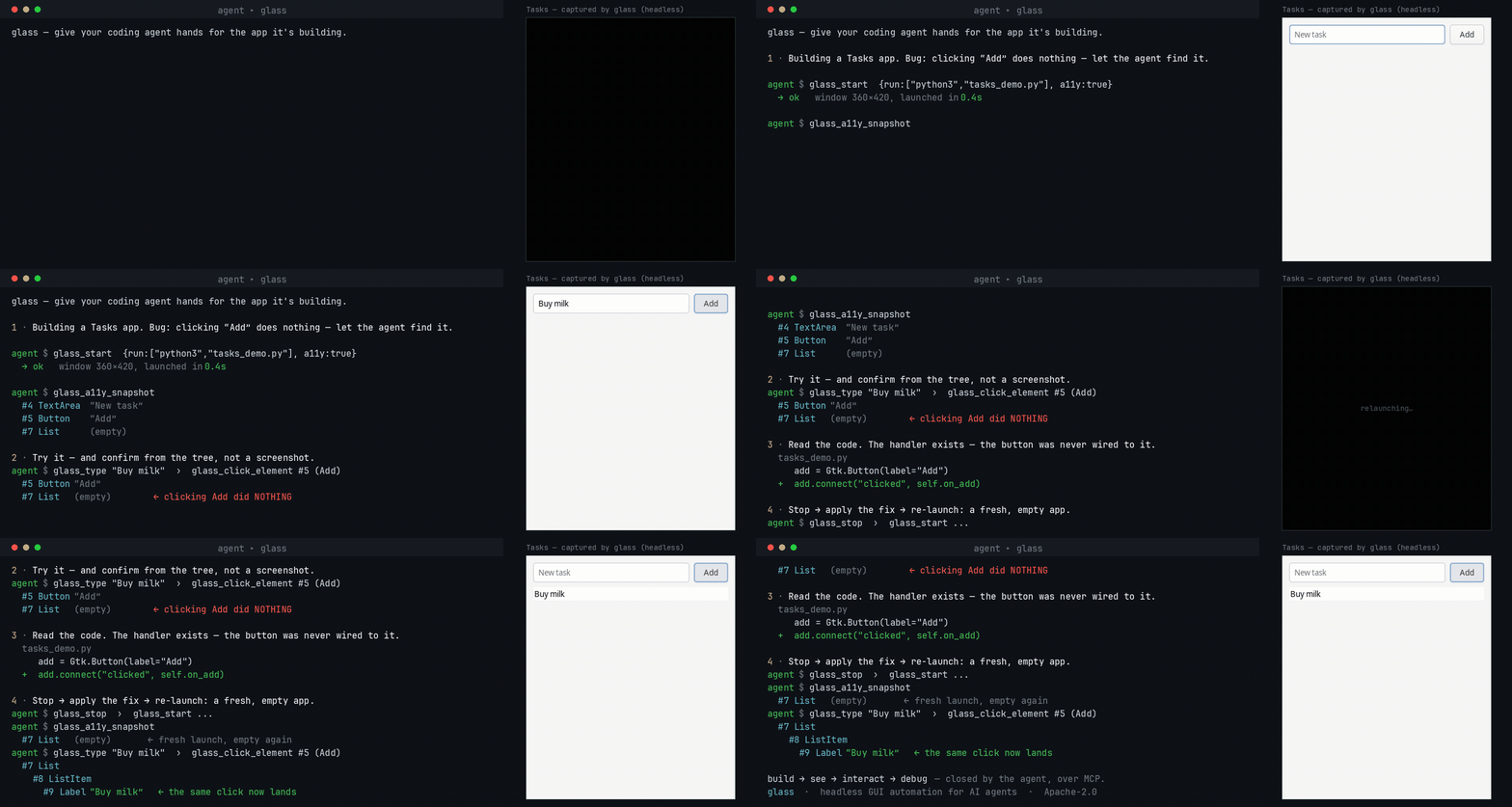
An agent building a GUI app runs it under glass, reproduces a bug from the accessibility tree (no screenshots), fixes the code, and re-verifies — the loop it otherwise can't close on its own. Try it yourself.
Try it in 60 seconds
-
Download glass for your platform from the Releases page and connect it to your agent — glass works with any MCP host (see which are verified).
-
Get the example app — clone this repo, or download
examples/tasks-demo/tasks_demo.py(on Linux it needssudo apt install python3-gi gir1.2-gtk-4.0). -
Paste this to your agent:
Use glass to run
examples/tasks-demo/tasks_demo.pywith accessibility on. There's a bug: clicking Add doesn't add the typed task. Reproduce it by driving the UI and checking the accessibility tree (don't just screenshot), then find and fix the bug in the code and verify a task actually appears.
Your agent launches the app, reproduces the bug from the accessibility tree, fixes the one-line
wiring bug, and confirms the task appears — the whole build → see → interact → debug loop, start to
finish. (glass-mcp doctor checks your environment if anything's off.)
The loop in practice
An agent can fill in a form, click Save, and check that the app reports success. When the app exposes an accessibility tree, the agent works with named controls and verifies changes from text:
glass_start { "run": ["python3", "app.py"] }
glass_do { "actions": [
  { "action": "set_value",
    "target": { "query": "account", "role": "TextField", "states": ["enabled"] },
    "text": "hello" },
  { "action": "click_element",
    "target": { "query": "Save", "role": "Button", "states": ["enabled"] },
    "mode": "auto" },
  { "action": "wait_for_element", "name": "Saved" }
] }
glass_logs
Use glass_find_elements to inspect candidates when the intended target is not unique or known well
enough to act on directly. Use glass_a11y_snapshot to explore the app's controls. See the
tool reference for click modes and platform behavior.
For a canvas or custom-rendered app with no accessibility tree, drive it by pixels instead —
glass_screenshot, glass_click {x,y}, and glass_diff, which returns changed_pct + a bbox as
text, so routine checks between screenshots cost no vision tokens. Why the loop is shaped this way:
the build → see → interact → debug loop.
To review a run after the app stops, opt into session evidence recording
with --trace-dir. Glass retains tool inputs and requested results in bounded storage, then
glass-mcp trace inspect and trace export validate the trace and package its evidence in a ZIP.
Recording is off by default; retained app content can contain sensitive data.
Install at a glance
Download the latest build for your platform from the Releases page, then set up your host:
- Linux — docs/how-to/setup-linux.md (X11 or Wayland;
Xvfb/sway+ bubblewrap) - Windows — docs/how-to/setup-windows.md (a prebuilt
.exe+ Sandboxie) - macOS — docs/how-to/setup-macos.md (install the notarized
.dmg; no build needed) - Android — docs/how-to/setup-android.md (an AVD emulator, from any host)
- iOS — docs/how-to/setup-ios.md (the Simulator, macOS host only)
Every asset is listed in docs/reference/platforms.md.
Prefer to compile, or on an architecture with no published asset? See
docs/how-to/build-from-source.md — it is a single cargo build.
Then connect glass to your agent and run glass-mcp doctor to check
the environment. New here? Follow the tutorial for a guaranteed first
success.
For new agent configurations, use glass-mcp --tool-profile lean for 17 tools, with actions through
glass_do, annotated screenshots and optional log waits. The full toolbox remains the compatible
binary default. Inspect either inventory without
starting a session using glass-mcp tools --json; see tool profiles.
Drive it well — the glass-drive skill
glass needs no app integration and no skill to run, but an agent drives it far more reliably with the open glass-drive Agent Skill — it stops the agent spending its first turns rediscovering the verify-cheaply-then-look loop. Installing it is the single highest-leverage thing you can add when pointing an agent at glass.
Platform support
✓ supported · ◑ partial · – not supported · 🚧 planned.
| Capability | Linux (X11 + Wayland) | Windows | Android (AVD) | iOS (Simulator) | macOS |
|---|---|---|---|---|---|
| Capture · input · windows · clipboard · logs | ✓ | ✓ | ✓ | ✓ | ✓ |
| Accessibility (semantic addressing) | ✓ AT-SPI | ✓ UI Automation | ✓ UIAutomator | ✓ idb | ✓ AX |
| Containment / sandboxing | ✓ bubblewrap | ✓ Sandboxie | ✓ the emulator VM | ✓ the Simulator | ✓ Seatbelt |
| Input without desktop interference | ✓ private display | – shared desktop | ✓ emulator | ✓ Simulator | ◑ separate account (preview) |
| Display isolation (app off your desktop) | ✓ headless Xvfb / sway | – VM needed | ✓ headless emulator | ✓ headless simctl boot | ◑ separate account (preview) |
Full matrix, per-capability detail, and system requirements: docs/reference/platforms.md. Transport is MCP over stdio (default) or network HTTP.
Documentation
The full docs — tutorial, how-to guides, reference, and explanations — are under
docs/. See CHANGELOG.md for release notes, and
Stability and versioning for what a 1.0 release guarantees.
Contributing? CONTRIBUTING.md has the gates a PR has to pass, and
Verify a change covers platform code your own host cannot run.
License
glass is open core, licensed Apache-2.0 — see LICENSE-APACHE.
glass MCPのよくある質問
エージェントはどのようにアプリケーションを操作しますか?
エージェントはアクセシビリティツリーを使用して名前付きのコントロールを操作するか、スクリーンショットと座標ベースのクリックを使用してピクセル単位でアプリを操作できます。
Glassはデスクトップに干渉せずにアプリを実行できますか?
はい、デフォルトのLinuxディスプレイやモバイルエミュレータは入力をデスクトップから分離して保持します。macOSでは、デスクトップとは別の別アカウントによるプレビューを提供します。