
AIクライアントやターミナルから、Google FlowのVeoビデオ生成モデルおよびImagen画像生成モデルを操作します。
別名 ffroliva/gflow-cli
- スター
- 396
- ツール
- 20
- ダウンロード数(30日間)
- 9,856
- 最新バージョン
- 0.100.0
- 最終コミット
- 2026年11月15日
- ライセンス
- MIT
gflow-cli MCPとは
AIクライアントやターミナルから、Google FlowのVeoビデオ生成モデルおよびImagen画像生成モデルを操作します。 20個のツールを提供しており、gflow_generate_image, gflow_generate_video, gflow_list_toolsなどがあります。
プロジェクトのREADMEから生成された概要
gflow-cli MCP server について
gflow-cliは、Google Flowの生成モデルを制御するためのターミナルベースのインターフェースとMCP serverを提供します。コマンドラインまたはAIクライアントを通じて、ビデオ生成用のVeoや画像作成用のImagenを操作できます。このツールは、永続的なPlaywrightプロファイルを使用してヘッド付きChromiumブラウザを駆動することで動作し、Google認証やreCAPTCHAの要件管理を容易にします。
このツールは、スクリプトによるパイプラインやバッチ処理を通じてメディア制作を自動化する必要がある開発者やクリエイター向けに設計されています。すべての生成はユーザー自身のカウントクレジットに対して課金されるため、ユーザーはFlowへのアクセス権を持つGoogleアカウントを持っている必要があります。画像生成や構成操作は無料ですが、Veoによるビデオ生成にはクレジットを消費します。このサーバーは、CLI経由でローカルで実行するか、Claude CodeやCursorなどのAIエージェントと統合するためのMCP serverとして実行できます。
できること
- 1画像の一括生成開発者はプロンプトが記載されたテキストファイルをループ処理することで、複数の画像を自動的に生成できます。
- 2キャラクターの一貫性の維持特定のキャラクターリファレンスを作成することで、異なる生成プロセスにおいても同一の人物が登場するように制御できます。
- 3ビデオクリップの延長このツールを使用して、既存のビデオクリップを標準の8秒制限を超えて延長できます。
プロジェクトの README から作成されています。すべてのユースケースは、その引用と照らし合わせて確認されています。
gflow-cli MCPのインストール方法
フォーマット検証日 2026年11月10日Cursor に追加Gooseに追加Claude Codeにgflow-cli MCPをインストール
$ claude mcp add gflow-cli -- uvx gflow-cli mcp runCursorにgflow-cli MCPをインストール
~/.cursor/mcp.json
{
  "mcpServers": {
    "gflow-cli": {
      "command": "uvx",
      "args": [
        "gflow-cli",
        "mcp",
        "run"
      ]
    }
  }
}VS Codeにgflow-cli MCPをインストール
.vscode/mcp.json
{
  "servers": {
    "gflow-cli": {
      "type": "stdio",
      "command": "uvx",
      "args": [
        "gflow-cli",
        "mcp",
        "run"
      ]
    }
  }
}VS Code CLIにgflow-cli MCPをインストール
$ code --add-mcp '{"name":"gflow-cli","type":"stdio","command":"uvx","args":["gflow-cli","mcp","run"]}'Claude Desktopにgflow-cli MCPをインストール
claude_desktop_config.json
{
  "mcpServers": {
    "gflow-cli": {
      "command": "uvx",
      "args": [
        "gflow-cli",
        "mcp",
        "run"
      ]
    }
  }
}Codexにgflow-cli MCPをインストール
$ codex mcp add gflow-cli -- uvx gflow-cli mcp runCodex config.tomlにgflow-cli MCPをインストール
~/.codex/config.toml
[mcp_servers.gflow-cli]
command = "uvx"
args = ["gflow-cli", "mcp", "run"]
Gemini CLIにgflow-cli MCPをインストール
$ gemini mcp add -s user gflow-cli uvx -- gflow-cli mcp runGemini settings.jsonにgflow-cli MCPをインストール
~/.gemini/settings.json
{
  "mcpServers": {
    "gflow-cli": {
      "command": "uvx",
      "args": [
        "gflow-cli",
        "mcp",
        "run"
      ]
    }
  }
}HostedMCP が 2026年11月16日 に起動を確認
gflow-cli 0.100.0 をネットワークもキーもない隔離コンテナでこのコマンドで起動しました。応答があり、20個のツールが一覧表示されました。
gflow-cli MCPツール 20
tools/list でサーバーから取得gflow_generate_imageGenerate an image using Google Flow's image models. Produces 1-4 images from a text prompt. out_file, if given, must resolve inside the configured output directory (output is deprecated: use out_file). Models: nano2 (Nano Banana 2.1, fast; 'nano2.1' also accepted), nano2-lite (Nano Banana 2 Lite), nano-pro (Nano Banana Pro), image4 (Imagen 4, no longer in Flow's menu). Aspects: 1:1, 9:16, 16:9, 4:3, 3:4. The prompt supports @AssetName mentions to tag saved project characters/assets by name (resolves to referenceEntities/referenceImages). Reference a SAVED named asset via @Name; reference an arbitrary one-off image via reference_images. See docs/REFERENCE_STRATEGIES.md. On accounts served from flow.google.com, use an existing project and local reference files. A character attaches there by name (@Name, or reference_entities paired with reference_entity_names); a UUID media reference the local catalog records in that same project is referenced in place (#995), but any other UUID, an entity id without a name, and image4 are not ported to that composer yet and fail before submit; retrying will not clear it. On an agent-only composer (#799) only text-to-image runs, so reference_images and character references fail there too. Returns local file paths to the generated images.
gflow_generate_videoGenerate a video using Google Flow's Veo model. Modes: t2v (text-to-video), i2v (image-to-video), r2v (reference-to-video). Aspects: 9:16, 16:9. Optional model (veo_lite/veo_fast/veo_quality/omni_flash/omni_1_2_flash), duration (seconds; omni_1_2_flash takes 3-15, at most 10 with an end_frame), and count select the Veo model, clip length, and batch size (CLI parity). The prompt supports @CharacterName mentions to tag saved project characters by name (resolves to referenceEntities; on flow.google.com a video @Name is not supported yet, exit 29 before submit, so pass reference_entities plus reference_entity_names to r2v). Reference a SAVED character via @Name; pass one-off ingredient images via reference_images. See docs/REFERENCE_STRATEGIES.md. Optional ui_mode ('classic'/'auto') verifies the classic editor pre-submit and aborts before spending credits if unreachable; 'agentic' is not supported for video. out_file, if given, must resolve inside the configured output directory (output is deprecated: use out_file). Returns the local file path to the generated video.
gflow_list_toolsList available gflow prompt tools (name, title, description, category).
gflow_list_modelsList the image and video models the generate tools accept: name, Flow's menu label (image), accepted aliases, reference cap, max duration (video), aspects and tiers. Static catalog, the same as `gflow models --json`; no browser, no spend.
gflow_get_creditsRead the current Google Flow credit balance for one saved profile or all profiles - the number Flow's account menu shows. Read directly from flow.google.com with the profile's saved session (no browser) when Flow accepts it; otherwise read in that profile's browser (one browser launch per profile, sequential for all_profiles). The direct read is off on macOS by default, behind a proxy, or with GFLOW_CLI_WIRE_READS=0. HTTP 429/503 returns a retryable error with no browser fallback: wait, do not loop. Spends no credits. Set all_profiles=true when choosing an account for generation; partial profile failures remain visible in the result. Set refresh=true to renew a signed-out session (rewrites that profile's saved cookies) in a headless browser and read again (slower - one more Chrome launch per signed-out profile; a revoked session still needs `gflow auth login`). The tier fields (sku, service_tier, user_paygate_tier, subscription_credits) are always null: flow.google.com does not report them.
gflow_character_listList the saved Flow CHARACTER entities in a project. Read-only, spends no credits. On flow.google.com, returns each character's entity_id, display_name, voice, personality, workflow_ids and thumbnail_media_id. Pass entity_id in reference_entities paired with display_name in reference_entity_names (image and video r2v). On flow.google.com, an image @Name still attaches the first word after @ by name via the @ picker without reading the character catalog, while video @Name is not supported yet (exit 29, mention index unavailable); video r2v takes reference_entities plus reference_entity_names. Drives a browser.
gflow_character_voicesList the preset voices available for a Flow Character's TTS. Static lookup — no network, no browser, no cost. Call it before creating a character to choose a valid voice name.
gflow_character_showShow one saved Flow CHARACTER entity by id or by exact display name. Read-only, spends no credits. On flow.google.com, returns the character's entity_id, display_name, voice, personality, workflow_ids and thumbnail_media_id. Exactly one of entity_id or name is required; ambiguous names fail. Drives a browser.
gflow_download_mediaFetch an already-generated VIDEO from Flow by its media ID and write it to disk. For a generation that finished and was billed but whose download failed — the clip is in the Flow project and the local catalog shows no file for it. Spends no credits: the generation was already paid for. The bytes are verified against the size Flow reports before the file is written. out_dir, if given, must resolve inside the configured output directory. Video only: an image media ID is refused immediately (exit 11) because the signed URL this needs comes from a record only a clip's route emits. See issue #877. The transfer already retries a dropped connection internally, so a failure marked retryable means wait a moment and call again — never immediately, and never in a tight loop: each call opens a browser under a per-profile lease, and a second concurrent call fails on that lease instead (exit 11).
gflow_upscale_imageUpscale a platform-generated Flow image to 2K or 4K and save it locally. media_id is the UUID of the image to upscale. scale is '2k' or '4k' (4k requires Ultra subscription; Pro/Plus accounts support 2k). project is optional (resolved from the local catalog when omitted). out_dir is the output directory (defaults to configured images directory; must resolve inside the configured output directory). profile selects the auth profile (defaults to the active profile). Spends no credits: image upscale is free.
gflow_upscale_videoUpscale or export a platform-generated Flow video to 1080p Full HD (or 270p GIF). media_id is the UUID of the video to upscale. scale is '1080p' (Full HD), '720p' (original), or '270p' (animated GIF). project is optional (resolved from the local catalog when omitted). out_dir is the output directory (defaults to configured videos directory; must resolve inside the configured output directory). profile selects the auth profile (defaults to the active profile). flow.google.com only (GFLOW_CLI_FLOW_HOST=labs.google refuses it). Measured free (1 observation, 2026-10-07): the 1080p export spent no credits.
gflow_list_projectsList all projects in the local gflow catalog. Returns project IDs, names, and creation dates from the SQLite database.
| gflow_generate_image | Generate an image using Google Flow's image models. Produces 1-4 images from a text prompt. out_file, if given, must resolve inside the configured output directory (output is deprecated: use out_file). Models: nano2 (Nano Banana 2.1, fast; 'nano2.1' also accepted), nano2-lite (Nano Banana 2 Lite), nano-pro (Nano Banana Pro), image4 (Imagen 4, no longer in Flow's menu). Aspects: 1:1, 9:16, 16:9, 4:3, 3:4. The prompt supports @AssetName mentions to tag saved project characters/assets by name (resolves to referenceEntities/referenceImages). Reference a SAVED named asset via @Name; reference an arbitrary one-off image via reference_images. See docs/REFERENCE_STRATEGIES.md. On accounts served from flow.google.com, use an existing project and local reference files. A character attaches there by name (@Name, or reference_entities paired with reference_entity_names); a UUID media reference the local catalog records in that same project is referenced in place (#995), but any other UUID, an entity id without a name, and image4 are not ported to that composer yet and fail before submit; retrying will not clear it. On an agent-only composer (#799) only text-to-image runs, so reference_images and character references fail there too. Returns local file paths to the generated images. | |
| gflow_generate_video | Generate a video using Google Flow's Veo model. Modes: t2v (text-to-video), i2v (image-to-video), r2v (reference-to-video). Aspects: 9:16, 16:9. Optional model (veo_lite/veo_fast/veo_quality/omni_flash/omni_1_2_flash), duration (seconds; omni_1_2_flash takes 3-15, at most 10 with an end_frame), and count select the Veo model, clip length, and batch size (CLI parity). The prompt supports @CharacterName mentions to tag saved project characters by name (resolves to referenceEntities; on flow.google.com a video @Name is not supported yet, exit 29 before submit, so pass reference_entities plus reference_entity_names to r2v). Reference a SAVED character via @Name; pass one-off ingredient images via reference_images. See docs/REFERENCE_STRATEGIES.md. Optional ui_mode ('classic'/'auto') verifies the classic editor pre-submit and aborts before spending credits if unreachable; 'agentic' is not supported for video. out_file, if given, must resolve inside the configured output directory (output is deprecated: use out_file). Returns the local file path to the generated video. | |
| gflow_list_tools | List available gflow prompt tools (name, title, description, category). | |
| gflow_list_models | List the image and video models the generate tools accept: name, Flow's menu label (image), accepted aliases, reference cap, max duration (video), aspects and tiers. Static catalog, the same as `gflow models --json`; no browser, no spend. | |
| gflow_get_credits | Read the current Google Flow credit balance for one saved profile or all profiles - the number Flow's account menu shows. Read directly from flow.google.com with the profile's saved session (no browser) when Flow accepts it; otherwise read in that profile's browser (one browser launch per profile, sequential for all_profiles). The direct read is off on macOS by default, behind a proxy, or with GFLOW_CLI_WIRE_READS=0. HTTP 429/503 returns a retryable error with no browser fallback: wait, do not loop. Spends no credits. Set all_profiles=true when choosing an account for generation; partial profile failures remain visible in the result. Set refresh=true to renew a signed-out session (rewrites that profile's saved cookies) in a headless browser and read again (slower - one more Chrome launch per signed-out profile; a revoked session still needs `gflow auth login`). The tier fields (sku, service_tier, user_paygate_tier, subscription_credits) are always null: flow.google.com does not report them. | |
| gflow_character_list | List the saved Flow CHARACTER entities in a project. Read-only, spends no credits. On flow.google.com, returns each character's entity_id, display_name, voice, personality, workflow_ids and thumbnail_media_id. Pass entity_id in reference_entities paired with display_name in reference_entity_names (image and video r2v). On flow.google.com, an image @Name still attaches the first word after @ by name via the @ picker without reading the character catalog, while video @Name is not supported yet (exit 29, mention index unavailable); video r2v takes reference_entities plus reference_entity_names. Drives a browser. | |
| gflow_character_voices | List the preset voices available for a Flow Character's TTS. Static lookup — no network, no browser, no cost. Call it before creating a character to choose a valid voice name. | |
| gflow_character_show | Show one saved Flow CHARACTER entity by id or by exact display name. Read-only, spends no credits. On flow.google.com, returns the character's entity_id, display_name, voice, personality, workflow_ids and thumbnail_media_id. Exactly one of entity_id or name is required; ambiguous names fail. Drives a browser. | |
| gflow_download_media | Fetch an already-generated VIDEO from Flow by its media ID and write it to disk. For a generation that finished and was billed but whose download failed — the clip is in the Flow project and the local catalog shows no file for it. Spends no credits: the generation was already paid for. The bytes are verified against the size Flow reports before the file is written. out_dir, if given, must resolve inside the configured output directory. Video only: an image media ID is refused immediately (exit 11) because the signed URL this needs comes from a record only a clip's route emits. See issue #877. The transfer already retries a dropped connection internally, so a failure marked retryable means wait a moment and call again — never immediately, and never in a tight loop: each call opens a browser under a per-profile lease, and a second concurrent call fails on that lease instead (exit 11). | |
| gflow_upscale_image | Upscale a platform-generated Flow image to 2K or 4K and save it locally. media_id is the UUID of the image to upscale. scale is '2k' or '4k' (4k requires Ultra subscription; Pro/Plus accounts support 2k). project is optional (resolved from the local catalog when omitted). out_dir is the output directory (defaults to configured images directory; must resolve inside the configured output directory). profile selects the auth profile (defaults to the active profile). Spends no credits: image upscale is free. | |
| gflow_upscale_video | Upscale or export a platform-generated Flow video to 1080p Full HD (or 270p GIF). media_id is the UUID of the video to upscale. scale is '1080p' (Full HD), '720p' (original), or '270p' (animated GIF). project is optional (resolved from the local catalog when omitted). out_dir is the output directory (defaults to configured videos directory; must resolve inside the configured output directory). profile selects the auth profile (defaults to the active profile). flow.google.com only (GFLOW_CLI_FLOW_HOST=labs.google refuses it). Measured free (1 observation, 2026-10-07): the 1080p export spent no credits. | |
| gflow_list_projects | List all projects in the local gflow catalog. Returns project IDs, names, and creation dates from the SQLite database. |
20個のツールをすべて表示ツールを折りたたむ
gflow_usage_statsSummarize local gflow-cli usage statistics over the last N weeks. Returns command invocation counts from local telemetry (when enabled) and generation counts from the local catalog. Like every gflow tool call, it may start the weekly background upload of usage totals when one is due (only on machines where a person has seen the usage notice; see the telemetry block's upload state).
gflow_auth_statusNon-interactive, credit-free Flow session probe (#497). Call this BEFORE a generation tool to fail fast on expired auth, before a long blocking generation call. Never starts an interactive login flow. May boot a short-lived headless browser, which on flow.google.com is the usual path, and may take up to ~2 min on a slow network. Every session result also carries `wire: {status, build}`, the health of the direct (browser-free) credits read, probed first with one GET and one POST to flow.google.com unless the direct read is off. `wire.status` is `accepted` (the saved cookies work), `signed_out_shell` or `http_401` (Flow refused the saved session), `store_unreadable` (the profile's cookies could not be read: Chrome has it open, or it has no saved session), `disabled` (GFLOW_CLI_WIRE_READS=0 or the macOS default), `proxy_configured`, `throttled`, `no_chrome_version`, `network`, `redirect`, `http_400`, `http_error`, `unparseable` or `unexpected`. With `accepted`, credit reads need no browser; any other status means they use the browser instead and does not change `status`, except `throttled`: Flow is rate-limiting the account, so the browser probe is skipped and the result is `status: throttled` with a retryable 429 `error` carrying `retry_after` seconds. `build` is Flow's build label when read, else null.
gflow_instructions_listList a Flow project's persistent Agent-Mode instruction cards (reads the live server brief). Credits-free.
gflow_instructions_addAdd a persistent instruction card to a Flow project's Agent-Mode brief (credits-free). Each ref is classified automatically: local image path → uploaded as an image reference; asset UUID → image reference; anything else → character id/name.
gflow_instructions_set_enabledEnable or disable one instruction card on a Flow project's brief, selected by title or card id (exactly one). Credits-free.
gflow_instructions_rmRemove one instruction card from a Flow project's brief, selected by title or card id (exactly one). Credits-free.
gflow_instructions_toggle_modeTurn a Flow project's brief master switch on or off. When off, NO cards apply even if individually enabled. Cards are left untouched. Credits-free.
gflow_instructions_applyDeclaratively FULL-SYNC a Flow project's brief: REPLACES all existing instruction cards with the given set (destructive — cards not listed are removed). Each card is {'title', 'text', 'ref': [...], 'enabled'}. Credits-free.
| gflow_usage_stats | Summarize local gflow-cli usage statistics over the last N weeks. Returns command invocation counts from local telemetry (when enabled) and generation counts from the local catalog. Like every gflow tool call, it may start the weekly background upload of usage totals when one is due (only on machines where a person has seen the usage notice; see the telemetry block's upload state). | |
| gflow_auth_status | Non-interactive, credit-free Flow session probe (#497). Call this BEFORE a generation tool to fail fast on expired auth, before a long blocking generation call. Never starts an interactive login flow. May boot a short-lived headless browser, which on flow.google.com is the usual path, and may take up to ~2 min on a slow network. Every session result also carries `wire: {status, build}`, the health of the direct (browser-free) credits read, probed first with one GET and one POST to flow.google.com unless the direct read is off. `wire.status` is `accepted` (the saved cookies work), `signed_out_shell` or `http_401` (Flow refused the saved session), `store_unreadable` (the profile's cookies could not be read: Chrome has it open, or it has no saved session), `disabled` (GFLOW_CLI_WIRE_READS=0 or the macOS default), `proxy_configured`, `throttled`, `no_chrome_version`, `network`, `redirect`, `http_400`, `http_error`, `unparseable` or `unexpected`. With `accepted`, credit reads need no browser; any other status means they use the browser instead and does not change `status`, except `throttled`: Flow is rate-limiting the account, so the browser probe is skipped and the result is `status: throttled` with a retryable 429 `error` carrying `retry_after` seconds. `build` is Flow's build label when read, else null. | |
| gflow_instructions_list | List a Flow project's persistent Agent-Mode instruction cards (reads the live server brief). Credits-free. | |
| gflow_instructions_add | Add a persistent instruction card to a Flow project's Agent-Mode brief (credits-free). Each ref is classified automatically: local image path → uploaded as an image reference; asset UUID → image reference; anything else → character id/name. | |
| gflow_instructions_set_enabled | Enable or disable one instruction card on a Flow project's brief, selected by title or card id (exactly one). Credits-free. | |
| gflow_instructions_rm | Remove one instruction card from a Flow project's brief, selected by title or card id (exactly one). Credits-free. | |
| gflow_instructions_toggle_mode | Turn a Flow project's brief master switch on or off. When off, NO cards apply even if individually enabled. Cards are left untouched. Credits-free. | |
| gflow_instructions_apply | Declaratively FULL-SYNC a Flow project's brief: REPLACES all existing instruction cards with the given set (destructive — cards not listed are removed). Each card is {'title', 'text', 'ref': [...], 'enabled'}. Credits-free. |
設定
GFLOW_CLI_HOMEWhere gflow keeps its Chrome profile, config and database. Defaults to a per-user directory.
| 名前 | 説明 | 種類 |
|---|---|---|
| GFLOW_CLI_HOME | Where gflow keeps its Chrome profile, config and database. Defaults to a per-user directory. |
自動チェック
実行日 2026年11月16日完全なレポート →自動チェックに合格しました。これはセキュリティ監査ではありません。コードを読み、サーバーに必要最小限のアクセス権を与えてください。 チェックの仕組み · 点数を上げるための改善点

- ソースリポジトリがリンクされており、アクセス可能ffroliva/gflow-cli is public and reachablegithub.com/ffroliva/gflow-cli ↗合格
- パッケージがこのリポジトリをソースとして指定gflow-cli names ffroliva/gflow-cli as sourcepypi.org/project/gflow-cli/ ↗合格
- ビルドの来歴 (Sigstore 証明)Sigstore attestation for gflow-clipypi.org/project/gflow-cli/ ↗合格
- オープンソースライセンス (OSI)MITspdx.org/licenses/MIT.html ↗合格
- 過去1年以内にコミットまたはリリースありLast commit or release 2026-11-15github.com/ffroliva/gflow-cli ↗合格
- OpenSSF ScorecardOpenSSF Scorecard 6.8 / 10; weakest: Code-Review 0, CII-Best-Practices 0, SAST 0scorecard.dev/viewer/?uri=github.com/ffroliva/gflow-cli ↗一部 10/15
- パッケージ名が有名なパッケージに酷似していないNo popular package one edit away from gflow-cli合格
- パッケージおよびその依存関係に重大な勧告なしthe package checked; no critical advisoryosv.dev ↗合格
- モデルへの隠れた指示がない20 tool descriptions and the README read; no override phrases, credential paths or hidden characters合格
- 破壊的なツールがラベル付けされているNo tool named like delete, drop or exec合格
- リモートエンドポイントが MCP ハンドシェイクに応答未チェック
README
GitHubで見るgflow-cli
Python CLI and MCP server for Google Flow. Drive Veo (image-to-video, text-to-video) and Imagen (text-to-image) from your terminal: scripted, batched, pipeline-ready.


⚠️ Read this before you install. gflow-cli is alpha and reverse-engineered — not affiliated with Google. It drives a headed browser on your own Google Flow session, so treat it as your own account risk: automation is subject to Google's ToS, and endpoints or UI can change without notice. It works with any Google account that has Flow access, and every generation bills against your account's Flow credit allowance. Read the full DISCLAIMER.
🛡️ "Will this get my account flagged?" The honest, specific answer — what the tool does to stay unremarkable (headed real Chrome, randomised interaction timing, paced submissions), what it deliberately does not do (no proxies, no fingerprint spoofing, no pretending it isn't automation), what you can tune, and what we cannot promise — is in docs/ACCOUNT_SAFETY.md.
💳 What failure costs you. Credits are only spent on Veo video generation — images and composition ops are free, so most breakage costs nothing. When Flow's UI drifts mid-run, the CLI fails fast and loudly with distinct exit codes (e.g. selector drift = exit 23) instead of resubmitting, and batch items are recorded locally before submission so a broken run never silently burns credits on a stale state. See KNOWN_ISSUES for the current risk list.
🌐 Headed browser today. gflow drives Flow through a persistent Playwright Chromium profile, because Google's auth and reCAPTCHA gates require it. The Architecture section shows where you can help.
Why gflow-cli?
You have a Google account with Flow access, you have Veo credits, and you run real batch work. gflow-cli gives you:
- Batch generation. Loop prompts straight from the shell:
for p in $(cat prompts.txt); do gflow image t2i "$p"; done. Image batching plusgflow video t2v/i2v/r2vall ship today, andgflow video extendcontinues an existing clip past Flow's 8s ceiling. - Consistent subjects.
gflow character createmints a Flow Character (face and body reference) so the same person appears from one generation to the next. - Prompt tools.
--tool creative-directorrewrites a terse prompt into a vivid one (Google's 5-component formula) before generating — on any command. Bring your own with My Tools. - Pipelines. Wire Veo into your content automation, AI-video stack, or batch experiments.
- Terminal-native. After one
gflow auth login, you stay in the shell. No clicking through dialogs. A stale session renews headlessly withgflow auth renew.
Same Veo and Imagen models, same quality, same billing against your own Google account, now programmatic.
60-second quick start
# 1 · Install (uv recommended; also: pip install gflow-cli)
uv tool install gflow-cli
uv tool run --from gflow-cli playwright install chromium     # one-time, ~150 MB
# later: `gflow update` upgrades in place (every command shows a banner when a newer release is out)

# 2 · Authenticate (one-time, opens a real Chrome window)
# Behind a proxy (e.g. Clash)? Set GFLOW_CLI_BROWSER_PROXY=http://127.0.0.1:7897 first (docs/CONFIGURATION.md)
gflow auth login --browser chrome

# Check the session (spends nothing)
gflow auth status
gflow credits user          # Veo credit balance (no browser when the direct read is on and the saved session is accepted; spends nothing)
gflow capabilities          # what gflow can drive here: yes/no/partial per capability (no call to Flow)

# 3 · Generate
gflow image t2i "a hot air balloon over Tokyo at sunrise"
# or:
gflow video t2v "Slow cinematic push-in on a sunlit forest clearing" --aspect 16:9
# or mint a reusable Character (face + body reference):
gflow character create --project <id> --name "Aria" --face-prompt "..." --body-prompt "..."
Outputs land under $GFLOW_CLI_OUTPUT_DIR, or you can route them to S3, MinIO, or Google Cloud Storage with GFLOW_CLI_STORAGE_URI. The first call takes 30 to 90 seconds while Chromium warms up; later calls reuse the warm session.
Why
--browser chrome? It is the only strategy that marks the profile as a real-Chrome profile, which is what later generation runs open it with. The defaultautopicks it whenever Chrome is installed — see docs/AUTHENTICATION.md.
Installing from a local checkout?
uv tool install <path>ignoresuv.lockand resolves dependencies from thepyproject.tomlranges, so it can hand you a Playwright build this project has never tested. Playwright ships the browser driver, and an untested minor can wedge a generation silently. Carry the locked version explicitly:uv tool install --force --with playwright==1.59.0 .Installing from PyPI (
uv tool install gflow-cli) is unaffected — the published range is upper-bounded. Check what you actually have withuv tool run --from gflow-cli python -c "import importlib.metadata as m; print(m.version('playwright'))".
For the full 10-minute walkthrough with troubleshooting and multi-account setup, see USER_GUIDE: Journey 1.
Examples
One command in, real Flow output back. Left: gflow image t2i generating a photorealistic scene in your library. Right: a frame-to-frame transform.
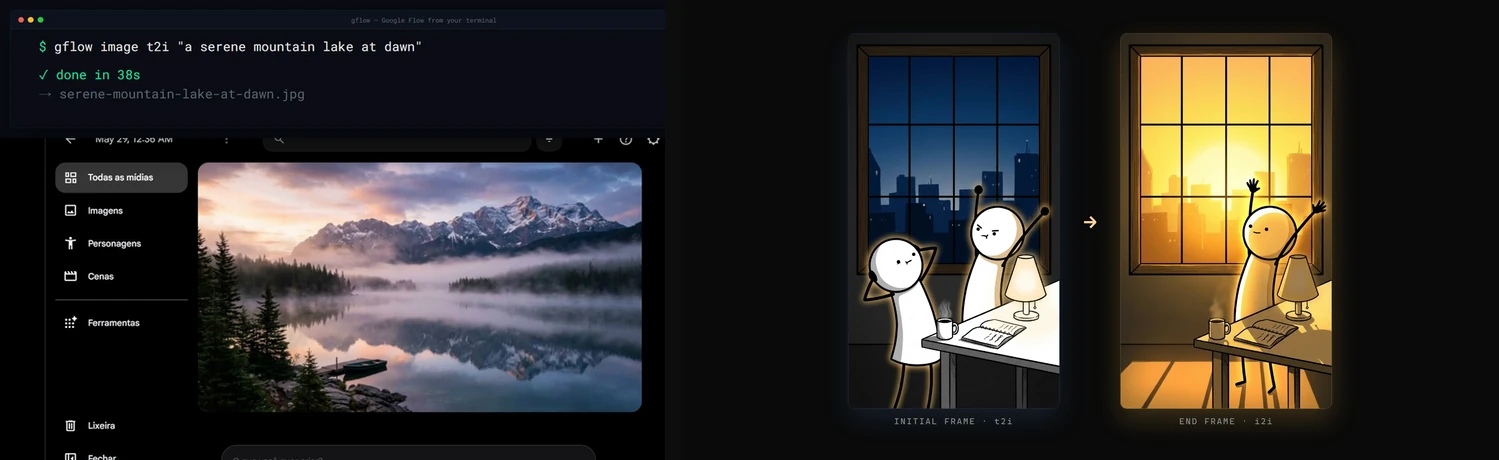
Demo
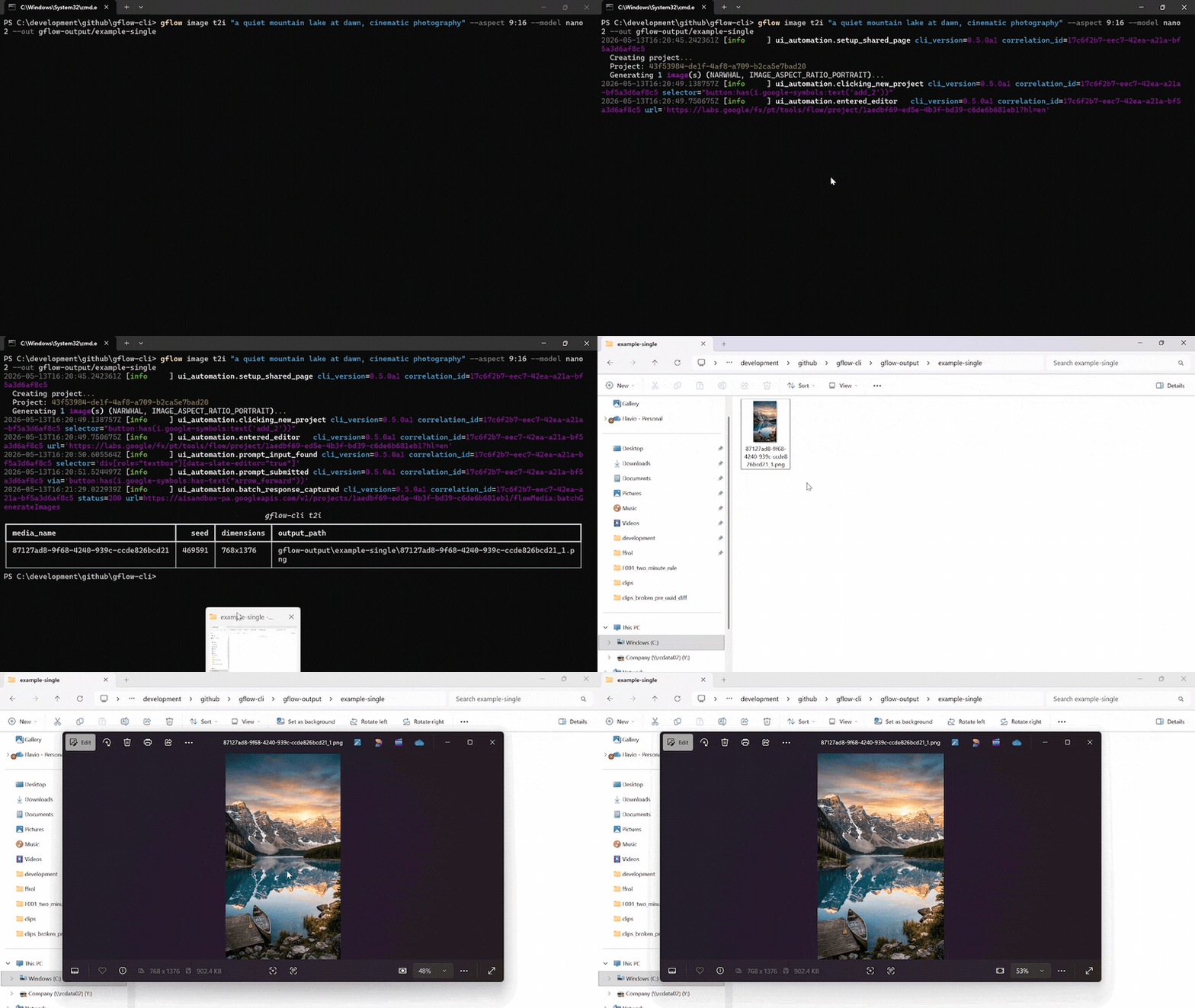
A single gflow image t2i "..." --aspect 9:16 --model nano2 call against a logged-in Flow profile. The terminal streams the run's structlog JSON, then lists the written PNG. Chromium drives the Flow editor silently in the background.
Reproduce the recording with scripts/record_demo.ps1 (Windows, OBS, ffmpeg, gifski). More formats, including the side-by-side split-screen: docs/DEMOS.md.
Documentation
docs/INDEX.md is the master routing layer. Quick links:
Usage data: gflow stores local usage counters and, after an interactive notice (and explicit consent in the EU/EEA), uploads weekly totals without an identifier. See the privacy notice and how to turn it off.
| Topic | Read |
|---|---|
| 🎯 Getting started | User Guide · Usage · Configuration |
| Storage & catalog | External Storage · Data Layer |
| 🎭 Characters | Characters, reusable subjects (gflow character) |
| 🤖 Agentic & automation | Instructions (gflow instructions, persistent brief cards) · Movie (gflow movie, multi-scene manifests) · Tools (--tool, prompt rewriting) · MCP server (gflow mcp run / gflow serve) |
| 🔐 Auth & sessions | Authentication · Known issues |
| 📣 Where to install from | Marketplaces (every channel and what each actually delivers) · Container (why the image introspects but cannot generate) |
| 🏗️ Internals | Architecture · Security · Usage data notice · Debugging |
| 📦 Releases | Changelog · Roadmap · Release protocol · Project status |
| 🤝 Contributing | Contributing · Development · GitHub workflow |
For AI agents & LLMs
gflow-cli ships four agent entry points. Pick the one your tool reads first.
| File | Audience | Tools |
|---|---|---|
| AGENTS.md | Universal coding-agent spec | Cursor · Codex · Aider · Antigravity · Jules · Devin · Windsurf · Zed · Warp · opencode · Copilot |
| CLAUDE.md | Claude Code's auto-loaded memory | Claude Code |
| llms.txt | LLM-readable summary (llmstxt.org format) | Paste into ChatGPT, Claude, or Gemini to onboard the model |
skills/gflow-cli/SKILL.md |
Claude Code Skill | Symlink into ~/.claude/skills/ |
Install the plugin (Claude Code)
One step, and you get the gflow-cli and video-production skills plus the MCP server:
/plugin marketplace add ffroliva/gflow-cli
/plugin install gflow@gflow-cli
The plugin ships disabled. Claude Code starts a plugin's MCP servers automatically once a
plugin is enabled, with no prompt of its own — and this server drives your own Google account,
where Veo video generation bills your credits. So installing it starts nothing, and enabling it
is a deliberate act. Images and composition are free; only video spends. For a hard guarantee,
register the server yourself with gflow mcp run --no-spend, which never registers the
credit-spending tools at all. See docs/MCP.md for the details, including which
revision /plugin marketplace add gives you.
Codex users: codex plugin marketplace add . then codex plugin add gflow@gflow-cli.
Onboard any agent in one line. Paste this into your agent of choice:
"Read AGENTS.md and docs/INDEX.md, then help me with my Flow batch."
Architecture & current limitations
gflow CLI  →  Provider (interchangeable)  →  Flow (ui_automation) / Mock (tests) / [planned: Official Veo]
                                              ↓
                                      Playwright Chromium (headed — login AND generation, by default)
                                              ↓
                              aisandbox-pa.googleapis.com  (Google's private Flow API)
Current transport: ui_automation drives Flow through a persistent Playwright Chromium profile. It is production-stable and verified end-to-end every release (see the per-release LIVE_VERIFICATION_* evidence files).
Two Flow frontends: Google is moving accounts from labs.google onto flow.google.com (#639) — same product, different widget toolkit and wire protocol (batchexecute instead of aisandbox-pa). The migrated driver covers text-to-video, image-to-video from a local start frame, reference-to-video from local files, text-to-image, image-to-image from local files, and a single-segment video extend. Image generation supports Nano Banana 2.1 (nano2, #958) / 2 Lite / Pro, the five aspect ratios measured on that host (16:9, 4:3, 1:1, 3:4, 9:16), and counts 1–4; an existing project is required at the transport boundary. Images can tag a character by @Name, and reference-to-video takes a named character with --reference-entity + --reference-entity-name (#723). An account served the agent-only composer (#799) gets text-to-image and text-to-video only. An image --ref <uuid> is referenced in place when the catalog records it in the same --project (#995). Other UUID media references, an entity id without a name, instructions, Imagen 4, and the rest of the matrix keep the labs driver until ported (GFLOW_CLI_FLOW_HOST, see CONFIGURATION).
What's blocked: a pure HTTP transport for video generation. The video upload endpoint returns HTTP 401 under non-Chrome browsers plus a reCAPTCHA mint we cannot reproduce headlessly. Three earlier HTTP strategies (evaluate_fetch, bearer, sapisidhash) live under src/gflow_cli/api/transports/experimental/ for research, off the production path.
How you can help: if you have driven aisandbox-pa.googleapis.com from outside a real Chrome session, or you understand Google's anti-bot stack here, please open an issue. A working REST transport would unlock serverless deployments, true horizontal concurrency, and roughly 10x the project's reach. Details: docs/ARCHITECTURE.md § Headed-browser dependency.
Project status
Alpha. Image (t2i, i2i, upload, upscale, batch) and video (t2v, i2v, r2v, chain, extend, upscale) run end-to-end on ui_automation, with a 5-model Veo picker plus --duration and --count. Beyond single generations: gflow movie renders multi-scene manifests, gflow instructions manages persistent Agent-Mode brief cards (credits-free), gflow character handles reusable subjects, gflow scene does credit-free server-side stitching, --tool applies prompt-rewriting tools, and an MCP server (gflow mcp run stdio / gflow serve Streamable HTTP) exposes the core surface to AI agents with a CI-enforced CLI↔MCP parity contract.
Full milestone history lives in CHANGELOG.md. Where the project is heading: ROADMAP.md.
Support gflow-cli
gflow-cli is built and maintained by one person. Every release is verified against real Google Flow, which spends real AI credits, and breakages get fixed fast because people run it in their pipelines. Sponsorship pays for both.


Relying on gflow-cli at work? The monthly company tiers put your logo here, and Silver and above also get priority issues. All tiers and what each one gets: docs/SPONSORS.md.
Patched gflow-cli in your fork? Please open an issue or a pull request — a fix that lands upstream helps everyone.
Hall of fame
No sponsors yet. Be the first — every public sponsor is listed here.
License & legal
MIT License © 2026 Flavio Oliva (ffroliva). The MIT license covers gflow-cli's code only. It grants no rights to Flow, Veo model output, or any Google service. Google's own terms (Labs Additional Terms and any plan-specific subscription terms) govern your generations. See the DISCLAIMER.
Acknowledgements
edge-tts, design inspiration for community SDKs over private cloud APIs.googleapis/python-genai, the official Veo SDK that a future provider release may alias.- Keysight, Google Labs – Flow AI with Veo3: A Network Traffic Analysis, an independent capture that helped validate the route patterns.
Stats






Star history
If gflow-cli saves you time, please ⭐ the repo. It is the cheapest way to support the project.
gflow-cli MCPのよくある質問
gflow-cli MCPをClaude Codeに追加するには
ターミナルでclaude mcp add gflow-cli -- uvx gflow-cli mcp runを実行します。すべてのプロジェクトで利用するには--scope userを追加します。
gflow-cli MCPをCursorに追加するには
~/.cursor/mcp.jsonを開き、上記のインストールセクションに示すCursor設定を使ってmcpServersの下にサーバーを追加します。
gflow-cli MCPが提供するツールは
20個のツールを提供しており、gflow_generate_image, gflow_generate_video, gflow_list_tools, gflow_list_models, gflow_get_creditsなどがあります。
認証はどのように処理されますか?
Playwrightの永続的なChromiumプロファイルを使用して、Google認証とreCAPTCHAのゲートを処理します。