
ベクトルデータベースの代わりにMarkdownとYAMLを使用し、AIコーディングアシスタント向けにファイル優先・ローカル優先のメモリレイヤーを提供します。
別名 elViRafa/agentic-memory, agentic-memory, memory-fabric
- スター
- 1
- ツール
- 17
- ダウンロード数(30日間)
- 637
- 最新バージョン
- 1.4.5
- 最終コミット
- 2026年11月2日
- ライセンス
- MIT
Memory Fabric MCPとは
Memory FabricはMCPサーバーです。 ベクトルデータベースの代わりにMarkdownとYAMLを使用し、AIコーディングアシスタント向けにファイル優先・ローカル優先のメモリレイヤーを提供します。. 17個のツールを提供しており、initialize_memory_fabric_tool, read_combined_context_tool, read_section_toolなどがあります。
プロジェクトのREADMEから生成された概要
Memory Fabric MCP server について
Memory Fabricは、Claude Code、Cursor、GitHub CopilotなどのAIコーディングアシスタント向けに設計された、ローカル優先のメモリレイヤーを提供します。クラウドアカウントやベクトルデータベースに依存するのではなく、コンテキストをYAMLフロントマター付きの人間が読めるMarkdownファイルとしてプロジェクト内に直接保存します。このアプローチにより、プロジェクトの知識は常に検査可能で、コミット可能であり、完全にオフラインの状態に保たれます。
開発者はModel Context Protocolを使用して、サーバーを好みのIDEやCLIに接続できます。このシステムは、事実(facts)が専用ディレクトリに保存されるstore-firstアーキテクチャを通じてメモリを管理し、architecture.mdのようなルートマップを自動生成します。事実を保存するためのwrite_memory_store_toolや、メモリのメンテナンスと集約を行うdream_toolなどの専用ツールが含まれています。ファイルベースであるためGitと自然に統合され、ブランチ間のメモリ競合を処理するためのカスタムマージドライバーも提供しています。
できること
- 1エピソードメモリのキャプチャを自動化エージェントの手動介入を必要とせず、すべてのgit commitをメモリのエントリとして自動的に記録します。
- 2高いメモリ品質の維持保存されたメモリがAIアシスタントにとって有用であり、適切にフォーマットされているかを確認するための評価を実行します。
- 3断片化したプロジェクト知識の集約Dreaming機能を使用して、ディープまたはライトなメンテナンスを実行し、メモリファイルをクリーンアップして整理します。
- 4繰り返されるエラーログの防止専用ツールを使用して、同じエラーの複数のインスタンスを、成長し続ける単一のレコードに統合します。
プロジェクトの README から作成されています。すべてのユースケースは、その引用と照らし合わせて確認されています。
Memory Fabric MCPのインストール方法
フォーマット検証日 2026年11月10日Cursor に追加Gooseに追加Claude CodeにMemory Fabric MCPをインストール
$ claude mcp add agentic-memory -- uvx memory-fabricCursorにMemory Fabric MCPをインストール
~/.cursor/mcp.json
{
  "mcpServers": {
    "agentic-memory": {
      "command": "uvx",
      "args": [
        "memory-fabric"
      ]
    }
  }
}VS CodeにMemory Fabric MCPをインストール
.vscode/mcp.json
{
  "servers": {
    "agentic-memory": {
      "type": "stdio",
      "command": "uvx",
      "args": [
        "memory-fabric"
      ]
    }
  }
}VS Code CLIにMemory Fabric MCPをインストール
$ code --add-mcp '{"name":"agentic-memory","type":"stdio","command":"uvx","args":["memory-fabric"]}'Claude DesktopにMemory Fabric MCPをインストール
claude_desktop_config.json
{
  "mcpServers": {
    "agentic-memory": {
      "command": "uvx",
      "args": [
        "memory-fabric"
      ]
    }
  }
}CodexにMemory Fabric MCPをインストール
$ codex mcp add agentic-memory -- uvx memory-fabricCodex config.tomlにMemory Fabric MCPをインストール
~/.codex/config.toml
[mcp_servers.agentic-memory]
command = "uvx"
args = ["memory-fabric"]
Gemini CLIにMemory Fabric MCPをインストール
$ gemini mcp add -s user agentic-memory uvx -- memory-fabricGemini settings.jsonにMemory Fabric MCPをインストール
~/.gemini/settings.json
{
  "mcpServers": {
    "agentic-memory": {
      "command": "uvx",
      "args": [
        "memory-fabric"
      ]
    }
  }
}Memory Fabric MCPツール 17
READMEから検出initialize_memory_fabric_toolread_combined_context_toolread_section_toolkeyword_search_toolwrite_local_memory_toolpropose_memory_patch_tooldream_toolprepare_dream_payload_toolapply_dream_results_toolevaluate_memory_fabric_toolevaluate_dream_quality_toolwrite_memory_store_tool
| initialize_memory_fabric_tool | — | |
| read_combined_context_tool | — | |
| read_section_tool | — | |
| keyword_search_tool | — | |
| write_local_memory_tool | — | |
| propose_memory_patch_tool | — | |
| dream_tool | — | |
| prepare_dream_payload_tool | — | |
| apply_dream_results_tool | — | |
| evaluate_memory_fabric_tool | — | |
| evaluate_dream_quality_tool | — | |
| write_memory_store_tool | — |
17個のツールをすべて表示ツールを折りたたむ
read_memory_store_toollist_memory_store_tooldelete_memory_store_toolwrite_session_journal_toolwrite_failure_memory_tool
| read_memory_store_tool | — | |
| list_memory_store_tool | — | |
| delete_memory_store_tool | — | |
| write_session_journal_tool | — | |
| write_failure_memory_tool | — |
自動チェック
実行日 2026年11月13日完全なレポート →自動チェックに合格しました。これはセキュリティ監査ではありません。コードを読み、サーバーに必要最小限のアクセス権を与えてください。 チェックの仕組み

- ソースリポジトリがリンクされており、アクセス可能elvirafa/agentic-memory is public and reachablegithub.com/elvirafa/agentic-memory ↗合格
- パッケージがこのリポジトリをソースとして指定未チェック
- ビルドの来歴 (Sigstore 証明)Sigstore attestation for memory-fabricpypi.org/project/memory-fabric/ ↗合格
- オープンソースライセンス (OSI)MITspdx.org/licenses/MIT.html ↗合格
- 過去1年以内にコミットまたはリリースありLast commit or release 2026-11-02github.com/elvirafa/agentic-memory ↗合格
- OpenSSF Scorecard未チェック
- パッケージ名が有名なパッケージに酷似していないNo popular package one edit away from memory-fabric合格
- パッケージおよびその依存関係に重大な勧告なし1 resolved dependencies checked; no critical advisoryosv.dev ↗合格
- モデルへの隠れた指示がない17 tool descriptions and the README read; no override phrases, credential paths or hidden characters合格
- 破壊的なツールがラベル付けされている未チェック
- リモートエンドポイントが MCP ハンドシェイクに応答未チェック
README
GitHubで見るMemory Fabric

File-first, local-first memory layer for MCP-compatible AI coding assistants.
Memory Fabric gives AI tools like Claude Code, Cursor, and GitHub Copilot a consistent, project-aware context layer without locking you into one model, editor, cloud provider, or operating system.
Memory is stored as human-readable Markdown with YAML frontmatter. No vector database. No cloud account. No embeddings required.
Features
- MCP-native: exposes memory tools through the standard Model Context Protocol
- File-first: Markdown files are the source of truth, inspectable and commit-ready
- Local-first: core reads and writes work offline
- Store-first: facts live in
memory-store/, one per file; root maps (architecture.md,decisions.md, ...) are generated views rebuilt by Dreaming, never hand-written - Captures itself: every git commit is recorded as episodic memory automatically — no agent cooperation required — via an opt-in post-commit hook
- Git-native merge: an optional custom merge driver lets two branches' memory merge as cleanly as their code, instead of conflicting on a shared timestamp line
- Self-verifying: memories can cite the file/line/commit they depend on;
ai-memory verifyflags citations that rotted - Learns from failure:
write_failure_memory_tooldeduplicates repeat occurrences of the same error into one growing record instead of scattering near-duplicates - Secret-safe: API keys and credentials are redacted before writing
- Token-budget aware: assembles context within limits; never slices files mid-document
- Quality eval: scores memory usefulness and Dreaming before/after results locally
- Unicode-safe: works with any human language
- Graceful degradation: works without
rg, git hooks, or Dreaming configured
Status
v1.4.5 — field diary pack/analyze and live posture pinning.
Live on PyPI.
Core CLI and MCP tools work end-to-end. See ROADMAP.md for what
shipped, what's in progress, and what's next.
Demo
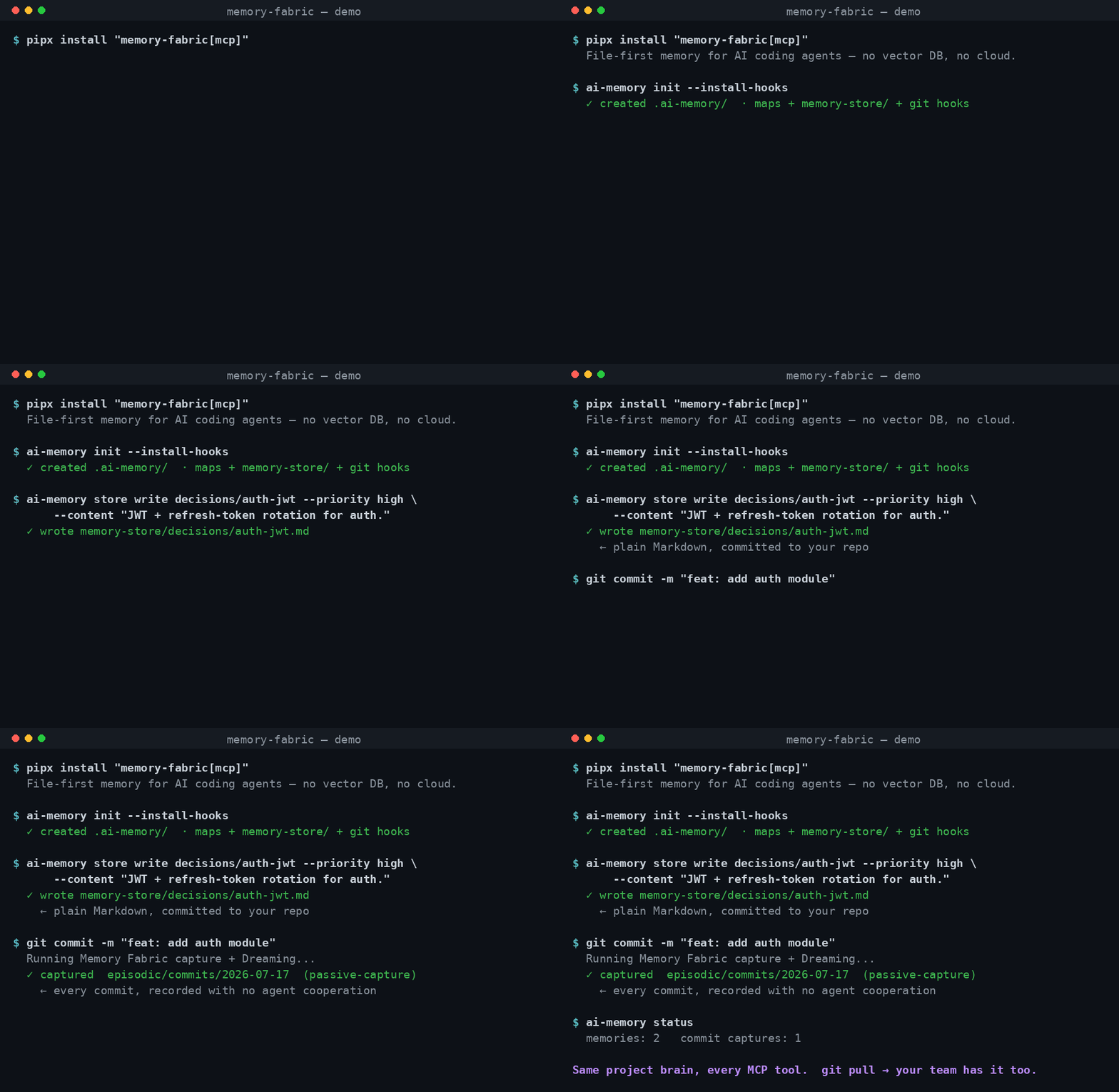
The CLI and self-capture flow: initialize a project, write a memory as a plain
Markdown file in your repo, and watch a git commit record itself as episodic
memory with no agent cooperation. The cross-tool moment — an agent writes memory
in one tool and a different tool reads it back — is storyboarded in
DEMO.md for the full video.
Privacy — no telemetry
Memory Fabric never sends data anywhere. There is no account, no cloud, no
analytics, no phone-home. The core read and write paths make no network calls at
all; the only optional network requests are a PyPI version-drift check and an
LLM-provider preflight, both of which you can turn off with --offline. Your
memory is plain Markdown in your own git history — it never leaves your machine
unless you push it.
An optional, off-by-default field diary can record operational counts on
your machine after you run ai-memory diary approve. That is not the session
journal, and it is not telemetry: nothing is transmitted. MEMORY_FABRIC_DIARY=0
is a kill switch. ai-memory diary pack builds a shareable folder under the
app data field-packs/ directory (Windows: %APPDATA%/memory-fabric/field-packs/);
you copy that folder yourself. ai-memory diary analyze scores product signals
from a pack or the local diary. This is a deliberate guarantee, not a default
we might change.
Installation
From PyPI (recommended)
Requires Python ≥ 3.11.
pipx install memory-fabric          # CLI only
pipx install "memory-fabric[mcp]"   # CLI + MCP server
Or with plain pip (inside a virtual environment):
pip install memory-fabric          # CLI only
pip install "memory-fabric[mcp]"   # CLI + MCP server
Zero-install one-off run (requires uv):
uvx --from "memory-fabric[mcp]" memory-fabric-mcp # starts the MCP server on stdio
From GitHub (latest, pre-release)
# CLI only
pipx install "git+https://github.com/elViRafa/agentic-memory.git"

# CLI + MCP server
pipx install "memory-fabric[mcp] @ git+https://github.com/elViRafa/agentic-memory.git"
Or with plain pip (inside a virtual environment):
pip install "git+https://github.com/elViRafa/agentic-memory.git"          # CLI only
pip install "memory-fabric[mcp] @ git+https://github.com/elViRafa/agentic-memory.git"  # + MCP
Upgrading
Because Memory Fabric is in active development, we recommend upgrading regularly:
-
Upgrade the Package:
# If installed via pipx: pipx upgrade memory-fabric # If installed in a virtual environment via pip: pip install --upgrade "memory-fabric[mcp]" # If installed from GitHub (pre-release): pipx install --force "memory-fabric[mcp] @ git+https://github.com/elViRafa/agentic-memory.git" -
Refresh the MCP client config (uvx installs): If your client config launches the server via
uvx(the default written by olderai-memory installruns), uv serves the build it cached the first time and never re-resolves an unpinned spec — restarting the client is not enough and can leave the server several releases behind without any signal. After upgrading, either:# Re-write the client config (now pins the exact installed version, or points # at the local memory-fabric-mcp binary when one sits next to the CLI): ai-memory install --client <your-client> --project # ...or drop the stale cached build so uvx re-resolves: uv cache clean memory-fabricai-memory doctorwarns when the local version drifts from the latest on PyPI or when a differentai-memoryinstallation shadows this one on PATH. -
Restart MCP Clients: After upgrading, restart your IDE (Cursor, VS Code) or assistant process (Claude Code) to ensure the client reloads the updated
memory-fabric-mcpserver. -
Refresh Local Projects (Optional): If you have projects initialized with older versions of Memory Fabric, navigate to the project directory and run:
ai-memory init --install-hooksThis will safely refresh starter templates and local git hook integration to the latest format without overwriting your existing memory markdown files.
Windows terminals: the CLI emits UTF-8 (memory content legitimately contains em-dashes and bullets). Windows Terminal and PowerShell 7 render it out of the box; on legacy consoles (PowerShell 5.1 with an OEM code page) set
chcp 65001orPYTHONUTF8=1if you see replacement characters.
Or clone and install in editable mode for local development:
git clone https://github.com/elViRafa/agentic-memory.git
cd agentic-memory
pip install -e .          # CLI only
pip install -e ".[mcp]"   # CLI + MCP server
Quick Start
1. Initialize a project
ai-memory init
Creates .ai-memory/ in the current directory with starter sections and a .gitignore.
2. Check health
ai-memory doctor
3. Evaluate memory quality
ai-memory eval
ai-memory eval --json
eval scores whether memories are useful for coding assistants. It checks section coverage, starter-template content, summary quality, metadata, retrieval readiness, and likely secrets.
If .ai-memory/ exists, reports are saved under ignored local files:
.ai-memory/evals/latest.json
.ai-memory/evals/latest.md
.ai-memory/evals/<timestamp>-memory.json
.ai-memory/evals/<timestamp>-memory.md
If .ai-memory/ does not exist yet, eval prints a pre-init report only and creates no files.
4. Query memory
ai-memory query "authentication"
5. Run maintenance (Dreaming)
ai-memory dream --mode light
ai-memory dream --mode deep
Dreaming creates a snapshot before maintenance. You can evaluate whether a Dreaming run improved memory quality:
ai-memory eval --dream latest
ai-memory dream --mode light --eval
Dream eval compares the pre-dream snapshot to current memory and reports score delta, changed files, improvements, and regressions.
MCP Server — Install
One command per client. Safe to re-run: merges with your existing config, never overwrites it, and backs up the original file if it can't be parsed.
One-click install


These call uvx --from "memory-fabric[mcp]" memory-fabric-mcp under the hood — same
canonical invocation as ai-memory install, just without the CLI step. Requires
uv.
| Client | Command |
|---|---|
| Claude Code | ai-memory install --client claude-code |
| Claude Desktop | ai-memory install --client claude-desktop |
| VS Code | ai-memory install --client vscode |
| Cursor | ai-memory install --client cursor |
| Windsurf | ai-memory install --client windsurf |
| Codex | ai-memory install --client codex |
| Antigravity | ai-memory install --client antigravity |
| Gemini CLI | ai-memory install --client gemini-cli |
| Cline | ai-memory install --client cline |
| All detected clients | ai-memory install --client all |
Add --project to write project-scoped config instead of the global/user config
(where the client supports it). Add --dry-run to preview the change as a unified
diff without writing anything. Add --uninstall to remove only the memory-fabric
entry, leaving everything else in the file untouched.
Available MCP Tools
| Tool | Description |
|---|---|
initialize_memory_fabric_tool |
Create .ai-memory/ scaffolding in a project |
read_combined_context_tool |
Load Tier 0 directives + prioritized memory within token budget |
read_section_tool |
Read a single memory section by name |
keyword_search_tool |
Search memory with ripgrep or Python fallback |
write_local_memory_tool |
Update steering sections (framework-rules, ubiquitous-language) only. Writing facts or root maps is rejected (store-first) — root maps are generated from memory-store/; use write_memory_store_tool |
propose_memory_patch_tool |
Preview proposed memory changes without applying |
dream_tool |
Run memory maintenance / consolidation (--mode light |
prepare_dream_payload_tool |
Prepare candidate snapshot and return consolidation prompt for client-driven dreaming |
apply_dream_results_tool |
Apply LLM consolidated JSON output to candidate snapshot and save changes |
evaluate_memory_fabric_tool |
Evaluate local memory quality |
evaluate_dream_quality_tool |
Evaluate a Dreaming run against a snapshot |
write_memory_store_tool |
Write a memory file to a semantic store path (e.g. architecture/decisions/auth); accepts an optional evidence citation list |
read_memory_store_tool |
Read a single memory-store file by its semantic path |
list_memory_store_tool |
List files in the memory store, optionally filtered by prefix/tags |
delete_memory_store_tool |
Remove a memory-store file by its semantic path |
write_session_journal_tool |
Append a timestamped session journal entry (episodic memory) |
write_failure_memory_tool |
Record an error → fix pair; repeat occurrences of the same error accumulate onto one entry |
Agentic Architecture (making agents use Memory Fabric automatically)
Registering the MCP server is necessary but not sufficient — AI agents will not use its tools unless explicitly instructed to do so.
Memory Fabric provides an automated Agentic Architecture to handle this for you.
When you run ai-memory init in your project, the CLI automatically deploys a complete suite of agent instruction files tailored for every major AI tool:
| Target | File(s) Created |
|---|---|
| Gemini CLI / Codex / Antigravity | AGENTS.md |
| Grok (TUI / Build / Agent harness) | AGENTS.md (primary project rules); full docs + MCP registration in ~/.grok/config.toml or .mcp.json; see also .grok/docs/user-guide/13-memory-fabric.md when installed for the client |
| Cursor IDE | .cursor/rules/memory-fabric.mdc |
| Windsurf IDE | .windsurf/rules/memory-fabric.md |
| Cline / Generic IDE Agents | .agents/rules/memory-store.md, .agents/rules/dreaming.md |
| Claude Code | CLAUDE.md (created or appended) |
| GitHub Copilot | .github/copilot-instructions.md (created or appended) |
Single Source of Truth (Syncing)
All these files are generated from two canonical content blocks inside the Memory Fabric Python package. Running ai-memory sync-agents regenerates every platform file from these templates, guaranteeing perfect consistency. If you used ai-memory init --install-hooks, a pre-commit git hook runs this sync automatically on every commit.
In the shared user files (AGENTS.md, CLAUDE.md, .github/copilot-instructions.md) the fabric content lives inside managed marker blocks (<!-- >>> memory-fabric:… >>> --> … <!-- <<< memory-fabric:… <<< -->); sync only ever rewrites content between the markers, so anything you add outside them is preserved byte-for-byte.
Project Directives (v1.1)
Beyond the package's own protocol instructions, you can define project directives — hand-curated development guidelines shared by every AI agent working on the repo. A directive is simply a root section file .ai-memory/<name>.md with role: steering frontmatter (like the built-ins framework-rules and ubiquitous-language), plus two optional boolean routing keys:
| Key | Meaning | Default |
|---|---|---|
sync |
include the directive in the per-tool files generated by sync-agents |
true |
context |
inject the directive as Tier 0 into read_combined_context |
true for the built-ins; false for user directives (file-reading agents already get the synced copy) |
ai-memory sync-agents composes every sync: true steering section into one project-directives document and distributes it as .agents/rules/project-directives.md, .cursor/rules/project-directives.mdc, .windsurf/rules/project-directives.md, and a managed marker block in AGENTS.md/CLAUDE.md/.github/copilot-instructions.md — so AGENTS.md-only readers (Codex, OpenCode, Gemini) receive them too. Deleting the last synced directive tears all of that down again.
For CI, ai-memory sync-agents --check is a drift gate: it writes nothing and exits 1 when any generated file is out of date. ai-memory doctor additionally warns when the always-loaded context surface exceeds its token budget (default 3000, MEMORY_FABRIC_DIRECTIVE_BUDGET), when a hand-edited steering file contains something that looks like a secret, and when a stale pre-1.1 fabric block sits outside the managed markers.
For full details on the architecture, see AGENTIC_ARCHITECTURE.md.
Why this matters
Without these instruction files, agents will often explain they "don't use MCP tools automatically," or worse, they will write memory markdown files directly using native file-system tools—bypassing secret scanning, token budgeting, and background Dreaming management.
By simply running ai-memory init, you get zero-configuration, plug-and-play capability across the entire agent ecosystem.
Using Memory Fabric in Other Projects
You can use a single installed instance of Memory Fabric across all your coding projects:
-
Scaffold the target project: Navigate to your target project's root folder and initialize it:
cd /path/to/other-project
ai-memory init --install-hooks
This automatically creates
.ai-memory/, deploys the Agentic Architecture rule files, sets up.gitignore, and installs the git post-commit hooks. -
Global MCP Configuration: Verify your AI assistant's configuration points to your globally installed
memory-fabric-mcpexecutable. The MCP tools automatically parse and use the active project's path passed by the assistant as thecwdargument, enabling a single global MCP server registration to support all your local workspaces.
Project Memory Layout
Memory Fabric is store-first: memory-store/ is the only place agents write facts by
hand, one fact per file. The root map files (architecture.md, decisions.md, debt.md,
schemas.md, index.md) are generated views rebuilt by Dreaming from their matching
memory-store/<category>/ subtree — never edit them directly, they carry generated: true
frontmatter and a hand edit gets folded back into the store for review on the next Dream.
The exception is the steering tier: any root section with role: steering frontmatter
(the built-ins framework-rules.md and ubiquitous-language.md, plus any project
directives you create) is hand-curated — humans and agents may edit these files directly
(review via MR). The built-ins are always loaded into context in full, never generated
and never evicted by the token budget; user directives default to context: false and
reach agents through the sync-agents per-tool files instead.
.ai-memory/
|-- index.md                  # generated discovery index
|-- architecture.md           # generated map of memory-store/architecture/
|-- schemas.md                # generated map of memory-store/schemas/
|-- decisions.md              # generated map of memory-store/decisions/
|-- debt.md                   # generated map of memory-store/debt/
|-- ubiquitous-language.md    # hand-curated steering directive (always loaded)
|-- framework-rules.md        # hand-curated steering directive (always loaded)
|-- memory-store/             # the source of truth — one fact per file
|   |-- index.md              # generated store-wide index
|   |-- architecture/...
|   |-- decisions/...
|   |-- debt/...
|   |-- schemas/...
|   |-- failures/<slug>.md    # error -> fix pairs, deduplicated by normalized signature
|   |-- episodic/<date>.md    # agent-written session journals
|   `-- episodic/commits/<date>/<short-hash>.md  # one passively captured commit each
|-- evals/       # ignored local quality reports
|-- snapshots/   # ignored rollback baselines
|-- private/     # ignored personal notes + session markers
`-- .gitignore
All memory files use YAML frontmatter:
---
store_path: architecture/decisions/auth-service
summary: "One-line fallback used when the file exceeds the token budget."
priority: high
tags: [api, auth]
schema_version: "1.3"
last_updated: 2026-06-01T12:00:00-04:00
evidence: [src/auth.py:42, "commit:abc1234"]
---

Your memory content here.
The optional evidence field lets a memory cite what it depends on — a file, a
file:line, or a commit:<hash>. Run ai-memory verify to check those citations still
resolve; a memory citing a file that was renamed or deleted gets flagged instead of
quietly rotting.
Memory Fabric MCPのよくある質問
Memory Fabric MCPをClaude Codeに追加するには
ターミナルでclaude mcp add agentic-memory -- uvx memory-fabricを実行します。すべてのプロジェクトで利用するには--scope userを追加します。
Memory Fabric MCPをCursorに追加するには
~/.cursor/mcp.jsonを開き、上記のインストールセクションに示すCursor設定を使ってmcpServersの下にサーバーを追加します。
Memory Fabric MCPが提供するツールは
17個のツールを提供しており、initialize_memory_fabric_tool, read_combined_context_tool, read_section_tool, keyword_search_tool, write_local_memory_toolなどがあります。
Memory Fabricはベクトルデータベースを必要としますか?
いいえ、ベクトルデータベースやエンベディングの代わりに、YAMLフロントマターを含む人間が読める形式のMarkdownを使用します。
データはクラウドに送信されますか?
いいえ、Memory Fabricはローカル優先であり、データがいかなるクラウド、アカウント、または分析サービスに送信されることもありません。
git commitはどのように処理されますか?
オプションのpost-commit hookを介して、すべてのgit commitをエピソードメモリとして自動的に記録できます。