
Codebase MCPサーバー
コミット 2026年10月29日セマンティックコード検索、永続的なメモリ、AI支援による編集パイプラインを備え、Claude Desktopをコーディングアシスタントへと進化させます。
別名 danyQe/codebase-mcp
- スター
- 50
- ツール
- 16
- ダウンロード数(30日間)
- —
- 最新バージョン
- —
- 最終コミット
- 2026年10月29日
- ライセンス
- Apache-2.0
Codebase MCPとは
CodebaseはMCPサーバーです。 セマンティックコード検索、永続的なメモリ、AI支援による編集パイプラインを備え、Claude Desktopをコーディングアシスタントへと進化させます。. 16個のツールを提供しており、session_tool, memory_tool, git_toolなどがあります。
プロジェクトのREADMEから生成された概要
Codebase MCP server について
codebase-mcpは、追加の月額料金を支払うことなく、既存のClaude ProまたはTeamサブスクリプションを活用したい開発者のために、Claude Desktopを特化したコーディングアシスタントへと変貌させます。Model Context Protocolを介して接続することで、Cursorのような有料サービスに代わるオープンソースの選択肢を提供します。このシステムは、ローカルの埋め込みとFAISSインデックスを使用して、Python、JavaScript、TypeScriptのファイルに対して1秒未満のセマンティック検索を実行します。
ユーザーはPython 3.11とuvパッケージマネージャーを使用してサーバーをローカルにセットアップし、コアエンジンを管理するためにFastAPIバックエンドを構成します。プライバシーを確保するためにほとんどの処理はローカルで保持されますが、edit_fileツールはAIによるコード修正を容易にするためにGemini APIキーを必要とします。このサーバーは16個の異なるツールを提供します。これには、設計上の学習事項やミスを分類する永続的なメモリシステム、機能開発を分離するためのセッションベースのGitワークフロー、およびコミット前にコードが特定の基準を満たしていることを確認するためにBlackとRuffを使用する自動品質ゲートが含まれます。
できること
- 1コンテキストを維持した新機能の実装既存のパターンを自動的に検索し、専用の開発ブランチを管理しながら、AIに新しいAPIエンドポイントの作成を依頼できます。
- 2インテリジェントなコードリファクタリングの実行品質ゲートに対して変更を検証するAI支援編集を使用して、サービスの構造変更を依頼できます。
- 3長期的なプロジェクト知識の維持永続的なメモリシステムを使用して、アシスタントが過去の設計上の決定を記憶し、過去のミスを繰り返さないようにします。
- 4複雑なコードベースのナビゲーションセマンティック検索やシンボルレベルの検索を実行して、プロジェクト内の特定の関数やクラスを見つけ出します。
プロジェクトの README から作成されています。すべてのユースケースは、その引用と照らし合わせて確認されています。
Codebase MCPツール 16
READMEから検出session_toolmemory_toolgit_toolwrite_tooledit_filesearch_toolread_code_toolproject_context_toollist_directory_toolcode_analysis_toollist_file_symbols_toolread_symbol_from_database
| session_tool | — | |
| memory_tool | — | |
| git_tool | — | |
| write_tool | — | |
| edit_file | — | |
| search_tool | — | |
| read_code_tool | — | |
| project_context_tool | — | |
| list_directory_tool | — | |
| code_analysis_tool | — | |
| list_file_symbols_tool | — | |
| read_symbol_from_database | — |
16個のツールをすべて表示ツールを折りたたむ
project_structure_toolfile_toolexecute_toolshow_directory_tree
| project_structure_tool | — | |
| file_tool | — | |
| execute_tool | — | |
| show_directory_tree | — |
設定
GEMINI_API_KEY
| 名前 | 説明 | 種類 |
|---|---|---|
| GEMINI_API_KEY | — |
自動チェック
実行日 2026年11月13日詳細レポート →まだ検証されていません。サーバーには80点のスコア、重大な問題がないこと、および検証に必要な十分なデータが必要です。 チェックの仕組み

- ソースリポジトリがリンクされており、アクセス可能合格
- オープンソースライセンス (OSI)合格
- 過去1年以内にコミットまたはリリースあり合格
- パッケージ名が有名なパッケージに酷似していない未チェック
- リモートエンドポイントがHTTPSを使用未チェック
- 破壊的なツールがラベル付けされている未チェック
- モデルへの隠れた指示がない合格
- パッケージと依存関係に重大なアドバイザリがない未チェック
README
GitHubで見るCodebase MCP
Privacy-first AI development assistant via MCP | Turn Claude into your personal coding assistant | Semantic code search • AI-assisted editing • Quality-checked generation • Persistent memory | Free open-source alternative to Cursor & paid AI coding tools | Python, React, TypeScript, FastAPI
Open Source**


Codebase MCP is an open-source AI-powered development assistant that connects Claude Desktop (or any MCP-compatible LLM) to your codebase through the Model Context Protocol. Stop paying for separate coding assistants - if you already have a Claude subscription, that's all you need.
📖 Read Full Documentation | 🏗️ Architecture | 🤝 Contributing
🌟 Why Codebase MCP?
The Problem
Modern AI coding assistants like Cursor, Windsurf, and others charge $20-40+/month on top of your existing LLM subscription. If you already pay for Claude, why pay again for a coding assistant?
The Solution
Codebase MCP turns your existing Claude subscription into a powerful coding assistant:
- ✅ One subscription - Use your existing Claude Pro/Team plan
- ✅ Privacy-first - Local embeddings and processing (except edit operations)
- ✅ Open source - Apache 2.0 license, community-driven
- ✅ Extensible - Works with any MCP-compatible LLM via Model Context Protocol
- ✅ Lightweight - ~100MB memory footprint for medium projects
- ✅ Fast - Sub-second semantic search with local FAISS indexing
⚡ Quick Start
Prerequisites
- Python 3.11+
- Claude Desktop (or any MCP-compatible client)
- Git installed
- uv package manager (recommended)
Installation
1. Clone the repository:
git clone https://github.com/danyQe/codebase-mcp.git
cd codebase-mcp
2. Install globally (recommended):
# Install uv if you haven't
pip install uv

# Create virtual environment and install dependencies
uv venv
source .venv/bin/activate  # On Windows: .venv\Scripts\activate
uv pip install -r requirements.txt

# Install formatters globally (required for code formatting)
pip install black ruff
3. Configure Gemini API (for edit tool):
# Create .env file
cp .env.example .env

# Get free API key from: https://aistudio.google.com/app/apikey
# Add to .env:
GEMINI_API_KEY=your_api_key_here
4. Configure Claude Desktop:
Add to your claude_desktop_config.json:
{
  "mcpServers": {
    "codebase-manager": {
      "command": "/path/to/your/.venv/bin/python",
      "args": [
        "/path/to/codebase-mcp/mcp_server.py"
      ]
    }
  }
}
5. Start the FastAPI server:
# In a separate terminal, navigate to your project directory
python main.py /path/to/your/project

# Server starts on http://localhost:6789
# You can access the web dashboard at: http://localhost:6789
6. Use with Claude Desktop:
- Restart Claude Desktop
- Start chatting - Claude now has access to 16 MCP tools for codebase management!
🎯 Key Features
🔍 Semantic Code Search
- AI-powered code understanding with local embeddings
- Multi-language support (Python, JavaScript, TypeScript)
- Symbol-level indexing (functions, classes, interfaces)
- Fuzzy search and exact matching modes
🧠 Persistent Memory System
- Remember context across chat sessions
- Categorize learnings: progress, mistakes, solutions, architecture
- Semantic memory search with importance scoring
- Never repeat the same mistake twice
🌿 Session-Based Git Workflow
- Isolated development branches for each feature
- Automatic commit tracking in
.codebasedirectory - Separate from user's
.git- track AI changes independently - Auto-merge support with quality gates
✍️ Intelligent Code Writing
- Write Tool: Create new files with auto-formatting and quality scoring
- Edit Tool: AI-assisted editing with Gemini integration (inspired by Cursor)
- Quality Gates: Auto-commit only when code quality ≥ 80%
- Dependency Checking: Prevent code duplication and missing imports
🎨 Auto-Formatting
- Python: Black + Ruff (PEP 8 compliant)
- TypeScript/JavaScript: Prettier (run through npx), plus a few simple lint-style warnings (no ESLint)
- Quality Scoring: Automatic code quality assessment
- Error Recovery: Intelligent retry with corrections
📊 Project Intelligence
- Real-time codebase analysis
- File structure visualization
- Dependency tracking
- Symbol extraction and indexing
🏗️ Architecture
┌─────────────────┐
│ Claude Desktop  │  User interacts via chat
└────────┬────────┘
         │ MCP Protocol (stdio)
         ↓
┌─────────────────┐
│   MCP Server    │  16 Tools (proxy layer)
│  (mcp_server.py)│  Lightweight, fast
└────────┬────────┘
         │ HTTP/REST
         ↓
┌─────────────────┐
│ FastAPI Server  │  Port 6789 (main.py)
│   Core Engine   │  40+ API endpoints
└────────┬────────┘
         │
    ┌────┴─────┬─────────┬──────────┐
    ↓          ↓         ↓          ↓
┌────────┐ ┌──────┐ ┌────────┐ ┌───────────┐
│Semantic│ │Memory│ │  Git   │ │Code Tools │
│ Search │ │System│ │Manager │ │  Pipeline │
└────────┘ └──────┘ └────────┘ └───────────┘
    │          │         │          │
    └──────────┴─────────┴──────────┘
               ↓
    ┌──────────────────────┐
    │   Local Storage      │
    │ • FAISS (vectors)    │
    │ • SQLite (metadata)  │
    │ • .codebase (git)    │
    └──────────────────────┘
Privacy Note: All processing is local except the edit tool, which uses Google's free Gemini API for AI-assisted code editing. Only the edited file is sent to Gemini - no project context or history.
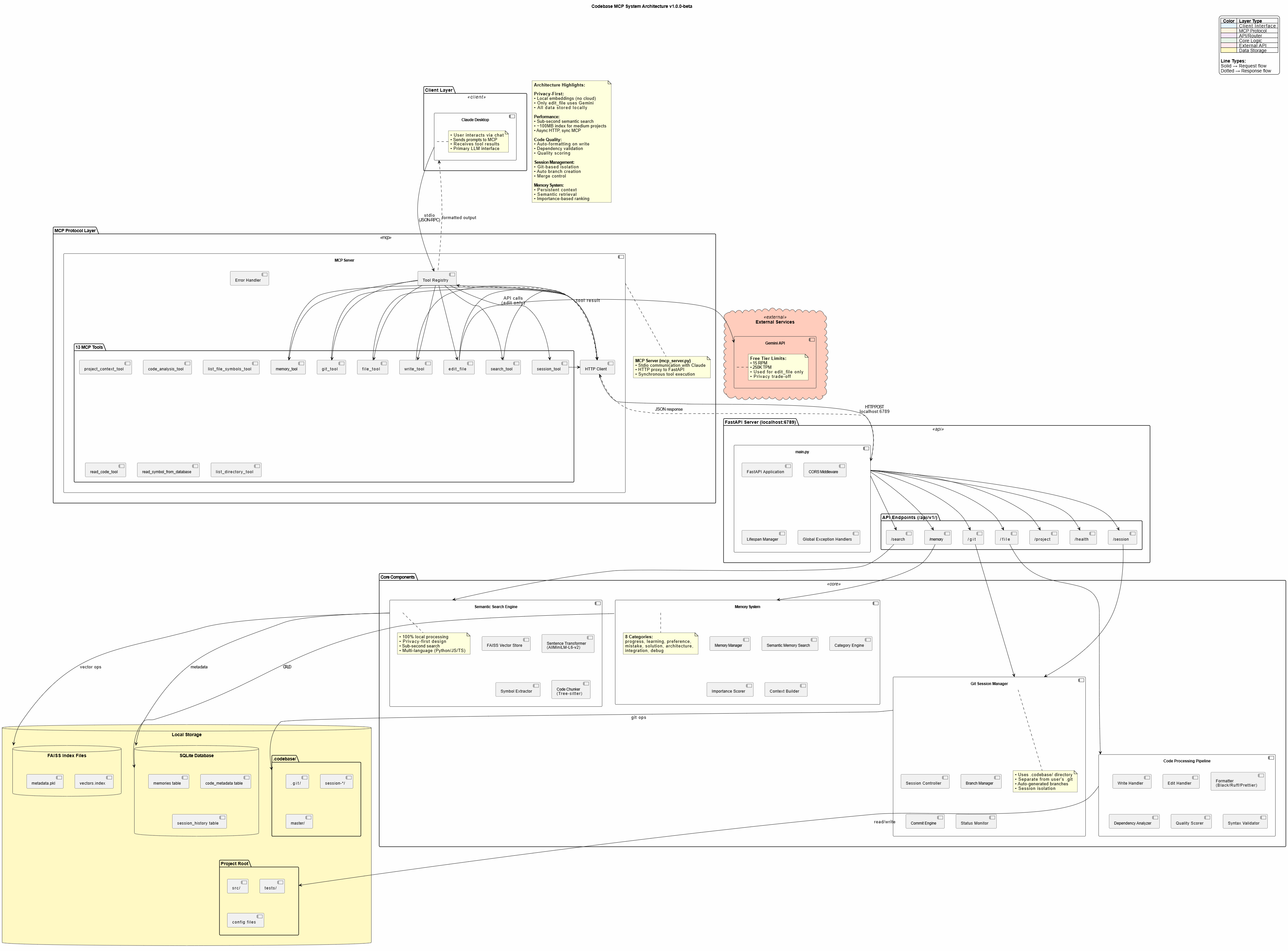
🛠️ Available Tools
Codebase MCP provides 16 MCP tools for comprehensive development automation:
| Tool | Purpose | Key Features |
|---|---|---|
session_tool |
Manage dev sessions | Create branches, auto-commit, merge |
memory_tool |
Store/retrieve knowledge | Persistent context, semantic search |
git_tool |
Git operations | Status, diff, log, commit, branches |
write_tool |
Intelligent file creation | Auto-format, quality scoring, dependency check |
edit_file |
AI-assisted editing | Gemini-powered, error recovery, format validation |
search_tool |
Semantic code search | 4 modes: semantic, fuzzy, text, symbol |
read_code_tool |
Smart code reading | Symbol-level, line ranges, whole file |
project_context_tool |
Project analysis | Structure, dependencies, overview |
list_directory_tool |
Directory exploration | Tree view, metadata, gitignore support |
code_analysis_tool |
Code quality checks | Syntax, linting, imports, dependencies |
list_file_symbols_tool |
Symbol extraction | Functions, classes, interfaces |
read_symbol_from_database |
DB symbol lookup | Fast indexed retrieval |
project_structure_tool |
Project visualization | Enhanced tree with stats |
file_tool |
Basic file operations (legacy) | Read and write by line range; write_tool is preferred for new code |
execute_tool |
Run a command | Arguments, timeout and working directory |
show_directory_tree |
Compact directory tree | Depth 1 to 5, tuned for LLM context |
📈 Performance
- Semantic Search: Sub-second response for typical codebases
- Memory Footprint: ~100MB for medium projects (<20k lines)
- Indexing Speed: ~30 seconds for 10k lines initial index
- Edit Operations: 5-15 seconds (Gemini API + formatting)
- Optimal Project Size: <20,000 lines (tested and verified)
Note: Edit tool can be slow due to Gemini API latency and code formatting. Claude Desktop may timeout on very large edits (use smaller, focused edits).
🎓 Usage Examples
Creating a New Feature
User: "Create a FastAPI endpoint for user authentication with JWT tokens"

Claude:
✅ Searching for existing auth patterns...
✅ Creating session: feat/user-auth
✅ Writing authentication.py with JWT implementation
✅ Auto-formatted with Black + Ruff
✅ Quality score: 95% - Auto-committed
✅ Storing solution in memory
Refactoring Code
User: "Refactor the user service to use dependency injection"

Claude:
✅ Reading current user service implementation
✅ Searching for DI patterns in codebase
✅ Editing with AI assistance (Gemini)
✅ Validating changes with quality gates
✅ Session: refactor/user-di ready for review
Memory-Driven Development
User: "Continue working on the payment integration"

Claude:
✅ Loading memory context...
✅ Found previous progress: Stripe API setup complete
✅ Found previous mistake: Don't use synchronous requests in async endpoints
✅ Continuing from last checkpoint...
🔐 Privacy & Security
Privacy-First Design
- Local Embeddings: AllMiniLM-L6-v2 runs entirely on your machine
- Local Processing: FAISS vector store, SQLite metadata - all local
- No Cloud Dependencies: Except for Gemini API (edit tool only)
Gemini API Usage
- Scope: Only
edit_filetool uses Gemini - Data Sent: Only the file being edited (no project context)
- Alternative: Contributors can add local LLM support (GPU required)
- Cost: Free tier (15 RPM, 250K TPM, 1K RPD)
Security Best Practices
- Never commit
.envwith API keys - Use
.gitignorefor sensitive files - Review AI-generated code before production deployment
- Keep dependencies updated
🤝 Contributing
We welcome contributions! This project was built to be community-driven and extensible.
Priority Areas:
- 🌐 Language Support: Add Java, Go, Rust, PHP, etc.
- 🧠 Local LLM Integration: Replace Gemini with local models
- 🔍 Search Improvements: Enhanced semantic algorithms
- 📊 UI/UX: Improve web dashboard
- ⚡ Performance: Optimization for larger codebases
See CONTRIBUTING.md for detailed guidelines.
📄 License
This project is licensed under the Apache License 2.0 - see LICENSE file for details.
Credits:
- Edit tool techniques inspired by Cursor
- Built with Claude Sonnet 4 and 4.5
- Powered by Model Context Protocol
🗺️ Roadmap
Current Version: v1.0.0-beta
Upcoming Features:
- Community-driven enhancements
- More language support
- Local LLM alternatives
- Performance optimizations
- Advanced prompt engineering templates
📞 Support
- 📖 Documentation: https://danyqe.github.io/codebase-mcp/
- 🐛 Issues: https://github.com/danyQe/codebase-mcp/issues
- 💬 Discussions: https://github.com/danyQe/codebase-mcp/discussions
- 🌟 Star this repo if you find it useful!
🎉 Acknowledgments
Special thanks to:
- Anthropic for Claude and the Model Context Protocol
- Google for the free Gemini API
- Cursor team for pioneering AI-assisted editing techniques
- Open source community for making this possible
Made with ❤️ by developers, for developers
Stop paying for coding assistants. Start building with your own LLM.
Codebase MCPのよくある質問
Codebase MCPが提供するツールは
16個のツールを提供しており、session_tool, memory_tool, git_tool, write_tool, edit_fileなどがあります。
別途サブスクリプションが必要ですか?
いいえ、既存のClaude ProまたはTeamプランを使用します。Cursorのような有料ツールに代わるオープンソースの選択肢として機能します。
コードのプライバシーは守られますか?
はい、ローカルでの埋め込み(embeddings)と処理を行うプライバシー優先設計を採用しています。編集対象の特定のファイルのみがGemini APIに送信されます。
サポートされているプログラミング言語は何ですか?
現在はPython、JavaScript、TypeScriptをサポートしています。