
AIエージェントがCometChatのドキュメントを検索し、チャット、音声、ビデオ、モデレーション機能の実装コードを生成できるようにします。
別名 cometchat/docs-mcp, docs-mcp
- スター
- 148
- ツール
- 4
- ダウンロード数(30日間)
- —
- 最新バージョン
- 0.2.1
- 最終コミット
- 2026年11月13日
- ライセンス
- Apache-2.0
CometChat Docs MCPとは
CometChat DocsはMCPサーバーです。 AIエージェントがCometChatのドキュメントを検索し、チャット、音声、ビデオ、モデレーション機能の実装コードを生成できるようにします。. 4個のツールを提供しており、search_cometchat_docs, fetch_cometchat_doc_page, get_cometchat_implementation_bundleなどがあります。
プロジェクトのREADMEから生成された概要
CometChat Docs MCP server について
CometChat Docsは、AIコーディングエージェントがアプリケーションにリアルタイム通信機能を統合できるようにするMCP serverを提供します。Claude、Cursor、Windsurf、VS Code Copilotなどの互換クライアントを使用している開発者は、自然言語を使用してチャット、音声、ビデオ、モデレーション機能を実装できます。このサーバーは、エージェントと公式のCometChatドキュメントの架け橋として機能し、AIが技術的な詳細を見つけ出し、必要な統合コードをプロジェクトに直接書き込むことを可能にします。
これは読み取り専用のサービスであり、動作にアカウント、APIキー、認証は必要ありません。単一のHTTPエンドポイントを介して動作し、SDKやAPI情報を探すための search_cometchat_docs や、特定のシナリオ向けに事前コンパイルされたドキュメントセットを取得するための get_cometchat_implementation_bundle といった特定のツールを提供します。React、React Native、Flutter、iOS、Android、Angularなどのさまざまなフレームワークに加え、WebflowやWordPress向けのチャットウィジェットのようなノーコードオプションもサポートしています。
できること
- 1UI Kitの実装モバイルまたはWebフレームワーク向けに、特定のUI Kitをインストールして初期化するようエージェントに指示します。
- 2コンテンツモデレーションの設定チャット内で禁止用語が送信されないようにする自動化システムのセットアップをAIに指示します。
- 3リアルタイムインジケーターの追加既存の会話インターフェースに、プレゼンスインジケーターやタイピングアニメーションの追加を依頼します。
- 4マルチテナントアーキテクチャの開発App Management APIを使用して、分離されたワークスペースを持つSaaSアプリケーションの構築をエージェントにガイドさせます。
プロジェクトの README から作成されています。すべてのユースケースは、その引用と照らし合わせて確認されています。
CometChat Docs MCPのインストール方法
フォーマット検証日 2026年11月10日Cursor に追加Gooseに追加Claude CodeにCometChat Docs MCPをインストール
$ claude mcp add --transport http docs-mcp https://mcp.cometchat.com/mcpCursorにCometChat Docs MCPをインストール
~/.cursor/mcp.json
{
  "mcpServers": {
    "docs-mcp": {
      "url": "https://mcp.cometchat.com/mcp"
    }
  }
}VS CodeにCometChat Docs MCPをインストール
.vscode/mcp.json
{
  "servers": {
    "docs-mcp": {
      "type": "http",
      "url": "https://mcp.cometchat.com/mcp"
    }
  }
}VS Code CLIにCometChat Docs MCPをインストール
$ code --add-mcp '{"name":"docs-mcp","type":"http","url":"https://mcp.cometchat.com/mcp"}'CodexにCometChat Docs MCPをインストール
$ codex mcp add docs-mcp --url https://mcp.cometchat.com/mcpCodex config.tomlにCometChat Docs MCPをインストール
~/.codex/config.toml
[mcp_servers.docs-mcp]
url = "https://mcp.cometchat.com/mcp"
Gemini CLIにCometChat Docs MCPをインストール
$ gemini mcp add -s user --transport http docs-mcp https://mcp.cometchat.com/mcpGemini settings.jsonにCometChat Docs MCPをインストール
~/.gemini/settings.json
{
  "mcpServers": {
    "docs-mcp": {
      "url": "https://mcp.cometchat.com/mcp",
      "type": "http"
    }
  }
}CometChat Docs MCPツール 4
READMEから検出search_cometchat_docsfetch_cometchat_doc_pageget_cometchat_implementation_bundlelist_cometchat_bundles
| search_cometchat_docs | — | |
| fetch_cometchat_doc_page | — | |
| get_cometchat_implementation_bundle | — | |
| list_cometchat_bundles | — |
設定
DOCS_REPO
| 名前 | 説明 | 種類 |
|---|---|---|
| DOCS_REPO | — |
自動チェック
実行日 2026年11月12日完全なレポート →自動チェックに合格しました。これはセキュリティ監査ではありません。コードを読み、サーバーに必要最小限のアクセス権を与えてください。 チェックの仕組み

- ソースリポジトリがリンクされており、アクセス可能合格
- オープンソースライセンス (OSI)合格
- 過去1年以内にコミットまたはリリースあり合格
- パッケージ名が有名なパッケージに酷似していない未チェック
- リモートエンドポイントがHTTPSを使用合格
- 破壊的なツールがラベル付けされている合格
- モデルへの隠れた指示がない合格
- パッケージおよびその依存関係に重大な勧告なし未チェック
README
GitHubで見るCometChat MCP Server
Add real-time chat, voice, video, and moderation to your app through your AI coding agent.





Docs • CometChat • Get an account (free, 100 MAU)
CometChat's first-party MCP server. Connect Claude, Cursor, Windsurf, VS Code Copilot, Codex, or any other Model Context Protocol–compatible agent and integrate CometChat into your app from natural-language prompts.
Ask the agent: "add a chat tab where users can DM each other" — it reads CometChat's documentation, picks the right components for your stack, and writes the integration code.
Read-only. No account, no API key, no authentication required.
Demo
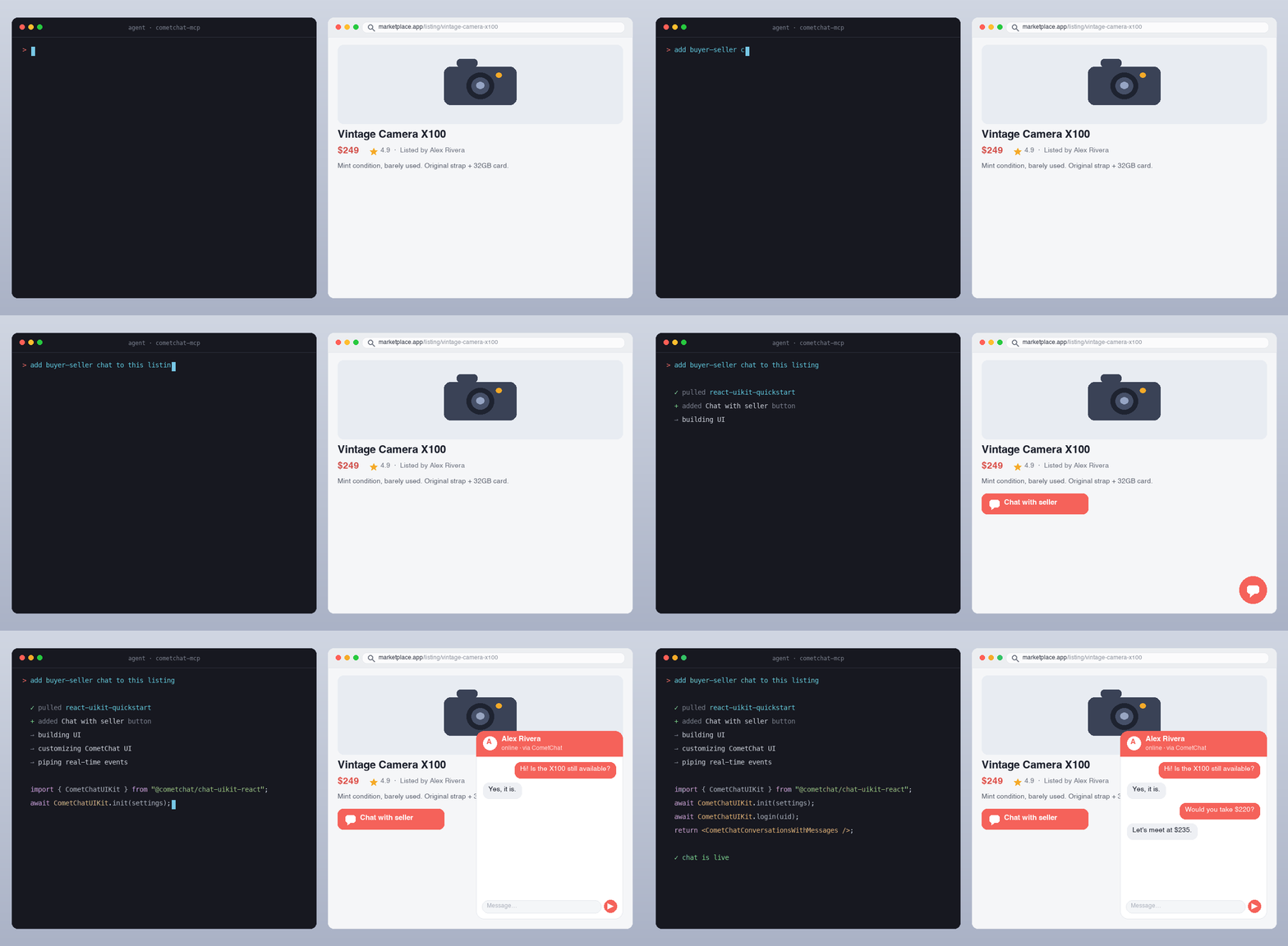
An AI agent reading CometChat's docs and writing a working chat integration from a single prompt.
Quick install
| Agent | How to add |
|---|---|
| Claude.ai / Claude Desktop | Settings → Connectors → Add custom connector → URL: https://mcp.cometchat.com/mcp |
| Cursor | Cmd+Shift+P → Open MCP settings → Add custom MCP → paste config below |
| Windsurf | Plugins (hammer icon) → Manage plugins → View raw config → paste config below |
| VS Code (Copilot Agent) | Cmd+Shift+P → MCP: Add MCP Server → URL: https://mcp.cometchat.com/mcp, Transport: HTTP |
| Claude Code (CLI) | claude mcp add --transport http cometchat https://mcp.cometchat.com/mcp |
| Claude Code (plugin) | claude plugin marketplace add cometchat/docs-mcp && claude plugin install cometchat@cometchat |
| Codex CLI (plugin) | codex plugin marketplace add cometchat/docs-mcp && codex plugin add cometchat@cometchat |
Config snippet (Cursor / Windsurf / generic MCP clients)
{
  "mcpServers": {
    "cometchat": {
      "url": "https://mcp.cometchat.com/mcp"
    }
  }
}
Usage
After connecting, prompt your agent with any of these:
- "How do I install the React UI Kit in my Vite project?"
- "Walk me through multi-tenant chat for a Next.js SaaS where workspaces are isolated."
- "Show me how to add presence indicators and typing dots to my iOS conversation list."
- "Set up content moderation so banned words are blocked before delivery."
- "Build a no-code chat widget for my Webflow site."
- "What's the rate limit for sending messages, and what error code do I get when I hit it?"
The agent reads CometChat's documentation, pulls the relevant implementation bundle, and writes the integration code into your project.
Tools
search_cometchat_docs— Search the SDK, UI Kit, Calls, REST API, AI agent, notification and moderation docs by topic, API name or error message. Returns ranked snippets with page URLs, current versions first. Optionalversionfilter andlimit(up to 25).fetch_cometchat_doc_page— Fetch one documentation page in full as markdown by URL or path, following moved pages. Pages over 50 KiB are truncated with a link to the full page.get_cometchat_implementation_bundle— Return the implementation bundle for a named scenario: the scenario's current docs pages (for a UI Kit: its integration guide, then the platform's AI reference page) compiled into one document, plus related page paths.list_cometchat_bundles— List every available implementation bundle (identifier, title, framework, date its page list was reviewed) for discovery.
All four carry readOnlyHint: true, a title annotation, and a declared outputSchema with structured results. Names are ≤ 64 characters. Each description states what the tool does, when it fits and its limits (errors, rate limit), naming this server's other tools only where one serves a specific need ("identifiers come from list_cometchat_bundles"). They carry no directives to the agent, no references to other servers or products, and no marketing language. tests/tools.test.ts guards the tool, parameter and output-field descriptions and the initialize instructions against a list of banned phrasings, and checks that list still rejects the shapes it was written for; it is a banlist, not a proof.
Resources
| URI | Purpose |
|---|---|
cometchat://skills/overview |
Agent orientation skill — Product summary, decision guidance, workflow, common gotchas, verification checklist |
cometchat://bundles/react-uikit-quickstart |
React UI Kit install + init + login + chat surface |
cometchat://bundles/react-native-uikit-quickstart |
React Native UI Kit with navigation and chat screen |
cometchat://bundles/flutter-uikit-quickstart |
Flutter UI Kit install + init + basic chat |
cometchat://bundles/ios-uikit-quickstart |
iOS UI Kit install + chat view |
cometchat://bundles/android-uikit-quickstart |
Android UI Kit install + chat screen |
cometchat://bundles/angular-uikit-quickstart |
Angular UI Kit install + init + login + chat surface |
cometchat://bundles/js-sdk-messaging-basics |
Vanilla JS SDK — send/receive text and media messages |
cometchat://bundles/widget-embed |
No-code widget embed for HTML, with pointers to WordPress, Webflow and Squarespace |
cometchat://bundles/moderation-setup |
Moderation getting started, with pointers to rules, lists and flagged messages |
cometchat://bundles/multi-tenant-chat |
Multi-tenancy — isolated apps under one plan, App Management APIs |
cometchat://bundles/presence-and-typing |
Online presence, typing indicators, read receipts |
How it works
- You prompt your agent in natural language.
- The agent reads the orientation skill (
cometchat://skills/overview) to understand which tool/bundle fits your request. - For top scenarios, the agent pulls an implementation bundle — the current docs pages for that integration in one document.
- For long-tail questions, the agent searches CometChat's docs and reads specific reference pages.
- The agent writes the code into your project, using the bundle as the source of truth and your project structure as the constraint.
CometChat in 30 seconds
CometChat is a real-time communications platform for adding chat, voice, and video calling to web and mobile apps. Used in production across SaaS, marketplaces, gaming, healthcare, education, and creator platforms.
- Free tier: first 100 monthly active users, no credit card required.
- SDKs: JavaScript, React Native, iOS, Android, Flutter.
- UI Kits: React, React Native, iOS, Android, Flutter, Angular, Vue.
- No-code: chat widget for any HTML site.
- Sign up:
app.cometchat.com— you'll need an App ID, Auth Key, and Region to build with the code the agent writes.
Server identity
| Field | Value |
|---|---|
| Display name | CometChat Docs |
| Version | 0.1.7 |
| Protocol | MCP 2025-11-25; earlier protocol versions are negotiated down |
| Transport | Streamable HTTP (with SSE) |
| Authentication | None (public docs only) |
| Capabilities | tools, resources |
| Health endpoint | GET https://mcp.cometchat.com/health |
Architecture
Your agent (Claude / Cursor / Windsurf / …)
        ↓ MCP over Streamable HTTP
        ↓
  mcp.cometchat.com/mcp  (this server)
        ↓
  ├── search_cometchat_docs     → SQLite FTS5 index of cometchat/docs
  ├── fetch_cometchat_doc_page  → cometchat.com/docs/*.md (first-party)
  └── get_cometchat_implementation_bundle → live docs pages listed in src/bundles/manifest.ts
- Stateless server, single universal endpoint, no user-specific state.
- Search index rebuilds from
github.com/cometchat/docson every push to that repo'smainbranch. - Implementation bundles have no content of their own. Each is a list of docs pages (
src/bundles/manifest.ts), read from the live docs on request, so a docs fix reaches the bundle with no MCP change. A built bundle is served for 10 minutes; after that a call still gets it at once and starts one background rebuild. A rebuild that hits a timeout or 5xx never replaces the cached bundle and is retried with a backoff (30 s, doubling, up to 10 minutes), so a docs outage neither drops bundles nor floods the docs site. A deleted page (404) is what the docs say: once a second build in a row agrees, that rebuild is kept and names the missing page.npm run verify:bundlesfails when a listed page moves, disappears, no longer fits in its bundle, is no longer the current version in docs.json, or tells people to install a package version that is unpublished, on an older major, or an exact pin a minor behind (checked against npm, pub.dev, CometChat's Maven repo, CocoaPods trunk and GitHub); the maintainers run it daily.
Local development
# Clone the docs repo (used to build the search index)
git clone --depth 1 https://github.com/cometchat/docs.git ../cometchat-docs-repo

# Install + build the FTS index + run the server
npm install
DOCS_REPO=../cometchat-docs-repo npm run build:index
npm run dev

# Run the test suite (vitest: validation, truncation, bundles, tools, resources, fetch,
#  search ranking and the index builder)
npm test

# Score search ranking on the index you built (CI pins the docs commit: see DEPLOY.md)
DOCS_REPO=../cometchat-docs-repo npm run eval:search

# Check every docs page a bundle lists still exists and is current (network)
npm run verify:bundles
The server listens on http://0.0.0.0:3000 by default. Health probe at GET /health, MCP endpoint at POST /mcp.
Inspect with the MCP Inspector
npx @modelcontextprotocol/inspector
# add server: http://localhost:3000/mcp
You should see all 4 tools with readOnlyHint: true and all 11 resources.
Repo layout
docs-mcp/
├── src/
│   ├── server.ts                  # MCP server entry, transport, tool dispatch
│   ├── tools/{search,fetch,bundle}.ts
│   ├── search/sqlite.ts           # SQLite FTS5 client
│   ├── bundles/manifest.ts        # each bundle's docs pages
│   ├── bundles/loader.ts          # compiles bundles from live docs pages
│   ├── resources/registry.ts      # skill + bundle resources
│   └── lib/{errors,truncate,validation,logger}.ts
├── scripts/build-index.ts         # builds SQLite FTS5 index from cometchat/docs
├── skills/overview.md             # agent orientation skill
├── tests/                         # vitest suite
├── .claude-plugin/
│   ├── plugin.json                # Claude Code plugin manifest
│   └── marketplace.json           # Claude Code marketplace manifest
├── .codex-plugin/plugin.json      # Codex plugin manifest
├── .cursor-plugin/plugin.json     # Cursor Marketplace manifest
├── .mcp.json                      # MCP config (Claude Code auto-discovery)
├── mcp.json                       # Open Plugins standard manifest
└── assets/logo.svg                # CometChat logo
Configuration
| Env var | Default | Notes |
|---|---|---|
PORT |
3000 |
HTTP port |
HOST |
0.0.0.0 |
Bind host |
DOCS_BASE_URL |
https://www.cometchat.com/docs |
Used for URLs in responses + the .md fetch fallback |
INDEX_PATH |
./data/index.sqlite |
SQLite FTS5 index location. Server still boots if missing; search returns backend_unavailable and /health is 503. |
SKILLS_DIR |
./skills |
Orientation skill (overview.md) directory |
FETCH_TIMEOUT_MS |
5000 |
Per-fetch HTTP timeout |
LOG_LEVEL |
info |
debug / info / warn / error |
NODE_ENV |
development |
Standard Node.js setting (Express runs in production mode); set production in containers |
ALLOWED_HOSTS |
<HOST>:<PORT>,localhost:<PORT>,127.0.0.1:<PORT> |
Comma-separated Host header allowlist for DNS-rebinding protection |
ALLOWED_ORIGINS |
unset | Comma-separated browser Origin allowlist for /mcp. Unset allows none: a request with an Origin gets 403. Clients that send no Origin (IDEs, CLIs, hosted connectors) are unaffected |
DNS_REBINDING_PROTECTION |
true |
Set false only if an upstream already validates Host |
RATE_LIMIT_ENABLED |
true |
Set false to disable per-IP rate limiting on /mcp. Exactly true or false; other values fail startup |
RATE_LIMIT_MAX |
120 |
Max requests per window per IP. Positive integer; 0 fails startup (disable with RATE_LIMIT_ENABLED=false) |
RATE_LIMIT_WINDOW_MS |
60000 |
Rate-limit window in ms. Positive integer |
INDEX_AUTO_REFRESH |
false |
Set true to rebuild the search index in-container when cometchat/docs changes. Requires git in the image and a writable INDEX_WORK_DIR. |
INDEX_POLL_INTERVAL_MS |
600000 |
How often to check the docs repo for a new commit (a git ls-remote, ~1s) |
INDEX_WORK_DIR |
./data/generations |
Where rebuilt index generations are written (tmpfs in production) |
INDEX_KEEP_GENERATIONS |
2 |
Previous index generations retained on disk for instant fallback |
INDEX_MIN_PAGES |
2000 |
Absolute floor: a candidate index with fewer pages is rejected |
INDEX_MAX_DROP_RATIO |
0.2 |
Relative floor: reject a candidate losing more than this fraction of the served page count, or of the served pages whose versions come from docs.json navigation |
DOCS_REPO_URL |
https://github.com/cometchat/docs.git |
Public docs repo; cloned anonymously, no credentials |
DOCS_REF |
main |
Branch to follow |
DOCS_COMMIT_PIN |
unset | Freeze on one commit and stop following HEAD (incident escape hatch) |
POSTHOG_KEY |
unset | PostHog project API key. Unset = usage analytics fully disabled (no-op) |
POSTHOG_HOST |
https://us.i.posthog.com |
PostHog instance host |
ANALYTICS_SALT |
unset | Required when POSTHOG_KEY is set (analytics stays off without it). Salts client fingerprints/IP hashes; rotating it resets all fingerprints |
Deployment
See DEPLOY.md for container build, environment, and platform notes.
Marketplaces
The same server URL is listed in these registries and directories:
| Listing | Where |
|---|---|
| Official MCP Registry | io.github.cometchat/docs-mcp |
| GitHub MCP Registry | github.com/mcp/cometchat/docs-mcp |
| Claude connector directory | claude.com/marketplace/connectors/cometchat |
| Cursor Directory | cursor.directory/plugins/cometchat |
| Smithery | smithery.ai/servers/cometchat/docs-mcp |
| Glama | glama.ai/mcp/servers/cometchat/docs-mcp |
| mcp.so | mcp.so/servers/docs-mcp-cometchat |
| PulseMCP | pulsemcp.com/servers/cometchat-docs |
| LightNow | lightnow.ai/servers/io.github.cometchat/docs-mcp |
| ClaudePluginHub | claudepluginhub.com/plugins/cometchat-cometchat |
Support
- Issues / feedback: open an issue in this repo.
- CometChat support:
support@cometchat.com. - Live MCP status:
curl https://mcp.cometchat.com/healthreturns{"status":"ok"}when healthy.
Contributing
PRs welcome — especially:
- New implementation bundles: add an entry to
src/bundles/manifest.tslisting existing docs pages. If no page covers the scenario, write the page incometchat/docsfirst; bundle content always comes from the docs. - Tool improvements behind the existing read-only contract.
Out of scope today:
- Tools that write to a customer's CometChat app (separate authenticated connector, on the roadmap).
- Mixed read/write tools (Anthropic auto-rejection rule).
Privacy
The CometChat MCP server is read-only and requires no account, API key, or authentication. It serves only CometChat's public documentation and does not request, store, or transmit your code, prompts, or personal data. Standard request metadata (such as IP address) may be processed transiently for rate limiting and abuse prevention.
For full details, see CometChat's privacy policy: cometchat.com/legal-privacy-policy.
License
Apache-2.0. See LICENSE.
CometChat Docs MCPのよくある質問
CometChat Docs MCPをClaude Codeに追加するには
ターミナルでclaude mcp add --transport http docs-mcp https://mcp.cometchat.com/mcpを実行します。すべてのプロジェクトで利用するには--scope userを追加します。
CometChat Docs MCPをCursorに追加するには
~/.cursor/mcp.jsonを開き、上記のインストールセクションに示すCursor設定を使ってmcpServersの下にサーバーを追加します。
CometChat Docs MCPが提供するツールは
4個のツールを提供しており、search_cometchat_docs, fetch_cometchat_doc_page, get_cometchat_implementation_bundle, list_cometchat_bundlesなどがあります。
このMCP serverを使用するために、アカウントやAPIキーは必要ですか?
いいえ、このサーバーは読み取り専用であり、アカウント、APIキー、認証は必要ありません。
エージェントはCometChatのドキュメントを使って何ができますか?
SDK、UI Kit、APIドキュメントの検索、ドキュメントページの全文取得、およびReactやFlutterの統合といった特定のシナリオに応じた実装バンドルの取得が可能です。
CometChatの料金はいくらですか?
CometChatには無料ティアがあり、クレジットカードの登録なしで月間アクティブユーザー数100人まで利用できます。