
codesurface MCPサーバー
✓ 検証済みコードベースのパブリックAPIをインデックス化し、MCPツールを通じて、コンパクトな検索、シグネチャ、クラス検索の結果をAIクライアントに提供します。
別名 Codeturion/codesurface
- スター
- 21
- ツール
- 7
- ダウンロード数(30日間)
- 275
- 最新バージョン
- 0.8.0
- 最終コミット
- 2026年7月28日
- ライセンス
- MIT
codesurface MCPとは
codesurfaceはMCPサーバーです。 コードベースのパブリックAPIをインデックス化し、MCPツールを通じて、コンパクトな検索、シグネチャ、クラス検索の結果をAIクライアントに提供します。. 7個のツールを提供しており、search, get_signature, get_classなどがあります。
プロジェクトのREADMEから生成された概要
codesurface MCP server について
codesurfaceは、AIエージェント向けにコンパクトな検索結果を提供するため、コードベースのパブリックAPIをインデックス化します。ソースファイルを解析してクラス、メソッド、プロパティ、フィールド、イベントを抽出し、これらのデータを専用のツールを通じて提供します。このアプローチにより、シグネチャやクラスメンバーなどのターゲットを絞った情報を提供できるため、ソースファイル全体を読み込む場合に比べてトークン使用量を削減できます。
開発者は、このserverをClaude Code、Cursor、Windsurf、またはその他のMCP対応クライアントで使用できます。C#、C++、Go、Java、Python、TypeScript/JavaScriptを含む複数の言語をサポートしています。セットアップは、uvxまたはpipを介して--project引数を使用してツールをプロジェクトディレクトリに向けることで行います。serverは言語を自動的に検出し、node_modulesや.gitなどの一般的なディレクトリをスキップして、インデックスの効率を維持します。
正確性を確保するため、serverはキーワードによる検索、正確なシグネチャの取得、および完全なクラスメンバーリストの表示のためのツールを提供します。また、ファイルが変更された際の増分更新用にreindexコマンドも含まれています。すべてのレコードに特定の行番号を提供することで、AIクライアントが必要なコードセグメントのみをターゲットとして読み取ることが可能になります。
できること
- 1特定のAPIメンバーの特定AIエージェントは、コードベース内のキーワードを検索することで、特定のサービスやクラスを見つけることができます。
- 2正確なメソッドシグネチャの取得開発者はAIに対し、特定の関数の正確なパラメータや戻り値の型を検索させることができます。
- 3クラス構造の調査特定のクラスに属するすべてのパブリックメンバーの完全なリストをリクエストできます。
- 4ターゲットを絞ったコードの読み取りファイル全体を読み込む代わりに、AIはインデックスの行番号を使用して、関連する行のみを読み取ることができます。
プロジェクトの README から作成されています。すべてのユースケースは、その引用と照らし合わせて確認されています。
codesurface MCPのインストール方法
フォーマット検証日 2026年11月10日Cursor に追加Gooseに追加Claude Codeにcodesurface MCPをインストール
$ claude mcp add codesurface -- uvx codesurfaceCursorにcodesurface MCPをインストール
~/.cursor/mcp.json
{
  "mcpServers": {
    "codesurface": {
      "command": "uvx",
      "args": [
        "codesurface"
      ]
    }
  }
}VS Codeにcodesurface MCPをインストール
.vscode/mcp.json
{
  "servers": {
    "codesurface": {
      "type": "stdio",
      "command": "uvx",
      "args": [
        "codesurface"
      ]
    }
  }
}VS Code CLIにcodesurface MCPをインストール
$ code --add-mcp '{"name":"codesurface","type":"stdio","command":"uvx","args":["codesurface"]}'Claude Desktopにcodesurface MCPをインストール
claude_desktop_config.json
{
  "mcpServers": {
    "codesurface": {
      "command": "uvx",
      "args": [
        "codesurface"
      ]
    }
  }
}Codexにcodesurface MCPをインストール
$ codex mcp add codesurface -- uvx codesurfaceCodex config.tomlにcodesurface MCPをインストール
~/.codex/config.toml
[mcp_servers.codesurface]
command = "uvx"
args = ["codesurface"]
Gemini CLIにcodesurface MCPをインストール
$ gemini mcp add -s user codesurface uvx -- codesurfaceGemini settings.jsonにcodesurface MCPをインストール
~/.gemini/settings.json
{
  "mcpServers": {
    "codesurface": {
      "command": "uvx",
      "args": [
        "codesurface"
      ]
    }
  }
}codesurface MCPツール 7
READMEから検出searchget_signatureget_classget_statsreindexfile_pathinclude_tests
| search | — | |
| get_signature | — | |
| get_class | — | |
| get_stats | — | |
| reindex | — | |
| file_path | — | |
| include_tests | — |
自動チェック
実行日 2026年11月14日完全なレポート →自動チェックに合格しました。これはセキュリティ監査ではありません。コードを読み、サーバーに必要最小限のアクセス権を与えてください。 チェックの仕組み

- ソースリポジトリがリンクされており、アクセス可能codeturion/codesurface is public and reachablegithub.com/codeturion/codesurface ↗合格
- パッケージがこのリポジトリをソースとして指定codesurface names codeturion/codesurface as sourcepypi.org/project/codesurface/ ↗合格
- ビルドの来歴 (Sigstore 証明)Sigstore attestation for codesurfacepypi.org/project/codesurface/ ↗合格
- オープンソースライセンス (OSI)MITspdx.org/licenses/MIT.html ↗合格
- 過去1年以内にコミットまたはリリースありLast commit or release 2026-07-28github.com/codeturion/codesurface ↗合格
- OpenSSF Scorecard未チェック
- パッケージ名が有名なパッケージに酷似していないNo popular package one edit away from codesurface合格
- パッケージおよびその依存関係に重大な勧告なし37 resolved dependencies checked; no critical advisoryosv.dev ↗合格
- モデルへの隠れた指示がない7 tool descriptions and the README read; no override phrases, credential paths or hidden characters合格
- 破壊的なツールがラベル付けされているNo tool named like delete, drop or exec合格
- リモートエンドポイントが MCP ハンドシェイクに応答未チェック
README
GitHubで見るcodesurface







MCP server that indexes your codebase's public API at startup and serves it via compact tool responses, saving tokens vs reading source files.
Parses source files, extracts public classes/methods/properties/fields/events, and serves them through 5 MCP tools. Works with Claude Code, Cursor, Windsurf, or any MCP-compatible AI tool.
Supported languages: C# (.cs), C++ headers (.h, .hpp, .hxx, .h++), Go (.go), Java (.java), Python (.py), TypeScript/JavaScript (.ts, .tsx, .js, .jsx)
Quick Start
Add to your .mcp.json:
{
  "mcpServers": {
    "codesurface": {
      "command": "uvx",
      "args": ["codesurface", "--project", "/path/to/your/src"]
    }
  }
}
Point --project at any directory containing supported source files (a Unity Assets/Scripts folder, a Spring Boot project, a .NET src/ tree, a Node.js/React project, a Python package, etc.). Languages are auto-detected.
Restart your AI tool and ask: "What methods does MyService have?"
CLAUDE.md Snippet
Add this to your project's CLAUDE.md (or equivalent instructions file). This step is important. Without it, the AI has the tools but won't know when to reach for them.
## Codebase API Lookup (codesurface MCP)

Use codesurface MCP tools BEFORE Grep, Glob, Read, or Task (subagents) for any class/method/field lookup. This applies to you AND any subagents you spawn.

| Tool | Use when | Example |
|------|----------|---------|
| `search` | Find APIs by keyword | `search("MergeService")` |
| `get_signature` | Need exact signature | `get_signature("TryMerge")` |
| `get_class` | See all members on a class | `get_class("BlastBoardModel")` |
| `get_stats` | Codebase overview | `get_stats()` |

Every result includes file path + line numbers. Use them for targeted reads:
- `File: Service.cs:32` → `Read("Service.cs", offset=32, limit=15)`
- `File: Converter.java:504-506` → `Read("Converter.java", offset=504, limit=10)`

Never read a full file when you have a line number. Only fall back to Grep/Read for implementation details (method bodies, control flow).
Tools
| Tool | Purpose | Example |
|---|---|---|
search |
Find APIs by keyword | "MergeService", "BlastBoard", "GridCoord" |
get_signature |
Exact signature by name or FQN | "TryMerge", "CampGame.Services.IMergeService.TryMerge" |
get_class |
Full class reference card with all public members | "BlastBoardModel" → all methods/fields/properties |
get_stats |
Overview of indexed codebase | File count, record counts, namespace breakdown |
reindex |
Incremental index update (mtime-based) | Only re-parses changed/new/deleted files. Also runs automatically on query misses |
search, get_signature, and get_class accept two optional filters:
file_path: scope results to a directory prefix or exact file (e.g."src/services/"or"src/services/MergeService.ts")include_tests: include test files in results (defaultfalse). Detects__tests__/,tests/,test/,*.test.*,*.spec.*,*_test.*,test_*
Tested On
| Project | Language | Files | Records | Time |
|---|---|---|---|---|
| vscode | TypeScript | 6,611 | 88,293 | 9.3s |
| Paper | Java | 2,909 | 33,973 | 2.3s |
| client-go | Go | 219 | 2,760 | 0.4s |
| langchain | Python | 1,880 | 12,418 | 1.1s |
| pydantic | Python | 365 | 9,648 | 0.3s |
| guava | Java | 891 | 8,377 | 2.4s |
| immich | TypeScript | 919 | 7,957 | 0.6s |
| fastapi | Python | 881 | 5,713 | 0.5s |
| ant-design | TypeScript | 2,947 | 5,452 | 0.9s |
| dify | TypeScript | 4,903 | 5,038 | 1.9s |
| crawlee-python | Python | 386 | 2,473 | 0.3s |
| flask | Python | 63 | 872 | <0.1s |
| cobra | Go | 15 | 249 | <0.1s |
| gin | Go | 41 | 574 | <0.1s |
| Unity game (private) | C# | 129 | 1,018 | 0.1s |
Line Numbers for Targeted Reads
Every record includes line_start and line_end (1-indexed). Multi-line declarations span the full signature:
[METHOD] com.google.common.base.Converter.from
  Signature: static Converter<A, B> from(Function<...> forward, Function<...> backward)
  File: Converter.java:504-506          ← multi-line signature

[METHOD] server.AlbumController.createAlbum
  Signature: createAlbum(@Auth() auth: AuthDto, @Body() dto: CreateAlbumDto)
  File: album.controller.ts:46          ← single-line
This lets AI agents do targeted reads instead of reading full files:
# Instead of reading the entire 600-line file:
Read("Converter.java")                     # 600 lines, ~12k tokens

# Read just the method + context:
Read("Converter.java", offset=504, limit=10)  # 10 lines, ~200 tokens
Benchmarks
Measured across 5 real-world projects in 5 languages, each using a 10-step cross-cutting research workflow.
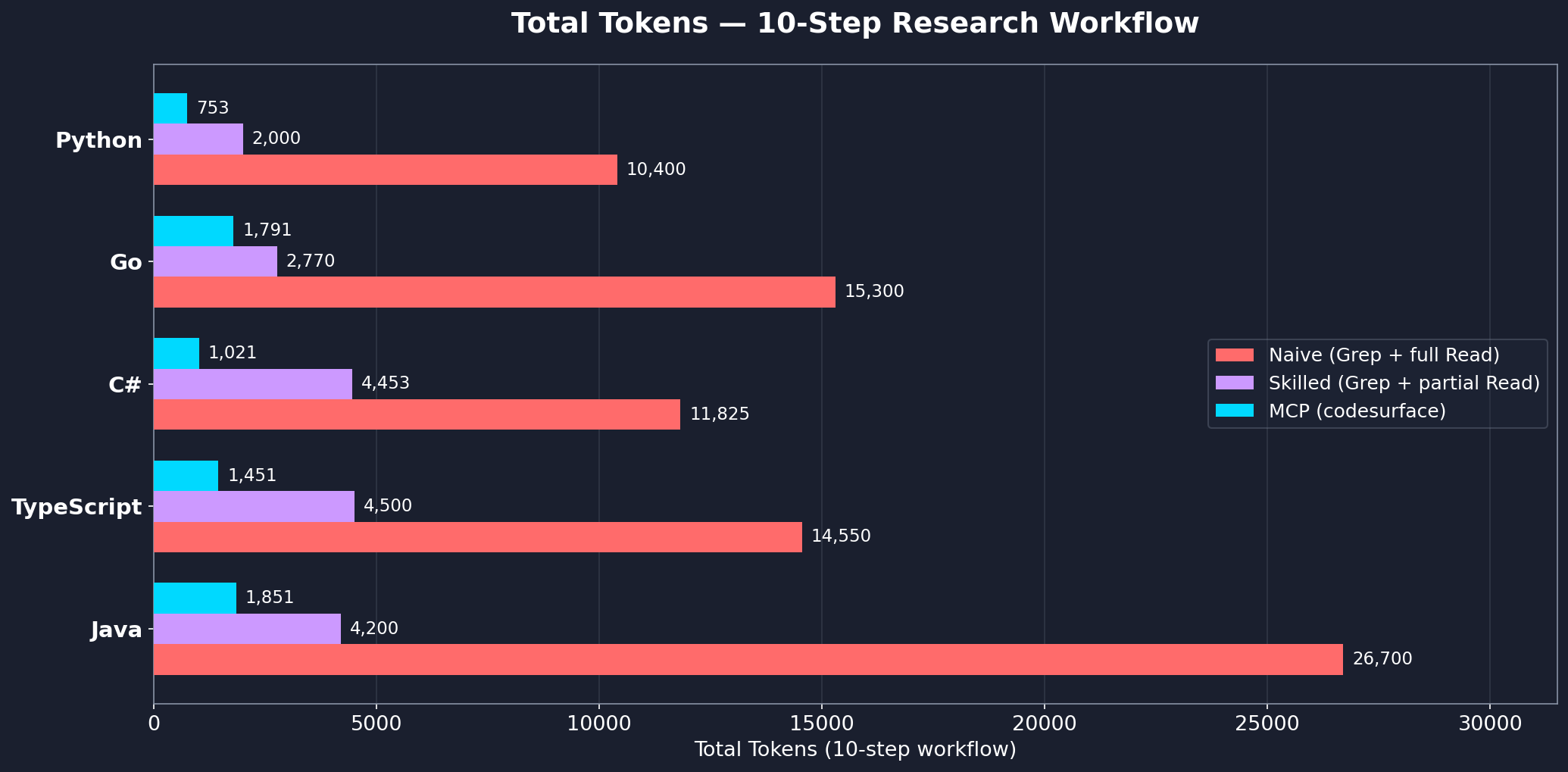
| Language | Project | Files | Records | MCP | Skilled | Naive | MCP vs Skilled |
|---|---|---|---|---|---|---|---|
| C# | Unity game | 129 | 1,034 | 1,021 | 4,453 | 11,825 | 77% fewer |
| TypeScript | immich | 694 | 8,344 | 1,451 | 4,500 | 14,550 | 68% fewer |
| Java | guava | 891 | 8,377 | 1,851 | 4,200 | 26,700 | 56% fewer |
| Go | gin | 38 | 534 | 1,791 | 2,770 | 15,300 | 35% fewer |
| Python | codesurface | 9 | 40 | 753 | 2,000 | 10,400 | 62% fewer |
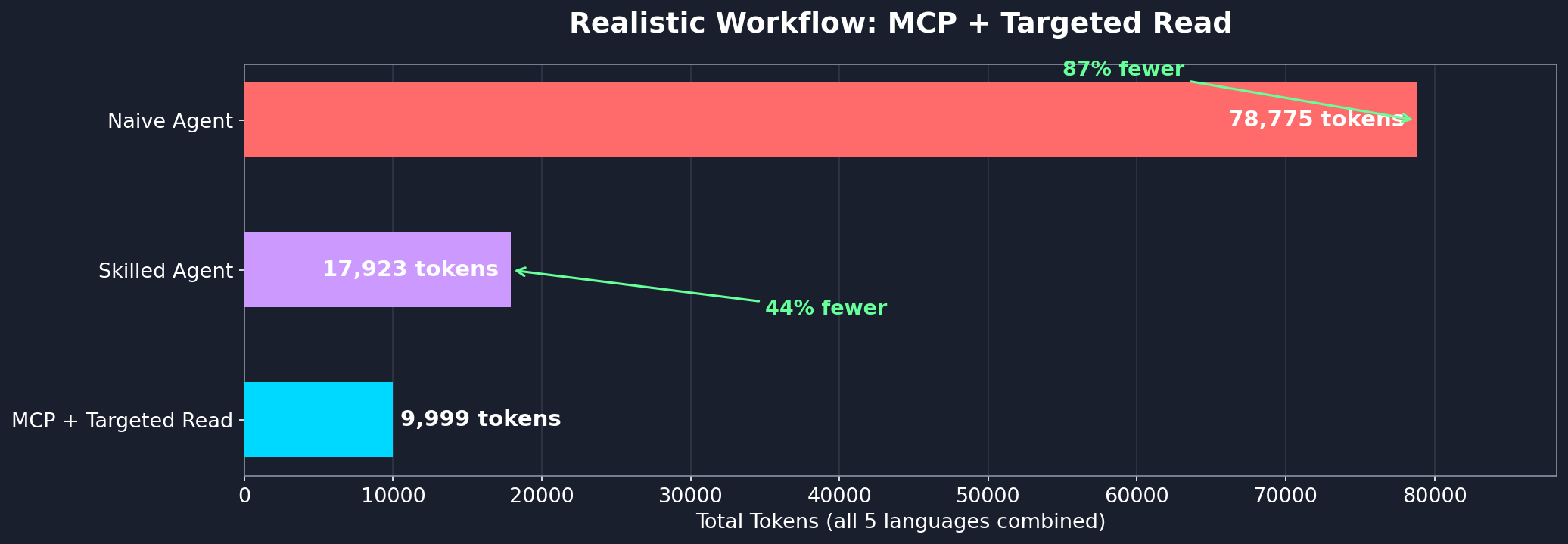
Even with follow-up reads for implementation detail, the hybrid MCP + targeted Read approach uses 44% fewer tokens than a skilled Grep+Read agent and 87% fewer than a naive agent:
Per-question breakdown
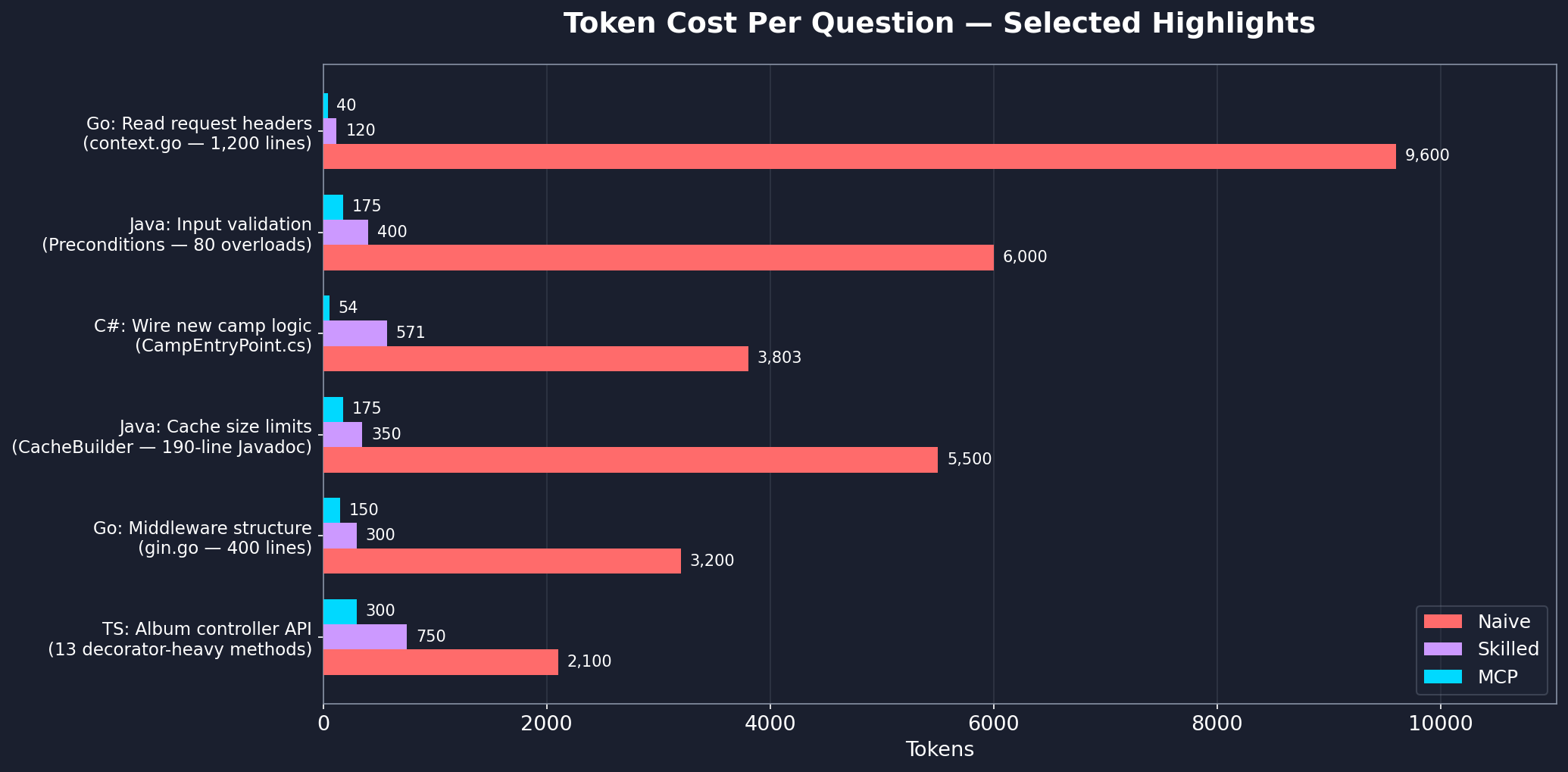
See workflow-benchmark.md for the full step-by-step analysis across all languages.
Filtering What Gets Indexed
By default, codesurface skips common vendored, build, and VCS directories: node_modules, vendor, bin, obj, dist, build, target, .git, .venv, __pycache__, and a few dozen others. Git worktrees and submodules are also skipped.
To exclude additional paths:
Project-level (committed): create a .codesurfaceignore file at your project root with one glob per line.
generated/**
docs/**
**/*.pb.go
Per-instance (CLI): pass --exclude with comma-separated globs.
{
  "command": "uvx",
  "args": ["codesurface", "--project", "src", "--exclude", "generated/**,vendor/**"]
}
Other indexing flags:
--include-submodules: index git submodules (skipped by default)--language <name>: pin to a single parser (e.g.--language cpp) instead of auto-detecting
Multiple Projects
Each --project flag indexes one directory. To index multiple codebases, run separate instances with different server names:
{
  "mcpServers": {
    "codesurface-backend": {
      "command": "uvx",
      "args": ["codesurface", "--project", "/path/to/backend/src"]
    },
    "codesurface-frontend": {
      "command": "uvx",
      "args": ["codesurface", "--project", "/path/to/frontend/src"]
    }
  }
}
Each instance gets its own in-memory index and tools. The AI agent sees both and can query across projects.
Setup Details
Using pip install:
pip install codesurface
{
  "mcpServers": {
    "codesurface": {
      "command": "codesurface",
      "args": ["--project", "/path/to/your/src"]
    }
  }
}
codesurface/
├── src/codesurface/
│   ├── server.py           # MCP server with 5 tools
│   ├── db.py               # SQLite + FTS5 database layer
│   ├── filters.py          # PathFilter (default exclusions, .codesurfaceignore, --exclude)
│   └── parsers/
│       ├── base.py         # BaseParser ABC
│       ├── cpp.py          # C++ header parser
│       ├── csharp.py       # C# parser
│       ├── go.py           # Go parser
│       ├── java.py         # Java parser
│       ├── python_parser.py # Python parser
│       └── typescript.py   # TypeScript/JavaScript parser
├── pyproject.toml
└── README.md
"No codebase indexed"
- Ensure
--projectpoints to a directory containing supported source files (.cs,.h,.hpp,.go,.java,.py,.ts,.tsx,.js,.jsx) - The server indexes at startup. Check stderr for
[codesurface] scanning N files...and[codesurface] done:lines
Server won't start
- Check Python version:
python --version(needs 3.10+) - Check
mcp[cli]is installed:pip install mcp[cli]
Stale results after editing source files
- The index auto-refreshes on query misses. If you add a new class and query it, the server reindexes and retries automatically
- You can also call
reindex()manually to force an incremental update
Contact
License
codesurface MCPのよくある質問
codesurface MCPをClaude Codeに追加するには
ターミナルでclaude mcp add codesurface -- uvx codesurfaceを実行します。すべてのプロジェクトで利用するには--scope userを追加します。
codesurface MCPをCursorに追加するには
~/.cursor/mcp.jsonを開き、上記のインストールセクションに示すCursor設定を使ってmcpServersの下にサーバーを追加します。
codesurface MCPが提供するツールは
7個のツールを提供しており、search, get_signature, get_class, get_stats, reindexなどがあります。
codesurfaceはどのプログラミング言語をサポートしていますか?
C#、C++ヘッダー、Go、Java、Python、TypeScript/JavaScriptをサポートしており、プロジェクトディレクトリ内の言語を自動的に検出します。
codesurfaceをMCP serverとして設定するにはどうすればよいですか?
.mcp.jsonにuvxコマンドを追加し、--projectでソースファイルが含まれるディレクトリを指定してください。
codesurfaceはどのようなMCPツールを提供しますか?
search、get_signature、get_class、get_stats、reindexの5つのツールを提供します。
ファイルが変更された際、codesurfaceはインデックスを最新の状態に保ちますか?
はい、クエリがヒットしなかった場合にインデックスが自動的に更新されます。また、mtimeに基づいた増分更新を行うために、手動でreindexを呼び出すことも可能です。
生成されたディレクトリやvendorディレクトリをインデックスから除外できますか?
はい、プロジェクトルートに.codesurfaceignoreファイルを作成してglobパターンを追加するか、--excludeフラグにカンマ区切りのglobパターンを渡すことで除外できます。