
異なるAIコーディングエージェント間でコンテキストを共有し、別のエージェントが中断した場所から作業を再開できるようにする、ローカルファーストのメモリおよび継続性レイヤーを提供します。
別名 Coder8124/logos, @noeton/logos
- スター
- 4
- ツール
- —
- ダウンロード数(30日間)
- —
- 最新バージョン
- —
- 最終コミット
- 2026年11月9日
- ライセンス
- Apache-2.0
Logos MCPとは
LogosはMCPサーバーです。 異なるAIコーディングエージェント間でコンテキストを共有し、別のエージェントが中断した場所から作業を再開できるようにする、ローカルファーストのメモリおよび継続性レイヤーを提供します。.
プロジェクトのREADMEから生成された概要
Logos MCP server について
複数のAIコーディングエージェントを使用する開発者は、logosを使用して、異なるセッションやツール間で継続性を維持できます。これはローカルファーストのメモリレイヤーとして機能し、Claude Code、Cursor、Codexなどのエージェントが単一のMarkdownファイルによるvaultを共有します。この構成により、あるエージェントが進行状況をチェックポイントとして保存し、別のモデルやツールが前のエージェントが停止した場所から正確に作業を再開できるようになります。
システムは完全にマシン上で動作し、vaultをローカルに保持することでデータのプライバシーを確保します。キャッシュにはSQLiteインデックスを使用しており、データを失うことなくlogos indexコマンドを使用して再構築できます。macOSとLinuxではHomebrew経由で、Windowsではnpm経由でインストール可能です。このMCP serverは、Claude Desktop、Cline、Devin、GitHub Copilotなどのさまざまなホストをサポートしており、シェルアクセスのみを持つエージェント向けにCLIも提供します。
単なる作業の再開だけでなく、before_you_tryツールを通じて、エージェントが失敗したアプローチを繰り返すのを防ぐのにも役立ちます。また、whyコマンドを使用して、特定のコード変更の背後にある理由を開発者がクエリすることも可能です。gitの履歴、Cursor rules、またはCLAUDE.mdなどのソースから既存のプロジェクト履歴をインポートして、メモリvaultにデータを投入できます。
できること
- 1中断されたコーディングタスクの再開最後に確認された状態と未完了のタスクを取得することで、プロジェクトをあるAIエージェントから別のエージェントへ引き継ぎます。
- 2繰り返されるコーディングエラーの回避新しいエージェントが、すでに失敗したことが証明されている解決策を試みるのを防ぎます。
- 3過去のコード決定の理解特定のファイルの現在の実装における根拠をAIに説明させます。
- 4既存のエージェントメモリの移行以前のbrain vaultを新しいlogosシステムに移行します。
プロジェクトの README から作成されています。すべてのユースケースは、その引用と照らし合わせて確認されています。
Logos MCPのインストール方法
フォーマット検証日 2026年11月10日Cursor に追加Gooseに追加Claude CodeにLogos MCPをインストール
$ claude mcp add logos -- npx -y @noeton/logosCursorにLogos MCPをインストール
~/.cursor/mcp.json
{
  "mcpServers": {
    "logos": {
      "command": "npx",
      "args": [
        "-y",
        "@noeton/logos"
      ]
    }
  }
}VS CodeにLogos MCPをインストール
.vscode/mcp.json
{
  "servers": {
    "logos": {
      "type": "stdio",
      "command": "npx",
      "args": [
        "-y",
        "@noeton/logos"
      ]
    }
  }
}VS Code CLIにLogos MCPをインストール
$ code --add-mcp '{"name":"logos","type":"stdio","command":"npx","args":["-y","@noeton/logos"]}'Claude DesktopにLogos MCPをインストール
claude_desktop_config.json
{
  "mcpServers": {
    "logos": {
      "command": "npx",
      "args": [
        "-y",
        "@noeton/logos"
      ]
    }
  }
}CodexにLogos MCPをインストール
$ codex mcp add logos -- npx -y @noeton/logosCodex config.tomlにLogos MCPをインストール
~/.codex/config.toml
[mcp_servers.logos]
command = "npx"
args = ["-y", "@noeton/logos"]
Gemini CLIにLogos MCPをインストール
$ gemini mcp add -s user logos npx -- -y @noeton/logosGemini settings.jsonにLogos MCPをインストール
~/.gemini/settings.json
{
  "mcpServers": {
    "logos": {
      "command": "npx",
      "args": [
        "-y",
        "@noeton/logos"
      ]
    }
  }
}自動チェック
実行日 2026年11月14日完全なレポート →自動チェックに合格しました。これはセキュリティ監査ではありません。コードを読み、サーバーに必要最小限のアクセス権を与えてください。 チェックの仕組み

- ソースリポジトリがリンクされており、アクセス可能coder8124/logos is public and reachablegithub.com/coder8124/logos ↗合格
- パッケージがこのリポジトリをソースとして指定@noeton/logos names coder8124/logos as sourcenpmjs.com/package/@noeton/logos ↗合格
- ビルドの来歴 (Sigstore 証明)Sigstore attestation for @noeton/logosnpmjs.com/package/@noeton/logos/v/0.5.8#provenance ↗合格
- オープンソースライセンス (OSI)Apache-2.0spdx.org/licenses/Apache-2.0.html ↗合格
- 過去1年以内にコミットまたはリリースありLast commit or release 2026-11-09github.com/coder8124/logos ↗合格
- OpenSSF Scorecard未チェック
- パッケージ名が有名なパッケージに酷似していないNo popular package one edit away from @noeton/logos合格
- パッケージおよびその依存関係に重大な勧告なし未チェック
- モデルへの隠れた指示がない0 tool descriptions and the README read; no override phrases, credential paths or hidden characters合格
- 破壊的なツールがラベル付けされている未チェック
- リモートエンドポイントが MCP ハンドシェイクに応答未チェック
README
GitHubで見るLogos
When one coding agent stops, the next one continues the work.











Docs · Quick Start · Benchmark · Site · Issues
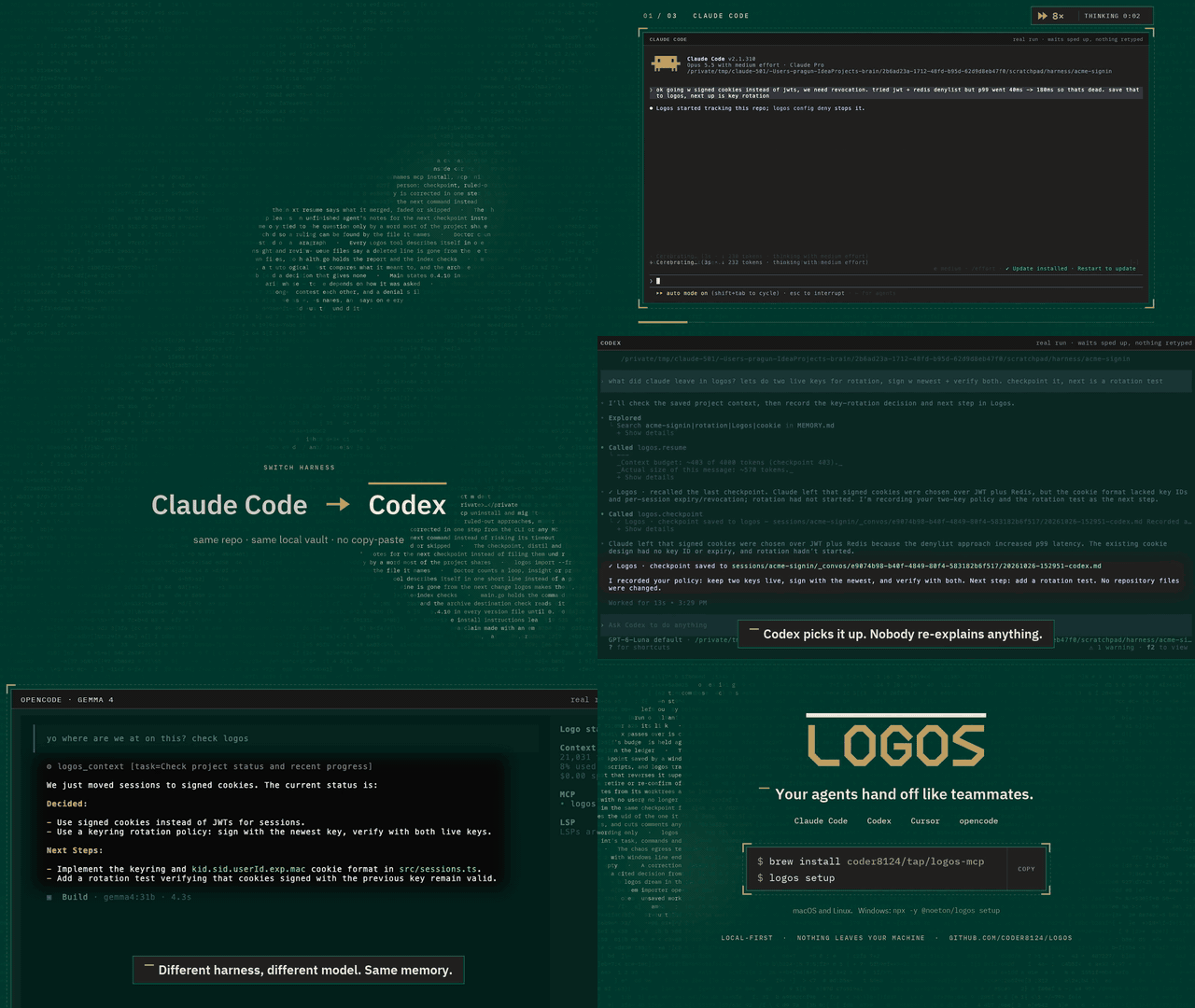
Logos is a local-first memory and continuity layer for coding agents. Claude Code, Codex, Cursor and your own agents share one vault over MCP. An agent checkpoints what it did, and the next one resumes where it stopped, even if it is a different model, in a different tool, on a different day.
Claude Code  ──▶  checkpoint  ──▶  Logos  ──▶  resume  ──▶  Cursor
                                (your vault)
The vault is a folder of markdown files on your machine. Nothing is uploaded,
and the SQLite index beside it is a cache: delete it, run logos index, and you
lose nothing.
Quick start
brew install coder8124/tap/logos-mcp && logos setup    # macOS and Linux
npm i -g @noeton/logos && logos setup                  # Windows
setup picks a vault, shows which agents it would wire, and asks before
touching any of them (--dry-run writes nothing). For Claude Code it also
installs the plugin, so the last handoff is in front of the model before it does
anything.
The formula is logos-mcp: a bare brew install logos installs Logos Bible
Software. Building from source, hand-wiring a host and the one-click buttons are
in Installation.
What it does
- Resume where the last agent stopped.
resumeshows what was done, what was verified and what is still open. - Stop the next agent repeating a dead end. Ruled-out approaches are their
own field, and
before_you_trychecks a plan against them. - Keep "verified" apart from "claimed". Resume marks another agent's verified items as its claim, and flags a command the activity log never saw.
- Answer "why is this code like this?"
why <path>shows what was being decided when a file was last worked on. - Remember what lasts. Decisions, constraints and procedures, reviewed before they become project memory.
- Bring your history. Import CLAUDE.md, AGENTS.md, Cursor rules, claude-mem, Claude Code's auto memory, transcripts or git history.
Every write returns a receipt, so you can see it working. The Handoff Loop shows how an agent uses it, step by step.
Works with
Claude Code, Codex, Cursor, Claude Desktop, Cline, Devin, GitHub Copilot, opencode, Amp, Grok Build, and anything else that speaks MCP. Agents with only a shell get a CLI command for every tool. See Agent Hosts.
Does it work?
On a handoff suite built for this (32 scenarios, nine memory systems, one machine), Logos passes 84.4%. The next best system passes 46.9%.
Every real system retrieves about equally well. What separates them is whether the agent that resumes gets the current answer, or gets it next to the stale one it replaced. Method, per-scenario scores and the cases Logos loses are in the benchmark.
Local, private and durable
- No model required. Search falls back from local embeddings (Ollama) to full-text search, and nothing breaks.
- Nothing is observed. Logos does not watch your screen, browser or files. The vault holds what agents wrote there, plus the Claude Code plugin's activity log, which you can turn off.
- Nothing leaves.
logos doctor --egresslists every address Logos can contact, and when. - Hard to break. It survives SIGKILL mid-write, a full disk, sync-client
conflict copies and two worktrees racing on one vault (
chaos/).
Exactly what is recorded, and every switch for it, is in Settings and Privacy.
Documentation
Everything lives in the wiki.
| Start | Use | Look up |
|---|---|---|
| Installation | The Handoff Loop | CLI Reference |
| Quick Start | Memory | MCP Tools Reference |
| Core Concepts | Importing History | Agent Hosts |
| Troubleshooting | The Vault | Embedding in Go |
Contributing
Contributions are welcome. CONTRIBUTING.md covers the build,
the test tiers and the two load-bearing conventions: the vault is the truth, and
every feature announces itself. Agents working here get the context-connect
and continuity skills from the plugin (plugin/skills/); this repository
dogfoods its own plugin.
Coming from brain? Since 0.5.0 the old names are not read. logos migrate
moves a ~/brain vault; see
Moving a 0.4 vault.
License
Apache 2.0. See LICENSE. Git history satisfies §4(b), so there are no change notices to add and no CLA (details). Prior work that shaped the ideas is in systemmd/CREDITS.md.
Logos MCPのよくある質問
Logos MCPをClaude Codeに追加するには
ターミナルでclaude mcp add logos -- npx -y @noeton/logosを実行します。すべてのプロジェクトで利用するには--scope userを追加します。
Logos MCPをCursorに追加するには
~/.cursor/mcp.jsonを開き、上記のインストールセクションに示すCursor設定を使ってmcpServersの下にサーバーを追加します。
Logosはデータのプライバシーをどのように扱いますか?
Logosはローカルファーストです。vaultはマシン上のMarkdownファイルのフォルダであり、データがアップロードされることはありません。
Logosを異なるAIエージェントで使用できますか?
はい、Claude Code、Codex、Cursor、Claude Desktop、Cline、Devin、GitHub Copilot、およびMCPをサポートするその他のツールで使用可能です。
インデックスファイルを削除するとどうなりますか?
データは失われません。indexコマンドを実行するだけで再構築できます。
動作にLLMは必要ですか?
基本機能にモデルは必要ありません。ローカルの埋め込みが利用できない場合は、全文検索にフォールバックします。