
AIコーディングエージェントに対し、タスクに関連するリポジトリのコンテキストと、根拠に基づいたファイルバンドルを提供することで、精度を向上させ、トークン使用量を削減します。
別名 codeledgerECF/codeledger, @codeledger/cli
- スター
- 8
- ツール
- —
- ダウンロード数(30日間)
- 4,468
- 最新バージョン
- 0.10.82
- 最終コミット
- 2026年11月11日
- ライセンス
- —
CodeLedger MCPとは
CodeLedgerはMCPサーバーです。 AIコーディングエージェントに対し、タスクに関連するリポジトリのコンテキストと、根拠に基づいたファイルバンドルを提供することで、精度を向上させ、トークン使用量を削減します。.
プロジェクトのREADMEから生成された概要
CodeLedger MCP server について
CodeLedgerは、AIコーディングエージェント向けに、精度向上とトークン消費量削減のためのローカルファーストなコンテキスト制御を提供します。依存関係の構造やテストファイルなどのシグナルをリポジトリからスキャンし、タスクに関連する限定的なファイルセットを選択することで機能します。この情報は .codeledger/active-bundle.md という特定のアーティファクトに書き込まれ、Claude Code、Cursor、GitHub Copilot などのエージェントが作業を開始する前にこれを読み取ることができます。
開発者はCLIを使用してリポジトリを初期化し、ready コマンドを使用して特定のタスクに向けた準備を行います。このツールはデフォルトで解析をローカルで実行し、テレメトリを通じてソースコードを送信することはありません。また、対応するクライアントと統合するために、コマンドラインから起動できるMCP serverも含まれています。さらに、compare コマンドを実行することで、トークン使用量やテスト合格率などの指標におけるパフォーマンスの改善を測定することも可能です。
できること
- 1タスク固有のコンテキスト準備AIエージェントが、特定のバグ修正や機能リクエストに関連する、絞り込まれたファイルバンドルを受け取ることができます。
- 2エージェントによる変更の検証セッションのサマリーやレシートを通じて、エージェントが何を修正したかを確認できます。
プロジェクトの README から作成されています。すべてのユースケースは、その引用と照らし合わせて確認されています。
CodeLedger MCPのインストール方法
フォーマット検証日 2026年11月10日Claude CodeにCodeLedger MCPをインストール
$ claude mcp add codeledger -- npx -y @codeledger/cliCursorにCodeLedger MCPをインストール
~/.cursor/mcp.json
{
  "mcpServers": {
    "codeledger": {
      "command": "npx",
      "args": [
        "-y",
        "@codeledger/cli"
      ]
    }
  }
}VS CodeにCodeLedger MCPをインストール
.vscode/mcp.json
{
  "servers": {
    "codeledger": {
      "type": "stdio",
      "command": "npx",
      "args": [
        "-y",
        "@codeledger/cli"
      ]
    }
  }
}Claude DesktopにCodeLedger MCPをインストール
claude_desktop_config.json
{
  "mcpServers": {
    "codeledger": {
      "command": "npx",
      "args": [
        "-y",
        "@codeledger/cli"
      ]
    }
  }
}CodexにCodeLedger MCPをインストール
~/.codex/config.toml
[mcp_servers.codeledger]
command = "npx"
args = ["-y", "@codeledger/cli"]
Gemini CLIにCodeLedger MCPをインストール
~/.gemini/settings.json
{
  "mcpServers": {
    "codeledger": {
      "command": "npx",
      "args": [
        "-y",
        "@codeledger/cli"
      ]
    }
  }
}自動チェック
実行日 2026年11月14日詳細レポート →自動チェックに合格しました。これはセキュリティ監査ではありません。コードを読み、サーバーに必要最小限のアクセス権を与えてください。 チェックの仕組み

- ソースリポジトリがリンクされており、アクセス可能codeledgerecf/codeledger is public and reachablegithub.com/codeledgerecf/codeledger ↗合格
- パッケージがこのリポジトリをソースとして示している@codeledger/cli names github:codeledgerECF/codeledger as its sourcenpmjs.com/package/@codeledger/cli ↗検出事項
- ビルドの来歴(Sigstore 証明)No build attestation published for this release未チェック
- オープンソースライセンス (OSI)No license検出事項
- 過去1年以内にコミットまたはリリースありLast commit or release 2026-11-11github.com/codeledgerecf/codeledger ↗合格
- OpenSSF Scorecard未チェック
- パッケージ名が有名なパッケージに酷似していないNo popular package one edit away from @codeledger/cli合格
- パッケージと依存関係に重大なアドバイザリがない1 resolved dependencies checked; no critical advisoryosv.dev ↗合格
- モデルへの隠れた指示がない0 tool descriptions and the README read; no override phrases, credential paths or hidden characters合格
- 破壊的なツールがラベル付けされている未チェック
- リモート endpoint が MCP ハンドシェイクに応答する未チェック
README
GitHubで見るCodeLedger
Give AI coding agents the right repo context before they start - then verify what changed.
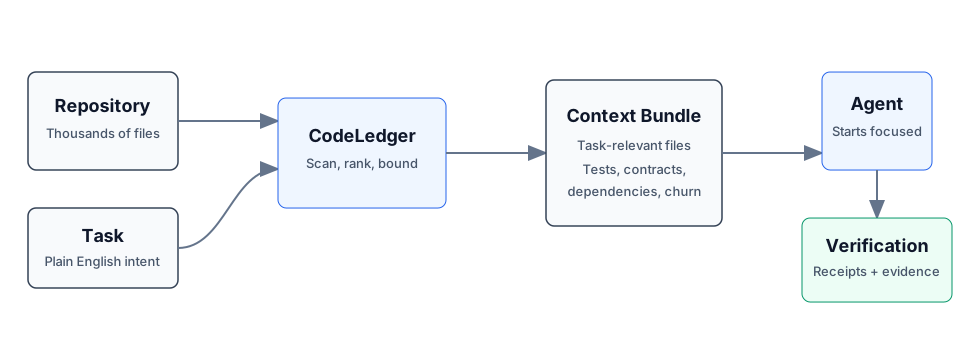
CodeLedger is local-first context control for AI coding agents. It scans a repository, selects a bounded task-relevant set of files, and writes an evidence-backed context bundle before the agent begins work.
Works with Claude Code, Codex, Cursor, GitHub Copilot, Gemini CLI, and other CLI or MCP-compatible coding agents.
Try It
npm install -g @codeledger/cli
cd your-project
codeledger ready --task "Fix null handling in user service"
CodeLedger initializes the repo if needed, refreshes the index, and creates the
task-specific bundle at .codeledger/active-bundle.md. Your agent reads that
artifact first so it starts with the files most relevant to the task.
Runtime analysis is local by default. Installing or updating may fetch packages or release artifacts from npm and GitHub Releases; CodeLedger runtime analysis does not send your source code through CodeLedger telemetry by default.
Example Benchmark
Example result from a mid-sized Node.js service. Results vary by repository, task, agent, and scenario.
| Metric | Without CodeLedger | With CodeLedger | Change |
|---|---|---|---|
| Tests Passed | 78% | 94% | +16% |
| Iterations | 4 | 2 | -50% |
| Files Changed | 17 | 9 | -47% |
| Time to Finish | 6m 12s | 3m 40s | -41% |
| Token Usage | 28k | 18k | -36% |
Do not take the benchmark on faith - measure CodeLedger on your own repo:
codeledger compare \
  --scenario .codeledger/harness/scenarios/auth-rate-limit.json \
  --guided
If CodeLedger improves your coding-agent workflow, star the repo to follow releases and help other developers discover it.
Start Here
- Getting Started
- CLI Reference
- How It Works
- MCP Server
- Feature Tiers
- Security
- Contributing
- Latest Release
- npm package
How It Works
- CodeLedger scans the repo for deterministic local signals such as dependency structure, churn, tests, contracts, and task keywords.
- It ranks and packs a bounded set of task-relevant files.
- It writes
.codeledger/active-bundle.mdfor your coding agent. - After work, verification, receipts, and session summaries help show what changed and whether the selected context was useful.
Same task plus same repo state produces the same file ranking behavior.
Core Capabilities
- Give agents the right context: deterministic file selection, scope inference, bounded budgets, blast-radius hints, and co-change context.
- Keep work continuous: session summaries, checkpoints, mid-session refine, and handoff/recovery commands.
- Keep agents inside the task: scope contracts, intent governance, loop detection, and multi-agent conflict checks.
- Prove what happened: review intelligence, receipts, provenance, audit exports, and release evidence.
For the full command surface, see the CLI Reference.
Agent Integration
Claude Code can use CodeLedger hooks after codeledger ready initializes the
repo. Cursor, Codex, GitHub Copilot, Gemini CLI, Aider, Windsurf, and other
agents can read CLAUDE.md plus .codeledger/active-bundle.md, or use the
repo-local wrappers when available.
CodeLedger also includes an MCP server for supported tiers:
codeledger mcp start
codeledger mcp status
See MCP Server and Feature Tiers for setup and tier details.
Trust And Verification
- Runtime source analysis runs locally by default.
- Source code is not sent through CodeLedger telemetry by default.
- No account is required for the local CLI flow.
- Public releases include
SHA256SUMSand release-evidence artifacts. codeledger doctorchecks the local install, hooks, config, index, and ledger health.- The public wrapper, docs, harness, and scanning surface are inspectable in
this repo; the protected hardened runtime is covered by
LICENSE-CORE.
Install
npm install -g @codeledger/cli
codeledger --version
Or use the release zip:
- Download the latest release.
- Extract it.
- Run
install.sh.
The installer uses the bundled package from the zip, so the installed wrapper version matches the release. The wrapper then fetches the matching hardened binary from the GitHub release unless your environment already provides it.
Everyday Flow
cd your-project
codeledger ready
codeledger ready --task "Fix null handling in user service"
Inside an initialized repo, you can also use:
codeledger activate --task "Fix null handling in user service"
codeledger doctor
Browser, cloud, and sandboxed environments can use the repo-local runtime
deployed under .codeledger/bin/ after initialization or vendoring.
Architecture
CodeLedger has an open public surface and a protected hardened runtime:
PUBLIC:    CLI wrapper, types, repo scanner, harness, reports, docs, hooks
PROTECTED: Scoring engine, selection algorithm, confidence internals
Use codeledger about, codeledger doctor, and command-specific --explain
output to inspect behavior and evidence without exposing protected
implementation internals.
Privacy
- Installation may use npm and GitHub Releases.
- Runtime analysis runs on your local machine by default.
- Runtime analysis makes zero source-code telemetry calls by default.
- Your source code is not required to leave your machine for the local CLI flow.
- Uninstall at any time.
License
- Public wrapper, types, repo scanning, harness, reports, docs, and examples: MIT
- Downloaded hardened binary: CodeLedger Core License
GitHub may classify the combined licensing structure as "Other" because the repo includes both MIT-covered public files and separately licensed protected runtime terms. Changing the license files should be a human legal decision.
Part Of ContextECF
CodeLedger applies Intelligent Context AI's context-control architecture to software engineering. For enterprise-wide governed context across applications and agents, see ContextECF.
CodeLedger is produced by Intelligent Context AI, Inc. See codeledger.dev.
CodeLedger MCPのよくある質問
CodeLedger MCPをClaude Codeに追加するには
ターミナルでclaude mcp add codeledger -- npx -y @codeledger/cliを実行します。すべてのプロジェクトで利用するには--scope userを追加します。
CodeLedger MCPをCursorに追加するには
~/.cursor/mcp.jsonを開き、上記のインストールセクションに示すCursor設定を使ってmcpServersの下にサーバーを追加します。
CodeLedgerはソースコードをサーバーに送信しますか?
いいえ、デフォルトでは実行時の解析はローカルで行われ、CodeLedgerのテレメトリを通じてソースコードが送信されることはありません。
どのAIコーディングエージェントがCodeLedgerに対応していますか?
Claude Code、Codex、Cursor、GitHub Copilot、Gemini CLI、Aider、Windsurf、およびその他のCLIまたはMCP対応のエージェントで使用できます。
CodeLedgerはどのようにコーディングワークフローを改善しますか?
タスクに関連するファイルを適切に選択することで、テストの合格率向上、反復回数の削減、およびトークン使用量の抑制に貢献します。
ローカルCLIを使用するためにアカウントは必要ですか?
ローカルCLIのフローにおいて、アカウントは必要ありません。