
fusionwright MCPサーバー
コミット 2026年10月27日AIアシスタントをAutodesk Fusionに接続し、検証ループを通じて3Dモデリング、検証、レンダリング、およびファイル書き出しを自動化します。
別名 Cocoloco20/fusionwright
- スター
- 2
- ツール
- 10
- ダウンロード数(30日間)
- —
- 最新バージョン
- —
- 最終コミット
- 2026年10月27日
- ライセンス
- MIT
fusionwright MCPとは
AIアシスタントをAutodesk Fusionに接続し、検証ループを通じて3Dモデリング、検証、レンダリング、およびファイル書き出しを自動化します。 10個のツールを提供しており、fusion_status, fusion_api, fusion_runなどがあります。
プロジェクトのREADMEから生成された概要
fusionwright MCP server について
fusionwrightは、Autodesk Fusion内での3Dモデリングと機械的な検証を自動化し、エンジニアやデザイナーの作業を支援します。ClaudeやCursorなどのAIアシスタントを稼働中のFusionセッションに接続することで、ユーザーは複雑な部品の構成を指示するだけで、アシスタントが必要なPythonコードの記述、実行、および検証を行うことができます。このセットアップは、ローカルブリッジアドインを使用してmacOSまたはWindows上で動作し、Python 3.10以降が必要です。
単純なスクリプトブリッジとは異なり、このMCP serverは正確性を確保するための検証ループを実装しています。コードを実行するfusion_run、Fusionカーネルに対して体積や干渉を検証するfusion_check、多角的なスクリーンショットを撮影するfusion_lookなどのツールを使用します。また、fusion_renderを介してフォトリアルなレンダリングを実行したり、STEP、STL、OBJなどの形式でファイルをエクスポートしたりすることも可能です。このアプローチにより、AIは最終的な設計が完了する前に、ジオメトリの誤りを特定して修正できます。
できること
- 1筐体の生成とエクスポート通気スロットを備えた特定のPCB筐体を作成し、STEPファイルとしてエクスポートするようAIに指示します。
- 2機械的な正確性の検証アシスタントに部品の無効なボディや干渉がないかチェックさせ、それらを自動的に修正させます。
- 3外観仕上げの自動化すべての外側のエッジにフィレットを追加し、特定の素材でレンダリングするよう依頼します。
- 4算術計算によるジオメトリの検証生成された3D体積が、Fusionカーネルを使用して計算された特定の数値と一致することを確認します。
プロジェクトの README から作成されています。すべてのユースケースは、その引用と照らし合わせて確認されています。
fusionwright MCPツール 10
READMEから検出fusion_statusfusion_apifusion_runfusion_rollbackfusion_inspectfusion_checkfusion_lookfusion_renderfusion_exportfusion_ui_command
| fusion_status | — | |
| fusion_api | — | |
| fusion_run | — | |
| fusion_rollback | — | |
| fusion_inspect | — | |
| fusion_check | — | |
| fusion_look | — | |
| fusion_render | — | |
| fusion_export | — | |
| fusion_ui_command | — |
自動チェック
実行日 2026年11月14日完全なレポート →まだ検証されていません。サーバーには80点のスコア、重大な問題がないこと、および検証に必要な十分なデータが必要です。 チェックの仕組み · 点数を上げるための改善点

- ソースリポジトリがリンクされており、アクセス可能cocoloco20/fusionwright is public and reachablegithub.com/cocoloco20/fusionwright ↗合格
- パッケージがこのリポジトリをソースとして指定未チェック
- ビルドの来歴 (Sigstore 証明)未チェック
- オープンソースライセンス (OSI)MITspdx.org/licenses/MIT.html ↗合格
- 過去1年以内にコミットまたはリリースありLast commit or release 2026-10-27github.com/cocoloco20/fusionwright ↗合格
- OpenSSF Scorecard未チェック
- パッケージ名が有名なパッケージに酷似していない未チェック
- パッケージおよびその依存関係に重大な勧告なし未チェック
- モデルへの隠れた指示がない10 tool descriptions and the README read; no override phrases, credential paths or hidden characters合格
- 破壊的なツールがラベル付けされているNo tool named like delete, drop or exec合格
- リモートエンドポイントが MCP ハンドシェイクに応答未チェック
README
GitHubで見るfusionwright
Let an AI build in Autodesk Fusion for you.
An open-source MCP server that connects an AI assistant (Claude, ChatGPT, Cursor, anything that speaks MCP) to your live Fusion session. You describe what you want; the AI writes the Fusion code, looks at the result from several angles, measures and verifies it with Fusion's own kernel, fixes its mistakes, then renders it and exports files you can print, machine or send on. It is not tied to any kind of object: brackets, enclosures, gears, jigs, furniture, product mock-ups, anything solid.
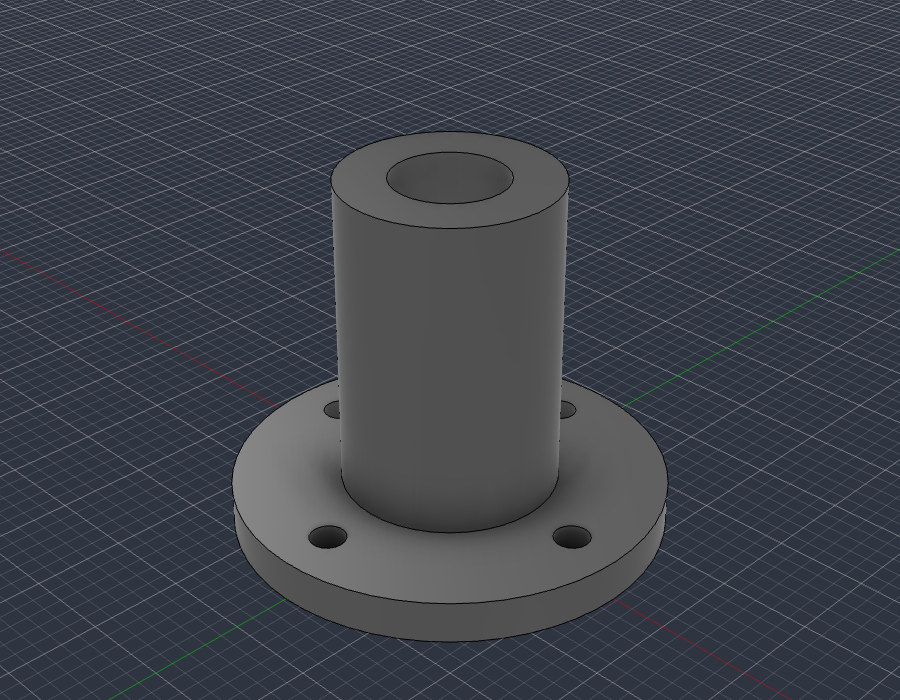
examples/flange_fusion_run.py, run through fusion_run in a live Fusion document: sketch, extrude, join, cut. The script checks Fusion's volume (37.542 cm3) against the hand-computed value (37.542 cm3), then fusion_look took this picture.
What you can ask for
- "Make an 80 x 50 x 25 mm enclosure for a PCB with four screw posts and vent slots, then export a STEP and an STL."
- "Model an M6 flange bracket with a 4-hole bolt circle, check it, and show me from the front."
- "Take the part open in Fusion, find any invalid bodies or interferences and fix them."
- "Add a 2 mm fillet to every outside edge and render it in brushed aluminium."
- "Build a 24-inch bookcase from 3/4 inch plywood and give me every part as its own component."
The loop that makes it dependable: write code, look at it, measure it against the arithmetic, repair, repeat. Executable CAD is often not correct CAD (research), and a validation loop sharply improves results, so the tools are built around checking the work.
Requirements
- Autodesk Fusion on macOS (tested) or Windows (untested). The free Personal-use tier works.
- Python 3.10+ and an MCP client.
It only uses Autodesk's documented public API and a legitimately licensed Fusion; it does not touch licensing.
Quick start
-
Install the bridge add-in (once): run
./scripts/install_addin.sh, then in Fusion pressShift+S, pick FusionBridge, click Run (tick Run on Startup to make it automatic). -
Register the server with your client.
Claude Desktop (
claude_desktop_config.json):{ "mcpServers": { "fusionwright": { "command": "uvx", "args": ["--from", "git+https://github.com/Cocoloco20/fusionwright", "fusionwright"] } } }Claude Code:
claude mcp add fusionwright -- uvx --from git+https://github.com/Cocoloco20/fusionwright fusionwright -
Ask. Exports land in
~/fusionwright-projects/(override withFUSIONWRIGHT_HOME).
Tools (10)
A small surface on purpose: fewer, higher-level tools beat dozens of thin wrappers.
| Tool | Purpose |
|---|---|
fusion_status |
Is Fusion reachable? Which document is open? |
fusion_api |
Look up the real Fusion API (class members with docs) before writing code |
fusion_run |
Run Python inside Fusion (helpers predefined); returns a rollback checkpoint |
fusion_rollback |
Undo everything after a checkpoint |
fusion_inspect |
Compact design state: sizes, volume, invalid bodies, timeline problems |
fusion_check |
Kernel validation: body validity, timeline health, interference, expected size |
fusion_look |
Screenshots from iso / front / back / left / right / top / bottom |
fusion_render |
Photoreal render with Fusion's local renderer |
fusion_export |
STEP, STL, F3D, OBJ, 3MF, IGES, SAT (local files only) |
fusion_ui_command |
Run any of Fusion's ~3,000 UI commands by id, or search them |
Inside fusion_run the names app, ui, design, root, adsk, P3, VI, FO, IN, coll() and board() are predefined; assign your answer to result. Fusion works in centimetres internally.
Examples
| File | What it shows |
|---|---|
examples/flange_fusion_run.py |
sketches, extrude / join / cut, picking profiles by area, checking against hand arithmetic |
Contributions of more examples (enclosures, gears, sheet metal, assemblies, anything) are welcome.
How it compares
- Autodesk's official Fusion MCP (announced May 2026) is a thin scripting bridge: read / screenshot, run a script, undo / redo. fusionwright adds a verification layer (kernel checks, multi-angle images, rollback checkpoints, an API lookup, UI-command access).
- Community Fusion MCPs expose dozens of low-level CAD operations (the biggest lists 89 tools) and mostly stop there. fusionwright is deliberately small and runs its bridge on an authenticated loopback port.
Safety
See SECURITY.md. In short: loopback only, bearer token (~/.fusion-bridge-token, mode 0600), Host-header guard, request-size cap; fusion_run blocks file deletion, network access and cloud saves by default and returns a rollback checkpoint. It is a safety net, not a sandbox: code you let an AI run inside Fusion is powerful. Save your work first.
What's tested
- 9 unit tests: the add-in's HTTP layer with a stubbed Fusion (token, host guard, size cap, error tracebacks) and a real stdio MCP round trip (tool list, safety guard, error messages).
- Live tests against a real Fusion (
pytest tests/integration): build a part and verify sizes, volume and interference with the kernel, views that must differ from each other, 5 export formats, a real render, rollback, API lookup, UI-command search, and a full MCP client round trip that returns images. - A 30-case capability suite (
tests/integration/capability_suite.py) covering sketches, constraints, extrude / cut / revolve / sweep / loft, fillet / shell / chamfer / hole, patterns, booleans, components and joints, parameters, timeline edits, materials, measurement, 8 export formats, STEP re-import, CAM setup creation, configurations, rendering and more.
See docs/COVERAGE.md for what the Fusion API can and cannot do and docs/GOTCHAS.md for API traps found along the way.
Known limitations
- Fusion-native drawings (
adsk.drawing) can only be created from a design saved to your Autodesk cloud, so they are not automated here. Verify every dimension before cutting, printing or machining. - "Everything a human can do in Fusion" is not literally achievable through its API.
fusion_ui_commandandfusion_runcover a great deal, but some interactions (some drag gestures, cloud workflows) remain manual.
Roadmap
Adapter for Autodesk's official Fusion MCP as an alternative transport · more verified examples · driving models from Fusion user parameters · MCP Apps live 3D preview · MCP Tasks for long renders · a cross-model evaluation suite.
Not affiliated
fusionwright is an independent project, not affiliated with or endorsed by Autodesk, Anthropic or OpenAI. "Autodesk" and "Fusion" are trademarks of Autodesk, Inc.
MIT licensed. Contributions welcome.
fusionwright MCPのよくある質問
fusionwright MCPが提供するツールは
10個のツールを提供しており、fusion_status, fusion_api, fusion_run, fusion_rollback, fusion_inspectなどがあります。
対応しているOSは何ですか?
macOSでテスト済みですが、Windowsでは現在未テストです。
Autodeskの有料サブスクリプションは必要ですか?
いいえ、Autodesk Fusionの無料の個人利用向けティアでもこのMCP serverを使用できます。
AIによる設計の正確性はどのように保証されますか?
コードの記述、Fusionのカーネルによる設計の検査、算術計算による測定、およびエラーの修正を行う検証ループを使用します。
書き出し可能なファイル形式は何ですか?
STEP、STL、F3D、OBJ、3MF、IGES、およびSAT形式で書き出しが可能です。