
Claude CodeやCursorなどのMCPクライアントから、ローカルのQoderエージェントにコーディングタスクを委譲します。
別名 cantbeblank96/qodercli-mcp
- スター
- 0
- ツール
- 21
- ダウンロード数(30日間)
- —
- 最新バージョン
- 0.4.3
- 最終コミット
- 2026年8月20日
- ライセンス
- MIT
qodercli MCPとは
Claude CodeやCursorなどのMCPクライアントから、ローカルのQoderエージェントにコーディングタスクを委譲します。 21個のツールを提供しており、prompt, cwd, modelなどがあります。
プロジェクトのREADMEから生成された概要
qodercli MCP server について
このサーバーは、Claude Code、Cursor、またはQoder IDEなどのMCPクライアント内から、ローカルのQoderエージェントにコーディングタスクを委譲することを可能にします。qodercliコマンドラインインターフェースの軽量なラッパーとして機能し、互換性のあるクライアントが複雑なプログラミング作業のサブエージェントとしてQoderを利用できるようにします。ユーザーは、プロンプトを実行するask-qoder、過去の作業を見つけるlist-sessions、実行時に利用可能なAIモデルを確認するlist-modelsの3つの主要なツールを通じてタスクを管理できます。
セットアップはnpxを使用して簡単に行え、Node.jsとローカルマシンにサインイン済みのqodercliのインストールのみが必要です。このサーバーは、read-only、workspace-write、danger-full-accessといったサンドボックスレベルを通じて、セキュリティに対するきめ細かな制御を提供します。また、セッションID、実行時間、クレジット使用量を含む構造化されたJSON出力もサポートしており、特定のセッションを再開することでマルチターンの対話が可能になります。開発者は、プロキシサポートのために環境変数を設定したり、好みの開発環境で確実に実行できるようにqodercliバイナリへのカスタムパスを指定したりできます。
できること
- 1マルチターンのリファクタリングを実行開発者はリファクタリングを開始し、その後セッションIDを使用して、新しいターンで追加の指示を与えることができます。
- 2安全なコード監査を実施エージェントがファイルを変更できないように制限しながら、コードベースのセキュリティレビューを依頼できます。
- 3利用可能なAIモデルを確認AIクライアントは、CLIが現在どのモデルをサポートしているかを確認し、古いモデル名を使用することを避けることができます。
- 4ファイル変更の自動化特定の作業ディレクトリ内で、エージェントにファイルの作成や編集を自動的に許可できます。
プロジェクトの README から作成されています。すべてのユースケースは、その引用と照らし合わせて確認されています。
qodercli MCPのインストール方法
フォーマット検証日 2026年11月10日Cursor に追加Gooseに追加Claude Codeにqodercli MCPをインストール
$ claude mcp add qodercli-mcp -- npx -y qodercli-mcpCursorにqodercli MCPをインストール
~/.cursor/mcp.json
{
  "mcpServers": {
    "qodercli-mcp": {
      "command": "npx",
      "args": [
        "-y",
        "qodercli-mcp"
      ]
    }
  }
}VS Codeにqodercli MCPをインストール
.vscode/mcp.json
{
  "servers": {
    "qodercli-mcp": {
      "type": "stdio",
      "command": "npx",
      "args": [
        "-y",
        "qodercli-mcp"
      ]
    }
  }
}VS Code CLIにqodercli MCPをインストール
$ code --add-mcp '{"name":"qodercli-mcp","type":"stdio","command":"npx","args":["-y","qodercli-mcp"]}'Claude Desktopにqodercli MCPをインストール
claude_desktop_config.json
{
  "mcpServers": {
    "qodercli-mcp": {
      "command": "npx",
      "args": [
        "-y",
        "qodercli-mcp"
      ]
    }
  }
}Codexにqodercli MCPをインストール
$ codex mcp add qodercli-mcp -- npx -y qodercli-mcpCodex config.tomlにqodercli MCPをインストール
~/.codex/config.toml
[mcp_servers.qodercli-mcp]
command = "npx"
args = ["-y", "qodercli-mcp"]
Gemini CLIにqodercli MCPをインストール
$ gemini mcp add -s user qodercli-mcp npx -- -y qodercli-mcpGemini settings.jsonにqodercli MCPをインストール
~/.gemini/settings.json
{
  "mcpServers": {
    "qodercli-mcp": {
      "command": "npx",
      "args": [
        "-y",
        "qodercli-mcp"
      ]
    }
  }
}qodercli MCPツール 21
READMEから検出promptcwdmodelreasoning_effortpermission_modeapproval_policysandboxsystem_promptappend_system_promptresume_session_idoutput_formatextra_args
| prompt | — | |
| cwd | — | |
| model | — | |
| reasoning_effort | — | |
| permission_mode | — | |
| approval_policy | — | |
| sandbox | — | |
| system_prompt | — | |
| append_system_prompt | — | |
| resume_session_id | — | |
| output_format | — | |
| extra_args | — |
21個のツールをすべて表示ツールを折りたたむ
timeout_msread-onlyworkspace-writedanger-full-accessdont_askaccept_editsbypass_permissionsautodefault
| timeout_ms | — | |
| read-only | — | |
| workspace-write | — | |
| danger-full-access | — | |
| dont_ask | — | |
| accept_edits | — | |
| bypass_permissions | — | |
| auto | — | |
| default | — |
設定
HTTPS_PROXYHTTPS proxy injected into qodercli subprocesses (optional)
HTTP_PROXYHTTP proxy injected into qodercli subprocesses (optional)
QODERCLI_DEFAULT_PERMISSION_MODEDefault permission mode when callers omit permission params: dont_ask (default, read-only) | accept_edits | bypass_permissions | auto | default
QODERCLI_PATHAbsolute path to the qodercli binary (defaults to `qodercli` on PATH)
| 名前 | 説明 | 種類 |
|---|---|---|
| HTTPS_PROXY | HTTPS proxy injected into qodercli subprocesses (optional) | |
| HTTP_PROXY | HTTP proxy injected into qodercli subprocesses (optional) | |
| QODERCLI_DEFAULT_PERMISSION_MODE | Default permission mode when callers omit permission params: dont_ask (default, read-only) | accept_edits | bypass_permissions | auto | default | |
| QODERCLI_PATH | Absolute path to the qodercli binary (defaults to `qodercli` on PATH) |
自動チェック
実行日 2026年11月14日完全なレポート →自動チェックに合格しました。これはセキュリティ監査ではありません。コードを読み、サーバーに必要最小限のアクセス権を与えてください。 チェックの仕組み

- ソースリポジトリがリンクされており、アクセス可能cantbeblank96/qodercli-mcp is public and reachablegithub.com/cantbeblank96/qodercli-mcp ↗合格
- パッケージがこのリポジトリをソースとして指定qodercli-mcp names cantbeblank96/qodercli-mcp as sourcenpmjs.com/package/qodercli-mcp ↗合格
- ビルドの来歴 (Sigstore 証明)No build attestation published for this release未チェック
- オープンソースライセンス (OSI)MITspdx.org/licenses/MIT.html ↗合格
- 過去1年以内にコミットまたはリリースありLast commit or release 2026-08-20github.com/cantbeblank96/qodercli-mcp ↗合格
- OpenSSF Scorecard未チェック
- パッケージ名が有名なパッケージに酷似していないNo popular package one edit away from qodercli-mcp合格
- パッケージおよびその依存関係に重大な勧告なし99 resolved dependencies checked; no critical advisoryosv.dev ↗合格
- モデルへの隠れた指示がない21 tool descriptions and the README read; no override phrases, credential paths or hidden characters合格
- 破壊的なツールがラベル付けされているNo tool named like delete, drop or exec合格
- リモートエンドポイントが MCP ハンドシェイクに応答未チェック
README
GitHubで見るqodercli-mcp
English | 简体中文





The missing MCP server mode for Qoder CLI — delegate coding tasks to local Qoder agents from any MCP client (Qoder IDE, Claude Code, Cursor…).
A minimal MCP server that wraps the local qodercli (Qoder CLI) as MCP tools, letting any MCP client (Qoder IDE, Claude Code, Cursor, …) call Qoder like a sub-agent.
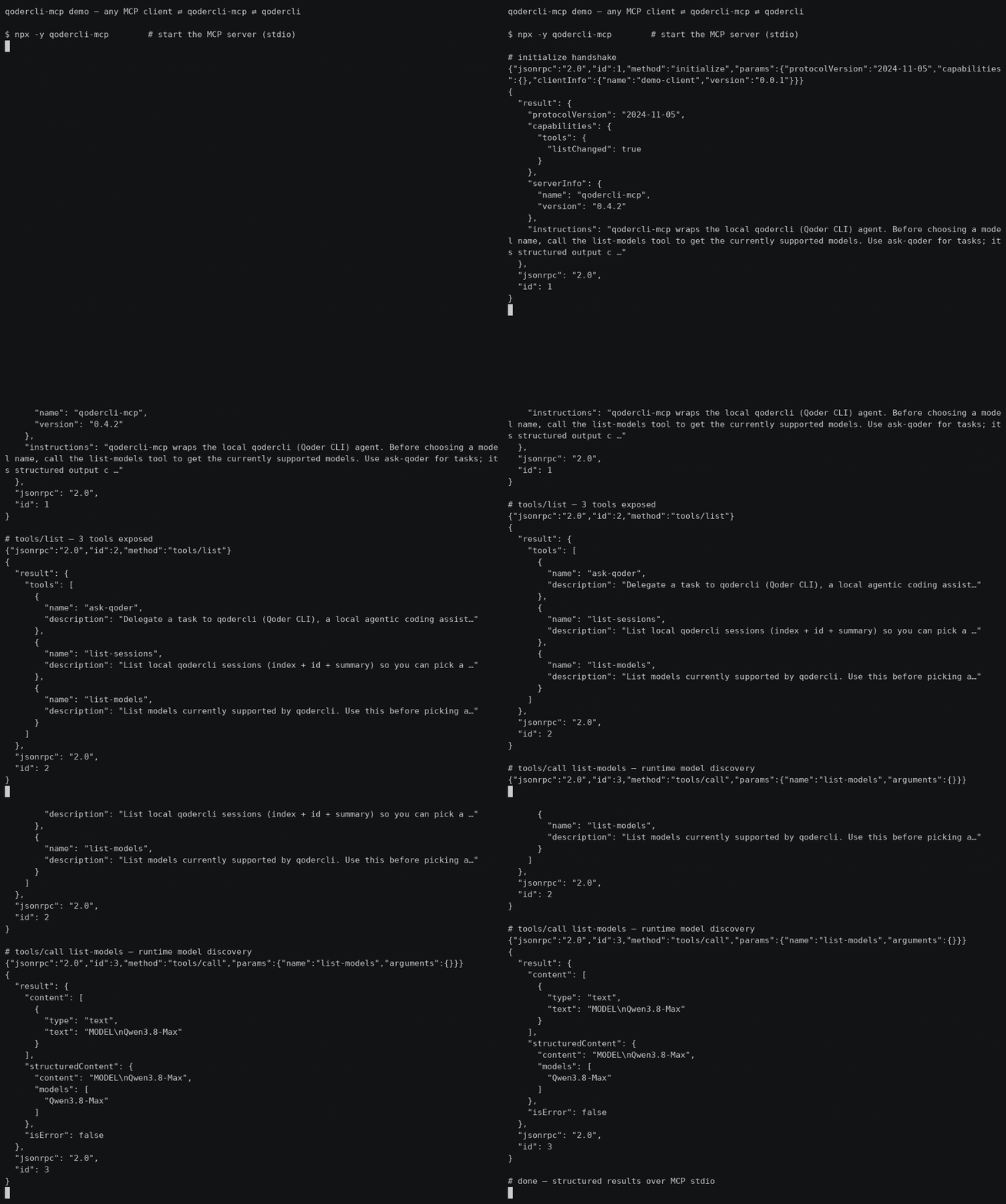
30s demo: MCP client ⇄ qodercli-mcp ⇄ qodercli — initialize → tools/list → list-models (real output, not sped up)
Quick start
Zero-config via npx — add this to your MCP client config (~/.qoder/mcp.json, claude_desktop_config.json, …):
{ "mcpServers": { "qodercli-mcp": { "command": "npx", "args": ["-y", "qodercli-mcp"] } } }
Three tools are exposed:
| Tool | Purpose |
|---|---|
ask-qoder |
Delegate a task to qodercli |
list-sessions |
Discover resumable sessions |
list-models |
Runtime model discovery |
Highlights: verified permission semantics (see below — e.g. dont_ask is read-only),
codex-style sandbox/approval_policy, structured output (session_id/duration_ms/total_credits).
Full configuration options are in Install.
Why
Some CLI agents ship an official MCP server mode (e.g. codex mcp-server), but qodercli currently only acts as an MCP client. This project fills that gap with a thin wrapper: it spawns qodercli -p <prompt> under the hood and streams the result back over MCP stdio.
Features
ask-qodertool — delegate a prompt to qodercli- Structured output (
session_id,is_error,duration_ms,total_credits,num_turns) via-o jsonparsing list-sessionstool to discover resumable sessionslist-modelstool for runtime model discovery (no stale model lists)reasoning_effortparameter (--reasoning-effort)- Server
instructionsin the MCP initialize result guide clients on usage - Codex-style
sandboxlevels (read-only/workspace-write/danger-full-access) - System prompt injection (
system_prompt/append_system_prompt) - Working directory, model, permission mode, output format control
- Session resume (
resume_session_id) for multi-turn delegation - Timeout protection with SIGKILL fallback
- Proxy quota support (
HTTP_PROXY/HTTPS_PROXYinjection) - Zero build step — plain ESM JavaScript, Node.js >= 18
Prerequisites
- Node.js >= 18
qodercliinstalled and signed in (qodercli login)
Install
Option A — npx (recommended): no clone needed, the MCP client downloads the package on first use.
"command": "npx", "args": ["-y", "qodercli-mcp"]
Option B — from source (for development):
git clone https://github.com/cantbeblank96/qodercli-mcp.git
cd qodercli-mcp
npm install
MCP client configuration
Qoder IDE
Add to ~/.qoder/mcp.json. Prefer the absolute path of node and set QODERCLI_PATH explicitly (nvm-managed binaries are often missing from the PATH seen by MCP child processes):
Proxy Support: To use your Qoder CLI proxy quota, add
HTTP_PROXYand/orHTTPS_PROXYto the server's environment. When these are set at the MCP server level, they will be passed to all qodercli subprocesses.
{
  "mcpServers": {
    "qodercli-mcp": {
      "command": "npx",
      "args": ["-y", "qodercli-mcp"],
      "env": {
        "QODERCLI_PATH": "/absolute/path/to/qodercli",
        "PATH": "/usr/local/bin:/usr/bin:/bin"
      }
    },
    "qodercli-mcp-with-proxy": {
      "command": "npx",
      "args": ["-y", "qodercli-mcp"],
      "env": {
        "QODERCLI_PATH": "/absolute/path/to/qodercli",
        "HTTP_PROXY": "http://127.0.0.1:39900",
        "HTTPS_PROXY": "http://127.0.0.1:39900",
        "PATH": "/usr/local/bin:/usr/bin:/bin"
      }
    }
  }
}
Developers running a local checkout instead of the published package (Option B) should replace command/args with the absolute node path and /path/to/qodercli-mcp/src/index.js (nvm-managed node is often missing from the PATH seen by MCP child processes).
Claude Code / Claude Desktop
{
  "mcpServers": {
    "qodercli-mcp": {
      "command": "node",
      "args": ["/absolute/path/to/qodercli-mcp/src/index.js"],
      "env": {
        "QODERCLI_PATH": "/absolute/path/to/qodercli"
      }
    }
  }
}
Tool: ask-qoder
| Parameter | Type | Description |
|---|---|---|
prompt |
string (required) | The task or question for qodercli |
cwd |
string | Working directory |
model |
string | Model for this session; call list-models to discover available names |
reasoning_effort |
string | Reasoning effort level (--reasoning-effort), e.g. low/medium/high; depends on the model |
permission_mode |
enum | dont_ask (default, read-only) | accept_edits (auto-approve file edits) | bypass_permissions (full access incl. shell) | auto | default; mutually exclusive with approval_policy, prefer sandbox |
approval_policy |
enum | codex-style: untrusted→read-only | on-request→auto | never→full access |
sandbox |
enum | read-only | workspace-write | danger-full-access (codex-style; controls the effective permission mode) |
system_prompt |
string | Replace the default system prompt |
append_system_prompt |
string | Append instructions to the default system prompt |
resume_session_id |
string | Resume a previous session |
output_format |
string | Passed to -o (default json). Note: non-json formats degrade structured output (session_id etc. become unavailable) |
extra_args |
string[] | Raw CLI args appended before the prompt; reserved flags (permission mode, system prompt, model, -o, -r, -w...) are rejected |
timeout_ms |
number | Timeout in ms, default 600000 |
Structured output
ask-qoder declares an MCP outputSchema and returns, in addition to the
human-readable text, a structuredContent object:
{
  "session_id": "77826b5c-...",   // pass back as resume_session_id
  "content": "OK",
  "is_error": false,
  "exit_code": 0,
  "duration_ms": 1280,
  "total_credits": 0.53,
  "num_turns": 1,
  "timed_out": false,
  "truncated": false
}
Sandbox mapping
| sandbox | Effective permission mode | Effect on qodercli |
|---|---|---|
| (omitted) | dont_ask |
Read-only: permission-requiring tools are silently denied |
read-only |
dont_ask |
Plus --disallowed-tools write_file,replace,run_shell_command as defense in depth |
workspace-write |
accept_edits |
Agent can create/modify files in cwd |
danger-full-access |
bypass_permissions |
Full access including shell |
Explicit permission_mode or approval_policy always wins over sandbox.
Permission modes (verified semantics)
| Mode | Behavior |
|---|---|
dont_ask |
Read-only: silently denies every tool call that requires permission. Headless-safe default |
accept_edits |
Auto-approves file edits; shell still governed by policy |
bypass_permissions |
Auto-approves everything including shell |
auto |
qodercli's own automatic policy |
default |
Interactive confirmation — not headless-friendly, avoid in MCP calls |
Tool: list-sessions
Lists local qodercli sessions (index, summary, session id) so a client can
pick a resume_session_id. Takes no arguments.
Tool: list-models
Lists models currently supported by qodercli (via --list-models), so a
client can pick a valid model value at runtime instead of relying on
stale knowledge. Returns both a text list and a structured models array.
Takes no arguments.
Usage Examples
Example 1: Simple code explanation
{ "name": "ask-qoder", "arguments": {
  "prompt": "Explain what main.py does",
  "cwd": "/path/to/project",
  "timeout_ms": 180000
}}
Example 2: Ask a second opinion
{ "name": "ask-qoder", "arguments": {
  "prompt": "@src/service.py Review this file for security issues and suggest improvements",
  "model": "qwen-plus",
  "permission_mode": "dont_ask",
  "timeout_ms": 300000
}}
Example 3: Multi-turn conversation via resume
// First call — session_id comes back in structuredContent
{ "name": "ask-qoder", "arguments": {
  "prompt": "Help me refactor this module to improve readability",
  "cwd": "/projects/backend",
  "timeout_ms": 300000
}}
// Then reuse structuredContent.session_id:
{ "name": "ask-qoder", "arguments": {
  "prompt": "Now add error handling for database timeouts",
  "resume_session_id": "77826b5c-cd6b-4213-b423-d95b4e1deab0"
}}
// Or discover ids with list-sessions
{ "name": "list-sessions", "arguments": {} }
Example 4: Code review with specific focus
{ "name": "ask-qoder", "arguments": {
  "prompt": "Analyze performance bottlenecks in utils.py",
  "model": "qwen-max",
  "permission_mode": "default",
  "output_format": "text",
  "timeout_ms": 240000
}}
Example 5: Read-only analysis
{ "name": "ask-qoder", "arguments": {
  "prompt": "Audit this codebase for security issues; do not modify anything",
  "cwd": "/workspaces/repo",
  "sandbox": "read-only",
  "timeout_ms": 300000
}}
read-only disables write/shell tools — good for audits and reviews.
Example 6: Project-wide analysis
{ "name": "ask-qoder", "arguments": {
  "prompt": "Summarize the architecture of this project and identify key modules",
  "cwd": "/workspaces/repo",
  "timeout_ms": 420000,
  "model": "qwen-plus"
}}
Best Practices
- Specify working directory — Always pass
cwdwhen operating on a specific project - Use timeout protection — For complex prompts, set explicit
timeout_msshorter than 60min - Resume for multi-turn — Chain follow-ups via
resume_session_idinstead of repeating context - Model selection — Call
list-modelsfirst to discover currently supported models; larger models are better for deep analysis - Permission mode — The server default is read-only (
dont_ask); setQODERCLI_DEFAULT_PERMISSION_MODE=bypass_permissionsto make full (YOLO) access the default for personal deployments. Per-call: tasks that must create/modify files needsandbox: "workspace-write"; shell access needsdanger-full-access. Do not combinesandboxwith an explicitpermission_mode(the latter wins)
Environment variables
| Variable | Default | Description |
|---|---|---|
QODERCLI_PATH |
qodercli |
Path to the qodercli binary |
QODERCLI_TIMEOUT_MS |
600000 |
Default timeout |
QODERCLI_MAX_OUTPUT_MB |
50 |
Per-call stdout/stderr cap in MB (OOM protection) |
QODERCLI_DEFAULT_PERMISSION_MODE |
dont_ask |
Default permission mode when the caller omits permission_mode/approval_policy/sandbox; set bypass_permissions for full (YOLO) access |
HTTP_PROXY |
- | HTTP proxy URL for qodercli |
HTTPS_PROXY |
- | HTTPS proxy URL for qodercli |
Development
npm test        # smoke test: protocol handshake + tool invocation
node src/index.js   # run the server manually (stdio)
Disclaimer
This is an unofficial, third-party tool. It is not affiliated with, endorsed, or sponsored by Qoder. Use permission_mode: bypass_permissions with care — delegated prompts may modify files in the target working directory.
Product Hunt Gallery
Main gallery image (1270×760, dark tech theme): ph-gallery.png. Optional demo video can be converted from the GIF (docs/demo.gif).
License
MIT
qodercli MCPのよくある質問
qodercli MCPをClaude Codeに追加するには
ターミナルでclaude mcp add qodercli-mcp -- npx -y qodercli-mcpを実行します。すべてのプロジェクトで利用するには--scope userを追加します。
qodercli MCPをCursorに追加するには
~/.cursor/mcp.jsonを開き、上記のインストールセクションに示すCursor設定を使ってmcpServersの下にサーバーを追加します。
qodercli MCPが提供するツールは
21個のツールを提供しており、prompt, cwd, model, reasoning_effort, permission_modeなどがあります。
このMCP serverはどのようなツールを提供しますか?
ask-qoder(タスクの委譲)、list-sessions(再開可能なセッションの確認)、list-models(実行時のモデル確認)の3つのツールを提供します。
qodercli-mcpでプロキシを使用するにはどうすればよいですか?
サーバーの環境変数にHTTP_PROXYおよび/またはHTTPS_PROXYを追加することで、Qoder CLIのプロキシクォータを使用できます。
以前のコーディングセッションを再開できますか?
はい、以前のタスクから返されたsession_idを新しい呼び出しのresume_session_idとして使用することで、マルチターンの委譲が可能です。
ビルド手順なしで実行する方法はありますか?
はい、これはプレーンなESM JavaScriptパッケージであるため、npx経由でビルド手順なしに実行できます。