実機、シミュレータ、およびエミュレータ上のモバイル、Web、TV、デスクトップアプリケーションを、AIエージェントが検査、制御、デバッグできるようにします。
別名 callstackincubator/agent-device
- スター
- 5,403
- ツール
- —
- ダウンロード数(30日間)
- —
- 最新バージョン
- 0.16.9
- 最終コミット
- 2026年11月15日
- ライセンス
- MIT
agent-device MCPとは
agent-deviceはMCPサーバーです。 実機、シミュレータ、およびエミュレータ上のモバイル、Web、TV、デスクトップアプリケーションを、AIエージェントが検査、制御、デバッグできるようにします。.
プロジェクトのREADMEから生成された概要
agent-device MCP server について
agent-deviceは、AIコーディングエージェントがモバイル、Web、TV、デスクトップ環境のソフトウェアとやり取りするための専用レイヤーを提供します。これにより、エージェントは実機、シミュレータ、またはエミュレータ上でアプリケーションの状態を検査し、ユーザーインターフェースを制御し、問題をデバッグできます。このシステムは、CLIを介したローカル動作、またはBrowserStackやAWS Device Farmなどのデバイスクラウドへのリモート接続として機能します。開発者は、組み込みのMCP serverまたは型定義されたNode.js APIを使用して、ワークフローに統合できます。
本ツールは、視覚的なスクリーンショットだけに頼るのではなく、トークン効率の高いアクセシビリティスナップショットを提供するため、エージェントはラベル、ロール、セレクターを通じて推論を行うことができます。このアプローチにより、テキストフィールドへの入力、ボタンの押下、スクロールなどの正確なアクションが可能になります。iOS、Android、HarmonyOS、tvOS、macOS、Linuxを含む幅広いプラットフォームをサポートしています。また、サーバーは並列ワークツリー間でのデバイスアクセスを管理し、自動テストや開発タスク中の競合を防ぎます。
できること
- 1UI変更の検証エージェントが新しい画面を実装した後、iOSシミュレータまたはAndroidエミュレータで実行して、正しく動作することを確認できます。
- 2アプリケーションクラッシュのデバッグ開発者は、特定のクラッシュを再現し、分析に必要なログを収集するようにエージェントに指示できます。
- 3反復的なワークフローの自動化エージェントは特定のユーザフローを探索し、そのステップのシーケンスをリプレイスクリプトとして保存して、将来のCIで利用できます。
- 4パフォーマンス問題のプロファイリング本ツールは、コードの変更がReact Nativeアプリケーションにおいて不要な再レンダリングを引き起こしていないかをエージェントが特定するのに役立ちます。
プロジェクトの README から作成されています。すべてのユースケースは、その引用と照らし合わせて確認されています。
agent-device MCPのインストール方法
フォーマット検証日 2026年11月10日Cursor に追加Gooseに追加Claude Codeにagent-device MCPをインストール
$ claude mcp add agent-device -- npx -y agent-deviceCursorにagent-device MCPをインストール
~/.cursor/mcp.json
{
  "mcpServers": {
    "agent-device": {
      "command": "npx",
      "args": [
        "-y",
        "agent-device"
      ]
    }
  }
}VS Codeにagent-device MCPをインストール
.vscode/mcp.json
{
  "servers": {
    "agent-device": {
      "type": "stdio",
      "command": "npx",
      "args": [
        "-y",
        "agent-device"
      ]
    }
  }
}VS Code CLIにagent-device MCPをインストール
$ code --add-mcp '{"name":"agent-device","type":"stdio","command":"npx","args":["-y","agent-device"]}'Claude Desktopにagent-device MCPをインストール
claude_desktop_config.json
{
  "mcpServers": {
    "agent-device": {
      "command": "npx",
      "args": [
        "-y",
        "agent-device"
      ]
    }
  }
}Codexにagent-device MCPをインストール
$ codex mcp add agent-device -- npx -y agent-deviceCodex config.tomlにagent-device MCPをインストール
~/.codex/config.toml
[mcp_servers.agent-device]
command = "npx"
args = ["-y", "agent-device"]
Gemini CLIにagent-device MCPをインストール
$ gemini mcp add -s user agent-device npx -- -y agent-deviceGemini settings.jsonにagent-device MCPをインストール
~/.gemini/settings.json
{
  "mcpServers": {
    "agent-device": {
      "command": "npx",
      "args": [
        "-y",
        "agent-device"
      ]
    }
  }
}自動チェック
実行日 2026年11月12日完全なレポート →自動チェックに合格しました。これはセキュリティ監査ではありません。コードを読み、サーバーに必要最小限のアクセス権を与えてください。 チェックの仕組み

- ソースリポジトリがリンクされており、アクセス可能合格
- オープンソースライセンス (OSI)合格
- 過去1年以内にコミットまたはリリースあり合格
- パッケージ名が有名なパッケージに酷似していない合格
- リモートエンドポイントがHTTPSを使用未チェック
- 破壊的なツールがラベル付けされている未チェック
- モデルへの隠れた指示がない合格
- パッケージおよびその依存関係に重大な勧告なし合格
README
GitHubで見るagent-device


Open source device layer for AI coding agents. Let coding agents control mobile, web, TV, and desktop apps on devices and simulators, locally or in the cloud, through a CLI, built-in MCP server, or typed Node.js API.
Let your coding agent verify its changes in the running app. agent-device lets agents inspect, control, debug, and verify apps on iOS, Android, and HarmonyOS (simulators, emulators, and physical devices), plus tvOS, Android TV, Fire TV (Fire OS), Amazon Vega OS TV (Vega Virtual Device), web, macOS, and Linux. Agents read token-efficient accessibility snapshots instead of reasoning over screenshots alone, act through refs and selectors, and save evidence for review. It also coordinates device access across parallel agent worktrees and connects to remote device clouds.
Works with Claude Code, Codex, Cursor, Windsurf, Cline, Goose, and any agent that can run a CLI or connect over MCP, or as the runtime under agents you build with the AI SDK or Eve. Developers at Expensify, Shopify, and others use it to verify their apps.
Quick start
Install the CLI and check setup. It requires Node.js 22.12 or newer; web automation requires Node.js 24 or newer. See Installation for target requirements.
npm install -g agent-device@latest
agent-device doctor
agent-device help workflow
Run doctor yourself before you hand the CLI to an agent. help workflow links to the guides for debugging, replay, and profiling.
Drive an app from the CLI
Add a contact in the built-in iOS Contacts app:
# Start a session.
agent-device open Contacts --platform ios

# Inspect the screen. The example below shows the output; refs vary.
agent-device snapshot -i
# @e2 [button] "Add"

# Use the ref and wait for the UI to settle.
agent-device press @e2 --settle
# The diff includes:
# + @e7 [text-field] "First name"

agent-device fill @e7 "Ada" --settle
# The next diff shows changed values and current refs:
# - @e7 [text-field] "First name"
# + @e14 [text-field] "Ada"
# = @e15 [text-field] "Last name"

# Capture evidence and close the session.
agent-device screenshot ./contact-form.png
agent-device close
Refs are valid only in the latest output: after a --settle command, use the refs in its diff, and take a new snapshot only if the diff omits what you need. Snapshots come from the app's accessibility tree, so clear labels, roles, and test IDs make agent runs more reliable; use screenshots and video as evidence or when accessibility data is poor.
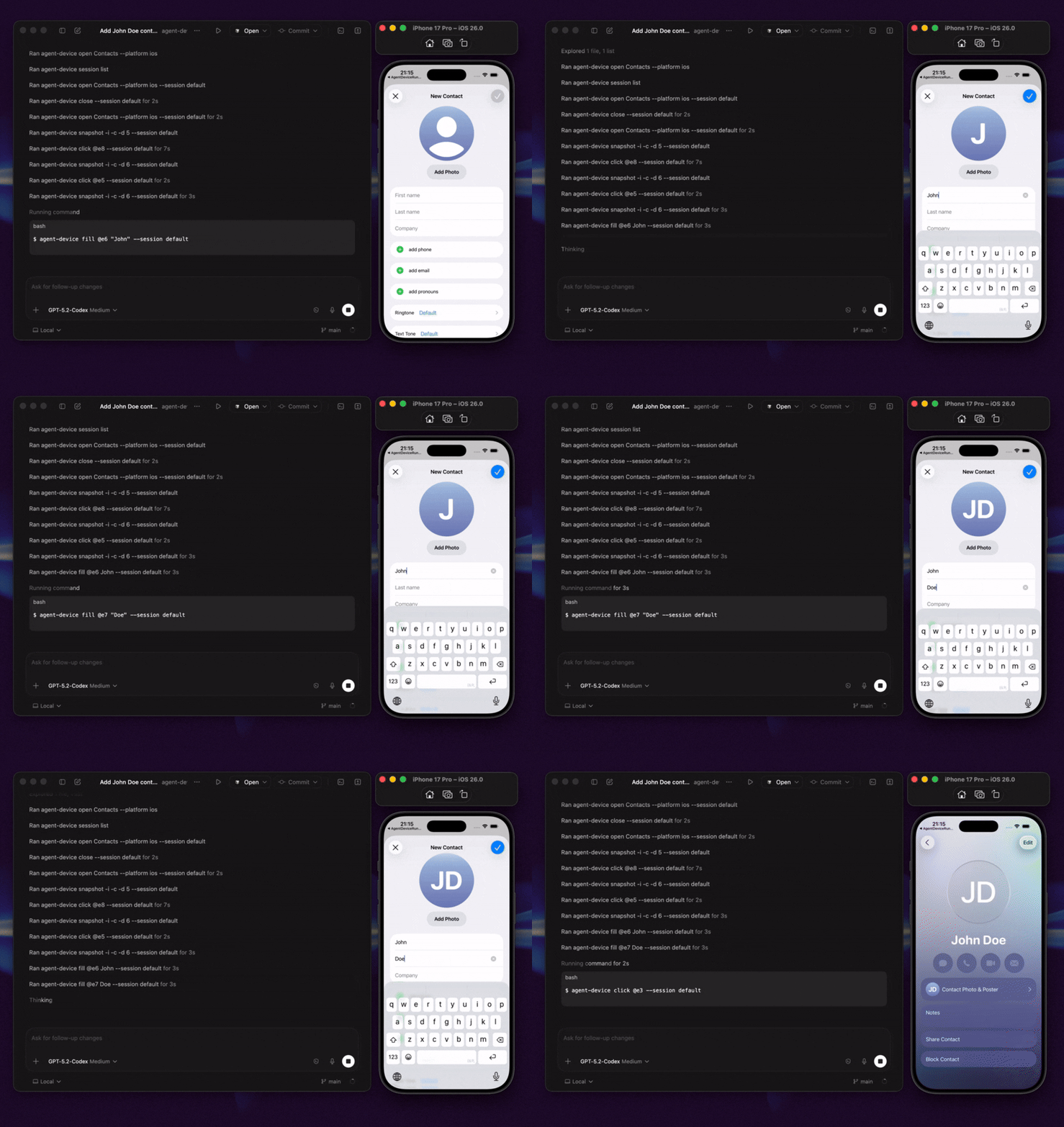
Add MCP tools to your agent
agent-device mcp starts the official stdio MCP server, exposing the installed commands as structured tools over the same execution path as the CLI:
{
  "mcpServers": {
    "agent-device": {
      "command": "agent-device",
      "args": ["mcp"]
    }
  }
}
See AI agent setup for per-client setup and when to prefer plain CLI over MCP.
Script it from Node.js
createAgentDeviceClient() gives Node.js code typed access to the same commands, as model tools in your own agent or from orchestration code:
import { createAgentDeviceClient } from 'agent-device';

const client = createAgentDeviceClient({ session: 'qa-run' });
try {
  await client.apps.open({ app: 'com.apple.Preferences', platform: 'ios' });
  const snapshot = await client.capture.snapshot({ interactiveOnly: true });
  const button = snapshot.nodes.find((node) => node.role === 'button');
  if (button) await client.interactions.press({ ref: button.ref });
} finally {
  await client.sessions.close();
}
See the Node.js API, the runnable examples, and the AI SDK and Eve integration guides.
What agents can do
- Inspect app state through accessibility snapshots, refs, and selectors, and profile React Native renders to find what makes an interaction slow.
- Act on visible UI by tapping or pressing elements, filling fields, scrolling, making gestures, waiting, asserting state, and handling alerts.
- Diagnose failures with screenshots, video, logs, traces, network data, performance samples, crash details, and React profiles.
- Repeat workflows by saving working steps as
.adscripts for local use or CI. Export strict Maestro YAML when needed.
See Commands for the commands and evidence each target supports.

What to ask your agent
With the CLI installed, prompts like these work end to end:
- "Implement the onboarding screen, run it on the iOS simulator and Android emulator, and attach screenshots."
- "Reproduce this crash and capture the logs that lead up to it."
- "Check whether this change causes unnecessary React Native re-renders."
- "Explore the checkout flow once, save it as a replay script, and run it in CI."
- "Verify this pull request on a physical device and attach reviewable evidence."
Next steps
- AI agent setup: skills, project rules, and per-client setup for Cursor, Codex, Claude Code, Windsurf, and others.
- Quick start: open an app, read its UI, and interact with it from the command line.
- Replay and E2E testing and Debugging and profiling: repeatable tests and bug hunting.
Where to run agent-device
The same session and evidence model works at every step: the agent explores the app, captures evidence, saves a replay, runs it in CI, and moves onto remote devices.
| Path | Best for | Start with |
|---|---|---|
| Local | Trying commands and debugging apps on simulators, emulators, physical devices, macOS, and Linux. | Follow the Quick Start. |
| CI/CD | Automated pull request and merge validation with replay scripts and captured artifacts. | Try the EAS workflow template. |
| Cloud / remote | Linux runners, managed devices, and remote jobs. | Set up a remote proxy, connect a device cloud (BrowserStack, AWS Device Farm, TestMu AI, Limrun), or contact Callstack for team QA. |
How it works
agent-device keeps device state in sessions. It uses a local accessibility bridge for iOS Simulator snapshots and XCTest for iOS interactions, physical iOS, and tvOS; ADB and the snapshot helper on Android, Android TV, and Fire OS; HDC and ArkUI uitest on HarmonyOS; Vega CLI/VDA on the Vega Virtual Device; a local helper on macOS, including Electron and other Chromium-based apps through the accessibility tree; and AT-SPI on Linux.
Support depth varies by target. Some backends, such as HarmonyOS and Vega OS, cover a subset of commands; run agent-device capabilities --platform <platform> to see what a target supports. The capabilities matrix shows which commands each target, desktop, web, and cloud provider supports.
Sessions are scoped to the caller's git worktree, and host-local device claims stop parallel agents from taking over each other's simulators and emulators. Run agent-device device status to inspect ownership without a daemon, and agent-device device release --stale to release claims whose owner is provably no longer running. The same commands drive hosted devices on BrowserStack, AWS Device Farm, TestMu AI, and Limrun.
agent-device uses the inspect-act-verify process from Vercel's agent-browser for mobile, TV, and desktop apps. Basic --platform web support runs agent-browser in the same session and replay system.
FAQ
What is agent-device?
agent-device is a command-line tool and MCP server that lets AI coding agents inspect, control, and verify mobile apps and save evidence for review. It supports iOS, Android, HarmonyOS, TV, web, macOS, and Linux.
Is there an MCP server for mobile app automation?
Yes. agent-device mcp starts the official stdio MCP server. The Quick start above has the client config, and AI agent setup covers per-client details.
Does it work with React Native, Expo, Flutter, and native apps?
Yes. agent-device supports native iOS and Android apps, plus React Native, Expo, and Flutter apps on supported targets. The commands and evidence vary by target.
How is it different from mobile MCP servers?
The MCP server is one entry point to the same runtime used by the CLI and typed Node.js API. Sessions, device ownership, selectors, evidence, replay, CI workflows, and cloud routing stay consistent across all three.
Can I build my own agent or QA product on agent-device?
Yes. The typed Node.js client is a public surface over that same runtime, so an agent you build inherits everything above. Start from the Node.js API, AI SDK, or Eve guides.
How is it different from Appium, Detox, or Maestro?
With agent-device, an agent reads app state and chooses each command at run time. For stable, repeatable test suites, use e2e, a TypeScript testing framework for web and mobile apps. agent-device can also save its runs as .ad scripts or export them as strict Maestro YAML.
Can agent-device run in CI?
Yes. Record a run as an .ad script, replay it in CI, and keep the screenshots and logs as artifacts; the EAS workflow template is a working example.
Articles and videos
Articles
- Build an AI QA agent for Expo apps with EAS Workflows
- Agent Device: iOS & Android automation for AI agents
- Building mobile QA agents with Vercel Eve
- How we optimized Agent Device for mobile app automation
Videos
- Verifying mobile apps with agent-device
- Using agent-device in an AI coding workflow
- Cloud agents that test mobile apps on real devices
Who uses agent-device?
Teams and developers at Callstack, JPMorgan Chase, Expensify, Shopify, Kindred, Total Wine & More, LegendList, HerLyfe, App & Flow, and others use agent-device.
Documentation
Contributing
See CONTRIBUTING.md.
Made at Callstack
agent-device is open source under the MIT license. Visit agent-device.dev or contact Callstack.
agent-device MCPのよくある質問
agent-device MCPをClaude Codeに追加するには
ターミナルでclaude mcp add agent-device -- npx -y agent-deviceを実行します。すべてのプロジェクトで利用するには--scope userを追加します。
agent-device MCPをCursorに追加するには
~/.cursor/mcp.jsonを開き、上記のインストールセクションに示すCursor設定を使ってmcpServersの下にサーバーを追加します。
agent-deviceとは何ですか?
AIコーディングエージェントがモバイルアプリを検査、制御、検証し、レビュー用のエビデンスを保存できるようにする、コマンドラインツールおよびMCP serverです。
React Native、Expo、Flutter、およびネイティブアプリに対応していますか?
はい、iOSおよびAndroidのネイティブアプリに加え、サポートされているターゲット上のReact Native、Expo、Flutterアプリをサポートしています。
モバイルアプリ自動化用のMCP serverはありますか?
はい、agent-device mcpを実行することで、公式のstdio MCP serverが起動します。
agent-deviceを使用して、独自のエージェントやQA製品を構築できますか?
はい、型定義されたNode.jsクライアントを使用して、独自のエージェントやオーケストレーションコードを構築できます。