
DBHub MCPサーバー
コミット 2026年11月12日Connects AI clients to PostgreSQL, MySQL, SQL Server, Oracle, MariaDB, and SQLite to explore schemas and execute SQL queries.
別名 bytebase/dbhub, @bytebase/dbhub
- スター
- 3,843
- ツール
- —
- ダウンロード数(30日間)
- 176,231
- 最新バージョン
- 1.6.1
- 最終コミット
- 2026年11月12日
- ライセンス
- MIT
DBHub MCPとは
DBHubはMCPサーバーです。 Connects AI clients to PostgreSQL, MySQL, SQL Server, Oracle, MariaDB, and SQLite to explore schemas and execute SQL queries.
プロジェクトのREADMEから生成された概要
DBHub MCP server について
Connecting AI clients to diverse database systems is what DBHub enables for developers using tools like Claude Desktop, Cursor, or VS Code. This lightweight gateway provides a single interface to interact with PostgreSQL, MySQL, MariaDB, SQL Server, Oracle, and SQLite. By using a minimal set of tools, it preserves the context window of your AI client, consuming only 1.4k tokens by default.
Users can configure multiple simultaneous connections through a TOML file and manage access via SSH tunneling or SSL/TLS encryption. The server includes safety features such as read-only mode, row limiting, and query timeouts to prevent accidental or runaway operations. Beyond the standard execute_sql and search_objects tools, users can opt-in to explain_sql and health_check or define their own parameterized operations. It is designed to be a zero-dependency solution that works locally via npx or through Docker containers.
できること
- 1Local Schema ExplorationA developer can use an AI client to navigate and understand complex database structures.
- 2Consolidating Database ConnectionsTeams can replace multiple specialized MCP servers with one single process to manage various database types.
- 3Safe Production DiagnosticsEngineers can perform troubleshooting on live data using built-in protections against heavy queries.
- 4Providing Data Access to Non-Technical StaffOrganizations can grant limited, read-only visibility into specific data views for employees who do not write code.
プロジェクトの README から作成されています。すべてのユースケースは、その引用と照らし合わせて確認されています。
DBHub MCPのインストール方法
フォーマット検証日 2026年11月10日Claude CodeにDBHub MCPをインストール
$ claude mcp add --env DB_PASSWORD=<YOUR_DB_PASSWORD> --env DSN=<YOUR_DSN> --env SSH_PASSPHRASE=<YOUR_SSH_PASSPHRASE> --env SSH_PASSWORD=<YOUR_SSH_PASSWORD> dbhub -- npx -y @bytebase/dbhubCursorにDBHub MCPをインストール
~/.cursor/mcp.json
{
  "mcpServers": {
    "dbhub": {
      "command": "npx",
      "args": [
        "-y",
        "@bytebase/dbhub"
      ],
      "env": {
        "DB_PASSWORD": "<YOUR_DB_PASSWORD>",
        "DSN": "<YOUR_DSN>",
        "SSH_PASSPHRASE": "<YOUR_SSH_PASSPHRASE>",
        "SSH_PASSWORD": "<YOUR_SSH_PASSWORD>"
      }
    }
  }
}VS CodeにDBHub MCPをインストール
.vscode/mcp.json
{
  "servers": {
    "dbhub": {
      "type": "stdio",
      "command": "npx",
      "args": [
        "-y",
        "@bytebase/dbhub"
      ],
      "env": {
        "DB_PASSWORD": "<YOUR_DB_PASSWORD>",
        "DSN": "<YOUR_DSN>",
        "SSH_PASSPHRASE": "<YOUR_SSH_PASSPHRASE>",
        "SSH_PASSWORD": "<YOUR_SSH_PASSWORD>"
      }
    }
  }
}Claude DesktopにDBHub MCPをインストール
claude_desktop_config.json
{
  "mcpServers": {
    "dbhub": {
      "command": "npx",
      "args": [
        "-y",
        "@bytebase/dbhub"
      ],
      "env": {
        "DB_PASSWORD": "<YOUR_DB_PASSWORD>",
        "DSN": "<YOUR_DSN>",
        "SSH_PASSPHRASE": "<YOUR_SSH_PASSPHRASE>",
        "SSH_PASSWORD": "<YOUR_SSH_PASSWORD>"
      }
    }
  }
}CodexにDBHub MCPをインストール
~/.codex/config.toml
[mcp_servers.dbhub]
command = "npx"
args = ["-y", "@bytebase/dbhub"]

[mcp_servers.dbhub.env]
DB_PASSWORD = "<YOUR_DB_PASSWORD>"
DSN = "<YOUR_DSN>"
SSH_PASSPHRASE = "<YOUR_SSH_PASSPHRASE>"
SSH_PASSWORD = "<YOUR_SSH_PASSWORD>"
Gemini CLIにDBHub MCPをインストール
~/.gemini/settings.json
{
  "mcpServers": {
    "dbhub": {
      "command": "npx",
      "args": [
        "-y",
        "@bytebase/dbhub"
      ],
      "env": {
        "DB_PASSWORD": "<YOUR_DB_PASSWORD>",
        "DSN": "<YOUR_DSN>",
        "SSH_PASSPHRASE": "<YOUR_SSH_PASSPHRASE>",
        "SSH_PASSWORD": "<YOUR_SSH_PASSWORD>"
      }
    }
  }
}設定
DB_PASSWORDシークレットDatabase password
DSNシークレットDatabase connection string (e.g., postgres://user:pass@host:5432/db)
SSH_PASSPHRASEシークレットSSH key passphrase
SSH_PASSWORDシークレットSSH password
DB_HOSTDatabase hostname
DB_NAMEDatabase name or SQLite file path
DB_PORTDatabase port
DB_TYPEDatabase type: postgres, mysql, mariadb, sqlserver, oracle, sqlite
DB_USERDatabase username
IDInstance identifier for tool names
PORTHTTP server port (default: 8080)
SSH_AUTH_SOCKPath to SSH agent socket
SSH_HOSTSSH server hostname
SSH_KEYPath to SSH private key
SSH_PORTSSH server port (default: 22)
SSH_USERSSH username
TRANSPORTTransport mode: stdio or http
| 名前 | 説明 | 種類 |
|---|---|---|
| DB_PASSWORD | Database password | シークレット |
| DSN | Database connection string (e.g., postgres://user:pass@host:5432/db) | シークレット |
| SSH_PASSPHRASE | SSH key passphrase | シークレット |
| SSH_PASSWORD | SSH password | シークレット |
| DB_HOST | Database hostname | |
| DB_NAME | Database name or SQLite file path | |
| DB_PORT | Database port | |
| DB_TYPE | Database type: postgres, mysql, mariadb, sqlserver, oracle, sqlite | |
| DB_USER | Database username | |
| ID | Instance identifier for tool names | |
| PORT | HTTP server port (default: 8080) | |
| SSH_AUTH_SOCK | Path to SSH agent socket | |
| SSH_HOST | SSH server hostname | |
| SSH_KEY | Path to SSH private key | |
| SSH_PORT | SSH server port (default: 22) | |
| SSH_USER | SSH username | |
| TRANSPORT | Transport mode: stdio or http |
自動チェック
実行日 2026年11月12日詳細レポート →まだ検証されていません。サーバーには80点のスコア、重大な問題がないこと、および検証に必要な十分なデータが必要です。 チェックの仕組み

- ソースリポジトリがリンクされており、アクセス可能合格
- オープンソースライセンス (OSI)合格
- 過去1年以内にコミットまたはリリースあり合格
- パッケージ名が有名なパッケージに酷似していない@bytebase/dbhub looks like dchub-mcp-server検出事項
- リモートエンドポイントがHTTPSを使用未チェック
- 破壊的なツールがラベル付けされている未チェック
- モデルへの隠れた指示がない合格
- パッケージと依存関係に重大なアドバイザリがない合格
README
GitHubで見る[!NOTE]
If you need an enterprise-level database MCP server with built-in guardrails like approval flow, access control, data masking, and audit logging beyond what DBHub offers, check out Bytebase.
            +------------------+    +--------------+    +------------------+
            |                  |    |              |    |                  |
            |  Claude Desktop  +--->+              +--->+    PostgreSQL    |
            |                  |    |              |    |                  |
            |  Claude Code     +--->+              +--->+    SQL Server    |
            |                  |    |              |    |                  |
            |  Cursor          +--->+    DBHub     +--->+    Oracle        |
            |                  |    |              |    |                  |
            |  VS Code         +--->+              +--->+    SQLite        |
            |                  |    |              |    |                  |
            |  Copilot CLI     +--->+              +--->+    MySQL         |
            |                  |    |              |    |                  |
            |                  |    |              +--->+    MariaDB       |
            |                  |    |              |    |                  |
            +------------------+    +--------------+    +------------------+
                 MCP Clients           MCP Server             Databases
DBHub is a minimal MCP server: token-efficient, zero-dependency, and just two tools by default with opt-in extras. This lightweight gateway allows MCP-compatible clients to connect to and explore different databases:
- Minimal: Zero dependency, token efficient with a minimal set of MCP tools to maximize context window
- Multi-Database: PostgreSQL, MySQL, MariaDB, SQL Server, Oracle, and SQLite through a single interface
- Multi-Connection: Connect to multiple databases simultaneously with TOML configuration
- Guardrails: Read-only mode, row limiting, and query timeout to prevent runaway operations
- Secure Access: SSH tunneling and SSL/TLS encryption
DBHub is the official example in the Claude Code docs for connecting to PostgreSQL via MCP.
Token Efficiency
DBHub loads just 2 tools by default at 1.4k tokens — 13-14x fewer than alternatives — keeping the context window open for your actual work.
| MCP Server | Default Config | Default Tools |
|---|---|---|
| DBHub | 1.4k | 2 (execute_sql, search_objects) |
| MCP Toolbox | 19.0k | 28 |
| Supabase MCP | 19.3k | all |
Use Cases
- Local Development: Schema exploration, query validation, and data debugging with Claude Code, VS Code, Cursor, etc.
- Non-Technical Access: Expose curated, read-only views to non-technical staff via Claude Desktop, VS Code, Cursor, etc.
- Multi-Database Consolidation: Replace separate MCP servers for each database with a single DBHub process
- Production Troubleshooting: Read-only diagnostics with guardrails against runaway queries
Supported Databases
PostgreSQL, MySQL, SQL Server, MariaDB, Oracle, and SQLite.
MCP Tools
DBHub implements MCP tools for database operations:
- execute_sql: Execute SQL queries with transaction support and safety controls
- search_objects: Search and explore database schemas, tables, columns, indexes, and procedures with progressive disclosure
- explain_sql (opt-in): Show a query's execution plan without running it
- health_check (opt-in): Report connection pool state and buffer cache hit ratio
- Custom Tools: Define reusable, parameterized SQL operations in your
dbhub.tomlconfiguration file
Workbench
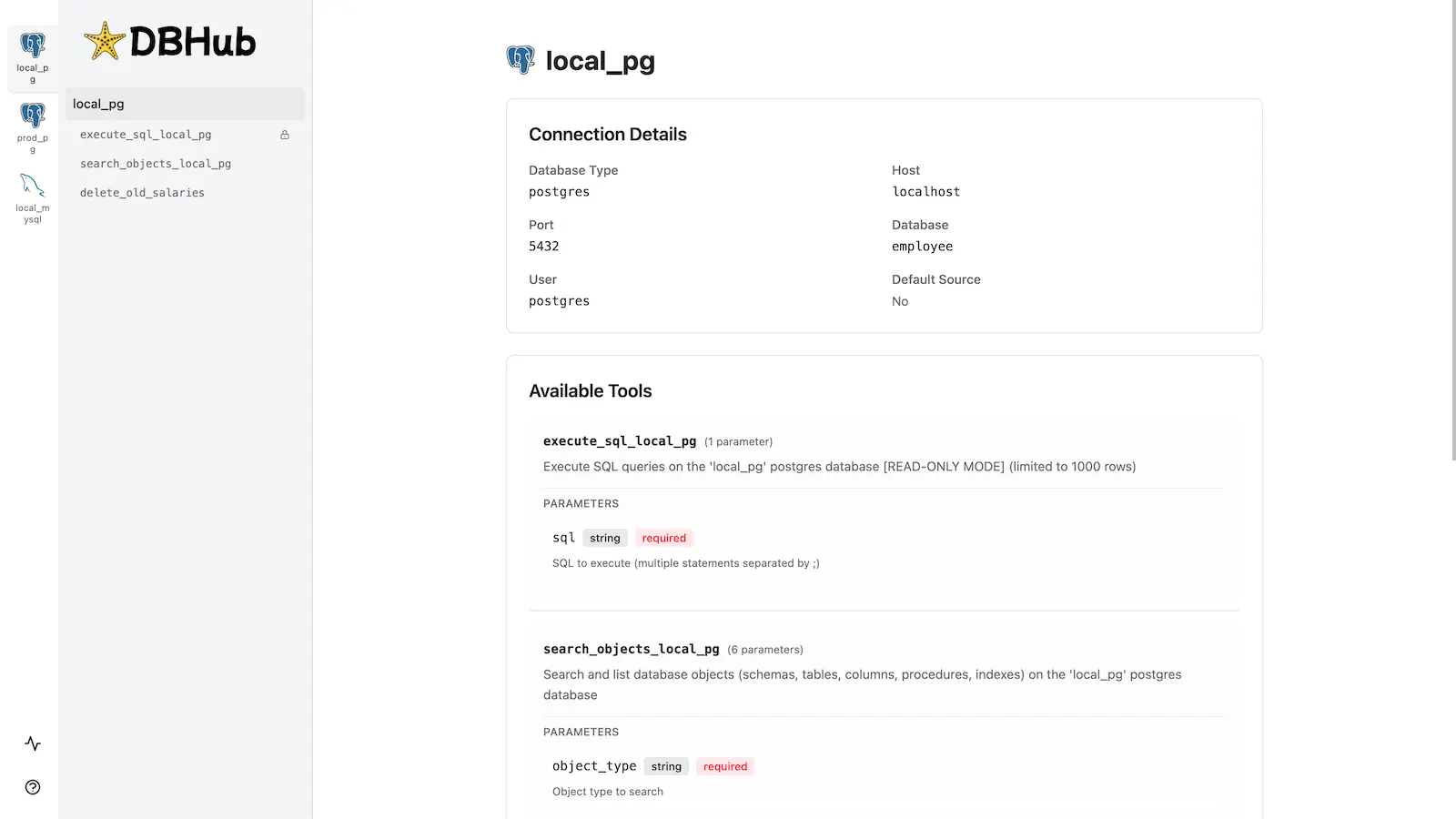
DBHub includes a built-in web interface for interacting with your database tools. It provides a visual way to execute queries, run custom tools, and view request traces without requiring an MCP client.
Installation
npx @bytebase/dbhub@latest --transport http --port 8080 --dsn "postgres://user:password@localhost:5432/dbname?sslmode=disable"
Also available as:
- Docker image
- MCP Bundle (one-click install, read-only)
- Claude Code plugin
See the Installation Guide for all options, Command-Line Options for parameters, and Multi-Database Configuration for connecting several databases at once.
Development
Requires Node.js >= 22.5.0 (DBHub uses the built-in node:sqlite module).
# Install dependencies
pnpm install

# Run in development mode
pnpm dev

# Build and run for production
pnpm build && pnpm start --transport stdio --dsn "postgres://user:password@localhost:5432/dbname"
Contributors
Star History
DBHub MCPのよくある質問
DBHub MCPをClaude Codeに追加するには
ターミナルでclaude mcp add --env DB_PASSWORD=<YOUR_DB_PASSWORD> --env DSN=<YOUR_DSN> --env SSH_PASSPHRASE=<YOUR_SSH_PASSPHRASE> --env SSH_PASSWORD=<YOUR_SSH_PASSWORD> dbhub -- npx -y @bytebase/dbhubを実行します。すべてのプロジェクトで利用するには--scope userを追加します。
DBHub MCPをCursorに追加するには
~/.cursor/mcp.jsonを開き、上記のインストールセクションに示すCursor設定を使ってmcpServersの下にサーバーを追加します。
Which databases can DBHub connect to?
DBHub connects to PostgreSQL, MySQL, SQL Server, MariaDB, Oracle, and SQLite through a single interface.
What MCP tools does DBHub provide?
By default it loads two tools, execute_sql and search_objects, with opt-in explain_sql, health_check, and custom tools.
Can DBHub connect to multiple databases at once?
Yes, multi-connection is supported through TOML configuration.
Does DBHub have read-only safety controls?
Yes, it offers read-only mode, row limiting, and query timeouts to prevent runaway operations.
How do I run DBHub?
You can start it with npx using the HTTP transport, and it is also available as a Docker image, MCP Bundle, and Claude Code plugin.