
最近のコード変更に関する選択式問題を出題することで、コーディングエージェントによる想起学習(retrieval practice)を可能にします。
別名 atomicreps/cli, cli
- スター
- 0
- ツール
- —
- ダウンロード数(30日間)
- —
- 最新バージョン
- 0.1.0
- 最終コミット
- 2026年10月6日
- ライセンス
- MIT
atomicreps MCPとは
atomicrepsはMCPサーバーです。 最近のコード変更に関する選択式問題を出題することで、コーディングエージェントによる想起学習(retrieval practice)を可能にします。.
プロジェクトのREADMEから生成された概要
atomicreps MCP server について
Atomic Repsは、想起学習を通じて開発者のコーディング知識の定着を支援するために設計されたツールです。コーディングエージェントがファイルの変更を伴うタスクを完了した直後に、ユーザーに選択式問題を提供することで機能します。このプロセスにより、最近のコード修正に関する記憶をテストし、アクティブな開発セッションを学習の機会へと変えることができます。
このサーバーは、Claude Code、GitHub Copilot、Cursor、Windsurf、Codexを含むさまざまなMCPクライアントと統合できます。ユーザーはNode 24以降を使用して、ターミナルのウィザード経由でサーバーをセットアップします。セットアップには無料アカウントの作成とウェブブラウザでの認証が必要です。接続後は、サーバーが問題の頻度、難易度、および特定のトピックを管理し、制御された学習ペースを維持します。
開発者は、rep、answer、me、settingsなどのツールを使用して体験をカスタマイズできます。システムはストリークやサマリーを通じて進捗を追跡する一方で、特定のトピックをミュートしたり、強度レベルを調整したりすることも可能です。実際のコード内容やプロンプトではなく、カタログハンドルとメタデータのみを送信するため、プライバシーが優先されます。
できること
- 1最近のコード変更の定着完了したばかりのバグ修正やコード変更について、AIに選択式問題を出題させます。
- 2学習進捗の追跡現在の学習ストリーク、スキル、セッションのサマリーを表示して、上達を確認します。
- 3学習トピックのカスタマイズ練習したくない特定のプログラミングトピックやサブスキルをミュートします。
- 4難易度と頻度の管理想起学習における問題の出現頻度や難易度レベルを調整します。
プロジェクトの README から作成されています。すべてのユースケースは、その引用と照らし合わせて確認されています。
atomicreps MCPのインストール方法
フォーマット検証日 2026年11月10日Cursor に追加Gooseに追加Claude Codeにatomicreps MCPをインストール
$ claude mcp add cli -- npx -y atomicrepsCursorにatomicreps MCPをインストール
~/.cursor/mcp.json
{
  "mcpServers": {
    "cli": {
      "command": "npx",
      "args": [
        "-y",
        "atomicreps"
      ]
    }
  }
}VS Codeにatomicreps MCPをインストール
.vscode/mcp.json
{
  "servers": {
    "cli": {
      "type": "stdio",
      "command": "npx",
      "args": [
        "-y",
        "atomicreps"
      ]
    }
  }
}VS Code CLIにatomicreps MCPをインストール
$ code --add-mcp '{"name":"cli","type":"stdio","command":"npx","args":["-y","atomicreps"]}'Claude Desktopにatomicreps MCPをインストール
claude_desktop_config.json
{
  "mcpServers": {
    "cli": {
      "command": "npx",
      "args": [
        "-y",
        "atomicreps"
      ]
    }
  }
}Codexにatomicreps MCPをインストール
$ codex mcp add cli -- npx -y atomicrepsCodex config.tomlにatomicreps MCPをインストール
~/.codex/config.toml
[mcp_servers.cli]
command = "npx"
args = ["-y", "atomicreps"]
Gemini CLIにatomicreps MCPをインストール
$ gemini mcp add -s user cli npx -- -y atomicrepsGemini settings.jsonにatomicreps MCPをインストール
~/.gemini/settings.json
{
  "mcpServers": {
    "cli": {
      "command": "npx",
      "args": [
        "-y",
        "atomicreps"
      ]
    }
  }
}自動チェック
実行日 2026年11月15日完全なレポート →自動チェックに合格しました。これはセキュリティ監査ではありません。コードを読み、サーバーに必要最小限のアクセス権を与えてください。 チェックの仕組み

- ソースリポジトリがリンクされており、アクセス可能atomicreps/cli is public and reachablegithub.com/atomicreps/cli ↗合格
- パッケージがこのリポジトリをソースとして指定atomicreps names atomicreps/cli as sourcenpmjs.com/package/atomicreps ↗合格
- ビルドの来歴 (Sigstore 証明)No build attestation published for this release未チェック
- オープンソースライセンス (OSI)MITspdx.org/licenses/MIT.html ↗合格
- 過去1年以内にコミットまたはリリースありLast commit or release 2026-10-06github.com/atomicreps/cli ↗合格
- OpenSSF Scorecard未チェック
- パッケージ名が有名なパッケージに酷似していないNo popular package one edit away from atomicreps合格
- パッケージおよびその依存関係に重大な勧告なし1 resolved dependencies checked; no critical advisoryosv.dev ↗合格
- モデルへの隠れた指示がない0 tool descriptions and the README read; no override phrases, credential paths or hidden characters合格
- 破壊的なツールがラベル付けされている未チェック
- リモートエンドポイントが MCP ハンドシェイクに応答HTTPS endpoint answered 401 (sign-in required)合格
README
GitHubで見るatomicreps


One short question about the thing you just built. Works inside Claude Code, GitHub Copilot, Cursor, Windsurf, Codex, or any MCP client.
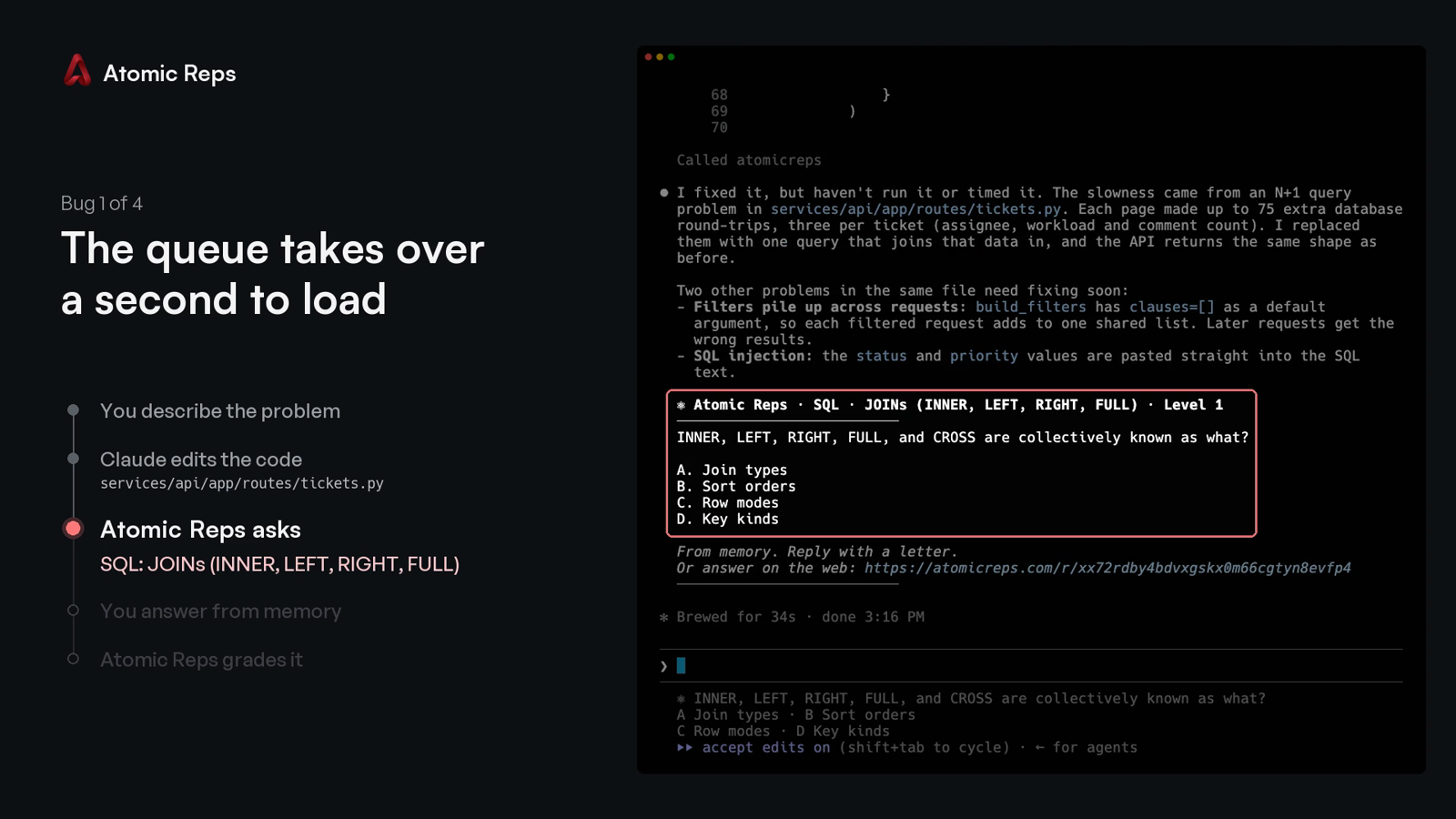
You describe a bug, your coding agent changes the code, and Atomic Reps asks you one multiple-choice question about that change. You answer with a letter, from memory, and the server grades it.
The two-minute demo: four bugs fixed in Claude Code, one question after each.
https://github.com/user-attachments/assets/521c1bb3-9f75-4c25-8b71-ed763de7debc
Quick start
Requires Node 24+ and a free account. On an older Node, every command prints the version it needs instead of starting.
npx atomicreps
The first run is a setup wizard:
- Pick what to practise, how often, and how hard.
- Sign in: the terminal prints a code, and you type it at atomicreps.com/connect.
- Pick your editors.
connectwrites only the entries you tick.
Then go back to work. When your agent finishes a task that changed files, the question appears after its answer:
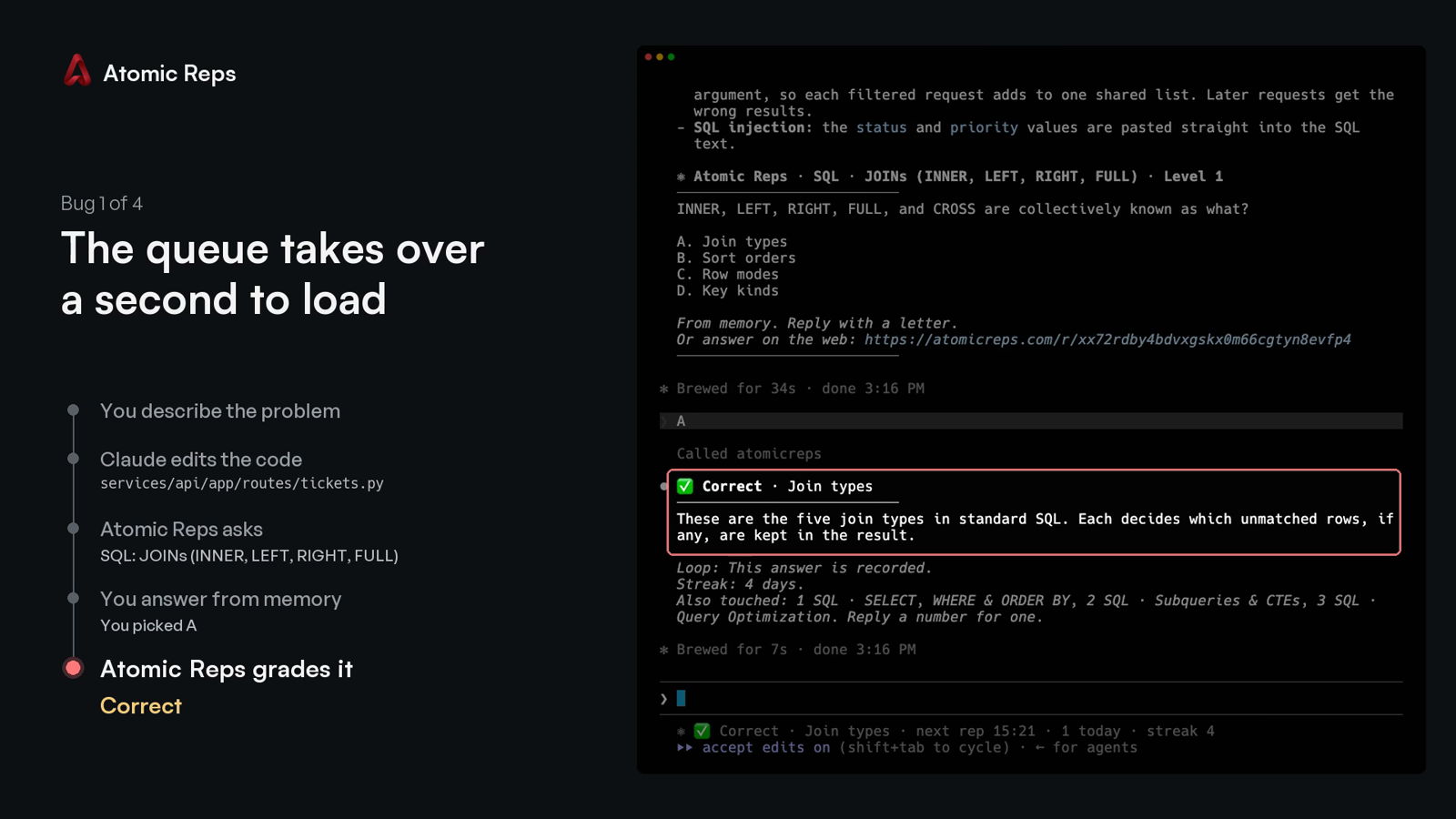
Type the letter. The verdict comes back with a one-line explanation, and the next line names up to three other topics the session touched:
Every run after the first opens the terminal screen: your streak, this session, your topics, mutes and rate.
Commands
npx atomicreps            the terminal screen; the setup wizard on the first run
npx atomicreps setup      the setup wizard again: areas, topics, how often, how hard
npx atomicreps login      sign in from a browser with a typed code
npx atomicreps connect    register the server with your editor
npx atomicreps connect --pin   pin the launch args to this installed version, for a command you can commit
npx atomicreps mcp        the stdio MCP server process (what the editor launches)
npx atomicreps doctor     token, server ping, version, when the next rep may come, allowlist
npx atomicreps why        the last ten times a question could have appeared, and why it did or did not
npx atomicreps logout     forget the token on this machine
npx atomicreps logout --purge   also forget your reps and status, and offer to undo connect
Add --alpha to any command to use staging. It keeps its own token and cache,
so you can be signed in to both staging and production at once.
Plain connect writes npx -y atomicreps mcp, which always resolves to
whatever is latest at launch. connect --pin writes npx -y atomicreps@<version> mcp instead, the version this CLI is running, so an
organisation can review one exact command and commit it rather than trusting
npx to fetch the same thing twice.
Claude Code
npx atomicreps connect offers four Claude Code rows:
- Claude Code registers the server at user scope.
- …and a question at the end of each turn adds a
Stophook and aUserPromptSubmithook to~/.claude/settings.json. When Claude finishes a turn that changed files, the question prints in your terminal without Claude taking an extra turn, and the letter you type next is graded. Hooks you already have stay. - …and allow its four tools adds
rep,answer,meandsettingstopermissions.allow, so the first question does not stop on a permission prompt. - …and a Claude Code status line shows the open question under the prompt. A status line you already have keeps printing first.
Without connect, the server alone:
claude mcp add --scope user atomicreps -- npx -y atomicreps mcp
GitHub Copilot
npx atomicreps connect offers VS Code and Copilot CLI as rows. Without it:
code --add-mcp '{"name":"atomicreps","type":"stdio","command":"npx","args":["-y","atomicreps","mcp"]}'
copilot mcp add atomicreps -- npx -y atomicreps mcp
Copilot in JetBrains, Visual Studio, Xcode and Eclipse reads the same entry
from its own mcp.json (Settings, then MCP). A team can
commit it as .vscode/mcp.json so every clone has it:
{
  "servers": {
    "atomicreps": { "type": "stdio", "command": "npx", "args": ["-y", "atomicreps", "mcp"] }
  }
}
Copilot reads the server's instructions and calls rep when a task ends,
the same as Cursor and Codex. Approve the four tools once and they stay
approved.
Cursor, Windsurf, Codex and other clients
connect adds one entry to ~/.cursor/mcp.json or
~/.codeium/windsurf/mcp_config.json, and runs codex mcp add for Codex.
Anything already in those files stays. By hand:
codex mcp add atomicreps -- npx -y atomicreps mcp
{
  "mcpServers": {
    "atomicreps": { "command": "npx", "args": ["-y", "atomicreps", "mcp"] }
  }
}
Any other MCP client takes the same command: npx -y atomicreps mcp. The
"I'll set it up myself" row in connect prints it and writes nothing.
How a rep is served
When your coding agent finishes a task, it calls rep once with a few words
for what changed. The server picks one question, or nothing, and your agent
shows it to you unchanged. Reply with a letter, or ignore it.
Under the verdict, one line names up to three other things the session touched. A number asks about one of them. "Never Swift" mutes a topic permanently. "Not this topic" mutes it for thirty days. "Unmute Swift" removes the mute. "How am I doing" prints your summary.
The server enforces the pace, not the agent. It sets a minimum gap between
automatic reps, a daily cap, and mute and off. It refuses an answer typed
within seconds of the question. It never includes the answer key in a rep.
Every failure returns no rep rather than an error; doctor says why.
Tools
| tool | what it does |
|---|---|
rep({ touched?, ask?, topic?, kind?, exclude? }) |
one question, one insight, or nothing; ask takes a handle from an offer |
answer({ pick, id? }) |
the verdict, the explanation, and the offer line |
me({ show? }) |
summary, skills, reps, streak or mutes |
settings({ intensity?, topics?, levels?, prefer?, mute?, muteMinutes?, days?, unmute?, dialog? }) |
the rate, the pinned topics, the difficulty range, the preferred areas, mutes, the dialog |
Handles are topic or topic.subskill (react.hooks_core). Fifty sub-skill
slugs repeat across topics, so the topic is always part of the name.
settings({ dialog: true }) asks for the letter in your editor's native
dialog instead of the chat. It blocks the turn, so it is a setting, never the
default.
Privacy
What leaves your machine on a rep call: catalog handles with small weights.
Also package, file extension and folder names the public catalog already
knows. Your agent's touched words are matched to handles on your machine;
the words themselves are never sent. An unknown package name is dropped. A
private name (@acme/react-internal) is sent as its public alias (react).
We never send your code, a file's contents, or a prompt. npx atomicreps setup prints the exact payload for your repo, before you sign in.
npx atomicreps mcp forwards each JSON-RPC message from your editor to the
Atomic Reps server with your token. The answer comes back the same way.
ATOMICREPS_API is honoured only for an Atomic Reps or loopback address,
since your token goes wherever it points. Anything else is ignored and
reported by doctor; set ATOMICREPS_UNSAFE_ORIGIN=1 to override.
Login
npx atomicreps prints a code. Type it at atomicreps.com/connect while
signed in; a forwarded link approves nothing. The token is saved in
~/.config/atomicreps/config.json (mode 0600), prefixed arep_ so secret
scanners find it. You can revoke it from your account page. logout forgets
it; logout --purge also deletes the reps and status this machine cached, then
lists every editor entry connect wrote (both channels) and removes the ones you
leave ticked.
The trust boundary, and how to report a vulnerability: SECURITY.md.
Check it yourself
dist/cli.js is built from these files and nothing else. The package has no
runtime dependencies.
npm install
npm run build    # writes dist/cli.js from src
npm test         # the behaviour described above, as tests
To compare with what npm serves: npm pack atomicreps, then read its
dist/cli.js beside the one you just built. Everything the client sends is in
src/api.ts. Everything it reads from your repository is in src/infer.ts.
MIT.
atomicreps MCPのよくある質問
atomicreps MCPをClaude Codeに追加するには
ターミナルでclaude mcp add cli -- npx -y atomicrepsを実行します。すべてのプロジェクトで利用するには--scope userを追加します。
atomicreps MCPをCursorに追加するには
~/.cursor/mcp.jsonを開き、上記のインストールセクションに示すCursor設定を使ってmcpServersの下にサーバーを追加します。
Atomic Repsはコーディングエージェントとどのように連携しますか?
エージェントがコードを変更すると、サーバーがその変更に関する選択式問題を出題します。記憶に基づいて記号で回答すると、サーバーが採点を行います。
サーバーは実際のコードをサービスに送信しますか?
いいえ、サーバーがコード、ファイルの内容、またはプロンプトを送信することはありません。カタログハンドルとパッケージ/フォルダ名のみを使用してトピックを照合します。
どのエディタやAIクライアントがサポートされていますか?
Claude Code、GitHub Copilot、Cursor、Windsurf、Codex、およびその他のMCPクライアントで動作します。
Atomic Repsのセットアップ方法を教えてください。
npx atomicreps を実行して開始できます。セットアップウィザードが起動し、学習分野、頻度、難易度を選択できます。