
Generate Tech Stack MCPサーバー
✓ 検証済みコードベースをスキャンし、使用されている言語、フレームワーク、データベース、インフラストラクチャを視覚的なHTMLインベントリとして生成します。
別名 askuma/generate-tech-stack, generate-tech-stack, generate-tech-stack-mcp
- スター
- 0
- ツール
- —
- ダウンロード数(30日間)
- 93
- 最新バージョン
- 0.2.2
- 最終コミット
- 2026年7月27日
- ライセンス
- MIT
Generate Tech Stack MCPとは
Generate Tech StackはMCPサーバーです。 コードベースをスキャンし、使用されている言語、フレームワーク、データベース、インフラストラクチャを視覚的なHTMLインベントリとして生成します。.
プロジェクトのREADMEから生成された概要
Generate Tech Stack MCP server について
このツールは、コードベースの依存関係を視覚的なインベントリとして作成することを開発者に可能にします。requirements.txt、package.json、Dockerfileなどのプロジェクトファイルをスキャンして、言語、フレームワーク、データベース、インフラストラクチャを特定します。その結果、アーキテクチャ図、棒グラフ、カテゴリ分けされたツールカード、ガイド付きツアー、テーマ切り替え機能を備えた、自己完結型のTECH_STACK.htmlファイルが生成されます。
ユーザーは、これをClaude CodeのSKILL、GitHub Copilot Extension、またはstdio経由の標準的なMCP serverとしてデプロイできます。pipインストールによるローカル実行、またはリモート拡張機能として動作します。Claude Desktop、Cursor、ZedなどのクライアントでMCP serverを使用する場合、generate_tech_stackツールを呼び出してレポートを書き出すか、list_tech_stackを使用してファイルを作成せずにJSON形式のサマリーを受け取ることができます。コアとなる解析スクリプトは、サードパーティの依存関係なしでPython 3.8以上で動作します。
できること
- 1視覚的なアーキテクチャレポートの生成AIに対して、現在のディレクトリをスキャンしてプロジェクトのすべてのツールを表示するテーマ付きのHTMLページを作成するよう指示します。
- 2軽量なJSONサマリーの取得フルサイズのHTMLファイルを生成せずに、テクノロジースタックのテキストベースの概要をリクエストします。
プロジェクトの README から作成されています。すべてのユースケースは、その引用と照らし合わせて確認されています。
Generate Tech Stack MCPのインストール方法
フォーマット検証日 2026年11月10日Cursor に追加Gooseに追加Claude CodeにGenerate Tech Stack MCPをインストール
$ claude mcp add generate-tech-stack -- uvx generate-tech-stack-mcpCursorにGenerate Tech Stack MCPをインストール
~/.cursor/mcp.json
{
  "mcpServers": {
    "generate-tech-stack": {
      "command": "uvx",
      "args": [
        "generate-tech-stack-mcp"
      ]
    }
  }
}VS CodeにGenerate Tech Stack MCPをインストール
.vscode/mcp.json
{
  "servers": {
    "generate-tech-stack": {
      "type": "stdio",
      "command": "uvx",
      "args": [
        "generate-tech-stack-mcp"
      ]
    }
  }
}VS Code CLIにGenerate Tech Stack MCPをインストール
$ code --add-mcp '{"name":"generate-tech-stack","type":"stdio","command":"uvx","args":["generate-tech-stack-mcp"]}'Claude DesktopにGenerate Tech Stack MCPをインストール
claude_desktop_config.json
{
  "mcpServers": {
    "generate-tech-stack": {
      "command": "uvx",
      "args": [
        "generate-tech-stack-mcp"
      ]
    }
  }
}CodexにGenerate Tech Stack MCPをインストール
$ codex mcp add generate-tech-stack -- uvx generate-tech-stack-mcpCodex config.tomlにGenerate Tech Stack MCPをインストール
~/.codex/config.toml
[mcp_servers.generate-tech-stack]
command = "uvx"
args = ["generate-tech-stack-mcp"]
Gemini CLIにGenerate Tech Stack MCPをインストール
$ gemini mcp add -s user generate-tech-stack uvx -- generate-tech-stack-mcpGemini settings.jsonにGenerate Tech Stack MCPをインストール
~/.gemini/settings.json
{
  "mcpServers": {
    "generate-tech-stack": {
      "command": "uvx",
      "args": [
        "generate-tech-stack-mcp"
      ]
    }
  }
}自動チェック
実行日 2026年11月15日完全なレポート →自動チェックに合格しました。これはセキュリティ監査ではありません。コードを読み、サーバーに必要最小限のアクセス権を与えてください。 チェックの仕組み

- ソースリポジトリがリンクされており、アクセス可能askuma/generate-tech-stack is public and reachablegithub.com/askuma/generate-tech-stack ↗合格
- パッケージがこのリポジトリをソースとして指定generate-tech-stack-mcp names askuma/generate-tech-stack as sourcepypi.org/project/generate-tech-stack-mcp/ ↗合格
- ビルドの来歴 (Sigstore 証明)Sigstore attestation for generate-tech-stack-mcppypi.org/project/generate-tech-stack-mcp/ ↗合格
- オープンソースライセンス (OSI)MITspdx.org/licenses/MIT.html ↗合格
- 過去1年以内にコミットまたはリリースありLast commit or release 2026-07-27github.com/askuma/generate-tech-stack ↗合格
- OpenSSF Scorecard未チェック
- パッケージ名が有名なパッケージに酷似していないNo popular package one edit away from generate-tech-stack-mcp合格
- パッケージおよびその依存関係に重大な勧告なし29 resolved dependencies checked; no critical advisoryosv.dev ↗合格
- モデルへの隠れた指示がない0 tool descriptions and the README read; no override phrases, credential paths or hidden characters合格
- 破壊的なツールがラベル付けされている未チェック
- リモートエンドポイントが MCP ハンドシェイクに応答未チェック
README
GitHubで見るgenerate-tech-stack
Scan any project and generate a visual TECH_STACK.html page — light/dark theme, auto-adapting, zero config.
Works as a Claude Code skill, MCP server, or GitHub Copilot Extension.
Live demo → — generated from fastapi/full-stack-fastapi-template, unmodified.
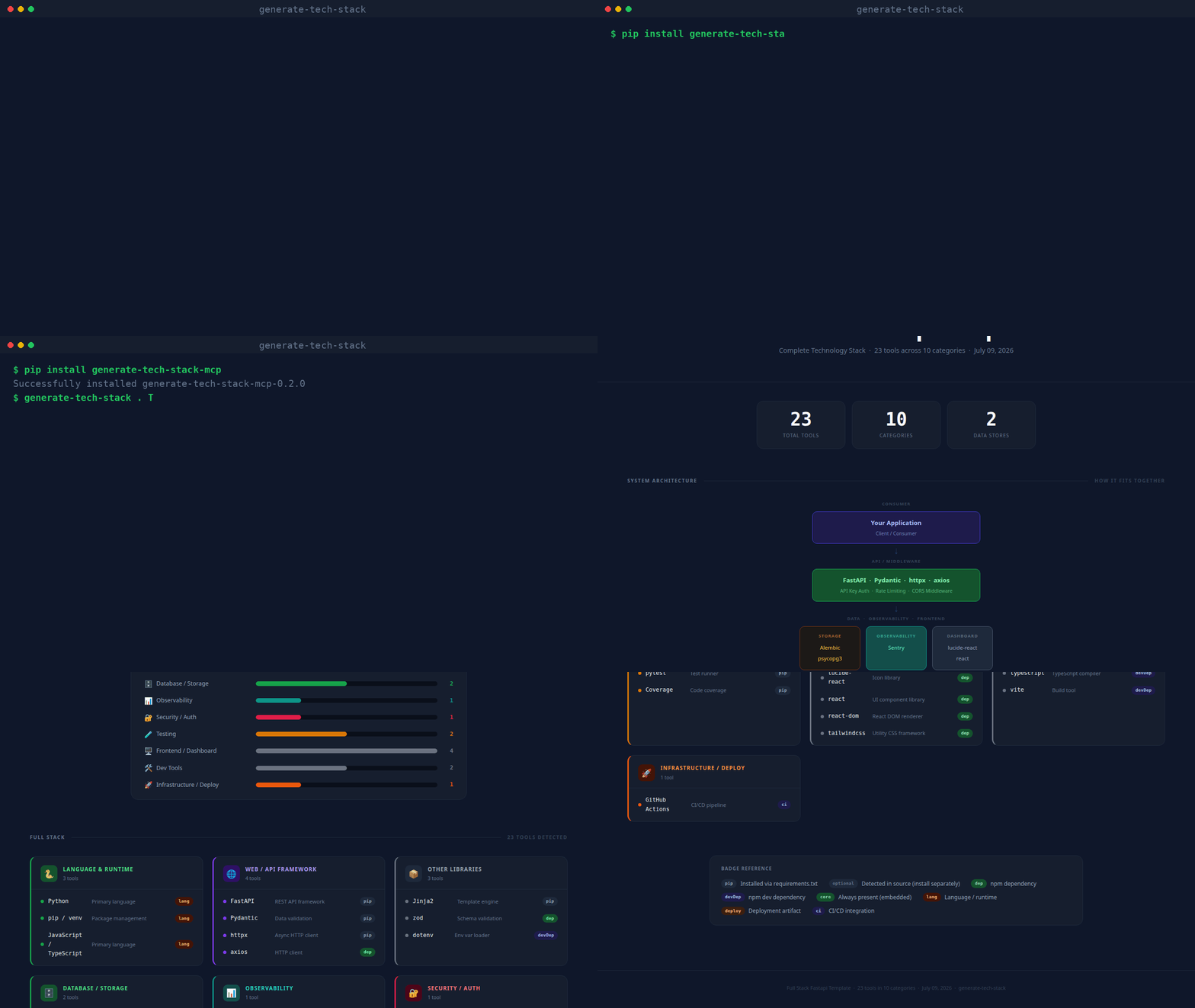
(real CLI output, unscripted — static screenshot if you'd rather not autoplay)
What it produces
Every generated page contains:
| Section | Description |
|---|---|
| Stat row | Total tools · Categories · AI Backends · Data Stores |
| Architecture diagram | Layered flow diagram (Consumer → API → AI/NLP → Data/Obs/Frontend) |
| Bar chart | Horizontal bars per category, colour-matched |
| Tool cards | One card per category; each tool shows a dot, name, description, and badge |
| Badge legend | Explains pip, dep, optional, core, deploy, ci, etc. |
| Footer | Project name · tool count · generation date |
| Guided tour | Spotlight walkthrough of every section, shown automatically the first time a report is opened; replay anytime with the ? button |
| Theme toggle | Sun/moon button next to the tour button switches between dark and light mode |
Repository layout
~/.claude/skills/generate-tech-stack/
├── SKILL.md                  ← Claude Code skill definition
├── INSTALL.md                ← detailed per-platform installation guide
├── README.md                 ← this file
├── scripts/
│   └── analyze.py            ← core scanner + HTML renderer (no dependencies)
├── mcp/
│   ├── server.py             ← MCP stdio server (pip install mcp)
│   └── requirements.txt
└── copilot/
    ├── index.js              ← GitHub Copilot Extension (Express)
    ├── package.json
    └── openai_function.json  ← OpenAI / Antigravity function definition
Usage
pip (CLI + MCP server)
pip install generate-tech-stack-mcp

generate-tech-stack . TECH_STACK.html    # CLI: scan and write the report
generate-tech-stack-mcp                   # stdio MCP server
With pip installed, any MCP host config reduces to:
{
  "mcpServers": {
    "generate-tech-stack": { "command": "generate-tech-stack-mcp" }
  }
}
Claude Code
/generate-tech-stack
Run it from any project directory. The skill calls scripts/analyze.py and opens the result in your browser.
MCP (Claude Desktop, VS Code, Cursor, Zed, Windsurf, Continue)
pip install mcp
Add to your host's MCP config (replace the path with your actual home directory):
{
  "mcpServers": {
    "generate-tech-stack": {
      "command": "python3",
      "args": ["/home/<you>/.claude/skills/generate-tech-stack/mcp/server.py"]
    }
  }
}
Then ask: generate my tech stack or /generate-tech-stack.
MCP tools exposed:
generate_tech_stack— scans a project, writesTECH_STACK.html, opens in browserlist_tech_stack— returns a JSON summary, no file written
GitHub Copilot Extension
cd copilot
npm install
npm start        # listens on port 3000
ngrok http 3000  # expose for GitHub to reach
Register a GitHub App with Copilot Extension enabled, set the Agent URL to https://your-url/agent, and install it on your account. Then in Copilot Chat:
@generate-tech-stack /generate-tech-stack
@generate-tech-stack /generate-tech-stack /path/to/project
Command line (standalone)
python3 ~/.claude/skills/generate-tech-stack/scripts/analyze.py /path/to/project
# output: /path/to/project/TECH_STACK.html

# custom output path:
python3 scripts/analyze.py . ~/Desktop/TECH_STACK.html
analyze.py has no third-party dependencies — just Python 3.8+.
What gets detected
| Source file | Detected tools |
|---|---|
requirements.txt / pyproject.toml |
Python packages (web, DB, AI, testing, observability, security…) |
package.json |
Node / npm packages (frameworks, frontend, DB drivers, tooling) |
go.mod |
Go language |
Cargo.toml |
Rust language |
pom.xml / build.gradle |
Java / Kotlin |
Gemfile |
Ruby |
composer.json |
PHP |
**/*.py source |
Optional/dynamic SDKs via importlib.find_spec() patterns |
docker-compose.yml / .env |
PostgreSQL, Redis, MongoDB, SQLite connection strings |
Dockerfile |
Docker |
docker-compose.yml |
Docker Compose |
.github/workflows/ |
GitHub Actions |
.gitlab-ci.yml |
GitLab CI |
alembic.ini |
Alembic migrations |
nginx.conf / Caddyfile |
Reverse proxy |
tsconfig.json / src/**/*.ts |
TypeScript |
Detected categories
| Category | Colour | Examples |
|---|---|---|
| Language & Runtime | Green | Python, Go, Rust, TypeScript |
| Web / API Framework | Purple | FastAPI, Express, Django, Next.js |
| Database / Storage | Green | SQLAlchemy, Prisma, Redis, ChromaDB |
| AI SDKs | Blue | OpenAI, Anthropic, LangChain, GuardrailsAI, NVIDIA NeMo, Presidio |
| NLP / ML | Teal | spaCy, Transformers, Sentence Transformers |
| Observability | Teal | Prometheus, OpenTelemetry, Sentry, Loguru |
| Testing | Yellow | pytest, Jest, Cypress, Playwright |
| Security / Auth | Rose | PyJWT, bcrypt, Authlib, Helmet |
| Infrastructure / Deploy | Orange | Docker, Kubernetes, Celery, Boto3 |
| Frontend / Dashboard | Gray | React, Vue, Tailwind, Recharts |
| Messaging / Comms | Blue | Kafka, RabbitMQ, Socket.io |
| Dev Tools | Gray | ESLint, Prettier, Vite, TypeScript |
Design
Dark by default with a light-mode toggle (top-right corner, no persistence — resets to dark on reload). Fonts: IBM Plex Sans (body) + JetBrains Mono (code/badges), loaded from Google Fonts. Vanilla JS powers the guided tour and theme toggle only — everything else is plain HTML + CSS. Self-contained single file, opens in any browser offline.
See also
- INSTALL.md — per-platform setup instructions
- SKILL.md — Claude Code skill specification
Generate Tech Stack MCPのよくある質問
Generate Tech Stack MCPをClaude Codeに追加するには
ターミナルでclaude mcp add generate-tech-stack -- uvx generate-tech-stack-mcpを実行します。すべてのプロジェクトで利用するには--scope userを追加します。
Generate Tech Stack MCPをCursorに追加するには
~/.cursor/mcp.jsonを開き、上記のインストールセクションに示すCursor設定を使ってmcpServersの下にサーバーを追加します。
このサーバーはどのような出力を生成しますか?
アーキテクチャ図、棒グラフ、ツールカード、ガイド付きツアーを含む視覚的なTECH_STACK.htmlページを生成します。
生成されたレポートの閲覧にインターネット接続は必要ですか?
いいえ、レポートは自己完結型の単一ファイルであるため、オフラインでも任意のブラウザで開くことができます。