
OpenCode MCPサーバー
コミット 2026年11月12日オーケストレーターモデルから分離されたOpenCodeサブエージェントへ重いタスクを委譲することで、コンテキストウィンドウの品質を維持し、トークンコストを削減します。
別名 alejandro-technology/opencode-mcp, mcp-server-opencode
- スター
- 6
- ツール
- 10
- ダウンロード数(30日間)
- —
- 最新バージョン
- —
- 最終コミット
- 2026年11月12日
- ライセンス
- —
OpenCode MCPとは
OpenCodeはMCPサーバーです。 オーケストレーターモデルから分離されたOpenCodeサブエージェントへ重いタスクを委譲することで、コンテキストウィンドウの品質を維持し、トークンコストを削減します。. 10個のツールを提供しており、opencode_start_server, opencode_stop_server, opencode_list_agentsなどがあります。
プロジェクトのREADMEから生成された概要
OpenCode MCP server について
opencode-mcpは、Claude Code、Codex、Cursor、Antigravity、またはPiを使用している開発者が、オーケストレーターから分離されたサブエージェントへ重い計算タスクを委譲することを可能にします。大規模なファイルの読み込み、広範な検索、繰り返しのテストループをバックグラウンドのOpenCodeサブエージェントにオフロードすることで、コンテキストウィンドウの肥大化を防ぎ、トークンコストを削減します。このアプローチにより、メインのリードエージェントのコンテキストを軽量に保ち、オーケストレーションに集中させることができるため、推論の品質を維持できます。
このサーバーを使用するには、Node.js 18以上と、システムパスに設定されたOpenCode 1.xがインストールされている必要があります。サーバーは、opencode_start_taskやopencode_wait_for_taskなどの特定のツールを通じて非同期タスクを管理し、複数の調査の並行実行を可能にします。また、ソースコードの変更を整理された状態に保つため、共有ディレクトリ内、または分離された管理下のGit worktree内でのタスク実行をサポートしています。システムは詳細な使用状況レポートを提供し、プロバイダーやモデルごとのメトリクスを含めることで、委譲されたセッションのコスト管理を支援します。
できること
- 1タスクの並行実行オーケストレーターをブロックすることなく、複数の調査または実装タスクを並行して実行します。
- 2コンテキストウィンドウの維持大規模なファイルの読み込みや広範な検索結果によって、プライマリエージェントのコンテキストが汚染されるのを防ぎます。
- 3サブエージェントによる反復的なデバッグ既存のタスクセッションにフォローアップのプロンプトを送信し、サブエージェントと対話しながら反復的な作業を行います。
プロジェクトの README から作成されています。すべてのユースケースは、その引用と照らし合わせて確認されています。
OpenCode MCPのインストール方法
フォーマット検証日 2026年11月10日Cursor に追加Gooseに追加Claude CodeにOpenCode MCPをインストール
$ claude mcp add opencode-mcp -- npx -y mcp-server-opencodeCursorにOpenCode MCPをインストール
~/.cursor/mcp.json
{
  "mcpServers": {
    "opencode-mcp": {
      "command": "npx",
      "args": [
        "-y",
        "mcp-server-opencode"
      ]
    }
  }
}VS CodeにOpenCode MCPをインストール
.vscode/mcp.json
{
  "servers": {
    "opencode-mcp": {
      "type": "stdio",
      "command": "npx",
      "args": [
        "-y",
        "mcp-server-opencode"
      ]
    }
  }
}VS Code CLIにOpenCode MCPをインストール
$ code --add-mcp '{"name":"opencode-mcp","type":"stdio","command":"npx","args":["-y","mcp-server-opencode"]}'Claude DesktopにOpenCode MCPをインストール
claude_desktop_config.json
{
  "mcpServers": {
    "opencode-mcp": {
      "command": "npx",
      "args": [
        "-y",
        "mcp-server-opencode"
      ]
    }
  }
}CodexにOpenCode MCPをインストール
$ codex mcp add opencode-mcp -- npx -y mcp-server-opencodeCodex config.tomlにOpenCode MCPをインストール
~/.codex/config.toml
[mcp_servers.opencode-mcp]
command = "npx"
args = ["-y", "mcp-server-opencode"]
Gemini CLIにOpenCode MCPをインストール
$ gemini mcp add -s user opencode-mcp npx -- -y mcp-server-opencodeGemini settings.jsonにOpenCode MCPをインストール
~/.gemini/settings.json
{
  "mcpServers": {
    "opencode-mcp": {
      "command": "npx",
      "args": [
        "-y",
        "mcp-server-opencode"
      ]
    }
  }
}OpenCode MCPツール 10
READMEから検出opencode_start_serveropencode_stop_serveropencode_list_agentsopencode_start_taskopencode_continue_taskopencode_cancel_taskopencode_cleanup_workspaceopencode_get_task_statusopencode_get_task_resultopencode_wait_for_task
| opencode_start_server | — | |
| opencode_stop_server | — | |
| opencode_list_agents | — | |
| opencode_start_task | — | |
| opencode_continue_task | — | |
| opencode_cancel_task | — | |
| opencode_cleanup_workspace | — | |
| opencode_get_task_status | — | |
| opencode_get_task_result | — | |
| opencode_wait_for_task | — |
設定
MCP_TOOL_TIMEOUTOPENCODE_MCP_SMOKE_MODEL
| 名前 | 説明 | 種類 |
|---|---|---|
| MCP_TOOL_TIMEOUT | — | |
| OPENCODE_MCP_SMOKE_MODEL | — |
自動チェック
実行日 2026年11月13日完全なレポート →まだ検証されていません。サーバーには80点のスコア、重大な問題がないこと、および検証に必要な十分なデータが必要です。 チェックの仕組み · 点数を上げるための改善点

- ソースリポジトリがリンクされており、アクセス可能alejandro-technology/opencode-mcp is public and reachablegithub.com/alejandro-technology/opencode-mcp ↗合格
- パッケージがこのリポジトリをソースとして指定mcp-server-opencode names alejandro-technology/opencode-mcp as sourcenpmjs.com/package/mcp-server-opencode ↗合格
- ビルドの来歴 (Sigstore 証明)No build attestation published for this release未チェック
- オープンソースライセンス (OSI)No license検出事項
- 過去1年以内にコミットまたはリリースありLast commit or release 2026-11-12github.com/alejandro-technology/opencode-mcp ↗合格
- OpenSSF Scorecard未チェック
- パッケージ名が有名なパッケージに酷似していないNo popular package one edit away from mcp-server-opencode合格
- パッケージおよびその依存関係に重大な勧告なし未チェック
- モデルへの隠れた指示がない10 tool descriptions and the README read; no override phrases, credential paths or hidden characters合格
- 破壊的なツールがラベル付けされているNo tool named like delete, drop or exec合格
- リモートエンドポイントが MCP ハンドシェイクに応答未チェック
README
GitHubで見るopencode-mcp



Keep your lead agent lean and save tokens by delegating heavy tasks to background subagents.
opencode-mcp is a Model Context Protocol (MCP) server that connects orchestrator hosts (Claude Code, Codex, Cursor, Antigravity, Pi) with OpenCode subagents. Instead of polluting your orchestrator's context window with large file reads, extensive search outputs, and repetitive test runs, you delegate those tasks to isolated subagents and receive only concise, structured results.
Why this matters (Context Window Economics)
- 🧠 Prevent Context Rot & Bloat: Monolithic agents suffer reasoning degradation as the context fills up. Keeping your lead agent as an orchestrator preserves high reasoning quality.
- 💰 Slash Token Costs: Running large exploratory reads or test-fix loops directly inside your primary (Fable/Opus, Astra/Sol) session repeatedly bills for thousands of cached tokens on every follow-up turn. Subagents run in isolated sessions using optimal models.
- ⚡ Asynchronous Parallel Execution: Dispatch multiple investigation or implementation tasks in parallel without blocking the orchestrator.
Quick install
Requires Node.js 18+ and OpenCode 1.x installed and configured (opencode must be on your PATH, with at least one provider/model set up) — this server spawns and drives OpenCode instances.
For Claude Code:
claude mcp add opencode -- npx -y mcp-server-opencode
For Codex:
codex mcp add opencode -- npx -y mcp-server-opencode
See Installation for manual config, and from-source options.
Tools
| Tool | Description |
|---|---|
opencode_start_server |
Start a new OpenCode server instance in the MCP process working directory |
opencode_stop_server |
Stop a running OpenCode server instance |
opencode_list_agents |
List agents/models available on a server instance (optional directory selects a project) |
opencode_start_task |
Delegate a task to an agent by starting a new session and prompt (optional agent / model override) |
opencode_continue_task |
Send a follow-up prompt to an existing task's session for iterative back-and-forth with the subagent |
opencode_cancel_task |
Abort a running delegated task by cancelling its session |
opencode_cleanup_workspace |
Explicitly remove an owned Git worktree after task reports finalize; dirty worktrees require opt-in discard |
opencode_get_task_status |
Poll the status of a delegated task (pending / running / completed / failed / empty / cancelled); optional include_progress adds a partial output snippet and the currently running tool while it's still running |
opencode_get_task_result |
Fetch the final result of a completed task |
opencode_wait_for_task |
Long-poll one or more delegated tasks until they finish (mode: "all" or "any") or the timeout elapses; optional include_progress best-effort enriches unfinished tasks within the same deadline, falling back to the last observed status/progress when time runs out |
Delegation workflow and model-selection guidance are provided through the MCP server instructions.
How it works
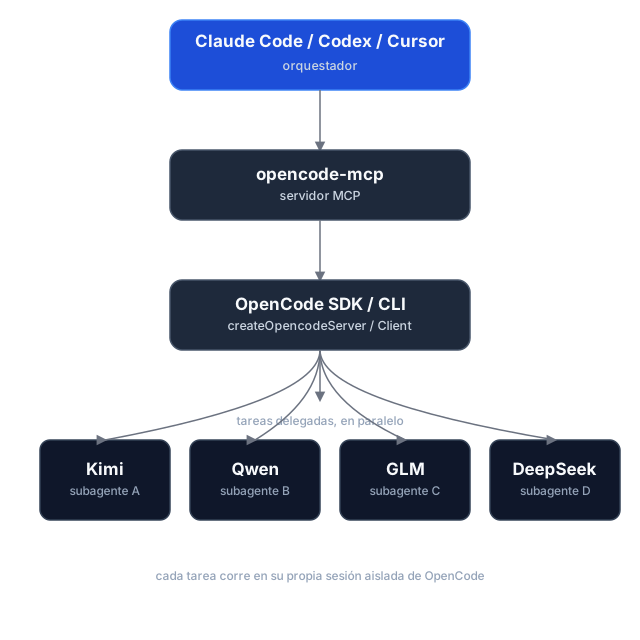
Task delegation is asynchronous: opencode_start_task returns a task_id and run_id without waiting, so hosts can start tasks in parallel. Tasks use the selected directory by default; managed Git worktrees are optional. Poll for status and retrieve results separately. If dispatch is uncertain, use the returned IDs to check or cancel the task instead of retrying it.
Execution reports and caller checks
Start and continuation calls can include expected_changes and checks. Status and result responses report workspace changes, verification, diagnostics, and evidence; pass a run_id to retrieve a historical run. Workspace changes are best-effort evidence, since concurrent writers can make attribution uncertain.
Shared directories and managed worktrees
Tasks run in the selected existing directory (shared, the default), or in an isolated managed Git worktree based on a commit. Worktrees are kept after execution; use opencode_cleanup_workspace with its workspace_id after reports are finalized. Cleanup only removes worktrees managed by this server, and dirty worktrees require explicit discard.
Usage reporting
Status, wait, and result responses include run and session usage snapshots, with metrics broken down by provider and model. Missing metrics remain unknown rather than zero, and cost is OpenCode-reported—not an invoice total. Finalized runs retain their snapshots for historical retrieval.
Task history and workspace ownership are held in memory for the lifetime of the MCP process. Restarting loses these records; retained worktrees are not automatically rediscovered.
Installation
Prerequisites
- Node.js 18+
- OpenCode 1.x installed and configured (
opencodemust be on yourPATH, with at least one provider/model set up) — this server spawns and drives OpenCode instances.
The current adapter uses the OpenCode v1 SDK/API and was validated against OpenCode 1.18.34 , 1.19.5. OpenCode 2.x is not yet supported.
Option 1 — npm (recommended)
The package is published as mcp-server-opencode. No cloning or building needed — point your MCP host at npx:
For Claude Code, one command does it:
claude mcp add opencode -- npx -y mcp-server-opencode
Or manually
{
  "mcpServers": {
    "opencode": {
      "command": "npx",
      "args": ["-y", "mcp-server-opencode"]
    }
  }
}
For Codex, add the server to ~/.codex/config.toml:
[mcp_servers.opencode]
command = "npx"
args = ["-y", "mcp-server-opencode"]
Or install it globally and use the binary directly:
npm install -g mcp-server-opencode
{
  "mcpServers": {
    "opencode": {
      "command": "opencode-mcp"
    }
  }
}
Option 2 — from source
git clone https://github.com/alejandro-technology/opencode-mcp.git
cd opencode-mcp
pnpm install
pnpm build
Then point your MCP host at the built entrypoint:
{
  "mcpServers": {
    "opencode": {
      "command": "node",
      "args": ["/path/to/opencode-mcp/build/src/index.js"]
    }
  }
}
Restart your MCP host after editing the config; the opencode_* tools should appear in its tool list.
Configuration
MCP_TOOL_TIMEOUT
opencode_wait_for_task accepts a timeout_ms input, but it's clamped to a server-side maximum so a single call stays inside the calling host's own MCP request timeout. That maximum defaults to 55000 ms and is configurable via MCP_TOOL_TIMEOUT.
The default is deliberately low: MCP hosts abort long tool requests with MCP error -32001: Request timed out before the tool can answer (observed on OpenCode hosts and the MCP Inspector at 100s+), so a graceful timed_out: true payload at 55s always beats a dead transport. Loop the wait — call opencode_wait_for_task again while timed_out is true — instead of raising timeout_ms. Raise this only when your host demonstrably tolerates longer tool requests.
MCP_TOOL_TIMEOUT can be set two ways:
-
Environment variable — set it in the MCP server config:
{ "mcpServers": { "opencode": { "command": "node", "args": ["/path/to/opencode-mcp/build/src/index.js"], "env": { "MCP_TOOL_TIMEOUT": "1200000" } } } } -
CLI argument — pass
MCP_TOOL_TIMEOUT=<ms>as an extra arg to the server process:{ "mcpServers": { "opencode": { "command": "node", "args": [ "/path/to/opencode-mcp/build/src/index.js", "MCP_TOOL_TIMEOUT=1200000" ] } } }
If both are present, the environment variable takes precedence over the CLI argument. Invalid or non-numeric values fall back to the 55000 ms default.
Permissions and trust
Headless tasks automatically answer permission prompts. Set OPENCODE_MCP_EXTERNAL_DIR to read-only (default), allow, or deny to control external-directory requests. An environment variable takes precedence over an OPENCODE_MCP_EXTERNAL_DIR=<policy> CLI argument; explicit OpenCode deny rules remain in effect.
Use this server only with trusted hosts and repositories. Git worktrees isolate source changes, not OS permissions: agents and caller-provided checks run as your local user, not in a security sandbox.
Development
Project structure
src/
├── index.ts                   # MCP server entrypoint (stdio transport, shutdown handlers)
└── modules/
    ├── tools/                 # One file per MCP tool, registered in index.ts
    └── shared/                # Cross-tool infrastructure (selected modules below)
        ├── server-registry.ts   # Tracks running OpenCode servers
        ├── task-registry.ts     # Task/session identity and per-run history
        ├── opencode-client.ts   # SDK clients, status derivation, and progress
        ├── run-observer.ts      # Background run finalization and result caching
        ├── execution-report.ts  # Workspace evidence and executable checks
        ├── execution-usage.ts   # Run/session usage aggregation
        ├── workspace-manager.ts # Managed Git worktree lifecycle
        ├── permissions.ts       # Headless permission decisions and responses
        ├── instructions.ts      # Delegation workflow and model-selection guidance
        ├── config.ts            # MCP_TOOL_TIMEOUT resolution
        └── mcp-result.ts        # JSON tool result helpers
Each module ships with a *.test.ts Vitest suite under the parallel tests/ tree mirroring src/.
Getting started
Use Node.js 22.18+ for development and smoke tests (native TypeScript execution); CI checks Node.js 22 and 24. The published server retains its Node.js 18+ runtime requirement.
pnpm install
pnpm dev     # runs the server through the MCP Inspector (tsx, no build needed)
Other scripts:
pnpm test           # vitest run
pnpm test:coverage  # vitest run --coverage
pnpm lint           # biome check
pnpm lint:write     # biome check --write
pnpm build          # clean tsc build to ./build (also the source typecheck)
Real OpenCode smoke tests
The opt-in smoke harness starts a real OpenCode server and removes its temporary fixtures afterward. It is not part of default CI.
pnpm smoke --message-id-only   # non-billable message-ID contract probe
pnpm smoke                     # full smoke; requires credentials and may incur model charges
The full smoke covers reports, usage, continuation, cancellation, isolated worktrees, and cleanup. Its default model is openai/gpt-6-luna; override it with an exact enabled model ID:
OPENCODE_MCP_SMOKE_MODEL=provider/model pnpm smoke
OpenCode MCPのよくある質問
OpenCode MCPをClaude Codeに追加するには
ターミナルでclaude mcp add opencode-mcp -- npx -y mcp-server-opencodeを実行します。すべてのプロジェクトで利用するには--scope userを追加します。
OpenCode MCPをCursorに追加するには
~/.cursor/mcp.jsonを開き、上記のインストールセクションに示すCursor設定を使ってmcpServersの下にサーバーを追加します。
OpenCode MCPが提供するツールは
10個のツールを提供しており、opencode_start_server, opencode_stop_server, opencode_list_agents, opencode_start_task, opencode_continue_taskなどがあります。
このサーバーはコンテキストウィンドウの管理にどのように役立ちますか?
大規模なファイルの読み込み、広範な検索、繰り返しのテスト実行などを分離されたサブエージェントに委譲し、簡潔な結果のみをリードエージェントに返すことで、コンテキストの劣化や肥大化を防ぎます。
複数のタスクを同時に実行できますか?
はい、タスクの委譲は非同期で行われるため、オーケストレーターをブロックすることなく、複数の調査や実装タスクを並行して実行できます。
インストールに必要なシステム要件は何ですか?
Node.js 18以上、およびPATHに設定されたOpenCode 1.xが必要です。