
fullstack-langgraph-nextjs-agent MCPサーバー
コミット 2026年9月4日LangGraph.jsを使用してAIエージェントを構築するための、本番環境対応Next.jsテンプレートです。MCP統合と、人間によるツール実行承認(human-in-the-loop)機能を備えています。
別名 agentailor/fullstack-langgraph-nextjs-agent
- スター
- 135
- ツール
- —
- ダウンロード数(30日間)
- —
- 最新バージョン
- —
- 最終コミット
- 2026年9月4日
- ライセンス
- MIT
fullstack-langgraph-nextjs-agent MCPとは
fullstack-langgraph-nextjs-agentはMCPサーバーです。 LangGraph.jsを使用してAIエージェントを構築するための、本番環境対応Next.jsテンプレートです。MCP統合と、人間によるツール実行承認(human-in-the-loop)機能を備えています。.
プロジェクトのREADMEから生成された概要
fullstack-langgraph-nextjs-agent MCP server について
高度なAIエージェントのデプロイを検討している開発者は、このNext.jsテンプレートを使用して、LangGraph.jsによる本番環境向けのアプリケーションを構築できます。PostgreSQLバックエンドによる会話メモリの永続化や、Server-Sent Eventsによるリアルタイムなストリーミングレスポンスを備えた、エージェント作成のための完全なスキャフォールドを提供します。このアーキテクチャは、MinIOやAWS S3などのS3互換ストレージを使用した画像やPDFのマルチモーダルファイルアップロードを含む、複雑なワークフローを処理できるように設計されています。
大きな特徴はModel Context Protocolの統合であり、コードを変更することなくWeb UIから動的なツール管理が可能です。これはstdioとHTTPの両方のMCP serverをサポートしています。安全性を確保するため、テンプレートには人間による介入メカニズムが含まれており、ユーザーはツール呼び出しが実行される前に、それを承認、拒否、または修正できます。また、システムはLangfuseと統合されており、エージェントの実行、ツールの呼び出し、トークン使用量のエンドツーエンドのオブザーバビリティを実現しているため、本格的でスケーラブルなAIサービスを構築するチームに適しています。
できること
- 1動的なエージェントツールの管理基盤となるソースコードを変更することなく、MCPを使用してWebインターフェース経由でエージェントに新しい機能を追加できます。
- 2安全なツール実行の実装AIエージェントがアクションを実行する前に、ツールのパラメータを確認および編集するための手動介入を要求できます。
- 3長期的なチャット履歴の保持永続的なデータベースを使用して、ユーザーが異なるセッション間で会話を再開できるようにします。
プロジェクトの README から作成されています。すべてのユースケースは、その引用と照らし合わせて確認されています。
設定
ANTHROPIC_API_KEYDATABASE_URLDEFAULT_MODELGOOGLE_API_KEYOPENAI_API_KEY
| 名前 | 説明 | 種類 |
|---|---|---|
| ANTHROPIC_API_KEY | — | |
| DATABASE_URL | — | |
| DEFAULT_MODEL | — | |
| GOOGLE_API_KEY | — | |
| OPENAI_API_KEY | — |
自動チェック
実行日 2026年11月14日完全なレポート →まだ検証されていません。サーバーには80点のスコア、重大な問題がないこと、および検証に必要な十分なデータが必要です。 チェックの仕組み · 点数を上げるための改善点

- ソースリポジトリがリンクされており、アクセス可能agentailor/fullstack-langgraph-nextjs-agent is public and reachablegithub.com/agentailor/fullstack-langgraph-nextjs-agent ↗合格
- パッケージがこのリポジトリをソースとして指定未チェック
- ビルドの来歴 (Sigstore 証明)未チェック
- オープンソースライセンス (OSI)MITspdx.org/licenses/MIT.html ↗合格
- 過去1年以内にコミットまたはリリースありLast commit or release 2026-09-04github.com/agentailor/fullstack-langgraph-nextjs-agent ↗合格
- OpenSSF Scorecard未チェック
- パッケージ名が有名なパッケージに酷似していない未チェック
- パッケージおよびその依存関係に重大な勧告なし未チェック
- モデルへの隠れた指示がない0 tool descriptions and the README read; no override phrases, credential paths or hidden characters合格
- 破壊的なツールがラベル付けされている未チェック
- リモートエンドポイントが MCP ハンドシェイクに応答未チェック
README
GitHubで見るLangGraph.js AI Agent Template
A production-ready Next.js template for building AI agents with LangGraph.js, featuring Model Context Protocol (MCP) integration, human-in-the-loop tool approval, and persistent memory.
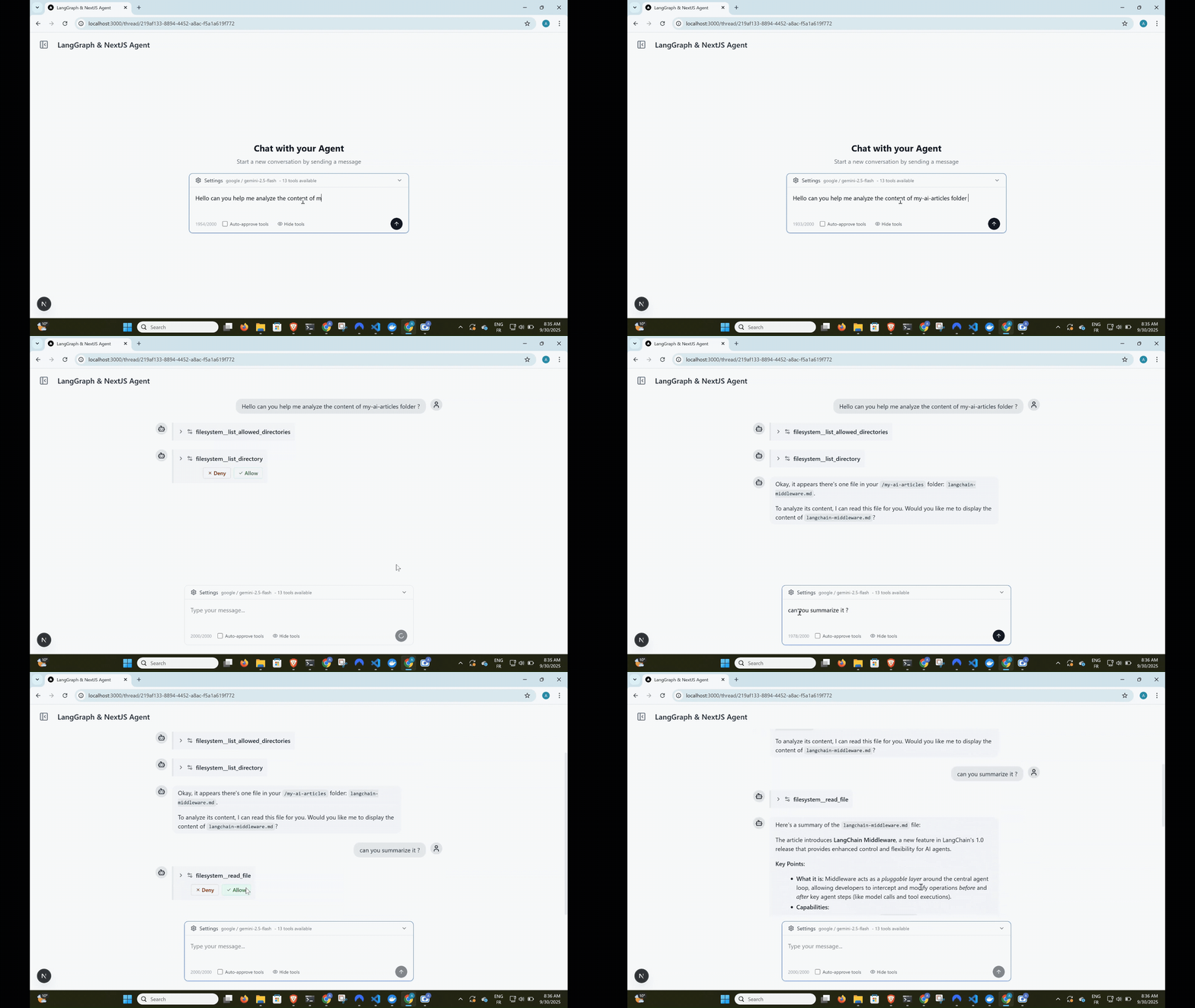
Complete agent workflow: user input → tool approval → execution → streaming response





Built with this template: Cameron
Cameron is a personal finance agent that started from this template and was built in public, one tagged release per article. If you want to see where this scaffold goes once it becomes a real agent — human-in-the-loop approval on every money-moving action, self-hosted data, a full LangGraph workflow — read its source as a worked example.
Need help taking this to production?
I help teams design and optimize LangGraph-based AI agents (RAG, memory, latency, architecture).
If you're building something serious on top of this template and want hands-on help:
Happy to jump on a short call.
Features
Dynamic Tool Loading with MCP
- Model Context Protocol integration for dynamic tool management
- Add tools via web UI - no code changes required
- Support for both stdio and HTTP MCP servers
- Tool name prefixing to prevent conflicts
Human-in-the-Loop Tool Approval
- Interactive tool call approval before execution
- Granular control with approve/deny/modify options
- Optional auto-approval mode for trusted environments
- Real-time streaming with tool execution pauses
Persistent Conversation Memory
- LangGraph checkpointer with PostgreSQL backend
- Full conversation history preservation
- Thread-based organization
- Seamless resume across sessions
Multimodal File Uploads
- Upload images, PDFs, and text files with messages
- S3-compatible storage (MinIO for development)
- Automatic file processing for AI consumption
- Production-ready with AWS S3, Cloudflare R2 support
Real-time Streaming Interface
- Server-Sent Events (SSE) for live responses
- Optimistic UI updates with React Query
- Type-safe message handling
- Error recovery and graceful degradation
Persistent Model Settings
- Provider and model selection saved to
localStorageautomatically - Settings survive page reloads and thread navigation
- No backend required — zero latency reads on startup
LLM Observability with Langfuse
- End-to-end tracing of agent runs, LLM calls, tool invocations, and token usage
- Works with Langfuse Cloud or a self-hosted instance
- Toggle via
LANGFUSE_ENABLEDenv var — zero overhead when disabled - See docs/OBSERVABILITY.md for setup instructions
Modern Tech Stack
- Frontend: Next.js 15, React 19, TypeScript, Tailwind CSS
- Backend: Node.js, Prisma ORM, PostgreSQL, MinIO/S3
- AI: LangGraph.js, OpenAI/Google/Anthropic models
- UI: shadcn/ui components, Lucide icons
Quick Start
Prerequisites
- Node.js 18+ and pnpm
- Docker (for PostgreSQL and MinIO)
- OpenAI API key, Google AI API key, or Anthropic API key
1. Clone and Install
git clone https://github.com/IBJunior/fullstack-langgraph-nextjs-agent.git
cd fullstack-langgraph-nextjs-agent
pnpm install
2. Environment Setup
cp .env.example .env.local
Edit .env.local with your configuration:
# Database
DATABASE_URL="postgresql://user:password@localhost:5434/agent_db"

# AI Models (choose one or more)
OPENAI_API_KEY="sk-..."
GOOGLE_API_KEY="..."
ANTHROPIC_API_KEY="sk-ant-..."

# Optional: Default model
DEFAULT_MODEL="gpt-4o-mini"  # or "gemini-1.5-flash" or "claude-sonnet-4-5"
3. Start Services
docker compose up -d # Starts PostgreSQL and MinIO
4. Database Setup
pnpm prisma:generate
pnpm prisma:migrate
5. Run Development Server
pnpm dev
# Or use custom port
pnpm dev --port=3005
Visit http://localhost:3000 to start chatting with your AI agent!
Screenshots
Usage Guide
Adding MCP Servers
- Navigate to Settings - Click the gear icon in the sidebar
- Add MCP Server - Click "Add MCP Server" button
- Configure Server:
- Name: Unique identifier (e.g., "filesystem")
- Type: Choose
stdioorhttp - Command: For stdio servers (e.g.,
npx @modelcontextprotocol/server-filesystem) - Args: Command arguments (e.g.,
["/path/to/allow"]) - URL: For HTTP servers
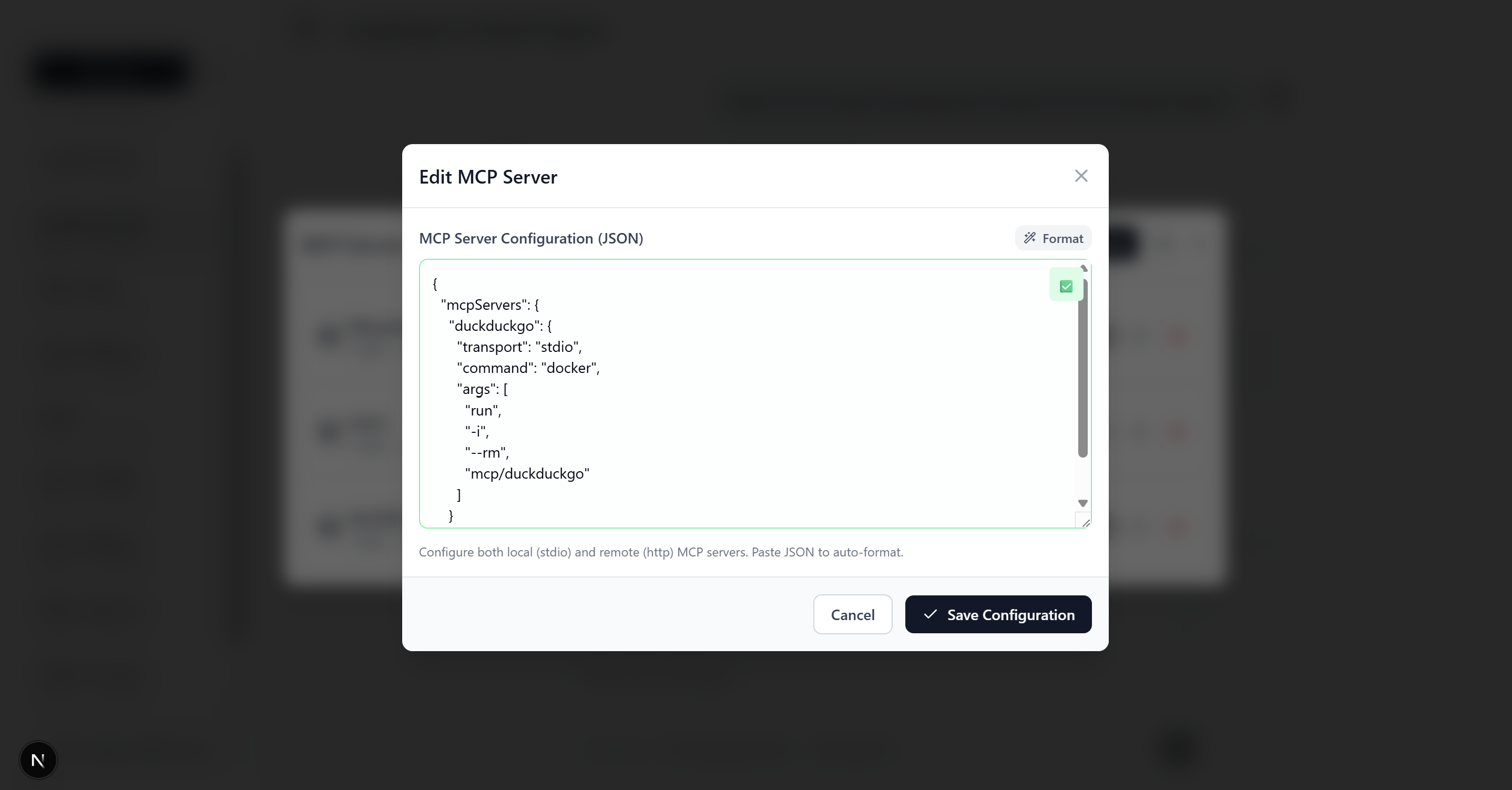 MCP server configuration form with example filesystem server setup
Want to build your own MCP server? Check out create-mcp-server - scaffold production-ready MCP servers in seconds with TypeScript, multiple frameworks (MCP SDK or FastMCP), and built-in debugging tools.
Example MCP Server Configurations
Filesystem Server (stdio)
{
  "name": "filesystem",
  "type": "stdio",
  "command": "npx",
  "args": ["@modelcontextprotocol/server-filesystem", "/Users/yourname/Documents"]
}
HTTP API Server
{
  "name": "web-api",
  "type": "http",
  "url": "http://localhost:8080/mcp",
  "headers": {
    "Authorization": "Bearer your-token"
  }
}
Note: Some HTTP MCP servers require OAuth 2.0 authentication. See OAuth Documentation for details.
Tool Approval Workflow
- Agent Requests Tool - AI suggests using a tool
- Approval Prompt - Interface shows tool details and asks for approval
- User Decision:
- ✅ Allow: Execute tool as requested
- ❌ Deny: Skip tool execution
- ✏️ Modify: Edit tool parameters before execution
- Continue Conversation - Agent responds with tool results
Architecture
High-Level Overview
┌─────────────────┐    ┌──────────────────┐    ┌─────────────────┐
│   Next.js UI   │◄──►│  Agent Service   │◄──►│  LangGraph.js   │
│   (React 19)   │    │  (SSE Streaming) │    │    Agent        │
└─────────────────┘    └──────────────────┘    └─────────────────┘
         │                       │                       │
         ▼                       ▼                       ▼
┌─────────────────┐    ┌──────────────────┐    ┌─────────────────┐
│   React Query   │    │     Prisma       │    │  MCP Clients    │
│   (State Mgmt)  │    │   (Database)     │    │   (Tools)       │
└─────────────────┘    └──────────────────┘    └─────────────────┘
                                │
                                ▼
                  ┌──────────────────────────────┐
                  │   PostgreSQL  │  MinIO/S3    │
                  │  (Persistence)│ (File Store) │
                  └──────────────────────────────┘
Core Components
Agent Builder (src/lib/agent/builder.ts)
- Creates StateGraph with agent→tool_approval→tools flow
- Handles tool approval interrupts
- Manages model binding and system prompts
MCP Integration (src/lib/agent/mcp.ts)
- Dynamic tool loading from database-stored MCP servers
- Support for stdio and HTTP transports
- Tool name prefixing for conflict prevention
Streaming Service (src/services/agentService.ts)
- Server-Sent Events for real-time responses
- Message processing and chunk aggregation
- Tool approval workflow handling
Chat Hook (src/hooks/useChatThread.ts)
- React Query integration for optimistic UI
- Stream management and error handling
- Tool approval user interface
File Storage (src/lib/storage/)
- S3-compatible storage with MinIO (development) or AWS S3 (production)
- File validation, upload, and content processing for AI
- Multimodal message building with base64 conversion
For detailed architecture documentation, see docs/ARCHITECTURE.md.
API Documentation
The app serves an interactive OpenAPI 3.1 explorer at /api-docs and the raw spec at
/api/openapi — generated from per-route Zod schemas. See docs/API.md for how
it works and how to document new routes.
Development
Available Scripts
pnpm dev                 # Start development server with Turbopack
pnpm build              # Production build
pnpm start              # Start production server
pnpm lint               # Run ESLint
pnpm format             # Format with Prettier
pnpm format:check       # Check formatting

# Database
pnpm prisma:generate    # Generate Prisma client (after schema changes)
pnpm prisma:migrate     # Create and apply migrations
pnpm prisma:studio      # Open Prisma Studio (database UI)
Agent Skills
This repo ships Agent Skills in .agents/skills/,
pinned by skills-lock.json. They give any skill-aware coding agent (Claude Code and friends) the
conventions for working on an agent codebase like this one:
| Skill | Use it when |
|---|---|
agent-prompt-engineering |
Writing or auditing the agent’s system prompt |
tool-design |
Adding or reviewing a tool / MCP server the agent calls |
agent-eval-cases |
Deciding what agent behavior deserves an eval case, and writing it |
Agent guidance for this repo lives in AGENTS.md (with CLAUDE.md pointing to it).
Project Structure
src/
├── app/                 # Next.js App Router
│   ├── api/            # API routes (stream, upload, mcp-servers)
│   └── thread/         # Thread-specific pages
├── components/         # React components
├── hooks/              # Custom React hooks
├── lib/                # Core utilities
│   ├── agent/          # Agent-related logic
│   └── storage/        # File upload & S3 utilities
├── services/           # Business logic
└── types/              # TypeScript definitions

prisma/
├── schema.prisma       # Database schema
└── migrations/         # Database migrations
Key Files
- Agent Configuration:
src/lib/agent/builder.ts,src/lib/agent/mcp.ts - API Endpoints:
src/app/api/agent/stream/route.ts,src/app/api/agent/upload/route.ts - File Storage:
src/lib/storage/(validation, upload, content processing) - Database Models:
prisma/schema.prisma - Main Chat Interface:
src/components/Thread.tsx,src/components/MessageInput.tsx - Streaming Logic:
src/hooks/useChatThread.ts
Contributing
We welcome contributions! This project is designed to be a community resource for LangGraph.js development.
Getting Started
- Fork the repository
- Create a feature branch:
git checkout -b feature/amazing-feature - Make your changes and add tests
- Commit:
git commit -m 'Add amazing feature' - Push:
git push origin feature/amazing-feature - Open a Pull Request
Development Guidelines
- Follow TypeScript strict mode
- Use Prettier for formatting
- Add JSDoc comments for public APIs
- Test MCP server integrations thoroughly
- Update documentation for new features
Learning Resources
LangGraph.js
Model Context Protocol (MCP)
Next.js & React
License
This project is licensed under the MIT License - see the LICENSE file for details.
Acknowledgments
- LangChain for the incredible AI framework
- Model Context Protocol for the tool integration standard
- Next.js team for the amazing React framework
Ready to build your next AI agent?
If this repo helped you and you’d like guidance implementing it in production, feel free to reach out on LinkedIn.
fullstack-langgraph-nextjs-agent MCPのよくある質問
エージェントはどのようなファイル形式を処理できますか?
エージェントは、画像、PDF、テキストファイルを含むマルチモーダルなファイルアップロードをサポートしています。