
Serveur MCP Screen Browser
Commit 13 nov. 2026Permet aux agents de codage d'enregistrer des vidéos de démonstration et des tutoriels narrés d'applications web en suivant des guides de parcours générés.
Aussi connu sous screenbrowser/skill, skill
- Étoiles
- 3
- Outils
- —
- Téléchargements, 30 jours
- —
- Dernière version
- 1.3.18
- Dernier commit
- 13 nov. 2026
- Licence
- MIT
Qu'est-ce que Screen Browser MCP ?
Screen Browser est un serveur MCP. Permet aux agents de codage d'enregistrer des vidéos de démonstration et des tutoriels narrés d'applications web en suivant des guides de parcours générés.
Résumé généré à partir du README du projet
À propos du MCP server Screen Browser
Screen Browser permet aux agents de codage de générer des tutoriels vidéo narrés et des démonstrations d'applications web. En lisant une base de code locale, un agent peut rédiger des guides de parcours qui utilisent le texte réel des boutons et des champs. Le serveur enregistre ensuite une session de navigateur réelle en suivant ces instructions sur une URL déployée, produisant un fichier MP4 complet avec sous-titres, chapitres et effets à l'écran.
Ce service fonctionne avec différents clients MCP, notamment Claude Code, Cursor, Codex et GitHub Copilot. Les utilisateurs peuvent s'authentifier via un flux OAuth basé sur le navigateur ou en fournissant une clé API en tant que bearer token. Le serveur est hébergé sur mcp.screenbrowser.com et gère des tâches telles que la création de projets, le téléchargement de guides, le lancement d'exécutions et la récupération de vidéos terminées. Il prend en charge l'enregistrement pour différents appareils comme l'iPhone, Android ou iPad avec divers ratios d'aspect.
Pour l'utiliser, vous devez fournir une URL déployée et un compte utilisateur de démonstration utilisant une authentification par e-mail et mot de passe. L'agent lit votre dépôt localement pour comprendre l'interface utilisateur, mais n'envoie que le texte du guide généré au serveur. Les vidéos sont limitées à une durée de cinq minutes.
Ce que vous pouvez faire avec
- 1Générer des tutoriels de fonctionnalitésDemandez à votre agent de codage de créer un parcours vidéo d'une nouvelle fonctionnalité spécifique de votre application.
- 2Automatiser la mise à jour de la documentationLorsque le code de votre application change, vous pouvez rapidement mettre à jour vos guides vidéo en modifiant une seule ligne.
- 3Valider les étapes du parcoursVérifiez gratuitement les instructions écrites d'un guide avant de vous lancer dans un enregistrement vidéo complet.
Extrait du README du projet. Chaque cas d'utilisation est vérifié par rapport à une citation du document.
Comment installer Screen Browser MCP
Formats vérifiés le 10 nov. 2026Ajouter à CursorAjouter à GooseInstaller Screen Browser MCP dans Claude Code
$ claude mcp add --transport http skill https://mcp.screenbrowser.com/Installer Screen Browser MCP dans Cursor
~/.cursor/mcp.json
{
  "mcpServers": {
    "skill": {
      "url": "https://mcp.screenbrowser.com/"
    }
  }
}Installer Screen Browser MCP dans VS Code
.vscode/mcp.json
{
  "servers": {
    "skill": {
      "type": "http",
      "url": "https://mcp.screenbrowser.com/"
    }
  }
}Installer Screen Browser MCP dans VS Code CLI
$ code --add-mcp '{"name":"skill","type":"http","url":"https://mcp.screenbrowser.com/"}'Installer Screen Browser MCP dans Codex
$ codex mcp add skill --url https://mcp.screenbrowser.com/Installer Screen Browser MCP dans Codex config.toml
~/.codex/config.toml
[mcp_servers.skill]
url = "https://mcp.screenbrowser.com/"
Installer Screen Browser MCP dans Gemini CLI
$ gemini mcp add -s user --transport http skill https://mcp.screenbrowser.com/Installer Screen Browser MCP dans Gemini settings.json
~/.gemini/settings.json
{
  "mcpServers": {
    "skill": {
      "url": "https://mcp.screenbrowser.com/",
      "type": "http"
    }
  }
}Vérifications automatisées
Exécuté le 14 nov. 2026Rapport complet →Pas encore vérifié. Un serveur nécessite un score de 80, aucune faille sérieuse et suffisamment de données pour que nous puissions effectuer les vérifications. Fonctionnement des vérifications · Ce qu'il faut corriger pour gagner des points

- Dépôt source lié et accessiblescreenbrowser/skill is public and reachablegithub.com/screenbrowser/skill ↗Réussi
- Le nom du package correspond au dépôt sourceNon vérifié
- Provenance du build (attestation Sigstore)Non vérifié
- Licence open source (OSI)MITspdx.org/licenses/MIT.html ↗Réussi
- Commit ou version publiée au cours de l'année écouléeLast commit or release 2026-11-13github.com/screenbrowser/skill ↗Réussi
- OpenSSF ScorecardNon vérifié
- Nom du package non proche d'un package populaireNon vérifié
- Aucun avis critique dans le package ou ses dépendancesNon vérifié
- Aucune instruction cachée destinée au modèle0 tool descriptions and the README read; no override phrases, credential paths or hidden charactersRéussi
- Les outils destructifs sont étiquetésNon vérifié
- Le point de terminaison distant répond à la poignée de main MCPHTTPS endpoint answered 401 (sign-in required)Réussi
README
Voir sur GitHubScreen Browser skill
Narrated demo and tutorial videos of your web app, from a guide or your coding agent.
Ask the agent that knows your codebase for a tutorial video of a feature. It writes the walkthrough in the words your buttons and fields use, Screen Browser records a real browser following it against your deployed app, narrates it, adds the on-screen effects, and the agent hands you the MP4 with a GIF, subtitles and chapters. When the app changes, edit a line and ask again.
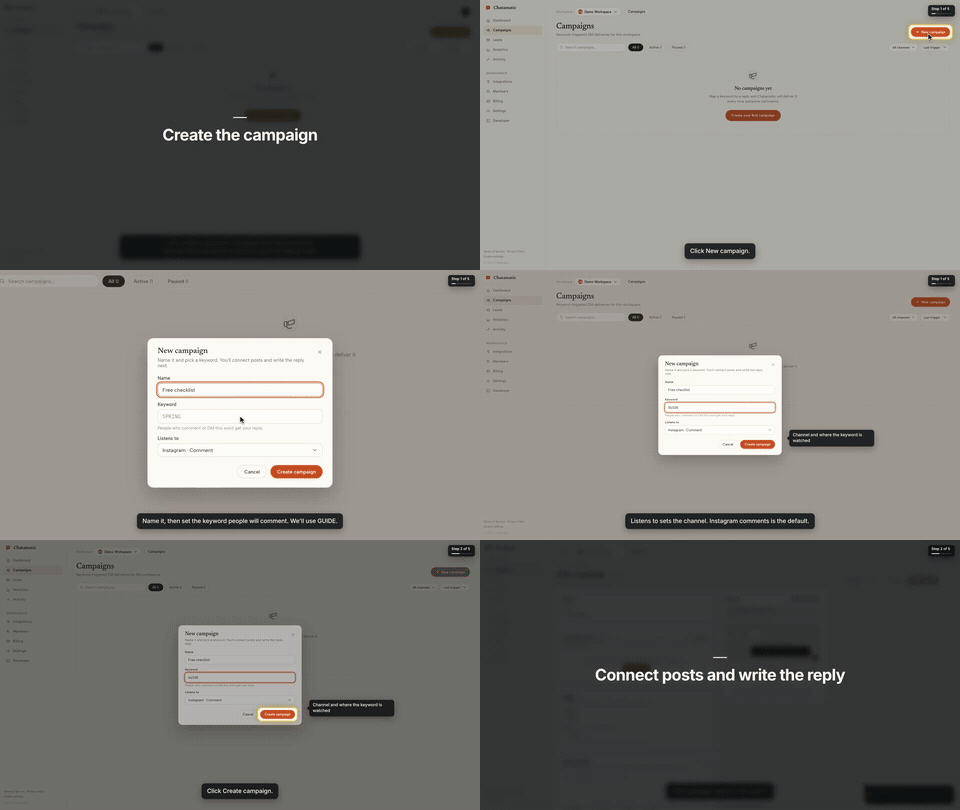
That is the first chapter of a 66-second video made from the request "make a tutorial video of creating a campaign". The whole session, from that sentence to the finished video with the exact prompt and every screen along the way, is in the Claude Code guide.
This repository gives your agent two things:
- The
screenbrowserskill — how to read your codebase and write the two guides Screen Browser needs (the login flow and the walkthrough), which effect fits which moment, how to check a guide for free before recording, and how to review the video before handing it over. - The MCP server configuration — the tools the agent calls: create the project, upload guides,
check them, start the run, poll it, fetch the video. The server itself is part of your Screen
Browser account at
https://mcp.screenbrowser.com.
Claude Code, Codex, Cursor or any MCP client can use it. Sign-in happens in the browser; there is no key to paste.
Install (Claude Code)
Add this repository as a plugin marketplace and install the plugin:
claude plugin marketplace add screenbrowser/skill
claude plugin install screenbrowser@screenbrowser
The first time the agent reaches for a Screen Browser tool, Claude Code opens your browser: sign in
to Screen Browser, approve the connection, and you are done. Nothing to copy. (If it does not
prompt, run /mcp and pick screenbrowser → Authenticate.)
Without the plugin system, register the server yourself and copy the skill:
claude mcp add --transport http screenbrowser https://mcp.screenbrowser.com
cp -r skills/screenbrowser ~/.claude/skills/
With an API key instead
If your agent cannot open a browser to sign in, create a key under Settings → API keys in Screen Browser and pass it as a bearer token:
claude mcp add --transport http screenbrowser https://mcp.screenbrowser.com \
  --header "Authorization: Bearer <your API key>"
Any MCP client works the same way: Streamable HTTP at https://mcp.screenbrowser.com, OAuth 2.1 with
dynamic client registration for interactive sign-in, or Authorization: Bearer <key>.
Other agents
The skill is a plain SKILL.md in the open Agent Skills format, and the server is standard MCP over
HTTP, so the same two pieces work outside Claude Code.
Cursor, VS Code, GitHub Copilot and other Agent Plugins clients — this repository is also an
Agent Plugins package (plugin.json, mcp.json, skills/), so
install it as a plugin from the repository URL and sign in when the client offers. Cursor without
the plugin: add the server to .cursor/mcp.json (or the global one in Cursor settings), click
Sign in next to it, and copy the skill into .cursor/skills/:
{
  "mcpServers": {
    "screenbrowser": { "url": "https://mcp.screenbrowser.com" }
  }
}
mkdir -p .cursor/skills && cp -r skills/screenbrowser .cursor/skills/
OpenAI Codex CLI — add the server to ~/.codex/config.toml, sign in once, and copy the skill
into Codex's skills folder:
[mcp_servers.screenbrowser]
url = "https://mcp.screenbrowser.com"
codex mcp login screenbrowser
mkdir -p ~/.codex/skills && cp -r skills/screenbrowser ~/.codex/skills/
Anything else (Gemini CLI, Windsurf, a custom agent) — register an HTTP MCP server with the URL
the way that tool documents it; a client that supports OAuth will sign you in, one that does not
takes the API key as an Authorization: Bearer header. Give the agent skills/screenbrowser/SKILL.md
as instructions (paste it, or point the tool's rules file at it). The MCP server itself also carries
the guide syntax as a resource and a write-tutorial-guide prompt, so a client with MCP prompts can
work without the skill file at all.
Use
Videos can be recorded on the desktop or as a phone or tablet (device: iphone, android, ipad,
…), in a phone frame on a vertical 9:16 or widescreen 16:9 canvas or as the bare screen; one run is
one device.
Open your app's repository in Claude Code and ask:
Make a tutorial video of creating a campaign.
The agent will check credits, create the project (it will ask you for the deployed URL, a demo user, and the legal attestation), write the guides from your routes and templates, validate them, show them to you, start the run, and give you the video link a few minutes later.
The MCP server also ships a get_guide_instructions tool with the same writing rules, for clients
without this skill, a write-tutorial-guide prompt that walks any client through the same flow, and
two resources: screenbrowser://guide-syntax and screenbrowser://example-guides.
What your app needs
- A demo user that signs in with email and password: no OAuth, no 2FA, no captcha. Seed it with realistic data.
- The deployed URL to record (staging is fine) and every host the app talks to (API subdomain, auth provider, CDN). An app that only runs on your computer works through a tunnel: ngrok or Cloudflare Tunnel (how).
- Confirmation that you are allowed to record the app (yours, a client's with permission, or an internal tool).
What it sends, and where
Everything the plugin does goes to one place: the Screen Browser MCP server at
https://mcp.screenbrowser.com, over HTTPS, signed in with your Screen Browser account. The
skill itself is instructions for the agent; it runs nothing on your machine and fetches nothing.
What the agent sends to Screen Browser when you ask for a video:
- the project's settings: your app's URL, the hosts it talks to, the sign-in check, narration language and voice;
- the guides it writes from your code: plain sentences naming buttons and fields as they appear on screen. Read them before they are saved; the agent shows them to you;
- the demo user's credentials, as project variables. Screen Browser stores them encrypted, uses them only to sign in during a recording, and never returns them through any tool. Values you give the agent pass through its conversation; to keep them out of chat, set them on the project's page in the Screen Browser dashboard instead;
- run commands: start, poll, cancel, and, only if you agree, a failure report with the recorder's screenshot and logs of a run that failed on Screen Browser's side.
It never sends your source code. The agent reads your repository locally to learn the labels; only the guide text leaves the machine. Nothing is sent to any other service. What Screen Browser keeps, and for how long, is in the privacy policy.
What it costs
Plans start at $49 a month, sized in minutes of finished video. Checking a guide before recording is free, and a run that fails is not charged. Videos are capped at five minutes. There is no free plan, but the first 100 accounts get 10 free minutes with no card. Current prices are on the pricing page.
Layout
plugin.json                        Agent Plugins manifest (Cursor, VS Code, Copilot, …)
mcp.json                           Agent Plugins MCP config (the URL; sign-in is OAuth)
.claude-plugin/plugin.json         Claude Code plugin manifest
.claude-plugin/marketplace.json    lets this repo act as its own Claude Code marketplace
.mcp.json                          Claude Code MCP server config
skills/screenbrowser/SKILL.md      the skill
skills/screenbrowser/references/   guide syntax reference, worked example
examples/chatamatic/               a real auth guide + main guide pair
What a guide looks like
Plain language, one step per line, naming things as they appear on screen. Screen Browser turns it into the script — the narration, the highlights, the pacing — and resolves each step against the live page:
Go to https://app.acme.test/campaigns
"Let's create a spring promotion."
Click "New campaign"
Type "Spring promo" into the Name field
Click "Save"
Confirm text "Campaign created" is visible
Ids and name= attributes are allowed when a step needs precision; class names generated by a build
tool are refused. The full reference, including the optional effect directives, is in
skills/screenbrowser/references/guide-syntax.md.
Documentation index for AI agents
The skill carries everything an agent needs to write a guide and run a recording. For anything else — prerequisites, costs, limitations, the API — https://screenbrowser.com/llms.txt is a Markdown index of the public documentation, and https://screenbrowser.com/docs/agents/ is the reference for this integration.
Support
Issues and ideas about the skill are welcome in this repository. Anything about your account or a particular recording: use the contact form at https://screenbrowser.com/contact/.
License
MIT. Screen Browser itself is a hosted service; this repository contains only the agent-facing skill, configuration and examples.
Questions sur Screen Browser MCP
Comment ajouter Screen Browser MCP à Claude Code ?
Exécutez claude mcp add --transport http skill https://mcp.screenbrowser.com/ dans votre terminal. Ajoutez --scope user pour le rendre disponible dans tous les projets.
Comment ajouter Screen Browser MCP à Cursor ?
Ouvrez ~/.cursor/mcp.json et ajoutez le serveur sous mcpServers, avec la configuration Cursor indiquée dans la section d'installation ci-dessus.
Est-ce que le serveur envoie mon code source à Screen Browser ?
Non, l'agent lit votre dépôt localement pour apprendre les labels, mais il n'envoie jamais votre code source au service.
Quelles sont les exigences pour mon application web ?
Votre application nécessite un utilisateur de démonstration avec une connexion par e-mail/mot de passe (pas de 2FA ni de captcha), une URL déployée, et tous les hôtes associés (API, auth, CDN) doivent être accessibles.
Existe-t-il un forfait gratuit ?
Il n'y a pas de forfait gratuit permanent, mais les 100 premiers comptes reçoivent 10 minutes gratuites, et la vérification d'un guide avant l'enregistrement est gratuite.