
Garantit le respect du périmètre d'intervention lors de tests d'intrusion effectués par des agents IA en validant les appels d'outils MCP par rapport aux cibles, techniques et créneaux horaires approuvés.
Aussi connu sous IntegSec/agentic-pentest-proxy, @integsec/agentic-pentest-proxy
- Étoiles
- 9
- Outils
- —
- Téléchargements, 30 jours
- 6 447
- Dernière version
- —
- Dernier commit
- 10 nov. 2026
- Licence
- Apache-2.0
Qu'est-ce que agentic-pentest-proxy MCP ?
agentic-pentest-proxy est un serveur MCP. Garantit le respect du périmètre d'intervention lors de tests d'intrusion effectués par des agents IA en validant les appels d'outils MCP par rapport aux cibles, techniques et créneaux horaires approuvés.
Résumé généré à partir du README du projet
À propos du MCP server agentic-pentest-proxy
Ce proxy MCP fait office de passerelle de sécurité pour les missions de tests d'intrusion impliquant des agents IA. Il s'interpose entre un client MCP, tel que Claude Desktop ou Claude Code, et vos outils existants pour garantir que chaque appel d'outil respecte un manifeste de périmètre prédéfini. En validant les arguments par rapport aux cibles approuvées, aux techniques spécifiques et aux créneaux horaires autorisés, le proxy empêche les agents d'effectuer des actions non autorisées pendant un test.
Les développeurs peuvent déployer cette solution via Node.js 22 ou une version ultérieure avec npm, Docker ou des images GHCR. Le système prend en charge différents types de connexion, notamment stdio pour les commandes locales, SSE pour les flux amont comme Burp Suite, et les services HTTP. Il inclut une passerelle gérée avec une interface utilisateur web pour l'administration d'équipe, ainsi qu'un workbench MCP permettant aux utilisateurs d'intercepter, de modifier ou de rejeter des requêtes en temps réel. Toutes les décisions sont enregistrées dans un journal d'audit local, consultable via une interface utilisateur en ligne de commande dédiée.
Ce que vous pouvez faire avec
- 1Appliquer les limites d'interventionEmpêcher un agent IA d'attaquer des cibles ou d'utiliser des techniques qui sortent du périmètre approuvé du test d'intrusion.
- 2Inspecter et modifier les requêtes manuellementUtiliser un workbench pour intercepter les appels d'outils et modifier leurs arguments avant qu'ils n'atteignent le MCP server amont.
Extrait du README du projet. Chaque cas d'utilisation est vérifié par rapport à une citation du document.
Comment installer agentic-pentest-proxy MCP
Formats vérifiés le 10 nov. 2026Ajouter à CursorAjouter à GooseInstaller agentic-pentest-proxy MCP dans Claude Code
$ claude mcp add agentic-pentest-proxy -- npx -y @integsec/agentic-pentest-proxyInstaller agentic-pentest-proxy MCP dans Cursor
~/.cursor/mcp.json
{
  "mcpServers": {
    "agentic-pentest-proxy": {
      "command": "npx",
      "args": [
        "-y",
        "@integsec/agentic-pentest-proxy"
      ]
    }
  }
}Installer agentic-pentest-proxy MCP dans VS Code
.vscode/mcp.json
{
  "servers": {
    "agentic-pentest-proxy": {
      "type": "stdio",
      "command": "npx",
      "args": [
        "-y",
        "@integsec/agentic-pentest-proxy"
      ]
    }
  }
}Installer agentic-pentest-proxy MCP dans VS Code CLI
$ code --add-mcp '{"name":"agentic-pentest-proxy","type":"stdio","command":"npx","args":["-y","@integsec/agentic-pentest-proxy"]}'Installer agentic-pentest-proxy MCP dans Claude Desktop
claude_desktop_config.json
{
  "mcpServers": {
    "agentic-pentest-proxy": {
      "command": "npx",
      "args": [
        "-y",
        "@integsec/agentic-pentest-proxy"
      ]
    }
  }
}Installer agentic-pentest-proxy MCP dans Codex
$ codex mcp add agentic-pentest-proxy -- npx -y @integsec/agentic-pentest-proxyInstaller agentic-pentest-proxy MCP dans Codex config.toml
~/.codex/config.toml
[mcp_servers.agentic-pentest-proxy]
command = "npx"
args = ["-y", "@integsec/agentic-pentest-proxy"]
Installer agentic-pentest-proxy MCP dans Gemini CLI
$ gemini mcp add -s user agentic-pentest-proxy npx -- -y @integsec/agentic-pentest-proxyInstaller agentic-pentest-proxy MCP dans Gemini settings.json
~/.gemini/settings.json
{
  "mcpServers": {
    "agentic-pentest-proxy": {
      "command": "npx",
      "args": [
        "-y",
        "@integsec/agentic-pentest-proxy"
      ]
    }
  }
}Configuration
AUDIT_LOG_PATHMCP_TRANSPORTSCOPE_MANIFEST_PATHUPSTREAM_MCP_ARGS_JSONUPSTREAM_MCP_COMMAND
| Nom | Description | Type |
|---|---|---|
| AUDIT_LOG_PATH | — | |
| MCP_TRANSPORT | — | |
| SCOPE_MANIFEST_PATH | — | |
| UPSTREAM_MCP_ARGS_JSON | — | |
| UPSTREAM_MCP_COMMAND | — |
Vérifications automatisées
Exécuté le 13 nov. 2026Rapport complet →A passé nos vérifications automatisées. Il ne s'agit pas d'un audit de sécurité : lisez le code et donnez au serveur l'accès le plus restreint dont il a besoin. Fonctionnement des vérifications

- Dépôt source lié et accessibleintegsec/agentic-pentest-proxy is public and reachablegithub.com/integsec/agentic-pentest-proxy ↗Réussi
- Le nom du package correspond au dépôt source@integsec/agentic-pentest-proxy names integsec/agentic-pentest-proxy as sourcenpmjs.com/package/@integsec/agentic-pentest-proxy ↗Réussi
- Provenance du build (attestation Sigstore)Sigstore attestation for @integsec/agentic-pentest-proxynpmjs.com/package/@integsec/agentic-pentest-proxy/v/0.4.12#p ↗Réussi
- Licence open source (OSI)Apache-2.0spdx.org/licenses/Apache-2.0.html ↗Réussi
- Commit ou version publiée au cours de l'année écouléeLast commit or release 2026-11-10github.com/integsec/agentic-pentest-proxy ↗Réussi
- OpenSSF ScorecardNon vérifié
- Nom du package non proche d'un package populaireNo popular package one edit away from @integsec/agentic-pentest-proxyRéussi
- Aucun avis critique dans le package ou ses dépendancesNon vérifié
- Aucune instruction cachée destinée au modèle0 tool descriptions and the README read; no override phrases, credential paths or hidden charactersRéussi
- Les outils destructifs sont étiquetésNon vérifié
- Le point de terminaison distant répond à la poignée de main MCPNon vérifié
README
Voir sur GitHubAgentic Pentesting MCP Gateway
New to the gateway? The documentation site shows the local and hosted paths side by side, including where test traffic comes from. The full guides below are also available there after team sign-in.
An MCP proxy that checks tool calls against a pentest scope manifest before forwarding them to your MCP tools. It blocks calls it can identify as outside the targets, techniques, or time window you approved, and records decisions in a local audit log.
Requires Node.js 22 or newer. The proxy supports stdio tools, SSE upstreams such as Burp Suite, and HTTP upstreams.
Managing several tools? The managed gateway adds a browser UI with local MCP server presets, scope templates and technique checkboxes, JSON policy import and download, administrator approval and assignment, and a separate engagement choice for each user. It exposes scoped tools, an active engagement resource, PlexTrac reference resources, a TurboPentest knowledge-base catalog with search and controlled live reads, and guided pentest prompts. It supports one hosted MCP URL for ChatGPT and Claude and a local Burp route.
The MCP workbench shows your live tool calls and background jobs. Intercept requests, edit arguments before forwarding, or drop a call. Long calls return a job ID that you can inspect or cancel without waiting for one MCP request to stay open. The gateway checks scope again after any edit.
To keep the local gateway running after sign-in, use pentest-gateway service install; use pentest-gateway service remove to undo it. It binds to loopback only. See the local startup guide. The gateway cannot prevent an agent with a separate shell or network path from bypassing MCP checks; see the secure deployment guide.
Quick start: add an MCP tool
-
Install the proxy:
npm install -g @integsec/agentic-pentest-proxy -
Create a scope manifest with the guided wizard:
pentest-manifest new -o scope.jsonSet the real engagement targets and time window. Review the generated file with the engagement owner before using it.
-
Generate a client entry for each MCP tool. Put the tool's normal launch command after
--:pentest-setup --name scanner-scoped --manifest ./scope.json -- npx -y @example/scanner-mcpReplace
npx -y @example/scanner-mcpwith the command from your tool's own setup instructions. The command prints anmcpServersentry. Paste that entry into your MCP client's configuration and restart the client. To add another tool, run setup again with a new--name, then add its entry under the samemcpServersobject.For example, the generated entry has this shape (the setup command fills in your actual manifest and audit paths):
{
  "mcpServers": {
    "scanner-scoped": {
      "command": "pentest-proxy",
      "env": {
        "SCOPE_MANIFEST_PATH": "/path/to/scope.json",
        "MCP_TRANSPORT": "stdio",
        "AUDIT_LOG_PATH": "/path/to/audit",
        "UPSTREAM_MCP_COMMAND": "npx",
        "UPSTREAM_MCP_ARGS_JSON": "[\"-y\",\"@example/scanner-mcp\"]"
      }
    }
  }
}
Use the
mcpServersblock in Claude Desktop's MCP configuration or in your Claude Code project's.mcp.json. Other MCP clients may label the server settings differently; use the generated command and environment variables in their equivalent fields. The proxy starts when the client launches the tool. -
Watch decisions in another terminal:
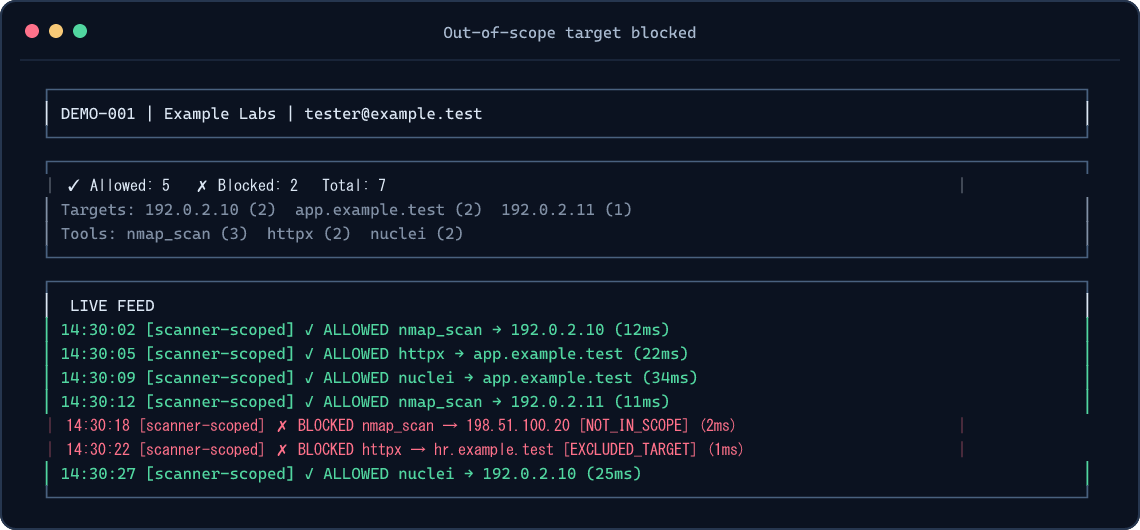
pentest-tui --audit-path ./auditSetup prints the exact audit path to use. If your shell is in another directory, use that printed path. For a one-off TUI without a global install:
npm exec --yes --package=@integsec/agentic-pentest-proxy -- pentest-tui --audit-path ./auditThe TUI reads local audit files; it does not start the proxy. See TUI screenshots.
Other MCP tool types
| Tool connection | What to do |
|---|---|
| stdio tool launched by a command | Use the setup command above with -- <command> [args...]. |
| SSE upstream already listening, such as Burp Suite | Use pentest-setup --name burp-scoped --manifest ./scope.json --sse http://127.0.0.1:9876. |
| HTTP upstream | Run the proxy as an HTTP service and point your MCP client at it. HTTP and Docker guide. |
Use one generated client entry per upstream tool. A single scope manifest can be shared by several entries; each call still gets checked. More client examples.
What gets checked
The proxy checks MCP tools/call arguments it can inspect. It blocks unknown target-bearing arguments, out-of-scope targets, explicit exclusions, restricted techniques, expired engagement windows, and free-form commands by default. DNS names authorized through IP ranges must resolve entirely inside the allowed ranges. Local JSONL auditing is always on; cloud logging is optional.
The proxy cannot control destinations selected inside an upstream tool, HTTP redirects, targets read from files or encoded payloads, DNS changes after validation, or traffic that bypasses MCP. Use network egress controls and review each upstream tool's schema before relying on the proxy for an engagement. Security model.
Install and release options
| Option | Command or image |
|---|---|
| Global npm install | npm install -g @integsec/agentic-pentest-proxy |
| Project install | npm install @integsec/agentic-pentest-proxy |
| GHCR image | ghcr.io/integsec/agentic-pentest-proxy:latest |
| Docker Hub image | integsec/agentic-pentest-mcp-proxy:latest |
The npm package includes the gateway, proxy, manifest builder, setup helper, TUI, bridge, and scanner adapter. Run pentest-gateway version or pentest-gateway --version to check the installed release. The older integsec- command names still work for existing client configurations. To see the optional install welcome banner, add --foreground-scripts; npm hides package install-script output by default. You can always run pentest-gateway --help for the same next steps. The welcome script does not access the network or modify files.
Google Cloud logging and Secret Manager SDKs are opt-in to keep the default install lean and free of their deprecated transitive package. If you use either GCP backend, install the SDKs alongside the proxy:
npm install -g @integsec/agentic-pentest-proxy @google-cloud/logging @google-cloud/secret-manager
AWS and Azure SDKs are included as optional dependencies. See configuration and cloud setup for the required environment variables and Docker notes. If you use GCP and are upgrading from 0.2.6, install the GCP SDKs before restarting the proxy; it now reports a missing Cloud Logging SDK at startup.
Troubleshooting
| Symptom | Check |
|---|---|
| Tool does not appear in your MCP client | Paste the generated entry inside one mcpServers object, restart the client, and confirm the client can run pentest-proxy. |
| TUI shows no decisions | Start a tool call, then use the exact audit path printed by setup. The TUI and client may have different working directories. |
| Call is blocked | Check the decision and reason in the TUI or audit JSONL. Confirm the target, exclusions, technique, and window in your manifest. |
| GCP backend says its SDK is missing | Install the two GCP packages shown above alongside the proxy. |
| Need all CLI options | Run pentest-gateway --help, pentest-proxy --help, pentest-setup --help, pentest-manifest --help, or pentest-tui --help. |
Reference
- Configuration and manifest fields
- Client integrations, HTTP, and Docker
- TUI usage and screenshots
- Security model and limitations
- Contributing and development
License
Apache-2.0. See LICENSE.
Questions sur agentic-pentest-proxy MCP
Comment ajouter agentic-pentest-proxy MCP à Claude Code ?
Exécutez claude mcp add agentic-pentest-proxy -- npx -y @integsec/agentic-pentest-proxy dans votre terminal. Ajoutez --scope user pour le rendre disponible dans tous les projets.
Comment ajouter agentic-pentest-proxy MCP à Cursor ?
Ouvrez ~/.cursor/mcp.json et ajoutez le serveur sous mcpServers, avec la configuration Cursor indiquée dans la section d'installation ci-dessus.
Que vérifie réellement le proxy ?
Il inspecte les arguments des appels d'outils MCP pour bloquer les arguments contenant des cibles inconnues, les cibles hors périmètre, les techniques restreintes et les fenêtres d'intervention expirées.
Le proxy peut-il empêcher un agent de contourner les vérifications via un shell séparé ?
Non, la passerelle ne peut pas empêcher un agent disposant d'un shell ou d'un chemin réseau distinct de contourner les contrôles MCP.
Quels types de connexions d'outils MCP sont pris en charge ?
Le proxy prend en charge les outils stdio, les flux SSE (comme Burp Suite) et les flux HTTP.