
Déployez des sites statiques et des fichiers sur des URL HTTPS actives directement depuis un agent IA, sans dépôts ni étapes de build.
Aussi connu sous hostsmith/mcp-server, @hostsmith/mcp-server
- Étoiles
- 0
- Outils
- 16
- Téléchargements, 30 jours
- 1 637
- Dernière version
- 1.8.0
- Dernier commit
- 14 nov. 2026
- Licence
- MIT
Qu'est-ce que Hostsmith MCP ?
Hostsmith est un serveur MCP. Déployez des sites statiques et des fichiers sur des URL HTTPS actives directement depuis un agent IA, sans dépôts ni étapes de build. Il expose 16 outils, comme list_sites, get_site, create_site.
Résumé généré à partir du README du projet
À propos du MCP server Hostsmith
Ce serveur permet de déployer des sites web statiques et des fichiers sur des URL HTTPS actives directement depuis un agent IA. Il permet aux développeurs de transformer des fichiers générés en pages web publiques en quelques secondes, sans avoir à gérer de dépôts, de configurations de build ou de pipelines CI.
Les utilisateurs peuvent se connecter via Claude Desktop, Claude.ai, Cursor, ou via stdio pour des outils comme Claude Code et Windsurf. L'authentification est gérée via OAuth 2.0, nécessitant un flux d'autorisation par navigateur plutôt que des jetons statiques. Le serveur prend en charge l'installation locale via npx ainsi que les connexions à distance via une URL hébergée. Il offre un contrôle granulaire sur la gestion des sites, incluant des outils pour créer, supprimer et lister des sites, ainsi que pour gérer les redirections et les déploiements de fichiers. Les utilisateurs peuvent également choisir entre une résidence des données aux États-Unis ou en UE pour répondre à des exigences architecturales spécifiques.
Ce que vous pouvez faire avec
- 1Publication de démos web généréesUn agent IA peut prendre un fichier HTML généré et l'héberger sur une URL active pour un aperçu immédiat.
- 2Déploiement instantané de rapports HTMLLes développeurs peuvent utiliser Claude Code pour envoyer des rapports de données directement vers une adresse HTTPS publique.
- 3Gestion des règles de redirection de siteVous pouvez demander à un agent d'ajouter, de mettre à jour ou de supprimer des règles de redirection d'URL spécifiques pour vos domaines personnalisés.
- 4Gestion des uploads binaires volumineuxLe serveur propose des outils spécifiques pour gérer les uploads directs de fichiers volumineux ou de binaires.
Extrait du README du projet. Chaque cas d'utilisation est vérifié par rapport à une citation du document.
Comment installer Hostsmith MCP
Formats vérifiés le 10 nov. 2026Ajouter à CursorAjouter à GooseInstaller Hostsmith MCP dans Claude Code
$ claude mcp add mcp-server -- npx -y @hostsmith/mcp-serverInstaller Hostsmith MCP dans Cursor
~/.cursor/mcp.json
{
  "mcpServers": {
    "mcp-server": {
      "command": "npx",
      "args": [
        "-y",
        "@hostsmith/mcp-server"
      ]
    }
  }
}Installer Hostsmith MCP dans VS Code
.vscode/mcp.json
{
  "servers": {
    "mcp-server": {
      "type": "stdio",
      "command": "npx",
      "args": [
        "-y",
        "@hostsmith/mcp-server"
      ]
    }
  }
}Installer Hostsmith MCP dans VS Code CLI
$ code --add-mcp '{"name":"mcp-server","type":"stdio","command":"npx","args":["-y","@hostsmith/mcp-server"]}'Installer Hostsmith MCP dans Claude Desktop
claude_desktop_config.json
{
  "mcpServers": {
    "mcp-server": {
      "command": "npx",
      "args": [
        "-y",
        "@hostsmith/mcp-server"
      ]
    }
  }
}Installer Hostsmith MCP dans Codex
$ codex mcp add mcp-server -- npx -y @hostsmith/mcp-serverInstaller Hostsmith MCP dans Codex config.toml
~/.codex/config.toml
[mcp_servers.mcp-server]
command = "npx"
args = ["-y", "@hostsmith/mcp-server"]
Installer Hostsmith MCP dans Gemini CLI
$ gemini mcp add -s user mcp-server npx -- -y @hostsmith/mcp-serverInstaller Hostsmith MCP dans Gemini settings.json
~/.gemini/settings.json
{
  "mcpServers": {
    "mcp-server": {
      "command": "npx",
      "args": [
        "-y",
        "@hostsmith/mcp-server"
      ]
    }
  }
}Outils MCP Hostsmith 16
Détectés depuis le READMElist_sitesget_sitecreate_sitedelete_sitelist_domainsget_accountdeploy_filesdeploy_create_uploaddeploy_finalizelist_redirectsset_redirectsedit_redirects
| list_sites | — | |
| get_site | — | |
| create_site | — | |
| delete_site | — | |
| list_domains | — | |
| get_account | — | |
| deploy_files | — | |
| deploy_create_upload | — | |
| deploy_finalize | — | |
| list_redirects | — | |
| set_redirects | — | |
| edit_redirects | — |
Afficher les 16 outilsAfficher moins d'outils
add_redirectdelete_redirectswitch_file_redirectstest_redirect
| add_redirect | — | |
| delete_redirect | — | |
| switch_file_redirects | — | |
| test_redirect | — |
Configuration
HOSTSMITH_API_DOMAINOverride the upstream API domain across both partitions; 'us.api.' and 'eu.api.' are prepended to this value.
HOSTSMITH_BASE_URLOverride the API base URL with a single fixed value, bypassing partition selection entirely.
HOSTSMITH_URLHostsmith app URL (OAuth endpoints).
| Nom | Description | Type |
|---|---|---|
| HOSTSMITH_API_DOMAIN | Override the upstream API domain across both partitions; 'us.api.' and 'eu.api.' are prepended to this value. | |
| HOSTSMITH_BASE_URL | Override the API base URL with a single fixed value, bypassing partition selection entirely. | |
| HOSTSMITH_URL | Hostsmith app URL (OAuth endpoints). |
Vérifications automatisées
Exécuté le 13 nov. 2026Rapport complet →A passé nos vérifications automatisées. Il ne s'agit pas d'un audit de sécurité : lisez le code et donnez au serveur l'accès le plus restreint dont il a besoin. Fonctionnement des vérifications

- Dépôt source lié et accessibleRéussi
- Licence open source (OSI)Réussi
- Commit ou version publiée au cours de l'année écouléeRéussi
- Nom du package non proche d'un package populaireRéussi
- L'endpoint distant utilise HTTPSRéussi
- Les outils destructifs sont étiquetésNon vérifié
- Aucune instruction cachée destinée au modèleRéussi
- Aucun avis critique dans le package ou ses dépendancesRéussi
README
Voir sur GitHub@hostsmith/mcp-server



Official Model Context Protocol server for the Hostsmith hosting platform.
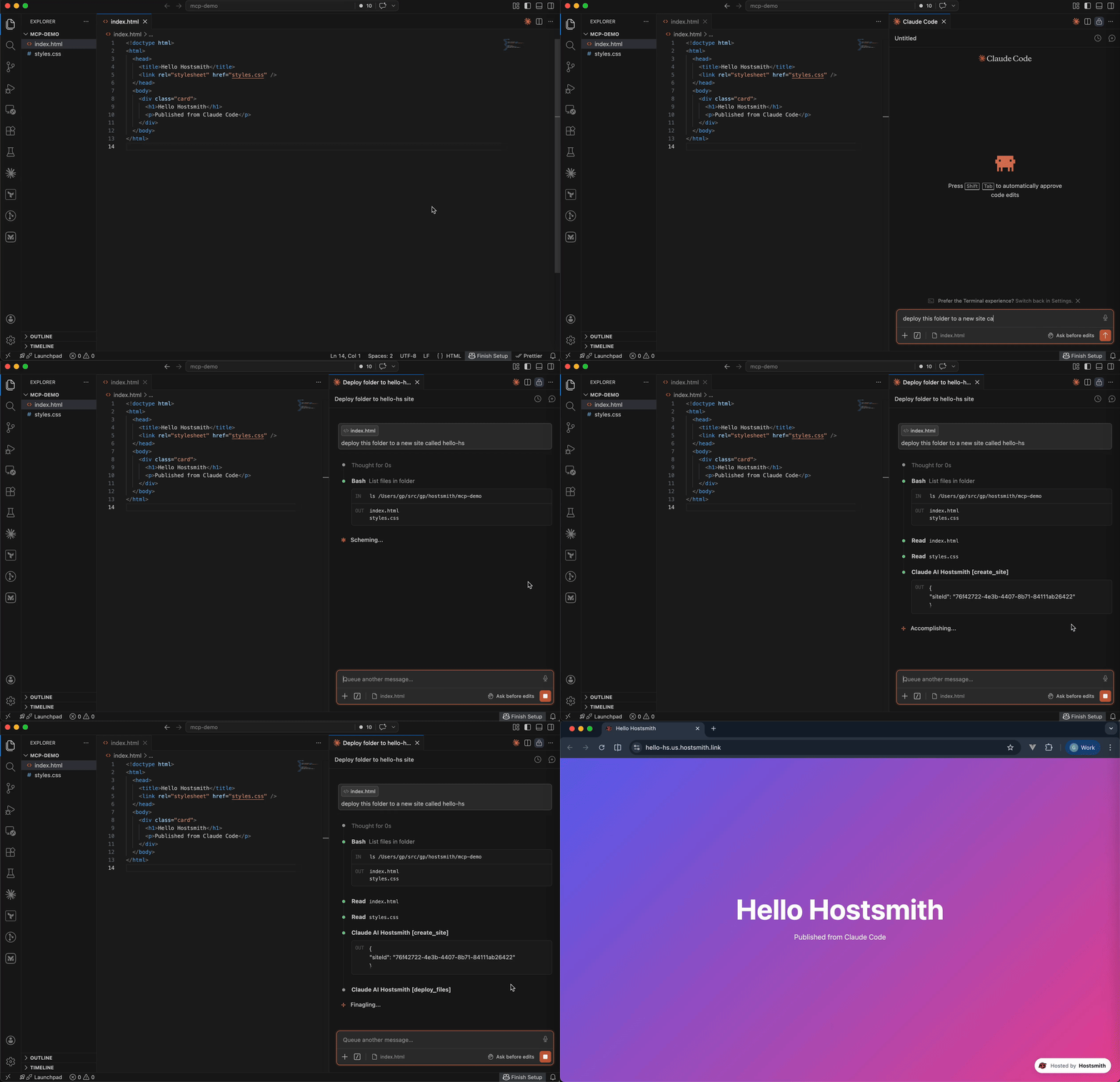
Static hosting for agents - give it a file, get a live URL. Claude Code shipping an HTML report. Cursor previewing a generated demo. Claude publishing a one-pager from claude.ai or Desktop. One MCP call → public HTTPS URL in seconds. No repo, no CI, no build step. Custom domains, private sites, EU or US data residency.
Why Hostsmith
- Artifact-first. No repo, no build config - drop a file (or have the agent generate one), get a URL.
- Built for agents. MCP-native, OAuth-scoped, structured tool descriptions agents can chain.
- EU or US data residency. Pick where the user's data lives, architecturally - not via a checkbox.
Tools
| Tool | Description |
|---|---|
list_sites |
List all sites in your account for a given data partition |
get_site |
Get details of a specific site |
create_site |
Create a new site, or a redirect host |
delete_site |
Delete a site |
list_domains |
List available domains (shared and custom) |
get_account |
Get account info, subscription plan, and usage |
deploy_files |
Deploy inline file contents to a site |
deploy_create_upload |
Start a direct upload for binaries / large files |
deploy_finalize |
Commit a deploy started with deploy_create_upload |
list_redirects |
List a site's redirect rules, in the order they are checked |
set_redirects |
Replace a site's user redirect rules, from rules or _redirects text |
edit_redirects |
Add, update and delete user redirect rules in one batch |
add_redirect |
Add one user redirect rule |
delete_redirect |
Delete one user redirect rule |
switch_file_redirects |
Switch the live deploy's _redirects rules off or back on |
test_redirect |
Test a path against the live or draft redirect rules |
Redirects apply only on your organization's own custom domains. User rules, kept on the hostname and changed through these tools, are checked before the live deploy's _redirects.
To forward a hostname with no content of its own, such as a retired domain or a campaign link, create a redirect host: create_site with kind: "redirect", then add its rules. A redirect host serves only its rules and takes no deploys. It doesn't count toward your plan's site limit; an organization can have up to 50.
Usage
Authentication is via OAuth 2.0. Static access tokens are not supported.
Claude (claude.ai, Desktop, Cowork, mobile)
Add Hostsmith once as a custom connector and it works in every Claude app on your account.
-
In Claude, open Customize > Connectors, click + Add, then Add custom connector.
-
Enter
Hostsmithas the name and paste the MCP server URL:https://mcp.hostsmith.net/mcp -
Click Continue, finish adding the connector, then connect it. Claude opens Hostsmith in your browser to authorize the connector against your Hostsmith account.
Free Claude plans allow one custom connector. On Team and Enterprise plans, an owner adds the connector under Organization settings > Connectors, and each member then clicks Connect next to Hostsmith under Customize > Connectors to sign in with their own Hostsmith account.
Claude asks for your approval before each tool call. To change that, open Hostsmith under Customize > Connectors and set its Tool permissions.
To revoke, open Hostsmith under Customize > Connectors, click ⋯, then Remove (Team and Enterprise owners: Organization settings > Connectors). To force a re-auth, click Disconnect, then Connect.
Stdio (Claude Code, Cursor, Cline, Windsurf, Zed)
Add this entry to your MCP client's config:
{
  "mcpServers": {
    "hostsmith": {
      "command": "npx",
      "args": ["-y", "@hostsmith/mcp-server"]
    }
  }
}
The first tool call triggers an OAuth flow in your browser to authorize the server against your Hostsmith account.
Remote URL (other clients)
Any MCP client that supports remote Streamable HTTP transport can point directly at the hosted server:
{
  "mcpServers": {
    "hostsmith": {
      "url": "https://mcp.hostsmith.net/mcp"
    }
  }
}
The client handles the OAuth flow automatically - you'll be redirected to Hostsmith to authorize access.
Claude Code can use the hosted server directly too:
claude mcp add --transport http hostsmith https://mcp.hostsmith.net/mcp
Cursor (one-click install)

Click the badge to add the remote Hostsmith server (https://mcp.hostsmith.net/mcp) to Cursor. The first tool call triggers OAuth in your browser.
Local HTTP (self-hosted)
Run the server in HTTP mode and have your MCP client perform OAuth against it:
npx @hostsmith/mcp-server http
{
  "mcpServers": {
    "hostsmith": {
      "url": "http://localhost:3100/mcp"
    }
  }
}
Embedding the HTTP handler
createFetchHandler returns a Web-Standard (req: Request) => Promise<Response> handler, for hosting the server in your own runtime (a Lambda, an edge worker, a Node server). It reads no environment variables; pass the configuration:
import { createFetchHandler } from "@hostsmith/mcp-server";

const handler = createFetchHandler({
  hostsmithUrl: "https://hostsmith.net",
  mcpBaseUrl: "https://mcp.example.com",
  // Optional: called for every authenticated MCP request with that
  // request's new McpServer and the access token's decoded claims,
  // before the server handles the request.
  onServer: async (server, { claims }) => {
    // e.g. attach your own instrumentation to `server`
  },
});
onServer is awaited. If it throws, the error is logged and the request is handled as if there were no hook. The claims are decoded, not verified; the Hostsmith API verifies the token on every tool call. Hostsmith's hosted server at mcp.hostsmith.net uses this hook for its usage analytics. The package itself contains no analytics client and sends no telemetry, and the CLI passes no hook.
Environment variables
| Variable | Default | Description |
|---|---|---|
HOSTSMITH_URL |
https://hostsmith.net |
Hostsmith app URL (OAuth endpoints). |
HOSTSMITH_API_DOMAIN |
- | Override the upstream API domain across both partitions. The server prepends us.api. and eu.api. to the value you set. Example: HOSTSMITH_API_DOMAIN=staging.example.com routes calls to https://us.api.staging.example.com and https://eu.api.staging.example.com. Use this to point at a staging or proxied API host. |
HOSTSMITH_BASE_URL |
- | Override the API base URL with a single fixed value, bypassing partition selection entirely. |
PORT |
3100 |
HTTP server port. |
MCP_BASE_URL |
http://localhost:$PORT |
Public URL of the MCP server, used in OAuth metadata. |
Network access
The MCP transport and OAuth flow run in your client's app process and need no agent-sandbox configuration - if your MCP client connected, those paths are working.
The one place sandboxed agents commonly fail is the upload PUT during deploy_create_upload + deploy_finalize: the bytes go from the agent's shell to the partition API host. From the agent terminal, allow outbound HTTPS (port 443) to:
us.api.hostsmith.net(for sites in theuspartition)eu.api.hostsmith.net(for sites in theeupartition)
Sandbox-specific snippets (Cursor sandbox.json, Claude Code settings.json, Codex config.toml, generic firewall guidance) live in the Network access docs.
The server's own calls to the Hostsmith API identify themselves with User-Agent: hostsmith-mcp-server/<version> hostsmith-js-sdk/<version>.
Troubleshooting
- Tool calls return 401: the OAuth session expired. Reconnect from your MCP client to re-authorize.
- OAuth redirect loops: confirm
MCP_BASE_URLmatches the URL your MCP client uses to reach the server. - Wrong partition: tool calls accept an explicit
partitionarg; if you omit it, the partition is inferred from your access token. - Upload PUT fails (DNS, refused, proxy, timeout): the agent's shell can't reach the partition API host. See Network access.
- Inspect the install:
npx @modelcontextprotocol/inspector npx -y @hostsmith/mcp-server httpto browse tools interactively.
Documentation
Deeper material lives at hostsmith.net/docs/mcp.
Contributing
See CONTRIBUTING.md (including the Releases section for the version-stamping flow). Security issues: see SECURITY.md.
License
Questions sur Hostsmith MCP
Comment ajouter Hostsmith MCP à Claude Code ?
Exécutez claude mcp add mcp-server -- npx -y @hostsmith/mcp-server dans votre terminal. Ajoutez --scope user pour le rendre disponible dans tous les projets.
Comment ajouter Hostsmith MCP à Cursor ?
Ouvrez ~/.cursor/mcp.json et ajoutez le serveur sous mcpServers, avec la configuration Cursor indiquée dans la section d'installation ci-dessus.
Quels outils Hostsmith MCP fournit-il ?
Il expose 16 outils, dont list_sites, get_site, create_site, delete_site, list_domains.
Puis-je choisir l'emplacement de stockage de mes données ?
Oui, vous pouvez choisir entre la résidence des données en UE ou aux États-Unis pour vos sites.